height MERCEDES-BENZ S CLASS 2019 User Guide
[x] Cancel search | Manufacturer: MERCEDES-BENZ, Model Year: 2019, Model line: S CLASS, Model: MERCEDES-BENZ S CLASS 2019Pages: 578, PDF Size: 23.31 MB
Page 101 of 578
RIfavailable,the legrestwillrise#Tosetthe upright position:manuallyadjustthe seattothe desired position.
or
#Call upthe settings withthe memory func‐tion (→page117).
%You can usetherear-compartmentchildsafety locktodisablethis function(→page 60).
%The legrestwillfold down ifoverloaded. Ifthis isthe case,fold upthe legrestandengage it.
Chauffeur mode
Information onchauffeur mode
&WARNINGRisk of injuryduetoheadrestraints which are not installed or areadjusted incorrectly
If headrestraints are not installed or areadjusted incorrectly,the headrestraints can‐not provide protection as intended.
There is an increasedrisk of injury inthehead and neck area, e.g. intheevent of anaccident or when braking.
#Always drive withthe headrestraintsinstalled.
#Before driving off, make sureforeveryvehicle occupantthatthe center oftheheadrestraint supportsthe back ofthehead at abouteye level.
Do not swapthe headrestraints ofthe front andrear seats. Otherwise,you cannot adjusttheheight and angle ofthe headrestraints correctly.
Adjustthe headrestraintfore-and-aft position sothat it is as close as possibletothe back ofyourhead.
&WARNINGRisk of accident with thefront passenger headrestraintfoldeddown
Ifthe front passenger seat is inthechauffeurmode position andthe front passenger headrestraint isfolded down,the view ofthe pas‐senger's outside mirror can be impaired.
#Tohavea free view ofthe outside mir‐ror,removethe front passenger headrestraint before beginning a journey.
*NOTEDamagetoobjects inthe luggagenet ofthe front passengerfootwell whenadjustingthe front passenger seattothechauffeur position
Objects inthe luggage net inthe frontpassengerfootwell can become damagedwhenthe front passenger seat is adjustedtothechauffeur position.
#Removethe objects fromthe luggagenet.
*NOTEDamagetothe seats when movingthe seats back
The seats may be damagedbyobjects whenmovingthe seats back.
#When movingthe seats back,makesurethatthere are no objects inthefootwell, under or behindthe seats.
Seats andstowing99
Page 106 of 578
Settingthe fullyreclined position ofthe frontpassenger seat (chauffeur mode)
Settingthereclined position
This function isavailable invehicles withthefol‐lowing equipment:
RElectrically adjustablerear seats
RIndividualrear seat without a legrest
You can movethe front passenger seat into afullyreclined position. Therear seat and frontpassenger seatthen provide a continuous sur‐face.
#Putthe seat cushion oftherear seat alltheway back inthefore-and-aft position(→page97).
#Movethe front passenger seat into positionforchauffeur mode (→page100).
#Removethe front passenger headrestraint(→page101).
#Movethe front passenger seat sothatthebackrest is in a fullyreclined position(→page93).
Leaving thereclined position
#Foldthe front passenger seat backrestuprighttoa suitable position.
#Installthe front passenger headrestraint(→page101).
Headrestraints
Adjusting the front seat headrestraintsmechanically
&WARNINGRisk of injuryfrom adjustingthevehicle settings whilethevehicle is inmotion
You could lose control ofthevehicle inthefollowing situations:
Rifyou adjustthe driver's seat,the headrestraint,thesteering wheel orthe mirrorwhilethevehicle is in motion
Rifyoufastenyour seat belt whilethevehi‐cle is in motion
#Beforestartingthe engine: adjustthedriver's seat,the headrestraint,the
steering wheel orthe mirror andfastenyour seat belt.
&WARNINGRisk of injuryduetoheadrestraints which are not installed or areadjusted incorrectly
If headrestraints are not installed or areadjusted incorrectly,the headrestraints can‐not provide protection as intended.
There is an increasedrisk of injury inthehead and neck area, e.g. intheevent of anaccident or when braking.
#Always drive withthe headrestraintsinstalled.
#Before driving off, make sureforeveryvehicle occupantthatthe center oftheheadrestraint supportsthe back ofthehead at abouteye level.
Do not interchangethe headrestraints ofthefront andrear seats. Otherwise,you will not beabletoadjustthe height and angle ofthe headrestraints correctly.
104Seats andstowing
Page 115 of 578
#Toswitch off/reducethe level:press but‐ton1repeatedly untilthe desiredventila‐tion level is set.If all indicator lamps are off,the seatventila‐tion is switched off.
%Ifyou switch the power supply off and onagain within 20 minutes,the previous seatventilation settingforthe driver's seat willremain active.
Steering wheel
Adjusting thesteering wheel electrically
&WARNINGRisk of injuryfrom adjustingthevehicle settings whilethevehicle is inmotion
You could lose control ofthevehicle inthefollowing situations:
Rifyou adjustthe driver's seat,the headrestraint,thesteering wheel orthe mirrorwhilethevehicle is in motion
Rifyoufastenyour seat belt whilethevehi‐cle is in motion
#Beforestartingthe engine: adjustthedriver's seat,the headrestraint,thesteering wheel orthe mirror andfastenyour seat belt.
&WARNINGRisk of entrapmentforchil‐dren when adjustingthesteering wheel
Children could injurethemselves iftheyadjustthesteering wheel.
#Never leavechildren unattended inthevehicle.
#When leavingthevehicle, alwaystakethe SmartKeywithyou and lockthevehicle.
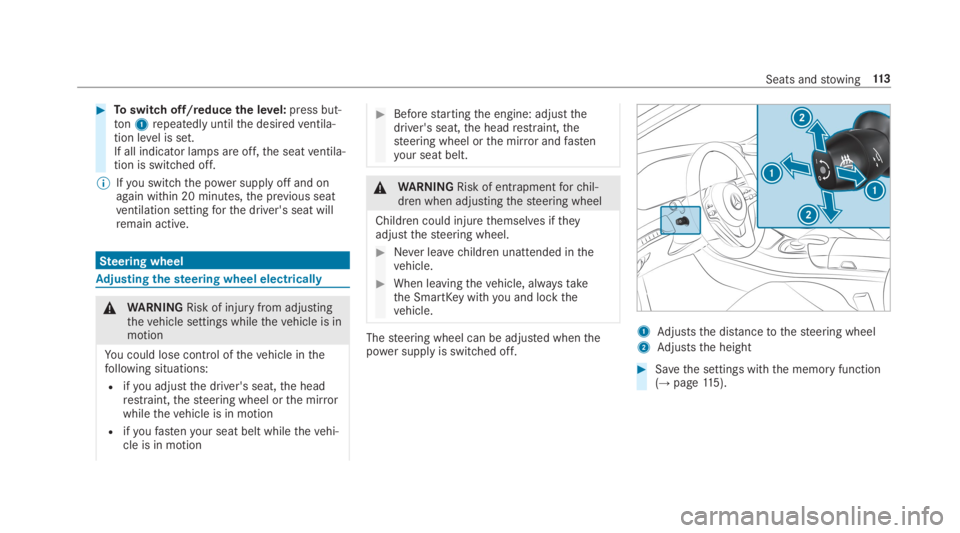
Thesteering wheel can be adjusted whenthepower supplyis switched off.
1Adjuststhe distancetothesteering wheel
2Adjuststhe height
#Savethe settings withthe memory function(→page115).
Seats andstowing11 3
Page 128 of 578
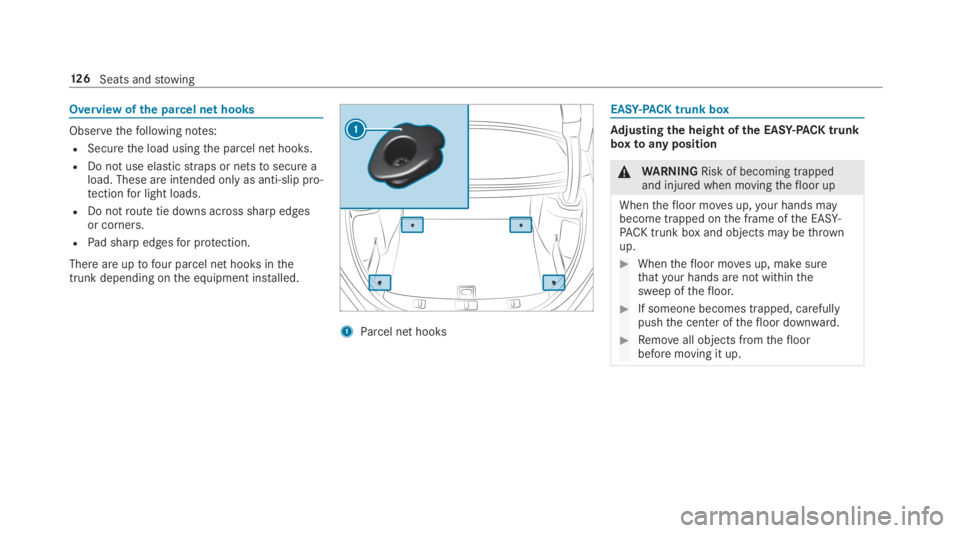
Overview ofthe parcel net hooks
Observethefollowing notes:
RSecurethe load usingthe parcel net hooks.
RDo not use elasticstraps or netstosecure aload. These are intended only as anti-slip pro‐tectionfor light loads.
RDo notroute tie downs across sharp edgesor corners.
RPad sharp edgesfor protection.
There are uptofour parcel net hooks inthetrunk depending onthe equipment installed.
1Parcel net hooks
EASY-PACKtrunk box
Adjusting the height of the EASY-PACK trunkboxtoany position
&WARNINGRisk of becoming trappedand injured when movingthefloor up
Whenthefloor moves up,your hands maybecome trapped onthe frame ofthe EASY-PACK trunk box and objects may bethrownup.
#Whenthefloor moves up, make surethatyour hands are not withinthesweep ofthefloor.
#If someone becomes trapped, carefullypushthe center ofthefloor downward.
#Removeall objects fromthefloorbefore moving it up.
12 6Seats andstowing
Page 219 of 578
#Make sure no one is underneaththevehicle or inthe immediate vicinity ofthe wheel arches whenyou lowerthevehicle.
&WARNINGRisk of entrapment fromvehi‐cle lowering
Vehicles with AIRMATIC or level control:Whenyou unload luggage or leavethevehi‐cle,thevehiclefirstrises slightly andthenreturnstothe set level shortly afterwards.
You or anyone else inthe vicinity ofthewheel arches orthe underbody couldthusbecome trapped.
Thevehicle can also be lowered after beinglocked.
#When leavingthevehicle, make surethat nobody is inthe vicinity ofthewheel arches orthe underbody.
Requirements:RThevehicle has beenstarted.
RThevehicle must not be movingfasterthan50mph (80 km/h).
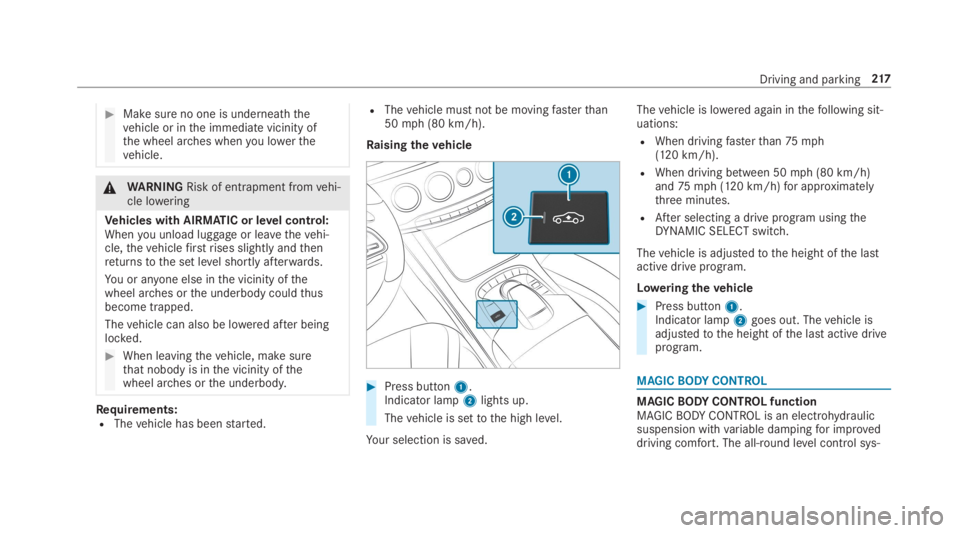
Raisingthevehicle
#Press button1.Indicator lamp2lights up.
Thevehicle is settothe high level.
Your selection is saved.
Thevehicle is lowered again inthefollowing sit‐uations:
RWhen drivingfasterthan75mph(120 km/h).
RWhen driving between 50mph (80 km/h)and75mph (120 km/h)for approximatelythree minutes.
RAfter selecting a drive program usingtheDYNAMIC SELECT switch.
Thevehicle is adjustedtothe height ofthe lastactive drive program.
Loweringthevehicle
#Press button1.Indicator lamp2goes out. Thevehicle isadjustedtothe height ofthe last active driveprogram.
MAGICBODYCONTROL
MAGICBODYCONTROL functionMAGICBODYCONTROL is an electrohydraulicsuspension withvariable dampingfor improveddriving comfort. The all-round level control sys‐
Driving and parking217
Page 224 of 578
Thevehicle is lowered again inthefollowing sit‐uations:
RWhen drivingfasterthan75mph(120 km/h).
RWhen driving between 50mph (80 km/h)and75mph (120 km/h)for approximatelythree minutes.
RAfter selecting a drive program usingtheDYNAMIC SELECT switch.
Thevehicle is adjustedtothe height ofthe lastactive drive program.
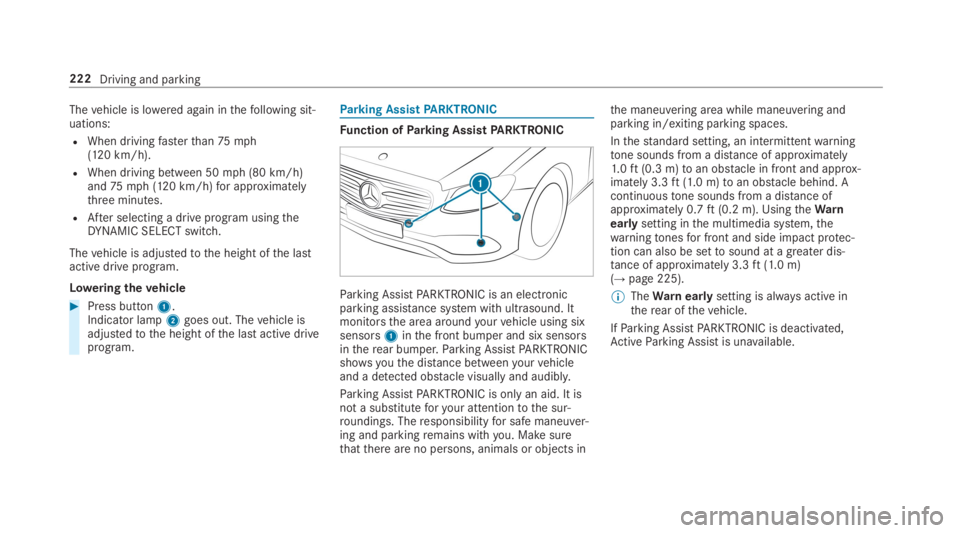
Loweringthevehicle
#Press button1.Indicator lamp2goes out. Thevehicle isadjustedtothe height ofthe last active driveprogram.
Parking AssistPARKTRONIC
Function ofParking AssistPARKTRONIC
Parking AssistPARKTRONIC is an electronicparking assistance system with ultrasound. Itmonitorsthe area aroundyourvehicle using sixsensors1inthe front bumper and six sensorsintherear bumper.Parking AssistPARKTRONICshowsyouthe distance betweenyourvehicleand a detected obstacle visually and audibly.
Parking AssistPARKTRONIC is onlyan aid. It isnot a substituteforyour attentiontothe sur‐roundings. Theresponsibilityfor safe maneuver‐ing and parkingremains withyou. Make surethatthere are no persons, animals or objects in
the maneuvering area while maneuvering andparking in/exiting parking spaces.
Inthestandard setting, an intermittentwarningtone sounds from a distance of approximately1.0ft(0.3 m)toan obstacle in front and approx‐imately 3.3ft(1.0 m)toan obstacle behind. Acontinuoustone sounds from a distance ofapproximately 0.7ft(0.2 m). UsingtheWarnearlysetting inthe multimedia system,thewarningtonesfor front and side impact protec‐tion can also be settosound at a greater dis‐tance of approximately 3.3ft(1.0 m)(→page 225).
%TheWarnearlysetting is always active intherear ofthevehicle.
IfParking AssistPARKTRONIC is deactivated,ActiveParking Assist is unavailable.
222Driving and parking
Page 232 of 578
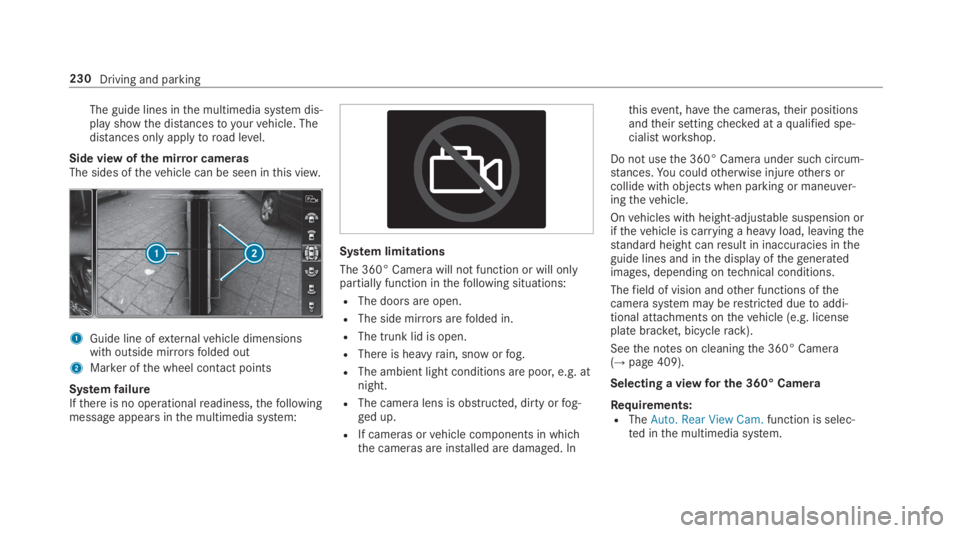
The guide lines inthe multimedia system dis‐play showthe distancestoyourvehicle. Thedistances only applytoroad level.
Side view ofthe mirror camerasThe sides ofthevehicle can be seen inthis view.
1Guide line ofexternalvehicle dimensionswith outside mirrorsfolded out
2Marker ofthe wheel contact points
SystemfailureIfthere is no operationalreadiness,thefollowingmessage appears inthe multimedia system:
System limitations
The 360° Camera will not function or will onlypartially function inthefollowing situations:
RThe doors are open.
RThe side mirrorsarefolded in.
RThe trunk lid is open.
RThere is heavyrain, snow orfog.
RThe ambient light conditions are poor, e.g. atnight.
RThe camera lens is obstructed, dirty orfog‐ged up.
RIf cameras orvehicle components in whichthe cameras are installed are damaged. In
thisevent, havethe cameras,their positionsandtheir settingchecked at aqualified spe‐cialistworkshop.
Do not usethe 360° Camera under such circum‐stances.You couldotherwise injureothers orcollide with objects when parking or maneuver‐ingthevehicle.
Onvehicles with height-adjustable suspension orifthevehicle is carrying a heavy load, leavingthestandard height canresult in inaccuracies intheguide lines and inthe display ofthegeneratedimages, depending ontechnical conditions.
Thefield of vision andother functions ofthecamerasystem may berestricted duetoaddi‐tional attachments onthevehicle (e.g. licenseplate bracket, bicyclerack).
Seethe notes on cleaningthe 360° Camera(→page 409).
Selecting a viewfor the 360° Camera
Requirements:RTheAuto. Rear View Cam.function is selec‐ted inthe multimedia system.
230Driving and parking
Page 327 of 578
For automatic map updatesAutomaticOnline Updatemust be activated inthe sys‐tem settings (→page 297).
Rthe manual map update updates map datafor several or allregions.
Further information onthe online map update isavailable at an authorized Mercedes-Benz Centeror at http://www.mercedes.me.
Further information on updates: http://manuals.daimler.com/baix/cars/connectme/en_GB/index.html.
Overview of map dataYourvehicle is supplied with map data atthefac‐tory. Depending onthe country, map dataforyourregion is either pre-installed orthe mapdata is supplied on a datastorage medium.
Ifthe map data onyourvehicle has been instal‐led atthefactory andyou wishtoreinstall it,youdo not needtoenterthe activation code.
For map datathatyou havepurchased intheformof a datastorage medium,you must enterthe accompanying activation code.
%Ifyou savethe map data on a datastoragemedium withthe online map update service,no entryisrequired. The activation code isstored onthe datastorage medium duringthe downloading process.
Observethefollowing when enteringthe activa‐tion code:
RThe activation code can be usedfor onevehi‐cle
RThe activation code is not transferable
RThe activation code has six digits
Intheevent ofthefollowing problems, pleasecontact an authorized Mercedes-Benz Center:
RThe multimedia system does not accepttheactivation code
RYou havelostthe activation code
Displayingthe compassMultimedia system:
,Navigation.ÀRoute and Position
#SelectCompass.
The compass display showsthefollowinginformation:
Rthe current direction of travel with bear‐ing (360°format) and compass direction
Rlongitude and latitude coordinates indegrees, minutes and seconds
Rheight (rounded)
Rnumber of GPS satellites from which asignal can bereceived
Settingthe map scale automaticallyMultimedia system:
,Navigation.ZOptions
The map scale is set automatically depending onyour driving speed.
For journeysin cities with detailed city models, amap view fromthe driver's perspective is used.
#SwitchAuto Zoomonsor offS.
Multimedia system325
Page 400 of 578
#Allowthe enginetocool down and onlytouch component parts described inthefollowing.
&WARNINGRisk of injuryfrom usingthewindshield wipers whilethe engine hoodis open
Whenthe engine hood is open andthe wind‐shield wipers are set in motion,you can betrappedbythe wiper linkage.
#Always switch offthe windshield wipersand ignition before openingthe enginehood.
Plug-inhybrid:observethe notes inthe Supple‐ment. Otherwise,you mayfailtorecognize dan‐gers.
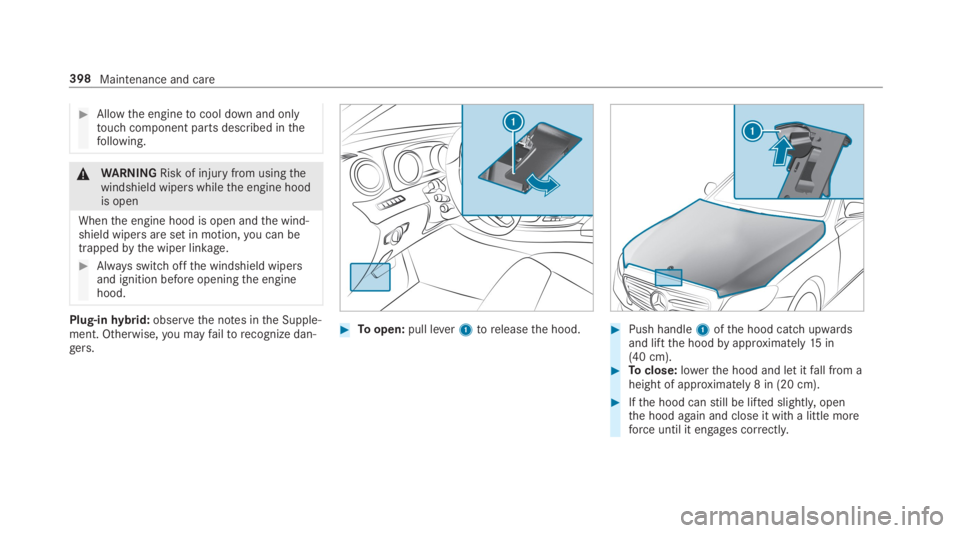
#Toopen:pull lever1toreleasethe hood.#Push handle1ofthe hood catch upwardsand liftthe hoodbyapproximately15in(40 cm).#Toclose:lowerthe hood and let itfall from aheight of approximately 8 in (20 cm).
#Ifthe hood canstill be lifted slightly,openthe hood again and close it with a little moreforce until it engages correctly.
398Maintenance and care
Page 430 of 578
RThevehicle has been loaded ontothe transporter correctly
RThevehicle is secured at allfourwheels with suitabletensioningstraps
RThe maximum permissible speed of35mph (60 km/h) is notexceededwhen transporting
*NOTEDamagetothevehicle from secur‐ing it incorrectly
#After loading,thevehicle must besecured on allfour wheels. Otherwise,thevehicle could be damaged.
#A minimum distance of 4 in (10 cm)upwards and 8 in (20 cm) downwardsmust bekepttothe transport platform.
Transport level is notavailableforthefollowingvehicles:
RMercedes-AMGvehicles
RVehicles with MAGICBODYCONTROL
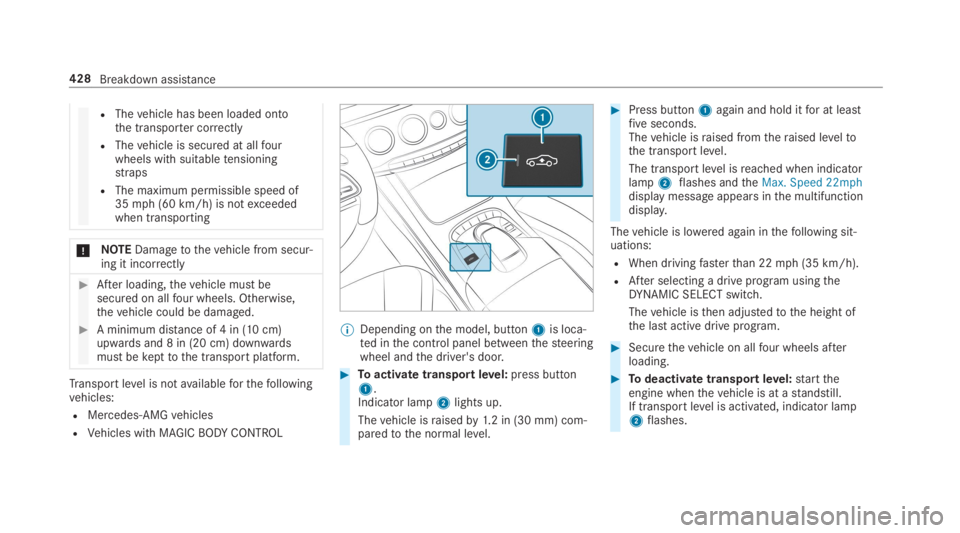
%Depending onthe model, button1is loca‐ted inthe control panel betweenthesteeringwheel andthe driver's door.
#Toactivate transportlevel:press button1.Indicator lamp2lights up.
Thevehicle israisedby1.2 in (30 mm) com‐paredtothe normal level.
#Press button1again and hold itfor at leastfiveseconds.Thevehicle israised fromtheraised leveltothe transport level.
The transport level isreached when indicatorlamp2flashes andtheMax. Speed 22mphdisplay message appears inthe multifunctiondisplay.
Thevehicle is lowered again inthefollowing sit‐uations:
RWhen drivingfasterthan 22mph (35 km/h).
RAfter selecting a drive program usingtheDYNAMIC SELECT switch.
Thevehicle isthen adjustedtothe height ofthe last active drive program.
#Securethevehicle on allfour wheels afterloading.
#Todeactivate transportlevel:starttheengine whenthevehicle is at astandstill.If transportlevel is activated, indicator lamp2flashes.
428Breakdown assistance