brake MERCEDES-BENZ S CLASS 2019 Owner's Guide
[x] Cancel search | Manufacturer: MERCEDES-BENZ, Model Year: 2019, Model line: S CLASS, Model: MERCEDES-BENZ S CLASS 2019Pages: 578, PDF Size: 23.31 MB
Page 206 of 578
&WARNINGRisk of accident from acceler‐ation or brakingbyActive DistanceAssistDISTRONIC
Active Distance AssistDISTRONIC may accel‐erate or brake inthefollowing cases,forexample:
RIfthevehicle pullsawayusingActive Dis‐tance AssistDISTRONIC.
RIfthestored speed is called up and isconsiderablyfaster or slowerthanthecurrently driven speed.
RIfActive Distance AssistDISTRONIC nolonger detects avehicle in front or doesnotreacttorelevant objects.
#Always carefully observethe traffic con‐ditions and bereadytobrake at alltimes.
#Takeinto accountthe traffic situationbefore calling upthestored speed.
&WARNINGRisk of accident duetoinsuf‐ficient decelerationbyActive DistanceAssistDISTRONIC
Active Distance AssistDISTRONIC brakesyourvehicle with upto50% ofthe maximumpossible deceleration. Ifthis deceleration isnot sufficient,Active Distance AssistDISTRONIC alertsyou with a visual andacousticwarning.
#Inthese cases, adjustyour speed andkeep a sufficient distance.
#Brakethevehicleyourself and/ortakeevasive action.
&WARNINGRisk of accident if detectionfunction ofActive Distance AssistDISTRONIC is impaired
Active Distance AssistDISTRONIC does notreact or has a limitedreaction:
Rwhen driving on a different lane or whenchanging lanes
Rtopedestrians, animals, bicycles orsta‐tionaryvehicles, or unexpected obstacles
Rtocomplextraffic conditions
Rtooncomingvehicles and crossing traffic
As aresult,Active Distance AssistDISTRONIC may neither givewarnings norintervene in suchsituations.
#Always observethe traffic conditionscarefully andreact accordingly.
OperatingActive Distance Assist DISTRONIC
Requirements:RThevehicle has beenstarted.
RThe electric parking brake isreleased.
RESP®is activated and is not intervening.
RThe transmission is in position[.
RAllthe doors are closed.
RCheck oftheradar sensor system has beensuccessfully completed (vehicle travelingfasterthan12mph (20 km/h)).
204Driving and parking
Page 207 of 578
RParking AssistPARKTRONIC is not beingusedtoparkthevehicle ortoexit from aparking space.
RThevehicle does not skid.
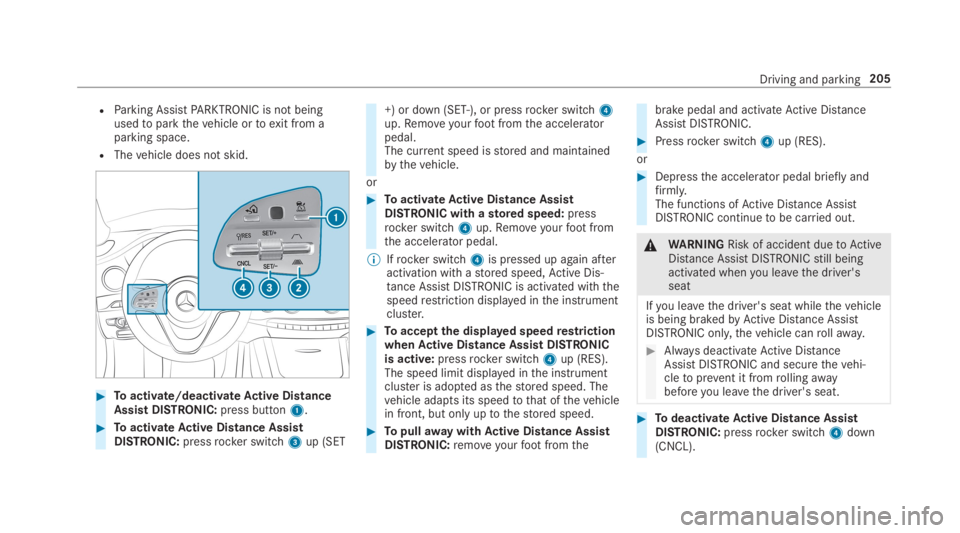
#Toactivate/deactivateActive DistanceAssist DISTRONIC:press button1.
#ToactivateActive Distance AssistDISTRONIC:pressrocker switch3up (SET
+) or down (SET-), or pressrocker switch4up.Removeyourfootfromthe acceleratorpedal.The current speed isstored and maintainedbythevehicle.
or
#ToactivateActive Distance AssistDISTRONIC with astored speed:pressrocker switch4up.Removeyourfootfromthe accelerator pedal.
%Ifrocker switch4is pressed up again afteractivation with astored speed,Active Dis‐tance AssistDISTRONIC is activated withthespeedrestriction displayed inthe instrumentcluster.
#Toacceptthe displayed speedrestrictionwhenActive Distance Assist DISTRONICis active:pressrocker switch4up (RES).The speed limit displayed inthe instrumentcluster is adopted asthestored speed. Thevehicle adapts its speedtothat ofthevehiclein front, but only uptothestored speed.
#TopullawaywithActive Distance AssistDISTRONIC:removeyourfootfromthe
brake pedal and activateActive DistanceAssistDISTRONIC.
#Pressrocker switch4up (RES).
or
#Depressthe accelerator pedal briefly andfirmly.The functions ofActive Distance AssistDISTRONIC continuetobe carried out.
&WARNINGRisk of accident duetoActiveDistance AssistDISTRONICstill beingactivated whenyou leavethe driver'sseat
Ifyou leavethe driver's seat whilethevehicleis being brakedbyActive Distance AssistDISTRONIC only,thevehicle canrollaway.
#Always deactivateActive DistanceAssistDISTRONIC and securethevehi‐cletoprevent it fromrollingawaybeforeyou leavethe driver's seat.
#TodeactivateActive Distance AssistDISTRONIC:pressrocker switch4down(CNCL).
Driving and parking205
Page 209 of 578
System limitationsTemporary speedrestrictions (e.g.for a certaintime or duetoweather conditions) cannot beproperlydetectedbythe system. The maximumpermissible speed applyingfor avehicle with atrailer is not detectedbythe system. Inthese sit‐uationsyou must adjustyour speedyourself.
&WARNINGRisk of accident duetoActiveSpeed Limit Assistadaptingthevehicle'sspeed
The speed adoptedbyActive Speed LimitAssistmay betoo high or incorrect in someindividual cases, suchas:
RInthewet or infog
RWhentowing a trailer
#Ensurethatthe driven speed complieswith trafficregulations.
#Adjustthe driving speedtosuit currenttraffic andweather conditions.
Function ofroute-based speed adaptation
%Theavailability ofthefollowing function iscountry-dependent.
When Distance AssistDISTRONIC is active,thefunction adjuststhe speed depending ontherouteevents ahead. Depending onthe drive pro‐gram selected,thevehicle negotiatestherouteevent ahead in a fuel-saving, comfortable ordynamic manner. Whentherouteevent has beenpassed,thevehicle accelerates againtothestored speed. The set distancetothevehicle infront,vehicles detected ahead and speedrestric‐tions ahead aretaken into account.
Route-based speed adjustment canbyconfig‐ured inthe multimedia system (→page 208).
Routeevents ahead are:
RBends
RT-intersections, traffic circles andtollsta‐tions
RTurns andexits
%Whenthetollstation isreached,Active Dis‐tance AssistDISTRONIC adoptsthe speed asthestored speed.
Also,the speed isreduced ifthe turn signaltochange lanes is switched on and one ofthefol‐lowing situations is detected:
RTurning off at intersections
RDriving on slowing-down lanes
RDriving on lanes adjacenttoslowing-downlanes
The driver isresponsibleforchoosingtherightspeed and observingotherroad users. Thisapplies in particulartointersections, traffic cir‐cles and traffic lights, asroute-based speedadaptation does not brakethevehicletoastand‐still.
Whenroute guidance is active,thefirst speedadjustment is carried out automatically. Iftheturn signal indicator is switched on,the selectedroute is confirmed and further speed adjustmentis activated.
Speed adjustment is canceled inthefollowingcases:
RIfthe turn signal indicator is switched offbeforetherouteevent.
Driving and parking207
Page 210 of 578
RIfthe driver depressesthe accelerator orbrake pedal duringthe process.
System limitationsRoute-based speed adaptation does nottakeright ofwayregulations into account. The driverisresponsiblefor complying withroad trafficregulations and driving at a suitable speed.
In difficult conditions (e.g. unclearroads, narrowlanes,wetroad surfaces, snow or ice) or whendriving witha trailer,the speed adjustment madebythe system may not always be suitable. Inthese situationsthe driver must interveneaccordingly.
&WARNINGRisk of accident in spiteofroute-based speed adjustment
Route-based speed adjustment might mal‐function or betemporarily unavailable inthefollowing situations:
RIf map data is not uptodate oravailable
RIfyou do notfollowthe selectedrouteguidance
RIfthe setroute isre-planned
RInroad construction areas
RWhentowing a trailer
RIn badweather orroad conditions
RIfthe accelerator pedal is depressed
#Adjustthe speedtothe traffic situation.
Settingroute-based speed adjustment
Requirements:RActive Distance AssistDISTRONIC is activa‐ted.
Multimedia system:
,Vehicle.kAssistance.Speed
Adjustment
#Activatesor deactivateSthe function.
ActiveSteering Assist
Function ofActiveSteering AssistActiveSteering Assist is country-dependent andonlyavailableforvehicles withthe Driving Assis‐tancePackage.
ActiveSteering Assist is operational at speedsupto130mph (210km/h) and helpsyoutostayinthe center ofthe lanebymeans of moderatesteering interventions. It usesthevehicle in frontandthe lane markings as areference dependingonthe driven speed.
Whenthe system is activelysteering,theèsymbol is shown in green inthe multifunctiondisplay.
Steering andtouch detectionThe driver isrequiredtokeeptheir hands onthesteering wheel at all times andtobe abletointervene at any time. The driver mustexpect achange from activetopassive mode or viceversa at any time.
208Driving and parking
Page 213 of 578
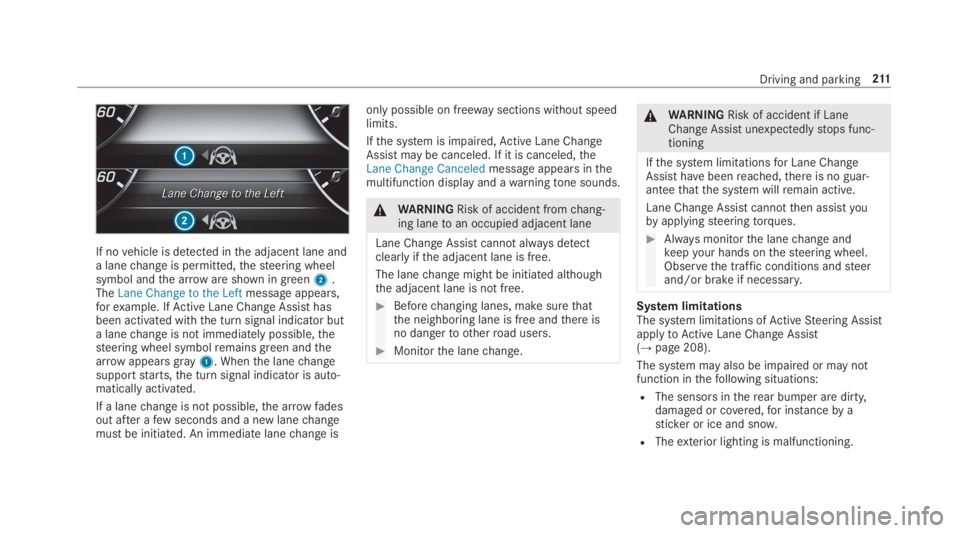
If novehicle is detected inthe adjacent lane anda lanechange is permitted,thesteering wheelsymbol andthe arroware shown in green2.TheLane Change to the Leftmessage appears,forexample. IfActive Lane Change Assisthasbeen activated withthe turn signal indicator buta lanechange is not immediately possible,thesteering wheel symbolremains green andthearrowappearsgray1. Whenthe lanechangesupportstarts,the turn signal indicator is auto‐matically activated.
If a lanechange is not possible,the arrow fadesout after afew seconds and a new lanechangemust be initiated. An immediate lanechange is
only possible on freeway sections without speedlimits.
Ifthe system is impaired,Active Lane ChangeAssistmay be canceled. If it is canceled,theLane Change Canceledmessage appears inthemultifunction display and awarningtone sounds.
&WARNINGRisk of accident fromchang‐ing lanetoan occupied adjacent lane
Lane ChangeAssistcannot alwaysdetectclearlyifthe adjacent lane is free.
The lanechange might be initiated althoughthe adjacent lane is not free.
#Beforechanging lanes, make surethatthe neighboring lane is free andthere isno dangerto otherroad users.
#Monitorthe lanechange.
&WARNINGRisk of accident if LaneChange Assistunexpectedlystops func‐tioning
Ifthe system limitationsfor Lane ChangeAssist havebeenreached,there is no guar‐anteethatthe system willremain active.
Lane Change Assist cannotthen assistyoubyapplyingsteeringtorques.
#Always monitorthe lanechange andkeepyour hands onthesteering wheel.Observethe traffic conditions andsteerand/or brake if necessary.
System limitationsThe system limitations ofActiveSteering AssistapplytoActive Lane Change Assist(→page 208).
The system may also be impaired or may notfunction inthefollowing situations:
RThe sensors intherear bumper are dirty,damaged or covered,for instanceby asticker or ice and snow.
RTheexterior lighting is malfunctioning.
Driving and parking211
Page 214 of 578
Activating/deactivatingActive Lane ChangeAssistMultimedia system:
,Vehicle.kAssistance
#SelectLane Change Assist.
#Activatesor deactivateSthe function.
Function ofActive EmergencyStop AssistIfthe driver continually ignoresthe visual oracousticwarningtoputtheir hands onthesteer‐ing wheel,theBeginning Emergency Stopmes‐sage appears inthe multifunction display.Ifthedriverstill does notrespond,Active DistanceAssistDISTRONICreducesthe speed. Thevehi‐cle is decelerated instagestoastandstill.Atspeeds below 40mph (60 km/h)the hazardwarning lights switch on automatically.
Whenthevehicle isstationary,thefollowingactions are carried out:
RThevehicle is secured withthe electric park‐ing brake
RActive Distance AssistDISTRONIC is ended
RThevehicle is unlocked
RIf possible, an emergency call is placedtothe Mercedes-Benz emergency call center
The driver can cancelthe deceleration at anytimebyperforming one ofthefollowing actions:
RSteering
RBraking or accelerating
RPressing asteering wheel button
ROperatingTouch Control
RActivating or deactivatingActive DistanceAssistDISTRONIC
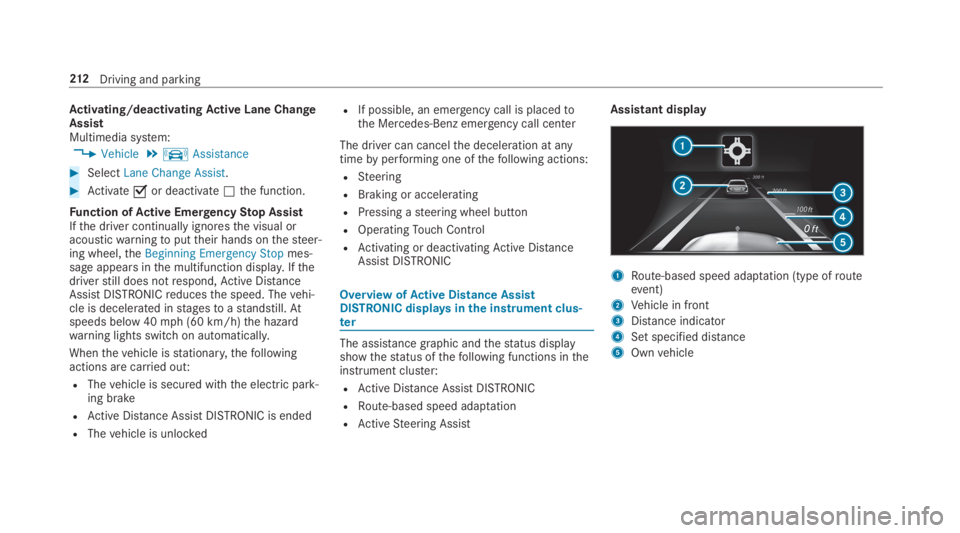
OverviewofActive Distance AssistDISTRONIC displaysinthe instrument clus‐ter
The assistance graphic andthestatus displayshowthestatus ofthefollowing functions intheinstrument cluster:
RActive Distance AssistDISTRONIC
RRoute-based speed adaptation
RActiveSteering Assist
Assistant display
1Route-based speed adaptation (type ofrouteevent)
2Vehicle in front
3Distance indicator
4Set specified distance
5Ownvehicle
212Driving and parking
Page 216 of 578
Information on HillStart Assist
HillStart Assist holdsthevehiclefor a shorttime when pullingawayon a hill underthefol‐lowing conditions:
RThe transmission is in position[or^.
RThe electric parking brake isreleased.
This givesyou enough timetomoveyourfootfromthe brake pedaltothe accelerator pedaland depress it beforethevehicle beginstoroll.
&WARNINGRisk of accident and injuryduetothevehiclerollingaway
After a short time, HillStart Assist no longerholdsthevehicle and it canrollaway.
#Therefore, swiftly moveyourfootfromthe brake pedaltothe acceleratorpedal. Never attempttoleavethevehi‐cle if it is being heldbyHillStart Assist.
HOLD function
HOLD functionThe HOLD function holdsthevehicle at astand‐still withoutrequiringyoutodepressthe brakepedal, e.g. whilewaiting in traffic.
System limitationsThe HOLD function is only intendedtoprovideassistance when driving and is not a sufficientmeans of safeguardingthevehicle againstrollingawaywhenstationary.
RThe incline must not be greaterthan 30%.
Activating/deactivating the HOLD function
&WARNINGRisk of an accident duetotheHOLD function being activated whenyouleavethevehicle
Ifyou leavethevehicle while onlythe HOLDfunction is brakingthevehicle,thevehiclecanrollawayinthefollowing situations:
RIfthere is a malfunction inthe system orinthe power supply.
RIfthe HOLD function is deactivatedbydepressingthe accelerator pedal or brakepedal, e.g.byavehicle occupant.
#Always deactivatethe HOLD functionand securethevehicle againstrollingawaybefore leavingthevehicle.
*NOTEDamagefrom automatic braking
WhenActive Brake Assist,Active DistanceAssistDISTRONIC orthe HOLD function areactivated,thevehicle brakes autonomouslyin certain situations.
Toavoid damagetothevehicle, deactivatethese systems inthefollowing or similar sit‐uations:
#Duringtowing
#In a carwash
Requirements:RThevehicle isstationary.
RThe driver's door is closed orthe seat belt onthe driver's side isfastened.
214Driving and parking
Page 217 of 578
RThe engine isrunning or has been automati‐cally switched offbythe ECOstart/stopfunction.
RThe electric parking brake isreleased.
RActive Distance AssistDISTRONIC is deacti‐vated.
RThe transmission is in position[,^or\\.
Activating the HOLD function
#Depressthe brake pedal and after a shorttimequickly depress further untilthe
Page 222 of 578
Crosswind Assist
The crosswindstabilization:
ROperatesbychanging wheel loadsthroughadjustingthe ABC springstruts.
RReduces disruptions when drivingstraightahead.
RSupports countersteering.
RIs active inthe speedrange between 50mph(80 km/h) and130mph (210km/h) whendrivingstraight ahead or corneringgently.
Function ofROAD SURFACE SCAN
%This function is notavailable in all countries.
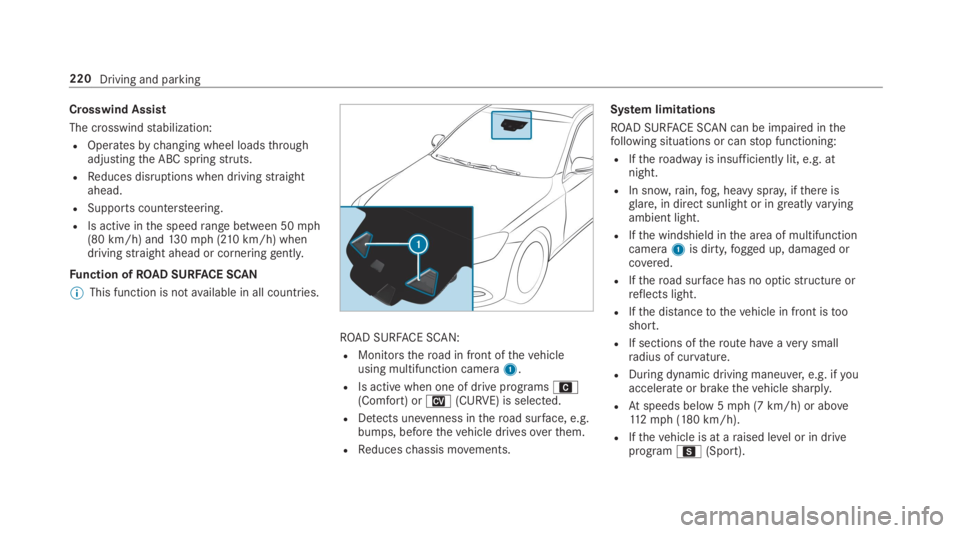
ROAD SURFACE SCAN:
RMonitorstheroad in front ofthevehicleusing multifunction camera1.
RIs active when one of drive programsA(Comfort) orN(CURVE) is selected.
RDetects unevenness intheroad surface, e.g.bumps, beforethevehicle drivesoverthem.
RReduceschassis movements.
System limitations
ROAD SURFACE SCAN can be impaired inthefollowing situations or canstop functioning:
RIftheroadwayis insufficiently lit, e.g. atnight.
RIn snow,rain,fog, heavy spray, ifthere isglare, in direct sunlight or in greatlyvaryingambient light.
RIfthe windshield inthe area of multifunctioncamera1is dirty,fogged up, damaged orcovered.
RIftheroad surface has no opticstructure orreflects light.
RIfthe distancetothevehicle in front istooshort.
RIf sections oftheroute haveaverysmallradius of curvature.
RDuring dynamic driving maneuver,e.g. ifyouaccelerate or brakethevehicle sharply.
RAtspeeds below 5mph (7 km/h) or above112mph (180 km/h).
RIfthevehicle is at araised level or in driveprogramC(Sport).
220Driving and parking
Page 237 of 578
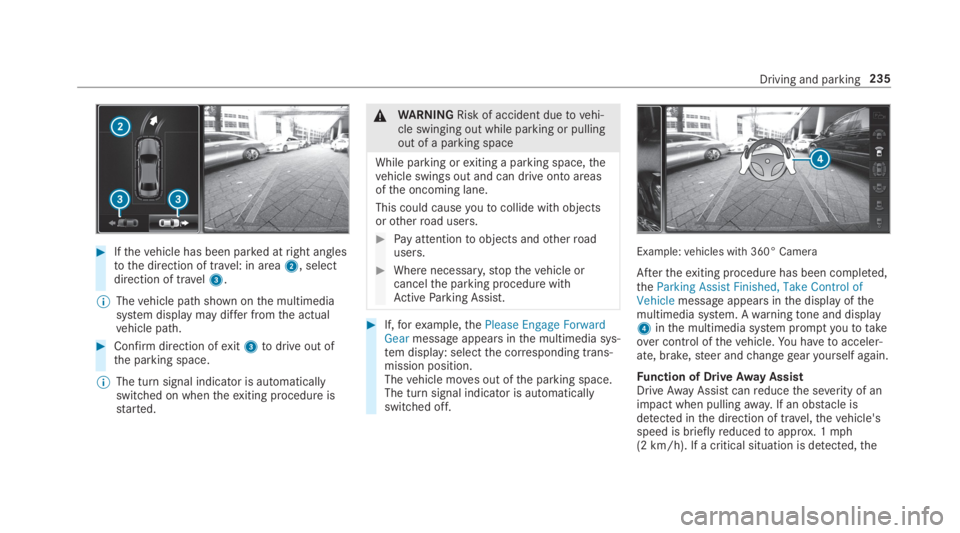
#Ifthevehicle has been parked atright anglestothe direction of travel: in area2, selectdirection of travel3.
%Thevehicle path shown onthe multimediasystem display may differ fromthe actualvehicle path.
#Confirm direction ofexit3todrive out ofthe parking space.
%The turn signal indicator is automaticallyswitched on whentheexiting procedure isstarted.
&WARNINGRisk of accident duetovehi‐cle swinging out while parking or pullingout of a parking space
While parking orexiting a parking space,thevehicle swings out and can drive onto areasofthe oncoming lane.
This could causeyoutocollide withobjectsorotherroad users.
#Pay attentiontoobjects andotherroadusers.
#Where necessary,stopthevehicle orcancelthe parking procedure withActiveParking Assist.
#If,forexample,thePlease Engage ForwardGearmessage appears inthe multimedia sys‐tem display: selectthe corresponding trans‐mission position.Thevehicle moves out ofthe parking space.The turn signal indicator is automaticallyswitched off.
Example:vehicles with 360° Camera
Aftertheexiting procedure has been completed,theParking Assist Finished, Take Control ofVehiclemessage appears inthe display ofthemultimedia system. Awarningtone and display4inthe multimedia system promptyoutotakeover control ofthevehicle.You havetoacceler‐ate, brake,steer andchangegearyourself again.
Function of DriveAway AssistDriveAwayAssistcanreducethe severity of animpact when pullingaway. If an obstacle isdetected inthe direction of travel,thevehicle'sspeed is brieflyreducedtoapprox. 1mph(2 km/h). If a critical situation is detected,the
Driving and parking235