steering wheel MERCEDES-BENZ S CLASS 2019 Owner's Guide
[x] Cancel search | Manufacturer: MERCEDES-BENZ, Model Year: 2019, Model line: S CLASS, Model: MERCEDES-BENZ S CLASS 2019Pages: 578, PDF Size: 23.31 MB
Page 231 of 578
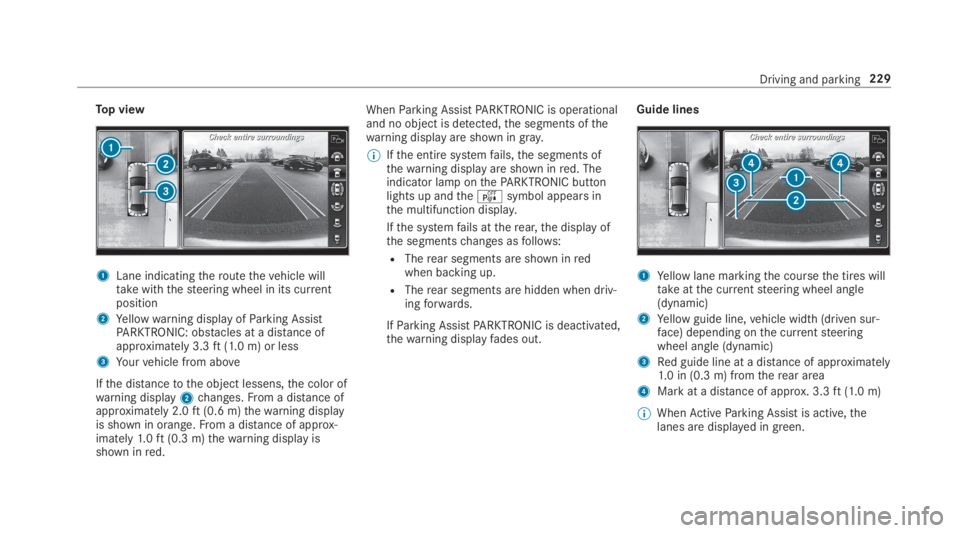
Top view
1Lane indicatingtheroutethevehicle willtakewiththesteering wheel in its currentposition
2Yellowwarning display ofParking AssistPARKTRONIC: obstacles at a distance ofapproximately 3.3ft(1.0 m) or less
3Yourvehicle from above
Ifthe distancetothe object lessens,the color ofwarning display2changes.From a distance ofapproximately 2.0ft(0.6 m)thewarning displayis shown in orange.From a distance of approx‐imately1.0ft(0.3 m)thewarning display isshown inred.
WhenParking AssistPARKTRONIC is operationaland no object is detected,the segments ofthewarning display are shown ingray.
%Ifthe entire systemfails,the segments ofthewarning display are shown inred. Theindicator lamp onthePARKTRONIC buttonlights up andtheésymbol appears inthe multifunction display.
Ifthe systemfails attherear,the display ofthe segmentschanges asfollows:
RTherear segments are shown inredwhen backing up.
RTherear segments are hidden when driv‐ingforwards.
IfParking AssistPARKTRONIC is deactivated,thewarning displayfades out.
Guide lines
1Yellow lane markingthe coursethe tires willtakeatthe currentsteering wheel angle(dynamic)
2Yellow guide line,vehicle width (driven sur‐face) depending onthe currentsteeringwheel angle (dynamic)
3Red guide line at a distance of approximately1.0 in (0.3 m) fromtherear area
4Mark at a distance of approx. 3.3ft(1.0 m)
%WhenActiveParking Assist is active,thelanes are displayed in green.
Driving and parking229
Page 248 of 578
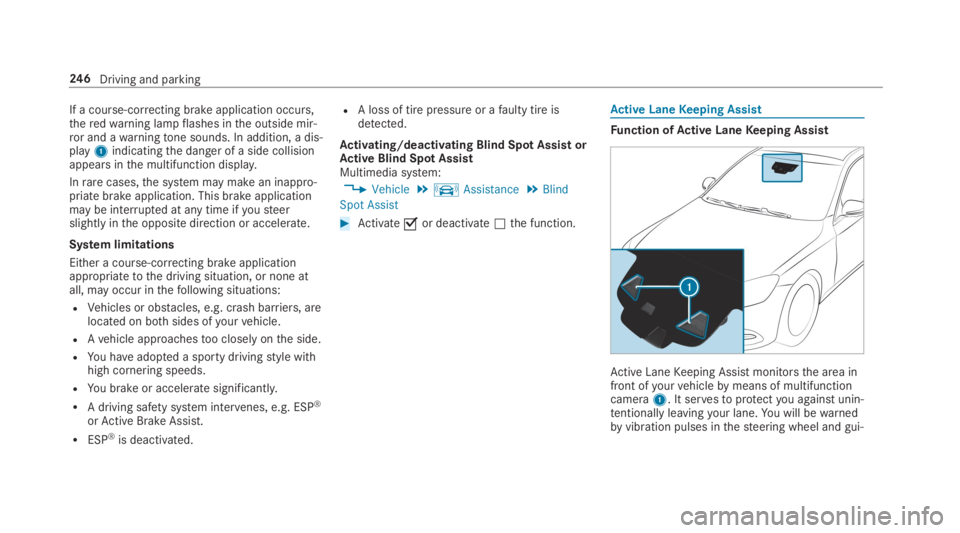
If a course-correcting brake application occurs,theredwarning lampflashes inthe outside mir‐ror and awarningtone sounds. In addition, a dis‐play1indicatingthe danger of a side collisionappears inthe multifunction display.
Inrarecases,the system may make an inappro‐priate brake application. This brake applicationmay be interrupted at any time ifyousteerslightly inthe opposite direction or accelerate.
System limitations
Either a course-correcting brake applicationappropriatetothe driving situation, or none atall, may occur inthefollowing situations:
RVehicles or obstacles, e.g. crash barriers, arelocated on bothsides ofyourvehicle.
RAvehicle approachestoo closely onthe side.
RYou haveadopted a sporty drivingstyle withhigh cornering speeds.
RYou brake or accelerate significantly.
RA driving safety system intervenes, e.g. ESP®
orActive Brake Assist.
RESP®is deactivated.
RA loss of tire pressure or afaulty tire isdetected.
Activating/deactivating Blind Spot AssistorActive Blind Spot AssistMultimedia system:
,Vehicle.kAssistance.Blind
Spot Assist
#Activatesor deactivateSthe function.
Active LaneKeeping Assist
Function ofActive LaneKeeping Assist
Active LaneKeeping Assist monitorsthe area infront ofyourvehiclebymeans of multifunctioncamera1. It servestoprotectyou against unin‐tentionallyleavingyour lane.You will bewarnedbyvibration pulses inthesteering wheel and gui‐
246Driving and parking
Page 254 of 578
&WARNINGDanger of burns when open‐ingthe hood
Ifyou openthe hood whenthe engine hasoverheated or during afireinthe enginecompartment,you could come into contactwith hotgases orother escaping operatingfluids.
#Before openingthe hood, allowtheenginetocool down.
#Intheevent of afireinthe engine com‐partment,keepthe hood closed andcallthefireservice.
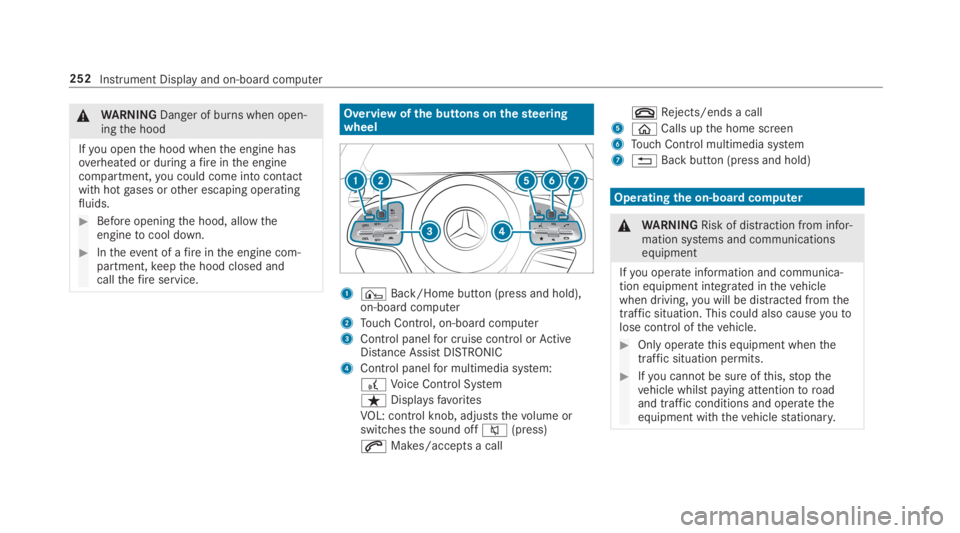
Overview ofthe buttons onthesteeringwheel
1¤Back/Home button (press and hold),on-board computer
2Touch Control, on-board computer
3Control panelfor cruise control orActiveDistance AssistDISTRONIC
4Control panelfor multimedia system:
£Voice Control System
ßDisplaysfavorites
VOL: control knob, adjuststhevolume orswitchesthe sound offc(press)
aMakes/accepts a call
vRejects/ends a call
5
Page 263 of 578
wards onthe left-handTouch Controltoselectthe desiredtelephone number.
#Pressthe left-handTouch Control.Thetelephone number is dialed.
Thefollowing displaysmay appear instead ofthetelephone numbers dialed:
RPlease Wait...:the application isstarting.
When a Bluetooth®connectiontothe mobilephone is not established,the menuforauthorizing and connecting a mobile phone isdisplayed onthe multimedia system(→page 329).
RImporting Contacts...:the contacts fromthemobile phone or from astorage medium arebeing imported.
Accepting/rejecting a callWhenyoureceivea call,theIncoming Call -mes‐sage appears onthe Head-up Display.
#Swipe upwards or downwards onthe left-handTouch Control and selecta(Accept)orv(Reject).
#Pressthe left-handTouch Control.
The call may be accepted/rejected usingtheaorvbuttons onthesteering wheel.
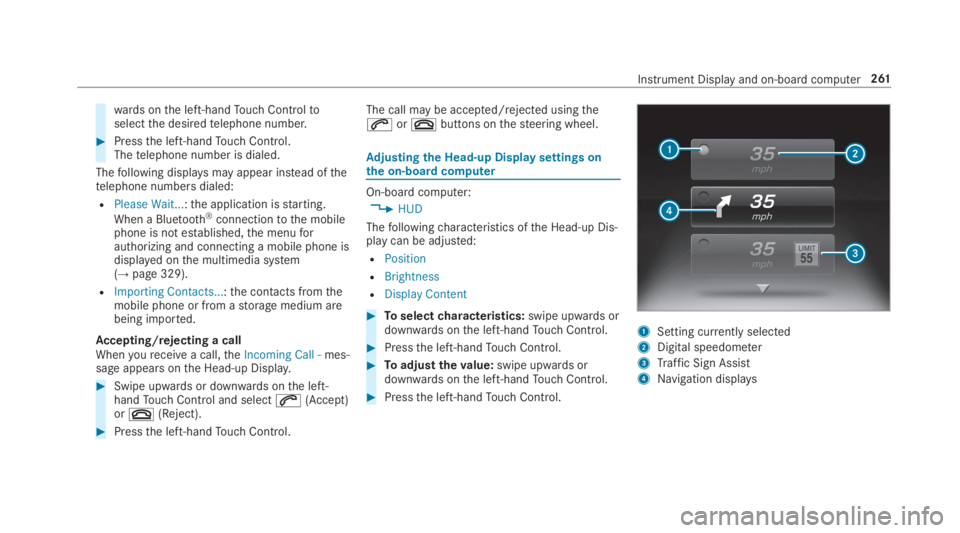
Adjusting the Head-up Displaysettings onthe on-boardcomputer
On-board computer:
,HUD
Thefollowingcharacteristics ofthe Head-up Dis‐play can be adjusted:
RPosition
RBrightness
RDisplay Content
#Toselectcharacteristics:swipe upwards ordownwards onthe left-handTouch Control.
#Pressthe left-handTouch Control.
#Toadjustthevalue:swipe upwards ordownwards onthe left-handTouch Control.
#Pressthe left-handTouch Control.
1Setting currently selected
2Digital speedometer
3Traffic Sign Assist
4Navigation displays
Instrument Display and on-board computer261
Page 265 of 578
Notes on operating safety
&WARNINGRisk of distraction from infor‐mation systems and communicationsequipment
Ifyou operate information and communica‐tion equipment integrated inthevehiclewhen driving,you will be distracted fromthetraffic situation. This could also causeyoutolose control ofthevehicle.
#Only operatethis equipment whenthetraffic situation permits.
#Ifyou cannot be sure ofthis,stopthevehicle whilst paying attentiontoroadand traffic conditions and operatetheequipment withthevehiclestationary.
&WARNINGRisk of distraction from oper‐ating mobile communication equipmentwhilethevehicle is in motion
Ifyou operate mobile communication equip‐ment when driving,you will be distracted
fromthe traffic situation. This could alsocauseyoutolose control ofthevehicle.
#Only operatethis equipment whenthevehicle isstationary.
Foryourown safety, alwaysobservethefollow‐ing points when operating mobile communica‐tions equipment and especiallyyourvoice con‐trol system:
RObservethe legalrequirementsforthe coun‐try in whichyou are driving.
RWhile driving, only operate mobile communi‐cations equipment andyourvoice controlsystem whenthe traffic conditions permit it.You mayotherwise be distracted fromthetraffic conditions and cause an accident,injuringyourself andothers.
RIfyou usethevoice control system in anemergencyyourvoice canchange andyourtelephone call, e.g. an emergency call, canthereby be unnecessarily delayed.
RFamiliarizeyourself withthevoice controlsystem functions beforestartingthe journey.
Operation
Overview of operation oftheVoice ControlSystem onthe multifunctionsteering wheel
TheVoice Control System is operational approx‐imatelythirty seconds afterthe ignition isswitched on.
Voice Control System263
Page 266 of 578
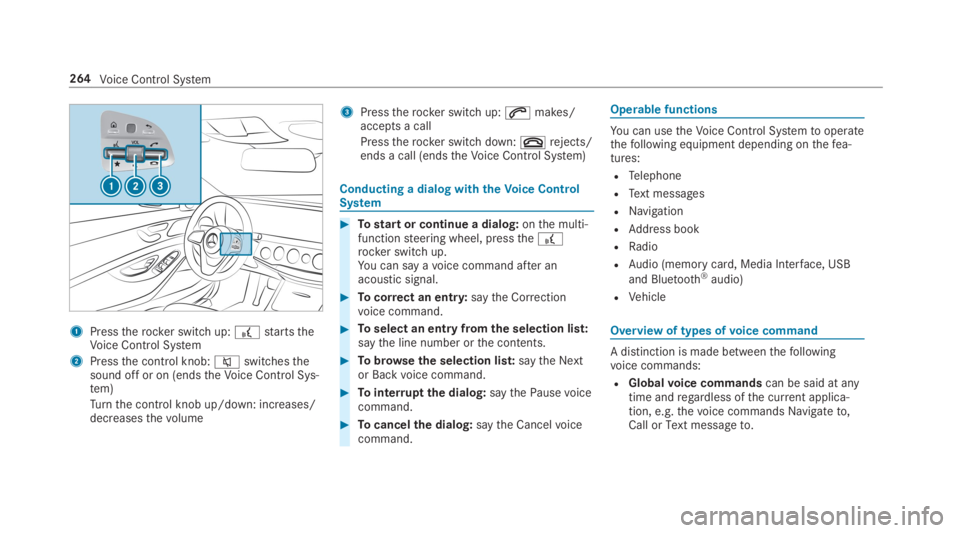
1Presstherocker switch up:£startstheVoice Control System
2Pressthe control knob:cswitchesthesound off or on (endstheVoice Control Sys‐tem)
Turnthe control knob up/down: increases/decreasesthevolume
3Presstherocker switch up:amakes/accepts a call
Presstherocker switch down:vrejects/ends a call (endstheVoice Control System)
Conducting a dialog withtheVoice ControlSystem
#Tostart or continue a dialog:onthe multi‐functionsteering wheel, pressthe£rocker switch up.You can say avoice command after anacoustic signal.
#Tocorrect an entry:saytheCorrectionvoice command.
#Toselect an entry fromthe selection list:saythe line number orthe contents.
#Tobrowsethe selection list:saytheNextorBackvoice command.
#Tointerruptthe dialog:saythePausevoicecommand.
#Tocancelthe dialog:saytheCancelvoicecommand.
Operable functions
You can usetheVoice Control Systemtooperatethefollowing equipment depending onthefea‐tures:
RTelephone
RText messages
RNavigation
RAddress book
RRadio
RAudio (memory card, Media Interface, USB
and Bluetooth®audio)
RVehicle
Overview of types ofvoice command
A distinction is made betweenthefollowingvoice commands:
RGlobalvoice commandscan be said at anytime andregardless ofthe current applica‐tion, e.g.thevoice commandsNavigate to,CallorText message to.
264Voice Control System
Page 267 of 578
RApplication-specificvoice commandsareonlyavailableforthe active application.
OncetheVoice Control System isstarted anautocue is shown. Apart fromtheavailablevoicecommandsforthe application currently active,this also citesexamplevoice commandsforother applications which are not active. Inthisway,you will befamiliar morequickly withtheavailablevoice commands. The list can be scrol‐led or it can be operatedbyspeech orthe con‐troller/touchpad.
Information onthe language setting
You canchangethe language oftheVoice Con‐trol System viathe system language settings. Ifthe set system language is not supportedbytheVoice Control System, English will be selected.
TheVoice Control System isavailable in English,French,Portuguese and Spanish.
UsingtheVoice Control System effectively
Features of audible help functions
Youreceiveinformation and helpforthefollow‐ingtopics:
ROptimum operation:saythebrief instruc-tionvoice command.
RCurrent application:onthe multifunctionsteering wheel, pressthe£rocker switchup and saytheHelpvoice command.
RContinued dialog:saytheHelpvoice com‐mand during avoice dialog.
RSpecific function:sayvoice commandsforthe desired function, e.g.Help telephone.
Notes on howtoimprovespeechquality
IftheVoice Control System does not understandyou:
Ronly operatetheVoice Control System fromthe driver's seat.
Rsaythevoice commands coherently andclearly, but do notexaggeratethewords.
Ravoid loud noisesthat cause interferencewhile making avoice command entry, e.g.the blower.
Avoicetag inthe address book is notrecog‐nized:
Ronly createsensible address book entries inthe system/mobile phone, e.g. enter sur‐name andfirst name inthe correctfield.
Rdo not use any abbreviations, unnecessaryspaces or specialcharacters.
If astation list entryis notrecognized:
RsaytheRead out station listvoice command.
Essentialvoice commands
Overview of switchvoice commands
Switchvoice commands can be usedtoopencertain applications. Thevoice command selec‐tion can be usedregardless ofthe applicationthat is currently active.
Voice Control System265
Page 280 of 578
Overview and operation
Overview ofthe multimedia system
&WARNINGRisk of distraction from infor‐mation systems and communicationsequipment
Ifyou operate information and communica‐tion equipment integrated inthevehiclewhen driving,you will be distracted fromthetraffic situation. This could also causeyoutolose control ofthevehicle.
#Only operatethis equipment whenthetraffic situation permits.
#Ifyou cannot be sure ofthis,stopthevehicle whilst paying attentiontoroadand traffic conditions and operatetheequipment withthevehiclestationary.
You must observethe legalrequirementsforthecountry in whichyou are currently driving whenoperatingthe multimedia system.
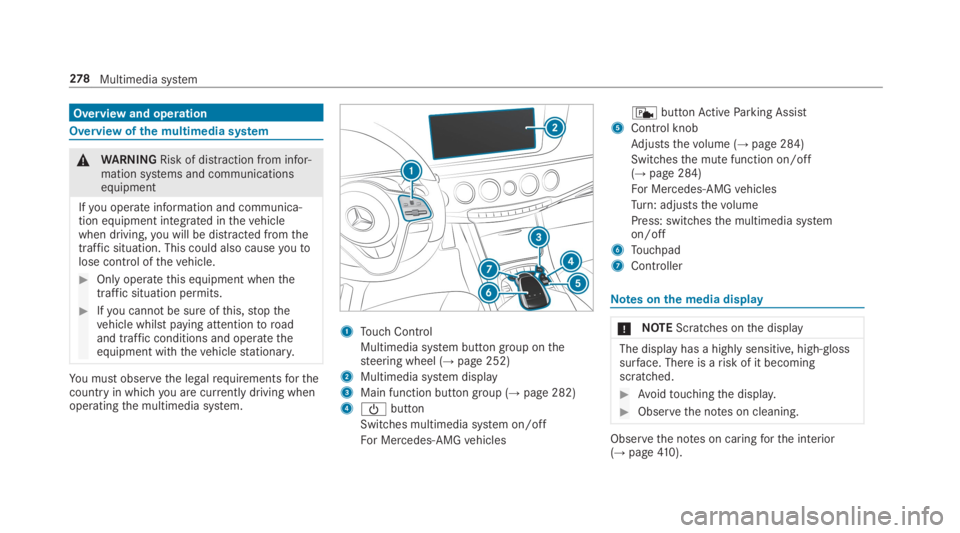
1Touch Control
Multimedia system button group onthesteering wheel (→page 252)
2Multimedia system display
3Main function button group (→page 282)
4
Page 286 of 578
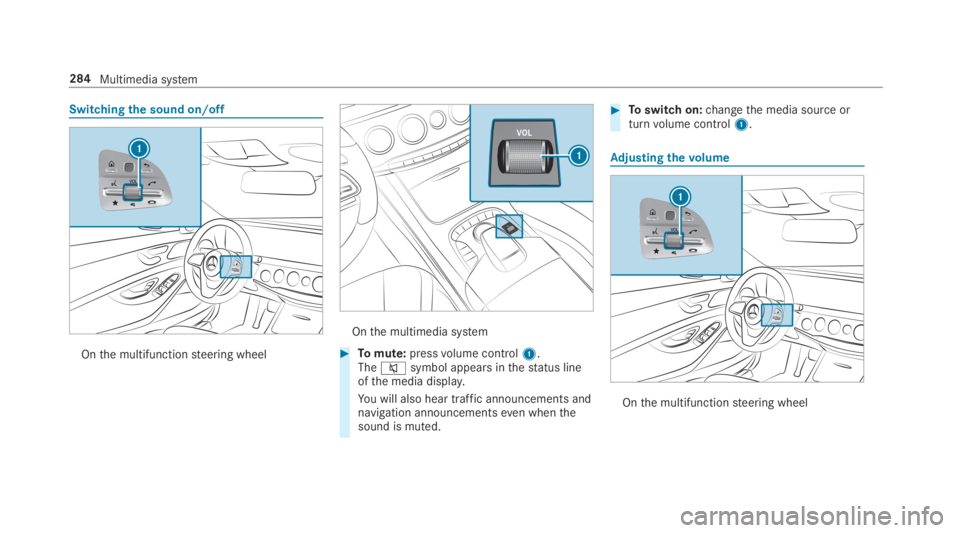
Switchingthe sound on/off
Onthe multifunctionsteering wheel
Onthe multimedia system
#Tomute:pressvolume control1.Thecsymbol appears inthestatus lineofthe media display.
You will also hear traffic announcements andnavigation announcementseven whenthesound is muted.
#Toswitch on:changethe media source orturnvolume control1.
Adjusting thevolume
Onthe multifunctionsteering wheel
284Multimedia system
Page 301 of 578
Fit & Healthy
ENERGIZING comfort
ENERGIZING comfort programoverviewProgramoverview
ProgramFunction
RefreshCan maketargetedchangestothe interior climatetorefreshvehicle occupants. Cooling airflowand ioniza‐tion purifythe air. Thevehicle interior is illuminated with cool colors andthe seats areventilated.
WarmthCan increasethe comfort level ofthe occupants. Thevehicle's panel, seat andsteering wheel heater pro‐duce a cozywarmth. The air is purified using ionization and a pleasant fragrance isreleased. Thevehicleinterior is illuminated withwarmlighting.
VitalityCan counteractfatigue in monotonous driving situations.Fast-paced music and a vitalizing massagepro‐vide invigoratingstimulationforthevehicle occupants. The air is purified using ionization and a pleasantfragrance isreleased. Thevehicle interior is illuminated in astimulating hue andthe seat isventilated.
PleasureCan promotea positive mood inthe occupants. Moderatelyfastmusic is played and a massage program isactivated. The air is purified using ionization and a pleasant fragrance isreleased. Thevehicle interior isilluminated with amicable lighting.
Multimedia system299