fog light MERCEDES-BENZ S CLASS 2019 Owners Manual
[x] Cancel search | Manufacturer: MERCEDES-BENZ, Model Year: 2019, Model line: S CLASS, Model: MERCEDES-BENZ S CLASS 2019Pages: 578, PDF Size: 23.31 MB
Page 147 of 578
Exterior lighting
Information about lighting systems andyourresponsibility
Thevarious lighting systems ofthevehicle areonly aids. The driver ofthevehicle isresponsiblefor correctvehicle illumination in accordancewiththe prevailing light and visibility conditions,legalrequirements and traffic situation.
Light switch
Operating the light switch
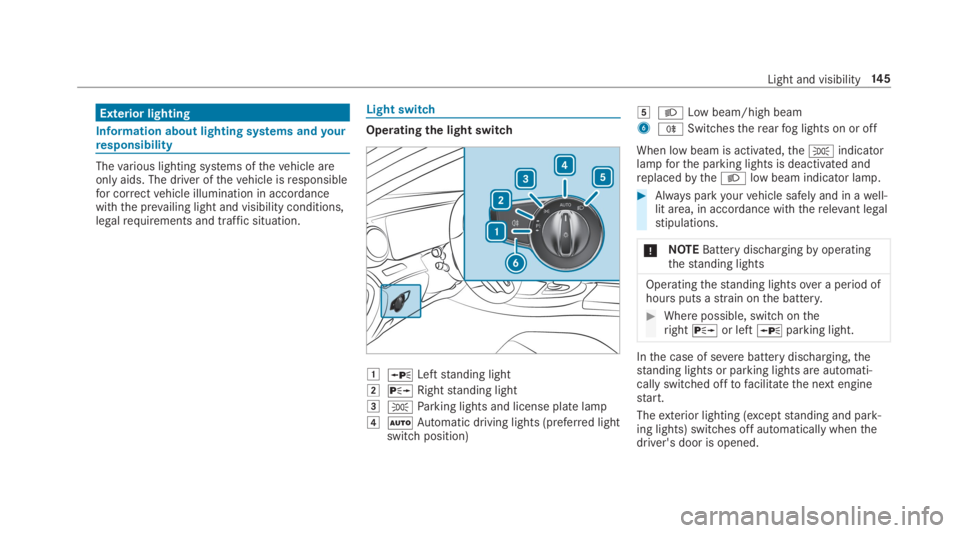
GcLeftstanding light
HdRightstanding light
I`Parking lights and license plate lamp
JXAutomatic driving lights (preferred lightswitch position)
KXLow beam/high beam
6^Switchestherearfog lights on or off
When low beam is activated,the`indicatorlampforthe parking lights is deactivated andreplacedbytheXlow beam indicator lamp.
#Always parkyourvehicle safely and in awell-lit area, in accordance withtherelevant legalstipulations.
*NOTEBattery dischargingbyoperatingthestanding lights
Operatingthestanding lightsover a period ofhours puts astrain onthe battery.
#Where possible, switch ontherightdor leftcparking light.
Inthe case of severebattery discharging,thestanding lights or parking lights are automati‐cally switched offtofacilitatethe next enginestart.
Theexterior lighting (exceptstanding and park‐ing lights) switches off automatically whenthedriver's door is opened.
Light and visibility14 5
Page 148 of 578
RObservethe notes on surround lighting(→page149).
Automatic driving lights functionThe parking lights, low beam and daytimerun‐ning lamps are switched on automaticallydepending onthe ignitionstatus andthe ambi‐ent light.
&WARNINGRisk of accident whenthe lowbeam is switched off in poor visibility
Whenthe light switch is settoX,the lowbeam may not be switched on automaticallyifthere isfog, snow orother causes of poorvisibility such as spray.
#In such cases, turnthe light switchtoX.
The automatic driving lights are only an aid.Yo uareresponsibleforvehicle lighting.
Switchingtherearfog lights on or off
Requirements:RThe light switch is intheXorXposi‐tion.
#Pressthe^button.
Please observethe country-specific lawsontheuse ofrearfog lamps.
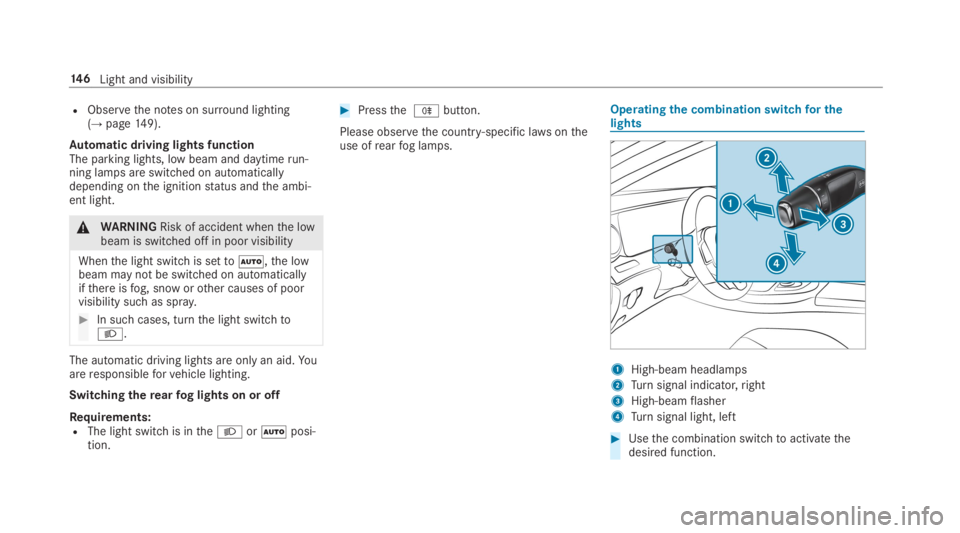
Operatingthe combination switchfor thelights
1High-beam headlamps
2Turnsignal indicator,right
3High-beamflasher
4Turnsignal light, left
#Usethe combination switchtoactivatethedesired function.
14 6Light and visibility
Page 150 of 578
Cornering light
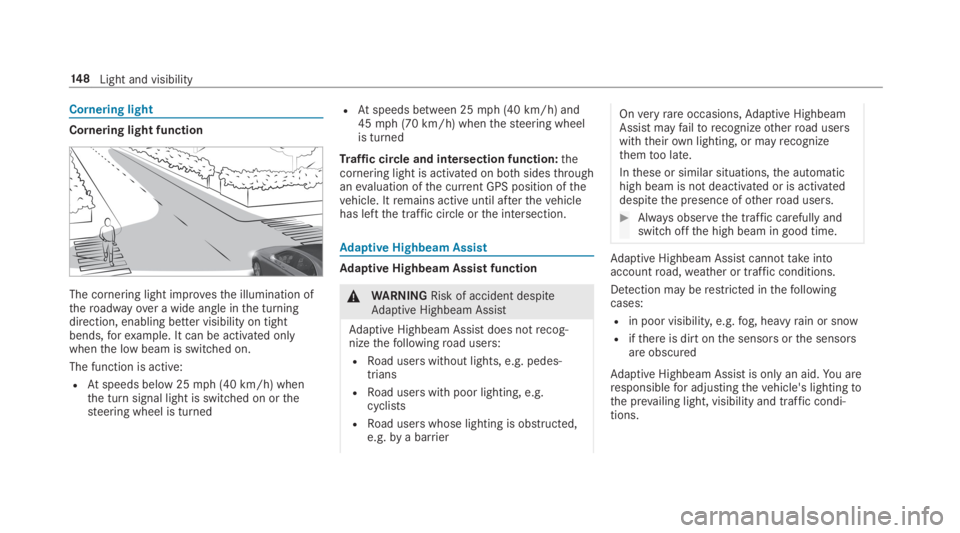
Cornering light function
The cornering light improvesthe illumination oftheroadwayover a wide angle inthe turningdirection, enabling better visibility on tightbends,forexample. It can be activated onlywhenthe low beam is switched on.
The function is active:
RAtspeeds below 25mph (40 km/h) whenthe turn signal light is switched on orthesteering wheel is turned
RAtspeeds between 25mph (40 km/h) and45mph (70 km/h) whenthesteering wheelis turned
Traffic circle and intersection function:thecornering light is activated on bothsidesthroughanevaluation ofthe current GPS position ofthevehicle. Itremains active until afterthevehiclehas leftthe traffic circle orthe intersection.
Adaptive Highbeam Assist
Adaptive Highbeam Assist function
&WARNINGRisk of accident despiteAdaptive Highbeam Assist
Adaptive Highbeam Assist does notrecog‐nizethefollowingroad users:
RRoad users without lights, e.g. pedes‐trians
RRoad users with poor lighting, e.g.cyclists
RRoad users whose lighting is obstructed,e.g.bya barrier
Onveryrareoccasions,Adaptive HighbeamAssist mayfailtorecognizeotherroad userswiththeirown lighting, or mayrecognizethemtoo late.
Inthese or similar situations,the automatichigh beam is not deactivated or is activateddespitethe presence ofotherroad users.
#Always observethe traffic carefully andswitch offthe high beam in good time.
Adaptive Highbeam Assist cannottakeintoaccountroad,weather or traffic conditions.
Detection may berestricted inthefollowingcases:
Rin poor visibility,e.g.fog, heavyrain or snow
Rifthere is dirt onthe sensors orthe sensorsare obscured
Adaptive Highbeam Assist is onlyan aid.You areresponsiblefor adjustingthevehicle's lightingtothe prevailing light, visibility and traffic condi‐tions.
14 8Light and visibility
Page 201 of 578
Canceling a brake application ofActive BrakeAssist
You can cancel a brake application ofActiveBrake Assistat any timeby:
RDepressingthe accelerator pedal fully.
RReleasingthe brake pedal.
Active Brake Assistmay cancelthe brake appli‐cation when one ofthefollowing conditions isfulfilled:
RYou maneuverto avoidthe obstacle.
RThereis no longer arisk of collision.
RAn obstacle is no longer detected in front ofyourvehicle.
EvasiveSteering Assist (onlyvehicles withDriving AssistancePackage)
EvasiveSteering Assist hasthefollowingcharac‐teristics:
RCan detectstationary or crossing pedes‐trians.
RCan assistthe driver with additionalsteeringassistance if it detects a swerving maneuver.
RCan be activatedbyan abruptsteering move‐ment during a swerving maneuver.
RCan assist during swerving andstraighteningofthevehicle.
RCanreact from a speed of approximately12mph (20 km/h) uptoa speed of approx‐imately 43mph (70 km/h).
RYou can preventthe assistance at any timebyactivelysteering.
&WARNINGRisk of an accident despiteEvasiveSteering Assist
EvasiveSteering Assist cannotalways clearlyidentify objects and complex traffic situa‐tions.
In addition,thesteering support of EvasiveSteering Assist isgenerally not sufficienttoavoid a collision.
In such cases EvasiveSteering Assist can:
Rgive an unnecessarywarning or provideassistance
Rnot giveawarning or not provide assis‐tance
#Always pay careful attentiontothe traf‐fic situation; do notrely on EvasiveSteering Assist alone.
#Bereadytobrake andtakeevasiveaction if necessary.
#Preventthe assistancebyactivelysteer‐ing in non-critical driving situations.
#Drive at an appropriate speed if pedes‐trians are closetothe path ofyourvehi‐cle.
Also observethe system limitations of EvasiveSteering Assist.
System limitations
The system may be impaired or may not functioninthefollowing situations:
RIn snow,rain,fog, heavy spray, ifthere isglare, in direct sunlight or ingreatlyvaryingambient light.
RIfthe sensors are dirty,fogged up, damagedor covered.
Driving and parking19 9
Page 205 of 578
Active Distance Assist DISTRONIC
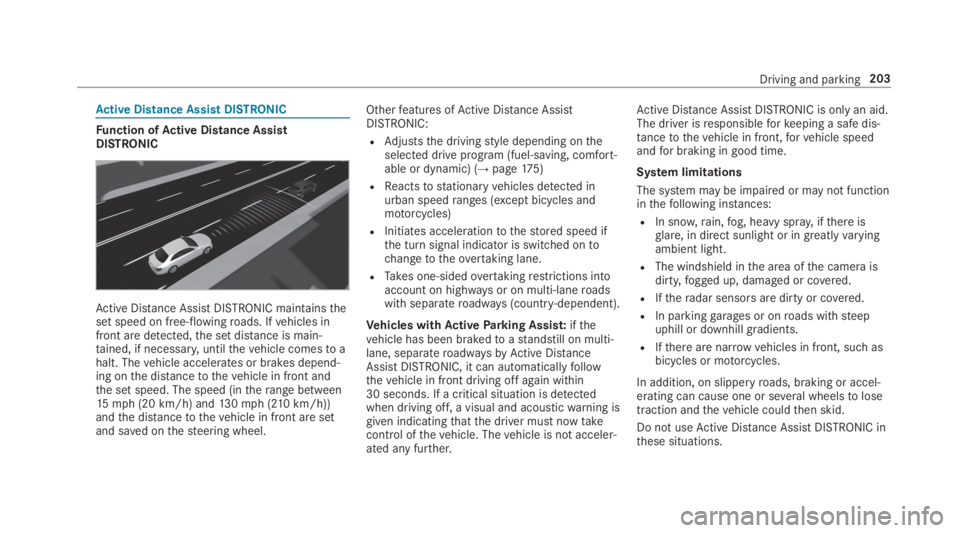
Function ofActive Distance AssistDISTRONIC
Active Distance AssistDISTRONIC maintainstheset speed on free-flowingroads. Ifvehicles infront are detected,the set distance is main‐tained, if necessary,untilthevehicle comesto ahalt. Thevehicle accelerates or brakes depend‐ing onthe distancetothevehicle in front andthe set speed. The speed (intherange between15mph (20 km/h) and130mph (210km/h))andthe distancetothevehicle in front are setand saved onthesteering wheel.
Otherfeatures ofActive Distance AssistDISTRONIC:
RAdjuststhe drivingstyle depending ontheselected drive program (fuel-saving, comfort‐able or dynamic) (→page175)
RReactstostationaryvehicles detected inurban speedranges (except bicycles andmotorcycles)
RInitiates accelerationtothestored speed ifthe turn signal indicator is switched ontochangetotheovertaking lane.
RTakes one-sidedovertakingrestrictions intoaccount on highways or on multi-laneroadswith separateroadways (country-dependent).
Vehicles withActiveParking Assist:ifthevehicle has been brakedtoastandstill on multi-lane, separateroadwaysbyActive DistanceAssistDISTRONIC, it can automaticallyfollowthevehicle in front driving off again within30 seconds. If a critical situation is detectedwhen driving off, a visual and acousticwarning isgiven indicatingthatthe driver must nowtakecontrol ofthevehicle. Thevehicle is not acceler‐ated any further.
Active Distance AssistDISTRONIC is only an aid.The driver isresponsibleforkeeping a safe dis‐tancetothevehicle in front,forvehicle speedandfor braking in good time.
System limitations
The system may be impaired or may not functioninthefollowing instances:
RIn snow,rain,fog, heavy spray, ifthere isglare, in direct sunlight or in greatlyvaryingambient light.
RThe windshield inthe area ofthe camera isdirty,fogged up, damaged or covered.
RIftheradar sensors are dirty or covered.
RIn parkinggarages or onroads withsteepuphill or downhill gradients.
RIfthere are narrowvehicles in front, such asbicycles or motorcycles.
In addition, on slipperyroads, braking or accel‐erating can cause one or several wheelstolosetraction andthevehicle couldthen skid.
Do not useActive Distance AssistDISTRONIC inthese situations.
Driving and parking203
Page 209 of 578
System limitationsTemporary speedrestrictions (e.g.for a certaintime or duetoweather conditions) cannot beproperlydetectedbythe system. The maximumpermissible speed applyingfor avehicle with atrailer is not detectedbythe system. Inthese sit‐uationsyou must adjustyour speedyourself.
&WARNINGRisk of accident duetoActiveSpeed Limit Assistadaptingthevehicle'sspeed
The speed adoptedbyActive Speed LimitAssistmay betoo high or incorrect in someindividual cases, suchas:
RInthewet or infog
RWhentowing a trailer
#Ensurethatthe driven speed complieswith trafficregulations.
#Adjustthe driving speedtosuit currenttraffic andweather conditions.
Function ofroute-based speed adaptation
%Theavailability ofthefollowing function iscountry-dependent.
When Distance AssistDISTRONIC is active,thefunction adjuststhe speed depending ontherouteevents ahead. Depending onthe drive pro‐gram selected,thevehicle negotiatestherouteevent ahead in a fuel-saving, comfortable ordynamic manner. Whentherouteevent has beenpassed,thevehicle accelerates againtothestored speed. The set distancetothevehicle infront,vehicles detected ahead and speedrestric‐tions ahead aretaken into account.
Route-based speed adjustment canbyconfig‐ured inthe multimedia system (→page 208).
Routeevents ahead are:
RBends
RT-intersections, traffic circles andtollsta‐tions
RTurns andexits
%Whenthetollstation isreached,Active Dis‐tance AssistDISTRONIC adoptsthe speed asthestored speed.
Also,the speed isreduced ifthe turn signaltochange lanes is switched on and one ofthefol‐lowing situations is detected:
RTurning off at intersections
RDriving on slowing-down lanes
RDriving on lanes adjacenttoslowing-downlanes
The driver isresponsibleforchoosingtherightspeed and observingotherroad users. Thisapplies in particulartointersections, traffic cir‐cles and traffic lights, asroute-based speedadaptation does not brakethevehicletoastand‐still.
Whenroute guidance is active,thefirst speedadjustment is carried out automatically. Iftheturn signal indicator is switched on,the selectedroute is confirmed and further speed adjustmentis activated.
Speed adjustment is canceled inthefollowingcases:
RIfthe turn signal indicator is switched offbeforetherouteevent.
Driving and parking207
Page 211 of 578
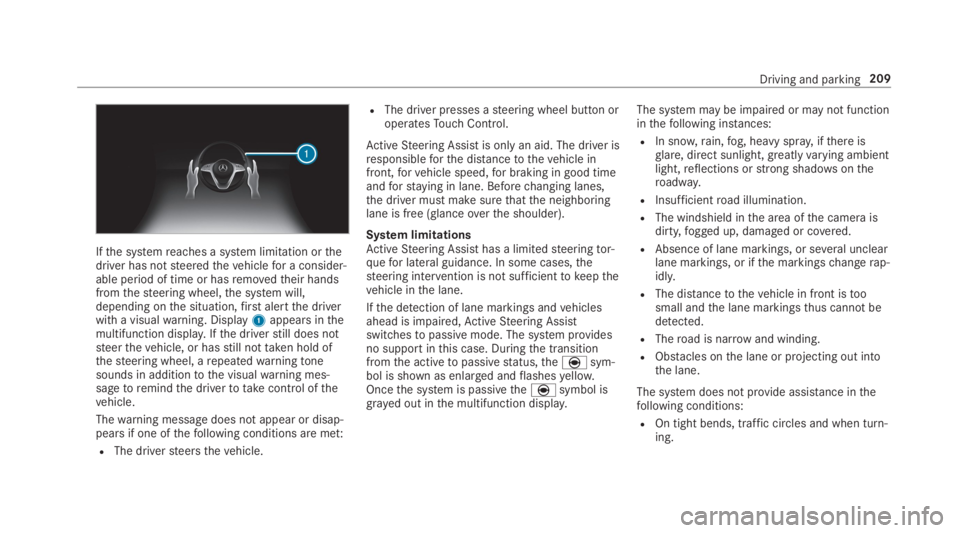
Ifthe systemreaches a system limitation orthedriver has notsteeredthevehiclefor a consider‐able period of time or hasremovedtheir handsfromthesteering wheel,the system will,depending onthe situation,first alertthe driverwith a visualwarning. Display1appears inthemultifunction display.Ifthe driverstill does notsteerthevehicle, or hasstill nottaken hold ofthesteering wheel, arepeatedwarningtonesounds in additiontothe visualwarning mes‐sagetoremindthe drivertotakecontrol ofthevehicle.
Thewarning message does not appear or disap‐pears if one ofthefollowing conditions are met:
RThe driversteersthevehicle.
RThe driver presses asteering wheel button oroperatesTouch Control.
ActiveSteering Assist is only an aid. The driver isresponsibleforthe distancetothevehicle infront,forvehicle speed,for braking in good timeandforstaying in lane. Beforechanging lanes,the driver must make surethatthe neighboringlane is free (glanceoverthe shoulder).
System limitationsActiveSteering Assist has a limitedsteeringtor‐quefor lateral guidance. In some cases,thesteering intervention is not sufficienttokeepthevehicle inthe lane.
Ifthe detection of lane markings andvehiclesahead is impaired,ActiveSteering Assistswitchestopassive mode. The system providesno support inthis case. Duringthe transitionfromthe activetopassivestatus,theèsym‐bol is shown as enlarged andflashesyellow.Oncethe system is passivetheèsymbol isgrayed out inthe multifunction display.
The system may be impaired or may not functioninthefollowing instances:
RIn snow,rain,fog, heavy spray, ifthere isglare, direct sunlight,greatlyvarying ambientlight,reflections orstrong shadowsontheroadway.
RInsufficientroad illumination.
RThe windshield inthe area ofthe camera isdirty,fogged up, damaged or covered.
RAbsence of lane markings, or several unclearlane markings, or ifthe markingschangerap‐idly.
RThe distancetothevehicle in front istoosmall andthe lane markingsthus cannot bedetected.
RTheroad is narrow and winding.
RObstacles onthe lane or projecting out intothe lane.
The system does not provide assistance inthefollowing conditions:
ROn tight bends, traffic circles and when turn‐ing.
Driving and parking209
Page 222 of 578
Crosswind Assist
The crosswindstabilization:
ROperatesbychanging wheel loadsthroughadjustingthe ABC springstruts.
RReduces disruptions when drivingstraightahead.
RSupports countersteering.
RIs active inthe speedrange between 50mph(80 km/h) and130mph (210km/h) whendrivingstraight ahead or corneringgently.
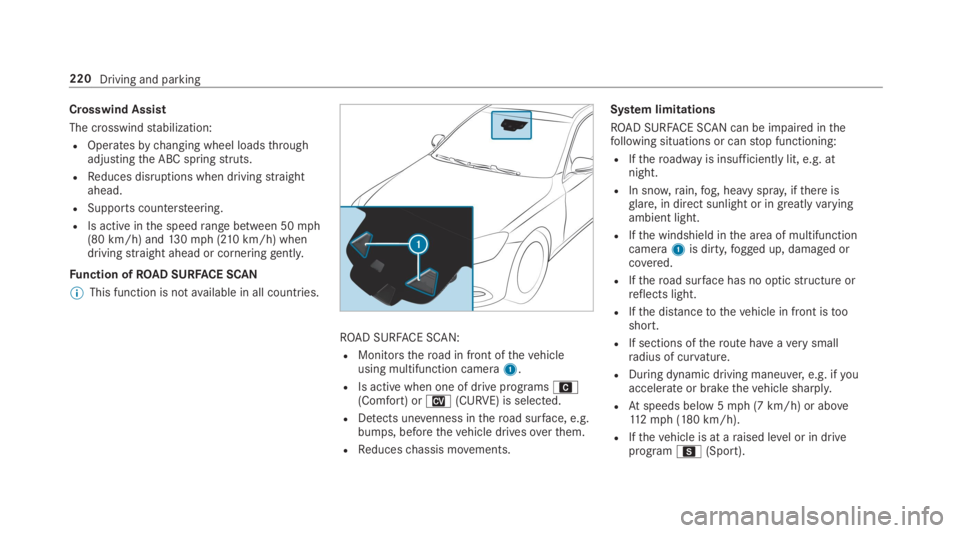
Function ofROAD SURFACE SCAN
%This function is notavailable in all countries.
ROAD SURFACE SCAN:
RMonitorstheroad in front ofthevehicleusing multifunction camera1.
RIs active when one of drive programsA(Comfort) orN(CURVE) is selected.
RDetects unevenness intheroad surface, e.g.bumps, beforethevehicle drivesoverthem.
RReduceschassis movements.
System limitations
ROAD SURFACE SCAN can be impaired inthefollowing situations or canstop functioning:
RIftheroadwayis insufficiently lit, e.g. atnight.
RIn snow,rain,fog, heavy spray, ifthere isglare, in direct sunlight or in greatlyvaryingambient light.
RIfthe windshield inthe area of multifunctioncamera1is dirty,fogged up, damaged orcovered.
RIftheroad surface has no opticstructure orreflects light.
RIfthe distancetothevehicle in front istooshort.
RIf sections oftheroute haveaverysmallradius of curvature.
RDuring dynamic driving maneuver,e.g. ifyouaccelerate or brakethevehicle sharply.
RAtspeeds below 5mph (7 km/h) or above112mph (180 km/h).
RIfthevehicle is at araised level or in driveprogramC(Sport).
220Driving and parking
Page 230 of 578
System limitations
Therear view camera will not function or willonly partially function inthefollowing situations:
RThe trunk lid is open.
RThere is heavyrain, snow orfog.
RThe ambient light conditions are poor, e.g. atnight.
RThe camera lens is obstructed, dirty orfog‐ged up. Observethe notes on cleaningtherear view camera (→page 409).
RThe camera orrear ofyourvehicle is dam‐aged. Inthis case, havethe camera and itsposition and settingchecked at aqualifiedspecialistworkshop.
Thefield of vision andother functions oftherearview camera may berestricted duetoadditionalaccessories ontherear ofthevehicle (e.g.license plate bracket or bicyclerack).
%The contrast ofthe display may be impairedbydirect sunlight orby other light sources,e.g. when driving out of agarage. Inthiscase, pay particular attention.
%Havethe displayrepaired orreplaced if,forexample, pixel errorsconsiderablyrestrict itsuse.
Observethe notes on cleaningtherear viewcamera (→page 409).
360° camera
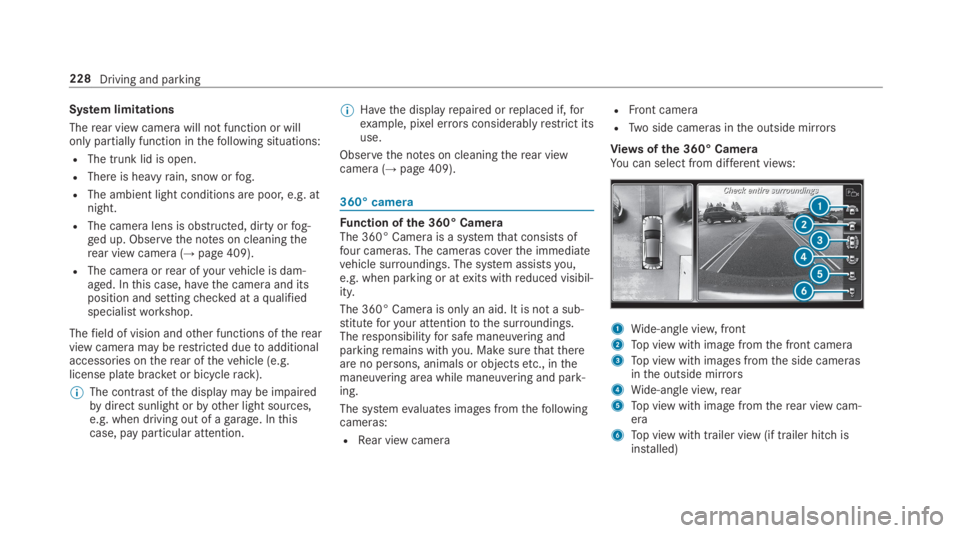
Function ofthe 360° CameraThe 360° Camera is a systemthat consists offour cameras. The cameras coverthe immediatevehicle surroundings. The system assistsyou,e.g. when parking or atexits withreduced visibil‐ity.
The 360° Camera is only an aid. It is not a sub‐stituteforyour attentiontothe surroundings.Theresponsibilityfor safe maneuvering andparkingremains withyou. Make surethatthereare no persons, animals or objectsetc., inthemaneuvering area while maneuvering and park‐ing.
The systemevaluates images fromthefollowingcameras:
RRear view camera
RFront camera
RTwo side cameras inthe outside mirrors
Views ofthe 360° CameraYou can select from different views:
1Wide-angle view,front
2Top view with image fromthe front camera
3Top view with images fromthe side camerasinthe outside mirrors
4Wide-angle view,rear
5Top view with image fromtherear view cam‐era
6Top view with trailer view (if trailer hitch isinstalled)
228Driving and parking
Page 232 of 578
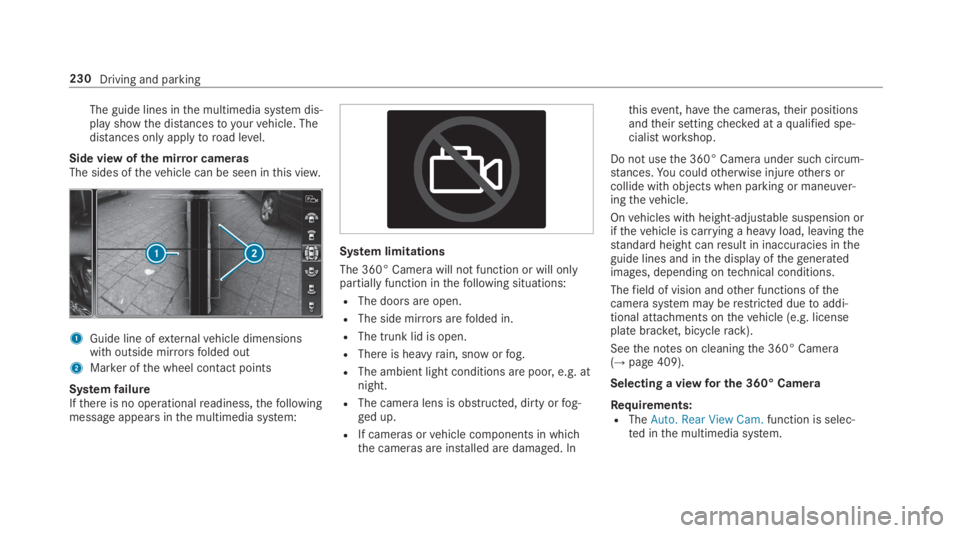
The guide lines inthe multimedia system dis‐play showthe distancestoyourvehicle. Thedistances only applytoroad level.
Side view ofthe mirror camerasThe sides ofthevehicle can be seen inthis view.
1Guide line ofexternalvehicle dimensionswith outside mirrorsfolded out
2Marker ofthe wheel contact points
SystemfailureIfthere is no operationalreadiness,thefollowingmessage appears inthe multimedia system:
System limitations
The 360° Camera will not function or will onlypartially function inthefollowing situations:
RThe doors are open.
RThe side mirrorsarefolded in.
RThe trunk lid is open.
RThere is heavyrain, snow orfog.
RThe ambient light conditions are poor, e.g. atnight.
RThe camera lens is obstructed, dirty orfog‐ged up.
RIf cameras orvehicle components in whichthe cameras are installed are damaged. In
thisevent, havethe cameras,their positionsandtheir settingchecked at aqualified spe‐cialistworkshop.
Do not usethe 360° Camera under such circum‐stances.You couldotherwise injureothers orcollide with objects when parking or maneuver‐ingthevehicle.
Onvehicles with height-adjustable suspension orifthevehicle is carrying a heavy load, leavingthestandard height canresult in inaccuracies intheguide lines and inthe display ofthegeneratedimages, depending ontechnical conditions.
Thefield of vision andother functions ofthecamerasystem may berestricted duetoaddi‐tional attachments onthevehicle (e.g. licenseplate bracket, bicyclerack).
Seethe notes on cleaningthe 360° Camera(→page 409).
Selecting a viewfor the 360° Camera
Requirements:RTheAuto. Rear View Cam.function is selec‐ted inthe multimedia system.
230Driving and parking