ECO mode MERCEDES-BENZ S-CLASS 2020 User Guide
[x] Cancel search | Manufacturer: MERCEDES-BENZ, Model Year: 2020, Model line: S-CLASS, Model: MERCEDES-BENZ S-CLASS 2020Pages: 602, PDF Size: 54.61 MB
Page 190 of 602
#
Ifge arshif trecom mendatio nmessage1 is
sho wnonthem ultifunc tiondispla y,shif tto
th er ecom mende dgear . Using
kickdo wn Mer
cedes- AMGvehicl es:obse rvet he notesi n
th eS upplement .Other wise, youm ayfailto rec‐
ogni zedangers. #
Maxi mum acceler atio n:dep ress thea ccel‐
er ator pedal beyond thep ressur epoint .
The automatic transmiss ionshiftsup tothen ext
ge ar when them aximum enginespeedis
re ac hed toprotect thee ngine from overrev ving. Glide
mode functio n Plug-i
nhybr id:obser vethen otes intheS upple‐
ment .Other wise, youm ayfailto recogni zedan‐
ge rs.
Mer cede s-AMG vehicl es:obse rvet he notesi n
th eS upplement .Other wise, youm ayfailto rec‐
ogni zedangers. Wi
th an ant icip ator yd rivin gs tyle,g lide mode
helps yout or educe fuelconsum ption.
Glide mode isch aract erize db ythe follo wing:
R The com bustion engin eisd isco nnect edfrom
th ed rive trai na nd thev ehicle continues to
ro llin neut ral.
R The transmission position005Bisdispla yedi n
gr een inthem ultifunc tiondispla y.
Glide mode isact ivat ed ifth ef ollo wing condi‐
tions arem et:
R Drivep rogram ; issel ect ed.
R The spee di sw ithi nas uitable rang e.
R The road's courseissuit able, e.g.nos teep
uphill ordownhill inclinesortight bends.
R Youd on otdepr essthea ccelera toro rb rake
peda l.
% Glide mode canalsob eactiv ated ifyo uh ave
select edtheEc ose tting fort he drivew hen
in drivep rogram =.
Glide modeisd eactiv ated again ifone ofthe
condi tions isno long erme t. Ve
hicl eswith Activ eD ista nce Assist
DI ST RO NIC :wh en ActiveD ista nce Assist
DIS TRONI Cisa ctive,the glide mode function is
re strict ed. Fu
nction of4MA TIC
4MA TICensur esthat all four wheel saredriven
when needed. Toget her withE SP®
and 4ETS,
4MA TICimprove sthe traction ofyour vehicle
whene verad rive nw hee lspins duetoinsuf fi‐
cie nttracti on.
If yo uf ail toadap tyour driving style, 4MA TICcan
neit her reduce ther isk ofan acci dent norover‐
ri de thel aw so fphysics. 4MATICcanno ttak e
acc oun tofroad, weather and traf ficc ondi tions .
4MA TICisonly anaid. Youa reresponsible espe‐
cially form aint ainingasafed ista nce from the
ve hicle infront, forv ehicle speed, forb raking in
good timeandfors taying inlane.
% Inwint ryroad con dition s,them aximum
ef fect of 4MA TICcan beachie vedo nlyi fy ou
use wint ertires (M+S tires), withs now
ch ains ifnec essar y. 18
8
Driving and parking
Page 219 of 602
The
driven speed isadjus tedw hen thev ehicle is
le ve lw itht he traf fics igna tthe latest.In the
case ofsig ns indi cati ngentr yintoa nu rban area ,
th es peed isadap teda ccor ding tothes peed
per mitt edwithin theu rban area. The speed limit
displa yint he Instrument Displayisa lway su pda ‐
te dw hen thev ehicle isleve lw itht he traffic sign .
If th er ei sn ospeed restriction onanunlimited
st re tcho froad (e.g. onafreewa y),ther ecom ‐
men dedspeed isaut omati callyadop teda sthe
st or ed speed. Thesystem uses thes peed stor ed
on anunlimit edstre tcho froad asther ecom ‐
men dedspeed. Ifyo ud on otalter thes tore d
speed onanunlimit edstre tcho froad, ther ec‐
omm ended speedis80 mph(130k m/h) .
If Ac tiveD ista nce AssistDIS TRONI Chasbeen
pu tint op assive mode bypressing thea cceler a‐
to rp eda l,onl yspeed limitswhi chareh igher
th an thes etspeed area dop ted.
Ac tiveS peed Limi tA ssistisonl yana id. The
dr iver isresponsible fork eeping asafed ista nce
fr om thev ehicle infront, forv ehicle speed and
fo rb raking ingood time. Themaximu mpermissi ‐
ble spee dalsod epe nds onfact or ss ucha sthe
ro ad sur face and traf ficc ondi tions . Sy
stem limit s
Te mp orarys peed restrictions (e.g.for ac ertain
tim eordue towe ather condition s)can notb e
pr oper lyde tected bythes ystem. Themaximum
per missible speedapplying toav ehicle witha
tr ailer isno td etect edbythes ystem. Inthese sit‐
uations youm usta djus ty our speed yourself . &
WARNIN GRisk ofacci dent duet oA ctiv e
Speed LimitAssistadap tingt he vehicle's
speed
The speed adoptedb yActiv eSpeed Limi t
Assi stma ybetoo high orincor rect insome
indi vidualcase s,su ch as:
R Inthew etor infog
R When towing atrailer #
Ensur ethat thed rive ns peed complies
wit htraffic regulations. #
Adjus tthe driving speed tosuit current
tr af fica nd weather condition s. Fu
nction ofrout e-base dspee dadap tatio n %
The follo wing function iscoun try- dependen t
and onlyavailable incon junction withthe
Dr iving Assista nc eP acka ge .
When ActiveD ista nce AssistDIS TRONI Cisa cti‐
va ted, thev ehicle speed willbeadjus teda ccor d‐
ing lyto ther out eeventsa head. Depen dingon
th ed rive prog rams elected, thev ehicle negoti‐
at es arout eevent aheadi naf uel-saving, com ‐
fo rtable ordynam icman ner.W hen ther out e
eve nthasb eenp asse d, thev ehicle accelerat es
ag ain tothes tore ds peed. Thesetd ista nce to
th ev ehicle infront, vehicles detected aheada nd
spe edrestrictions aheada retake ni ntoa cco unt.
Ro ute-based speedadap tatio nc an be conf ig‐
ur ed inthem ultimedia system (/ page218).
Th ef ollo wing routee vents aret aken into
acco unt:
R Bend s
R T-int ersect ions,tra ffic circ lesa nd tollst a‐
tio ns
R Turnsa nd exits Dr
ivin gand par king 217
Page 281 of 602
R
avoid loud noises that caus einter fere nce
wh ilem aking avoice command entry,e.g.
th eb lowe r.
Av oice tagi nt he addr essbook isno trecog ‐
niz ed:
R onlycreates ensible addressbook entriesin
th es ystem/mo bilephone, e.g.entersur‐
name andfirs tn am eint he cor rect field. R
donotu se anya bbr eviation s,unn eces sary
spaces orspec ialcharact ers.
If as tatio nliste ntry isno trecog nized:
R sayt he Read outstation listvoice com mand . Essentia
lvoice comm ands Ov
ervie wo fswitc hvoice comm ands Swit
chvoice com mand scan be used toopen
cer tain applicat ions.The voice com mand selec‐
tion canbeused rega rdless ofthea pplication
th at iscur rently active.
Switc hvoice comm ands Vo
ice comm and Function
Navigation To
switc hton avigati on mod e
Ma p To
switc htom apdisp lay
Address book To
switc htoa ddr ess book
Telep hone To
switc htot elephone mode
Text message To
switc htot extm essage s
Radio To
switc htor adio mode
Media To
switc htom edia mode Vo
ice Cont rolS ystem 27
9
Page 328 of 602
Cha
nging direction overvie w Ther
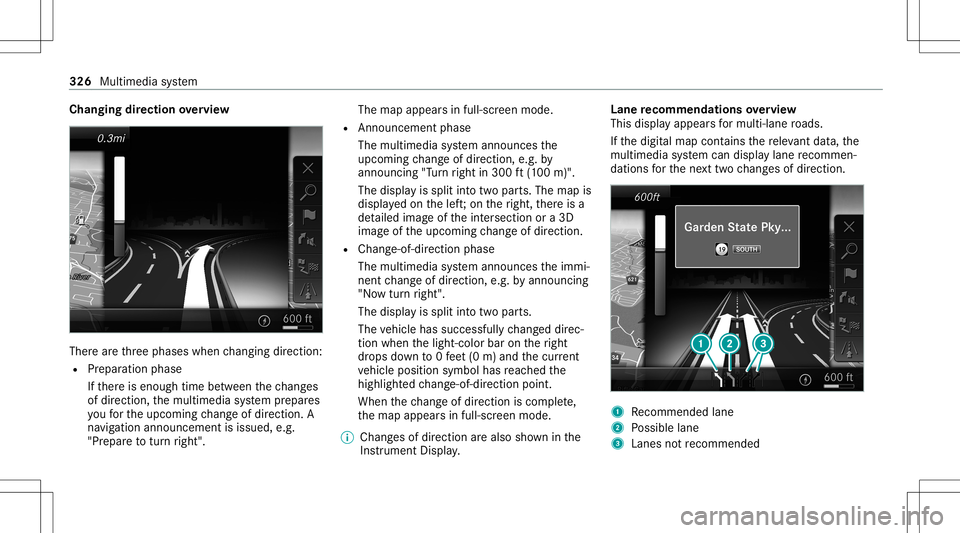
earethre ep hases whenchang ingdirect ion:
R Preparation phase
If th er ei se nough timebetween thec hang es
of dir ection, them ultimedia system prepar es
yo uf or theu pcoming chang eofdirect ion.A
na vig atio nannoun cem entisissue d,e.g .
"Pr epar etot urnr ight". The
map appear sinf ull-scr eenmode.
R Ann ouncemen tphase
The multimedia system announ cesthe
upco mingchang eofdirect ion,e.g.b y
ann oun cing"Turn right in300 ft(100 m)".
The displa yiss plit intot wo parts.The map is
displa yedo nthe left;on ther ight, ther ei sa
de tailed imag eofthe intersection ora3 D
imag eofthe upcoming chang eofdirect ion.
R Chan ge-of-d irecti onpha se
The multimed iasystem announ cesthei mmi‐
nen tchang eofdirect ion,e.g.b ya nnoun cing
"No wturnr ight".
The displa yiss plit intot wo parts.
The vehicle hassuccessfull ychang eddirec‐
tion when thel ight- color baronther ight
dr ops down to0f eet(0m )and thec urrent
ve hicle position symbolhasreac hed the
highlight edchang e-of-dir ect ion poin t.
When thec hang eofdirect ion iscom plete,
th em apappear sinf ull-scr eenmode.
% Chang esofdir ect ion area lso sho wninthe
Ins trument Display. Lane
recomm endationsoverview
This displa yappear sfor multi-lane roads.
If th ed igitalmap contains ther ele vant data,t he
multimedia system can displa ylane recomme n‐
da tions fort he next twoc hang esofdir ection. 1
Recomme ndedlane
2 Possible lane
3 Lanes notrecom mende d 326
Multime diasystem
Page 331 of 602
Ov
ervie wo frout eguidanc efroma noff-road
loc ation toad estinatio n
Of f-road position: thec urrent vehicle position is
locat edwithin thed igitalmap onroads that are
no ta vailable.
When routeg uidan cebegin sthe follo wing dis‐
pla ysappear :
R The Road NotMapped messageiss hown.
R Adirect ion arro ws howing thel inear direc‐
tion totheP OI.
When thev ehicle isbac konar oadknowntothe
multime diasystem, routeg uidan cecontinue sas
no rm al.
Ov ervie wo foff-road status during route
guidanc e
Due toroadw orks ,for exam ple, ther em aybe dif‐
fe re nces betwee nt he dat aonthe digit almap
and thea ctual courseofther oad. Insuc hcases,
th em ultimedia system will temp orarily be
unable tolocat ethe vehicle's current positio no n
th ed igitalmap. Thevehicle isoff-r oad. When
thev ehicle isoff-r oad, thef ollo wing dis‐
pla ysares hown:
R theRoad NotMapped message
R adirect ion arrow showing thel inear direct ion
to theP OI
When thev ehicle isbac konar oadknowntothe
multime diasystem, routeg uidan cecontinue sas
no rm al. Des
tination Sa
ving thec urrent vehicl eposition
Mul timedi asystem:
4 Navigation #
Ifth em apisdispla yedi nf ull scr een mode,
pr ess thec ent ralc on trol elemen t.
The map menuappear s. #
Selec t1 onthem apmenu (/page333).
The current vehicle position issave dt ot he
"Pr evious destination s"memo ry. St
oring am apposit ion
Mult imedia system:
4 Navigation
The map isin full-scr eenmode. #
Press theT ouc hControl, thec ontroller orthe
to uc hpad. #
Select "mo vemap" inmap menu 2
(/ page333) . #
Select aposition onthem ap.
If multiple entries area vailable foram ap
posi tion, alista ppear s. #
Highl ightanentr y. #
Select ¥ Store in"Previ ousD esti na-
tions ".
The map position issave dt ot he "Previous
des tination s"memo ry.
Edit ingthep revious destinations
Multi media system:
4 Navigation
5 ¬ Previous andOther Destination s
5 Previous Destination s #
Highlight oneofthep reviou sdestin ation s. Multim
ediasystem 329
Page 335 of 602
Map
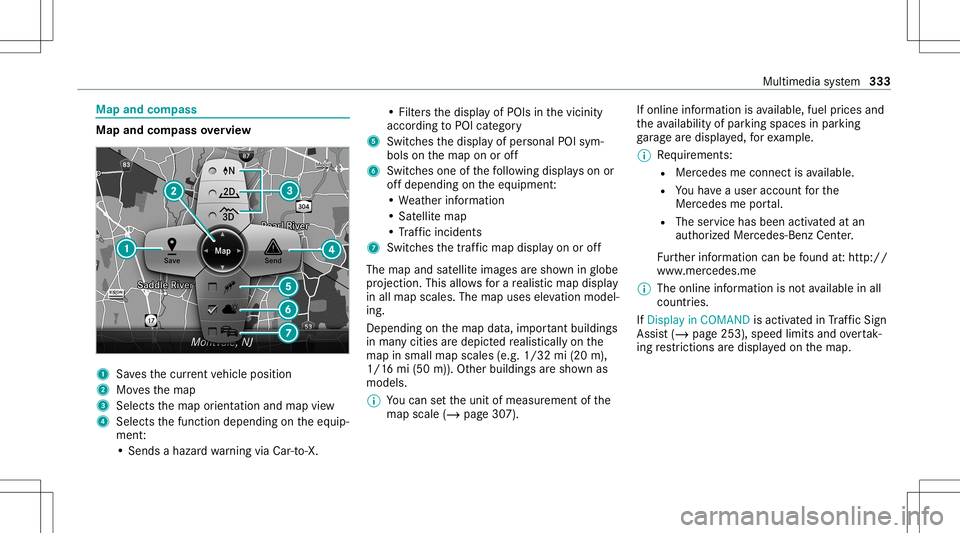
andcom pass Map
andcom pass overview 1
Savest he cur rent vehicle position
2 Movest he map
3 Selects them aporient ation andmap view
4 Select sthe function depending onthee quip‐
ment :
•S ends ahazar dwarning viaCar -to-X . •F
ilter st he displa yofPOIs inthev icinit y
accor dingtoPOI categor y
5 Switc hesthed ispla yofpersonal POIsym‐
bols onthem apon oroff
6 Switc hesone ofthef ollo wing displa yson or
of fd epending onthee quipment :
•W eather information
•S atellit em ap
•T raffic incide nts
7 Switchest he traffic map displa yono roff
The map andsatellit eimag esares hown inglobe
pr oject ion.This allowsforar ealis ticmap display
in all map scales. Themap uses elevatio nm odel‐
ing .
Dep endingonthem apdat a,im por tant buildi ngs
in ma nyciti esared epicted realis ticallyo nthe
map insmall mapscales (e.g.1/32 mi(20 m),
1/1 6mi(50 m)). Other buildings ares hown as
model s.
% Youc an setthe unit ofmeasur ementofthe
map scale (/page307). If
online information isavailable, fuelprice sand
th ea vailabilit yofparkin gspac esinpar king
ga rage ared ispla yed, fore xamp le.
% Requiremen ts:
R Mer cedes meconnectisa vailable.
R Youh ave auser accoun tfor the
Mer cedes meportal.
R The service hasbeen activat ed atan
aut hor ized Mercedes -Benz Cent er.
Fu rther information canbefound at:h ttp: //
www .merced es.me
% The onlinei nfor mat ionisno ta vailable inall
coun tries.
If Dis play inCOMA NDisact ivat ed inTraf ficS ign
Assi st(/ pag e253) ,speed limits andovertak‐
ing restrictions ared ispl ay ed on them ap. Multimedia
system 333
Page 336 of 602
%
Com panylogo sdispl ayed on them apare
tra demar ksofther espectiv ecom panies and
used solely fort he pur pose ofindicating the
locat ionsofthese com panies. Theuseof
suc hlogos onthem apdoes notindicat e
appr oval of, suppo rtof or adv ertising by
th ese com panies fort he navig ation system
itself.
Se tting them apscale
Re quirement s:
R The map issho wn.
Multime diasystem:
4 Navigation #
Tozoo min:swi pedown ontheT ouc hCon‐
tr ol.
or #
Turn thec ontroller count er-cloc kwise.
or #
Movetwof ing ersa parton thet ouc hpad . #
Tozoo mo ut:swipeup on theT ouc hControl.
or #
Turn thec ontroller clockwise.
or #
Movetwof ing erst ogether onthet ouc hpad .
% Youc an setthe unit ofmeasur ementofthe
map scale (/page307).
Mo ving them ap
Multi media system:
4 Navigation 5
Z Option s
5 Map Menu #
Alternativ ely,ift he map isdispla yedi nf ull
scr een mode, press thec ent ralc on trol ele‐
men t.
The map menuappear s. #
Selec t"Mo vemap" inmap menu 2
(/ page333) . #
Swipe inanyd irection ontheT ouc hControl
or touc hpad.
or #
Slid ethe contr ollerinanyd irect ion.
The map movesi nt he cor responding direc‐
tion under thec rosshair .The further you
mo veyour fing er aw ay from thes tartin gp osi‐ tio
no nthe touc hpad, thef astert he map
mo ves.
Selec tingthem aporientat ion
Multi media system:
4 Navigation 5
Z Option s
5 Map Menu #
Alternativ ely,ift he map isdispla yedi nf ull
scr een mode, press thec ent ralc on trol ele‐
men t.
The map menuappear s. #
Inmap menu3 ,selec tN, 2D or
3D( /pag e333).
R N:t he2D map viewi sd ispla yeds othat
nor thisalw aysa tthe top.
R 2D:t he2D map viewi sa ligned tothe
dir ect ion oftrav el.
R 3D:t he3D map viewi sa ligned tothe
dir ect ion oftrav el. 33
4
Multimedia system
Page 343 of 602
Blue
tooth®
pr ofileo verview Blue
tooth®
pr ofile
of the mobi lephon eFu
nction
PB AP (Phone Book
Access Profile) Cont
actsareaut o‐
matic allydispla yedi n
th em ultimedia sys‐
te m
MAP (Messag e
Access Profile) Messag
efunc tion s
can beused Te
lephon yoper ating mod esove rview
Depen dingonyour equipme nt,the follo wing tel‐
ephon yoper atin gmodes area vailable:
R Am obilephon eisc onnec tedt ot he multime‐
dia system viaBlue tooth®
(/ pag e341).
R Twom obile phones arec onn ectedwiththe
multimedia system viaBlue tooth®
(tw o
phone mode) (/page342). Inf
orma tion ontelephon y
The follo wing situat ionscanlead tothec all
being discon nectedwhile thev ehicle isin
mo tion:
R Ther eisinsuf ficie ntnetworkc ove rage inthe
ar ea
R Youm ovef romo neGSM orUMT Stransmit‐
te r/r eceiv erarea (cell )int oa nother and no
comm unication chann elsaref ree
R The SIMc ardu sed isno tc om pat ible withthe
ne tworka vailable
R Am obilephon ewith" Twinc ard" islogg ed
int ot he networkw itht he second SIMcardat
th es ame time
The multimedia system suppor tscalls inHD
Vo ice ®
fori mp rove ds peec hqualit y.Ar equir e‐
ment fort his isthat them obile phone andthe
mobil ephone networkp rovide rofthe per son
yo ua recalli ngsuppo rtHD Voice ®
.
Depe ndingonthe qualit yofthe connect ion,the
vo ice qualit ym ayfluct uate. Connect
ingam obile phone (Bluetooth®
te l‐
ephon y)
Re quirement s:
R Blue tooth®
is act ivat ed on them obile phone
(see them anuf actur er'soper ating instruc‐
tion s).
R Blue tooth®
is act ivat ed on them ultimedia
sy stem (/ page303).
Multimedia system:
4 Phone 5
00A5 Devic es
Sear ching foram obilep hone #
Select Connect NewDevice. #
Select Star tSearch onSys tem .
The available mobilephon esared ispla yed. If
an ew mobile phoneisfound ,iti si nd icat ed
by the# symbol.
Connecting amobile phone (authorizat ion
using SecureSimple Pairing) #
Selec tthe mobile phone.
Ac ode isdispla yedi nt he multimedia system
and onthem obile phone. Multimedia
system 34
1
Page 344 of 602
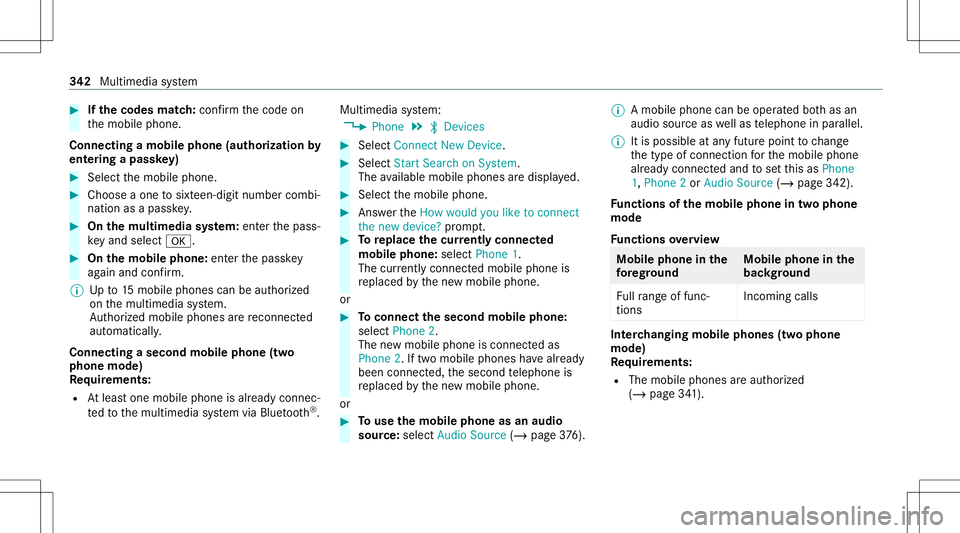
#
Ifth ec odes match: con firm thec ode on
th em obile phone.
Connecting amobile phone (authorizat ion by
ent ering apassk ey) #
Select them obile phone. #
Choose aone tosixt een-digit numbercombi‐
nation asap assk ey. #
On them ultim edia system: enterthep ass‐
ke ya nd sele ct0076. #
On them obil ephone: enterthep assk ey
ag ain and confirm .
% Upto15 mobil ephones canbeauthor ized
on them ultimedia system.
Au thor ized mobile phones arer econ nected
au tomatical ly.
Connect ingasecond mobilephone (two
ph one mod e)
Re quirement s:
R Atleas tone mobile phoneisa lready connec‐
te dt ot he multimedia system viaBlue tooth®
. Multimedia
system:
4 Phone 5
00A5 Devic es #
Select Connec tNew Devic e. #
Select Start Search onSystem.
The available mobilephon esared ispla yed. #
Select them obile phone. #
Answ ertheHow would youliketocon nect
the new device? prom pt. #
Toreplac ethe cur rentl yc onnect ed
mobile phone:selectPhone 1.
The currentl yc onne cted mob ilep hone is
re placed bythen ew mobile phone.
or #
Toconnect thes econd mobilephone:
selec tPhon e2.
The newm obile phoneisc onnec teda s
Phone 2.Iftwo mobile phones have already
been connected, thes econ dtelephone is
re placed bythen ew mobile phone.
or #
Touse them obil ephone asan aud io
sour ce:selec tAudio Source(/ page376). %
Am obilep hone can beoperated both as an
audio sourceaswellas telephon einp arallel.
% Itis possible atanyf utur ep oint tochang e
th et ype ofcon nect ionfort he mobile phone
alr eady connect edand tosetthis asPhone
1, Phone 2or Audio Source (/page342) .
Fu nctions ofthem obil ephone intw op hone
mod e
Fu nctions overview Mobile
phoneinthe
fo re gr ound Mobile
phone inthe
bac kground
Fu llra ng eo ffunc ‐
tio ns Incom
ingcalls In
te rchangi ngmobil ephone s(tw op hone
mode)
Re quirement s:
R The mobile phonesarea uthor ized
(/ page341). 34
2
Multimedia system
Page 347 of 602
Fu
rther information onther ecom mende drecep ‐
tio na nd transm ission volume: https:/ /
www .mercedes-ben z-mobile.co m/
Ad jus tingthe calland ringt one volum e
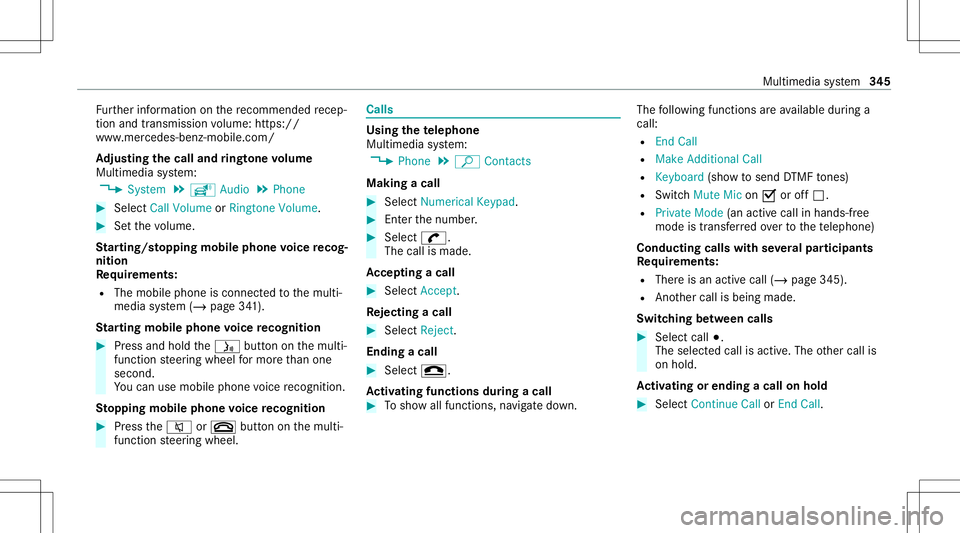
Multime diasystem:
4 System 5
õ Audio 5
Phone #
Select CallVolume orRington eVolume. #
Setthe volume.
St arting/ stopping mobilephon evoice recog‐
nit ion
Re quirement s:
R The mobile phoneisc onnec tedt ot he multi‐
media system (/ page341).
St arting mobi lephone voice recognit ion #
Press and hold the00E3 buttononthem ulti‐
func tion steer ing wheel form oret han one
second.
Yo uc an use mob ilephon evoice recogni tion.
St opp ingmobil ephone voice recognit ion #
Press the0063 or0076 buttononthem ulti‐
func tion steer ing wheel. Calls
Using
thet elephone
Multime diasystem:
4 Phone 5
ª Contac ts
Making acall #
Select Numerical Keypad. #
Entert he number . #
Select 0097.
The callismade.
Ac cep tingac all #
Select Accep t.
Re jec tingac all #
Select Reject .
En din gac all #
Select 005A.
Ac tiv atin gfunc tions dur ingac all #
Tosho wallfunctions, navig ated own. The
follo wing functionsareavailable during a
call:
R EndC all
R Mak eAddition alCall
R Keybo ard(sho wtosend DTMF tones)
R Swi tchMu teMicon 0073 oroff0053.
R Private Mode(a na ctive cal linh ands-fr ee
mod eist ransf erredo vertot he telephon e)
Conducting callswithseve ralp articip ants
Re quirement s:
R Ther eisa na ctivec all(/ page345).
R Another call isbeing made.
Switc hingbetw een calls #
Select call003B.
The select edcall isactiv e.The other call is
on hold.
Ac tiv atin gorendingac allo nh old #
Select Continu eCallor End Call. Mu
ltimed iasystem 34
5