audio MERCEDES-BENZ S-CLASS 2020 User Guide
[x] Cancel search | Manufacturer: MERCEDES-BENZ, Model Year: 2020, Model line: S-CLASS, Model: MERCEDES-BENZ S-CLASS 2020Pages: 602, PDF Size: 54.61 MB
Page 344 of 602
#
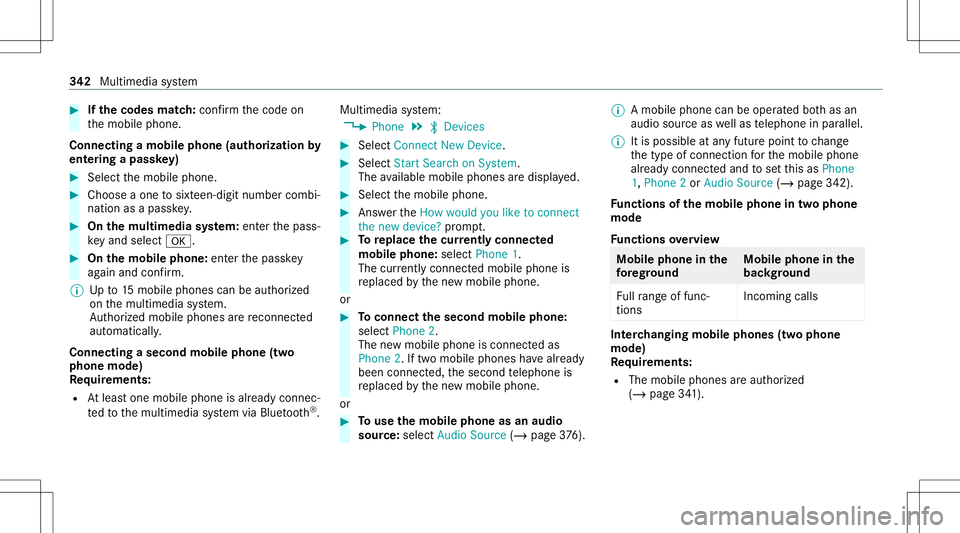
Ifth ec odes match: con firm thec ode on
th em obile phone.
Connecting amobile phone (authorizat ion by
ent ering apassk ey) #
Select them obile phone. #
Choose aone tosixt een-digit numbercombi‐
nation asap assk ey. #
On them ultim edia system: enterthep ass‐
ke ya nd sele ct0076. #
On them obil ephone: enterthep assk ey
ag ain and confirm .
% Upto15 mobil ephones canbeauthor ized
on them ultimedia system.
Au thor ized mobile phones arer econ nected
au tomatical ly.
Connect ingasecond mobilephone (two
ph one mod e)
Re quirement s:
R Atleas tone mobile phoneisa lready connec‐
te dt ot he multimedia system viaBlue tooth®
. Multimedia
system:
4 Phone 5
00A5 Devic es #
Select Connec tNew Devic e. #
Select Start Search onSystem.
The available mobilephon esared ispla yed. #
Select them obile phone. #
Answ ertheHow would youliketocon nect
the new device? prom pt. #
Toreplac ethe cur rentl yc onnect ed
mobile phone:selectPhone 1.
The currentl yc onne cted mob ilep hone is
re placed bythen ew mobile phone.
or #
Toconnect thes econd mobilephone:
selec tPhon e2.
The newm obile phoneisc onnec teda s
Phone 2.Iftwo mobile phones have already
been connected, thes econ dtelephone is
re placed bythen ew mobile phone.
or #
Touse them obil ephone asan aud io
sour ce:selec tAudio Source(/ page376). %
Am obilep hone can beoperated both as an
audio sourceaswellas telephon einp arallel.
% Itis possible atanyf utur ep oint tochang e
th et ype ofcon nect ionfort he mobile phone
alr eady connect edand tosetthis asPhone
1, Phone 2or Audio Source (/page342) .
Fu nctions ofthem obil ephone intw op hone
mod e
Fu nctions overview Mobile
phoneinthe
fo re gr ound Mobile
phone inthe
bac kground
Fu llra ng eo ffunc ‐
tio ns Incom
ingcalls In
te rchangi ngmobil ephone s(tw op hone
mode)
Re quirement s:
R The mobile phonesarea uthor ized
(/ page341). 34
2
Multimedia system
Page 347 of 602
Fu
rther information onther ecom mende drecep ‐
tio na nd transm ission volume: https:/ /
www .mercedes-ben z-mobile.co m/
Ad jus tingthe calland ringt one volum e
Multime diasystem:
4 System 5
õ Audio 5
Phone #
Select CallVolume orRington eVolume. #
Setthe volume.
St arting/ stopping mobilephon evoice recog‐
nit ion
Re quirement s:
R The mobile phoneisc onnec tedt ot he multi‐
media system (/ page341).
St arting mobi lephone voice recognit ion #
Press and hold the00E3 buttononthem ulti‐
func tion steer ing wheel form oret han one
second.
Yo uc an use mob ilephon evoice recogni tion.
St opp ingmobil ephone voice recognit ion #
Press the0063 or0076 buttononthem ulti‐
func tion steer ing wheel. Calls
Using
thet elephone
Multime diasystem:
4 Phone 5
ª Contac ts
Making acall #
Select Numerical Keypad. #
Entert he number . #
Select 0097.
The callismade.
Ac cep tingac all #
Select Accep t.
Re jec tingac all #
Select Reject .
En din gac all #
Select 005A.
Ac tiv atin gfunc tions dur ingac all #
Tosho wallfunctions, navig ated own. The
follo wing functionsareavailable during a
call:
R EndC all
R Mak eAddition alCall
R Keybo ard(sho wtosend DTMF tones)
R Swi tchMu teMicon 0073 oroff0053.
R Private Mode(a na ctive cal linh ands-fr ee
mod eist ransf erredo vertot he telephon e)
Conducting callswithseve ralp articip ants
Re quirement s:
R Ther eisa na ctivec all(/ page345).
R Another call isbeing made.
Switc hingbetw een calls #
Select call003B.
The select edcall isactiv e.The other call is
on hold.
Ac tiv atin gorendingac allo nh old #
Select Continu eCallor End Call. Mu
ltimed iasystem 34
5
Page 354 of 602
#
Onlyoper atet his equipme ntwhen the
tr af fics ituation per mits. #
Ifyo uc anno tb es ureo fthis, stop the
ve hicle whilstpaying attention toroad
and trafficc ondi tions andoperate the
eq uipment withthe vehicle statio nary. Yo
um usto bse rvet he legalrequ iremen tsfort he
countr yinw hich youa recur rentl yd rivi ng when
op erati ng them ultimedia system.
iPhone ®
func tionscan be used viathem ultime‐
dia system using Apple CarPla y®
.T he ya reoper‐
at ed using thec ent ralc on trol elemen torthe
Sir i®
vo ice- oper ated con trol system. Youc an
act ivat et he voice- oper ated con trol system by
pr essing andholding the00E3 buttononthe
multifu nctionsteer ing wheel.
When usingApple CarPla y®
via thev oice-oper‐
at ed contr olsystem, them ultimedia system can
st ill be oper ated via theV oice Contr olSy stem
(/ page277).
On lyone mobile phoneatat ime canbeconn ec‐
te dv iaApple CarPla y®
to them ultimedia sys‐
te m. The
availabilit yofAppleCarPla y®
ma yvary
acc ordin gtot he countr y.
The service prov ider isresponsible fort his appli ‐
cation andthes ervices andcontent conne cted
to it.
Apple CarPla y®
is ar egis tere dt rademar kof
Apple Inc.
Inf ormat iononApple CarPla y®
While usingApple CarPla y®
va rious funct ionsof
th em ultimedia system, e.g.telephon yorthe
media sourcesBlue tooth®
audio andiPod ®
,a re
una vailable.
Onl yone routeg uidan cecan beact ivea tat ime.
If ro uteg uidan ceisact iveo nthe multimedia sys‐
te m, itis closed whenrouteg uidan ceisstar ted
on them obile phone.
Connecting aniPhone ®
via Apple CarPla y®
Re quirement s:
R Apple ®
oper atingsystemv ersion iOS8.3or
abo veisins talled onthei Phone ®
.
R AnInterne tc onnect ionisrequ ired fort he full
ra ng eo ffunc tions forA pple CarPla y®
. R
The iPho ne®
is connect edtothem ultimedia
sy stem viatheU SBpor tç using asuita‐
ble cable (/page370).
Mu ltimed iasystem:
4 Connec t5
Apple CarPlay
Se tting automat icor manu alstar t
Am essa geappear swhen connectedf or thef irst
time. #
Automatic star t:select Automatically.
Start Automatically isactiv ated 0073.
Apple CarPla y®
will nows tart imm ediat ely
af te rt he iPhone ®
is connect edtothem ulti‐
media system using aUSBcable. #
Manua lstar t:select Manual ly. #
Select thei Phone ®
in thed evice list.
Ac cep ting/r eject ingthed atap rotection reg‐
ulat ions
Am essag ewitht he dat aprotection regulations
appear s. #
Select Accept &Start .
or 352
Multimedia system
Page 356 of 602
Inf
orma tion onAndr oidAuto
While usingAndroid Auto,v arious functions of
th em ultimedia system, fore xamp lethem edia
sour ceBlue tooth®
audio, aren otavailable.
On lyone routeg uidan cecan beact ivea tat ime.
If ro uteg uidan ceisact iveo nthe multimedia sys‐
te m, itis closed whenrouteg uidan ceisstar ted
on them obile phone.
Connecting amobile phone viaAndr oidAuto
Re quirement s:
R The firs ta ctivatio no fAndr oidA utoo nthe
multimedia system mus tbec arried out when
th ev ehicle isstatio naryfor saf etyr easons.
R The mobile phonesuppor tsAndr oidAuto
fr om Andr oid5.0.
R The Andr oidAutoapp isins talled onthe
mobil ephone.
R Inorder touse thet elephone functions,the
mobil ephone mustbec onnect edtothem ul‐
timedia system viaBlue tooth®
(/ pag e341).
If th er ew asno prior Interne tc onn ection, this
is es tablished withthe use ofthem obile
phone withA ndroid Au to. R
The mobile phoneisconn ectedtothem ulti‐
media system viatheU SBpor tç using a
suit able cable (/page370).
R AnInterne tc onnection isrequ ired fort he full
ra ng eo ffunc tions forA ndr oid Auto.
Multimedia system:
4 Connec t5
Android Auto #
Select them obile phone from thed evice list.
Ac cep ting/r eject ingthed atap rotection reg‐
ulat ions
Am essag ewitht he dat aprotection regulations
appear s. #
Select Accept &Start .
or #
Select Decline &End.
Ac tiv atin gautomati cstar t #
Select StartA utoma tically0073.
St arting manuall y #
Select them obile phone from thed evice list. Exiting
AndroidAuto #
Press the00E2 buttonon them ultifunc tion
st eer ing wheel, fore xamp le.
% IfAn droid Autowa sn otdispla yedi nt he fore ‐
gr ound befored isconn ecting,thea pplication
st ar ts intheb ackg round when reconnect ed.
Yo uc an call upAndroid Autointhem ain
menu.
Calling uptheA ndr oid Autosound settings
Multimedia system:
4 Connec t5
Android Auto 5
Sound #
Select thet one men u(/ page 387).
Endi ngAndr oidAuto
Multimedia system:
4 Connec t5
Android Auto #
Select Disconnect.
The connect ionisended.
The mobile phonecontinues tobe supplied
wit he lect ricity .
or 35
4
Mu ltimed iasystem
Page 369 of 602
#
Press and hold thec ent ralc on trol elemen t
unt ilan audible signalsound s.
The ß symbol appearsbythe statio n
nam e. #
Select ß Favorites.
The listo fsave dfavo rite statio nsappear s.
or #
Creat eana ccoun tfor theo nline prov ider
(T uneIn radio) andthen log inon them ulti‐
media system.
Yo ur favo rite sa reimpor tedt ot he multimedia
sy stem.
Dele ting favo rite s #
Select ß Favorites. #
Select astatio n. #
Press and hold thec ent ralc on trol elemen t
unt ilan audible signalsound s.
The ß symbol bythes tatio nn amed isap‐
pear s. Se
tting Interne tR adio options
Multi media system:
4 Radio 5
Þ Radio Source
5 TuneIn Radio5
Z Option s
The follo wing option sareavailable:
R Select Stream:s electthe stre am qualit y.
R Login toTuneIn Account :log into your
Tu neIn user acco unt.
R Log OutofA ccou nt:logouto fyour TuneIn
us er acco unt. #
Select anoptio n. Med
ia Au
dio mode In
fo rm ation onthea udiomod e &
WARNIN GRisk ofdist ra ction whenhan‐
dl ing data stor ag em edia
If yo uh andle adatas torage medium while
dr iving, your att entio nisd iver tedf romt he tr
af ficc ondi tions .Thisc ouldalso cau seyou
to lose control of thev ehicle. #
Onlyhandle adatas tora ge medium
when thev ehicle isstatio nary. Pe
rm issible file systems:
R FAT32
R exFA T
R NTFS
Pe rm issible datastorage medium:
R SD card
R USB stor ag ed evice
R iPod ®
/iPhone ®
R MTP devices
R Blue tooth®
audio equipme nt
% Obse rvet he follo wing notes:
R The multimedia system suppor tsat otal
of up to50,000 files.
R Dat astorage media upto2T Ba resup ‐
por ted( 32‑ bitaddr essspace). Multimedia
system 36
7
Page 370 of 602
Sup
portedf ormats:
R MP3
R WMA
R AAC
R WAV
R FLAC
R ALAC
% Obser vethef ollo wing notes:
R Due tothel arge variet yo favailable
music files rega rding encoder s,sam pling
ra tesa nd dat arates, playba ckcanno t
alw aysb eg uar anteed.
R Due tothew ide rang eo fUSB device s
av ailable onthem arke t,play bac kcann ot
be guar anteed fora llUSB devices.
R Cop y-pr otect edmusic files orDRM
enc rypte dfiles cannotb ep laye db ack.
R MP3 players mus tsupp ortM ediaTrans ‐
fe rP rotocol (MT P). Ma
nuf actu redu nder license from Dolb yLabor a‐
to ries. Dolb y,Dol byAudio and thed ouble-D sym‐
bol aret rademar ksofDolb yLabor ator ies. Gr
aceno te,t he Graceno telogo andlogotype,
"P ow ered byGracen ote", MusicID andPlaylist
Plus aree ither regis tere dt rademar ksortrade‐
mar ksofGraceno te,Inc .int he United States
and/ orother countr ies. 368
Multimedia system
Page 372 of 602
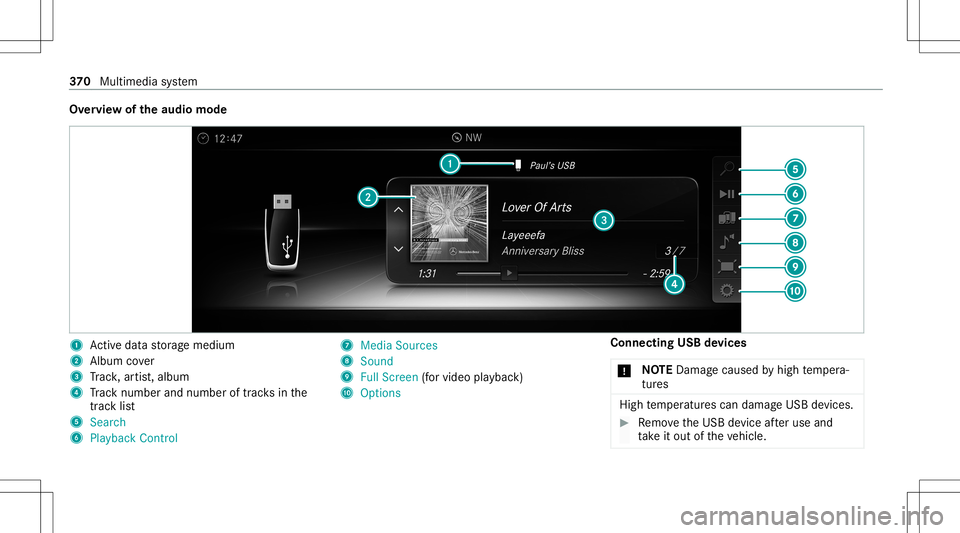
Ov
ervie wo fthe audio mode 1
Actived atas tora ge medium
2 Album cover
3 Trac k, artis t,album
4 Trac kn um ber and num beroftrac ks inthe
tr ac kl ist
5 Search
6 Play ba ck Control 7
Med iaSou rces
8 Sound
9 FullScree n(for vid eo play bac k)
A Option s Connecting
USBdevices
* NO
TEDama gecau sed byhigh temp era‐
tur es High
temp eratur escan damag eUSBdevices. #
Remo vetheU SBdevice afte ru se and
ta ke itout ofthev ehicle. 37
0
Multimedia system
Page 376 of 602
#
Todeac tivatef ull-sc reen mod e:press the
to uc hpad.
Cha nging videosettings
Mult imed iasystem:
4 Media 5
Z Option s
5 Picture Format
The follo wing picturef ormats area vailable:
R Automat ic
R 16:9
R 4:3
R Zoom #
Select apicturef ormat.
Ad jus tingthe brightne ssmanu ally
If th eAutom aticpictur eformat isswitc hedoff,
yo uc an adj ustthe brightness yourself . #
Select Bright ness. #
Adjus tthe brightness. Media
search St
arting them ediasear ch
Multimedia system:
4 Media 5
ª Search
Depen dingonthec onnect edmedia sourcesand
fi les, thef ollo wing categor iesarel iste d:
R Current TrackList
R Keyword Search
R Playlists
R Artists
R Albums
R Track s
R Folders
R Music Genres
R Year
R Composers
R Videos
R Podcast s(Apple ®
de vices)
R Audiobook s(Apple ®
de vices) #
Select acategor y. %
The categor iesarea vailable assoon asthe
ent irem edia content hasb eenr ead inand
analyzed . Media
Interface Inf
orma tion abou tthe Media Interface
Media Inte rface isau niversal interface fort he
con nection ofmobile audioequipm ent.Themul‐
time dias ystemh astwoU SBpor ts.The USB
por tsarel ocat edinthes towa ge com partment
unde rthe armr est.
Suppor tedd evices
The Med iaInt erface allo ws yout oc onnect the
fo llo wing datastorage media:
R iPod ®
R iPhone ®
R MP3 player
R USB devices
Fo rd etails and alisto fsuppor tedd evices, visit
our websit eathttp:// www .mercedes-
benz .com/c onnect.Follo wthe instructions in
th e" Media Interface" secti on. 37
4
Multimedia system
Page 378 of 602
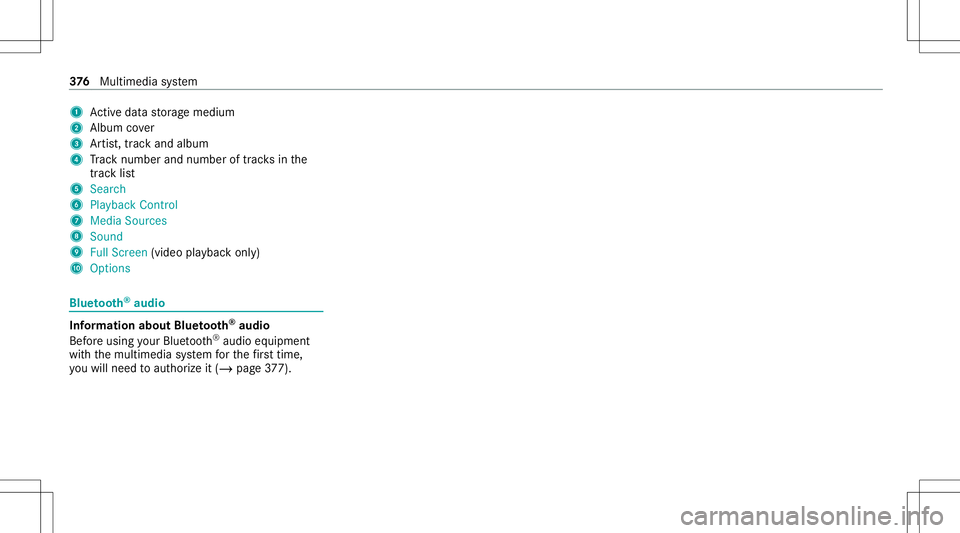
1
Actived atas tora ge medium
2 Album cover
3 Artis t,trac ka nd albu m
4 Trac kn um ber and num beroftrac ks inthe
tr ac kl ist
5 Search
6 Play ba ck Control
7 Med iaSou rces
8 Sound
9 FullScree n(vi deo play bac konly)
A Option s Blue
tooth®
audio Inf
ormation aboutBluetooth®
audio
Bef oreu sing your Blue tooth®
audio equipme nt
wit hthe multimedia system fort he firs tt im e,
yo uw illne ed toaut hor ize it(/ page377). 37
6
Multimedia system
Page 379 of 602
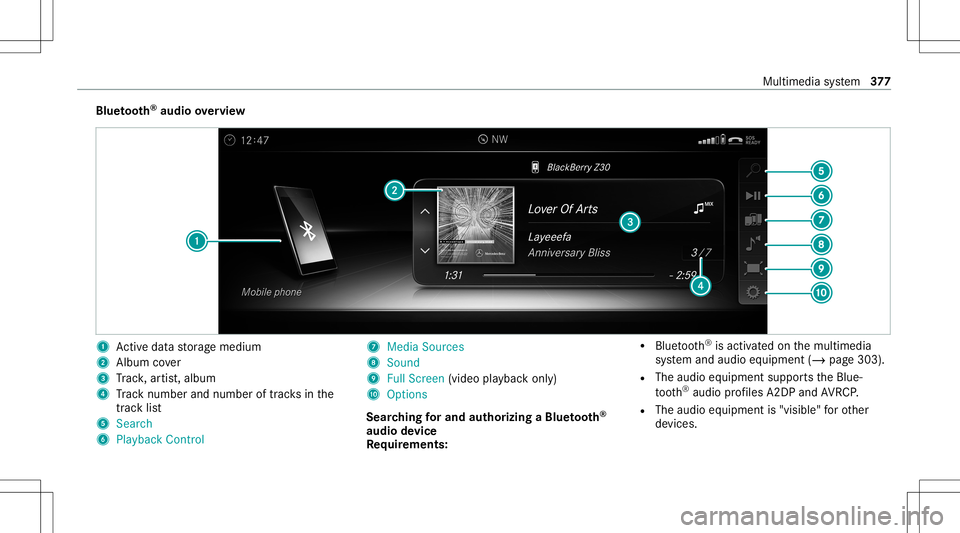
Blue
tooth®
audio overview 1
Actived atas tora ge medium
2 Album cover
3 Trac k, artis t,album
4 Trac kn um ber and num beroftrac ks inthe
tr ac kl ist
5 Search
6 Play ba ck Control 7
Med iaSou rces
8 Sound
9 FullScree n(vi deo play bac konly)
A Option s
Sear ching fora nd author izing aB luetooth®
audio devic e
Re quirement s: R
Blue tooth®
is act ivat ed on them ultimedia
sy stem and audio equipment (/page303).
R The audio equipment supportstheB lue‐
to oth®
audio profiles A2DP and AVRC P.
R The audio equipment is"visible" foro ther
de vices. Multimedia
system 37
7