ignition MERCEDES-BENZ S-CLASS 2020 User Guide
[x] Cancel search | Manufacturer: MERCEDES-BENZ, Model Year: 2020, Model line: S-CLASS, Model: MERCEDES-BENZ S-CLASS 2020Pages: 602, PDF Size: 54.61 MB
Page 195 of 602
#
Neverlea ve thee ngine or,ifp resent ,
th ea uxiliar yheating running inan
encl osedspace without sufficie ntventi‐
la tio n. &
WARNIN GRisk ofinju rywhen opening
or clos ingadoor withthe garage door
opener
When youo per ateo rprogram thed oor with
th ei ntegr ated garage door opener ,people in
th er ang eofm ove ment ofthed oor may
become trapped orstru ck bythed oor . #
When usingthei ntegr ated garage door
opener ,alway sm akes uret hat nobody
is wit hin ther ang eofm ove ment ofthe
door . Onl
yoper atet he follo wing doorsusing the
ga rage door opener :
R Door swithas afet ys topa nd reve rsing fea‐
tur e
R Doorsw hichc onform tothec urrent U.S.
sa fety standar ds
Re quirement s: R
The vehicle hasbeen parkedo utside the
ga rage oroutside ther ang eofm ove ment of
th ed oor .
R The engine isswitc hedoff.
R The ignition isswitc hedon.
% The garage door opener function isalw ays
av ailable whenthei gnition isswitc hedon. #
Chec kifthe transmitt erfreq uency ofthe
re mo tecontr olha st he freq uency rang eo f
280 to868 MHz.
Ra dio equipment approval num ber:
R NZLM UAHL5 (USA)
R 4112 A-MU AHL5 (Canada ) #
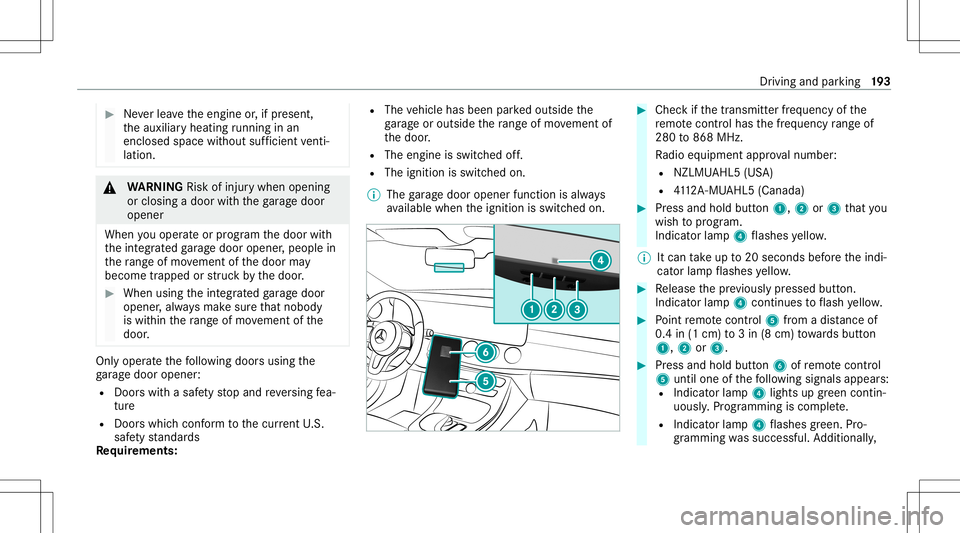
Press and hold button1, 2or3 that you
wish toprog ram.
Indicat orlam p4 flashes yello w.
% Itcan take up to20 seconds beforet he indi‐
cat orlam pflashes yello w. #
Release thep reviou slyp ressed button.
Ind icat orlam p4 con tinues toflash yello w. #
Point remo tecontr ol5 from adista nc eo f
0. 4i n( 1c m) to3in( 8c m) towa rdsb utton
1, 2or3. #
Press and hold button6 ofremo tecontr ol
5 unti lone ofthef ollo wing signals appears:
R Indicat orlam p4 lights upgreen contin ‐
uously .Programming iscom plete.
R Indicat orlam p4 flashes green .Pro‐
gr ammi ngwassuccessful. Addition ally, Dr
iving and parking 19
3
Page 212 of 602
Ve
hicl eswith Drivin gAssistanc ePacka ge:
The settings canbemade whenthe ignition is
switc hedon.
The follo wing settings area vailable:
R Early
R Medium
R Late #
Select asetting .
% Your sele ction isretained when thev ehicle is
ne xt star ted.
Deactiv atingActiv eB rake Assist
% Itis recomme ndedthat youa lway sl ea ve
Ac tiveB rake Assi stact ivat ed. #
Select Off.
The distance warning func tion andthea uton‐
omous braking function ared eactiv ated.
Ve hicl eswithout Drivin gAssistanc ePack‐
ag e:When thev ehicle isne xt star ted, the
mediu msetting isau tomatical lysele cted.
Ve hicl eswith Drivin gAssistanc ePack‐
ag e:Evasi ve Steer ing Assis tisn otavailable.
When thei gnition isne xt star ted, the mediu
msetting issele cted automatical lyand
Ev asiv eSteer ing Assis tisa vailable.
% IfAc tiveB rake Assi stisdeact ivat ed, the
00D4 symbol appearsinthes tatus bar ofthe
multifu nctiondisplay. Speed
controlcruise contr ol Fu
nction ofcruise contr ol
Cr uise controlregulat esthes peed tothev alue
selec tedb ythe driver .
If yo ua ccelerat etoo vertak e, fore xamp le,the
st or ed speed isno td ele ted. Ifyo ur emo veyour
fo ot from thea cceler ator pedal afte ro vertakin g,
cr uise control will resume speed regulation back
to thes tore ds peed.
Cr uise controliso per ated using thec orrespond‐
ing steer ing wheel buttons. Youc an stor ea ny
speed above15 mp h(20 km/h)upt ot he maxi‐
mum speed.
If yo uf ail toadap tyour driving style, cruise con‐
tr ol can neither reduce ther isk ofan acci dent
nor override thel aws ofphysics. Itcan nottak e
int oa ccount road, weather ortraf ficc ondi tions .Cr
uise contr olisonly anaid. The driver is
re sponsible fort he distance tothev ehicle in
fr ont, forv ehicle speed, forb raking ingood time
and fors taying inlane.
Mer cedes‑AM Gvehic les:Cruise control is
av ailable uptoam aximum speedof155 mph
(250 km/h).
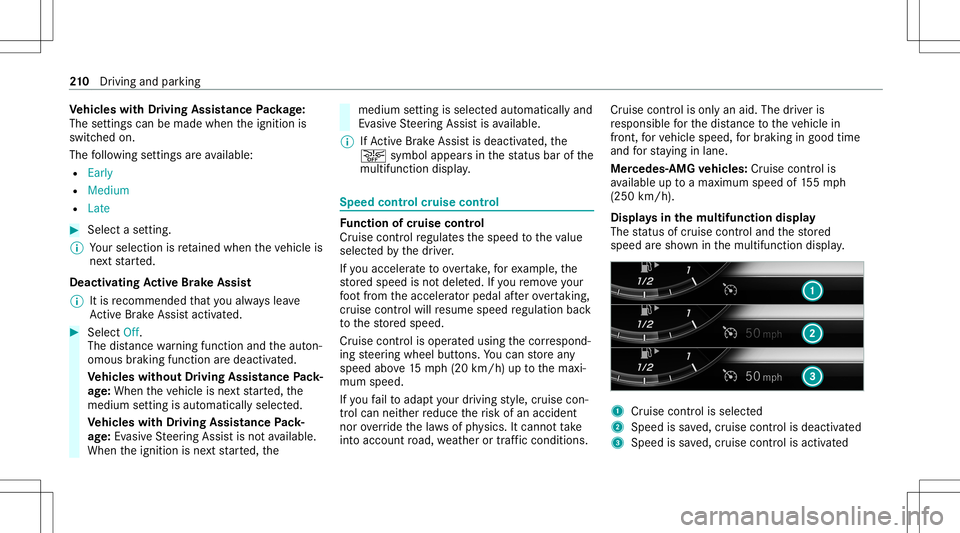
Displa ysinthem ultif unct iondisp lay
The status ofcruise control and thes tore d
speed ares hown inthem ultifunc tiondispla y. 1
Cruise contro liss elec ted
2 Spee diss ave d,cruise control isdeactiv ated
3 Speed issave d, cruise control isactiv ated 21
0
Driving and parking
Page 257 of 602
R
Itis dar k. 1
Night View Assi stdispla y
2 Standb ysymbo lfor activ epede strian detec‐
tion
3 High lighti ng
4 Pedes trian detected
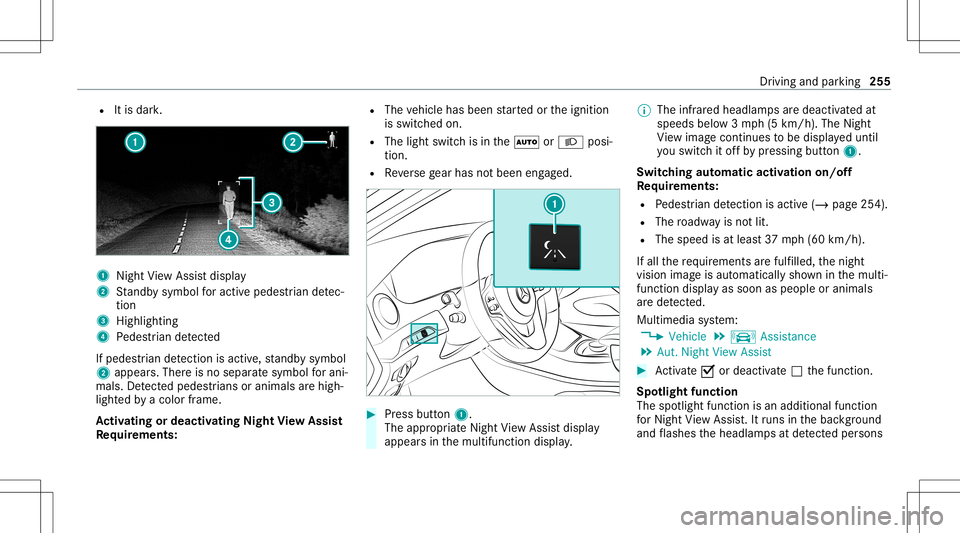
If ped estria nd etecti onisact ive, standb ysymbo l
2 appear s.Ther eisn osepar ates ymbo lfor ani‐
mals. Detected ped estria ns orani mal sarehig h‐
li ght edbyac olor frame.
Ac tiv atin gordeac tivatin gNight View Assis t
Re quirement s: R
The vehicle hasbeen star tedo rthe ignition
is switc hedon.
R The light switc hisint he 0058 or0058 posi‐
tion.
R Reverseg ear has notb een engaged. #
Press butt on1.
The appr opriateN ightViewA ssistdispla y
appear sint he multifunction display. %
The infrared headlam psared eactiv ated at
speeds below3mph(5k m/h) .The Night
Vi ew imag econtin ues tobe displa yedu ntil
yo us wit ch itof fb yp ressing button1.
Switc hingautomat icactiv ation on/of f
Re quirement s:
R Pedes trian detection isacti ve(/ pag e254).
R The roadw ayisno tlit.
R The speed isat leas t37m ph(60 km/h).
If all ther equir ements aref ulfilled, then ight
vision imageisa utomatic allys hown inthem ulti‐
func tion displa yassoon aspeople oranimals
ar ed etect ed.
Multime diasystem:
4 Vehicle 5
k Assist ance
5 Aut. Night ViewAssist #
Activate0073 ordeacti vate 0053 thef unc tion .
Spo tlight function
The spotlight function isan additional function
fo rN ight View Assi st.I tr uns intheb ackg round
and flashes theh eadlam psatdetected per sons Dr
iving and parking 255
Page 279 of 602
R
Ifyo uu sethev oice contr olsystem inan
emer gency your voice can chang eand your
te lephon ecall, e.g. anemer gency call,can
th er eb yb eu nnec essar ilydela yed.
R Famili arize yourself withthe voice con trol
sy stem func tionsbefor es tartin gt he jour ney.
R Com plyw itht he loading guidelines
(/ page125). Oper
ation Ov
ervie wo foper ation oftheV oice Contr ol
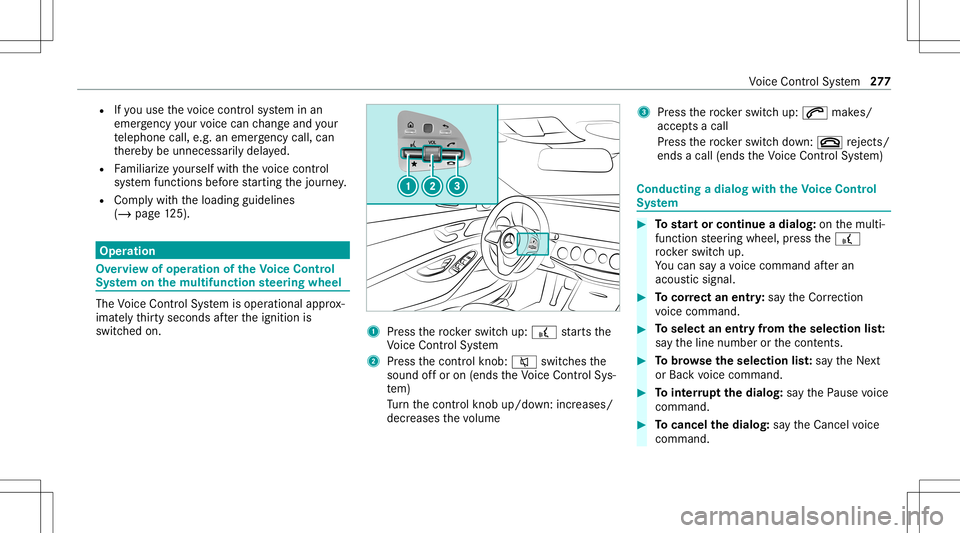
Sy stem onthem ultif unct ionsteer ing wheel The
Voice Cont rolS ystemi soper ational approx‐
imat elyt hir tyseconds afte rt he ignition is
switc hedon. 1
Press ther ockers witc hup:£ star ts the
Vo ice Cont rolS ystem
2 Press thec ontrol kn ob: 0063 switchesthe
sound offo ro n(ends theV oice Contr olSy s‐
te m)
Tu rn thec ontrol kn ob up/do wn:increases/
decr eases thev olume 3
Press ther ockers witc hup:0061 makes/
accep tsac all
Pr ess ther ockers witc hdown:0076 rejects /
end sac all( en ds theV oice Contr olSy stem) Conducting
adialog withthe Voice Contr ol
Sy stem #
Tostar to rcontinue adialo g:on them ulti‐
func tion steer ing wheel, press the£
ro ck er switc hup.
Yo uc an sayav oice command afte ra n
acou stic sign al. #
Tocor rect an ent ry:sa yt he Correction
vo ice com mand . #
Toselect anentr yfromt heselect ion list:
sa yt he line number orthec ontents. #
Tobrows ethe select ion list:sa yt he Next
or Back voice com mand . #
Tointerru pt thed ialog: sayt he Pause voice
com mand . #
Tocancel thed ialog: sayt he Cancel voice
com mand . Vo
ice Cont rolS ystem 27
7
Page 304 of 602
#
Con firm chang eswhen exitin gthe menu.
The dateiss etaut omaticall yviaGPS. Ac
tiv atin g/deac tivatin gvoice amplif ication
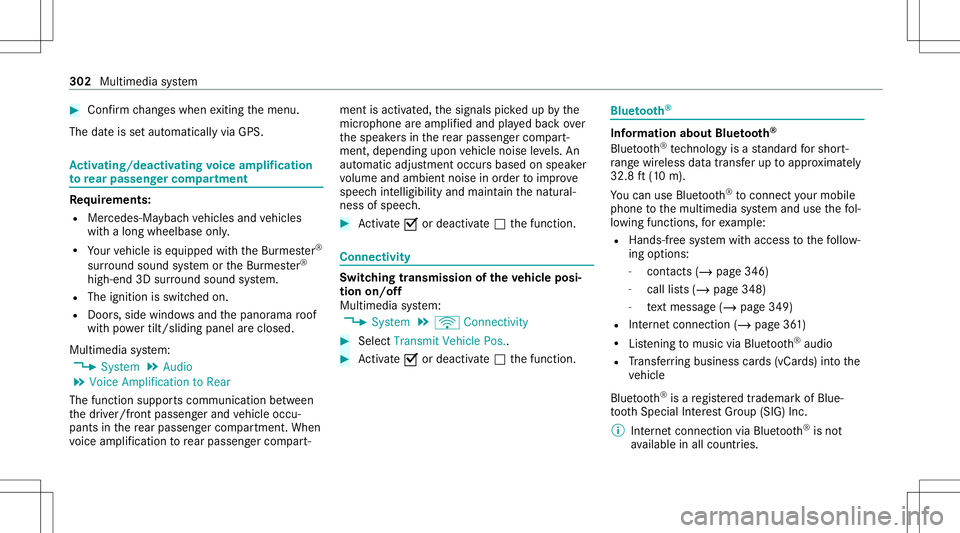
to rear passe nger comp artment Re
quirement s:
R Mer cedes- Maybac hvehicles andvehicles
wit hal ong wheelba seonl y.
R Your vehicle iseq uipped withthe Bur mes ter®
sur round soun dsystemo rthe Bur mes ter®
high-end 3Dsurround soun dsystem.
R The ignition isswitc hedon.
R Door s,side windo wsand thep anor ama roof
wit hp owe rtilt/sli dingpanel arec losed .
Mul timedi asyst em:
4 System 5
Audio
5 Voice Amplific ationtoRear
The func tion suppor tscomm unication between
th ed rive r/f ront passe nger and vehicle occu‐
pants inther ear passeng ercom partment .When
vo ice amplif icat ion torear passe nger com part‐ men
tisa ctivat ed, thes ignals pickedu pbythe
micr ophone area mp lifi ed and playedb acko ver
th es peak ersi nt he rear passe nger com part‐
men t,depen dingupon vehicle noise leve ls. An
aut omat icadjus tment occursb ased onspeak er
vo lume andambien tnois eino rder toimprove
speec hintelligi bility andmaint ainthen atura l‐
ness ofspeec h. #
Activate0073 ordeacti vate 0053 thef unc tion . Connectivity
Switc
hingtransmission ofthev ehic lepos i‐
tio no n/off
Mul timedi asystem:
4 System 5
ö Connec tivity #
Select Transm itVehicle Pos.. #
Activate0073 ordeacti vate 0053 thef unc tion . Blue
tooth® Inf
orma tion abou tBluet oo th®
Bl ue tooth®
tech nol ogy isas tandar dfor shor t-
ra ng ew irel es sd atat ransf erup toappr oximat ely
32. 8ft(10 m).
Yo uc an use Blue tooth®
to connect your mob ile
phon etot he multimedia system and usethef ol‐
lo wing function s,fore xamp le:
R Han ds-free system witha ccess tothef ollo w‐
ing options:
- cont acts (/page346)
- call lists (/ page348)
- text mes sage (/ pag e349)
R Interne tc onnec tion (/page361)
R Listening tomusi cviaBlue tooth®
audio
R Trans ferring business cards(vCar ds)intot he
ve hicle
Blue tooth®
is ar egis tere dt rademar kofBlue‐
to othS pecial Interes tG roup (SIG) Inc.
% Interne tc onn ection viaBlue tooth®
is no t
av ailable inall coun tries. 302
Multimed iasystem
Page 309 of 602
Se
tting thed istance unit Multi
media system:
4 System 5
% Units #
Select kmormi. #
Inthem ultifunc tiondispla yofthe Instrument
Displa y,switc hthe Additional Speedometer
displa yon0073 . Data
impor tand expor t Dat
aimp ort/e xpor tfunc tion
The follo wing functionsarepossible :
R Trans ferring datafromo nesystem orvehicle
to ano ther system orvehicle.
R Creating abacku pc opyo fyour personal data
and loadingitag ain.
R Protect ing your per son aldat aagains tunw an‐
te de xpo rtwit hP INprotect ion.
% Please note that theN TFS file system isno t
suppor ted. The FAT32 file system isrecom‐
mend ed. Im
por ting /expor tingdata
* NO
TELos sofdatad uetoprematur e
re mo val #
Donotremo vethed atas tora ge
medium whendataisb eing expor ted.
Mer cedes- Benzisn otliable fora ny loss of
dat a. Re
quirement s:
R The vehicle isstatio nary.
R The ignition isswitc hedonorthev ehicle has
been star ted.
R The SDcardisinser ted( /pag e369) orthe
USB device isconnec ted( / pag e370).
Mul timedi asystem:
4 System 5
System Backup #
Select Import DataorExport Data.
Im por ting #
Select adatas torage medium.
Ap romp tappear sasking whe ther your eall y
wish tooverwr itet he cur rent data.Ifd ata or
igin at es from another vehicle, this isrecog‐
nized during data readin g.
The mult imed iasystem isrestar tedo ncet he
dat ahasbeen impor ted.
% Current vehicle settin gscan beedit edafte r
th ei mp ort.
Expor ting
If PIN protect ion isactiv ated, your PIN isrequ es‐
te d. #
Entert he four -digit PIN. #
Select adatas torage medium.
The dataise xpo rted. The dataexpo rtma y
ta ke severalm inut es. Ac
tiv atin g/deac tivatin gPINprotection Re
quirement s
To unlo cktheP IN:
R Ther eisa nInter ne tc onnect ion.
R AM ercedes meaccoun texis tsat http://
ww w.me rcedes.me.
R The Person alization service isactiv e
(/ page309). Multimedia
system 30
7
Page 313 of 602
%
Ifaut omatic softwareu pda tesa reactiv ated,
th es ystemu pdat eswill bedownloaded auto‐
maticall y(/ pag e310).
As soo nasanu pdatei sa vailable ford ow nloa d,
ac orresponding messageappea rson them edia
displa y.
Yo uh ave thef ollo wing selection options:
R Download
The updat ewillbe downloaded intheb ack‐
gr ound.
R Det ails
Inf ormation aboutthep ending system
updat eisd ispla yed.
R Later
The updat ecan be downloaded manuallyata
lat er time (/page310).
If th ed ownload iscom pleteda nd theu pdat eis
re ady fori ns tallation ,you will beinformed ofthis
af te rt he next ignition cycle, fore xamp le.
% Park thev ehicle safely inas uitable location
bef ores tartin gt he installation . Re
quiremen tsfort he installation :
R The ignit ionisswitc hedon.
R The engin eisn otrunning .
R Notesa nd warnings have been read and
acc epted.
R The parkingb rake isapplied.
If all requ iremen tsarem et,t he updat ewillbe
ins talled. Themultim ediasystem cann otbe
oper ated while theu pdat eisb eing installed and
ve hicle functionsarer estrict ed.
If er ro rs should occurduring thei nstallation ,the
multimedia system automaticall yattem ptst o
re stor et he prev ious version. Ifre stor ation ofthe
pr ev ious version isno tp ossible ,asymbol
appear sonthe multimedia system displa y.
Please consultaqualif iedspec ialistworks hop to
re solv ethe problem. Re
setfunction Multimedia
system:
4 System 5
Reset
Pe rsonal dataisd eleted, fore xamp le:
R Statio nprese ts
R Con nectedm obile phones #
Select Yes.
If PIN protect ion isactiv ated, apromp tappear s
ask ing ifyo ua lso wish torestor et his tothef ac‐
to ry settin gsdur ing arese t. #
Select Yes. #
Enterthec urrent PIN .
The PINisrese t.
or #
Select No.
The current PIN stay st he same afte rr ese t‐
ting.
% Ifyo uh ave forg otteny our PIN,ana uthor ized
Mer cedes-Ben zCenterc an dea ctivatet he
PIN protect ion fory ou. Multimedia
system 31
1
Page 357 of 602
#
Disconne ctthec onnect ingcable between
th em obile phone andmultimedia system.
Mer cedes- Benzrecomme ndsdisconnecti ng
th ec onnect ingcable onlyw hen thev ehicle is
st atio nary. Tr
ansf erre dv ehic ledat aw ithAndr oidAuto
and Apple CarPla y® Ov
ervie wo ftransf erre dv ehic ledat a
Whe nusing Andr oidAutoor Apple CarPla y®
,c er‐
ta in vehicle dataist ransf erredt ot he mobile
phone. Thisenables yout og ettheb esto utof
select edmobile phoneservices. Vehicle datais
no td irectl yaccessible.
The follo wing system information istransmit ted:
R Softwarer elease ofthem ultimedia system
R System ID(anon ymized)
The transf erofthis dat aisu sed tooptimize com‐
munication between thev ehicle andthem obile
phone.
To do this, and toassig nseve ralv ehicles tothe
mobil ephone, avehicle identifierisrando mly
ge ner ated . Thi
sh asno conne ctiontot he vehicle identif ica‐
tion number (VIN)andisdele tedw hen them ulti‐
media system isrese t(/ pag e311).
Th ef ollo wing driving status dataist rans mit ted:
R Trans miss ionposit ionengaged
R Distinction between parked, stands till,ro lling
and drivin g
R Day/n ight mode ofthei nstrument cluster
The transf erofthis dat aisu sed toalter how
con tent isdispl ayed tocor respond tothed riving
situation .
The follo wing positiondataist ransmit ted:
R Coor dinat es
R Speed
R Com pass direct ion
R Accel erati on dire ction
Thi sd atai so nlyt ransf erredw hile then avigation
sy stem isactiv eino rder toimprove it(e.g. soit
can continue func tioningwhen inat unnel). Mer
cedes mecalls Mak
ingacall via theo verhead contr olpa nel
Re quirement s:
R Youh avea ccess toaG SM network.
R The cont ract partner' sGSM networkc ove r‐
ag ei sa vailable inther espectiv eregion.
R The ignition isswitc hedonsothat vehicle
dat acan be transf erreda utomatic ally. Multimedia
system 355
Page 358 of 602
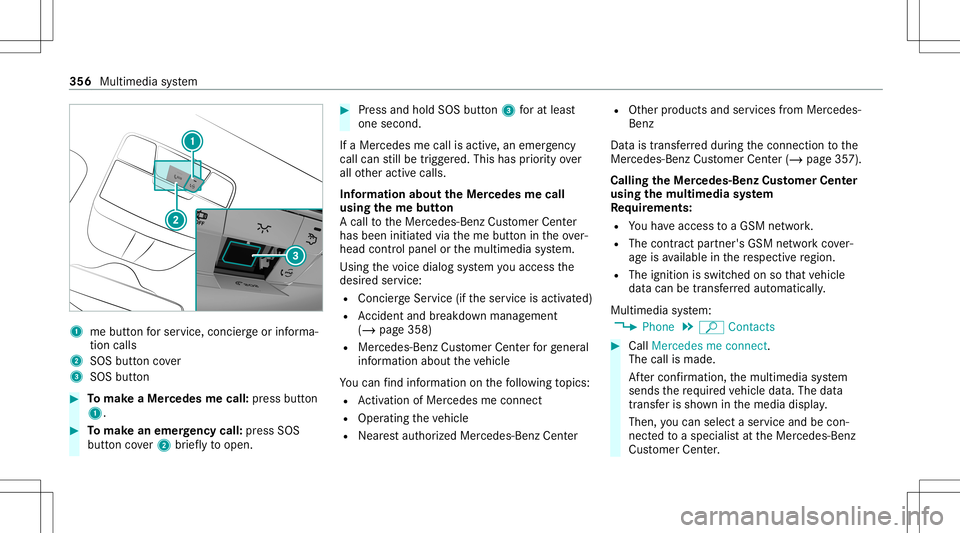
1
mebutt onfors ervice, concier georinforma‐
tion calls
2 SOS buttoncover
3 SOS button #
Tomak eaM ercede smecall: press butt on
1. #
Tomak eane me rgency call:press SOS
butt oncover2 brief lyto open. #
Press and hold SOS button3 fora tlea st
one second.
If aM ercedes mecall isactiv e,an emer gency
cal lcan still be trigg ered. This hasprior ity ove r
all other activ ecalls.
Inf ormat ionabout theM ercedes mecall
using them ebutton
Ac allt ot he Mer cedes-Benz Customer Cent er
has been initiatedv iathem ebutton intheo ver‐
head controlpanel orthem ultimedia system.
Using thev oice dialog system youa ccess the
desir edser vice:
R Concier geSer vice (ift he ser vice isactiv ated)
R Accid ent and brea kdo wnmana gement
(/ page358)
R Mer cedes-Benz Customer Centerforg ene ral
inf orma tiona bout thev ehicle
Yo uc an find informa tiono nthe follo wing topics:
R Activati on ofMe rcedes meconnect
R Oper ating thev ehicle
R Near esta uthor ized Mercedes-Ben zCent er R
Other products andservices from Mer cedes-
Benz
Dat aist ransf erredd uring thec onnect iontothe
Mer cedes-Ben zCustomer Cent er(/ page357).
Call ingtheM ercedes- BenzCustomer Center
usi ng the multi mediasystem
Re quirement s:
R Youh ave access toaG SM network.
R The cont ract partner' sGSM networkc ove r‐
ag ei sa vailable inther espectiv eregion.
R The ignition isswitc hedonsothat vehicle
dat acan be transf erreda utomatic ally.
Multimedia system:
4 Phone 5
ª Contac ts #
Call Mercedes meconnect.
The callismade.
Af terc onf irmation, them ultimedia system
sends ther equir ed vehicle data.The data
tr ansf erissho wninthem edia displa y.
Then, youc an sele ctas ervic ea nd becon‐
ne cted toas pec ialis tatthe Mer cedes-Benz
Cus tomer Cent er. 356
Multimedi asystem
Page 362 of 602
cal
lint he eve ntofab reak do wn oras imilar sit‐
ua tio n.
Di spl aysi nt he media display :
SOS READY :eCa llav ailable
SO SN OTREA DY:t heignition isno to no reCall
is no ta vailable.
Dur ing anact ivee mer gency call,0053 appe ars
in thed ispla y.
Yo uc an find mor einfor ma tiono nthe regional
av ailabilit yofeCall at:h ttps ://ww w.me rced es-
ben z-mobi le.com /extra /eca ll/
% Ifth er ei sam alfunct ioninthee mer gency
cal lsyst em (e.g. amalfunct ionwiththe
speak er,m icrophone, airbag,SOS butt on), a
cor responding messageappea rsinthem ul‐
tifun ction displa yofthe instrument cluster.
Tr igg ering anaut omat icemer gency call
Re quirement s
R The ignit ionisswitc hedon.
R The star terb att eryi ss ufficie ntlyc har ged.
If re stra int systems suchasairbags orEmer ‐
ge ncy Tensi oni ng Device shave been activated af
te ra na ccide nt,theM ercedes- Benzemer‐
ge ncy callsystemm ayaut omaticall yinitiat ean
emer gency call.
The eme rgency callhas been made:
R Avoice connec tionismade totheM ercedes-
Benz emergency callcent er.
R Am essage witha cciden tdatai st ransm itted
to theM ercedes- Benzemergency callcent er.
The Mercedes-Be nzeme rgency callcent er
can trans mit thev ehicle position datatoo ne
of thee mer gency callcent ers.
The SOS button intheo verhead control panel
fl ashes untilth ee mer gency callisf inished.
It is no tp ossibl et oimmed iatelye nd anaut o‐
matic emergency call.
If no conne ctioncan be made tothee mer gency
ser vice seithe r,ac orresponding message
appea rsinthem edia displa y. #
Dialthe local emergency num bero ny our
mobile phone. If
an emer gency callhas been initiat ed:
R Remain inthev ehicle ifth er oad andtraffic
condi tions permit yout od osou ntil avoice
connec tionises tablished withthe emer‐
ge ncy callcent eroperator.
R Bas edon thec all, theo per ator decides
whe ther itis neces sarytoc allr escue teams
and/ orthep olice tothea cciden tsite.
R Ifno vehicle occupant answers, an ambu‐
lance issent tothev ehicle immediat ely.
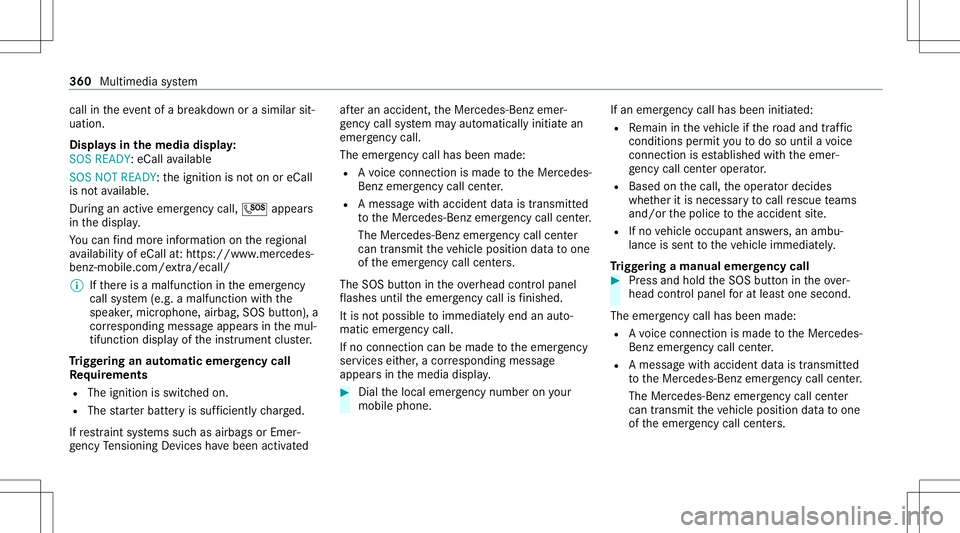
Tr igg ering am anual emer gency call #
Press and hold theS OS butt onintheo ver‐
head controlpanel fora tlea st one second.
The emer gency callhas been ma de:
R Avoice connec tionismade totheM ercedes-
Benz emergency callcent er.
R Am essage witha cciden tdatai st ransm itted
to theM ercedes- Benzemergency callcent er.
The Mercedes-Be nzeme rgency callcent er
can trans mit thev ehicle position datatoo ne
of thee mer gency callcent ers. 36
0
Mu ltimed iasystem