light MERCEDES-BENZ S CLASS 2022 Owners Manual
[x] Cancel search | Manufacturer: MERCEDES-BENZ, Model Year: 2022, Model line: S CLASS, Model: MERCEDES-BENZ S CLASS 2022Pages: 610, PDF Size: 19.8 MB
Page 261 of 610
%
Donotus eth esur round viewcam eraunde r
suc hcir cum stanc es.Youco uld other wise
injur eot her sor collide withobject swhen
par king theve hicle.
Fo rte ch nica lre ason s,thest andar dheigh tof the
ve hicle maybe altered ifth eve hicle iscar rying a
hea vyload andcanresult ininaccur aciesinthe
guide linesandinthedispla yof thege ner ated
ima ges.
The field ofvision andother funct ionsofthe
came rasystem maybe restrict ed dueto addi‐
tio nal attachme ntson theve hicle (e.g.license
plat ebr ac ket,bicy cle rack ).
% The contras tof thedispla yma ybe impair ed
by abr upt,dir ect sunlight orby other light
sour ces, e.g.when driving outofaga rage .In
th is case, paypar ticular attent ion.
% Have thedispla yre pair edorreplaced if,for
ex am ple, pixelerro rs consi derablyrestrict its
us e.
See theno teson cleaning thesur round view
cam era(/ page33 8). Calli
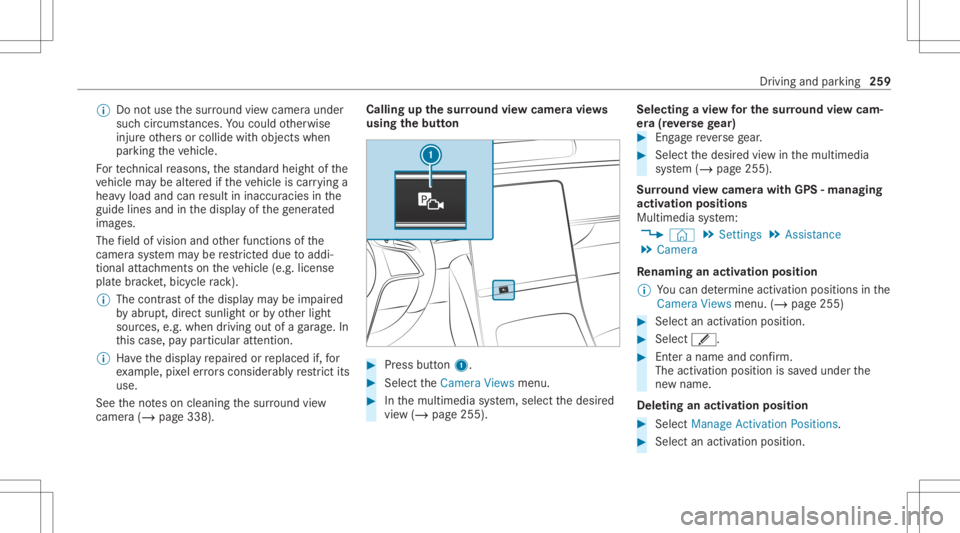
ngup thesur round viewcamer avie ws
using thebut ton #
Press butt on1. #
Select theCamera Viewsmenu. #
Inthemultimedia system, select thedesir ed
vie w(/ page255). Selecting
avie wforthe surround viewcam‐
er a(reve rsege ar) #
Eng agere ve rsege ar. #
Select thedesir edviewin themultimedia
sy stem (/ page255).
Sur round viewcamer awith GPS-managin g
activ ation positions
Mul timedi asy stem:
4 © 5
Set ting s5
Assist ance
5 Camera
Re naming anactiv ation position
% Youcan determ ine activation positionsinthe
Camer aViews menu.(/ page25 5) #
Select anact ivatio nposi tion. #
Select ´. #
Entera name andconf irm.
The activ ation position issave dunder the
ne wnam e.
De letin gan acti vatio npos ition #
Select Manag eActiva tionPos itions . #
Select anacti vatio npo sitio n. Dr
iving and parking 259
Page 266 of 610
R
Bac king upintopa rking spaces perpendic u‐
lar tothero ad
Ve hicles withsur round viewcam era
R Parking inpar kingspaces parallel tothero ad
R Parking inpar kingspaces perpendic ularto
th ero ad (op tionall yeit her forw ards or
re ve rse)
R Parking inpar kingspaces that can onlybe
de tected assuch due tomar kings (for exam‐
ple atthero adside )
R Exiting apar kingspac epar allel tothero ad
R Exiting apar kingspac eper pen dicul arto the
ro ad (op tionall yeit her leftor right)
Ac tivePa rking Assistis onl yan aid. Itis no ta
subs titutefo ryo ur att entio nto thesur round ings.
The responsibili tyforsaf emaneu vering and
pa rking remains withyo u. Mak esur eth at no
per son s,anim alsorobj ect set c. arein the
maneu vering rang e.
If Ac tivePa rking Assistis available, theÇ
messag eappear son thedr iver displa y.When
th esy stem detects parking spaces ,È
appear s.The arrow ssho won whic hside ofthe ro
ad free par kingspac esareloc ated. Thes ear e
th en sho wnonthecent raldispla y.
When ActivePa rking Assistis act ivat ed, thetur n
signal indicat orsar eactiv ated based onthecal‐
culat edpat hof your vehicle. When youar e
en tering orexitin gapar kingspace, thepr oce‐
dur eis assis tedby acc eleration ,br akin g,steer‐
ing and gear chang es.
To star tth epar king procedur e,press thec
butt on(/ page265).
Ac tivePa rking Assistwill becan celed inthefo l‐
lo wing situat ions:
R Youdeac tivatePa rking AssistPA RK TRONI C.
R Youpr ess thec buttonagain.
R Youbegin steer ing.
R Youen gage trans missi on positio n005D.
R ESP ®
int erve nes.
R Youopen thedr iver's door .
Sy stem limit s
If th eex terior lighting ismalfunct ioning,Active
Pa rking Assistis no tav ailable. Als
oobse rveth esy stem limits ofthefo llo wing
sy stems:
R Rear vie wcam era(/ page25 3)
R Surround viewcam era(/ page25 5)
Obj ectsloc ated abo veorbelo wthede tection
ra ng eof ActivePa rking Assist, suc has over‐
hanging loads,overhang sor loadin gra mp sof
tr uc ks orthebor dersof par king spaces, areno t
de tected during mea surement ofthepar king
space. Thesearealso then notta ke nint o
acco untwhen calcul ating thepar king procedur e.
In some circums tances, ActivePa rking Assist
ma yth er efor eguide youint oth epar king space
pr ematur elyorbrak eto olat e.
Cer tain en vironm entalcon dition s,suc has sno w‐
fa llor hea vyrain, ma ylead toapar kingspac e
bein gmeas ured inac curat ely. Pa rking spaces
th at arepar tiallyoccupied bytrai le rdr aw bar s
might notbe ident ified assuc hor be measur ed
inco rrect ly.Only useAc tivePa rking Assiston
le ve l,high- grip ground. 26
4
Drivin gand parking
Page 270 of 610
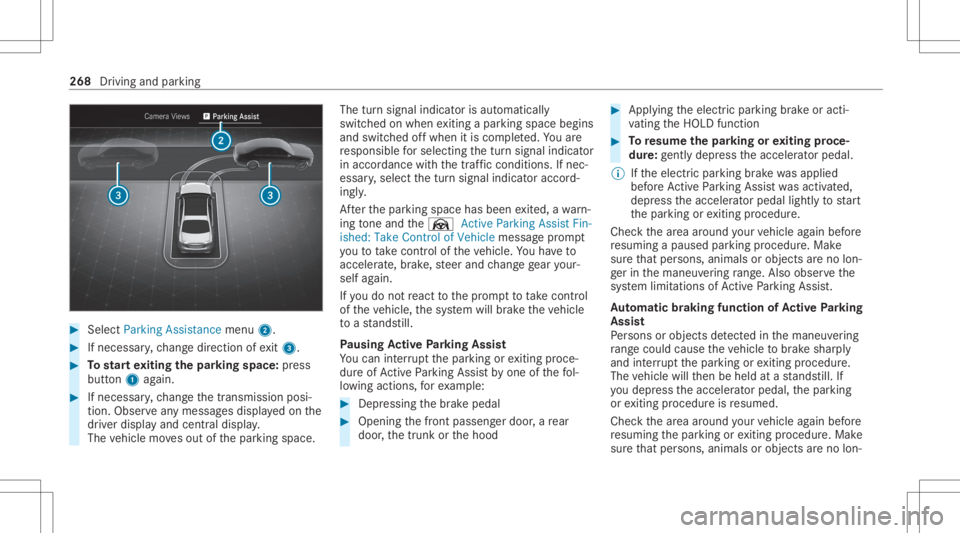
#
Select Parking Assistance menu2. #
Ifneces sary,ch ang edir ect ion ofexit3. #
Tostar tex iting thepa rking space:press
butt on1 again. #
Ifnec essar y,ch ang eth etransmission posi‐
tion .Obser veanymes sagesdispla yedon the
dr iver displa yand central displa y.
The vehicle movesout ofthepar king space. The
turnsignal indicat orisaut omaticall y
switc hedonwhen exitin gapar kingspace begins
and switc hedoffwhen itis com pleted. Youar e
re sponsible forsele cting thetur nsignal indicat or
in accor dance withth etraf fic condi tions.If nec‐
ess ary, select thetur nsignal indicat oraccor d‐
ing ly.
Af terth epar king space hasbeen exited, awa rn‐
ing tone and theØ Active Parkin gAssist Fin-
ished: TakeContr olof Vehicle messagepr om pt
yo uto take contr olof theve hicle. Youha ve to
acc elerat e,brak e, steer and chang ege ar your‐
self again.
If yo udo notre act tothepr om pttotake contr ol
of theve hicle, thesy stem will brak eth eve hicle
to ast ands till.
Pa using Activ ePa rking Assis t
Yo ucan interru pt thepar king orexitin gpr oce‐
dur eof ActivePa rking Assistby one ofthefo l‐
lo wing actions ,fo rex am ple: #
Depressi ngthebr ak epedal #
Openin gth efront passeng erdoor ,a re ar
door ,th etrunk orthehood #
Appl ying theelectr icpar king brak eor acti‐
va ting theHOLD function #
Toresume thepa rking orexiting proce‐
dur e:gently depress theaccelera torpeda l.
% Ifth eelectr icpar king brak ewa sappli ed
bef oreAc tivePa rking Assistwa sactiv ated,
depr esstheacceler ator pedal lightlyto star t
th epar king orexitin gpr ocedur e.
Chec kth ear ea around your vehicle again before
re suming apause dpar king procedur e.Mak e
sur eth at per son s,anim alsorobj ect sar eno lon‐
ge rin themaneuv ering rang e. Als oob ser vethe
sy stem limit ations ofActivePa rking Assist.
Au tomatic braki ng fun ction ofActiv ePa rking
Assis t
Pe rsons orobject sde tected inthemaneuv ering
ra ng ecou ldcau setheve hicle tobrak eshar ply
and interru pt thepar king orexitin gpr ocedur e.
The vehicle willthen be held atast ands till.If
yo udepr esstheacceler ator pedal, thepar king
or exitin gpr ocedur eis resumed.
Chec kth ear ea around your vehicle again before
re suming thepar king orexitin gpr ocedur e.Mak e
sur eth at per son s,anim alsorobj ect sar eno lon‐ 268
Drivin gand parking
Page 276 of 610
In
mos tof themenus, youcan useOptionsto
conf igurefur ther settings forth emenu- specific
displa ycon tent.
% Youcan find further information aboutthe
possible settings andselect ionsonthe
menus intheDigit alOper ator's Manual. Head-
upDispla y Fu
nction oftheHead -upDispla y The
Head- upDis playpr oje ctsva rious cont ent
int oth edr iver's field ofvision, forex am ple.
Yo ucan usetheHead-up Displaymenu barto
select differe nt cont exts, e.g.:
R Minim al
R Spo rt
R Standar d
R Augment edrealit y
R ECOdispla y
R Setting s
R Head -upDisplayon /of f The
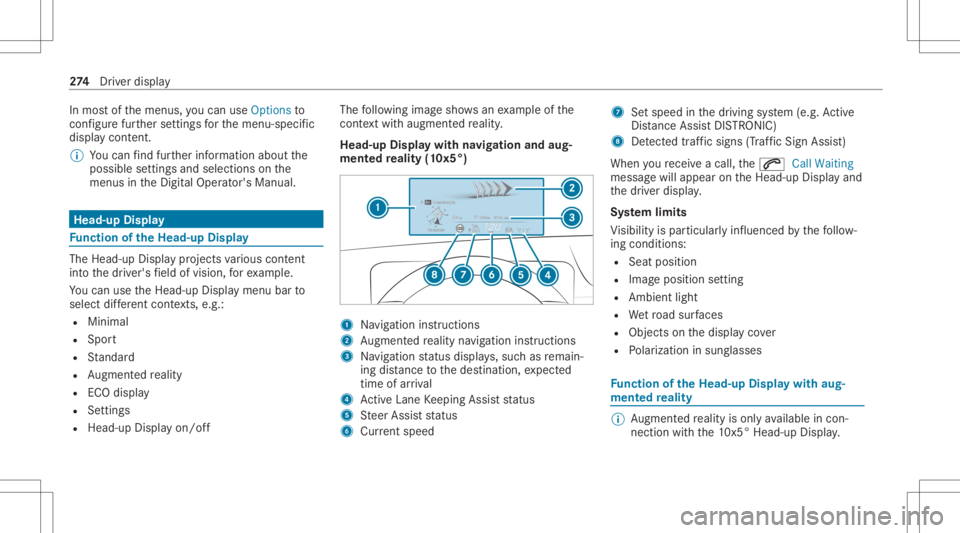
follo wing imagesho wsanexam ple ofthe
cont extwi th augmen tedre alit y.
Head-up Displaywith navig ation andaug‐
ment edreality (10x5° ) 1
Navig ation instructions
2 Augment edrealit yna vig atio nins truct ions
3 Navig ation status displa ys,suc has remain‐
ing distance tothedes tinat ion,expect ed
time ofarriva l
4 ActiveLa ne Keeping Assistst atus
5 Steer Assis tst atus
6 Current spe ed 7
Setspe edinthedr iving system (e.g. Active
Dis tance AssistDIS TRONI C)
8 Detected traf fic sig ns (Tra ffic Sign Assist)
When youre cei veacall, the0061 CallWaiting
messag ewill appear ontheHead-up Displayand
th edr iver displa y.
Sy stem limit s
Vi sibili tyispar ticular lyinf luenced bythefo llo w‐
ing con dition s:
R Seat position
R Imag eposit ionsetting
R Ambient light
R Wetro ad sur faces
R Obje ctsonthedispla yco ver
R Polar izat ion insung lasses Fu
nction oftheHead -upDispla ywit haug ‐
ment edreality %
Augment edrealit yis on lyavailable incon ‐
nec tionwit hth e10 x5° Head-upDisp lay. 27
4
Driver disp lay
Page 278 of 610
Oper
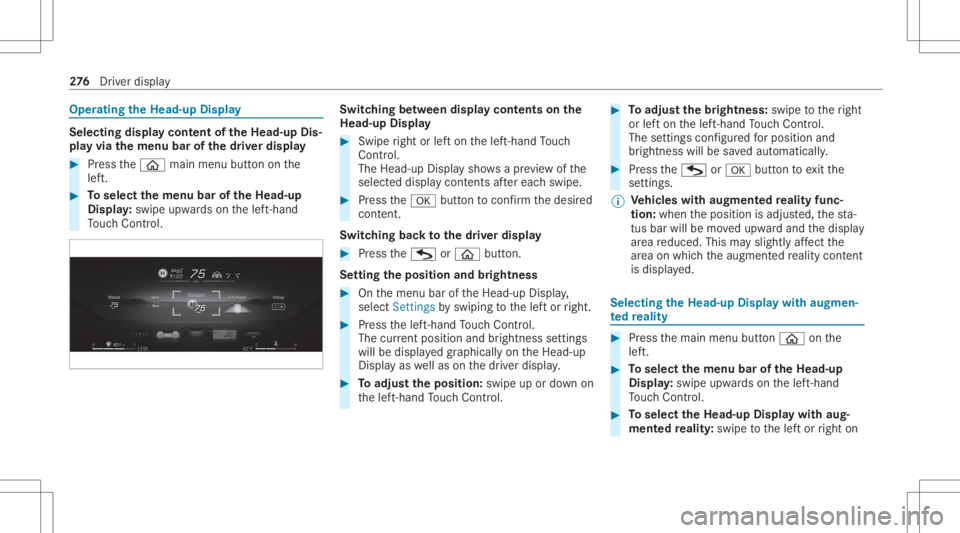
ating theHead -upDispla y Selecti
ngdisp laycont entoftheHead -upDis‐
pla yvia themenu barofthedr iver disp lay #
Press the00E2 mainmenu buttonon the
lef t. #
Toselect themenu baroftheHead -up
Displa y:swipe upwards on thelef t-hand
To uc hCon trol. Swit
ching betw een disp laycont ents onthe
Head-up Display #
Swipe right orlefton thelef t-hand Touc h
Con trol.
The Head -upDisplaysho wsapr ev iew of the
select eddispla ycont ents afte reac hswi pe. #
Press the0076 buttontoconf irm thedesir ed
con tent.
Sw itchin gbac kto thedr iver disp lay #
Press theG or00E2 button.
Se tting theposit ionand bright ness #
Onthemenu baroftheHead-up Display,
select Settings byswiping tothelef tor right. #
Press thelef t-hand Touc hCon trol.
The current positio nand brightnes sse ttings
wi llbe displ ayed graphicall yon theHead-up
Displa yas wellas on thedr iver displa y. #
Toadjus tth eposit ion:swipe upordown on
th elef t-hand Touc hCon trol. #
Toadjus tth ebr ight ness: swipe totheright
or lefton thelef t-hand Touc hCon trol.
The setting sco nfigur edforposi tion and
br ightness willbe save daut omatic ally. #
Press theG or0076 buttontoexitth e
se ttin gs.
% Ve
hicl eswith augment edreality func‐
tion :whe nth eposition isadjus ted, thest a‐
tus bar will bemo vedupw ardand thedispla y
ar ea reduced. Thismayslightl yaf fect the
ar ea on whic hth eaugment edrealit ycon tent
is displ ayed. Selecting
theHead -upDispla ywit haug men‐
te dre ality #
Press themain menu button00E2 onthe
lef t. #
Toselect themenu baroftheHead -up
Displa y:swipe upwards on thelef t-hand
To uc hCon trol. #
Toselect theHead -upDispla ywit haug ‐
ment edreality :swi petothelef tor right on 27
6
Driver disp lay
Page 281 of 610
Ov
ervie wand oper ation No
teson theMB UX multim edia system &
WARNIN GRisk ofdist ra ction from infor‐
mati onsystems andcomm unication s
eq uipment
If yo uoper ateinf ormat ionand comm unic a‐
tio neq uipme ntintegratedin theve hicle
when driving, youwill bedistract ed from the
tr af fic situ ation. Thiscou ldalso cau seyouto
lose control of theve hicle. #
Onlyoper ateth is eq uipmen twhen the
tr af fic situ ation per mits. #
Ifyo ucan notbe sur eof this, stop the
ve hicle whilstpa ying attention toroad
and traffic condi tions andoperate the
eq uipment withth eve hicle statio nary. Yo
umus tobse rveth eleg alrequ iremen tsforth e
cou ntryin whi chyouar ecur rentl ydr ivi ng when
op erati ng themultimedia system. *
NO
TEIncr eased surface temp eratur e
due todirect sunlight onthecent raldis‐
pla y The
surface ofthecent raldispla yis very
dar k.
If th edispla yis ex posed todirect sunlight ,
th esur face can beco mevery hot. #
Ifth ecent raldispla yhas been exposed
to direct sunlight ,allo witto cool down
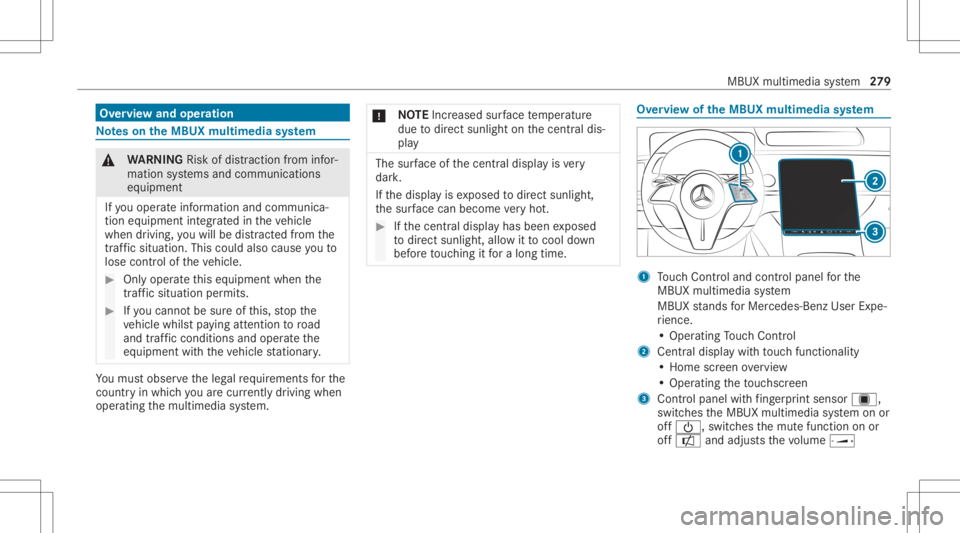
bef oreto uc hin git fora long time. Ov
ervie wof theMB UX multim edia system 1
Touc hCon trol and contro lpanel forth e
MBUX multimedia system
MBUX stands forMer cedes-Benz UserExpe‐
ri ence.
• Oper ating Touc hCon trol
2 Centraldispl aywit hto uc hfun ction alit y
• Hom esc reen ove rview
• Opera tingth eto uc hsc reen
3 Contr olpanel withfing erpr int sens orú,
sw itches theMBUX multimedia system onor
of f00D0, switchesthemut efunc tion onor
of fa andadjus tsthevo lume ø MBU
Xmultim ediasystem 27
9
Page 288 of 610
The
system maybe impair edorma yno tfunc tion
in thefo llo wing situat ions:
R The cameras mayheat updur ing opera tion.
As are sult thecamer asma yswitc hof fte m‐
por arily ,par ticula rly dur ing lon gerper iods of
oper ation andathigh outsi detemp eratur es.
Do notto uc hor coverth ecamer asand wait
unt ilth ecamer ashave cool eddown and are
av ailable again.
The Inte rior Assist ant Unavailabl eFur ther
In for mat iontoFol low mes sageappear s.
Yo ure cei veames sagewhen thecamer ais
av ailable again.
R Front orrear cam erais co veredor dir ty,fo g‐
ge dup orscra tched.
Wa itunt ilth ecamer ahas cooled down
bef orecleanin gth ecamer aco ver.
The Currently Unavailable SeeOperator's
Manual messageappear s.
Clean theoutside ofthecamer aco verwit ha
dr yor dam pco tton cloth.Do notus emicr o‐
fi ber cloths. Do notre mo vetheco verwhen
clea ning. R
Ave hicle occupant isvery large.Cl othing
being worn(glove s, hat, scarf,color ofclo th‐
ing) orobje ctscar ried on aper son, forex am‐
ple awa tchwi th alar ge face, areaf fecting
th ecamer avie w. Or thede tection rang eof
th ecamer ais restrict ed.
The Interi orAssi stant availab ility for the
dri ver islimite d,see Operator'sManua lmes‐
sag eap pea rs.
Ke ep thecamer a'sfield ofvision clear.
Objec tsinthede tection area ofthecamer a
can restrict thecamer avie w. Please make
sur e,that e.g .no obj ect shan gon theinside
re ar vie wmir ror.
R The MBUX Interior Assis tant isfaulty .
The Inte rior Assist ant Not Available. Please
co ntact your Mercedes-Ben zdealer .mes ‐
sag eappear s.
Con sult anaut hor izedMer cedes-Ben zCen ‐
te r.
R Vehicles withre ar ben chseat :as soon asthe
cent errear seat isocc upied, there ar seat
fun ction sar eno tsuppo rted. The
Interior Assist antinrear compart ment
only available whencenterseat isvacant
messag eappear s.
To use theInt erior Assis tant inthere ar
passe nger com partment ,ke ep thecent er
re ar seat free. Anti
cipa tory exitwa rning (SAFET Y/reactiv e) Re
quiremen ts:
R The vehicle iseq uipped withAc tiveBli nd
Spo tAssi stwit hex itwa rning.
R ActiveBli nd Spo tAssi stisact ivat ed
(/ page24 6).
R Theve hicle iseq uipped withactiv eambient
lighting orambient lighting.
R The camer asareswitc hedon:
The front camer aactiv ates thefront door s.
The rear cam eraact ivat es there ar door s.
% Obse rveth einf ormation onthesy stem limits
of ActiveBli nd Spo tAssi stwit hex itwa rning
(/ page24 2). 286
MBUX multimedi asy stem
Page 289 of 610
The
funct ioncan warnvehicle occupants abouta
possible collisionwithan appr oaching vehicle or
bicy clewhen they exitth eve hicle.
As soon asave hicle occupant movesth eir hand
to wa rdsth edoor handle, depending ontheve hi‐
cle equipment, thefo llo wing warnings are
issued:
R The active ambien tlight ingorambien tlight ‐
ing flashes red.
R The warning lam pin theoutside mirrorals o
fl ashes redfo rone ofthefront door s.
R When thedoor isopened, awa rning tone
sou nds.
% The visualwa rning isthus already given
bef oreth edoor isopened.
% Further information onActiveBli nd Spo t
Assi stwit hex itwa rning (/ page24 2) and
on ambientlighti ng(/ page 158). Swi
tchin gthe reading light and sear chlight
and onoroff Re
quirement s:
R Forthe reading light:th ecamer asare
switc hedon:
The front camer aactiv ates there adin glight
fo rdr iver and front pass enger.
The rear cam eraact ivat es there adin glight
fo rth elef tand right rear seat passe ngers.
R The driver' sand fron tpasse nger' shan d
mo vement take splace under theinside rear‐
vie wmir ror.Re ar passe ngersmo vetheir
hand atthegr ab handle infront ofthere ad‐
ing lam p.
R Forthe search light :th efunc tion isavaila‐
ble intheve hicle when itis dar k.
The camer asareswitc hedon:
The front camer are cor dstheint eraction
ar ea oftheunocc upied front passeng erseat.
The rear cam erare cor dstheint eraction area
of theunocc upied leftor right rear seat . R
The seat sco veredar eunocc upied orach ild
is sitt ing inach ild restra int system.
Switc hingthere ading light on and off Ca
rrying outoper ation ofthere adin glight forth e
dr iver and front passeng er MBUX
multimedia system 28
7
Page 290 of 610
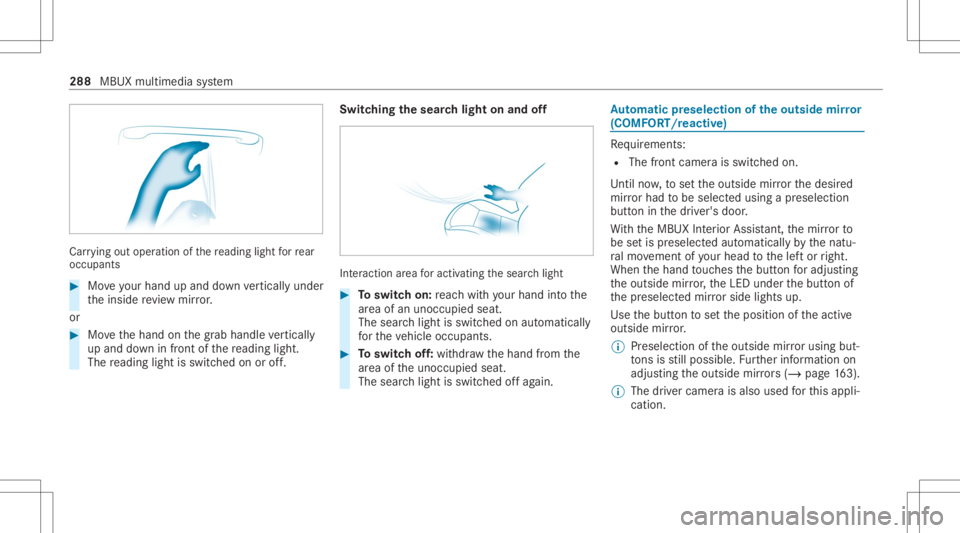
Car
rying out oper ation ofthere ading lightforre ar
occ upant s #
Moveyour han dup and down verticall yunder
th einside revie wmir ror.
or #
Movethehand onthegr ab handle verticall y
up and down infront ofthere adin glight .
The readin glight isswit ched on oroff. Switc
hingthesear chlight onand off Int
eract ion area foractiv ating thesear chlight #
Toswitc hon: reac hwit hyo ur han dint oth e
ar ea ofan uno ccupied seat.
The sear chlight isswitc hedonaut omat ically
fo rth eve hicle occupants. #
Toswitc hof f:wit hdr aw thehand from the
ar ea oftheunocc upied seat.
The sear chlight isswitc hedoffag ain. Au
tomatic pres elec tio nof the outsi de mir ror
(COMF ORT/r eact ive) Re
quiremen ts:
R The front camera isswitc hedon.
Unti lno w, tosetth eoutside mirrorth edesir ed
mir rorhad tobe select edusing apr eselect ion
butt oninthedr iver's door .
Wi th theMBUX Interior Assis tant, themir rorto
be setis preselect edaut omatic allybythenatu‐
ra lmo vement ofyour head tothelef tor right.
When thehand touc hes thebutt onforadju sting
th eoutside mirror,th eLED under thebutt onof
th epr eselect edmir rorside lights up.
Use thebutt ontosetth eposition oftheactiv e
outside mirror.
% Preselection oftheoutside mirrorusi ng but‐
to ns isstill possible .Fu rther information on
adjus tingtheoutside mirrors (/ pag e16 3).
% Thedr iver came raisalso used forth is appli‐
cat ion. 288
MBUXmultim ediasystem
Page 293 of 610
#
Mak esur eth at when theposition of
dr iver's seat isbeing adjustedusing the
multime diasystem, nopeople orbody
par tsarein theseat's rang eof mo ve‐
ment.
If th er eis arisk ofsomeone becoming trap‐
ped, stop theadjus tmentpr ocess immedi‐
at ely: #
a)Tapth ewa rning mess ageon thecen‐
tra ldispla y.
or #
b)Press amemor yposition buttonora
seat adjus tmentswitc hon thedr iver's
door .
The adjus tmentpr ocess willbestop‐
ped. The
driver's seat iseq uipped withan access pre‐
ve nter.
If th edr iver's door isopen, thedr iver's seat will
no tbe setaf te rcall ing upthedr iver's profile. User
profiles and user -specif iccont ent
Pr ereq uisit esforth eve hicle owner :
R Youha ve aMer cedesme user accoun t.
R Youha ve aMer cedesme PIN.
R Youha ve agreed tothete rm sof use.
R The vehicle islink edtoaMer cedesme user
acc oun t.
% Ifon eof thepr e-r equisit eslistedis missing
or ifno user profile has been select ed,the
dat adescr ibedinthefo llo wing sectionwill
be save din theve hicle asthest andar dse t‐
tin g.Standar dse tting scan bechang edbyall
ve hicle users.
User profiles save per sonal settings. Ifth eve hi‐
cle isused byseveralpeople, aper son can
ch ang eth eir profile settings without chang ing
th ese ttings ofother user s.
Yo ucan individ ualiz eauser profile intheve hicle
using these t-up assis tant or using these ttings
in your user profile. Some setting s,e.g .th e
Mer cedes mePIN and apr ofile pho toaremade
in theMer cedes meapp orintheMer cedes me
Po rtal. User
-spec ific con tent and applica tions with per‐
sonal dataar epr otect edbydiffere nt leve ls of
secur ity.To acc ess protect edcon tent, the
Mer cedes mePIN and, depending ontheve hicle
eq uipment, biometric sensor scan beused.
% The secur ityleve lis setby themultimedia
sy stem and calculat edfrom thecombin ation
of all sensor inputs. Some securityleve ls
can notbe turned off.
% When auser profile isact ivat ed, thefo llo w‐
ing person alized comfort systems, forex am‐
ple, canbeadjus tedor their settings loaded:
R Seat
R Ambien tlight
R Outside mirrors
R Blinds
R Aircondi tioningadjus tment
If th euser profile isactiv ated when driving
th en thedr iver's seat position willnotbe
adjus ted. MBUX
multimedia system 29
1