lock MERCEDES-BENZ S CLASS 2022 User Guide
[x] Cancel search | Manufacturer: MERCEDES-BENZ, Model Year: 2022, Model line: S CLASS, Model: MERCEDES-BENZ S CLASS 2022Pages: 610, PDF Size: 19.8 MB
Page 82 of 610
Pr
oblems withKEYLESS-GO, troubleshoo ting Yo
ucan nolon gerlo ck orunloc kth eve hicl e
using KEYLESS-GO
Po ssible causes:
R The function oftheSmar tKey has been deac‐
tiv ated.
R The Smar tKey batt eryis we ak ordisc harged. #
Activateth efunc tion oftheSmar tKey
( / pag e75 ). #
Chec kth ebatt eryusing theindicat orlam p
(/ page73 ). #
Replace theSmar tKey batt ery, ifnec essar y
(/ page75 ). #
Useth ere placemen tSmar tKey . #
Use theemer gency keyto loc kor unloc k
(/ page81 ). #
Have theve hicle andSmar tKey checkedat a
qu alif ied spec ialistwo rkshop. Ther
eis int erfere nce from apo we rful radio
sig nal source
Po ssible causes ifth efunc tion ofKEYLE SS-GO is
im pair ed:
R High voltag epo we rlines
R Mobi lephones
R Electr onicdevices (notebook s,table ts)
R Shielding duetome talobje ctsor induc tion
loops forelectr icalgate systems oraut o‐
matic barrier s #
Mak esur eth at ther eis suf ficie ntdist anc e
be tween theSmar tKey and thepo tentia l
sou rceof interfere nce. Ac
tiv atin gor deac tivatin gthe automati c
lo ck ing featur e Mul
timedi asy stem:
4 © 5
Set ting s5
Vehicle
5 Lock ingFunc tion
% The vehicle isloc kedaut omatic allywhen the
ignit ionisswitc hedonand thewheels are
tur ning faster than walkin gpace. #
Swit chAuto matic Door Lockonoroff.
In thefo llo wing situat ions,th er eis adang erof
being lockedout when thefunc tion isactiv ated:
R The vehicle isbeing towe dor pushed.
R Ifth eve hicle isbeing tested on aro ller dyna‐
mome ter. Po
we rcl os ingfun ction &
WARNIN GRisk ofbeco ming trap ped
whe nth edoor sclose automatic ally
Body partsor objec tscan become trapped,
causing injuries. #
Ensur eth at no body partsor obj ect s
ar ein theclosing area. #
Automatic closing ofthedoor scan be
canc eled bypulling theout eror inner
door handle. If
yo upush thedoor intoth eloc kto thefirs t
de tent positio n,thepo we rclosi ngfunction will
au tomatical lypull thedoor intoth eloc k. 80
Openin gand closing
Page 84 of 610
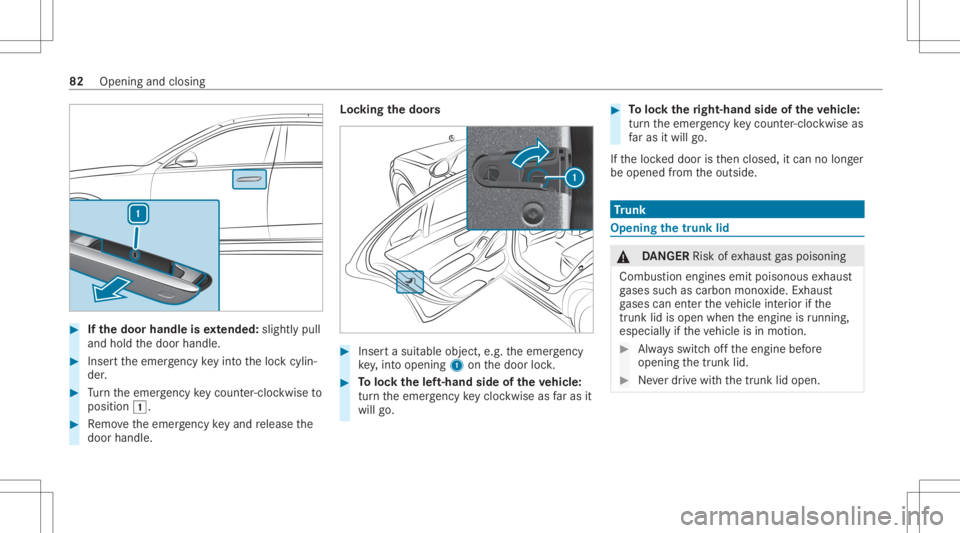
#
Ifth edoor handleisex tended: slightlypull
and hold thedoor handle. #
Inser tth eemer gency keyin to theloc kcy lin‐
der . #
Turn theemer gency keyco unt er-cloc kwi seto
position 0047. #
Remo vetheemer gency keyand release the
door handle. Loc
king thedoor s #
Inser ta suit able object ,e.g .th eemer gency
ke y,int oopen ing1onthedoor lock. #
Toloc kth elef t-han dside oftheve hicl e:
tur nth eemer gency keyclo ckwise asfaras it
wil lgo. #
Toloc kth eright- hand sideoftheve hicl e:
tur nth eemer gency keyco unt er-cloc kwi seas
fa ras itwil lgo.
If th eloc keddoor isthen closed, itcan nolong er
be opened from theoutside. Tr
unk Openi
ngthetrunk lid &
DANG ER Risk ofexhaus tga spoisoning
Combus tionengines emitpoisonous exhaus t
ga ses suchas carbon monoxide.Exhaus t
ga ses can entertheve hicle interior ifth e
tr unk lid is op en when theengine isrunning ,
esp ecially ifth eve hicle isin mo tion. #
Alw aysswitc hof fth eengine before
opening thetrunk lid. #
Neverdr ive wit hth etrunk lidopen. 82
Openin gand closing
Page 85 of 610
*
NO
TEDama getothetrunk lidbyobs ta‐
cle sab ove theve hicle The
trunk lidswings upwards when itis
opened. #
Ther efor e, mak esur eth at ther eis suf fi‐
cie ntcle arance above thetrunk lid. #
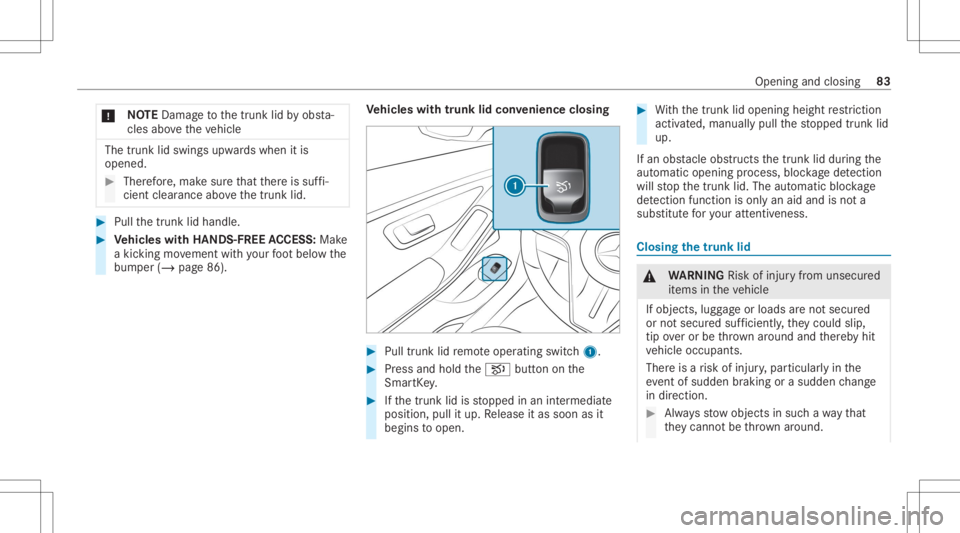
Pull thetrunk lidhandle. #
Vehicl eswith HANDS -FREEACCESS: Make
a kic kin gmo vement withyo ur foot belo wthe
bum per(/ page86). Ve
hicl eswith trunk lidconve nience closing #
Pull trunk lidremo teoper ating switch1. #
Press and hold theH buttononthe
Smar tKey . #
Ifth etrunk lidisstopped inan intermediat e
position, pullitup. Release itas soon asit
begin sto open. #
With thetrunk lidopening heightrestriction
acti vated, manuall ypull thestopped trunk lid
up.
If an obs tacle obs tructs thetrunk liddur ing the
aut omat icopen ingproce ss,bloc kage detection
wi llst op thetrunk lid.The automatic blockage
de tection functi onisonly anaid and isno ta
su bs titu teforyo ur att entiven ess . Closing
thetrunk lid &
WARNIN GRisk ofinju ryfrom unsecu red
it ems intheve hicle
If object s,lugg ageor loads areno tsecur ed
or notsecur edsuf ficie ntly,they cou ldslip,
tip ove ror be throw nar ou nd and ther eb yhit
ve hicle occupants.
Ther eis arisk ofinjur y,par ticular lyin the
ev ent ofsudden braking orasudden chang e
in dir ect ion. #
Alw aysst ow object sin suc hawa yth at
th ey canno tbe thro wn around. Open
ingand closing 83
Page 86 of 610
#
Beforeth ejour ney,secur eobjects, lug‐
ga ge orloads agains tslipping ortipping
ove r. Obser
vetheno teson loadi ngtheve hicle.
No teson closing thetrunk lid:your vehicle is
eq uipped withaut omatic SmartKey recogni tion.
If aSmar tKey belongin gto theve hicle isde tec‐
te din theve hicle, thetrunk lidwill notbe locked
and willpop open again.
No tethat thetrunk lidwill notbe lockedifth e
fo llo wing situat ionoccurs:
R Youha ve loc kedth eve hicle andclose the
tr unk lid wh ile aSma rtKe ybelo nging to the
ve hicle isinside theve hicle.
and
R Asecond SmartKey belongin gto theve hicle
is no tde tected outsid eth eve hicle.
Au tomatic SmartKey recogni tionisonly anaid
and isno ta su bs titu teforyo ur att entiven ess . #
Beforeloc kin g,en sur eth at atleas ton e
Sm artK ey belongin gto theve hicle isoutside
th eve hicle. #
Toclose thetrunk lid:pull thetrunk lid
do wn using thehandle recess andpush it
clos ed.
% Ifyo ulight lypush thetrunk lidclosed, the
po we rclosi ngfunction willau tomatical lypull
th etrunk lidintoth eloc k.
Ve hicl eswith trunk lidconvenience closing &
WARNIN GRisk ofbeco ming trap ped
du ring automatic closing ofthetrunk lid
Pa rts of thebody could become trapped.
Ther ema ybe people intheclosing area. #
Mak esur eth at nobody isin thevicinit y
of theclosing area. #
Use oneofthefo llo wing option sto stop
th eclosing process:
R Press theH buttononthe
Smar tKey .
R Press orpull there mo teoper ating
switc hon thedr iver's door .
R Press theclosing orloc king button
on thetrunk lid. R
Pull thetrunk lidhandle. Ve
hicl eswith HANDS -FREEACCESS: itis also
poss ibletostop theclosing process bymaking a
kic king movement belowthere ar bum per. #
Pull thetrunk lidhandle. Release itas soon
as itbegin sto clos e. #
Ifth etrunk lidisstopped inan intermediat e
position, pushitdo wn.
The trunk lidwill cont inue toclos e. 84
Opening andclosing
Page 87 of 610
#
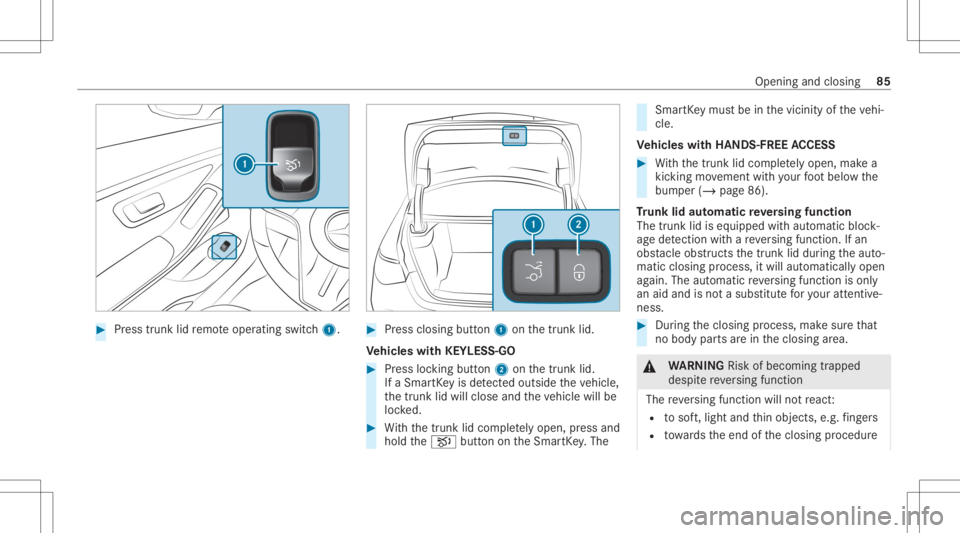
Press trunk lidremo teoper ating switch1. #
Press closing button1 onthetrunk lid.
Ve hicl eswith KEYLESS-GO #
Press locking button2 onthetrunk lid.
If aSmar tKey isde tected outsid eth eve hicle,
th etrunk lidwill close andtheve hicle willbe
loc ked. #
With thetrunk lidcom pletely op en,pr es sand
hold theH buttonontheSmar tKey .The Smar
tKey mus tbe inthevicin ityoftheve hi‐
cle.
Ve hicl eswith HANDS -FREEACCESS #
With thetrunk lidcom pletely op en,ma kea
kic king movement withyo ur foot belo wthe
bum per(/ page86).
Tr unk lidaut omatic reve rsing funct ion
The trunk lidiseq uipped withaut omat icbloc k‐
ag ede tection with are ve rsing func tion.If an
obs tacle obs tructs thetrunk liddur ing theaut o‐
matic closing process, itwill automatic allyopen
ag ain. Theautomatic reve rsing func tion isonl y
an aid and isno ta subs titutefo ryo ur att entive‐
ne ss. #
Dur ing theclosing process, makesur eth at
no body partsarein theclosing area. &
WARNIN GRisk ofbeco ming trap ped
des pite reve rsing func tion
The reve rsing func tion willnotre act :
R tosof t,light andthin obje cts, e.g. fing ers
R towa rdsth eend oftheclosing procedur e Openin
gand closing 85
Page 90 of 610
Switc
hingsepar atetrunk locking onand off Multimedia
system:
4 © 5
Set ting s5
Vehicle
5 Openin g/closing
Switc hingsepar atetrunk locking on #
Select BlockTrunk Access. #
Creat eaPIN. #
Press OKtoconf irm thePIN. #
Enterth ePIN again and confirm it.
The trunk willremain lockedifyo uunlo ckthe
ve hicle centrally .
% Ifan acc ident hasbeen detected, thetrunk
will unloc keve nif sep aratelock ing is
switc hedon.
% Youcan open thetrunk withth eemer gency
ke yev en while trunk lockis activ e.Separ ate
tr unk locking willremain active.
Swi tching separ atetrunk locking off #
Select BlockTrunk Access . #
EnterthePIN.
If th ePIN iscor rect, sep aratetrunk locking
wi llbe swi tched offand thePIN dele ted.
Re setting thePIN
If yo uha ve forg ottenth ePIN ,yo ucan switchoff
separ atetrunk locking withth eemer gency key. #
Select BlockTru nkAccess . #
Confirm Forg etPIN? . #
Unloc kth etrunk within thre eminut eswit h
th eemer gency key.
Sepa rate trunk lock ing will beswitc hedoff
and thePIN dele ted. Un
loc king andopening thetrunk from insid e
wit hth eemer gency release Re
quirement s:
R The 12Vve hicle batteryis conn ectedand
ch arge d. #
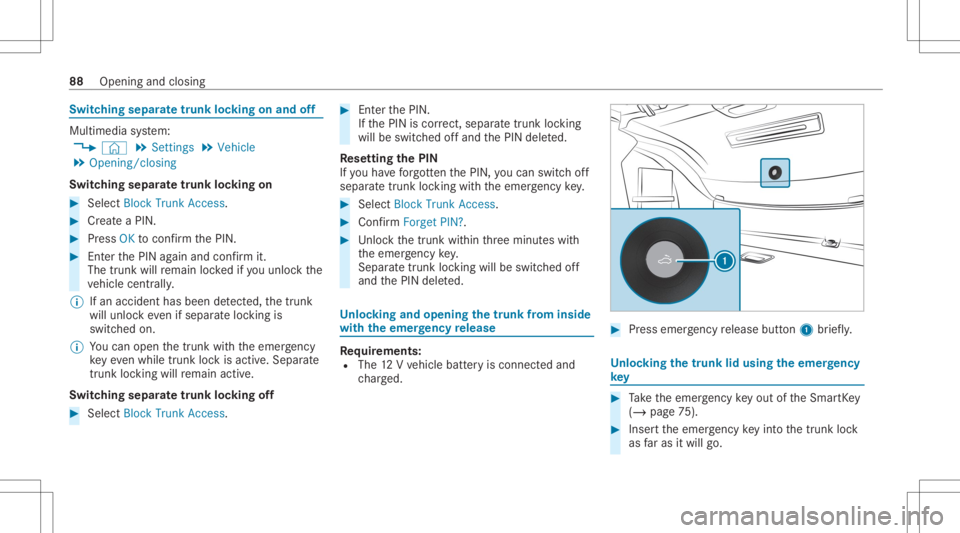
Press emer gency release button1 brief ly. Un
loc king thetrunk lidusing theemer gency
ke y #
Take theemer gency keyout oftheSmar tKey
( / pag e75 ). #
Insertth eemer gency keyin to thetrunk lock
as faras itwil lgo. 88
Opening andclosing
Page 92 of 610
#
Activateth ech ild safetyloc kfo rth e
re ar passe nger com partment side win‐
do ws . #
When leaving theve hicle, alwaysta ke
th eSmar tKey wit hyo uand lockth e
ve hicle. #
Neverlea vechildr enunat tende din the
ve hicle. Re
quirement s:
R The powe rsupp lyor theignition isswitc hed
on. 1
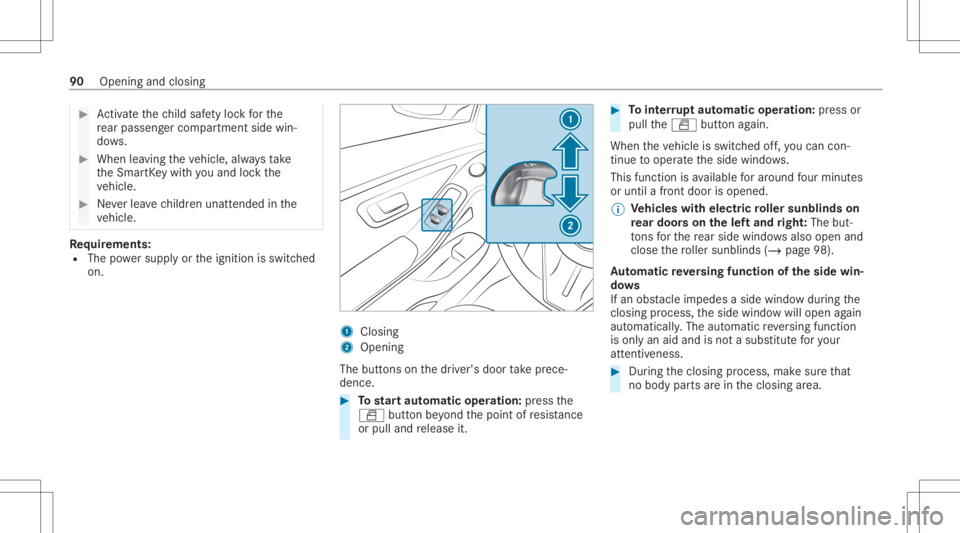
Closing
2 Openin g
The buttons onthedr iver's door take prece‐
denc e. #
Tostar taut omatic operation :pr ess the
0062 buttonbeyond thepoint ofresis tance
or pulland release it. #
Tointerru pt aut omatic operation :pr ess or
pul lth e0062 buttonagain.
When theve hicle isswitc hedoff,yo ucan con‐
tin ue tooper ateth eside windo ws.
This funct ionisavailable forar ound four min utes
or unt ila fron tdoor isopen ed.
% Ve
hicl eswith electricroller sunblind son
re ar door son thelef tand right :The but‐
to ns forth ere ar side windowsalso open and
clo sethero ller sunblin ds(/ page98).
Au tomatic reve rsing funct ionoftheside win‐
do ws
If an obs tacle imped esasid ewi ndo wdu ring the
clos ingproces s,theside windo wwill open again
aut omaticall y.The automatic reve rsing func tion
is onl yan aid and isno ta subs titutefo ryo ur
att entiven ess . #
Dur ing theclosing process, makesur eth at
no body partsarein theclosing area. 90
Openin gand closing
Page 94 of 610
pr
ocess andmakesur eth at no body
par tsarein theclosing area. #
Press and hold thes buttononthe
Smar tKey .
The follo wing functionsar eper form ed:
R The vehicle isloc ked.
R The side windo wsareclo sed.
R The pano ramic sliding roof isclosed. #
Tointerru pt con venience closing: release
th es button. #
Tocont inue convenience closing: press
and hold thes buttonagain.
% Con venie nce closing also func tions with
KEYLESS- GO(/ page78 ). Re
sol ving problems withtheside windo ws &
WARNIN GRisk ofbeco ming trap ped or
fa ta lly injured ifre ve rsing protect ion is
no tactiv ated
If yo uclo seaside windowagain imm ediat ely
af te rit has been blocked, theside windo w
will close withincr eased ormaximum forc e.
The reve rsing func tion isthen notactiv eand
body partsma ybecome trapped. #
Mak esur eth at no par tsof thebody are
in theclosing area. #
Tostop theclosing process, release the
butt onorpress thebutt onagain to
re open theside windo w. A
sid ewind owcann otbe closed andyoucan‐
no tsee thecaus e. #
Chec kto see whether anyobjec tsarein the
windo wguide. #
Adjus tth eside windo ws.
Ad jus tingthe side windo ws If
aside windo wisobs truct eddur ing closing and
re opens again immediat ely: #
Immediat elyaf te rth is, pull and hold thecor‐
re sponding buttonagain until theside win‐
do whas closed andhold thebutt onforat
lea stone moresecond (re-adjus tment).
The side windo wwill beclosed without the
aut omat icreve rsing func tion.
If th eside windo wisobs truct edagain and
re opens again immediat ely: #
Immediat elyaf te rth is, pull and hold thecor‐
re sponding buttonagain until theside win‐
do whas closed andhold thebutt onforat
lea stone moresecond (follo w-up adjust‐
men t).
The side windowwill beclos edwithout the
aut omat icreve rsing func tion.
Th eside windo wscann otbe opened or
closed usingthecon venience opening fea‐
tur e.
Po ssible causes:
R The Smar tKey batt eryis we ak ordisc harged. 92
Openin gand closin g
Page 95 of 610
#
Chec kth ebatt eryusing theindicat orlam p
(/ page73 ). #
Replace theSmar tKey batt ery, ifnec essar y
(/ page75 ). Sl
idingsu nroof Open
ingand closing theslidi ngsunr oof %
The term "slidin gsun roof" refers to thepan‐
or ama roof wit hpo we rtilt/sli dingpanel . &
WARNIN GRisk ofbeco ming trap ped
whe nth esliding sunroofisbeing opened
and closed
Body partsma ybecome trapped inthera ng e
of mo vement. #
Dur ing theopening andclosing proc‐
ess, makesur eth at no body partsare
in thesw eep ofthesliding sunroof. #
Ifsomeon eis tra pped, release thecon ‐
tr ol panel immediat ely.
or #
Touc hth econ trol panel during auto‐
matic operation.
The opening /closingpr ocess willbe
st opped. &
WARNIN GRisk ofbeco ming trap ped if
th esliding sunroofisoper ated bychil‐
dr en
Childr enoper atingth esliding sunroofcould
get caught inthemo ving parts,par ticular lyif
unatt ended. #
Neverlea vechildr enunat tende din the
ve hicle. #
When leaving theve hicle, alwaysta ke
th eke ywit hyo uand lockth eve hicle. &
WARNIN GRisk ofbeco ming trap ped
whe nth ero ller sunblin dis being opened
and closed
Body partsma ybecom etrapped between
th ero ller sunblin dand frame orslidin gro of. #
Dur ing theopening orclosing process,
mak esur eth at no body partsarein the
ro ller sunblin d'srang eof mo vement. #
Ifsomeone istrapp ed,release thecon ‐
tr ol panel immediat ely.
or #
Touc hth econ trol panel during auto‐
matic operation.
The opening /closingpr ocess willbe
st opped. *
NO
TEMalfunctio ndu eto sno wand ice Sno
wand icemaycause thesliding sunroof
to malfu nction. #
Open thesliding sunroofonlyif it is free
of sno wand ice. *
NO
TEDama gecau sed byprotru ding
objec ts Objec
tsthat protru de from thesliding sun‐
ro of ma ydamag eth esealing strips. Openin
gand closin g93
Page 98 of 610
or
#
Touc hth econ trol panel during auto‐
matic closing.
The closing process willbestopped. Au
tomatic reve rsing funct ionofthero ller
sunblind s
If an obs tacle obs tructs aro ller sunblin ddur ing
th eclosing process, thero ller sunblin dwill open
ag ain automat ically.The automatic reve rsing
func tion isonl yan aid and isno ta subs titutefo r
yo ur att entiven ess . #
When closingth ero ller sunblin ds,mak esur e
th at no body partsarein thera ng eof mo ve‐
ment. &
WARNIN GRisk ofbeco ming trap ped
des pite reve rsing func tion
In par ticular ,th ere ve rsing func tion does not
re act tosof t,light andthin obje cts, e.g. fin‐
ge rs. #
When closing thero ller sunblin d,mak e
sur eth at no body partsarein thera ng e
of mo vement. #
Ifsomeone istrapp ed,release thecon ‐
tr ol panel immediat ely.
or #
Touc hth econ trol panel during auto‐
matic closing.
The closing process willbestopped. Au
tomatic functionsof the slidi ng sun roof %
The term "slidin gsun roof" refers to thepan‐
or ama roof wit hpo we rtilt/sli dingpanel .
Ra in-closing featur ewhe ndr ivi ng
Ve hicl eswith apanor amaroof wit hpo we r
til t/s lidin gpane l:If it star ts to rain, thera ised
sliding sunroofwill automat icallybe lowe red
while theve hicle isin mo tion.
Au tomatic lowe ring function
Ve hicl eswith apanor amaroof wit hpo we r
til t/s lidin gpane l:If th esliding sunroofisraised
at there ar,it will automat icallybe lowe red
slightly athigher speeds. Atlow speeds, itwill
be raised again automat ically. &
WARNIN GRisk ofbeco ming trap ped by
aut omat iclowe ring ofthesliding sunroof
At higher speeds, thera ised slidin gsunr oof
will automat icallybe lowe redslightl yat the
re ar. #
Mak esur eth at nobody reac hes intoth e
sliding sunroof's rang eof mo vement
whil eth eve hicle isin mo tion. #
Ifsomebody becomestrapped, brief ly
push thesliding sunroofbutt onfor‐
wa rdsor bac kwards. Re
ctif ying problem swit hth eslidi ngsunr oof &
WARNIN GRisk ofbeco ming trap ped or
fa ta linj uries when thesliding sunroofis
closed again
If yo uclo sethesliding sunroofagain immedi‐
at ely afte rit has been blockedor rese t,th e
sliding sunroofwill close withincr eased or
maximum forc e. 96
Openin gand closing