phone MERCEDES-BENZ S CLASS 2022 User Guide
[x] Cancel search | Manufacturer: MERCEDES-BENZ, Model Year: 2022, Model line: S CLASS, Model: MERCEDES-BENZ S CLASS 2022Pages: 610, PDF Size: 19.8 MB
Page 283 of 610
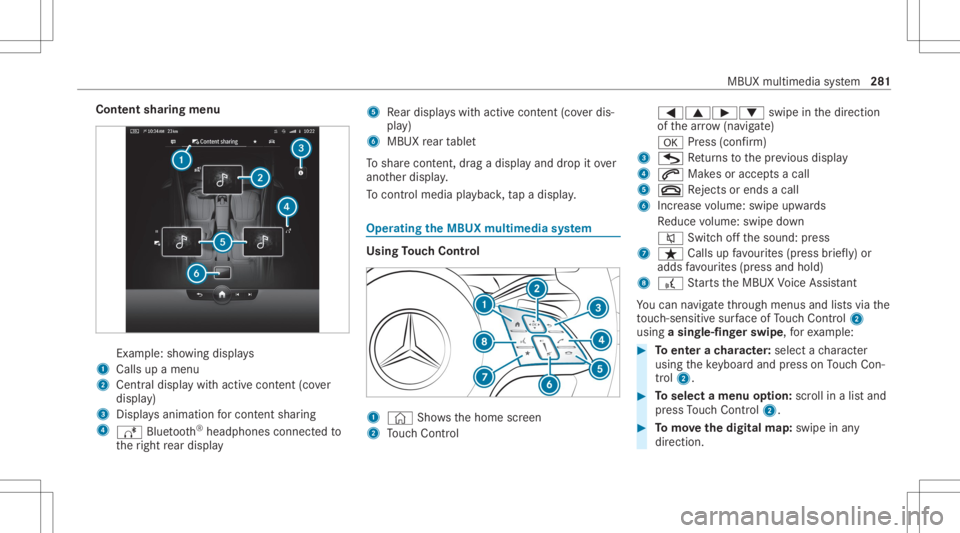
Cont
entsharing menu Ex
am ple: showing displa ys
1 Calls upamen u
2 Centraldispl aywit hact ive con tent (co ver
displa y)
3 Displa ysanim ationfo rcont entshar ing
4 Ä Bluetooth®
headphones connectedto
th eright rear displa y 5
Rear displa yswit hact ive con tent (co verdis‐
pla y)
6 MBUX rear table t
To shar econt ent, drag adispla yand drop itov er
ano ther displa y.
To contr olmed iaplay bac k,tapadispla y. Oper
ating theMB UX multim edia system Using
Touc hCon trol 1
© Showsthehome screen
2 Touc hCon trol 0059006300D0
0064swipe inthedir ect ion
of thear row (navigate)
0076 Press (con firm )
3 G Retur ns tothepr ev ious displa y
4 0061 Makesoracc epts acall
5 0076 Rejects orend sa cal l
6 Increase volume: swipe upwards
Re duce volume: swipe down
0063 Switchoffth esound: press
7 ß Callsupfavo urites (press brief ly)or
adds favo urites (press and hold)
8 £ Starts theMBUX Voice Ass ista nt
Yo ucan navig ateth ro ugh men usand lists via the
to uc h-sen sitive sur face ofTouc hCon trol 2
usin ga sing le-fingerswip e,fo rex am ple: #
Toent erach aract er:sele ctach aract er
usin gth eke yboar dand press onTouc hCon ‐
tr ol 2. #
Toselect amenu option: scrollinalis tand
pr ess Touc hCon trol 2. #
Tomo vethedigita lma p:swipe inany
dir ect ion. MBU
Xmult imedia system 28
1
Page 299 of 610
The
conn ection typesshowndepend onthe
de vice tobe con nected. The func tion must
be suppor tedby themultimedia system and
by thede vice tobe con nected. The type of
con nection established mustbe select edon
th emultimedia system and onthede vice to
be con nected.
% Some functionsma yfirs tnee dto be activ a‐
te don thecomm unication device being con‐
nect ed.Mor ede tailed informatio ncan be
fo und inthemanuf acturer'soper ating
ins truction s.
% The useoftheve hicle datata riff by extern al
de vic es isno tav ailable inall coun tries.
Mult imed iasystem:
4 © 5
Set ting s5
System
5 Internet andBluetoot h
% The availabilit yof thefunc tionsis dependent
on thecount ry. #
Select Wi-Fi.
The contr olleris to theright :Wi -Fi is
sw itched on. Whe
nWi -Fi issw itched on,youcan conn ect the
multime diasystem withex tern al ho tspo ts or
mak eit av ailable asaho tspo tfo rex tern al de vi‐
ces .
When Wi-Fi issw itched off,it is no tpo ssi ble to
es tablish aho tspo tcon nection .
When Wi-Fi issw itched off,no conne ctioncan
be established withth eMBUX rear table t.
% The datavo lume canbepur chased directl y
fr om amob ilephone netw orkpr ov ider via
th eMer cedes mePortal.
% The useoftheve hicle datata riff by extern al
de vic es isno tav ailable inall coun tries.
Using themu ltim edia system asaWi -Fiho t‐
spo t #
Sele ctMBUX Hotspot . #
Sele ctone ofthefo llo wing connection
op tion s.
Connecting usingaQR code
Re quiremen t:an app forscanning theQR code is
ins talled onthede vice being connect ed. Alt
ernativ ely:thede vice being connect edhas an
int egr ated QR code scann er(see manuf acturer's
oper ating instruction s). #
Scan theQR code shown.
The Wi-Fi conne ctionis es tablished.
Connecting usingNFC #
ActivateNFC onthede vice tobe con nected. #
When theNFC iconisdispla yedin theMBUX
Hot spot menu, holdthede vice tobe con nec‐
te dto theNFC interface. #
Followtheins truction son thede vice.
The Wi-Fi conne ctionis es tablished.
Connecting usingasecur itykey #
Select theve hicle from thede vice tobe con ‐
nec ted. The vehicle isdispla yedwit hth e
MBUX XXXXX networkname. #
Enterthesecur itykeywhic his sho wninthe
centr aldispl ayon thede vice tobe con nec‐
te d. #
Conf irm theent ry. MBUX
multimedia system 29
7
Page 300 of 610
Gene
ratin gane wsecur itykey #
Select theho tspo tname MBUX XXXXX inthe
MBUX Hotspot menu. #
Conf irm thepr om ptwit hYes .
A ne wsec urity keyis ge ner ated .
A conne ctionwi llbe established withth ene wly
cr eat edsecur itykey.
% When ane wsecur itykeyis ge ner ated ,al l
ex istin gWi -Fi conne ctionsareth en discon ‐
nect ed.Ifth eWi -Fi conne ctionsarebe ing re-
es tablished, thene wsecur itykeymus tbe
en tere d.
Using amobile commu nication device asa
Wi -Fiho tspo t(t et her ing)
An extern al Wi -Fi hotspo tis acce ssedfo rth e
Int erne tconnection ofthemultimedia system.
The datata riff of themobile communication
de vice viaPurchased DataPlanisused forth e
dat acon nection .
% This function iscount ry-de pende nt.
% With extern al Wi -Fi hotspo ts,which ar e
encr yptedvia TKIP ,online softwareupdat es cann
otbe car ried out viatheex tern al Wi -Fi
ho tspo t. #
Select theSet Upoption intheInt ernet and
Bluetoot hmenu. #
Select Connec tto the Internet .
Se tting upanInterne tconnection viaWi-Fi
% The Wi-Fi func tionon themobile phoneand
Int erne taccess viaWi-Fi mu stbe activ ated
(see themanuf acturer'soper ating instruc‐
tion s). #
Select Search forAcc ess. #
Select thene twork. #
Log into theWi -Fi network.
or #
Select themobile phonewithth eö Wi-Fi
sy mbo l. Sy
stem langu age No
teson thesy stem langu age
This function allowsyouto determ ine thelan‐
guag efo rth emenu displaysand thena vig ation
announ cements.The select edlanguag eaf fects th
ech aract ersav ailable forentr y.The navig ation
announc ementsar eno tav ailable inall lan‐
guag es.Ifalang uageis no tav ailable, thena vig a‐
tion announ cementswill beinEn glish.
Se tting thelangu age
Multi media system:
4 © 5
Set ting s5
System
5 Language
Se tting thesy stem langu age
A lis tof theav ailable system languag esis
sho wn. #
Select alanguag e.
The system languag eis switc hedtothe
select edlangua ge. Re
setting themu ltim edia system (rese tfun c‐
tion) &
WARNIN GRisk ofacci dents dueto fail‐
ur eof thecent raldispla yfunc tions
While themultimedia system isbeing rese t,
its functions suchas there ar vie wcam era
ar eno tav ailable. 298
MBUXmult imed iasystem
Page 310 of 610
re
cor ding isau tomatical lyprotect edagains t
being overwritt en. #
Tostar t:select StartRecording .
The lengt hof there cor ding issho wn. The
Ple ase donot remo vethe stora gemed ium.
mess ageap pea rs.The video file isstor ed on
th eUSB device. #
Toend: selectEn dRecor ding.
% Insome countries, geo-coor dinates(longi‐
tude andlatitude) aresho wninthevideo
imag e.
Fo rte ch nica lre ason s,thege o-coor dinates
ma ysho wgreat erinaccur acies.
A repor tma yappear inthefo llo wing cases :
R Individual Recording:th ememor yis full or
th er ear eonl ya fe w min utes recor ding time
av ailable. Thevideore cor ding stops orwill be
st opped imminent ly.
Chan getheUSB device ordele teavide ofile.
R The camera isno tfunc tional,theCamera
Unavailable messageappear s.
Ha ve thecamer ach eckedin an aut hor ized
Mer cedes- BenzCent er. R
Ifth ecount rybor der indicat ionhas been
switc hedon.
R Ifan outdoor recor ding isstar tedwit hth e
came raapp during adashc amrecor ding, the
dashcam recor ding pauses and resumes
aut omaticall yaf te rth ecamer are cor ding is
fi nis hed .A no tifica tionto this effect isdis‐
pl ay ed. Te
lephone Te
lephon y No
teson telephon y &
WARNIN GRisk ofdist ra ction from oper‐
ati ng integr ated commu nication equip‐
ment whiletheve hicle isin mo tion
If yo uoperat eco mm unic ationeq uipme nt
int egratedin theve hicle when driving, you
cou ldbe dist ra cted from thetra ffic situat ion.
This could alsocause youto lose control of
th eve hicle. #
Onlyoper ateth is eq uipmen twhen the
tr af fic situ ation per mits. #
Ifyo ucan notbe sur eof this, stop the
ve hicle whilstpa ying attention toroad
and traffic condi tions andoperate the
eq uipment withth eve hicle statio nary. &
WARNIN GRisk ofan acci dent from
ope rating mob ile comm unicati onequip ‐
ment while th eve hicle isin mo tion
Mobile communication sde vices distract the
dr iver from thetraf fic situ ation. Thiscou ld
al so cau sethedr iver tolose control of the
ve hicle. #
Asthedr iver ,onl yoper atemobile com‐
municat ionsdevices when theve hicle is
st atio nary. #
Asave hicle occupant, onlyuse mobile
communication sde vices inthear eas
int ended forth is pur pose, e.g.inthe
re ar passe nger com partment . Yo
umus tobse rveth eleg alrequ iremen tsforth e
cou ntryin whi chyouar ecur rentl ydr ivi ng when 30
8
MBUX multimed iasystem
Page 311 of 610
oper
ating mobile communic ationequipment in
th eve hicle. &
WARNIN GRisk ofinju rydue toobject s
being stowe dincor rectl y
If obje ctsintheve hicle interior arestowe d
inc orrectly ,th ey can slide orbe throw n
ar oun dand hitvehicle occupants. Inaddi‐
tion, cupholder s,open stow agespac esand
mobi lephon ere cep tacle scanno tal wa ys
re tain all obje ctswit hin.
Ther eis arisk ofinjur y,par ticular lyin the
ev ent ofsudden braking orasudden chang e
in dir ect ion. #
Alw aysst ow object sso that they can‐
no tbe throw nar ou nd insuch situa‐
tions. #
Alw aysmak esur eth at obj ect sdo not
pr otru de from stow agespac es,parcel
ne ts or stow agene ts. #
Close theloc kable stow agespac es
bef orest ar tin gajo ur ne y. #
Alw aysst ow and securehea vy,har d,
poin ted, shar p-edg ed,fragile orbulky objec
tsinthetrunk/ cargocom part‐
ment . Obser
vetheadditional information onstow ing
mobile communic ationsde vice scor rectly:
R Loa ding theve hicle (/page12 8)
Blue tooth®
connect ion
The men uvie wand theav ailable function sin the
te lephon emen uar ein par tdepen dentonthe
Blu etoo th®
pr ofile ofthecon nect edmobile
phone. Ifth emobile phonesuppor tsall thefo l‐
lo wing Bluetooth®
pr ofiles, thefull rang eof fea‐
tur es isavailable:
R PBAP (Pho neBoo kAc cess Profile)
- The cont acts onthemobile phoneare
sho wnautomaticall yon themultimedia
sy stem.
R MAP (Messag eAc cess Profile)
- The mob ile pho nemess agefuncti onscan
be used on themultimedia system.
R HFP (hands-f reepr ofile)
- Wireless telephon yis available onthe
multime diasystem. R
SAP(SIM Access Profile)
- The cartelephon ehas access totheSIM
car ddat aand dials intoth emobile phone
ne tworkvia theex terior ant enna.
Ir re spectiv eof this, Blue tooth®
audio function al‐
ity can byused withan ymob ileradio unit.
Fo rinf ormation onthera ng eof func tions ofthe
mobil era dio unit tobe con nected, see theman‐
uf actur er'soper ating instruction s.
Ne tworkco nn ectio n:
The follo wing cases canlead tothecall being
discon nectedwhile theve hicle isin mo tion:
R Youswit chintoatransm ission /recep tion
st atio n,inwhic hno com mun ication chann el
is free.
R The SIM car dused isno tcom patible withth e
ne tworkav ailable
R Amobi lephon ewit h"T winc ard" islogg ed
int oth ene tworkwit hth esecon dSIM cardat
th esame time
The multimedia system suppor tscalls inHD
Vo ice ®
forim prove dspeec hqu alit y.Arequ ire‐ MBU
Xmultim ediasystem 309
Page 312 of 610
ment
forth is isthat themobile phoneandthe
mobil ephone networkpr ov ider oftheper son
yo uar ecalli ngsuppo rtHD Voice ®
.
Depe ndingon thequ alit yof thecon nect ion,the
vo ice qualit yma yfluct uat e.
Fu rther information canbeobt ained from an
aut hor ized Mercedes-Ben zCent eror at:
https: //www .mercedes-benz .com/connect Te
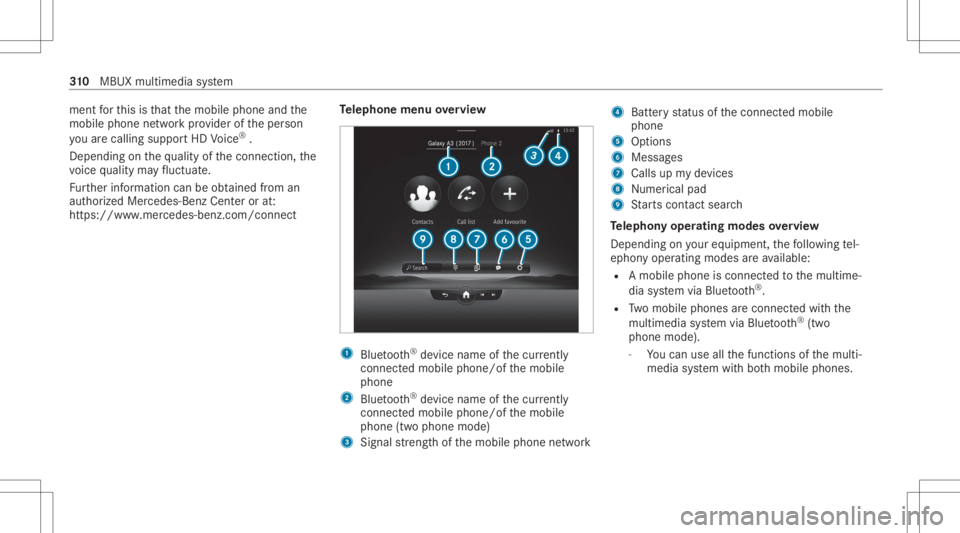
lephone menuoverview 1
Blue tooth®
de vice name ofthecur rently
conne cted mob ile pho ne/o fth emobile
phone
2 Blue tooth®
de vice name ofthecur rently
conne cted mob ile pho ne/o fth emobile
phone (twophone mode)
3 Signal stre ngt hof themobile phonenetwork 4
Batt eryst atus ofthecon nect edmobile
phone
5 Option s
6 Messag es
7 Calls upmy devices
8 Nume rical pad
9 Starts con tact sea rch
Te lephon yoper ating mod esove rview
Depen dingonyour equipme nt,th efo llo wing tel‐
ephon yoper atingmodes areav ailable:
R Amobi lephon eis con nectedto themultime‐
dia system viaBlue tooth®
.
R Twomobile phones areconn ectedwithth e
multime diasystem viaBlue tooth®
(tw o
phone mode).
- Youcan useallthefunc tionsof themulti‐
media system withbo th mobil ephones. 31
0
MBUX multimedia system
Page 313 of 610
Connect
ingamob ilephone
Re quirement s:
R Blue tooth®
is act ivat ed on themobile phone
(see themanuf acturer'soper ating instruc‐
tion s).
R Blue tooth®
is act ivat ed on themultimedia
sy stem.
Multimedia system:
4 © 5
Phone 5
Z 5
Devic es
5 My Devic es
Sear ching fora mob ile pho ne #
Select Connect NewDevice.
Co nnectin gamob ile pho ne #
Select amob ile ph one .
A cod eis disp laye din themultimedia system
and onthemobile phone. #
Ifbo th code smatc h,conf irm thecode onthe
mobil ephone. Fu
nctions inthete lephon ymenu
In thete lephon ymen uyo uha ve thefo llo wing
func tions,forex am ple:
R Mak ingcalls ,e.g .:
- R Accep ta cal l
- k EndCall
- Answ ering acal lwi th ames sage
- i Conferenc e
- Accep ting orrejecti ngawa itin gcall
R Managin gcon tacts, e.g.:
- Downl oading mob ile pho necont acts
- Managi ngthefo rm atofacon tact's name
- Dele tingfavo rite s
R Recei ving andsend ingmess ages, e.g.:
- Usingthere ad-al oudfunction
- Dictating ane wmes sage Mer
cede sme and apps Mer
cede sme connect Inf
ormation onMer cede sme connect
Mer cedes meconnect consistsof multi pleserv‐
ices.
Yo ucan usethefo llo wing service svia themulti‐
media system and theove rhead control panel,
fo rex am ple:
R Accid ent and Brea kdo wnManag eme nt(me
bu tton orsitu ation-de pendentdispl ayinthe
multime diasystem)
R Mer cedes- Benzemergency callsy stem (aut o‐
matic emergency calland SOS button)
The Mercedesme conne ctAccid ent and Brea k‐
do wn Manag eme ntand theMer cedes- Benz
emer gency callcent erareav ailable toyou
ar oun dth ecloc k.
The mebutt onand theSOS buttoncan befound
on theve hicle's overhead control panel
(/ page31 3). MBUX
multimedi asy stem 31
1
Page 314 of 610
Yo
ucan also calltheMer cedes- BenzCustomer
Cent erusi ng themultimedia system
(/ page31 4).
Pl eas eno te that Mer cedesme connectis a
Mer cedes-Ben zser vice.In emer gencie s,firs tcal l
th enation alemer gency service sus ing the
st andar dnat ionalemer gency service telephon e
numb ers. In emer gencie s,yo ucan also usethe
Mer cedes-Ben zemer gency callsy stem
(/ page31 9).
Ple ase note theMer cedes meconnect term sof
use and thedat apr otect ion information for
Mer cedes meconn ect.Youcan find these in
yo ur Mer cedesme user accoun t.
Fu rther information aboutMercedes meconn ect
ser vices canbeobt ained intheMer cedes me
Po rtal: http s:// me. secure.m erced es-ben z.com
Inf orma tion onMer cedes meconnect Acci‐
dent andBreak down Manag emen t
The Accid ent and Brea kdo wnManag eme ntcan
incl udeth efo llo wing functions:
R Supplem enttotheMer cedes- Benzemer‐
ge ncy callsy stem (/ page31 9) If
necessa ry,th econ tact per son atthe
Mer cedes-Ben zemer gency callcent erfor‐
wa rdsth ecall toMer cedes meconn ectAcci‐
dent andBrea kdo wnManag eme nt.Forw ard‐
ing thecall isho we verno tpossi bleinall
countr ies.
R Breakdo wnassi stanc eby ate ch nici anon
lo cati onand /or theto wing away oftheve hi‐
cle tothenear estaut hor ized Mercedes- Benz
Cent er
Yo uma ybe charge dfo rth ese services.
R Addition totheemer gency guide af te rau to‐
matic accide ntor breakdo wndetection
(/ page 314)
In theev ent ofabr eakdo wnoracciden t,fur‐
th er vehicle datais sent whichenables opti‐
mal suppor tby theMer cedes- BenzCustomer
Cent erand theaut hor ized service partner or
br eakdo wnassis tance.
R Addition totheMer cedes meconnect
ser vice Telediagno stics
Wi th theTe lediagno stics func tion,spec ific
we arand failur ere por tsarere cor ded bythe
ser vice prov ider ,in so faras these can be clear
lyint erpr eted and areav ailable thro ugh
th emonit oring ofcom ponen tsthat aresub‐
je ct to diagnos tics.
If yo ur vehicle detects abr ea kdo wnorthre at
of abr eak down, youma ybe prom pte dvia
th emultimedia system tocont actthe
Mer cedes-Ben zCus tomer Cent erforfur ther
help. Thisprom ptinthemultimedia system
onl yappear swhen theve hicle isstatio nary.
% These services aresubject totech nica l
re strictions such asthemobile phonecover‐
ag e, mobil ene tworkqu alit yand theability of
th epr ocessin gsy stems tointerpr et the
tr ans ferred dat a.In some circums tances,
th is can result indela ysorthefa ilur eof the
inf ormatio nto appear inthemultimedia sys‐
te m.
Mor einf ormation aboutMer cedes meconnect
ser vices canbeobt ained intheMer cedes me
Po rtal: http s:// me. secure.m erced es-ben z.com 31
2
MBUX multimedia system
Page 316 of 610
R
Near estaut hor ized Mercedes-Benz Center
R Other products andservices from Mer cedes-
Benz
Dat ais transf erreddur ing thecon nect iontothe
Mer cedes-Ben zCus tomer Cent er(/ page31 5).
Ca lling theMer cedes- BenzCustomer Center
usi ng the multi mediasy stem
Re quirement s:
R Access toaGSM networkis available.
R The contract partner' sGSM networkco ver‐
ag eis available inthere spectiv ere gion.
R The ignition mustbe switc hedonsothat
ve hicle datacan betransf erredaut omati‐
call y.
Multimedia system:
4 © 5
Phone 5
© #
Call Mercedes meconnect.
Af terconf irmation, themultimedia system
sends there qu ired vehicle data.The data
tr ansf erissho wninthecent raldispla y. Then,
youcan selectaser viceand beconn ect ed
to aspec ialistat theMer cedes- BenzCustomer
Cent er.
Call ingtheMer cedes- BenzCustomer Center
af te raut omat icac ciden tor break down
de tection
Re quirement s:
R The vehicle hasdetected anacci dent or
br ea kdo wnsitu ation.
R The vehicle isstatio nary.
R The hazar dwa rning light sar eswitc hedon.
% This function isno tav ailable inall coun tries.
The vehicle candetect acci dent orbrea kdo wn
situ ations undercer tain cir cums tances.
In theeve ntan acci dent or brea kdo wnisde tec‐
te d, theemer gency guide sho wssafetyno tesin
th emultimedia system displa y.
Af terqu itting theemer gency guide displ ayon
th emultimedia system, apr om ptappear sask ing
whe ther youwo uld liketo get suppor tfr om the
Mer cedes-Ben zCus tomer Cent er. #
Select Call.
R Afteryo ur agr eem ent,or ifth eMer cedes
me connect service "Acciden tand Break‐
do wn Manag ement"is activ e,theve hicle
dat ais transf erredaut omatic ally
(/ page31 2).
R TheMe rcedes-B enzCustomer Cent er
ta ke syo ur call and orga nize sth ebr eak‐
do wn and acciden tassis tance.
Yo uma ybe charge dfo rth ese services.
% Depen dingonthese verity of theacciden t,
an aut omatic emergency callcan beiniti‐
at ed .Thi sha spr iority over all other activ e
calls.
% Inaddition, ifth eMer cedes meconnect
ser vice "Telediagnos tics"is activ e,asimilar
pr om ptcan appea raf te ra dela yin theeve nt
of abr ea kdo wn. Ifyo uar ealr eady incontact
wit hth eMer cedes- BenzCustomer Cent eror
ha ve already recei vedsuppor t,th is prom pt
can beigno redor declined. 31
4
MBUX multimedia system
Page 317 of 610
%
Ifyo uans werth epr om ptforsupp ortfr om
th eMer cedes- BenzCustomer Cent erwit h
Ca llLater, themessag ewill behidden and
appear again later.
The prom pttrig ge redby theMer cedes me
con nect service "Telediagnos tics",can either
be con firm ed ordeclined. Afterbeing
decli ned, this will notbe sho wnagain.
Ar ranging aser vice appointment viaa
Mer cedes mecall
If yo uha ve act ivat ed themaint enanc emanag e‐
ment service, releva nt vehicle datais transf erred
aut omat icallyto theMer cedes- BenzCustomer
Cent er.Yo uwill then recei veindiv idual recom‐
mend ations rega rding themaint enanc eof your
ve hicle.
Re gardless ofwhe ther youha ve conse nted to
th emaint enanc emanag ement service, themulti‐
media system reminds youaf te ra cer tain
amount oftim eth at aser viceis due. Apr om pt
appear sask ing ifyo uwo uld liketo mak ean
app ointment. #
Toarra ng easer vice appointment :select
Call .
Af teryo ur agr eem ent,th eve hicle datais
tr ansf erredand theMer cedes- Benzcustomer
cent ertake syo ur prefer redappointm ent
dat e.The information isthen sent toyour
desir edser viceout let.
This willcontact youto conf irm theappoint‐
ment andifneces sarycon sult about the
de tails.
% Ifyo usele ctCall Laterafte rth eser vice mes‐
sag eappear s,themessag eis hidden and
re appear sat alat er tim e.
Tr ansf erre ddata during aMer cedes mecall
If yo uini tiat easer vicecall usin gMer cedesme,
dat ais transf erredto enable targeted advice and
an efficie ntser vice .
The follo wing requ iremen tsmus tbe fulf illed for
th etransf erofthedat a:
R The ignition isswitc hedon.
R The requ ired dat atransf ertech nol ogy issu p‐
po rted bythemobile phonenetworkpr o‐
vider . R
The qualit yof themobile connect ionissuf fi‐
cie nt.
Mu lti-sta ge trans ferdepe ndsonthefo llo wing
fa ct or s:
R Reason forth einitiat ionofthecall
R The available mobilephon etransm ission
te ch nol ogy .
R The activatedMer cedes meconnectser v‐
ices.
R The service select edinthevo ice con trol sys‐
te m.
Dat atransf erifMer cede sme connectser v‐
ice sar eno tactiv ated
If no Mer cedes meconnect services areactiv a‐
te d, thefo llo wing datais transf erred:
R Vehicle identif ication number
R Time ofthecall
R Reason forth einitiat ionofthecall
R Conf irmation ofthedat apr otect ion prom pt
R Coun try ind icat oroftheve hicle
R Setlanguag efo rth emultimedia system MBUX
multimedia system 31
5