service MERCEDES-BENZ S CLASS 2022 User Guide
[x] Cancel search | Manufacturer: MERCEDES-BENZ, Model Year: 2022, Model line: S CLASS, Model: MERCEDES-BENZ S CLASS 2022Pages: 610, PDF Size: 19.8 MB
Page 243 of 610
Ex
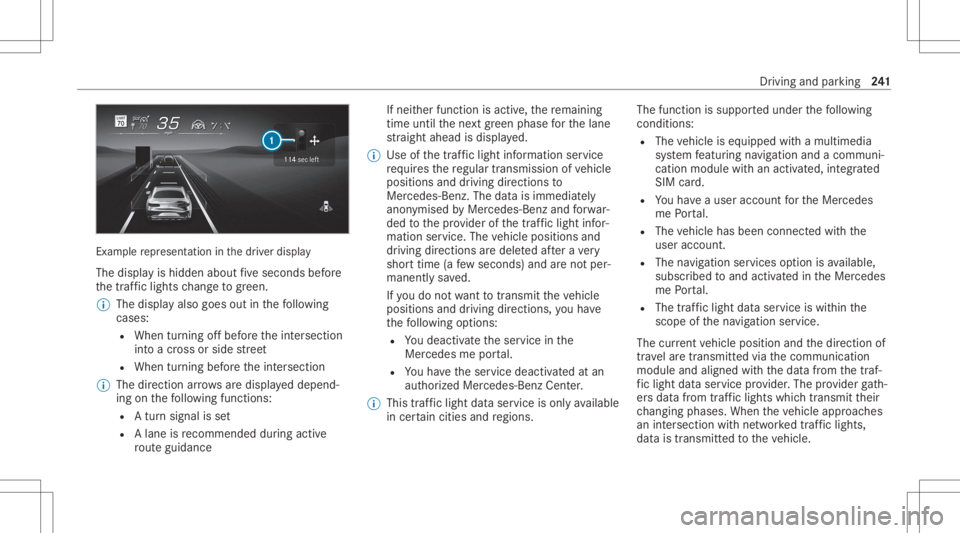
am ple re pr esent ation inthedr iver displa y
The displa yis hidden aboutfive seconds before
th etra ffic light sch ang eto gree n.
% Thedisp lay also goes outinthefo llo wing
cases :
R When turnin gof fbef oreth eint ersect ion
int oacr oss orside stre et
R When turning beforeth eint ersect ion
% The direct ion arrow sar edispla yeddepend‐
ing onthefo llo wing functions:
R Atur nsign alisset
R Alane isrecomme ndedduring acti ve
ro uteguidan ce If
ne ither function isact ive, there maini ng
time untilthene xt green phase forth elane
st ra ight ahead isdispla yed.
% Use ofthetraf fic light informati onser vice
re qu ires there gular transmission ofvehicle
positions anddriving directions to
Mer cedes-Ben z.The datais immediat ely
anon ymised byMer cedes-Ben zand forw ar‐
ded tothepr ov ider ofthetra ffic light infor‐
matio nser vice .The vehicle positions and
dr iving directions aredele tedaf te ra ve ry
shor ttime (afew sec ond s)and areno tper‐
man entlysave d.
If yo udo notwa nttotrans mitth eve hicle
positions anddriving directions, youha ve
th efo llo wing option s:
R Youdeac tivateth eser vice inthe
Mer cedes meportal.
R Youha ve theser vice deactiv ated atan
aut hor ized Mercedes- BenzCenter.
% This traffic light dataser vice isonl yav ailable
in cer tain cit ies and regions. The
funct ionissuppor tedunder thefo llo wing
con dition s:
R The vehicle iseq uipped withamultimedia
sy stem featur ingnavig atio nand acom mun i‐
cat ion modul ewit han act ivat ed, integrated
SIM card.
R Youha ve auser accoun tfo rth eMer cedes
me Portal.
R The vehicle hasbeen connectedwithth e
user accoun t.
R The navig atio nser vices optio nis available,
subsc ribed toand activat ed intheMer cedes
me Portal.
R The traffic light data ser vice iswit hin the
scope ofthena vig ation service.
The current vehicle position andthedir ect ion of
tra velar etransmit tedvia thecomm unication
module andaligned withth edat afrom thetraf‐
fi c light data ser vice prov ider .The prov ider gath‐
er sdat afrom traffic light swhic htransm itth eir
ch ang ingphase s.When theve hicle approaches
an intersection withne tworke dtra ffic light s,
dat ais transm itted totheve hicle. Dr
iving andparking 24
1
Page 244 of 610
A
se ttur nsigna lle ft or right and lane recom‐
mend ations during acti verouteguidan ceare
ta ke nint oacco untforth edispla y.
The service isforinf ormation purposes onlyand
is no tlink edtoanyot her vehicle functions, sys‐
te ms orcom ponents. Pleasenote that thedis‐
pla yeddat ais no tav ailable inall traf fic ar ea s
and maybe incor rect.
Ce rtain light signalsystems automaticall yadap t
th eir switc hingtimes tothecur rent traf fic situ a‐
tion. Thiscan lead toasudden chang ein the
cou ntdo wndispl ay.
The driver displa yis sho wnafte rsele cting the
Assi stance menu .If ano ther menu isselect ed,
th etraf fic light countdo wnisno tdi spl ayed.
Also obser vethefo llo wing informatio n:
R Selec ta speed adaptedto thetraf fic, sur‐
ro und ingsand weather condition s
R Obse rveactual traffic sign s
R Obser veapplic abletraffic ru les and regula‐
tions Obser
vetheno teson driving systems andyour
re sponsibili ty;yo uma yot her wise failto recog‐
nize dangers.
Sy stem limit s
The displa ydoes notappear inthefo llo wing sit‐
uation s,forex am ple:
R Ther eis no traf fic light data available.
R The timere maini nguntil thene xt green
phase isless than tenseco nds.
R Emerg encyvehicles orlocal publictranspor t
ar elocat edinthevicinit yof theint ersect ion.
R The datatra nsmiss ionfrom theve hicle has
been interru pte d.
R Light signal systems arelocat edinacon ‐
st ru ction sitear ea orarebei ng mai ntained.
R The light signal system ismalfunct ioning.
R The subscr iption totheser vice hasexpir ed. Ac
tiv eBli nd Spo tAs sist wit hex itwa rning Fu
nction ofActiv eBli nd Spo tAs sist wit hex it
wa rning
Ac tiveBli nd Spo tAssi stuses radar sensor sto
monit orthear ea up to130ft (40 m)behind and
10 ft(3 m) next to your vehicle.
The system can detect vehicles trave ling from
speeds ofappr oximat ely8 mp h(12 km/h) and
issue awa rning ifth ey mo veintoth emonit oring
ra ng e.
St atus displa yin thedr iver's displa y
¸ Gray:th esy stem isactiv ated but inoper a‐
tiv e.
¸ Green: thesy stem isactiv ated and oper a‐
tion al. 24
2
Driving and parking
Page 303 of 610
•
Sh ow ing thero uteov ervie w, ent ering
int ermediat edes tinat ions, select ingalterna‐
tiv ero utes
• Dis playing traffic inci dents andlocalar ea
re por ts
5 Mak essettings forView, Messa ges&Acous-
tic Signal sand Route
% Ifth ena vig ation menu isno tsho wn, tapon
th edigit almap.
% The option sar eno tav ailable inall coun tries. Ent
ering ades tination Re
quirement s:
R Foron line search :an Inte rn et connecti onis
es tablished .
R Mer cedes meconnectis available.
R Youha ve setup auser account inthe
Mer cedes mePortal.
R The vehicle isconn ectedwithth euser
account andyouha ve acc eptedth ete rm sof
use. Fu
rther information canbefound at:
ht tp s:// www .merced es.me
R The serviceis available.
R The servicehas been activat ed atan aut hor ‐
ize dMer cedes-Ben zCent er. Mult
imed iasystem:
4 © 5
Navigation 5
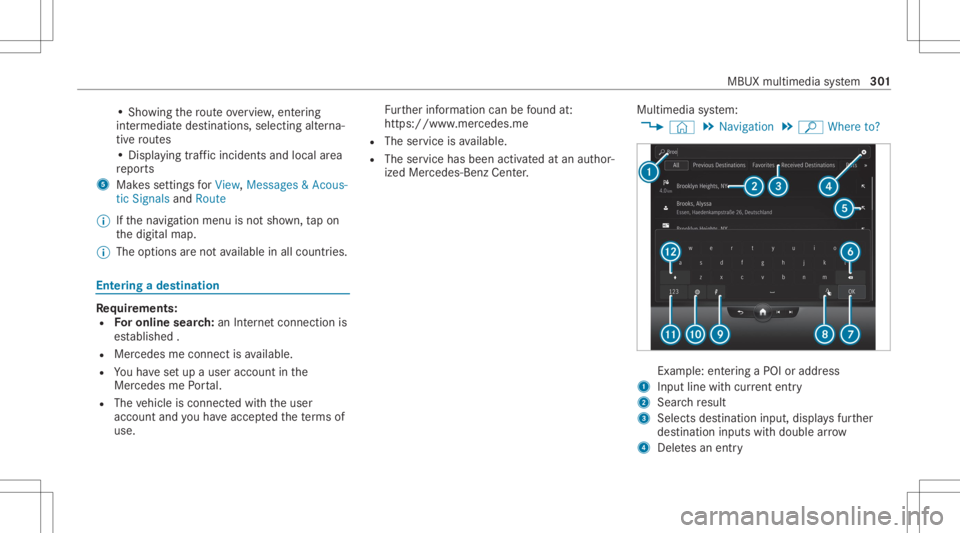
ª Where to? Ex
am ple: entering aPOI oraddr ess
1 Input line withcur rent entr y
2 Searchre sult
3 Selects destination input, displa ysfur ther
des tinat ioninputs withdouble arrow
4 Deletes an ent ry MBUX
multimedia system 30
1
Page 304 of 610
5
Adoptsthesear chresult intheinput line and
con tinues thesear ch
6 Deletes thelas tch aract erent ered
7 Hide sth eke ypad
8 Switches tohandwr itingrecogni tion
9 Starts theMBUX Voice Ass ista nt
A Setsthewr itten languag e
B Switc hestodigits andspecial charact ers
C Swit ches toupper -case orlowe r-case letter s #
Enterthedes tinat ionin1. The entries can
be made inanyor der .
The sear chresults aredispla yedin alis t.
% Onlin esear chresults forPOIs maycont ain
add itional information, forex am ple open ing
tim esand price s.The informat ionisprov i‐
ded byan online map service.
This online function isno tav ailable inall
coun tries.
% Youcan entera des tination asa3 wo rd
addr essfrom what 3words. This optio nis no t
av ailable inall coun tries. #
Hide theke yboar dwit h0076. #
Selec tth edes tinat ioninthelis t.
The routeis calc ulated.
% Obs erve theno teson theMBUX multimedia
sy stem (/ page27 9). Ca
lcu latin garo ut eand using settings for
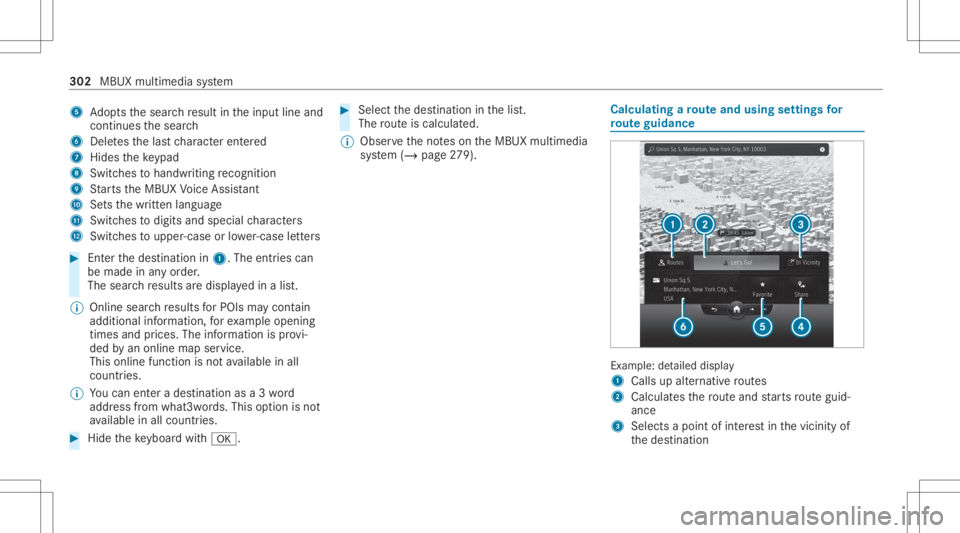
ro ut eguidanc e Ex
am ple:de tailed displa y
1 Calls upalternat ive ro utes
2 Calcula testh ero uteand star ts routeguid‐
anc e
3 Select sa poin tof interes tin thevicin ityof
th edes tinat ion 302
MBUX multimedia system
Page 307 of 610
Selec
tingmap orientation #
Tapre peat edlyon theÄ compass symbol
on themap.
The map orient ations chang esinthis order :
R The 3Dmap viewisaligned tothedir ec‐
tion oftra vel.
R The 2Dmap viewisaligned tothedir ec‐
tion oftra vel.
R The 2Dmap viewisdispla yedso that
no rth is alw aysat theto p.
R The map showsthecom pleteroute. Using
services Re
quirement s:
R Ther eis an Interne tcon nection .
R Mer cedes meconnectis available.
R Youha ve setup auser account inthe
Mer cedes mePortal.
R The vehicle isconn ectedtoauser accoun t
and youha ve acc eptedth econ ditions ofuse
fo rth eser vice. Fu
rther information canbefound at:
ht tp s:// www .merced es.me
R The serviceis available.
R The servicehas been activat ed atan aut hor ‐
ize dMer cedes-Ben zCent er.
Mult imed iasystem:
4 © 5
Navigation
Sho wing traf fic inf orma tion #
Select Z inthena vig ation menu. #
Select View. #
Select MapSymbols . #
ActivateTra fficInci dents and FreeFlo wing
Tra ffic.
Tr af fic inci dents ,fo rex am ple roadw orks ,
local area repor ts(e.g. fog) and warning mes‐
sag es, aresho wnonthero ute.
The traffic del ayisdispla yedfo rth ecur rent
ro ute. The smal lestva lue forth edispla yfo r
tr af fic del aysis aminut e. Displa
yinghazar dwa rnings
If hazar dwa rnings areav ailable these can be
sho wnassymbols onthemap. Thedispla y
depends onthese ttings forth eTraffic Incidents
op tion . #
Setth eop tion using Z.
If th eop tion isactiv ated, allofthesymbols
ar esho wn.
If th eop tion isdeactiv ated, thesymbols are
onl ysho wnwhen ther eis ahazar dwa rning.
The follo wing hazar dsma ybe sho wnonthe
map:
R Accid ents andbrea kdo wns
R Fogand ice
R Hazar dsrepor tedmanually
R Vehicle withactiv ehazar dwa rning light
R Mobile roadw orks
Disp laying onlin ema pcont ents #
Selec tZ inthena vig ation menu. #
Select View. #
Select MapSymbols . MBUX
multimedia system 305
Page 308 of 610
#
Swi tchon anonli neser vice ,e.g. Wea ther.
Cu rrent weather informat ionisdispla yedon
th ena vig ation map,e.g.temp eratur eor
cloud cover.
The service information isno tsho wninall
map scales, e.g.weather symbo ls.
Pa rking service &
WARNIN GRisk ofacci dent andinjury
due tonotob ser ving themaximum per‐
mitt edaccess height
If th eve hicle height isgreat erthan themaxi‐
mum permitt edaccess heightforpar king
ga rage s,thero of and other partsof theve hi‐
cle maybe damag ed.Vehicle occupants may
be injur ed. #
Beforeent ering apar king garage or
under ground parking, obser vethesign‐
pos tedent rance height. #
Ifth eve hicle height isgreat erthan the
acc ess heigh t,do notent er. *
NO
TEBef oresel ecti ngthepar king
op tion The
datais based oninformation prov ided by
th ere spectiv eser vice prov ider .
Mer cedes Benzacc epts no liability forth e
acc uracy oftheinf ormation prov ided relatin g
to thepar king garage /pa rking lot. #
Alw aysobser vethelocal Information
and conditions . %
This service isno tav ailable inall coun tries. #
Select Z andactivat ePark ing. #
Tapon 005D inthemap. #
Select apar king option .
The map showsthepar king option sin the
vicinity .
The follo wing informatio nis displa yed(if
av ailable):
R Destinat ionaddr ess, distance from cur‐
re nt vehicle position andarriva ltim e
R Informatio non thepar king garage /pa rk‐
ing facil ity Fo
rex am ple, open ingtimes, parking
ch arge s,cur rent occu pancy ,ma ximu m
pa rking time,ma ximu maccess height.
The maxim umaccess height shownby
th epar king service does notre place the
nee dfo robser vatio nof theactual cir‐
cums tances.
R Available paymen top tio ns (Mer cedes
pa y,coins ,ba nk notes, car ds)
R Detailson par kingta riff s
R Numb erofavailable parkingspac es
R Paymen tme thod (e.g. atthepar king
me ter)
R Services/f acilities atthepar king option
R Telephon enumb er #
Calculat eth ero ute(/ page30 2). 306
MBUX mult imed iasystem
Page 313 of 610
Connect
ingamob ilephone
Re quirement s:
R Blue tooth®
is act ivat ed on themobile phone
(see themanuf acturer'soper ating instruc‐
tion s).
R Blue tooth®
is act ivat ed on themultimedia
sy stem.
Multimedia system:
4 © 5
Phone 5
Z 5
Devic es
5 My Devic es
Sear ching fora mob ile pho ne #
Select Connect NewDevice.
Co nnectin gamob ile pho ne #
Select amob ile ph one .
A cod eis disp laye din themultimedia system
and onthemobile phone. #
Ifbo th code smatc h,conf irm thecode onthe
mobil ephone. Fu
nctions inthete lephon ymenu
In thete lephon ymen uyo uha ve thefo llo wing
func tions,forex am ple:
R Mak ingcalls ,e.g .:
- R Accep ta cal l
- k EndCall
- Answ ering acal lwi th ames sage
- i Conferenc e
- Accep ting orrejecti ngawa itin gcall
R Managin gcon tacts, e.g.:
- Downl oading mob ile pho necont acts
- Managi ngthefo rm atofacon tact's name
- Dele tingfavo rite s
R Recei ving andsend ingmess ages, e.g.:
- Usingthere ad-al oudfunction
- Dictating ane wmes sage Mer
cede sme and apps Mer
cede sme connect Inf
ormation onMer cede sme connect
Mer cedes meconnect consistsof multi pleserv‐
ices.
Yo ucan usethefo llo wing service svia themulti‐
media system and theove rhead control panel,
fo rex am ple:
R Accid ent and Brea kdo wnManag eme nt(me
bu tton orsitu ation-de pendentdispl ayinthe
multime diasystem)
R Mer cedes- Benzemergency callsy stem (aut o‐
matic emergency calland SOS button)
The Mercedesme conne ctAccid ent and Brea k‐
do wn Manag eme ntand theMer cedes- Benz
emer gency callcent erareav ailable toyou
ar oun dth ecloc k.
The mebutt onand theSOS buttoncan befound
on theve hicle's overhead control panel
(/ page31 3). MBUX
multimedi asy stem 31
1
Page 314 of 610
Yo
ucan also calltheMer cedes- BenzCustomer
Cent erusi ng themultimedia system
(/ page31 4).
Pl eas eno te that Mer cedesme connectis a
Mer cedes-Ben zser vice.In emer gencie s,firs tcal l
th enation alemer gency service sus ing the
st andar dnat ionalemer gency service telephon e
numb ers. In emer gencie s,yo ucan also usethe
Mer cedes-Ben zemer gency callsy stem
(/ page31 9).
Ple ase note theMer cedes meconnect term sof
use and thedat apr otect ion information for
Mer cedes meconn ect.Youcan find these in
yo ur Mer cedesme user accoun t.
Fu rther information aboutMercedes meconn ect
ser vices canbeobt ained intheMer cedes me
Po rtal: http s:// me. secure.m erced es-ben z.com
Inf orma tion onMer cedes meconnect Acci‐
dent andBreak down Manag emen t
The Accid ent and Brea kdo wnManag eme ntcan
incl udeth efo llo wing functions:
R Supplem enttotheMer cedes- Benzemer‐
ge ncy callsy stem (/ page31 9) If
necessa ry,th econ tact per son atthe
Mer cedes-Ben zemer gency callcent erfor‐
wa rdsth ecall toMer cedes meconn ectAcci‐
dent andBrea kdo wnManag eme nt.Forw ard‐
ing thecall isho we verno tpossi bleinall
countr ies.
R Breakdo wnassi stanc eby ate ch nici anon
lo cati onand /or theto wing away oftheve hi‐
cle tothenear estaut hor ized Mercedes- Benz
Cent er
Yo uma ybe charge dfo rth ese services.
R Addition totheemer gency guide af te rau to‐
matic accide ntor breakdo wndetection
(/ page 314)
In theev ent ofabr eakdo wnoracciden t,fur‐
th er vehicle datais sent whichenables opti‐
mal suppor tby theMer cedes- BenzCustomer
Cent erand theaut hor ized service partner or
br eakdo wnassis tance.
R Addition totheMer cedes meconnect
ser vice Telediagno stics
Wi th theTe lediagno stics func tion,spec ific
we arand failur ere por tsarere cor ded bythe
ser vice prov ider ,in so faras these can be clear
lyint erpr eted and areav ailable thro ugh
th emonit oring ofcom ponen tsthat aresub‐
je ct to diagnos tics.
If yo ur vehicle detects abr ea kdo wnorthre at
of abr eak down, youma ybe prom pte dvia
th emultimedia system tocont actthe
Mer cedes-Ben zCus tomer Cent erforfur ther
help. Thisprom ptinthemultimedia system
onl yappear swhen theve hicle isstatio nary.
% These services aresubject totech nica l
re strictions such asthemobile phonecover‐
ag e, mobil ene tworkqu alit yand theability of
th epr ocessin gsy stems tointerpr et the
tr ans ferred dat a.In some circums tances,
th is can result indela ysorthefa ilur eof the
inf ormatio nto appear inthemultimedia sys‐
te m.
Mor einf ormation aboutMer cedes meconnect
ser vices canbeobt ained intheMer cedes me
Po rtal: http s:// me. secure.m erced es-ben z.com 31
2
MBUX multimedia system
Page 315 of 610
Data
trans ferre ddur ing Mer cedes mecon‐
ne ct cal lse rvices
The datatransf erreddur ing aMer cedes mecon‐
nec tcall depends on:
R The reason forinitia tionofthecall
R The service that isselec tedin thevo ice con ‐
tr ol system
R The activ ated Mer cedes meconnect services
Yo ucan find outwh ich da ta istransf erredwhen
using theser vices inthecur rentl yva lid
Mer cedes meconnectte rm sof use and thedat a
pr otect ion information forMer cedes mecon‐
nect. Youcan find these inyour Mer cedesme
user accoun t. Mer
cedes mecalls Ma
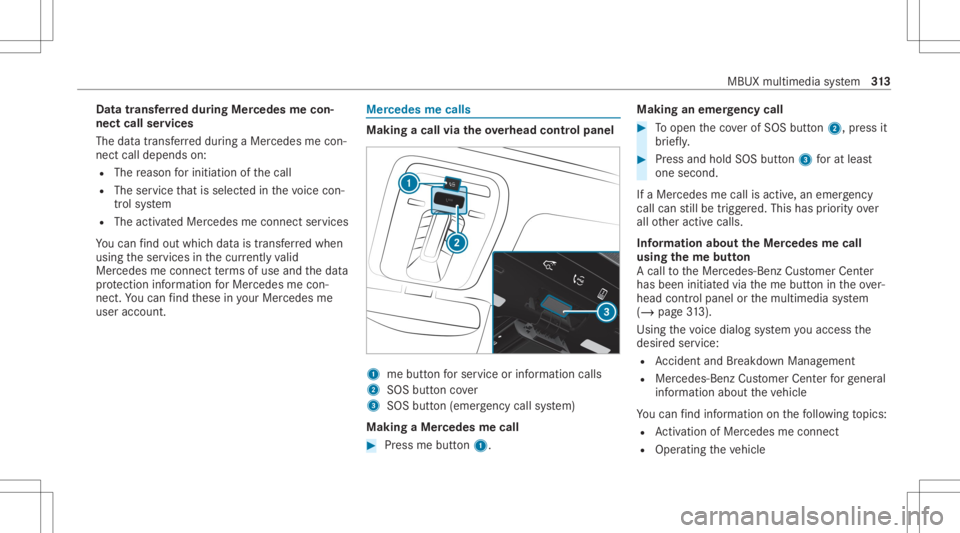
king acall viatheove rhead contr olpa nel 1
mebutt onforser vice orinformation calls
2 SOS buttoncover
3 SOS button (emerg ency callsy stem)
Making aMer cedes mecall #
Press mebutt on1. Making
anemer gency call #
Toopen theco verof SOS button2, press it
br ief ly. #
Press and hold SOS button3 forat lea st
one second.
If aMer cedes mecall isactiv e,an emer gency
cal lcan still be trigg ered. This hasprior ity ove r
all other activ ecalls.
Inf ormat ionabout theMer cedes mecall
using theme button
A cal lto theMer cedes- BenzCustomer Cent er
has been initiatedvia theme butt onintheove r‐
head controlpanel orthemultimedia system
(/ page31 3).
Us ing th evo ice dialog system youacc ess the
desir edser vice:
R Accid ent and Brea kdo wnManag eme nt
R Mer cede s-Benz Customer Centerforge ner al
inf orma tionab ou tth eve hicle
Yo ucan find informa tionon thefo llo wing topics:
R Activati on ofMe rcedes meconnect
R Oper ating theve hicle MBUX
multimedia system 31
3
Page 316 of 610
R
Near estaut hor ized Mercedes-Benz Center
R Other products andservices from Mer cedes-
Benz
Dat ais transf erreddur ing thecon nect iontothe
Mer cedes-Ben zCus tomer Cent er(/ page31 5).
Ca lling theMer cedes- BenzCustomer Center
usi ng the multi mediasy stem
Re quirement s:
R Access toaGSM networkis available.
R The contract partner' sGSM networkco ver‐
ag eis available inthere spectiv ere gion.
R The ignition mustbe switc hedonsothat
ve hicle datacan betransf erredaut omati‐
call y.
Multimedia system:
4 © 5
Phone 5
© #
Call Mercedes meconnect.
Af terconf irmation, themultimedia system
sends there qu ired vehicle data.The data
tr ansf erissho wninthecent raldispla y. Then,
youcan selectaser viceand beconn ect ed
to aspec ialistat theMer cedes- BenzCustomer
Cent er.
Call ingtheMer cedes- BenzCustomer Center
af te raut omat icac ciden tor break down
de tection
Re quirement s:
R The vehicle hasdetected anacci dent or
br ea kdo wnsitu ation.
R The vehicle isstatio nary.
R The hazar dwa rning light sar eswitc hedon.
% This function isno tav ailable inall coun tries.
The vehicle candetect acci dent orbrea kdo wn
situ ations undercer tain cir cums tances.
In theeve ntan acci dent or brea kdo wnisde tec‐
te d, theemer gency guide sho wssafetyno tesin
th emultimedia system displa y.
Af terqu itting theemer gency guide displ ayon
th emultimedia system, apr om ptappear sask ing
whe ther youwo uld liketo get suppor tfr om the
Mer cedes-Ben zCus tomer Cent er. #
Select Call.
R Afteryo ur agr eem ent,or ifth eMer cedes
me connect service "Acciden tand Break‐
do wn Manag ement"is activ e,theve hicle
dat ais transf erredaut omatic ally
(/ page31 2).
R TheMe rcedes-B enzCustomer Cent er
ta ke syo ur call and orga nize sth ebr eak‐
do wn and acciden tassis tance.
Yo uma ybe charge dfo rth ese services.
% Depen dingonthese verity of theacciden t,
an aut omatic emergency callcan beiniti‐
at ed .Thi sha spr iority over all other activ e
calls.
% Inaddition, ifth eMer cedes meconnect
ser vice "Telediagnos tics"is activ e,asimilar
pr om ptcan appea raf te ra dela yin theeve nt
of abr ea kdo wn. Ifyo uar ealr eady incontact
wit hth eMer cedes- BenzCustomer Cent eror
ha ve already recei vedsuppor t,th is prom pt
can beigno redor declined. 31
4
MBUX multimedia system