warning light MERCEDES-BENZ S CLASS 2022 Owner's Manual
[x] Cancel search | Manufacturer: MERCEDES-BENZ, Model Year: 2022, Model line: S CLASS, Model: MERCEDES-BENZ S CLASS 2022Pages: 610, PDF Size: 19.8 MB
Page 241 of 610
%
Ifth efunc tion isavailable, youcan activat e
or deac tivateth ewa rnings atpedes trian
cr ossin gs,stop signs andredlights inthe
Tr af fic Sign Assistmenu under Further Warn-
ings (/page239) .
Sy stem limit s
The system maybe impair edorma yno tfunc tion
par ticular lyin thefo llo wing situat ions:
R Ifvisibilit yis poor ,e.g. due toinsuf ficie ntillu ‐
mina tionofthero ad, high lyvariable shade
con dition s,rain, sno w,fog, swir ling dustor
hea vyspr ay.
R Ifth er eis glar e, e.g .fr om oncom ingtraffic,
di re ct sunli ght orreflect ions.
R Ifth ewindshield inthear ea ofthemultifunc ‐
tion camer ais dir ty,or ifth ecamer ais fog‐
ge dup, damag edorcovered.
R Iftraf fic sig ns aredifficult todetect, e.g.
beca useth ey aredir ty,co vered, faded, cov‐
er ed withice, damag ed,badly position ed,
poor lylit or twis ted. R
Activetraf fic sig ns with LED displ aysma yno t
be detected cor rectly oratalldu eto tech ni‐
cal fact or s, su ch astransm issionfreq uenc y.
R Ifth einf ormation onthena vig ation system's
digit almap isincor rect, incom plet eor out of
dat e.
R Ifsigns orthero ad layo ut isambig uous,e.g.
traf fic sig ns inroadw orks ,at exits and
ra mp s,in neighbor inglanes orpar alle lro ads.
R Ifsign sdo notcon form tothest andar d.
R Ifsign sor road layo uts arespec ific to the
cou ntryand devia tefrom thero uteguidan ce
in thena vig ation system, e.g.ator beyond
cons tructi onsite s.
R Aftershar ptur ns and tight curves, when traf‐
fi c sig ns areou tsid eth ecamer a'sfield of
vision.
R Ifyo uove rtak eve hicles withtraf fic sig ns
whi chareaf fixe dor att ached tothem. Se
tting Traf fic Sign Assis t
Mult imed iasystem:
4 © 5
Set ting s5
Assist ance
5 Assist ance 5
Traffic SignAssist
Ac tiv atin gor deac tivatin gthe speedwarning #
Activateor deacti vate Spee dLim itWa rning .
Se tting thetype ofwa rning #
Selec t´ next to Spee dLim itWa rning. #
Select Visual& Aud ible or Vis ual.
Se tting thewarning threshold
This value determ ines thespeed atwhic ha
wa rning isissued whenexceeded. #
Setth edesir edspeed underWarnin gThresh-
old.
Ac tiv atin gor deac tivatin gfur ther functions
of Traf fic Sign Assis t #
Activateor deacti vate Furthe rWa rnings .
The available function sar eact ivat ed ordeac ‐
tiv ated. Dr
ivin gand parking239
Page 245 of 610
Dr
iver displ ayintheAssist ancemenu
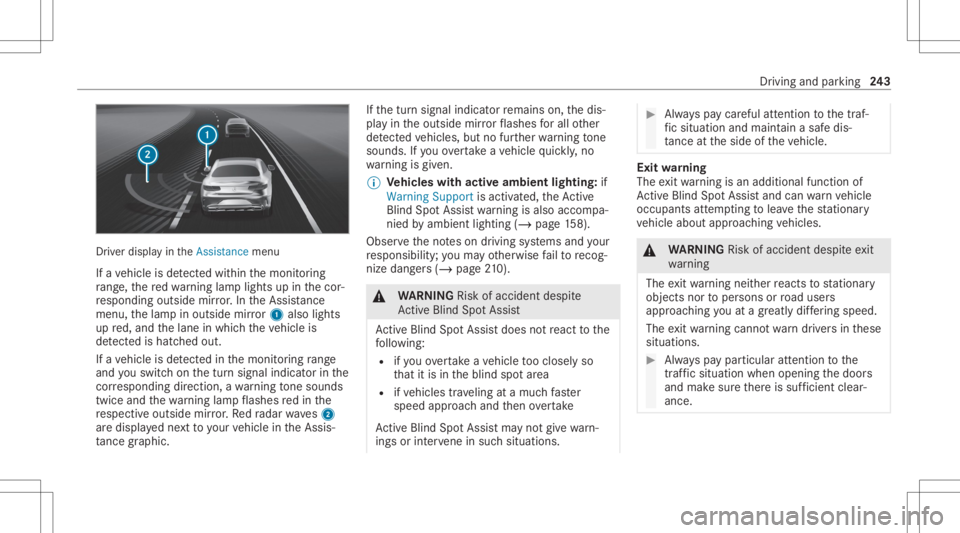
If ave hicle isde tected within themonit oring
ra ng e, there dwa rning lam plight sup inthecor‐
re sponding outsidemirror.In theAssis tance
menu ,th elam pin outside mirror1 alsolig hts
up red, and thelane inwhic hth eve hicle is
de tected isha tched out.
If ave hicle isde tected inthemonit oring rang e
and youswit chon thetur nsignal indicat orinthe
cor responding direction, awa rning tone sou nds
twi ce and thewa rning lam pflashes redin the
re spectiv eoutside mirror.Re dra dar waves2
ar edispla yedne xt to your vehicle intheAssis‐
ta nce grap hic. If
th etur nsignal indicat orremains on,thedis‐
pla yin theoutside mirrorflashes forall other
de tected vehicles, butnofurther wa rning tone
sou nds. Ifyo uove rtak eave hicle quickl y, no
wa rning isgiv en.
% Vehicl eswith activeambien tlig hting: if
Warni ngSupp ortisactiv ated, theAc tive
Bli nd Spo tAssi stwa rning isalso accompa‐
nied byambie ntlight ing(/ page15 8).
Ob serveth eno teson driving systems andyour
re sponsibili ty;yo uma yot her wise failto recog‐
nize dangers(/ page 210). &
WARNIN GRisk ofacci dent despite
Ac tiveBli nd Spo tAssi st
Ac tiveBli nd Spo tAssi stdoes notre act tothe
fo llo wing:
R ifyo uove rtak eave hicle tooclosely so
th at itis in theblind spotar ea
R ifve hicles trave ling atamuc hfa ster
speed approachand then ove rtak e
Ac tiveBli nd Spo tAssi stma yno tgiv ewa rn‐
ings orinterve ne insuch situations. #
Alw ayspa ycar eful attention tothetra f‐
fi c situ ation and maintain asaf edis‐
ta nce attheside oftheve hicle. Exit
warning
The exitwa rning isan addition alfunc tion of
Ac tiveBli nd Spo tAssi stand canwarnvehicle
occupants attem pting tolea vethest atio nary
ve hicle about approaching vehicles. &
WARNIN GRisk ofacci dent despite exit
wa rning
The exitwa rning neit her react sto statio nary
obj ect sno rto per sons orroad user s
appr oachingyo uat agr ea tly differ ing speed.
The exitwa rning cannotwa rndriver sin these
situation s. #
Alw ayspa ypar ticular attention tothe
tr af fic situ ation whe nope ning thedoor s
and makesur eth er eis suf ficie ntcle ar‐
ance . Dr
iving and parking 24
3
Page 246 of 610
If
ave hicle isde tected inthemonit oring rang e,
th ere dwa rning lam plight sup inthecor re‐
sponding outsidemirror.
If ave hicle occupant pullsthedoor handle on
th eside ofthewa rning, awa rning tone sou nds
twi ce and theambient lightinginthere spectiv e
door andthewa rning lam psinthecor respond‐
ing outside mirrorflash red.
Ve hicl eswith MBUX Interior Ass istant :th e
visu alwa rning begin sas soon asthehand ofa
ve hicle occupant movesin to thear ea ofthe
door .
% Ve
hicl eswith ambien tlig hting oractiv e
ambien tlig hting: theWarning Supportof
th eambient lightingcanbeactiv ated and
deactiv ated (/ page15 8).
% The warning assis tance candiffer depending
on theeq uipment andmayva ry acc ordin gto
th ese tting.
The exitwa rning isonl yav ailable whenActive
Bli nd Spo tAssi stisact ivat ed and uptoamax i‐
mum ofthre eminut esafte rth eignition has
been switchedoff.The exitwa rning isno long er av
ailable once thewa rning lam pin theoutside
mir rorflashes thre etimes.
The exitwa rning isonl yan aid and nota subs ti‐
tut efo rth eatt ent ion ofvehicle occupants. The
re sponsibili tyforopening andclosi ngthedoor s
and forlea ving theve hicle remains withth eve hi‐
cle occupants.
Sy stem limit s
Ac tiveBli nd Spo tAssi stma ybe limi tedin thefo l‐
lo wing situat ions,in par ticular :
R Ifth er eis dir ton thesensor sor thesensor s
ar eobscur ed
R Inpoor visibility ,e.g. due tofog, hea vyrain or
sno w
R Ifth er ear enar row vehicles, e.g.bicycles or
mo torbik es
R Ifth ero ad has very wide ornar row lanes
R Ifve hicles areno tdr iving inthemiddle of
th eir lane
Wa rnings maybe issued inerro rwhen driving
close tocrash barrier sor similar continuous lane
bor ders.Alw aysmak esur eth at ther eis suf fi‐ cie
ntdist anc eto theside forot her traf fic or
obs tacle s.
Wa rnings maybe interru pte dwhen driving along‐
side long vehicles, forex am ple truc ks,fo ra pr o‐
long edtime.
Ac tiveBli nd Spo tAssi stisno topera tionalwhen
re ve rsege ar iseng aged.
Ad dition ally,theex itwa rning maybe limit edin
th efo llo wing situat ions:
R When thesensor sar eco veredby adjac ent
ve hicles innar row par kingspac es
R When people approachth eve hicle
R Intheeve ntofstatio naryor slo wlymo ving
obj ect s
Fu nction ofthebr ak eap plica tionofActiv e
Bli nd Spo tAs sist
If Ac tiveBli nd Spo tAssi stdetects arisk ofaside
im pact inthemonit oring rang e, acou rse-co r‐
re cting brak eap plica tion iscar ried out. This is
designed tohelp youavo idacollis ion.
The cour se-cor recting brak eap plica tion isavaila‐
ble inthespeed rang ebe twee nap prox imat ely
20 mph(3 0km/h) and125mp h(2 00 km/h) . 24
4
Driving and parking
Page 249 of 610
ous
lane markings oronl ycont inuous lanemark‐
ings (/page24 8).
St atus displa ysforAc tiv eLan eKe eping
Assis t
ï White:Ac tiveLa ne Keeping Assistis
deactiv ated.
ï Yello w: ther eis amalfunct ion.Please
also obser vethedispla ymessag es.
ð Gray:Ac tiveLa ne Keeping Assistis acti‐
va ted, but notoper ating.
ð Green: ActiveLa ne Keeping Assistis
activ ated and oper ating. Ifth esy stem is
oper ational ononlyone side, thelane
mar king issho wningreen onthecor re‐
sponding side.
ð Red:ActiveLa ne Keeping Assisthas gui‐
ded youbac kint oyo ur lane witha
co urse- correct ing steer ing interve ntio n.
The status displa ywill flash ifth er eis
also ahap ticwarning inthesteer ing
wheel. Thelane marking issho wninred
onl yon theside forwhi chther eis a
wa rning. Ve
hicl eswithout Drivin gAss istanc e
Pa ckag e:ifbo th lane markingsare
simult aneousl ysho wninredin thest atus
displa y,Ac tiveLa ne Keeping Assisthas
initiat edanemer gency stop
(/ page22 7).
Ac tiv eLan eCha ngeAs sist displ ayinthe
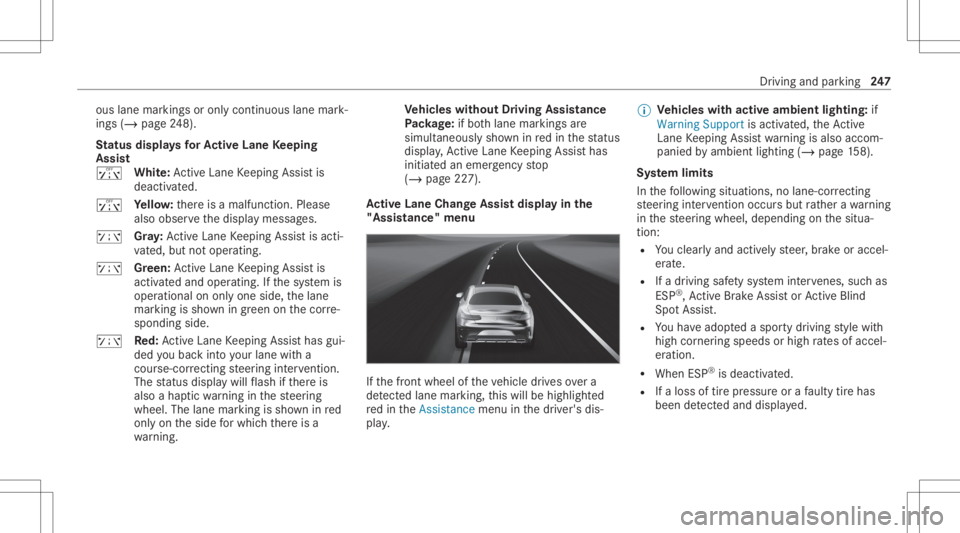
"Assis tance"menu If
th efront wheel oftheve hicle drives ove ra
de tected lane mar king, this will behighligh ted
re din theAssist ancemenu inthedr iver's dis‐
pla y. %
Vehicl eswith activeambien tlig hting: if
Warni ngSupp ortisactiv ated, theAc tive
La ne Keeping Assistwa rning isalso accom‐
panied byambie ntlight ing(/ page15 8).
Sy stem limit s
In thefo llo wing situat ions,no lane- correcting
st eer ing interve ntio noccu rsbut rath er awa rning
in thesteer ing wheel, depending onthesitua‐
tion :
R Youcle arly and activel yst eer ,br ak eor accel‐
er ate.
R Ifadr iving safetysy stem interve nes, such as
ES P®
,Ac tiveBr ak eAssi stor ActiveBli nd
Spo tAssi st.
R Youha ve adop tedaspor tydriving style wit h
high corner ing speeds orhigh ratesof accel‐
er ation.
R When ESP®
is deactiv ated.
R Ifaloss oftirepr essur eor afa ulty tirehas
been detected and displ aye d. Dr
iving andparking 24
7
Page 289 of 610
The
funct ioncan warnvehicle occupants abouta
possible collisionwithan appr oaching vehicle or
bicy clewhen they exitth eve hicle.
As soon asave hicle occupant movesth eir hand
to wa rdsth edoor handle, depending ontheve hi‐
cle equipment, thefo llo wing warnings are
issued:
R The active ambien tlight ingorambien tlight ‐
ing flashes red.
R The warning lam pin theoutside mirrorals o
fl ashes redfo rone ofthefront door s.
R When thedoor isopened, awa rning tone
sou nds.
% The visualwa rning isthus already given
bef oreth edoor isopened.
% Further information onActiveBli nd Spo t
Assi stwit hex itwa rning (/ page24 2) and
on ambientlighti ng(/ page 158). Swi
tchin gthe reading light and sear chlight
and onoroff Re
quirement s:
R Forthe reading light:th ecamer asare
switc hedon:
The front camer aactiv ates there adin glight
fo rdr iver and front pass enger.
The rear cam eraact ivat es there adin glight
fo rth elef tand right rear seat passe ngers.
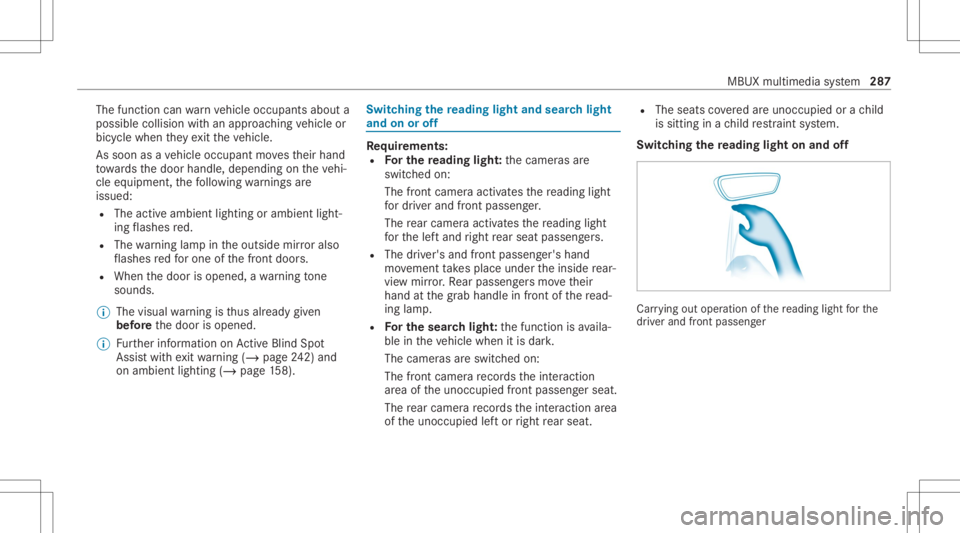
R The driver' sand fron tpasse nger' shan d
mo vement take splace under theinside rear‐
vie wmir ror.Re ar passe ngersmo vetheir
hand atthegr ab handle infront ofthere ad‐
ing lam p.
R Forthe search light :th efunc tion isavaila‐
ble intheve hicle when itis dar k.
The camer asareswitc hedon:
The front camer are cor dstheint eraction
ar ea oftheunocc upied front passeng erseat.
The rear cam erare cor dstheint eraction area
of theunocc upied leftor right rear seat . R
The seat sco veredar eunocc upied orach ild
is sitt ing inach ild restra int system.
Switc hingthere ading light on and off Ca
rrying outoper ation ofthere adin glight forth e
dr iver and front passeng er MBUX
multimedia system 28
7
Page 307 of 610
Selec
tingmap orientation #
Tapre peat edlyon theÄ compass symbol
on themap.
The map orient ations chang esinthis order :
R The 3Dmap viewisaligned tothedir ec‐
tion oftra vel.
R The 2Dmap viewisaligned tothedir ec‐
tion oftra vel.
R The 2Dmap viewisdispla yedso that
no rth is alw aysat theto p.
R The map showsthecom pleteroute. Using
services Re
quirement s:
R Ther eis an Interne tcon nection .
R Mer cedes meconnectis available.
R Youha ve setup auser account inthe
Mer cedes mePortal.
R The vehicle isconn ectedtoauser accoun t
and youha ve acc eptedth econ ditions ofuse
fo rth eser vice. Fu
rther information canbefound at:
ht tp s:// www .merced es.me
R The serviceis available.
R The servicehas been activat ed atan aut hor ‐
ize dMer cedes-Ben zCent er.
Mult imed iasystem:
4 © 5
Navigation
Sho wing traf fic inf orma tion #
Select Z inthena vig ation menu. #
Select View. #
Select MapSymbols . #
ActivateTra fficInci dents and FreeFlo wing
Tra ffic.
Tr af fic inci dents ,fo rex am ple roadw orks ,
local area repor ts(e.g. fog) and warning mes‐
sag es, aresho wnonthero ute.
The traffic del ayisdispla yedfo rth ecur rent
ro ute. The smal lestva lue forth edispla yfo r
tr af fic del aysis aminut e. Displa
yinghazar dwa rnings
If hazar dwa rnings areav ailable these can be
sho wnassymbols onthemap. Thedispla y
depends onthese ttings forth eTraffic Incidents
op tion . #
Setth eop tion using Z.
If th eop tion isactiv ated, allofthesymbols
ar esho wn.
If th eop tion isdeactiv ated, thesymbols are
onl ysho wnwhen ther eis ahazar dwa rning.
The follo wing hazar dsma ybe sho wnonthe
map:
R Accid ents andbrea kdo wns
R Fogand ice
R Hazar dsrepor tedmanually
R Vehicle withactiv ehazar dwa rning light
R Mobile roadw orks
Disp laying onlin ema pcont ents #
Selec tZ inthena vig ation menu. #
Select View. #
Select MapSymbols . MBUX
multimedia system 305
Page 354 of 610
&
WARNIN GRisk ofexplosion during
ch argin gpr oce ssand star tin gassis tance
Dur ing thech argin gpr oce ssand star tin g
assis tance, thebatt eryma yre lease anexplo‐
siv ega smixtur e. #
Avoid fire ,open flames ,cr eat ing spar ks
and smoking. #
Mak esur eth er eis suf ficie ntventil a‐
tio n. #
Donotle an ove ra batt ery. &
WARNIN GRisk ofexplosion from afro‐
zen battery
A disc hargedbatt eryma yfreeze attemp era‐
tur es slightl yabo veorbelo wfreezing point.
Dur ing star tin gassis tance orbatter ych arg‐
ing ,bat tery gascan bereleased. #
Alw aysallo wabatt eryto thaw before
ch argin git or per form ing star tin gassis ‐
ta nce. If
th eindicat or/warning lampsintheins trument
clus terdo notlig ht up atlow temp eratur es,itis
ve ry likelyth at thedisc hargedbatt eryhas fro‐
zen .In this case youma yne ither jump-start the
ve hicle norcharge thebatt ery.
The service life of abatt eryth at has been
th awe dma ybe dramaticall yshor tened .The
st ar tin gch aract eristic sma ybe impair ed,espe ‐
ciall yat low temp eratur es.
It is recomme ndedthat youha ve ath aw ed bat‐
te ry checkedat aqu alif ied spec ialistwo rkshop.
All vehicl es
* NO
TEDama gecau sed bynum erou sor
ex tende datt em ptsto star tth eengine Nu
me rous orextende datt em ptsto star tth e
engine maydamag eth ecat alytic converter
due tonon-co mbusted fuel. #
Avoid numer ousand extende datt em pts
to star tth eengine. Obser
vethefo llo wing pointsdur ing star tin g
assis tance and when chargin gth ebatt ery:
R Onlyuse undamag edjum per cables/c harg‐
ing cables withasuf ficie ntcross -secti onand
insu late dte rm inal clam ps.
R Non-insulat edpar tsof thete rm inal clam ps
mus tno tcom eint ocon tact with other metal
par tswhile thejum per cable/c harging cable
is con nect edtothebatt ery/jum p-start con‐
nectio npoi nt.
R The jumper cable/c harging cable mustno t
com eint ocon tactwi th anypar tswhic hma y
mo vewhen theengine isrunning .
R Alw aysmak esur eth at nei ther youno rth e
batt eryis elect rostatic allych arge d.
R Keep away from fire and open flames .
R Donotlean overth ebatt ery.
Obser vetheadditional follo wing pointswhen
ch argin gth ebatt ery:
R Onlyuse batterych arge rs tested and
appr oved forMer cedes-Benz.
R Read thebatt erych arge r's oper ating instruc‐
tions beforech argin gth ebatt ery. 352
Breakdo wnassis tance
Page 503 of 610
Disp
laymes sages
Possible causes/conseq uencesand0050 0050
Solutions
Á Key Being Initialized Please
Wait *T
hevehicle isprocessing inorder toteac hin thene wSmar tKey . #
Waitunt ilpr oces sing iscom plete.
Place theKey inthe
Marked SpaceSeeOpera-
tor's Manual *S
mar tKey detection ismal functi oning. #
Chang eth elocation oftheSmar tKey intheve hicle. #
Place theSmar tKey inthemar kedspace forst ar tin gth eengine withth eSmar tKey (/ pag e18 2). Lig
hts Dis
playmess ages
Possible causes/conseq uencesand0050 0050
Solutions
: Check LeftLow
Beam (exa mp le) *T
hecor responding lightsourceisdef ectiv e. #
Drive on car efully . #
Visit aqu alif ied spec ialistwo rkshop immediat ely.
% LED lightsour ces: thedispla ymessag efo rth ecor responding lightappea rsonl ywhen allthelight- emitt ing
diodes inthelight arefa ulty . Dis
playmes sagesand warning/ indic ator lam ps 50
1
Page 504 of 610
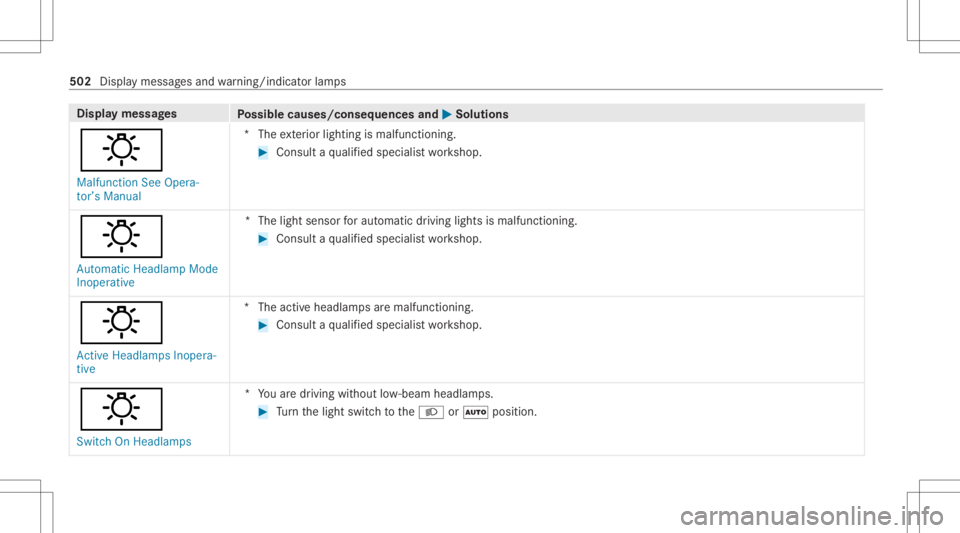
Disp
laymes sages
Possible causes/conseq uencesand0050 0050
Solutions
: Malfunct ionSee Opera-
tor’s Manual *T
heexterior lighting ismalfunct ioning. #
Consult aqu alif ied spec ialistwo rkshop.
: Automatic HeadlampMode
Inoperative *T
helight sensor forau tomatic driving lightsismalfu nctioning. #
Consu ltaqu alif ied spec ialistwo rkshop.
: Act ive Headla mpsInopera-
tive *T
heactiv eheadla mpsar emalfunctioning. #
Consult aqu alif ied spec ialistwo rkshop.
: Switch OnHeadla mps *Y
ouaredr iving without low- beam headlam ps. #
Turn thelight switc hto the0058 or0058 position . 502
Displa ymessag esand warning/ indic ator lam ps
Page 505 of 610
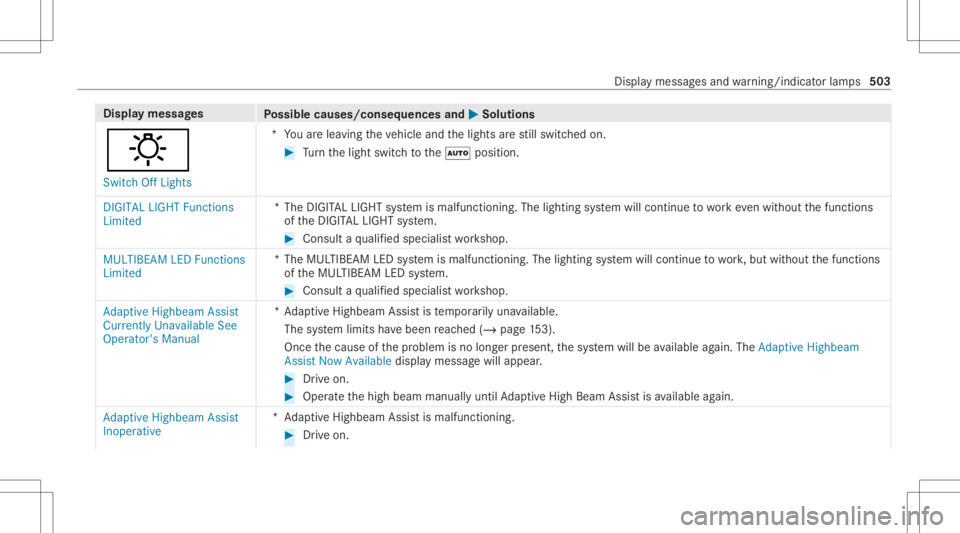
Disp
laymes sages
Possible causes/conseq uencesand0050 0050
Solutions
: Switc hOff Lights *Y
ouarelea ving theve hicle andthelights arest ill switc hedon. #
Turn thelight switc hto the0058 position .
DIGITA LLIGHT Functions
Limited *T
heDIGIT ALLIGHT system ismalfunct ioning.Thelighting system will continue towo rkeve nwi thout thefunc tions
of theDIGIT ALLIGHT system. #
Consult aqu alif ied spec ialistwo rkshop.
MULTIBEA MLED Funct ions
Limited *T
heMUL TIBEA MLED system ismalfunct ioning.Thelighting system will continue towo rk,but without thefunc tions
of theMUL TIBEAMLED system. #
Consult aqu alif ied spec ialistwo rkshop.
Adaptive Highbeam Assist
Currently UnavailableSee
Operator's Manual *A
dap tiveHighbeam Assistis temp orarily una vailable.
The system limits have been reac hed (/page15 3).
Once thecause ofthepr oblem isno long erpresent ,th esy stem will beavailable again. TheAdap tiveHig hbeam
As sist Now Available displaymes sagewill appear . #
Drive on . #
Operat eth ehigh beam manually untilAdaptiveHig hBeam Assis tis available again.
Adap tiveHig hbeam Assist
In oper ative *A
daptiveHighbeam Assistis malfunc tioning. #
Drive on. Displa
ymessag esand warning/ indic ator lam ps 503