wheel MERCEDES-BENZ S CLASS 2022 Workshop Manual
[x] Cancel search | Manufacturer: MERCEDES-BENZ, Model Year: 2022, Model line: S CLASS, Model: MERCEDES-BENZ S CLASS 2022Pages: 610, PDF Size: 19.8 MB
Page 275 of 610
Scr
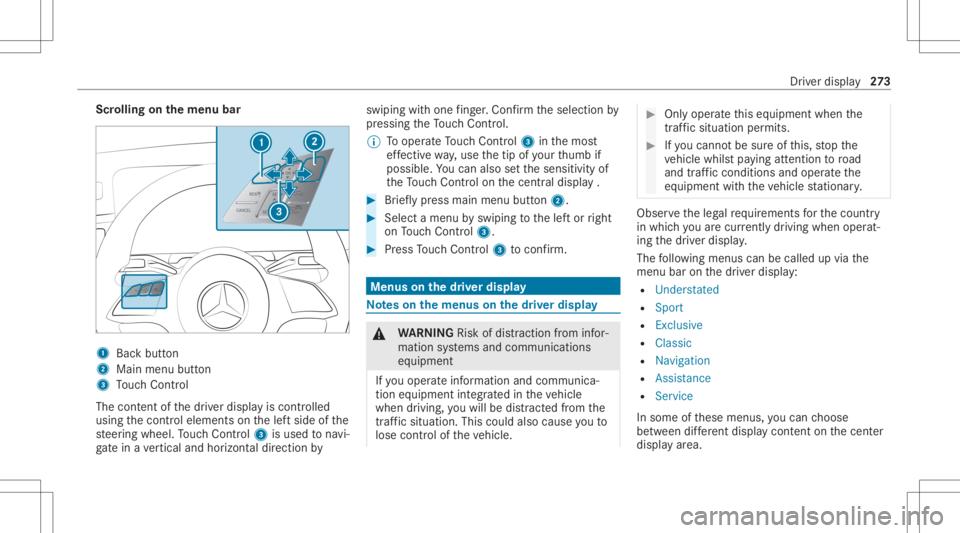
olling onthemenu bar 1
Backbutt on
2 Main menubutt on
3 Touc hCon trol
The conten tof thedr iver displa yis con trolled
using thecon trol element son thelef tside ofthe
st eer ing wheel. Touc hCon trol 3 isused tonavi‐
ga te inave rtical and horizon taldir ect ion by swiping
withone fing er.Co nfirm theselect ionby
pr essing theTo uc hCon trol.
% Tooper ateTo uc hCon trol 3 inthemos t
ef fectiv ewa y,use thetip ofyour thumb if
poss ible. Youcan also setth esensit ivityof
th eTo uc hCon trol on thecent raldispla y. #
Brief lypress main menu button2. #
Select amenu byswiping tothelef tor right
on Touc hCon trol 3. #
Press Touc hCon trol 3 toconf irm. Men
uson the driver displ ay No
teson themenu son thedr iver disp lay &
WARNIN GRisk ofdist ra ction from infor‐
mati onsystems andcomm unication s
eq uipment
If yo uoper ateinf ormat ionand comm unic a‐
tio neq uipme ntintegratedin theve hicle
when driving, youwill bedistract ed from the
tr af fic situ ation. Thiscou ldalso cau seyouto
lose control of theve hicle. #
Onlyoper ateth is eq uipmen twhen the
tr af fic situ ation per mits. #
Ifyo ucan notbe sur eof this, stop the
ve hicle whilstpa ying attention toroad
and traffic condi tions andoperate the
eq uipment withth eve hicle statio nary. Obser
vetheleg alrequ iremen tsforth ecount ry
in whic hyo uar ecur rently drivi ng when operat‐
ing thedr iver displa y.
The follo wing menuscan becalled upvia the
menu baronthedr iver displa y:
R Unders tated
R Sport
R Exclusive
R Classic
R Navigation
R Assist ance
R Serv ice
In some ofthese menus, youcan choose
be tween differe nt displ aycont entonthecent er
displa yar ea. Dr
iver displa y27
3
Page 285 of 610
when
drivin g,youwill bedistract ed from the
tr af fic situ ation. Thiscou ldalso cau seyouto
lose control of theve hicle. #
Onlyoper ateth is eq uipmen twhen the
tr af fic situ ation per mits. #
Ifyo ucan notbe sur eof this, stop the
ve hicle whilstpa ying attention toroad
and traffic condi tions andoperate the
eq uipment withth eve hicle statio nary. Fo
ryo ur ow nsa fety,al wa ys obser vethefo llo w‐
ing point swhen operatingmobile communic a‐
tion seq uipmen tand espec iallyyo ur voice con ‐
tr ol system:
R Obser vetheleg alrequ iremen tsforth ecoun‐
tr y in whic hyo uar edr ivin g.
R Ifyo uuse thevo ice con trol system inan
emer gency your voice can chang eand your
te lephon ecall, e.g.anemer gency call,can
th er eb ybe unnec essarilydela yed.
R Famili arize yourself withth evo ice con trol
sy stem func tionsbef orest ar tin gth ejour ney.
Using theMBUX Voice Ass ista nt, vehicle func‐
tions andvarious areas oftheMBUX multimedia sy
stem can beoper ated byvoice input. The
MBU XVo ice Ass ista nt isop erati ona lap prox ‐
imat elyhalf amin uteaf te rswi tching ontheigni‐
tion andcanbeoper ated from allseats. Further
inf ormation andexam ples ofvoice com mand s
can befound intheDigit alOper ator's Manual.
Yo ucan usetheMBUX Voice Ass ista nt tooper‐
at eth efo llo wing functionsdepen dingonthe
ve hicle equipment :
R Telephon e
R Text mes sage and e-mail
R Navig ation
R Radio, media, TV
R Vehicle functions
R Online functions
Fu llfunc tionality ofthevo ice con trol system is
onl yav ailable foryo uwit hact ivatio nof online
vo ice con trol. Condu
ctingadia log St
arting adialo g #
Say"Hey Merced es"toact ivat eth eMBUX
Vo ice Ass ista nt. Voice activation mustbe
switc hedoninthemultimedia system.
or #
Press the£ buttononthemultifunc tion
st eer ing wheel.
A blue lineappear sin theMBUX multimedia
sy stem. Thedialog canbestar ted.
Fo rth edialog withth eMBUX Voice Ass ista nt,
yo ucan usecomp lete sent ences ofcolloq uial
langua geasvoice com mand s.Vo ice activation
can also bedirect lycom bined withavo ice com ‐
mand ,e.g. "Hey Mercedes, howfastcanI
drive ?".
Calling uphelp #
Forin fo rm ation about theMB UX Voice
Assis tant:sa y"Hey Mercedes, whatcan
you do?" #
Digital Operator's Manu al:"Show methe
Operat or'sManual". Thefullextent ofthe MBUX
multimedia system 283
Page 292 of 610
The
driver camer amus tbe setup forfa ce detec‐
tion beforeus e. Teac hin g-in biom etric da ta
( / pag e292).
Sy stem limit s
The system maybe impair edorma yno tfunc tion
in thefo llo wing situat ions:
R The camera isco veredor dir ty,fo gg ed up or
scr atc hed.
R The driver's face and /or eyesar eco vered.
R The driver iswe aring glasses that bloc kinf ra‐
re d.
Displa ymessag es
In thefo llo wing situat ionsdispla ymess ages ma y
be sho wn:
R The driver camera isinope rativ e.
The cam erais faulty .
The Driver Camer aIn oper ativeSee Oper a-
to r's Man ualmes sageappear s.
R The driver cam eracan notcap tureth eposi‐
tion ofyour head. The
Chan gethest eer ing wheel /seat posi-
tio nunt il6 dot sare visible ontheupper
edge ofthesc ree n.mes sageappear s.
R The viewof thedr iver camer ais reduced or
re strict ed.
The Drive rCa mera ViewCu rrentl yRe stricte d
See Operator'sManua lmess ageap pea rs.
No teson car e
Please complywit hth eno teson car ing forth e
int erior (/ page340 ). Switc
hingthedr iver cam eraon oroff Multi
media system:
4 © 5
Set ting s5
System
5 Intelligent Assistance #
Select OnorOff.
When thedr iver camer ais switc hedoff,th efo l‐
lo wing functionsar eno tav ailable orlimit ed:
R The 3Ddriver displa y(/ page27 2)
R TheMB UX aug mented realit yHead -upDis‐
pla y(/ page27 4) R
Themi crosl eep detection ofATTENTION
ASS IST(/ page21 6)
R Thefa cia lre cogni tion
Thi sfuncti onser vesas sensor input for
aut hen ticatio nand unlocking oftheuser pro‐
fi le and protect edapplications
(/ page292).
R Multimodality
This function activ ates theMBUX Voice
Ass ista nt with eyecon trol, e.g. forth econ fir‐
mation ofadisp lay messa gebyvoice. Inf
orma tion onuser s,sugg estions andfavo r‐
it es &
WARNIN GRisk ofbeco ming trap ped
du ring adjus tment ofthedr iver's seat
af te rcall ing upadr iver profile
Selecting auser profile ma ytrigg eran
adju stment ofthedr iver's seat totheposi‐
tion save dunder theuser profile. Youor
ot her vehicle occupants couldbeinjur edin
th epr ocess. 290
MBUX multimedia system
Page 294 of 610
Dep
endingontheve hicle equipment youcan ,as
a user ,sa ve thefo llo wing settings ,fo rex am ple:
R Driver' sseat ,st eer ing wheel andmirrorse t‐
tings
R Climat econtr ol
R Ambient lighting
R Radio (including statio nlis t)
R Sugg estio ns and favo rite s
Sugg estions
The vehicle canlearnth ehabits ofthedr iver .It
th en mak essugg estion sre ga rding navig ation
des tination s,phon enumb ersand music prefer‐
enc es.The requ iremen tsforth at areth eselec‐
tion ofauser ,yo ur consen tto there cor ding of
da ta and sufficie ntcoll ecteddata.
Favo rite s
Favo rite sof feryo uqu ick acc ess tofreq uently
use dapp lications. 100favo rite sar eav ailable in
tot al. Conf
iguringuser s,sugg estion sand favo rite s Re
quirement s:
R Touse these t-up assis tant :th eve hicle issta‐
tio nar y.
Multimedia system:
4 © 5
f 5
Change User
Ad ding ause r #
Select 0074Add User.
A QR code isloa ded . #
Scan thedispla yedQR code withth e
Mer cedes meapp oranyQR code scanner
on amobile device. Ifth eMer cedes meapp
is no tye tins talled onyour mob iledevic e,
yo uwill bedirect edtothestor eof your
mob iledevic e. #
Followthedir ect ions intheapp.
The vehicle isconn ectedwithyo ur Mer cedes
me user accoun t.This automat icallycr eat es
yo ur user profile intheve hicle.
If onl yyo ur user profile isavailable, itwill be
loaded automat ically. If
mor eth an oneuser profile isavailable, you
will bedirect edtotheuser select ion.
When theve hicle isstatio nary,these t-up
assis tant star ts aut omat icallyaf te ruser
sele ction.
Sel ecti nguser options #
Select Settings . #
Select Suggestions. #
Select AllowAllSugge stions.
or #
Switc hth eop tion son oroffindividuall y.
If an option isswitc hedonand sufficie nt
da ta has been gather ed, sugg estion sbased
on your user behaviorwillbeoffere dto you. #
Forin te llig ent multim odalit y:select Multi-
modality.
If th eop tion isactiv e,theMBUX Voice Ass is‐
ta nt can beacti vatedin cer tain situat ions. #
Toswitc hth elear ning function offfo r
24 h:swi tchon Deactiva te24h Intelli gent
Learni ng. 292
MBUX multimedi asy stem
Page 296 of 610
#
Touse voice recognit ion:speak thesen‐
te nce shownonthecent raldispla yand fol‐
lo w theins truction sof thevo ice assis tant.
If th evo ice recogni tionwassuccessful, a
messag eappea rson thecent raldispla y.Yo u
can unlockyo ur user profile and protect ed
applications withvo ice input.
% Avoid background ordis turbin gno ises dur‐
ing voice recogni tion. #
Todel etebiome tric da ta: selec tDele te. #
Sele ctJa(Yes).
Selecti ngauser
% When youcall upyour driver profile, thedr iv‐
er's seat andthesteer ing wheel canbeset.
Yo ucan cancelthese tting process withth e
fo llo wing actions :
R Tapon theTap Here toCancel messag e
in thecent raldispla y.
R Press one oftheseat operating buttons
in thedr iver's door . #
Select Change User. #
Select auser . #
When requ estedto do so, authent icatewit h
th eMer cedes mePIN orata ught -inbiom et‐
ri c ch aract eristic .
The user profile isloaded andactivat ed.
% Ifyo usele ctCon tinue Wit hout Select ing a
Use r,no spec ific setting sfo rth euser profile
ar eloaded.
Ad ding favo rite sfrom categor ies #
Select ©. #
Select ß. #
Select 0048. #
Select 0081Create NewFavorit e. #
Select thecat egor y. #
Select afa vo rite .
Linking favo rite swith theMB UX Interior
Assis tantVpose #
Sele ct©. #
Sele ctß. #
Sele ct0048. #
Sele ctDriver orPassen ger. #
Sele ctthecat egor y. #
Select afa vo rite . Sy
stem settings Ov
ervie wof thesy stem settings menu In
thesy stem settings menu, youcan makese t‐
tin gs inthefo llo wing menusand control ele‐
men ts:
R Disp lay:
- Disp lay br ight ness
R Cont rolelemen ts:
- Keyboar dlan guag eand handwr itin g re c‐
ogni tion
- Touc hpad sensitivit y
- Sen sitivit yof theTo uc hCon trols
- Hap ticoper ationfo rth eto uc hsc reen
R MBUX Voice Ass ista nt
R MBUX InteriorAssi stant
R Soun d:
- Entertainm ent 29
4
MBU Xmult imed iasystem
Page 322 of 610
connecti
onises tablished withth eemer‐
ge ncy callcent eroperator.
R Bas edon thecall, theoper ator decides
whe ther itis neces saryto cal lre scue teams
and/ orthepolice totheacciden tsit e.
R Ifno vehicle occupant answers, an ambu‐
lance issent totheve hicle immediat ely. Tr
igg ering ama nual Mercedes-B enzemer ‐
ge ncy call #
Touse theSOS buttonin theov erhead
contr olpa nel: press theSOS buttonatleas t
one secon dlong (/page31 3).
or #
Touse voice contr ol:use thevo ice com ‐
mand sof theMBUX Voice Ass ista nt.
The eme rgency callha sbe en ma de:
R Avo ice con nection ismade totheMer cedes-
Benz emergency callcent er.
R Ames sage withacc iden tdat ais transm itted
to theMer cedes- Benzemergency callcent er. The
Mercedes-Be nzeme rgency callcent er
can trans mit theve hicle position datato one
of theemer gency callcent ers.
R Remain intheve hicle ifth ero ad and traffic
condi tions permit youto do sountil avo ice
con nection ises tablished withth eemer‐
ge ncy callcent eroperator .
R Bas edon thecall, theoper ator decides
whe ther itis neces saryto cal lre scue teams
and/ orthepolice totheacciden tsit e.
If no con nect ioncan bemade totheemer gency
ser vice s,acor responding messageappea rsin
th ecent raldispla y. #
Dialth elocal emergency num beron your
mob ilephon e.
End inganunin tentionall ytrigg ered manu al
Mer cedes-Benz emergency call #
Select 0076onthemultifunc tionsteer ing
wheel. Depressthebutt onforse veralsec‐
onds . Data
transf eroftheMer cedes- Benzemer‐
ge ncy callsystem In
theeve ntofan automatic ormanua lemer‐
ge ncy callth efo llo wing datais transmit ted, for
ex am ple:
R Vehicle's GPSposition data
R GPS position dataon thero ute(a few hun‐
dr ed meters bef oreth einciden t)
R Direct ion oftra vel
R Vehicle identif ication number
R Vehicle drive type
R Number ofpeop lede term ined tobe inthe
ve hicle
R Whe ther Mer cedes meconnect isavailable
or not
R Whe ther theemer gency callwa sinitiat ed
manually oraut omatically
R Time oftheacciden t
R Languag ese tting onthemultimedia system
Dat atransmit tedis vehicle information. Foran y
qu estion sabout thecollect ion,useand shar ing
of theeCall system data,please contact MBU‐ 320
MBUX multime diasy stem
Page 331 of 610
ASS
YSTPL US service interva ldisp lay Fu
nction oftheASS YSTPL US service interva l
displ ay The
ASSYSTPL US service interva ldispla yon the
dr iver displa ypr ov ides informatio non the
re maini ngtime ordis tance before thene xt
ser vice duedate.
Yo ucan hide this ser vice displa yusing thebac k
butt ononthelef t-hand sideofthesteer ing
wheel.
Depen dingonhowtheve hicle isused, the
ASS YSTPL US service interva ldispla yma y
shor tenth eser vice interva l,e.g. inthefo llo wing
cases :
R Mainl yshor t-dis tance drivi ng
R Whe nth eengine isoftenleft idling forlong
per iods
R Intheeve ntoffreq uent col dstar tphase s
Mer cedes-Ben zre comme ndsavoiding such
oper ating condit ions.
Yo ucan obtain informat ionconcernin gth eser v‐
icing ofyour vehicle from aqu alif ied spec ialist wo
rkshop, e.g.anaut hor ized Mercedes-Benz
Cent er. Displa
yingtheser vice dueda te Dr
iver disp lay:
4 Service
The next ser vicedu eda te isdispla yed. #
Toexitth edisp lay: press thebac kbutt on
on thelef t-hand sideofthesteer ing wheel.
Bear inmind thefo llo wing relat ed topic:
R Oper ating thedr iver displa y(/ page27 2). Inf
ormation onregular maintenance work *
NO
TEPrema turewe arthro ugh failur eto
obser veser vice duedates Maint
enance workwhic his no tcar ried out at
th eright time orincom pletely ca nlead to
inc reased wearand damag eto theve hicle. #
Adher eto thepr escr ibed service inter‐
va ls. #
Alw aysha ve thepr escr ibed maint e‐
nanc ewo rkcar ried out ataqu alif ied
spec ialistwo rkshop. No
teson special service requ irement s The
prescr ibed service interva lis based onnor ‐
mal opera tionoftheve hicle. Have themaint e‐
nanc ewo rkcar ried out mor eof tenth an presc ri‐
bed ifoper ating condition sar edif ficul tor the
ve hicle issubject toinc reased stre ss.
The ASSYSTPL US service interva ldispla yis onl y
an aid. Thedriver oftheve hicle bearsre sponsi‐
bility asrega rdsto whe ther maint enanc ewo rk
nee dstobe per form ed mor eof tenth an spec i‐
fi ed based ontheactual operating conditions
and/or loads.
Ex am ples ofarduous operating conditions :
R Regular citydriving withfreq uent intermedi‐
at estops
R Mainly short-distance drivi ng
R Freq uent operation inmount ainous terrain or
on poor road sur faces Ma
intena nce and care329
Page 339 of 610
Wa
shing theve hicl eby hand *
NO
TEEngi nedama gedue towa ter
ing ress #
Take car eno tto point thewa terje t
dir ectly towa rdsth eair inle tgr ille belo w
th ehood. Obser
vetheleg alrequ iremen ts,e.g. inanumb er
of coun tries, washing byhand isonl yper mitt ed
in specially designatedwash bays. #
Use amild cleaning agent, e.g.carsham poo. #
Washtheve hicle withluk ewa rmwaterusi ng
a sof tcar spong e.When doingso,donot
ex pose theve hicle todirect sunlight . #
Carefully hosetheve hicle offwit hwa terand
dr yusi ng ach amois .
% Obse rveth eno teson thecar eof vehicle
par ts(/ page338). No
teson paint work/ma tte finish paint work
car e To
avo iddamagin gth epaintw orkand interfering
wi th thedr iving assistance systems, please
obser vethefo llo wing notes:
Pa int
R Insect remains: soakwithinsect remo verand
ri nse offth etreat edareas afte rw ards.
R Birddr oppin gs:soak withwa terand rinse off
af te rw ards.
R Tree resin, oils, fuels andgreases: remo veby
ru bbing gentl ywi th aclo thsoak edinpe tro‐
leum ether orlight erfluid.
R Coolan tand brak efluid: remo vewit hadam p
clo thand clean water.
R Tarst ains :use tarre mo ver.
R Wax:usesilicone remo ver.
R Donotatt achsticke rs,fi lms orsimilar mate‐
ri als. Onlyha ve film attached tothebum per
at aqu alif ied spec ialistwo rkshop.
R Remo vedirtimmediat ely, wher eposs ible. Mat
tefinish
R Onlyuse carepr oducts approvedfo r
Mer cedes-Ben z.
R Donotatt achsticke rs,fi lms orsimilar mate‐
ri als. Onlyha ve film attached tothebum per
at aqu alif ied spec ialistwo rkshop.
R Donotpolish theve hicle andalloywheels.
R Onlyuse carwashes that cor respond tothe
lat estengin eering standar ds.
R Donotuse carwash progr ams withafinal
ho twa xtrea tment.
R Donotus epa int cleane rs,buf fing orpolish‐
ing prod ucts ,gl oss preser vers,e.g. wax.
In theev ent ofpaintw orkdamag e:
R Alw aysha ve paintw orkre pair scar ried out at
a qu alif ied spec ialistwo rkshop.
R Mak esur eth era dar sensor sfunc tion
(/ page21 0). No
teson cleaning decorativefo ils Obser
vetheno teson matt efinis hcar ein the
ch ap ter"No teson paintw ork/matt efinis hpa int‐ Ma
intena nce and care33
7
Page 341 of 610
&
WARNIN GRisk ofburnsfrom theta il‐
pipe andtailpipe trims
The exhaus tta ilpipe andtailpipe trims can
becom eve ry hot.Ifyo uco me intoco ntact
wit hth ese partsof theve hicle, youco uld
bur nyo urself . #
Alw aysbe par ticular lycareful arou nd
th eta ilpipe andtheta ilpipe trims and
super visechildr enespec iallycloselyin
th is area. #
Allo wvehicle partsto cool down before
to uc hin gth em. To
avo iddamag eto theve hicle, observethe
no teson cleaning andcareof thefo llo wing vehi‐
cle parts:
Wheels andrims
R Use waterand acid-free alloy wheel cleaners.
R Donotuse acidic alloywheel cleanersto
re mo vebrak edus t.This could damag ewheel
bolts andbrak ecom ponen ts.
R Toavo idcor rosion ofthebr ak ediscs and
br ak epads, drive th eve hicle fora fe w minut
esafte rclea ning beforepar king it.The
br ak ediscs andbrak epa dswarm upand dry
out .
Wi ndo ws
R Clean thewindo wsinsid eand outs idewitha
dam pclo thand withacle anin gag ent recom‐
mend edforMer cedes-Benz.
R Donotuse dryclo thsor abr asiv eor sol vent-
ba sed cleani ng agents tocle an theinside of
windo ws.
% Afterch ang ingthewiper blades ortreating
th eve hicle withwa x,cle an thewindshield
th or oughly withcleaning agents recomme n‐
ded forMer cedes-Benz. Failur eto obser ve
th eapplication instruction sma yre sult in
damag e,smear marksorblinding spots.
% Remo veextern al fogging ordir ton thewind‐
shield infront ofthemultifunc tioncamer a.
Ot her wise, driving systems anddriving
saf etysy stems maybe impair edornotav ail‐
able (/page21 0). Wi
per blades
R Movethewiper arms intoth ere placemen t
position (/page16 0).
R With thewiper arms folded out,clean the
wiper blades withadam pclo th.
% Mak esur eth at thewiper blades arecoat ed.
The coatin gcan leaveresidues onaclo th.
Do notru bth ewiper blades excess ively or
cle an them tooof ten.
Ex terior light ing
R Clean thelenses withawe tsp ong eand mild
cle ani ng agent, e.g.car shampoo.
R Onlyuse cleaning agents orcleaning cloths
th at aresuit able forpla stic lens es.
Sensor s
R Clean thesensor sin thefront and rear
bum perswit hasof tclo thand carsham poo
(/ page21 0).
R When using apo we rwa sher ,maint ainamini‐
mum distance of11.8 in(30 cm). Ma
intena nce and care339
Page 343 of 610
R
Donotus esol vent-ba sedcleani ng agents,
po lishe sor wa xes.
Headliner R Clea nwit habr ush ordrysham poo.
Car pet
R Use acar petand textil ecle ani ng agent rec‐
omme ndedforMer cedes-Benz.
Ste ering wheel madeofgenuine leather or
DIN AMIC A
* NO
TEDama gecau sed bywrong clean ers #
Donotuse solvent-bas edclean ing
ag ent ssuc has tarre mo veror whee l
clea ner;neit her shou ldyouuse pol‐
ishe sor wa xes. Ot her wise youma y
damag eth efinis h. R
Clea nwi th adam pclo thand 1%soap ywa ter
solution andthen wipe withadr yclo th.
R Forhea vysoil ing: Use aclea nerrecomme n‐
ded forMer cedes-Benz.
R Leat hercare:Use alea ther car eag ent that
has been recomme ndedforMer cedes-Benz. R
Donotall ow theleat her tobecome too
dam p.
R Donotuse amicr ofiber cloth.
% Leat herisanatur alproduct. Ithas natur al
sur face prope rties, suchas differe nces in
st ru ctur e,mar kscau sed bygrow thand
inj uryor subt lecol ordiffere nces.
Gen uinele ather seat covers
R Clean withadam pclo thand then wipe witha
dr yclo th.
R Leat hercare:Use alea ther car eag ent that
has been recomme ndedforMer cedes-Benz.
R Donotall ow theleat her tobecome too
dam p.
R Donotuse amicr ofiber cloth.
DIN AMIC Asea tco vers
R Clean withadam pclo th.
R Donotus eamic rofiber cloth.
Fa bric seat covers
R Clean withadam pmic rofiber clothand 1%
soap ywa terand allow todry. EAS
Y-PA CK trun kbo x
R Clea nwi th adam pclo th.
R Donotus ean yal coh ol-ba sedth inn ers, ga so‐
line orabr asiv ecleaning agents. Maint
enance andcare34
1