warning MERCEDES-BENZ S-CLASS CABRIOLET 2017 Owners Manual
[x] Cancel search | Manufacturer: MERCEDES-BENZ, Model Year: 2017, Model line: S-CLASS CABRIOLET, Model: MERCEDES-BENZ S-CLASS CABRIOLET 2017Pages: 521, PDF Size: 10.48 MB
Page 284 of 521
#
Accep tthe general and specific term sofu se.
Liv eT raffic In form ation remains activated for
th es elected extension pe riod. Activation
begins on thed ateofe xtension.
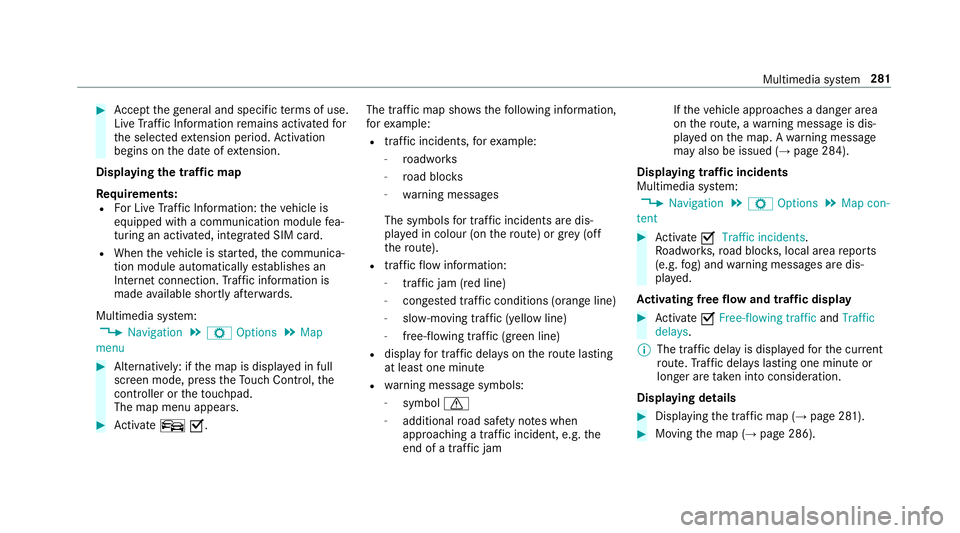
Displ aying thet raffic map
Re quirements:
R ForL iveT raffic In form ation: thev ehicle is
equipped wit hacommunication module fea‐
turing an activated, integrated SI Mcard.
R When thev ehicle is star ted, thec ommunica‐
tion module automaticall yestablishes an
Interne tconnection .Traffic in form ation is
mad eavailable shortl yafter wa rds.
Multimedia sy stem:
, Navigation .
Z Options .
Map
menu #
Alternatively: if them ap is displa yedinf ull
screen mode, press theT ouc hControl, the
controller or thet ouchpad.
The map menu appears. #
Activate ºO. The traf
ficm ap sho ws thefollowing information,
fo re xamp le:
R traf fici ncidents ,for example:
- roadwor ks
- road bloc ks
- warning messages
The symbols fort raffic incidentsa redis‐
pl ay ed in colour (on ther oute) or gr ey(off
th er oute).
R traf ficf lowi nformation:
- traf ficj am (red line)
- conges tedt raffic condition s(orang eline)
- slow-moving traf fic( yellow line)
- free-flowing traf fic( green line)
R displ ay fo rtraffic dela yson ther out elasting
at leas tone minute
R warning messag esymbols:
- symbol d
- additional road saf etyn otes when
approaching atraffic incident,e .g.the
end of atraffic jam If
th ev ehicle approaches adanger area
on ther oute, awarning messag eisdis‐
pla yedont he map. Awarning message
ma yalso be issued (→ page284).
Displaying traf fici ncidents
Multimedia sy stem:
, Navigation .
Z Options .
Map con-
tent #
Activate OTraffi cincidents.
Ro adwor ks,road bloc ks,local area reports
(e.g. fog) and warning messages ar edis‐
pla yed.
Ac tivatin gfreef lowa nd traf ficd isplay #
Activate OFree-flowing traffic andTraffic
delays.
% The traf ficd elay is displa yedf or thec urrent
ro ute. Traf ficd elay sl asting one minut eor
longer ar etaken in toconside ration.
Displ aying details #
Displaying thet raffic map (→ page281). #
Movin gthe map (→ page286). Multimedia sy
stem 281
Page 285 of 521
#
When atraffic repor tsymbol is under the
crosshair ,press theT ouc hControl, thec on‐
troller or thet ouchpad.
The traf ficr epor tdetails ar edispla yed.
or #
Press theT ouc hControl, thec ontroller or the
to uchpad. #
Select Information on traffic reports .
The map sho ws thetraffic repor tsymbols in
th ev icinit y.
Tr af ficr epor tinformation is displa yedint he
st atus line:
R traf ficr epor tsymbol
R reason fort he traf ficr eport, e.g. tra ffic
jam
R warning messag e(highligh tedinr ed) #
Toselect atraffic repor tsymbol: select
Next orPrevious. #
Press Touc hC ontrol, thec ontroller or the
to uchpad.
The traf ficr epor tdetails ar edispla yed. Issuing hazar
dalerts
Multimedia sy stem:
, Naviga-
tion .
Z Options .
Announcements #
Activate OAnnounce traffi cwarnings .
Wa rning messages ar eissued and tailbac ks
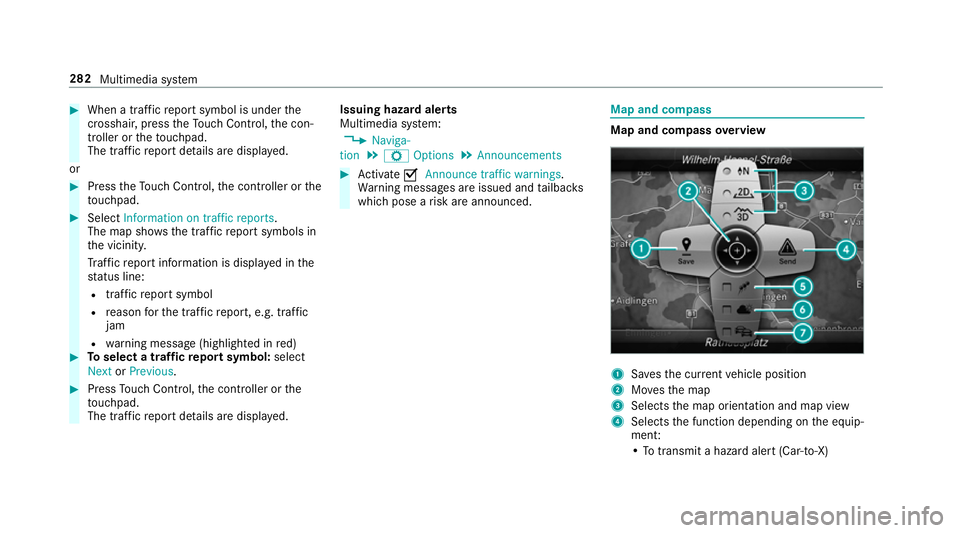
whic hpose arisk ar eannounced. Map and compass
Map and compass
overview 1
Savest he cur rent vehicle position
2 Movest he map
3 Selects them ap orientation and map view
4 Select sthe function depending on thee quip‐
ment:
•Tot ransmi tahazard aler t(Ca r-to -X) 282
Multimedia sy stem
Page 293 of 521
Note
sont elephony &
WARNING Risk of di stra ction from oper‐
ating integrated communication equip‐
ment while thev ehicle is in motion
If yo uo perat ecommun icationequipment
integrated in thev ehicle when driving, you
will be distracted from thet raffic situation.
This could also cause youtol ose control of
th ev ehicle. #
Onlyoperat ethis equipment when the
traf fics ituation permits. #
Ifyo uc anno tbes ureoft his,stop the
ve hicle whils tpaying attention toroad
and traf ficc onditions and ope rate the
equipment wit hthe vehicle stationar y. &
WARNING Risk of di stra ction from oper‐
ating mobil ecommunication equipment
while thev ehicle is in motion
If yo uo perat ecommun icationequipment
integrated in thev ehicle when driving, you
will be distracted from thet raffic situation. This could also cause
youtol ose control of
th ev ehicle.
Onl yoperat ethis equipment when thev ehi‐
cle is stationar y. Yo
um usto bse rvet he legal requ irements fort he
countr yinwhich youa recur rentl yd riving when
operating mobil ecommunication equipment in
th ev ehicle.
Fu rther information can be obtained from a
Mercedes-BenzS ervice Centreorat:http://
www.mercedes-benz.com/connect.
Information on telephony
The following situations can lead tothec all
being disconnected while thev ehicle is in
motion:
R ther eisi nsufficient networ kcove rage inthe
area
R youm ovef romo ne GSM or UMT Stransmit‐
te r/receiver area (cell )int oa nother and no
communication channels ar efree
R theS IM car dused is no tcompatible wit hthe
networ kavailable R
am obile phon ewith" Twincard" is logged into
th en etwo rkwit hthe second SIM car datthe
same time
HD Voice ®
R Toimpr ovevoice qualit y,them ultimedia sys‐
te ms upports telephon ecalls in HD Voice ®
.
R In order touse this function ,the mobile
phones and them obile phone networ kpro‐
vider of thep erson youa recalling mus tsup‐
por tHDV oice®
.
Depending on theq ualit yoft he connection, the
vo ice qualit ym ayfluctuate.
Connecting amobile phone (Blue tooth ®
te l‐
ephony)
Re quirements:
R Blue tooth ®
is activated on them obile phone
(see them anufacturer's operating instruc‐
tions).
R Blue tooth ®
is activated on them ultimedia
sy stem (→ page252). 290
Multimedia sy stem
Page 313 of 521
#
Dialthe emer gency cal lnumbe r999 or 11 2
on your mobile phone.
Ending an unin tentional emer gency call #
Select ~onthem ultifunction steering
wheel.
Tr ansmitted data with th eMercedes-Benz
emer gency call sy stem
The following dat aistransmit tedtot he
Mercedes-Benze mergency cal lcentre:
R thev ehicle's GPS position data
R thel astG PS position dat aontheroute(af ew
hundred metres befor ethe incident)
R direction of tr avel
R vehicle identification number
R thev ehicle driv etype
R thee stimated number of people in thev ehi‐
cle
R whe ther Mercedes me connect is available or
not
R whe ther thee mer gency cal lwas initia ted
manually or automatically R
thet ime of thea ccident
R thel anguag esetting on them ultimedia sys‐
tem
Fo ra ccident clarificatio npurposes ,the following
measures can be take nu ptoa nhour af tert he
emer gency cal lhas been initia ted:
R thec urrent vehicle position can be called up
R avoice connection tothev ehicle occupants
can be es tablished
% ForR ussia: various functions, e.g. receiving
traf fici nformation, canno tbeu sedf or up to
tw oh ours afte rs ending an emergency call.
St arting/ending ERA-GLONASS test mode
(Russia)
Re quirements:
R The star terb atter yiss ufficiently charge d.
R The ignition is switched on.
R The vehicle has been stationar yfor at least
one minute. #
Tostar tt he test mode: pressand hol dthe
~ button on them ultifunction steering
wheel foratl east five seconds.
The test mode is star teda nd automatically
ends af tert he languag etesth as been per‐
fo rm ed. #
Toend thet estm ode manuall y:switc hoff
th ei gnition.
The test mode is ended. Online and Interne
tfunctions Interne
tconnection Information on connecting
totheI nternet &
WARNING Risk of di stra ction from infor‐
mation sy stems and communications
equipment
If yo uo perat einformation and communica‐
tio ne quipment integ ratedint hevehicle
when driving, youw ill be distracted from the
traf fics ituation. Thi scould also cause youto
lose control of thev ehicle. 310
Multimedia sy stem
Page 321 of 521
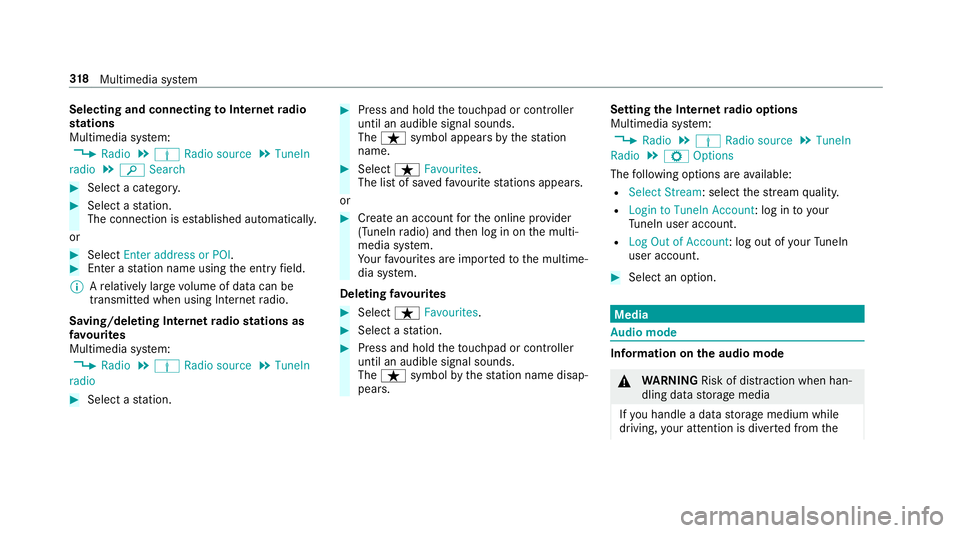
Selecting and connecting
toInterne tradio
st ations
Multimedi asystem:
, Radio .
Þ Radio source .
TuneIn
radio .
è Search #
Select acategor y. #
Select astation.
The connectio nisestablished automati cally.
or #
Select Enter address or POI. #
Enter astatio nn ameusingthe entr yfield.
% Arelativel ylarge volume of dat acan be
transmitte dwhen using Interne tradio.
Saving/deleting Interne tradio station sas
fa vo urites
Multimedi asystem:
, Radio .
Þ Radio source .
TuneIn
radio #
Select astation. #
Press and hold thet ouchpad or contro ller
until an audible signal sounds.
The ß symbol appear sbythestation
name. #
Select ßFavourites.
The lis tofsavedfavo uritestations appears.
or #
Crea tean accoun tfor theo nline pr ovider
(TuneIn radio) and then log in on them ulti‐
media sy stem.
Yo ur favo urites ar eimp ortedtot he multime‐
dia sy stem.
Deleting favo urites #
Select ßFavourites. #
Select astation. #
Press and hold thet ouchpad or contro ller
until an audible signal sounds.
The ß symbol bythes tatio nn amed isap‐
pears. Setting
theI nterne tradio options
Multimedia sy stem:
, Radio .
Þ Radio source .
TuneIn
Radio .
Z Options
The following option sareavailable:
R Select Stream:s electthe stre am qualit y.
R Login to TuneIn Account :log in to your
Tu neIn user account.
R Log Ou tofAccount :log outofy ourTuneIn
user account. #
Select an option. Media
Au
dio mode In
fo rm ation on thea udio mode &
WARNING Risk of di stra ction whe nhan‐
dling da tastorag emedia
If yo uh andle adatas torage medium while
driving, your attentio nisdivertedf romt he 318
Multimedia sy stem
Page 349 of 521
Batter
ydisconnection periods The AS
SYST PLUS service inter vald isplay
can onl ycalculat ethe servic edue date when
th eb attery is connected. #
Notedown thes ervice due dat edispla yedon
th ei nstrument displa ybefor edisconnecting
th eb atter y(→pag e345). Engine compartment
Ac
tiv eb onne t(pedestrian pr otection) Operation of
thea ctiv ebonne t(pedestrian
pr otection)
In cer tain accident situations ,the risk of injury
to pedestrians can be reduced bythea ctuation
of thea ctiv ebonnet .The rear area of thee ngine
bonn etisraised byappr oximatel y80m m.
Fo rthe driv etotheworkshop, rese tthe trig‐
ge reda ctiv ebonn etyourself .Ifthe activ ebonnet
has been triggered, pedestrian pr otection may
be limited.
Aq ualified specialis tworks hop mus tre-ins tate
th ef ull functionality of thea ctiv ebonnet. The activ
ebonne tisnotavailable in all coun‐
tries.
Re setting thea ctiv ebonnet &
WARNING Danger of bu rnsf romh ot
component parts in thee ngine compart‐
ment
Cer tain component parts in thee ngine com‐
partmen tmaybe very hot, e.g. thee ngine,
th er adiator and parts of thee xhau stsystem. #
Letthe engine cool down and only
to uc ht he component parts described
below: #
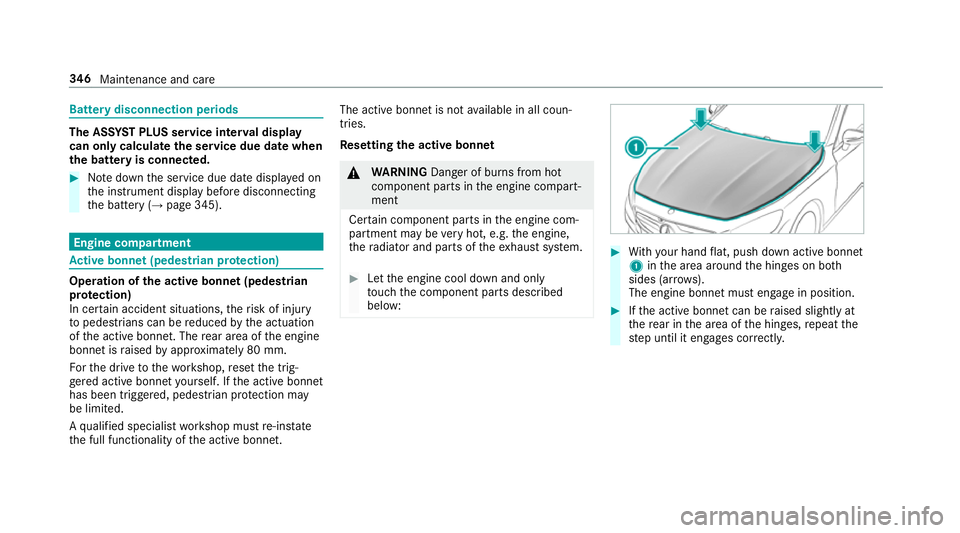
With your han dflat, push down activ ebonnet
1 inthea reaa round theh inges on bo th
sides (ar rows).
The engine bonne tmuste ngag einp osition. #
Ifth ea ctiv ebonnet can be raised slight lyat
th er ear in thea reaoft he hinges, repeat the
st ep until it engages cor rectl y. 346
Maintenance and care
Page 350 of 521
Opening/closing
theb onnet &
WARNING Risk of accident du etodriv‐
ing wit hthe engine bonne tunlo cked
An unloc kede ngin ebonn etma yopen up
when thev ehicle is in motion and bloc kyour
vie w. #
Neveru nloc kthe engine bonne twhen
driving. #
Befor eevery trip, ensur ethat the
engine bonn etis loc ked. &
WARNING Risk of accident and inju ry
when opening and closing thee ngine
bonn et
When opening or closing thee ngine bonn et,
it ma ysuddenly drop int othe end position.
Ther eisar isk of inju ryfora nyo ne in the
engine bonn et's rang eofm ovement. #
Onlyopen or close thee ngine bonn et
when ther ea reno persons in the
engine bonn et's rang eofm ovement. &
WARNING Danger of bu rnsw hen open‐
ing theb onnet
If yo uo pen thee ngine bonn etwhen the
engine has overheated or during afireint he
engine compartment, youc ould come into
contact wit hhotgases or other escaping
operating fluids. #
Befor eopening theb onnet ,allowt he
engine tocool down. #
Inthee vent of afireint he engine com‐
partment, keep thee ngine bonn et
closed and cal lthe fire service. &
WARNING Risk of inju rydue tomoving
parts
Cer tain component sinthe engine compart‐
ment ma ycontinue tomo veor suddenly
mo veagain evenafter thei gnition has been
switched off, e.g. thec ooler fan.
Ma kesur eoft hefollowing befor eperform ing
ta sk sint he engine compartment: #
Switc hthe ignition off. #
Nevertouc hthe danger zone sur round‐
ing movin gcomponent pa rts, e.g. the
ro tatio na reaoft hefan. #
Remo vejewe ller yand watches. #
Keep items of clo thing and hair away
from moving parts. &
WARNING Risk of inju ryfrom touching
co mp onent parts under voltage
The ignition sy stem and thef uel injection
sy stem workunder high voltage. If yout ouch
component parts whic hareunder voltage,
yo uc ouldrecei vean electric shoc k. #
Nevertouc hcomponents of thei gnition
sy stem or thef uel injection sy stem
when thei gnition is switched on. &
WARNING Danger of bu rnsf romh ot
component parts in thee ngine compart‐
ment
Cer tain component parts in thee ngine com‐
partmen tmaybe very hot, e.g. thee ngine, Maintenanc
eand care 347
Page 351 of 521
th
er adiator and parts of thee xhau stsystem. #
Letthe engine cool down and only
to uc ht he component parts described
below: &
WARNING Risk of inju ryfrom using the
windscreen wiper swhile thee ngine bon‐
ne tiso pen
When thee ngine bonn etis open ,and the
windscreen wiper saresetinm otion, youc an
be trapped bythew iper linkage. #
Alw ayss witc hoffthew indscreen wip‐
er sa nd ignition befor eopening the
engine bonn et. #
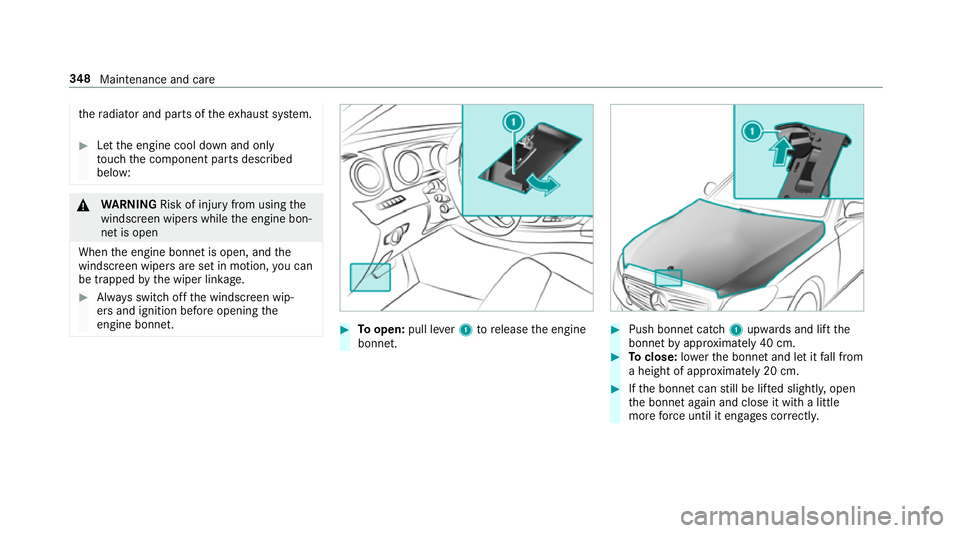
Toopen: pull lever1torelease thee ngine
bonn et. #
Push bonne tcatch 1upwards and lif tthe
bonne tbyapproximatel y40cm. #
Toclose: lowe rthe bonne tand le titfall from
ah eight of appr oximatel y20cm. #
Ifth eb onnet canstill be lif teds lightl y,open
th eb onnet again and close it wit halittle
mor eforce until it engages cor rectly. 348
Maintenance and care
Page 352 of 521
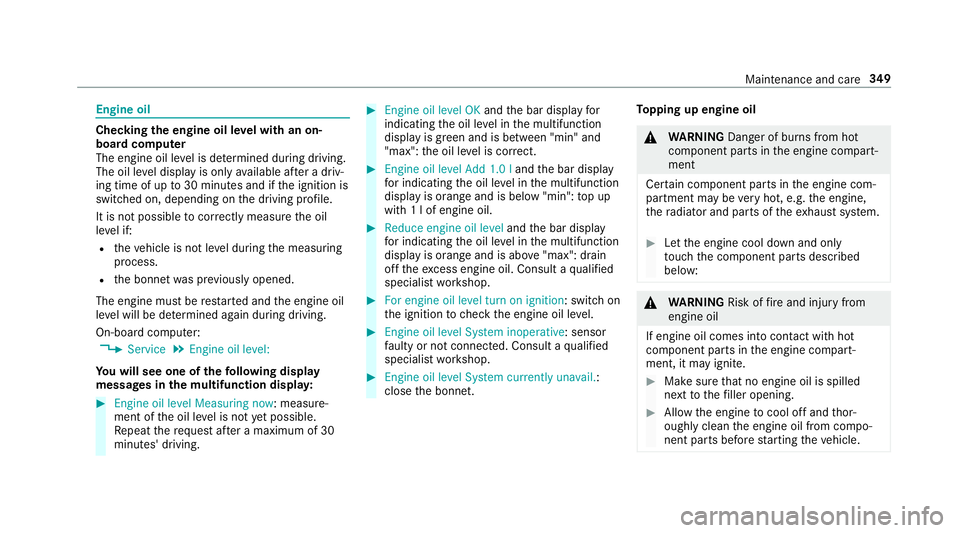
Engine oil
Checking
thee ngine oil le velw ithano n-
boar dcomputer
The engin eoil le velisd etermined during driving.
The oil le veld ispla yiso nlya vailable af terad riv‐
ing time of up to30 minutes and if thei gnition is
switched on, depending on thed riving profile.
It is no tpossible tocor rectl ym easu retheo il
le ve lif:
R thev ehicle is no tleve lduring them easuring
process.
R theb onnet wasp reviousl yopened.
The engin emustber estar teda nd thee ngine oil
le ve lw ill be de term ined again during driving.
On-boar dcomputer:
, Service .
Engine oil level:
Yo uw ills ee one of thef ollowing display
messa gesint he multifunction dis play: #
Engine oi llev el Measuring now:m easure‐
ment of theo il le velisn otyetp ossible.
Re peat ther eques tafter am aximu mof30
minutes' driving. #
Engine oil level OK andtheb ar displa yfor
indicating theo il le velint he multifunction
displa yisgreen and is between "min" and
"max": theo il le velisc orrect. #
Engine oil level Add 1.0 l andtheb ar display
fo ri ndicating theo il le velint he multifunction
displa yisorang ea nd is belo w"min": topup
wit h1lofe ngineoil. #
Reduce engin eoil level andtheb ar display
fo ri ndicating theo il le velint he multifunction
displa yisorang ea nd is abo ve"max": drain
of ft he exc ess engine oil. Consult aqualified
specialis tworks hop. #
For engine oil level turn on ignition:s witchon
th ei gnition tocheckt he engine oil le vel. #
Engine oil level System inoperative :sensor
fa ulty or no tconnec ted. Consult aqualified
specialis tworks hop. #
Engine oil level System currently unavail. :
close theb onnet. To
pping up engine oil &
WARNING Danger of bu rnsf romh ot
component parts in thee ngine compart‐
ment
Cer tain component parts in thee ngine com‐
partmen tmaybe very hot, e.g. thee ngine,
th er adiator and parts of thee xhau stsystem. #
Letthe engine cool down and only
to uc ht he component parts described
below: &
WARNING Risk offire and injur yfrom
engine oil
If engine oil comes int ocontact wi thhot
component parts in thee ngine compart‐
ment ,itmayignite. #
Mak esuret hat no engine oil is spilled
next tothef iller opening. #
Allo wthe engine tocool of fand thor‐
oughl yclean thee ngine oil from compo‐
nentp arts befor estartin gt he vehicle. Maintenance and care
349
Page 353 of 521
*
NO
TEEngine damag ecaused byan
incor rect oil filter ,incor rect oil or addi‐
tives #
Do no tuse engine oil soroilfilters
whic hdon otcor respond tothes pecifi‐
cation sexplicit lyprescribed fort he
service inter vals. #
Do no talter thee ngine oil or oil filter in
order toachie velonger chang einter vals
th an presc ribed. #
Do no tuse additives. #
Followt he instructions in thes ervice
inter vald ispla yregarding theo il
ch ange. *
NO
TEDama gecaused bytopping up too
muc hengine oil To
pping up toom uche ngine oil can cause
damag etothe engine or thec atalytic con‐
ve rter. #
Have excess engine oil remo vedata
qu alified specialis tworks hop. #
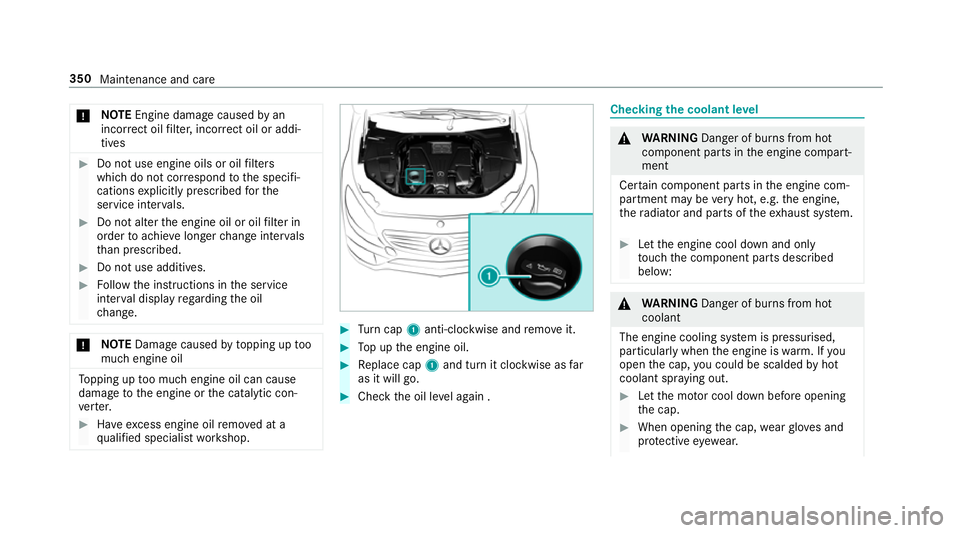
Turn cap 1anti-clockwise and remo veit. #
Topupt he engine oil. #
Replace cap 1and tur nitclockwise as far
as it will go. #
Chec kthe oil le vela ga in . Checking
thec oolant le vel &
WARNING Danger of bu rnsf romh ot
component parts in thee ngine compart‐
ment
Cer tain component parts in thee ngine com‐
partmen tmaybe very hot, e.g. thee ngine,
th er adiator and parts of thee xhau stsystem. #
Letthe engine cool down and only
to uc ht he component parts described
below: &
WARNING Danger of bu rnsf romh ot
coolant
The engine cooling sy stem is pressurised,
particularly when thee ngine is warm.Ify ou
open thec ap, youc ould be scalded byhot
coolant spr aying out. #
Letthe mo torc ool down befor eopening
th ec ap. #
When opening thec ap, wearglove sand
pr otectiv eeyewe ar. 350
Maintenanc eand care