lock MERCEDES-BENZ S-CLASS CABRIOLET 2017 Owner's Manual
[x] Cancel search | Manufacturer: MERCEDES-BENZ, Model Year: 2017, Model line: S-CLASS CABRIOLET, Model: MERCEDES-BENZ S-CLASS CABRIOLET 2017Pages: 521, PDF Size: 10.48 MB
Page 146 of 521
To
preser vethee ngine during thef irst 1,500 km:
R driv eatv arying road speeds and engine
speeds.
R driv eind rive program Cor E.
R chang egear befor ethe revc ounter needl eis
Ôof thew aytother ed area of ther ev coun‐
te r.
R do no tshif td ow nag ear manuall yinorder to
brake.
R avoidoverstra inin gthe vehicle, e.g. driving at
full thro ttle.
R do no tdepress thea ccelera torp eda lpast
th ep ressur epoint (kickdown).
R onlyincrease thee ngine speed gradually and
accelera tethev ehicle tofull spee dafter
1, 500 km.
This also applie swhent he engine or parts of the
driv etra in ha vebeen replaced.
Please also obser vethef ollowing running-in
no tes:
R In cer tain drivin gand drivin gsafet ys ystems,
th es ensor sadjus tautomaticall ywhile acer‐ ta
in dis tance is driven af tert he vehicle has
been delivered or af terr epairs. Full sy stem
ef fectivenes sisnotachie vedu ntil thee nd of
th is teach-in process.
R Brak elinings, brak ediscsa nd tyres that are
either ne worhavebeen replaced onl yach‐
ie ve optimum braking ef fect and grip af ter
se veralh undred kilom etre sofd riving. Com‐
pensat efor ther educed braking ef fect by
applying greater forc etot he brak epedal. Note
sond riving &
WARNING Risk of accident du eto
object sinthe driver's foot we ll
Object sinthe driver's foot we ll ma yimp ede
pedal tra velorb lockad epressed pedal.
This jeopardises theo perating and road
saf etyoft hevehicle. #
Stow all object sinthevehicle securely
so that they canno tget intot he driver's
fo ot we ll. #
Alw aysf itth ef loor mats securel yand
as prescribed in order toensur ethat
th er eisa lway ss ufficient room fort he
pedals. #
Do no tuse loose floor mats and do not
place floor mats on topofo ne ano ther. &
WARNING Risk of accident du eto
unsuitable foot we ar
Operatin gthe pedals ma ybeimpaired by
we aring unsuitable foot we ar,e .g.:
R plat form shoes
R high-heeled shoes
R slippers #
Alw aysw ear suitable foot we ar when
drivin gsot hatyouc an operat ethe ped‐
als safel y. Driving and pa
rking 14 3
Page 157 of 521
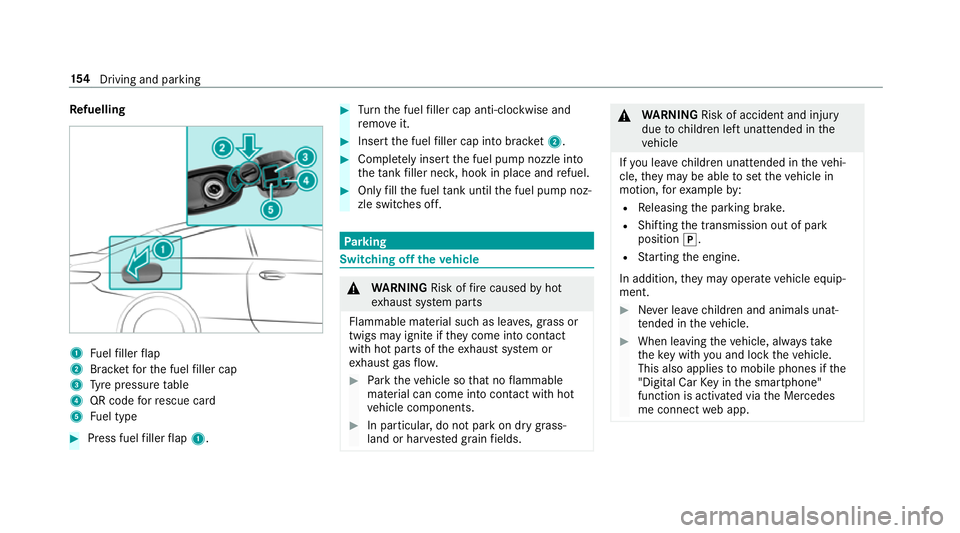
Re
fuelling 1
Fuelfiller flap
2 Brac ketfor thef uel filler cap
3 Tyre pressur etable
4 QR code forr escue card
5 Fuel type #
Press fuel filler flap 1. #
Turn thef uel filler cap anti-clockwise and
re mo veit. #
Inser tthe fuel filler cap int obrack et 2 . #
Comp lete ly inse rtthef uel pum pnozzle into
th et ank filler nec k,hook in place and refuel. #
Onlyfillthef uel tank unti lthe fuel pum pnoz‐
zle switches off. Pa
rking Switching of
fthe vehicle &
WARNING Risk offire caused byhot
ex haus tsystemp arts
Flammable material suc hasleaves, grass or
twigs ma yignit eift heyc ome int ocontact
wi th hotp arts of thee xhau stsystem or
ex haus tgas flow. #
Park thev ehicle so that no flammable
material can com eintoc ontact wi thhot
ve hicle components. #
In particular ,donotpar kond rygrass‐
land or har vested grain fields. &
WARNING Risk of accident and inju ry
due tochildren lef tunat tende dint he
ve hicle
If yo ul eave children unat tende dint hevehi‐
cle, they ma ybea bletos etthev ehicle in
motion, fore xamp leby:
R Releasing thep arking brake.
R Shifting thet ransmission out of park
position j.
R Startin gthe engine.
In addition, they ma yoperat evehicle equip‐
ment. #
Neverlea ve children and animals unat‐
te nde dint hevehicle. #
When leaving thev ehicle, alw ayst ake
th ek eywit hyou and loc kthe vehicle.
This also applies tomobil ephones if the
"Digital Car Keyint he smartphone"
function is activated via theM ercedes
me connect weba pp. 15 4
Driving and pa rking
Page 166 of 521
Ac
tivatin gordeactivatin gstandb ymode
Multimedi asystem:
, Vehicle .
î Vehicle set-
tings .
Standby mode #
Activate Oor deacti vate ª thef unction.
When youa ctivat ethe function,ap rompt
appears. #
Select Yes.
St andb ymode is activated. Driving and driving saf
etys ystems Driving sy
stems and your responsibility Yo
ur vehicle is equipped wit hdriving sy stems
whic hassis tyou in driving, parking and manoeu‐
vring thev ehicle. The driving sy stems ar etools
and do no trelie veyouofy ourresponsibility .Pay
attention tothet raffic condition satall times
and inter vene when necessa ry.Bea wareofthe
limitation sregarding thes afeu se of these sys‐
te ms. Fu
nction of ther adar senso rs Some driving and driving sa
fety sy stems use
ra dar sensor stomonitor thea reainf ront of,
behind or next tothev ehicle (depending on the
ve hicle's equipment).
Depending on thev ehicle's equipment, ther adar
senso rsarei ntegrated behind theb umpers
and/or behind ther adiator grille. Keep these
parts free of dirt, ice and slush (→ page360).
The sensor smustn otbe co vered, fore xamp le
by bicycle rack s, ove rhanging loads or radar-
re flecting sticke rs.F ollowing an impact and in
th ee vent of associated dama ge,w hic hm aynot
be visible, totheb umper sorradiator grille, ha ve
th ef unction of ther adar senso rscheckedata
qu alified specialis tworks hop. The driver assis‐
ta nce sy stem ma ynolonger workproperly. Overvie
wofdriving sy stems and driving
saf etys ystems In
this section, youw illfind informatio nabout
th ef ollowing driving sy stems and driving saf ety
sy stems:
R 360° Camer a(→pag e199)
R ABS ( Anti-lock BrakingSystem)
(→ pag e166)
R ActiveD ista nce Assi stDISTRONIC
(→ page 178)
R Adaptiv ebrake light s(→pag e174 )
R AIR BOD YCONTROL (→ page191 )
R ActiveB rake Assi st (→pag e169)
R ActiveL aneK eeping Assis t(→pag e217 )
R ATTENTION ASSIS T(→ pag e208)
R BAS(Bra ke Assist System) (→ page166)
R EBD ( Electronic Brakeforce Distribution)
(→ pag e169)
R ESP ®
(Electronic Stability Program)
(→ pag e167 )
R Hill StartA ssist Drivin
gand parking 16 3
Page 167 of 521
R
HOLD functio n(→ page 190)
R STEER CONTROL (→ page 169)
R ActiveS teering Assis t(→ pag e184)
R Limi ter( →pag e175)
R Nigh tViewA ssist ( →pag e212 )
R ActiveP arking Assis t(→ pag e202)
R Parking Assis tPARKTRONIC (→ page 194)
R Reversing camer a(→pag e197)
R Cruis econtrol (→ page 174)
R Blind Spo tAssis tand ActiveB lind Spo tAssist
( → pag e214 )
R Traf ficS ign Assi st (→pag e209) Fu
nctions of ABS (anti-loc kbraking sy stem) AB
Sr egulates theb rake pressur eincritical driv‐
ing situations:
R During braking, e.g. at maximum full-s top
braking or insuf ficient traction of thet yres,
th ew heels ar epreve nted from blocking.
R Vehicle steerability while braking is ensured. If ABS inter
venes when braking, youw illfeel a
pulsing in theb rake pedal. The pulsating brake
pedal can be an indication of hazardous road
condition sand can ser veas areminder totake
ex trac arew hile driving.
Sy stem limitations
R ABSisa ctivefroms peeds of appr ox.
8k m/h.
R ABS ma ybeimpaire dorm aynotfunction if a
malfunction has occur reda nd they el‐
low ! ABSwarning lam plight supc ontin‐
uousl yinthe instrument clus tera fter the
engine is star ted. Fu
nction of BAS(Brak eAssis tSystem) &
WARNING Risk of an accident caused by
am alfunctio ninBAS (Brak eAssistSys‐
te m)
If BA Sism alfunctioning ,the braking dis tance
in an eme rgency braking situation is
increased. #
Depress theb rake pedal wit hfull force
in emer gency braking situations. ABS
pr eve nts thew heels from locking. BA
Ss uppo rtsy our emer gency braking situation
wit ha dditional brak eforce.
If yo ud epress theb rake pedal quickl y,BA Sis
acti vated:
R BASa utomatically boosts theb rake pres‐
sure.
R BASc an sho rten theb raking dis tance.
R ABS pr events thew heels from locking.
The brakes will function as usual oncey ou
re lease theb rake pedal. BASisd eactivated. 16 4
Driving and pa rking
Page 246 of 521
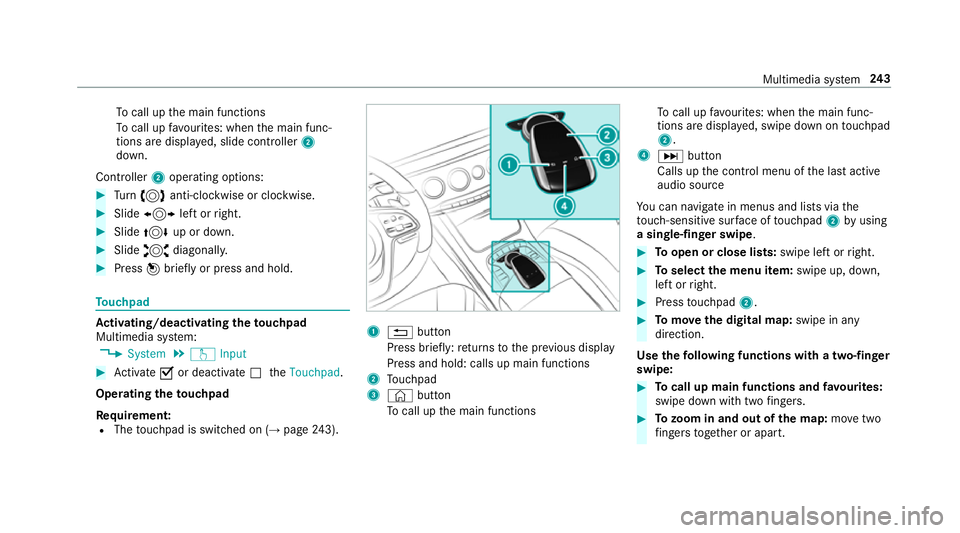
To
cal lupt he main functions
To cal lupf avourites: when them ain func‐
tion saredispla yed, slide controller 2
down.
Cont roller 2operatin goptions: #
Turn 3 anti-clockwis eorclock wise. #
Slide 1 leftorr ight. #
Slide 4 up or down. #
Slide 2 diagonally. #
Press 7brief lyor press and hold. To
uchpad Ac
tivating/deactivatin gthe touchpad
Multimedi asystem:
, System .
w Input #
Activate Oor deacti vate ª theTouchpad .
Operating thet ouchpad
Re quirement:
R The touchpad is swit ched on (→ page243). 1
% button
Press brief ly:r eturns tothep reviou sdisplay
Press and hold: calls up main functions
2 Touchpad
3 © button
To cal lupt he main functions To
cal lupf avourites: when them ain func‐
tion saredispla yed, swipe down on touchpad
2.
4 D button
Calls up thec ontrol menu of thel asta ctive
audio source
Yo uc an navigat einmenus and lists via the
to uch-sensitiv esurface of touchpad 2byusing
as ingle-finger swipe . #
Toopen or close lists: swipe leftorright. #
Toselect them enu item: swipe up, down,
lef torr ight. #
Press touchpad 2. #
Tomo vethed igita lmap: swipe in any
direction.
Use thef ollowing functions wit hatwo-finger
swipe: #
Tocall up main functions and favo urites:
swipe down wit htwo fingers. #
Tozoo minand out of the map: movetwo
fi nger stogether or apart. Multimedia sy
stem 243
Page 258 of 521
#
Accept thec onnection requ estfromt he new
device.
As ecurity keyisd isplayed. #
Ente rthe security keyint he extern al device.
The devic eisauthorised.
Selecting aconnected device #
Select Authorise anew device.
The devices already connec teda redispla yed. #
Select Continue using connected devices.
The Please start COMAND Touch on your
device and follow the instructions. message
appears. #
Select Continue.
Fo llowt he instructions toauthorise the
selected device.
De-authorising thed evice #
Select aconnec tedd evice from thel ist.
The Please start COMAND Touch on your
device and follow the instructions. message
appears. #
Select Continue.
Ap romp twill appear asking whe ther you
wo uld lik etodeauthorise thes elected
device. #
Select Yes.
The device is deauthorised. Ac
tivating/deactivatin gparenta lcon trol Multimedia sy
stem:
, System .
Parental control
Locking an extern al device #
Select an extern al device. #
Select Lock.
The devic econnec tedv iatheC OMAND
To uc hA ppis loc kedOor unloc kedª. Sy
stem language Note
sont he system language
This function allo wsyoutod etermine thel an‐
guag efor them enu displa ysand then avigation
announcements. The selected languag eaffects
th ec haracter savailable fore ntr y.The navigation announcement
sarenota vailable in all lan‐
guages. If alanguag eisnotavailable, then aviga‐
tion announcements will be in Engl ish.
Setting thes ysteml anguage
Multimedia sy stem:
, System .
Language #
Setthe language.
% Ifyo ua reusin gArabic map data, thet ext
information can also be shown in Arabic on
th en avigation map. Todo so, select ةيبرعلاas
th el anguag efromt he languag elist. Naviga‐
tion announcements ar ethen also made in
Arabic. Setting
thed istance unit Multimedia sy
stem:
, System .
% Units #
Select kmormi. #
Inthem ultifunction displa yofthe instrument
displa y,switc hthe Additional speedometer
displa yonO. Multimedia sy
stem 255
Page 260 of 521
Ac
tivatin gPINprotection ford atae xport #
Select Change settings .
Confir mwitht he PIN. #
Select Protect data export.
Ac tivate Oor deacti vate ª thef unction.
Ac tivatin gPINprotection foro ffline mode #
Select Changesettings .
Confir mwitht he PIN. #
Select Protect deactivation of offline mode.
Ac tivate Oor deacti vate ª thef unction.
Un blocking theP IN
Re quirements:
R Ther eisanI nternetconnection.
R AM ercedes me account exists at http://
www.me rcedes.me.
R The Personalisation (→pag e259)service is
activated.
If th eP IN has been entered incor rectly three
times ,the PIN will be bloc ked. Youc an ha ve a
single-use passwor dsent to yo uviathe Mercedes me connect online por
taltor esetthe
PIN pr otection. #
Select Unbloc kPIN. #
Ente rthe single-use password.
PIN pr otection is reset, and youc an se ta
ne wP IN.
% Alternativel y,yo uc an ha vePIN pr otection
re se tata Mercedes-Benz Service Centre. User profile
Setting
auser profile
Multimedia sy stem:
, System .
g Personalisation
Displaying auser profile when starting
If th is function is active, apromp tappear swhen
st artin gthe sy stem asking whic huser profile to
use. #
Select Display profile list after start . #
Activate Oor deacti vate ª thef unction.
Selecting auser profile #
Select Guestor individual profile #.%
Some settings from theu ser profile ar eonly
loaded when thev ehicle is stationar yor
when thei gnition is switched on.
Au tomatic syn chronisation
Eac htime thei gnition is switched of foron,the
individual user profiles ar esynchronised on the
multimedia sy stem and on thes erve r.This
ensures that thel ates tuser profiles ar ealways
av ailable. #
Select Automatic synchronisation. #
Activate Oor deacti vate ª thef unction.
% Form orei nformation about importing/
ex portin guser profiles (→ page260).
Creating auser profile
Multimedia sy stem:
, System .
g Personalisation .
Cre-
ate profile #
Ente ran ame. #
Select a.
Individuals ettings ar esave dint he user profile,
e.g.:
R System settings Multimedia sy
stem 257
Page 286 of 521
•Tof
ilterthed ispla yofP OIs in thev icinity
according toPOI category
5 Switches thed ispla yofp ersonal POI sym‐
bols on them ap on or off
6 Switches one of thef ollowing displa yson or
of fd epending on thee quipment:
•W eather information
•S atellit emap
•T raffic incidents
7 Switche sthe tra ffic map displa yonoro ff
The map and satellit eimages ar eshown in globe
projection. This allo wsforar ealistic map display
in all map scales. The map uses ele vatio nm odel‐
ling.
Depending on them ap data, impor tant buildings
in ma nycities ar edepicted realisticall yonthe
map in small map scales (20m,50m ). Other
buildings ar eshown as models.
% Youc an se tthe unit of measurement of the
map scale (→ page255).
If online information is available, fuel price sand
th ea vailabilit yofparkingspaces in multi-s torey
car pa rksa redispla yed, fore xamp le. %
Requirements:
R Youh ave aMercedes me account.
R The servic ehas been activated at a
Mercedes-Ben zServic eCentre.
Fu rther information can be found at :http://
www.mercedes.me
If Display in COMAND is activated inTraf ficS ign
Assi st (→pag e209) ,speed limits and overtak‐
ing restrictions ar edispl ay ed on them ap.
% Compan ylogos displa yedont he map are
trademar ksofther espectiv ecompanies and
used solely fort he purpose of indicating the
locations of these companies. The use of
suc hlogos on them ap does no tindicate
appr oval of, suppo rtof or advertising by
th ese companies fort he navigation sy stem
itself.
Setting them apscale
Re quirements:
R The map is shown. Multimedia sy
stem:
, Navigation #
Tozoo min:swipe down on theT ouc hCon‐
trol.
or #
Turn thec ontroller anti-clockwise.
or #
Movetwof inger saparton thet ouchpad. #
Tozoo mo ut:swipe up on theT ouc hControl.
or #
Turn thec ontroller clockwise.
or #
Movetwof inger stogether on thet ouchpad.
% Youc an se tthe unit of measurement of the
map scale (→ page255). Multimedi
asyst em 283
Page 296 of 521
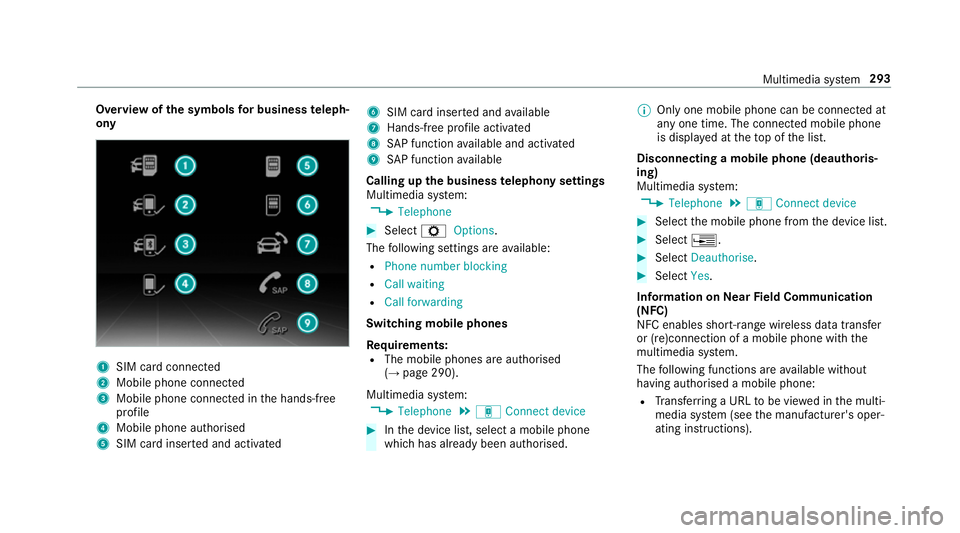
Overvie
wofthe symbols forb usines steleph‐
ony 1
SIM car dconnec ted
2 Mobile phone connected
3 Mobile phone connected in theh ands-free
profile
4 Mobile phone authorised
5 SIM car dinser teda nd activated 6
SIM car dinser teda nd available
7 Hands-free profile activated
8 SAPfunction available and activated
9 SAPfunction available
Calling up theb usiness telephon ysettings
Multimedia sy stem:
, Telephone #
Select ZOptions.
The following settings ar eavailable:
R Phon enumber blocking
R Call waiting
R Call forwarding
Swit ching mobile phones
Requ irements:
R The mobile phones ar eauthorised
(→ pag e290).
Multimedia sy stem:
, Telephone .
á Connec tdevice #
Inthed evice list, select amobile phone
whic hhas already been authorised. %
Onlyone mobile phone can be connected at
an yo ne time. The connected mobile phone
is displa yedatt hetopoft he list.
Disconnecting amobile phone (deauthoris‐
ing)
Multimedia sy stem:
, Telephone .
á Connec tdevice #
Select them obile phone from thed evice list. #
Select ¥. #
Select Deauthorise. #
Select Yes.
Information on NearField Communication
(NFC)
NFC enables short- rang ew ireles sdatat ransfer
or (re)connection of amobile phon ewitht he
multimedia sy stem.
The following function sareavailable without
havin gauthorised amobile phone:
R Trans ferring aURLtobe vie wedint he multi‐
media sy stem (see them anufacturer's oper‐
ating instructions). Multimedia sy
stem 293
Page 308 of 521
Po
sition data:
R Coordinates
R Speed
R Compass direction
R Acceleration di rection
Thi sd ataiso nlyt ransfer redw hile then avigation
sy stem is activ einorder toimpr oveit (e.g. so it
can continue functioning when in atunnel). Mercedes me connect
Information on Mercedes me connect
Mercedes me connec
tprovide sthe following
services:
R Breakdown management
R Appointmen trequests or similar
R Mercedes-Benz emer gency cal lsystem
R Accident mana gement
The Mercedes-Benz Cust omer Centreand the
Mercedes-Benze mergency cal lcentr eareavaila‐
ble fory ou around thec lock. The Inf
ocall button, theb reakdown assis tance
cal lbuttona nd thee mer gency cal lbuttonc an be
fo und on theo verhead control panel of thev ehi‐
cle (→ page307).
Yo uc an also call theM ercedes-Benz Cus tomer
Centr eusing them ultimedia sy stem
(→ pag e307).
Please no tethat Mercedes me connec tisa
Mercedes-Ben zservice. In emer gencies, al ways
cal lthe national emer gency service sfirst using
th es tandar dnational emer gency service phone
numbe rs.Ine mergencies, youc an also use the
Mercedes-Benze mergency cal lsyst em
(→ pag e310).
Fu rther information on Mercedes me connect,
th ep rovide dservice scope and operation:
http://manuals.daimler.com/baix/cars/
connectme/de_DE/index.html
Calling theM ercedes-Benz Cus tomer Centre
using the multimedi asystem
Requ irements:
R Youh ave access toaG SM networ k. R
The contra ct partner' sGSM networ kcove r‐
ag eisa vailable in ther espectiv eregion.
R The ignition is switched on so that vehicle
dat acan be transfer reda utomaticall y.
Multimedia sy stem:
, Telephone .
ª Contacts #
Call Mercedes me connect.
Af terc onfirmation, them ultimedia sy stem
sends ther equired vehicle data.
The dat atransfer is shown in thed ispla y.
Then, youc an select aservic eand be con‐
nected toas pecialis tatthe Mercedes-Benz
Cus tomer Centre.
Fu rther information on Mercedes me connect,
th ep rovide dservice scope and operation is
av ailable at :http://ma nuals.daimler.com/baix/
cars/connectme/de_DE/ind ex.html
Making acallv ia the overhead control panel
Re quirements:
R Youh avea ccess toaG SM networ k.
R The contra ct partner' sGSM networ kcove r‐
ag eisa vailable in ther espectiv eregion. Multimedia sy
stem 305