ECO mode MERCEDES-BENZ S-CLASS CABRIOLET 2018 User Guide
[x] Cancel search | Manufacturer: MERCEDES-BENZ, Model Year: 2018, Model line: S-CLASS CABRIOLET, Model: MERCEDES-BENZ S-CLASS CABRIOLET 2018Pages: 502, PDF Size: 6.27 MB
Page 346 of 502
Drivingdistance possibl ein limp-hom emod e
af te r the pressure loss warning:
Load condition Driving distance pos‐
sible in limp-homemode
Pa rtially laden 50 miles (80 km)
Fu lly laden 19miles (30 km)
RThe driving dis tance possible in li mp-home
mode may vary depending on the driving
st yle.
RMaximum permissible speed 50 mph
(80 km/h).
If a tire has gone flat and cannot be replaced
with an MOEx tended tire, you can use a stand‐
ard tire as a temp orary measure.
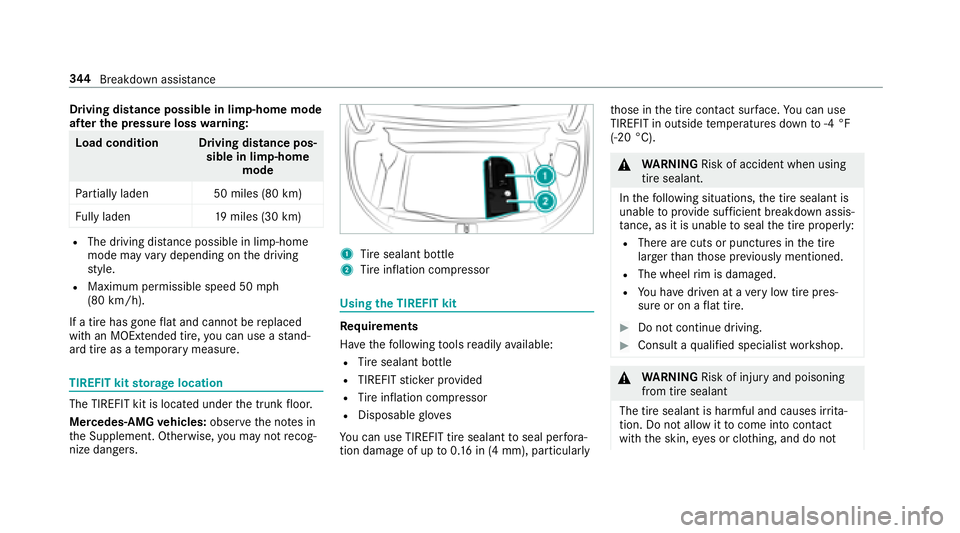
TIREFIT kit storage location
The TIREFIT kit is located under the trunk floor.
Mercedes‑AMG vehicles: observeth e no tes in
th e Supplement. Otherwise, you may not recog‐
nize dangers.
1Ti re sealant bottle
2Tire inflation compressor
Using the TIREFIT kit
Re quirements
Ha ve thefo llowing tools readily available:
RTire sealant bottle
RTIREFIT sticke r pr ovided
RTire inflation compressor
RDisposable glove s
Yo u can use TIREFIT tire sealant toseal per fora ‐
tion damage of upto0.16 in (4 mm), particular lyth
ose in the tire conta ct surface.You can use
TIRE FIT in outside temp eratures down to-4 °F
(-20 °C).
& WARNING Risk of accident when using
tire sealant.
In thefo llowing situations, the tire sealant is
unable toprov ide suf ficient breakdown assis‐
ta nce, as it is unable toseal the tire properly:
RThere are cuts or punctures in the tire
larger than those pr eviously mentioned.
RThe wheel rim is dama ged.
RYo u ha vedriven at a very low tire pres‐
sure or on a flat tire.
#Do not continue driving.
#Consult a qualified specialist workshop.
&
WARNING Risk of injury and poisoning
from tire sealant
The tire sealant is harmful and causes ir rita ‐
tion. Do not allow it tocome into contact
wi th th e skin, eyes or clo thing, and do not
34 4
Breakdown assis tance
Page 384 of 502
Changing a wheel
Notes on selecting, installing and replacing
tires
Mercedes -AMG vehicles: observeth e no tes in
th e Supplement. Otherwise, you may not recog‐
nize dangers.
Yo u can ask for information rega rding permitte d
wheel/tire combinations at an authorized
Mercedes-Benz Center.
& WARNING Risk of accident due toincor‐
re ct dimensions of wheels and tires
If wheels and tires of the wrong size are
ins talled, the wheel brakes or wheel suspen‐
sion components may be damaged.
#Alw aysre place wheels and tires with
th ose that fulfill the specifications of
th e original part.
When replacing wheels, make sure tofit th e
cor rect:
RDesignation
RModel
When replacing tires, make sure toins tallth e
cor rect:
RDesignation
RManufactu rer
RModel
&
WARNING Risk of injury thro ugh exceed‐
ing the specified tire load rating or the
permissible speed rating
Exceeding the specified tire load rating or
th e permissible speed rating may lead totire
damage andtothe tires bur sting.
#Therefore, only use tire types and sizes
appr ovedfo ryo ur vehicle model.
#Obser vethe tire load rating and speed
ra ting requ ired foryo ur vehicle.
* NO
TEDama getovehicle and tires due to
non-app rove d tire types and sizes
Fo r saf etyre asons, only use wheels, tires
and accessories which havebeen appr oved
fo ryo ur vehicle byMercedes-Benz.
These tires ha vebeen specially adap tedfo r
use with the control sy stems, e.g. ABS or
ESP
®, and are mar ked as follo ws :
RMO = Mercedes-Benz Original
RMOE = Mercedes-Benz Original Extended
(run-flat tires only for cer tain wheels)
RMO1 = Mercedes-Benz Original (only cer‐
tain AMG tires)
Cer tain characteristics, e.g. handling, vehicle
noise emissions or fuel consum ption, may
ot herwise be adversely af fected. In addition,
when driving wi tha load, tire dimension var‐
iations could cause the tires tocome into
contact wi th the body and axle components.
This could result in damage tothe tires or the
ve hicle.
382
Wheels and tires
Page 400 of 502
soon as possible with unleaded pre‐
mium gradegasoline.
#Do not drive at the maximum speed.
#Av oid sudden acceleration and engine
speeds over 3000 rpm.
This may reduce engine output and increase fuel
consum ption. Ne verre fuel using gasoline with a
lo we r octane number.
Fu rther information on fuel can be found:
Rat a gasst ation
Rat a qualified specialist workshop
RUSA onl y:at http://www.mbusa.com
Information on additives in gasoline
Obser vethe no tes on operating fluids
(
→page 396).
* NO
TEDama gecaused bynon-app rove d
additives
Even small amounts of the wrong additive
may lead tomalfunctions occur ring.
#Only add cleaning additives recommen‐
ded byMercedes-Benz tothe fuel.
Mercedes-Benz recommends that you use
br and-name fuels with additives.
The fuel grade available in some countries may
not be suf ficient. Residue could build up in the
fuel injection sy stem as a result. In this case, in
consultation with an authorized Mercedes-Benz
Center, the fuel may be mixed with the cleaning
additive recommended byMercedes-Benz. Be
sure toobser vethe no tes and mixing ratios
speci fied on the conta iner.
Ta nk content and fuel reser ve
The total capacity of the fuel tank may vary,
depending on theve hicle equipment.
Model Total capacity
S 56 04M ATIC 21.1ga l(8 0.0 l)
Model Of whichreser ve
S 560 4MATIC 2.1gal (8.0 l)
Engine oil
Note s on engine oil
Obser vethe no tes on operating fluids
(
→page 396).
* NO
TEEngine damage causedbyan
incor rect oil filter, incor rect oil or addi‐
tives
#Do not use engine oils or oil filters other
th an those which meet the specifica‐
tions necessary forth e prescribed
service inter vals.
398
Tech nical da ta
Page 401 of 502
#Do not alterth e engine oil or oil filter in
order toachie velonger change inter vals
th an prescri bed.
#Do not use additives.
#Have the engine oil changed af terth e
prescribed inter vals.
Mercedes-Benz recommends that you ha vethe
oil change car ried out at a qualified specialist
wo rkshop.
Fu rther information on engine oils and oil filters:
Rin the Mercedes-Benz Specifications for
Operating Fluids at http://be vo.mercedes-
benz.com (byen tering the designation)
Rin the Mercedes-Benz Specifications for
Operating Fluids in the Mercedes-Benz BeVo
app (by entering the designation)
Rat a qualified specialist workshop Quality and capacity of engine oil
MB-F
reigabe or MB-Appr oval
Model MB-Freigabe or MB-
Appr oval
S 560 4MATIC 229.52, 229.61
Thefollowing values referto an oil change,
including the oil filter.
Capacity
Model Capacity
S 560 4MATIC 9.5 US qt (9.0 l)
Notes on brake fluid
Obser vethe no tes on operating fluids
(→page 396).
& WARNING Risk of an accident due to
va por poc kets form ing in the brake sys‐
te m
The brake fluid constantly absorbs moisture
from the air. This lo wersthe boiling point of
th e brake fluid. Ifth e boiling point is too lo w,
va por poc kets may form inthe brake sy stem
when the brakes are applied hard.
This causes the braking ef fect to be
impaired.
#Ha ve the brake fluid rene we d at the
specified inter vals.
Ha ve the brake fluid regularly changed at a quali‐
fi ed specialist workshop.
Only use brake fluid appr ovedby Mercedes-Benz
according toMB-F reigabe or MB-Appr oval 33 1.0.
Fu rther information on brake fluid:
Rin the Mercedes-Benz Specifications for
Operating Fluids at http://be vo.mercedes-
benz.com
Rat a qualified specialist workshop
Te ch nical da ta399
Page 467 of 502
Attention assistant
see ATTENTION ASSIST
Au dio mode
Ac tivating media mode ........................ 305
Connecting USB devices ..................... 308
Co pyright ............................................. 305
Information .......................................... 304
Inserting/ removing an SD card ...........3 05
Media searc h ....................................... 311
Overview ............................................. 307
Pa use and playback function .............. .308
Selecting a track ................................. 308
Selecting playba ckoptions .................. 308
Tr ack list .............................................. 308
Au thorized workshop
see Qualified specialist workshop
Au tomatic activation
Ac tivating/deactivating .......................2 01
Au tomatic distance control
see Active Dis tance Assist DISTRONIC
Au tomatic driving lights .........................109
Au tomatic engine start (ECO start/
sto p function) .......................................... 134 Au
tomatic front passen ger airbag
shu toff ........................................................ 43
Fu nction of the automatic front
passenger airbag shutoff ....................... 43
Au tomatic front passen ger front air
bag shu toff ................................................ 43
Au tomatic front passen ger front air‐
bag shu toff ................................................ 45
PA SSENGER AIR BAG indicator lamp .... .45
Au tomatic lateral supp ort adjustme
nt
Setting ................................................... 86
Au tomatic mir rorfo lding function
Ac tivating/deactivating ........................ 119
Au tomatic transmission
DIRECT SELECT le ver ........................... 137
Drive program display .......................... 136
Drive programs .................................... 136
DY NA MIC SELECT switch .................... 136
Engaging drive position ....................... 138
Engaging reve rsege ar ........................ .138
Kickdown ............................................. 140
Manual gearshifting ............................ .139
Selecting park position ........................ 138
Shifting toneutral ................................ 138 St
eering wheel paddle shif ters ............ 139
Tr ansmission position display .............. 137
Tr ansmission positions ........................ 137
B
BA S (Brake Assist Sy stem) .................... .151
Battery SmartK ey............................................... 59
Battery (vehicle) Charging .............................................. 350
Jump -star ting ...................................... 350
No tes .................................................. 348
Belt see Seat belts
Blind Spot Assist .....................................2 02
Ac tivating/deactivating .......................2 04
Fu nction .............................................. 202
Sy stem limitations .............................. .202
Blue tooth
®
Ac tivating/deactivating .......................2 44
Setting up an Internet connection ....... 298
Settings ............................................... 244
Switching profile (DUN/PAN) .............. 299
Index 465
Page 476 of 502
see Cruise control
see Driving saf etysy stem
see HOLD function
see MAGIC BODY CONTROL
see Night View Assist
see Parking Assist PARKTRONI C
see Rear view camera
see Traf fic Sign Assist
Drivin gtips
Drinking and drivin g............................ 132
Gene ral driving tips ............................ .132
No tes on breaking-in a new vehicle ..... 131
Dr ow siness de tection
see ATTENTION ASSIST
Dynamic handling control sy stem
see ESP
®(Elect ronic Stability Prog ram)
DY NA MIC SELECT .................................... 136
Confi guring drive program I ................. 136
Displ aying engine data ........................ 136
Displ aying vehicle data ........................ 136
Drive program display .......................... 136
Drive programs .................................... 136
Fu nction .............................................. 136 Operating (DYNAMIC SELECT switch)
.............................................................1 36
Selecting the drive prog ram ................1 36
E
E10 ............................................................ 397
Easy entry feature
Fu nction/no tes ...................................... 91
Setting ................................................... 92
Easy exitfeature
Fu nction/no tes ...................................... 91
Setting ................................................... 92
EBD (Electronic Brake forc e Distribu‐
tion)
Function/no tes ................................... 155
ECO display Function .............................................. 135
Re setting ............................................. 214
ECO start/s top function ................. 134, 135
Au tomatic engine start ........................ 134
Au tomatic engine stop .........................1 34
Me thod of operation ............................1 34
Switching off/on ................................. 135 Electric pa
rking brake .............147,14 8, 149
App lying automatically ........................ .147
App lying or releasing manually ............ 149
Emergency braking .............................. 149
Re leasing automatically ...................... .148
Electrical fuses Before replacing a fuse ........................ 359
Electrical fuses see Fuses
Electronic Stability Prog ram
see ESP
®(Electronic Stability Prog ram)
Electronics ............................................... 392
Emer gency
Assis tance overview .............................. 18
Saf et
yve st .......................................... 342
E
me rgency braking ................................ .149
Emer gency call sy stem
Mercedes-Benz mbrace
®(USA) .......... .295
Emer gency engine start ......................... 358
Emer gency operation mode
St arting theve hicle ............................. 130
474
Index
Page 477 of 502
Emergency release
Tr unk lid(from ins ide)............................ 70
Emer gency Tensioning Devices
Ac tivation .............................................. 34
ENE RGIZING comfort
Overview of programs ........................ .254
St arting the program ........................... 255
Energy consum ption
SmartK ey............................................... 58
Engine ECO start/ stop function ......................1 34
Engine number ....................................3 94
Jump-s tarting ...................................... 350
St arting (eme rgency operation
mode) .................................................. 130
St arting (Remo teOnline) ..................... 130
St arting (s tart/s top button) .................1 29
Switching off (s tart/s top button) ........ 142
Engine data Displaying ............................................ 136
Engine number ........................................ 394
Engine oil .................................................. 331
Ad ding ................................................ .331 Ad
ditives .............................................3 98
Capacity .............................................. 399
Che cking the oil le vel using the on-
board computer ............... .....
............... 331
MB-Fr eigabe or MB-Appr oval .............. .399
Quality ................................................. 399
ESC (Electronic Stability Control)
see ESP
®(Electronic Stability Prog ram)
ESP
®
Crosswind Assist ................................. 154
ESP
®(Electronic Stability Prog ram) ...... 152
Ac tivating/deactivating .......................1 54
Fu nction/no tes ................................... 152
Exhaust pipes (Care) ...............................338
Exterior lighting Care .................................................... 338
Ex terior lighting
see Lights
External device Locking ................................................ 248
F
Fa tigue de tection
see ATTENTION ASSIST
Fa ult message
see Display message
Favo rite s
Ad ding ................................................ .237
Callin g up ............................................ 237
De leting .............................................. .238
Moving ................................................ 238
Overview ............................................. 237
Re naming ............................................ 238
Flacon Insert ing/removing .............................. 124
Flat tire .................................................... .342
Changing a wheel ................................ 386
MOExtended tires ................................ 343
No tes .................................................. 342
TIREFIT kit ...........................................3 44
Floor mats ................................................ 107
Fr ag rance
see Fragrance sy stem
Index 47
5
Page 483 of 502
Outside mirror — Calling up sa ved
settings .................................................9 3
Outside mir ror — Saving settings ........... 93
Seat — Calling up sa ved settings ...........9 3
Seat — Saving settings ........................... 93
St eering wheel — Calling up sa ved
settings .................................................9 3
St eering wheel — Saving settings ........... 93
Menu (on-board computer) Assis tance graphic ............................... 212
Designs ................................................ 218
Head-up Display ................................... 217
Media ................................................... 216
Na vigation ............................................ 214
Overview ............................................. 209
Ra dio ...................................................2 15
Service ................................................. 212
Te lephone ............................................ 216
Tr ip ...................................................... .213
Mercedes-AMG vehicles
No tes ................................................... 128
Mercedes-Benz Apps Calling up ............................................ 300
Using voice control .............................. 300 Mercedes-Benz Center
see Qualified specialist workshop
Mercedes-Benz mbrace
®(USA)
Emer gency call sy stem ............ ............ 295
Making a call via theove rhead con‐
trol panel ............................................. 294
MB Info call ......................................... 296
Ro adside Assis tance call ..................... 296
Tr ans ferred data ................................. .296
Message (multifunction display) see Display message
Message memory .................................... 404
Messages see Text message s
Mir rors
see Outside mir rors
Mobile phone Canceling permission for Internet
connection .......................................... 299
Wi reless charging ................................ 106
Mobile phone see Android Auto
see Apple CarPlay™ see
Telephone
Mobile phone voice recognition
St arting .............................................. .284
St opping ..............................................2 84
Model series ............................................ 394
MOExtended tires ................................... 343
Multifunction camera ROAD SURFA CESCAN ........................ .179
Multifunction display (on-board com‐
puter) ........................................................ 211
Multifunction steering wheel
Overview of buttons ............................ 209
Multifunction steering wheel
see Steering wheel
Multimedia sy stem ........................ .233,242
Ac tivating/deactivating standby
mode ...... ...
.........................................
.150
Ad justing thevo lume .......................... .239
Central control elements ..................... 234
Configuri ng displaysettings ................2 42
ENERGIZING comfort program over‐
view ..................................................... 254
Main functions ..................................... 237
Index 481
Page 491 of 502
Information ..........................................251
Pe rforming ...........................................2 51
Sound PRE-SAFE
®Sound ................................. 47
Wheels and tires ..................................3 62
Sound see Burmes ter
®sur round sound sy stem
see Sound settings
Sound settings ......................................... 324
Ad justing the balance/fader ............... .324
Ad justing treble, mid-range and bass
settings ............................................... 324
Au tomatic volume adjustment ............ .324
Calls upthe sound menu ..................... 324
Information .......................................... 324
Speech dialog sy stem
see Voice Cont rol Sy stem
Speed index (tires) ..................................377
Speedome ter
Digital .................................................. 213
Spotlight function Activating/deactivating .......................2 02St
andby mode
Ac tivating/deactivating .......................1 50
Fu nction .............................................. 149
St anding lights ........................................ 108
St art/S top button
St arting theve hicle ............................. 129
Switching off theve hicle ..................... 142
Switching on the po wer supply or
ignition ................................................ 128
St art/s top function
see ECO start/ stop function
St arting the engine
see Vehicle
St arting-o ffaid
see Hill star t assist
St ati
on
Deleting ............................................... 318
Direct frequency entry ......................... 318
Moving .................................................3 18
Searc hing ............................................. 318
Setting ................................................. 318
St oring .................................................3 18St
ation presets
Editing ................................................. 318
ST EER CONT ROL
Fu nction/no tes ................................... 155
Ste ering wheel ........................................ 209
Ad justing (electrically) ........................... 90
Buttons ................................................ 209
St eering wheel heater ........................... .91
Using the memory function .................. .93
Ste ering wheel heater
Ac tivating/deactivating ......................... 91
Ste ering wheel paddle shif ters .............. 139
St ow age areas
see Stow age compartment
St ow age co mpartment .............................9 5
Armrest ................................................. 95
Center console ...................................... 95
Door ...................................................... 95
Glasses compa rtment ........................... 97
Glo vebox .............................................. 95
Pa rcel net hooks .................................... 98
Re ar armrest .......................................... 97
Re ar seat backrest ........................ ...
.....
97
Re ar-compartment cen ter armrest ........ 97
Index489
Page 492 of 502
Stow age co mpartments
see Stow age compartment
St ow age space under the trunk floor ...... 99
Sulfur content .......................................... 397
Sun visor Operating ............................................ .119
Sur round lighting
Setting .................................................1 12
Sur round View
see 360° Camera
Suspension Adjusting thech assis le vel (AIR
BO DY CONTROL) .................................. 176
Ad justing thech assis le vel (MAGIC
BO DY CONTROL) .................................1 80
Suspension see AIR BODY CONTROL
see MAGIC BODY CONTROL
Switch-off delay time Exterior ................................................ 112
Interior .................................................1 14
Switching the sur round sound on/off
Burmes ter
®sur round sound sy stem ... 325 Synchronization function
Activating/deactivating (multimedia
sy stem) ................................................ 123
Sy stem settings
Language ............................................ .248
No tes on language selection ............... 248
Re set function (multimedia sy stem) ... .253
Setting the dis tance unit ..................... 248
Software upda te.................................. 251
Sy stem settings
see Multimedia sy stem
T
Ta nk capacity
Fu el ..................................................... 398
Re ser ve(fuel) ...................................... 398
Te ch nical data
Information .......................................... 392
Ti re pressure monitoring sy stem ......... 369
Ve hicle identification plate .................. 394
Te lephone ........................................ .216, 280
Ac tivating functions du ring a call ........ 285
Call and ringtone volume .................... .284
Calls with se veral participants ............ .285 Connecting a mobile phone (Near
Field Communication (NFC)) ...............2
83
Connecting a mobile phone (Pass‐
ke y) .................................................... .282
Connecting a mobile phone (Secure
Simple Pairing) .................................... 282
Disconnecting a mobile phone ............ 283
Importing con tacts .............................. 287
Incoming call duri ng anexisting call .... 285
Information .......................................... 282
Menu (on-board computer) .................. 216
Mobile phone voice recognition .......... 284
No tes ................................................... 281
Operating modes ................................. 281
R
e ception and transmission volume .... 284
Swit ching mobile phones .................... 283
Swit ching mobile phones (Near Field
Communication (NFC)) ........................ 283
Te lephone menu overview .................. .280
Te lephone operation ............................ 284
Using Near Field Communication
(NFC) .................................................. .283
Vo ice commands (Voice Cont rol Sys‐
te m) ..................................................... 227
Wi reless charging (mobile phone) ........ 106
490
Index