lights MERCEDES-BENZ S-CLASS CABRIOLET 2018 User Guide
[x] Cancel search | Manufacturer: MERCEDES-BENZ, Model Year: 2018, Model line: S-CLASS CABRIOLET, Model: MERCEDES-BENZ S-CLASS CABRIOLET 2018Pages: 502, PDF Size: 6.27 MB
Page 86 of 502
#Save the settings with the memory function
(→page 93).
% The head restra int height is adjus ted auto‐
matically when you adjust the seat height or
th e seat fore -and-aft position.
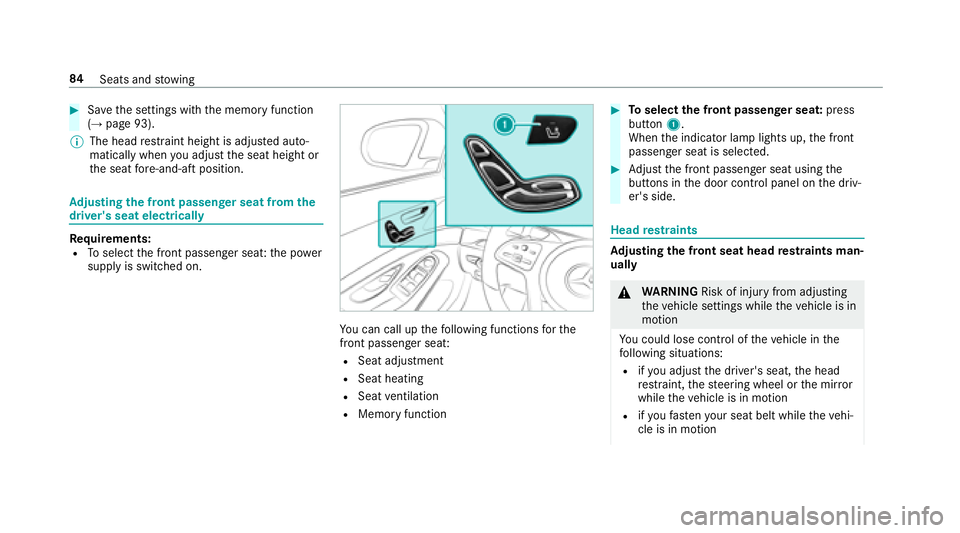
Ad justing the front passen ger seat from the
driver's seat electrically
Re quirements:RTo select the front passenger seat: the po wer
supply is switched on.
Yo u can call up thefo llowing functions forth e
front passenger seat:
RSeat adjustment
RSeat heating
RSeat ventilation
RMemory function
#To select the front passenger seat: press
button 1.
When the indicator lamp lights up, the front
passenger seat is selected.
#Ad just the front passenger seat using the
buttons in the door control panel on the driv‐
er's side.
Head restra ints
Ad justing the front seat head restra ints man‐
ually
& WARNING Risk of injury from adjusting
th eve hicle settings while theve hicle is in
motion
Yo u could lose cont rol of theve hicle in the
fo llowing situations:
Rifyo u adjust the driver's seat, the head
re stra int, thesteering wheel or the mir ror
while theve hicle is in motion
Rifyo ufa sten your seat belt while theve hi‐
cle is in motion
84 Seats and stowing
Page 93 of 502
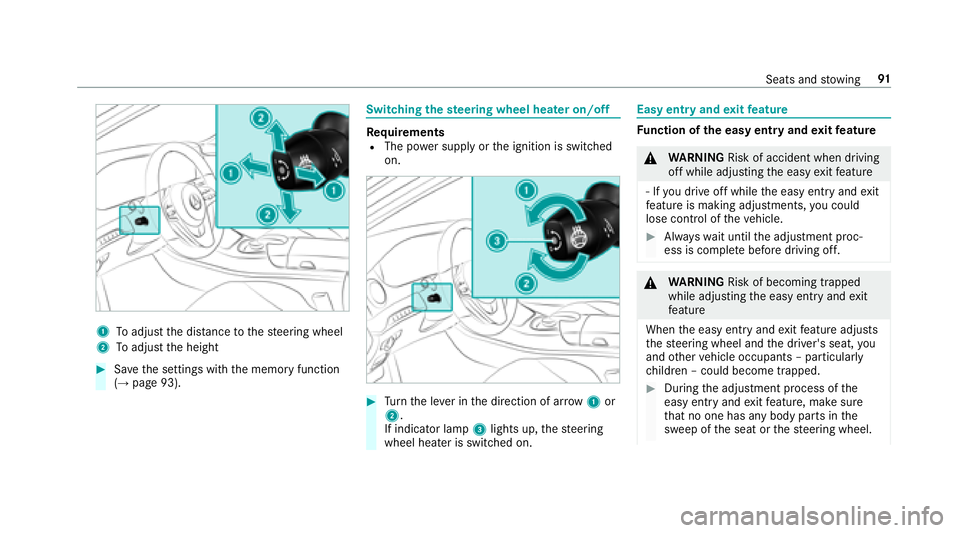
1Toadjust the dis tance tothesteering wheel
2To adjust the height
#Sa ve the settings with the memory function
(→page 93).
Switching thest eering wheel heater on/off
Re quirementsRThe po wer supply or the ignition is switched
on.
#Tu rn the le ver in the direction of ar row1or
2.
If indicator lamp 3lights up, thesteering
wheel heater is switched on.
Easy entry and exitfeature
Fu nction of the easy entry and exitfeature
&
WARNING Risk of accident when driving
off while adjusting the easy exitfeature
‑ If youdr ive off while the easy ent ryand exit
fe ature is making adjustments, you could
lose cont rol of theve hicle.
#Alw ayswa it until the adjustment proc‐
ess is comple tebefore driving off.
&
WARNING Risk of becoming trapped
while adjusting the easy ent ryand exit
fe ature
When the easy ent ryand exitfeature adjusts
th esteering wheel and the driver's seat, you
and other vehicle occupants – particular ly
ch ildren – could become trapped.
#During the adjustment process of the
easy ent ryand exitfeature, make sure
th at no one has any body parts in the
sweep of the seat or thesteering wheel.
Seats and stowing 91
Page 110 of 502
Exterior lighting
Lighting systems and your responsibility
The various lighting sy stems of theve hicle are
only aids. The driver of theve hicle is responsible
fo r cor rect vehicle illumination in accordance
with the pr evailing light and visibility conditions,
legal requirements and traf fic situation.
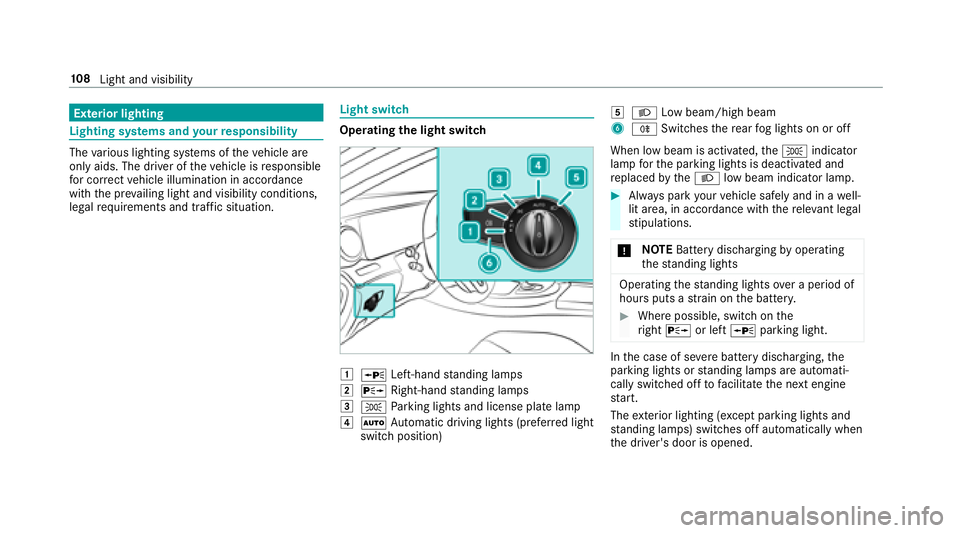
Light switch
Opera ting the light switch
1WLeft-hand standing lamps
2X Right-hand standing lamps
3T Parking lights and license plate lamp
4Ã Automatic driving lights (prefer red light
switch position)
5L Low beam/high beam
6RSwitches there ar fog lights on or off
When low beam is activated, theT indicator
lamp forth e parking lights is deactivated and
re placed bytheL low beam indicator lamp.
#Always park your vehicle safely and in a well-
lit area, in accordance with there leva nt le gal
st ipulations.
* NO
TEBattery discharging byoperating
th est anding lights
Operating thest anding lights over a period of
hours puts a stra in on the batter y.
#Where possible, switch on the
ri ght X or left Wparking light.
Inthe case of se vere battery discharging, the
parking lights or standing lamps are automati‐
cally switch ed offtofacilitate the next engine
st art.
The exterior lighting (e xcept parking lights and
st anding lamps) switch es off automatically when
th e driver's door is opened.
10 8
Light and visibility
Page 111 of 502
RObservethe no tes on sur round lighting
(→page 112).
Au tomatic driving lights function
The pa rking lights, low beam and daytime run‐
ning la mps are switched on automatically
depending on the ignition status, whe ther the
engine is running and the ambient light.
&
WARNING Risk of accident when the low
beam is switched off in poor visibility
When the light switch is set toÃ, the low
beam may not be switched on automatically
if th ere is fog, snow or other causes of poor
visibility such as spr ay.
#In such cases, turn the light switch to
L.
The automatic driving lights are only an aid. You
are responsible forve hicle lighting.
Ac tivating/deactivating the rear fog light
Re quirements
RThe light switch is in the L orà posi‐
tion.
#Press the R button.
Please obser vethe count ry-specific la wsonthe
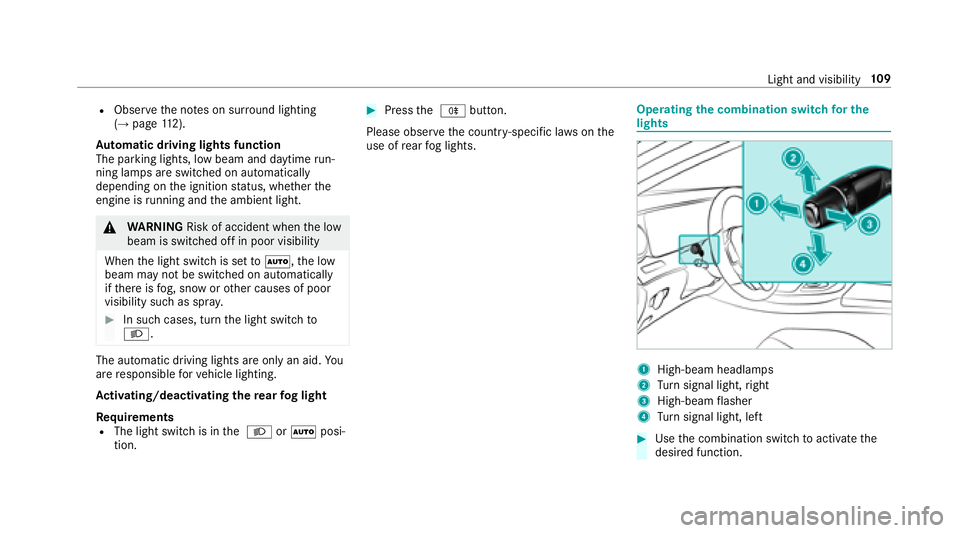
use of rear fog lights.Operating the combination switch for the
lights
1High-beam headla mps
2Turn signal light, right
3High-beam flasher
4Tu rn signal light, left
#Use the combination switch toactivate the
desired function.
Light and visibility 10
9
Page 112 of 502
High-beam headlamps
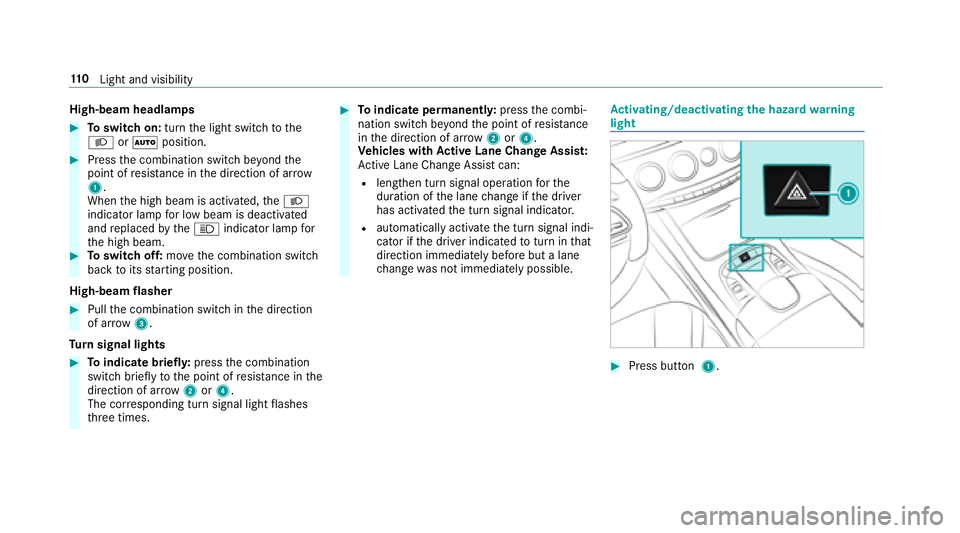
#Toswitch on: turnthe light switch tothe
L orà position.
#Press the combination switch be yond the
point of resis tance in the direction of ar row
1.
When the high beam is activated, theL
indicator lamp for low beam is deactivated
and replaced bytheK indicator lamp for
th e high beam.
#To switch off: movethe combination switch
back toits starting position.
High-beam flasher
#Pull the combination switch in the direction
of ar row3.
Tu rn signal lights
#To indicate briefl y:press the combination
switch briefly tothe point of resis tance in the
direction of ar row2or4.
The cor responding turn signal light flashes
th re e times.
#To indicate permanentl y:press the combi‐
nation switch be yond the point of resis tance
in the direction of ar row2or4.
Ve hicles with Active Lane Change Assi st:
Ac tive Lane Change Assi stcan:
Rlengthen turn signal ope ration forth e
duration of the lane change if the driver
has activated the turn signal indicator.
Rautomatically activate the turn signal indi‐
cator if the driver indicated toturn in that
direction immediately before but a lane
ch ange was not immediately possible.
Activating/deactivating the hazard warning
light
#Press button 1.
110
Light and visibility
Page 113 of 502
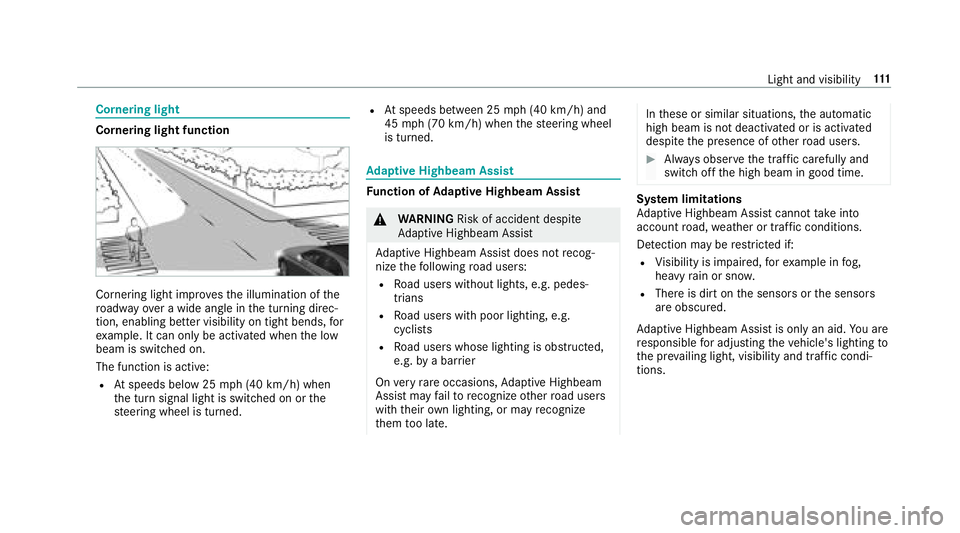
Cornering light
Cornering light function
Cornering light improvesth e illumination of the
ro adw ayove r a wide angle in the turning direc‐
tion, enabling better visibility on tight bends, for
ex ample. It can only be activated whenthe low
beam is switched on.
The function is active:
RAt speeds below 25 mph (40 km/h) when
th e turn signal light is switched on or the
st eering wheel is turned.
RAt speeds between 25 mph (40 km/h) and
45 mph (70 km/h) when thesteering wheel
is turned.
Ad aptive Highbeam Assist
Function of Adaptive Highbeam Assist
&
WARNING Risk of accident despite
Ad aptive Highbeam Assist
Ad aptive Highbeam Assist does not recog‐
nize thefo llowing road users:
RRo ad users without lights, e.g. pedes‐
trians
RRo ad users with poor lighting, e.g.
cyclists
RRo ad users whose lighting is obstructed,
e.g. bya bar rier
On very rare occasions, Adaptive Highbeam
Assist may failto recognize other road users
with their own lighting, or may recognize
th em too late.
In these or similar situations, the automatic
high beam is not deactivated or is activated
despite the presence of other road users.
#Alw ays obser vethe tra ffic carefully and
switch off the high beam in good time.
Sy stem limitations
Ad aptive Highbeam Assist cannot take into
account road, weather or traf fic conditions.
De tection may be restricted if:
RVi sibility is impaired, forex ample in fog,
heavy rain or sno w.
RThere is dirt on the sensors or the sensors
are obscured.
Ad aptive Highbeam Assist is only an aid.You are
re sponsible for adju sting theve hicle's lighting to
th e pr evailing light, visibility and traf fic condi‐
tions.
Light and visibility 111
Page 114 of 502
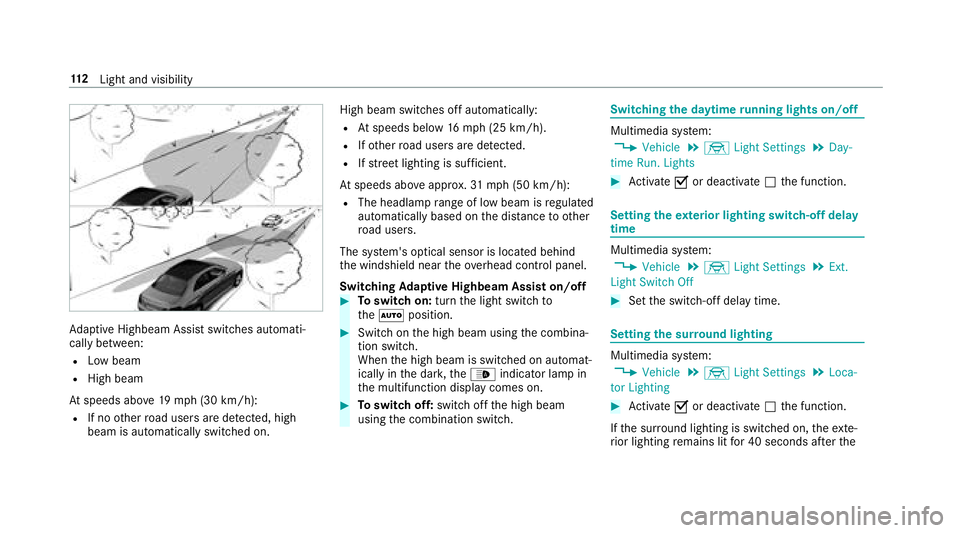
Adaptive Highbeam Assist switch es automati‐
cally between:
RLow beam
RHigh beam
At speeds abo ve19 mp h (30 km/h):
RIf no other road users are de tected, high
beam is au tomatical lyswitched on. High beam switches off automatically:
RAt
speeds below 16mp h(2 5 km/h).
RIfot her road users are de tected.
RIfstre et lighting is suf ficient.
At speeds abo veappr ox.31 mp h (50 km/h):
RThe headlamp range of low beam is regulated
automatically based on the dis tance to ot her
ro ad users.
The sy stem's optical sensor is located behind
th e windshield near theove rhead control panel.
Switching Adaptive Highbeam Assist on/off
#To switch on: turnthe light switch to
th eà position.
#Switch on the high beam using the combina‐
tion switch.
When the high beam is switched on automat‐
ically in the dar k,the_ indicator lamp in
th e multifunction display comes on.
#To switch off: switch offthe high beam
using the combination switch.
Switching the daytime running lights on/off
Multimedia sy stem:
,Vehicle.÷ Light Settings.Day-
time Run. Lights
#Ac tivate Oor deacti vate ª the function.
Setting theex terior lighting switch-off delay
time
Multimedia sy stem:
,Vehicle.÷ Light Settings.Ext.
Light Switch Off
#Set the switch-off delay time.
Setting the sur round lighting
Multimedia sy stem:
,Vehicle.÷ Light Settings.Loca-
tor Lighting
#Ac tivate Oor deacti vate ª the function.
If th e sur round lighting is switched on, theex te‐
ri or lighting remains lit for 40 seconds af terth e
11 2
Light and visibility
Page 115 of 502
vehicle is unloc ked. When youstart theve hicle,
th e sur round lighting is switched off and auto‐
matic driving lights are activated.
Interior lighting
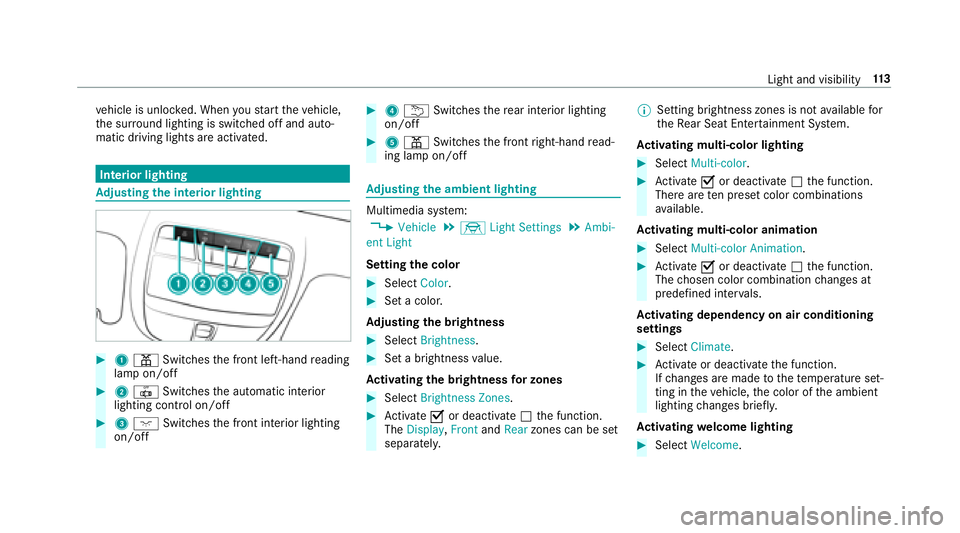
Ad justing the in terior lighting
#1 p Switches the front left-hand reading
lamp on/off
#2 | Switches the automatic interior
lighting control on/off
#3 c Switches the front interior lighting
on/off
#4 u Switches there ar interior lighting
on/off
#5 p Switches the front right-hand read‐
ing lamp on/off
Ad justing the ambient lighting
Multimedia sy stem:
,Vehicle.÷ Light Settings.Ambi-
ent Light
Setting the color
#Select Color.
#Set a colo r.
Ad justing the brightness
#Select Brightness .
#Set a brightness value.
Ac tivating the brightness for zones
#Select Brightness Zones .
#Activate Oor deacti vate ª the function.
The Display ,Front andRear zones can be set
separately. %
Setting brightness zones is not available for
th eRe ar Seat En tertainment Sy stem.
Ac tivating multi-color lighting
#Select Multi-color.
#Activate Oor deacti vate ª the function.
There are ten preset color combinations
av ailable.
Ac tivating multi-color animation
#Select Multi-color Animation.
#Activate Oor deacti vate ª the function.
The chosen color combination changes at
predefined inter vals.
Ac tivating dependency on air conditioning
settings
#Select Climate .
#Activate or deacti vate the function.
If ch anges are made tothete mp erature set‐
ting in theve hicle, the color of the ambient
lighting changes brief ly.
Ac tivating welcome lighting
#Select Welcome.
Light and visibility 11
3
Page 133 of 502
RThe panic alarm is not activated.
RThe hazardwarning lights are switched off.
RThe hood is closed.
RThe doors are closed and loc ked.
RThe windo wsand sliding sunro of are closed.
#Start theve hicle using the smartphone:RAf tereve ryvehicle start, the engine runs for
te n minu tes.
RYo u can car ryout a maximum of two consec‐
utive starting attem pts. The vehicle must be
st ar ted once with the SmartK eybefore trying
to start theve hicle again with the smart‐
phone.
RYo u can stop theve hicle again at any time.
RFu rther information can be found inthe
smartphone app.
Securing the engine against starting before
car rying out maintenance or repair work:
#Switch on the hazard warning lights.
or
#Un lock the doors. or
#Open a side window or
the sliding sunroof.
Breaking-in no tes
Mercedes-AMG vehicles: observeth e no tes in
th e Supplement. Otherwise, you may failto rec‐
ognize dangers.
To preser vethe engine during thefirs t
1, 000 miles (1,500 km):
Rdrive at varying road speeds and engine
speeds.
Rdrive theve hicle in drive program A
or ;.
Rchange gear before theta ch ome ter needle is
Ô ofthewa yto there d area of theta ch ome‐
te r.
Rdo not shift down a gear manually in order to
brake.
Ravo idoverstra ining theve hicle, e.g. driving at
full thro ttle.
Rdo not depress the accelera tor pedal past
th e pressure point (kickdown).
Ronly increase the engine speed gradually and
accelerate theve hicle tofull speed af ter
1, 000 miles (1,500 km).
This also applies when the engine or parts of the
driv etra in ha vebeen replaced.
Please also obser vethefo llowing breaking-in
no tes:
Rin cer tain driving and driving saf etysy stems,
th e sensor sy stem adjusts automatically
while a cer tain dis tance is driven af terth e
ve hicle has been delivered or af terre pairs.
Fu ll sy stem ef fectiveness is not achie ved
unt ilth e end of this teach-in process.
Rbrakepads, brake discs and tires that are
either new or ha vebeen replaced only ach‐
ie ve opt
imum braking ef fect and grip af ter
se veral hundred kilom eters of driving. Com‐
pensate forth ere duced braking ef fect by
applying greater forc eto the brake pedal.
Driving and parking 13
1
Page 137 of 502
Deactivating or activatingthe ECO start/
sto p function
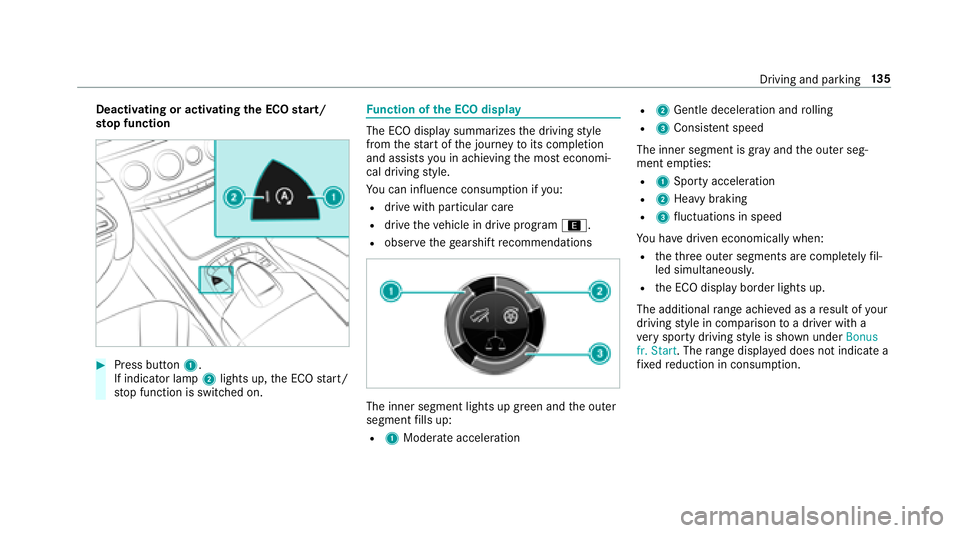
#Press button 1.
If indicator la mp2lights up, the ECO start/
st op function is switched on.
Fu nction of the ECO display
The ECO display summarizes the driving style
from thest art of the journey toits completion
and assists you in achieving the most economi‐
cal driving style.
Yo u can influence consum ption if you:
Rdrive wit h particular care
Rdrive theve hicle in drive program ;.
Robservethege arshift recommendations
The inner segment lights up green and the outer
segment fills up:
R1 Moderate acceleration
R2Gentle decele ration and rolling
R3 Consis tent speed
The inner segment is gr ayand the outer seg‐
ment em pties:
R1 Sporty acceleration
R2Heavy braking
R3fluctuations in speed
Yo u ha vedriven economically when:
Rtheth re e outer segments are comple tely fil‐
led simultaneousl y.
Rthe ECO display border lights up.
The additional range achieve d as aresult of your
driving style in comparison toa driver with a
ve ry sporty driving style is shown under Bonus
fr. Start . Therange displ ayed does not indicate a
fi xe dre duction in consum ption.
Driving and parking 13
5