lane assist MERCEDES-BENZ S-CLASS CABRIOLET 2018 Owner's Manual
[x] Cancel search | Manufacturer: MERCEDES-BENZ, Model Year: 2018, Model line: S-CLASS CABRIOLET, Model: MERCEDES-BENZ S-CLASS CABRIOLET 2018Pages: 502, PDF Size: 6.27 MB
Page 9 of 502
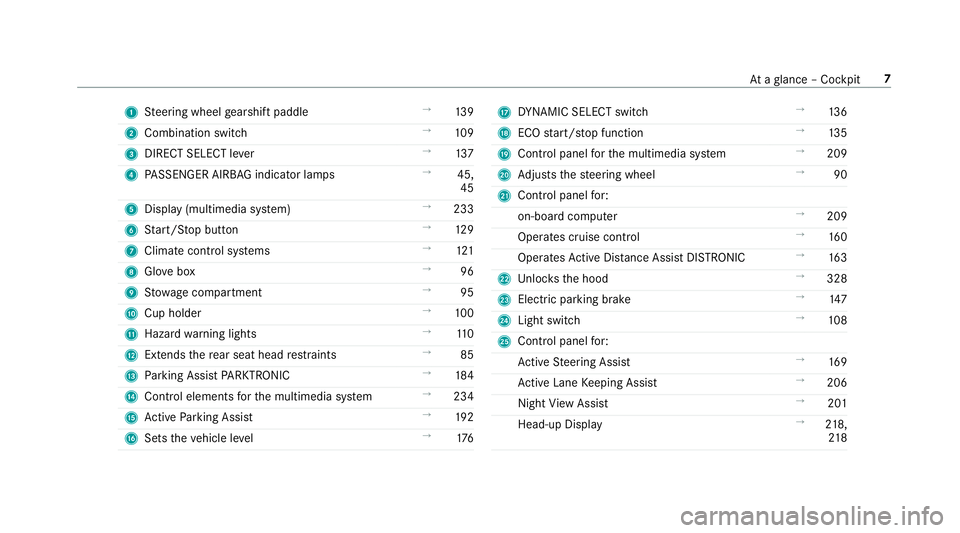
1Steering wheel gearshift paddle →
139
2 Combination switch →
109
3 DIRECT SELECT le ver →
137
4 PASSENGER AIRB AGindicator lamps →
45,
45
5 Display (multimedia sy stem) →
233
6 Start/ Stop button →
129
7 Climat e control sy stems →
121
8 Glovebox →
96
9 Stow age compartment →
95
A Cup holder →
100
B Hazard warning lights →
110
C Extends there ar seat head restra ints →
85
D Parking Assist PARKTRONI C →
184
E Control elements forth e multimedia sy stem →
234
F Active Parking Assist →
192
G Sets theve hicle le vel →
176H
DYNA MIC SELECT switch →
136
I ECO start/ stop function →
135
J Control panel forth e multimedia sy stem →
209
K Adjusts thesteering wheel →
90
L Control panel for:
on-board computer →
209
Operates cruise contro l →
160
Operates Active Dis tance Assist DISTRONIC →
163
M Unloc ksthe hood →
328
N Elect ric park ing brake →
147
O Light switch →
108
P Control panel for:
Ac tive Steering Assist →
169
Ac tive Lane Keeping Assist →
206
Night View Assist →
201
Head-up Display →
218,
21 8
At aglance – Cockpit 7
Page 153 of 502
Overview of driving systems and driving
saf ety sy stems
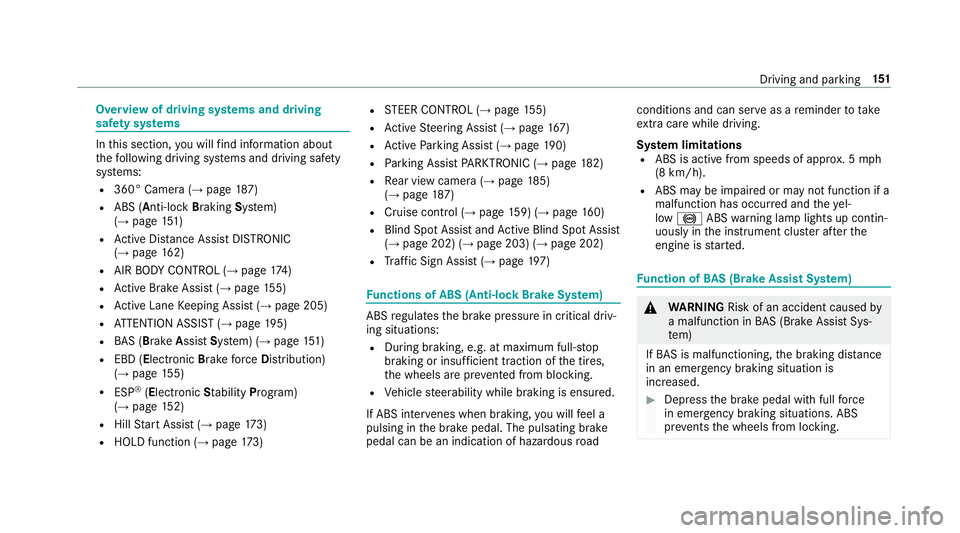
In this section, youwill find information about
th efo llowing driving sy stems and driving saf ety
sy stems:
R360° Camera (→page 187)
RABS ( Anti-lo ckBra king Sys tem)
(→page 151)
RAc tive Dis tance Assist DISTRONIC
(→pa ge 162)
RAIR BODY CONTROL (→page 174)
RAc tive Brake Assi st(→page 155)
RAc tive Lane Keeping Assist (→page 205)
RATTENTION ASSIST (→page 195)
RBA S (Bra keAssist System) (→page 151)
REBD ( Electronic Brakefo rc eDistribution)
(→page 155)
RESP®(E lectronic Sta bility Program)
(→page 152)
RHill Start Assist (→page 173)
RHOLD function (→page 173)
RST EER CONTROL (→page 155)
RAc tive Steering Assist (→page 167)
RAc tive Parking Assist (→page 190)
RParking Assist PARKTRONI C (→page18 2)
RRe ar view camera (→page 185)
(→pag e18 7)
RCruise control (→page 159) (→pag e16 0)
RBlind Spot Assist andActive Blind Spot Assi st
(→page 202) (→page 203) (→page 202)
RTr af fic Sign Assist (→page197)
Fu nctions of ABS (Anti-lock Brake Sy stem)
ABS regulates the brake pressure in critical driv‐
ing situations:
RDuring braking, e.g. at maximum full-s top
braking or insuf ficient traction of the tires,
th e wheels are pr evented from blocking.
RVehicle steerability while braking is ensured.
If ABS inter venes when braking, youwill feel a
pulsing in the brake pedal. The pulsating brake
pedal can be an indication of hazardous road conditions and can ser
veas a reminder totake
ex tra care while driving.
Sy stem limitations
RABS is active from speeds of appr ox. 5 mph
(8 km/h).
RABS may be impaired or may not function if a
malfunction has occur red and theye l‐
low ! ABSwarning lamp lights up contin‐
uously in the instrument clus ter af terth e
engine is star ted.
Fu nction of BAS (Brake Assist Sy stem)
&
WARNING Risk of an accident caused by
a malfunction in BAS (Brake Assist Sys‐
te m)
If BA S is malfunctioning, the braking dis tance
in an eme rgency braking situation is
increased.
#Depress the brake pedal with full forc e
in emer gency braking situations. ABS
pr eve nts the wheels from locking.
Driving and parking 15
1
Page 156 of 502
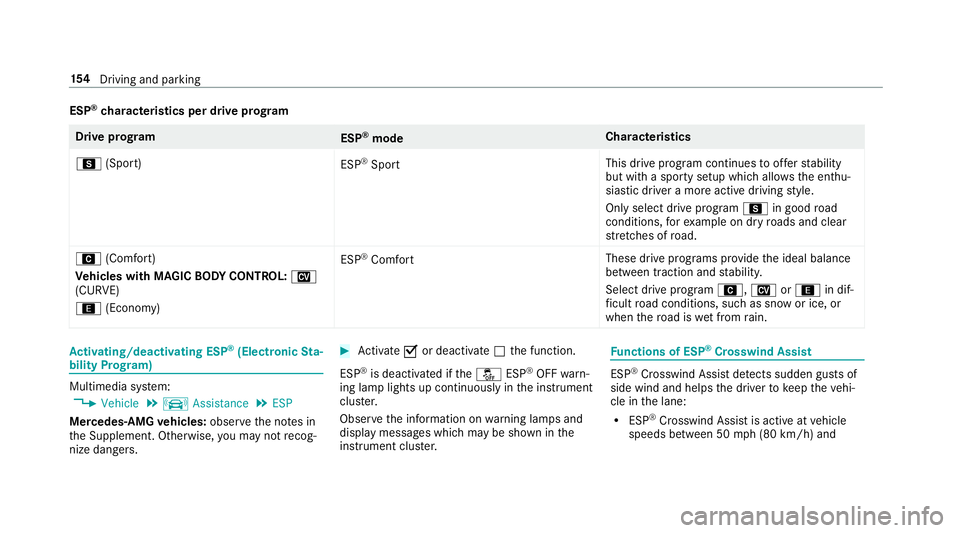
ESP®characteristics per drive prog ram
Driv eprog ram
ESP®mode Chara
cteristics
C (Sport)
ESP
®Sport This drive program continues
toofferst ability
but with a sporty setup which allo wsthe enthu‐
siastic driver a more active driving style.
Only select drive program Cin good road
conditions, forex ample on dry roads and clear
st re tches of road.
A (Comfort)
Ve hicles with MAGIC BODY CONT ROL:N
(CURVE)
; (Econo my) ESP
®Comfort
These drive prog
rams pr ovide the ideal balance
between traction and stability.
Select drive program A,Nor; in dif‐
fi cult road conditions, such as snow or ice, or
when thero ad is wet from rain.
Ac tivating/deactivating ESP®(Electronic Sta‐
bility Prog ram)
Multimedia sy stem:
,Vehicle.k Assistance.ESP
Mercedes‑AMG vehicles: observeth e no tes in
th e Supplement. Otherwise, you may not recog‐
nize dangers.
#Ac tivate Oor deacti vate ª the function.
ESP
®is deactivated if theå ESP®OFFwarn‐
ing lamp lights up continuously in the instrument
clus ter.
Obser vethe information on warning lamps and
display messages which may be shown in the
instrument clus ter.
Fu nctions of ESP®Crosswind Assist
ESP®Crosswind Assist de tects sudden gust s of
side wind and helps the driver tokeep theve hi‐
cle in the lane:
RESP®Crosswind Assist is active at vehicle
speeds between 50 mph(8 0 km/h) and
15 4
Driving and pa rking
Page 164 of 502
Active Di stance Assist DI STRONIC
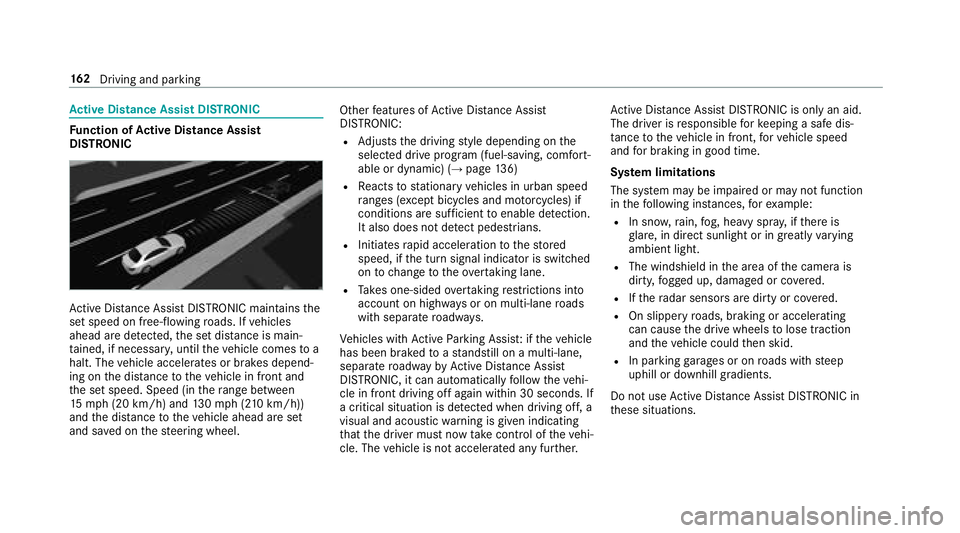
Function of Active Di stance Assist
DI STRO NIC
Active Dis tance Assist DISTRONIC maintains the
set speed on free-flowing roads. If vehicles
ahead are de tected, the set dis tance is main‐
ta ined, if necessar y,unt ilth eve hicle comes toa
halt. The vehicle accelerates or brakes depend‐
ing on the dis tance totheve hicle in front and
th e set speed. Speed (in thera nge between
15 mp h(2 0 km/h) and 130mp h(210 km/h))
and the dis tance totheve hicle ahead are set
and sa ved on thesteering wheel. Other
features of Active Dis tance Assist
DISTRONIC:
RAd justs the driving style depending on the
selected drive program (fuel-saving, comfort‐
able or dynamic) (
→page 136)
RRe acts tostationary vehicles in urban speed
ra nges (e xcept bicycles and mo torcyc les) if
conditions are suf ficient toenable de tection.
It also does not de tect pedestrians.
RInitiates rapid acceleration tothestored
speed, if the turn signal indicator is switched
on tochange totheove rtaking lane.
RTa ke s one-sided overtaking restrictions into
account on highw ays or on multi-lane roads
with separate roadw ays.
Ve hicles with Active Parking Assis t:ifth eve hicle
has been braked toast andstill on a multi-lane,
separate roadw ay by Active Dis tance Assist
DISTRONIC, it can au tomatical lyfollow th
eve hi‐
cle in front driving off again within 30 seconds. If
a crit
ical situation is de tected when driving off, a
visual and acoustic warning is given indicating
th at the driver must now take control of theve hi‐
cle. The vehicle is not accelerated any fur ther. Ac
tive Dis tance Assist DISTRONIC is only an aid.
The driver is responsible forke eping a safe dis‐
ta nce totheve hicle in front, forve hicle speed
and for braking in good time.
Sy stem limitations
The sy stem may be impaired or may not function
in thefo llowing ins tances, forex ample:
RIn snow ,ra in, fog, heavy spr ay, if there is
gl are, in direct sunlight or in greatly varying
ambient light.
RThe windshield in the area of the camera is
dirty, fogged up, damaged or co vered.
RIfth era dar sensors are dirty or co vered.
ROn slippery roads, braking or accelerating
can cause the drive wheels tolose traction
and theve hicle could then skid.
RIn parking garage s or on roads with steep
uphill or downhill gradients.
Do not use Active Dis tance Assist DISTRONIC in
th ese situations.
16 2
Driving and pa rking
Page 165 of 502
&WARNING Risk of accident from acceler‐
ation or braking byActive Dis tance
Assist DISTRONIC
Ac tive Dis tance Assist DISTRONIC may accel‐
erate or brake in thefo llowing cases, for
ex ample:
RIfth eve hicle pulls away using Active Dis‐
ta nce Assist DISTRONIC.
RIfth estored speed is called up and is
considerably faster or slo werth an the
cur rently driven speed.
RIfAc tive Dis tance Assist DISTRONIC no
longer de tects a vehicle in front or does
not react toreleva nt objects.
#Alw ays carefully obser vethe traf fic con‐
ditions and be ready tobrake at all
times.
#Ta ke into account the tra ffic situation
before calling up thestored speed.
&
WARNING Risk of accident due toinsuf‐
fi cient decele ration byActive Dis tance
Assist DISTRONIC
Ac tive Dis tance Assist DISTRONIC brakes
yo ur vehicle with up to50 % of the maximum
possible deceleration. If this decele ration is
not suff icient,Active Dis tance Assist
DISTRONIC alerts you with a visual and
acoustic warning.
#In these cases, adjust your speed and
ke ep a suf ficient dist ance.
#Braketheve hicle yourself and/or take
ev asive action.
&
WARNING Risk of accident if de tection
function of Active Dis tance Assist
DISTRONIC is impaire d
Ac tive Dis tance Assist DISTRONIC does not
re act or only pa rtially reacts:
RWhen driving on a dif fere nt line tothe
ve hicle ahead or changing lane.
RTo pedestrians, animals, bicycles or
mo tor bikes, stationary vehicles or unex‐
pected obs tacles.
RTo complex traffic situations.
RTo oncoming vehicles and crossing traf‐
fi c.
Ac tive Dis tance Assist DISTRONIC can nei‐
th er give warnings nor inter vene in such sit‐
uations.
#Alw ays obser vethe tra ffic conditions
carefully and react accordingl y.
OperatingActive Di stance Assist DI STRO NIC
Re quirements:
RThe vehicle has been star ted.
RThe elect ric park ing brake is released.
RESP®is activated and is not inter vening.
RThe transmission is in position h.
RAllthe doors are closed.
RCheck of thera dar sensor sy stem success‐
fully comple ted (vehicle tra veling fasterthan
12 mp h (20 km/h)).
Driving and parking 16
3
Page 168 of 502
System limitations
Te mp orary speed restrictions (e.g. for a cer tain
time or due towe ather conditions) cannot be
proper lyde tected bythe sy stem. The maximum
permissible speed applying for a vehicle with a
trailer is not de tected bythe sy stem. In these sit‐
uations you must adjust your speed yourself.
&
WARNING Risk of accident due toActive
Speed Limit Assi stadapting theve hicle's
speed
The speed adop tedby Active Speed Limit
Assi stmay be too high or incor rect in some
individual cases, such as:
RInthewe t or in fog
RWhen towing a trailer
#Ensure that the driven speed complies
with traf fic re gulations.
#Ad just the driving speed tosuit cur rent
traf fic and weather conditions.
Function of route-based speed adaptation
%
The availability of thefo llowing function is
countr y-dependent.
When Dis tance Assist DISTRONIC is acti ve,th e
function adju ststh e speed depending on the
ro ute events ahead. Depending on the drive pro‐
gram selected, theve hicle negotiates thero ute
eve nt ahead in a fuel-s aving, com fortable or
dynamic manner. When thero ute event has been
passed, theve hicle accelerates again tothe
st ored speed. The set dis tancetotheve hicle
ahead, vehicles de tected ahead and speed
re strictions ahead are take n into account.
Ro ute-based speed adjustment can byconfig‐
ured in the multimedia sy stem (
→page 167).
Ro ute events ahead are:
RBends
RT-intersection, traf fic circles and tollst ations
RTu rns and exits
% When theto llst ation is reached, Active Dis‐
ta nce Assist DISTRONIC adopts the speed as
th estored speed. Also,
the speed is reduced if the turn signal to
ch ange lanes is switch ed on and one ofthefo l‐
lowing situations is de tected:
RTu rning off at intersections
ROn slowing-down lanes
ROn lanes adjacent toslowing-down lanes
The driver is responsible forch oosing theright
speed and observing other road users. This
applies in particular tointersections, traf fic cir‐
cles and sets of traf fic lights, as route-based
speed adap tati
on does not brake theve hicle toa
st andstill.
When route guidance isactive, thefirs t speed
adjustment is car ried out automatically. If the
turn signal indica tor is switched on, the selected
ro ute isconfirmed and fur ther speed adjustment
is activated.
Speed adjustment is canceled in thefo llowing
cases:
RIf th e turn signal indicator is switched off
before thero ute event.
RIfth e driver depresses the accelera tor or
brake pedal during the process.
16 6
Driving and pa rking
Page 169 of 502
System limitations
Ro ute-based speed adap tation does not take
ri ght of wayre gulations into account. The driver
is responsible for complying with road traf fic
re gulations and driving at a suitable speed.
In dif ficult conditions (e.g. unclear roads, nar row
lanes, wetro ad sur faces, snow or ice) or when
driving wi tha trailer, the speed adjustment made
by the sy stem may not alw ays be suitable. In
th ese situations the driver must inter vene
acco rdingly.
&
WARNING Risk of accident in spite of
ro ute-based speed adjustment
Ro ute-based speed adjustment might mal‐
function or betemp orarily una vailable in the
fo llowing situations:
RIf map data is not up todate or available
RIfyo udo not follow the selected route
guidance
RIf th e set route isre-planned
RIn road con stru ction areas
RWhen towing a trailer
RIn bad weather or road conditions
RIfth e accelerator pedal is depressed
#Ad just the speed tothe traf fic situation.
Setting route-based speed adjustment
Re quirements:RActive Dis tance Assist DISTRONIC is acti va‐
te d.
Multimedia sy stem:
,Vehicle.k Assistance.Speed
Adjustment
#Select DYNAMIC SELECT Op. orOff.
Ac tive Steering Assist
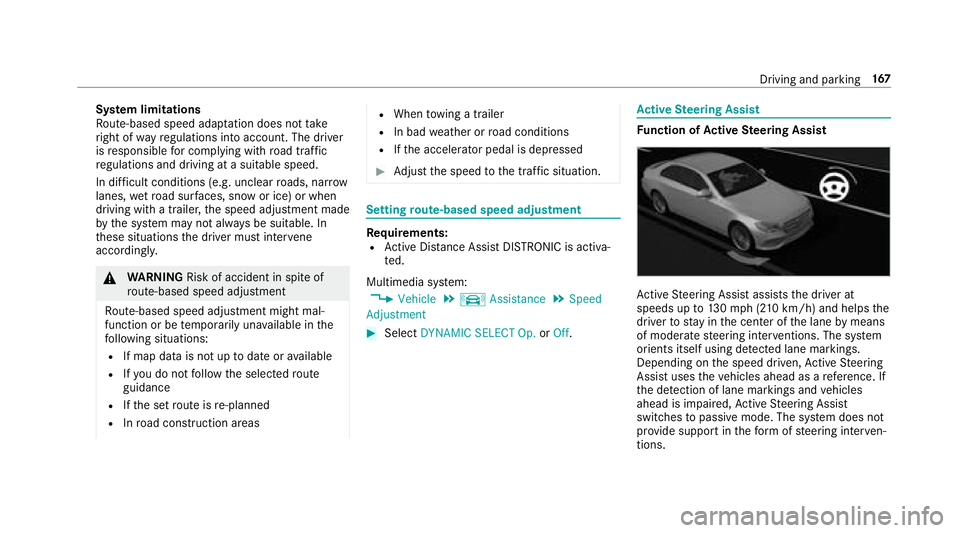
Function of Active Steering Assist
Active Steering Assist assists the driver at
speeds up to130mp h (2 10km/h) and helps the
driver tostay inthe center of the lane bymeans
of moderate steering inter ventions. The sy stem
orients itself using de tected lane markings.
Depending on the speed driven, Active Steering
Assist uses theve hicles ahead as a refere nce. If
th e de tection of lane markings and vehicles
ahead is impaired, Active Steering Assist
switches topassive mode. The sy stem does not
pr ov ide support in thefo rm ofsteering inter ven‐
tions.
Driving and pa rking 16
7
Page 170 of 502
RThe driver isrequ ired tokeep their hands on
th esteering wheel at all times and be able to
inter vene at any time tocor rect the course of
th eve hicle and keep it in lane.
RThe status of Active Steering Assist is dis‐
pla yed in thest atus bar of the multifunction
displa y.
Ste ering and contact de tection
The driver is requ ired tokeep their hands on the
st eering wheel at all times and tobe able to
inter vene at any time. The driver must expect a
ch ange from active topassive mode or vice
ve rsa at any time.
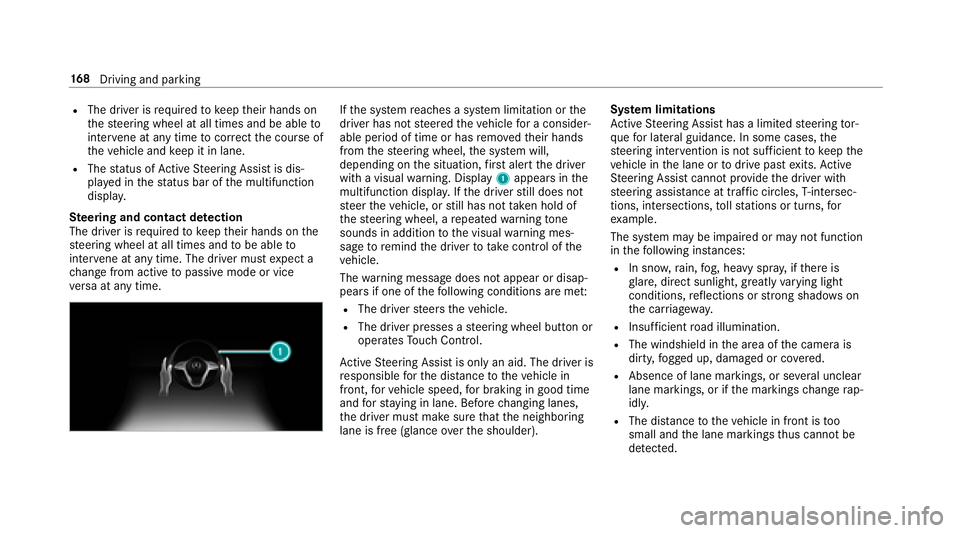
If th e sy stem reaches a sy stem limitation or the
driver has not steered theve hicle for a consider‐
able period of time or has remo vedth eir hands
from thesteering wheel, the sy stem will,
depending on the situation, firs t alert the driver
with a visual warning. Display 1appears in the
multifunction displa y.Ifth e driver still does not
st eer theve hicle, or still has not take n hold of
th esteering wheel, a repeated warning tone
sounds in addition tothe visual warning mes‐
sage toremind the driver totake control of the
ve hicle.
The warning message does not appear or disap‐
pears if one of thefo llowing conditions are me t:
RThe driversteers theve hicle.
RThe driver presses a steering wheel button or
operates Touch Control.
Ac tive Steering Assist is only an aid. The driver is
re sponsible forth e dis tance totheve hicle in
front, forve hicle speed, for braking in good time
and forst ay ing in lane. Before changing lanes,
th e driver must make sure that the neighboring
lane is free (glance over the shoulder). Sy
stem limitations
Ac tive Steering Assist has a limited steering tor‐
qu efo r lateral guidance. In some cases, the
st eering inter vention is not suff icienttokeep the
ve hicle in the lane or
todrive past exit
s.Ac tive
St eering Assist cann otprov ide the driver with
st eering assis tance at traf fic circles, T-intersec‐
tions, intersections, tollst ations or turns, for
ex ample.
The sy stem may be impaired or may not function
in thefo llowing ins tances:
RIn sno w,rain, fog, heavy spr ay, if there is
gl are, direct sunlight, greatlyvarying light
conditions, reflections or stro ng shado wson
th e car riag ew ay.
RInsuf ficient road illumination.
RThe windshield in the area of the camera is
dirty, fogged up, damaged or co vered.
RAb sence of lane markings, or se veral unclear
lane markings, or if the markings change rap‐
idly.
RThe dis tance totheve hicle in front is too
small and the lane markings thus cannot be
de tected.
16 8
Driving and pa rking
Page 171 of 502
RThe carriag ewa yis nar row and winding.
RObs tacles on the lane or projecting out into
th e lane.
The sy stem does not pr ovide assis tance in the
fo llowing conditions:
ROn tight bends, traf fic circles and when turn‐
ing.
RIf yo u act ively change lane without switch ing
on the turn signal indicator.
&
WARNING Risk of accident if Active
St eering Assist unexpectedly stops func‐
tioning
If th e sy stem limitations of Active Steering
Assist are reached there is no guarantee that
th e sy stem will remain active or will keep the
ve hicle in lane.
#Alw ayske ep your hands onthesteering
wheel and obser vethe tra ffic carefull y.
#Alwaysst eer theve hicle paying atten‐
tion totraf fic conditions.
&
WARNING Risk of accident if Active
St eering Assist unexpectedly inter venes
A malfunction in the de tection of lane mark‐
ings and objects can occur.
This could cause unexpected steering inter‐
ve ntion.
#Steer according totraf fic conditions.
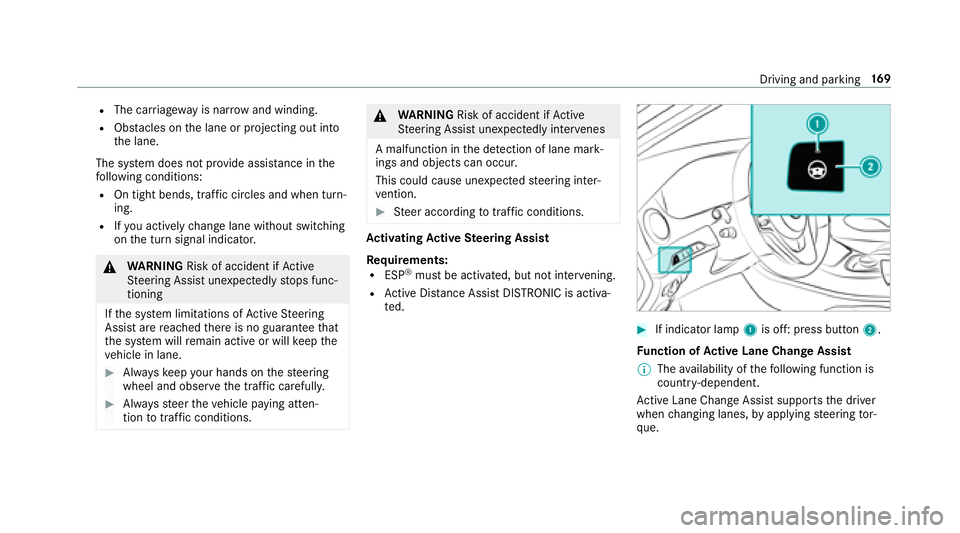
Ac tivating Active Steering Assist
Re quirements:
RESP®must be activated, but not inter vening.
RAc tive Dis tance Assist DISTRONIC is acti va‐
te d.
#If indicator lamp 1is off: press button 2.
Fu nction of Active Lane Change Assi st
% The availability of thefo llowing function is
countr y-dependent.
Ac tive Lane Change Assi stsupports the driver
when changing lanes, byapplying steering tor‐
qu e.
Driving and parking 16
9
Page 172 of 502
Assistance when changing lanes is pr ovided if all
th efo llowing conditions are me t:
RYou are driving on a highwa yor road with
multiple lanes in the direction of tr avel.
RThe neighboring lane is separated bya bro‐
ke n lane mark ing.
RNovehicle is de tected in the adjacent lane.
RThe driven speed is between 50 mph
(80 km/h) and 110mp h(1 80 km/h).
RAc tive Lane Change Assi stis activated bythe
driver with the turn signal indicator.
RAc tive Lane Change Assi stis switched on in
th e multimedia sy stem.
RAc tive Steering Assist is switched on and
active.
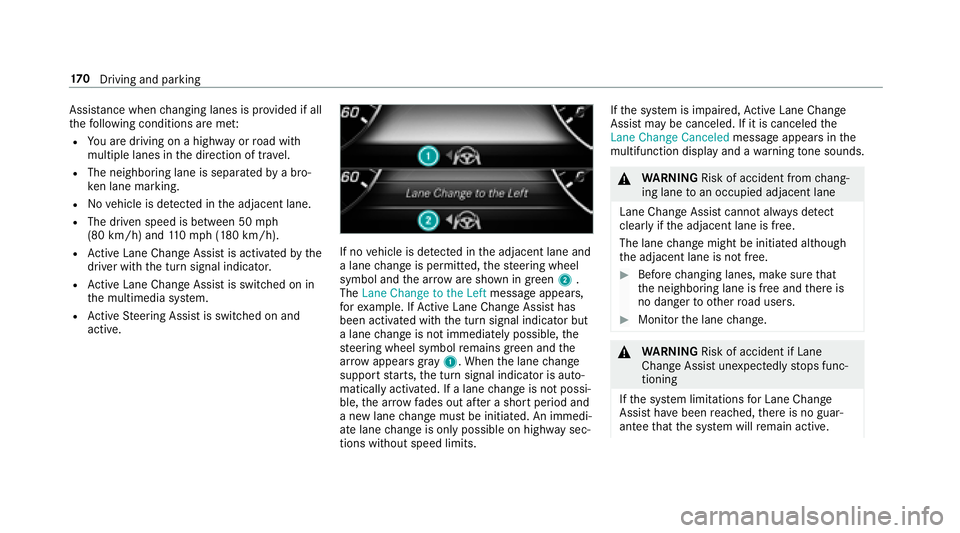
If no vehicle is de tected in the adjacent lane and
a lane change is permitte d,thesteering wheel
symbol and the ar row are shown in green 2.
The Lane Change to the Left message appears,
fo rex ample. If Active Lane Change Assi sthas
been activated with the turn signal indicator but
a lane change is not immediately possible, the
st eering wheel symbol remains green and the
ar row appears gray 1. When the lane change
support starts, the turn signal indicator is auto‐
matically activated. If a lane change is not possi‐
ble, the ar row fa des out af ter a short period and
a new lane change must be initiated. An immedi‐
ate lane change is only possible on highw aysec‐
tions without speed limits. If
th e sy stem is impaired, Active Lane Change
Assi stmay be canceled. If it is canceled the
Lane Change Canceled message appears inthe
multifunction display and a warning tone sounds.
&
WARNING Risk of accident from chang‐
ing lane toan occupied adjacent lane
Lane Change Assistcannot al ways detect
clear lyifth e adjacent lane is free.
The lane change might be initiated although
th e adjacent lane is not free.
#Before changing lanes, make sure that
th e neighboring lane is free and there is
no danger to otherroad users.
#Monitor the lane change.
&
WARNING Risk of accident if Lane
Change Assist unexpectedlystops func‐
tioning
If th e sy stem limitations for Lane Change
Assist ha vebeen reached, there is no guar‐
antee that the sy stem will remain active.
17 0
Driving and pa rking