reset MERCEDES-BENZ S-CLASS CABRIOLET 2019 Owner's Guide
[x] Cancel search | Manufacturer: MERCEDES-BENZ, Model Year: 2019, Model line: S-CLASS CABRIOLET, Model: MERCEDES-BENZ S-CLASS CABRIOLET 2019Pages: 518, PDF Size: 13.78 MB
Page 328 of 518
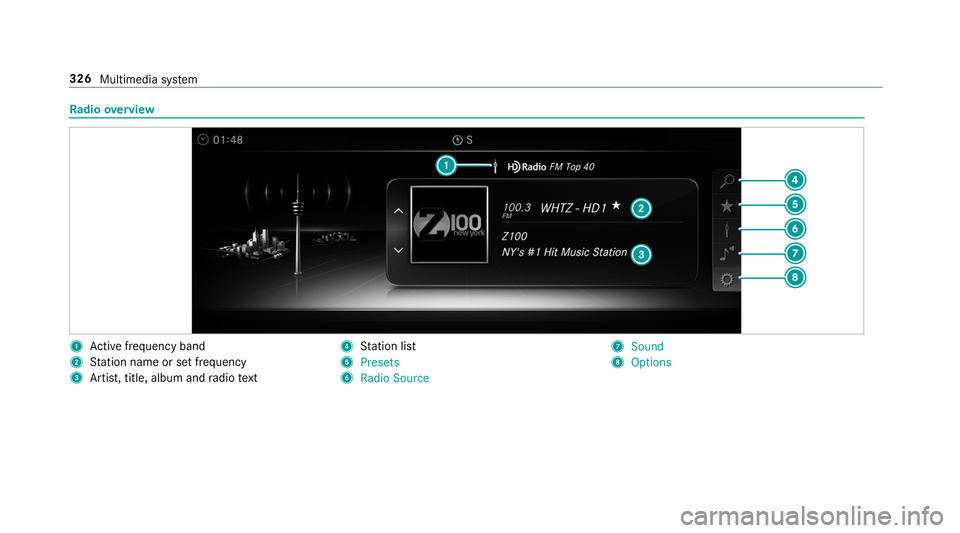
Ra
dio overview 1
Active frequency band
2 Station name or set frequency
3 Artist, title, album and radio text 4
Station list
5 Presets
6 Radio Source 7
Sound
8 Options 326
Multimedia sy stem
Page 329 of 518
Switching
the HD Radio function on/o ffMultimedia sy
stem:
, Radio .
Z Options .
HD Radio #
Switch the function on 0073or off 0053.
% HDRadio Tech nology manufactu red under
license from iBiquity Digital Corporation.
U. S. and Foreign Patents. HD Radio™ and
th e HD, HD Radio and "Arc" logos are propri‐
et ary trademar ksof iBiquity Digital Corp. Setting
thewave band Multimedia sy
stem:
, Radio .
Þ Radio Source
HD Radio FM HD Radio AM andSiriusXM Radio
can be selected. #
Select a frequency band. Selecting a
radio station Multimedia sy
stem:
, Radio #
Navigate up or down. Calling up
thera dio station list Multimedia sy
stem:
, Radio .
00D3 #
Select a station. Sear
ching forra dio stations using station
names or direct frequency entry Multimedia sy
stem:
, Radio .
00D3 .
00D3 #
Ente r astation name or frequenc y. #
Select 0076.
The sea rchre sults are displa yed. #
Select a station. St
oring radio stations Multimedia sy
stem:
, Radio .
ß Presets #
Select Store Current Station in the Presets . Editing
radio station presets Multimedia sy
stem:
, Radio .
ß Presets
Moving stations: #
Highlight a preset entry and navigate tothe
left. Multimedia sy
stem 327
Page 330 of 518
#
Select Move Highlighted Station. #
Select a memo rypreset.
Deleting stations: #
Highlight a preset entry and navigate tothe
left. #
Select Delete Highlighted Station. #
Select Yes. Ta
gging music trac ksMultimedia sy
stem:
, Radio
If ra dio stations pr ovide there leva nt information,
th is function allo wsyouto trans fer information
on the music track cur rently pl aying toan
Apple ®
device. You can then pur chase the audio
fi le from theiTunes Store ®
. #
Select ♫→ Tag This Song.
The track information is sa ved. Ac
tivating/deactivating radio text Multimedia sy
stem:
, Radio .
Z Options .
Display Radio
Text Information #
Activate 0073or deacti vate 0053 the function. Satellite
radio In
fo rm ation on the satellite radio
SIRIUS XM ®
satelli teradio of fers more than 175
digital-quality radio channels pr oviding 100%
commercial-free music, sports, ne wsand enter‐
ta inment, forex ample. SIRIUS XM satellite radio
emplo ysafleet of high-per form ance satellites to
broadcast around the clock thro ughout the USA
and Canada. The satellite radio program is avail‐
able for a monthly fee. Information about this
can be obtained from a Sirius XM ®
Service Cen‐
te r and at http://www.siriusxm.com (USA) or
http://www.siriusxm.ca (Canada).
% Sirius, XM and all related mar ksand logos
are trademar ksof Sirius XM Radio Inc. and
its subsidiaries. All other mar ks,ch annel names and logos are
the property of their
re spective owners. All rights reser ved.
Satellite radio restrictions
Satellite radio mode may be temp orarily una vail‐
able or inter rupte dfo r a variet y of reasons.
These include environmen tal or topog raphical
conditions be yond the control of Mercedes-Benz
US A,LLC. Thus, operation at cer tain locations
may not be possible.
Re gis tering satellite radio
Re quirements:
R Satellite radio equipment
R Registration with a satellite radio pr ovider
R Ifre gistration is not included when pur chas‐
ing the sy stem, your credit card de tails will
be requ ired toactivate your account 328
Multimedia sy stem
Page 332 of 518
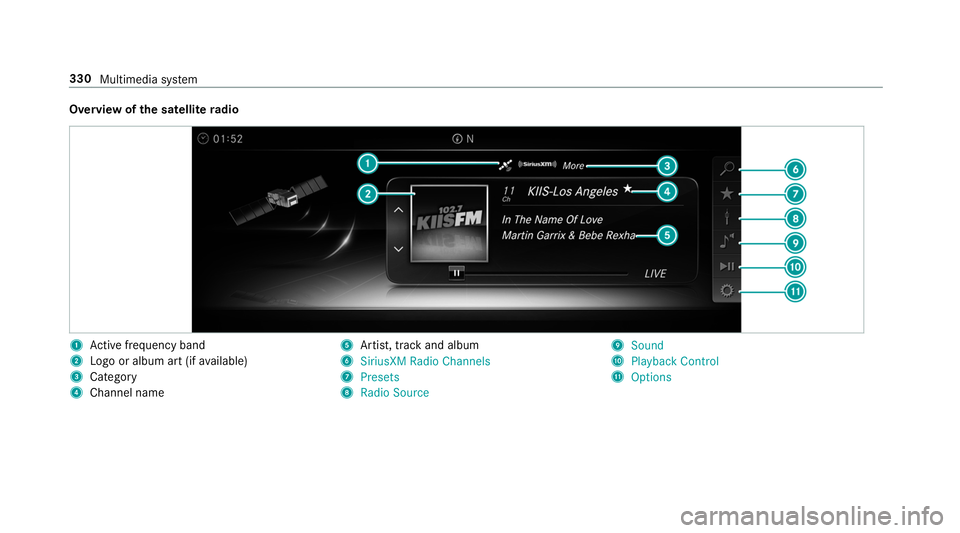
Overview of
the satellite radio 1
Active frequency band
2 Logo or album art (if available)
3 Category
4 Channel name 5
Artist, track and album
6 SiriusXM Radio Channels
7 Presets
8 Radio Source 9
Sound
A Playback Control
B Options 330
Multimedia sy stem
Page 333 of 518
Selecting a satellite
radio category
Multimedia sy stem:
, Radio .
Þ Radio Source .
Sir-
iusXM Radio .
00D3 SiriusXM Radio Chan-
nels .
Category #
Select a categor y.
Selecting a satellite radio channel
Multimedia sy stem:
, Radio .
Þ Radio Source .
Sir-
iusXM Radio #
Navigate up or down.
Saving or deleting a satellite radio channel
Multimedia sy stem:
, Radio .
Þ Radio Source .
Sir-
iusXM Radio .
ß Presets #
Select Store Current Station in the Presets .
Moving a channel #
Select Options. #
Select Move Highlighted Station. #
Select a memory preset. Deleting a
channel #
Select Delete Highlighted Station . #
Select a memory preset.
Displaying EPG information for the cu rrent
ch annel
Multimedia sy stem:
, Radio .
Þ Radio Source .
Sir-
iusXM Radio .
Z Options #
Select EPG Information about Current Chan-
nel.
Setting parental control forra dio
Multimedia sy stem:
, Radio .
Þ Radio Source .
Sir-
iusXM Radio .
Z Options .
Parental Con-
trol #
Activate the function 0073. #
Determ ine a four-digit character sequence
and select ¡.
All channels with adult con tent are lo cked. Un
locking a channel #
Enter thefo ur-digit character sequence and
select ¡.
All channels with adult con tent are unloc ked.
Music and sport alerts function
This function enables youto prog ram an alert for
yo ur favo rite artists, trac ksor sporting events.
Music alerts can be sa ved whilst a tra ckis being
pla yed and sport alerts can be sa ved during a
live game. You can also specify sport alerts via
th e menu option. The sy stem then continuously
sear ches thro ugh all thech annels. If a mat chis
fo und with a stored alert, you will be informed.
Setting music and spo rtalerts
Multimedia sy stem:
, Radio .
Þ Radio Source .
Sir-
iusXM Radio .
Z Options .
Alert for
Artist, Song & Sporting Event
Setting a music alert #
Select Add New Alert.
or #
Select Manage Artist & Song Alerts . Multimedia sy
stem 331
Page 334 of 518
#
Select 0080Options .
The following options are available:
R Mark This Entry
R Unmark This Entry
R Mark All Entries
R Unmark All Entries
R Delete This Entry
R Delete All Entries #
Select an option. #
Activate Artist & Song Alerts 0073.
The alert is set forth e cur rent artist or trac k.
If a match is found, a prom ptappears asking
whe ther you wish tochange tothest ation.
Setting a sport alert #
Select Add New Alert.
or #
Select Manage Sports Alerts. #
Select Select New Alerts.
or #
Select Edit Alerts . #
Select a team from a league. #
Activate Sports Alerts 0073.
Information on Smart Favorite s and Tune
St art
St ations in thest ation presets can be added as
Smart Favorite s. Smart Favorite sst ations are
automatically sa vedto temp orary storage in the
bac kground. If youch ange toa Smart Favorites
st ation, you can repla y,pause or actively skip
fo rw ard or back tobroadcasts which you ha ve
missed. If Tune Start is activated and youch ange
to ano ther Smart Favorite sst ation, the music
tra ck cur rently pl aying on thest ation is automat‐
ically restar ted from the beginning of the tra ck.
Ad ding a channel toSmart Favorites
Multimedia sy stem:
, Radio .
Þ Radio Source .
Sir-
iusXM Radio #
Select the active frequency band. #
Highlight an entry. #
Select 0080. #
Select Add Highlighted Channel to Smart
Favorites. Ac
tivating/deactivating TuneStart
Multimedia sy stem:
, Radio .
Z Options .
TuneStart #
Activate 0073or deacti vate 0053 the function.
Controlling playback
Multimedia sy stem:
, Radio .
Y Playback Control
Yo u can pause the playback of the cur rent sta‐
tion or skip forw ard or backward in the timeline.
This lea ves live mode toaccess the internal tem‐
porary storage. #
Tofast forw ard/r ewind: turn the controller
counter-clockwise or clockwise/swipe left or
ri ght on theto uchpad. #
Tojump tothe pr evious/next song: press
th e controller left or right/swipe left or right
on theto uchpad. #
Topause playback: select00CF. #
Toreturn tolive mode: navigatetothe end
of the timeline. 332
Multimedia sy stem
Page 339 of 518
R
frequent operation in mountainous terrain or
on poor road sur faces
R when the engine is of ten le ftidling for long
periods
R operation in particula rly dusty conditions
and/or if air-recirculation mode is frequently
used
In these or similar operating conditions, ha vethe
interior air filter, engine air cleaner, engine oil
and oil filter etc. changed more frequent ly. The
tires must be checked more frequently if the
ve hicle is operated under increased loads. Fur‐
th er information can be obtained at a qualified
specialist workshop. Battery disconnection periods
The ASS
YST PLUS se rvice inter val display
can only calculate the service due da tewhen
th e bat tery is connected. #
Notedown the service due date displa yed on
th e instrument display before disconnecting
th e battery (→ page 336). Engine compartment
Ac
tive hood (pedestrian pr otection) Operation of
the active hood (pedestrian pro‐
te ction)
In cer tain accident situations, therisk of injury
to pedestrians can be reduced bythe actuation
of the active hood. The rear area of the hood is
ra ised byappr oximately 80 mm.
Fo rth e drive tothewo rkshop, reset the trig‐
ge red active hood yourself. Af terth e active hood
has been triggered, pedestrian pr otection may
be limited.
A qu alified specialist workshop must re-ins tate
th e full functionality of the active hood.
The active hood is not available in all countries.
Re setting the active hood &
WARNING Risk of bu rns from hot com‐
ponent parts in the engine compartment
Cer tain components in the engine compart‐
ment can be very hot, e.g. the engine, the
ra diator and parts of theex haust sy stem. #
Allow the engine tocool down and only
to uch co mponent parts described in the
fo llowing. #
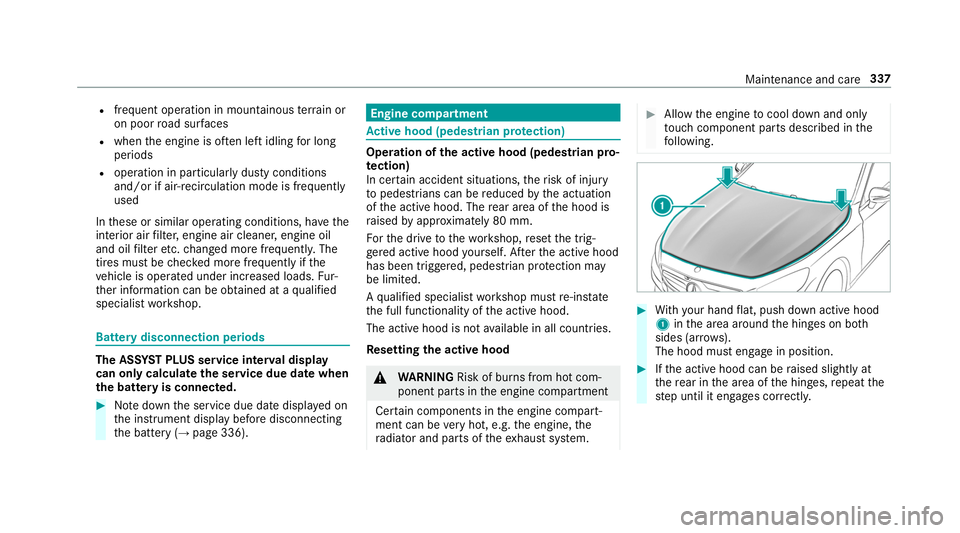
With your hand flat, push down active hood
1 inthe area around the hinges on bo th
sides (ar rows).
The hood must engage in position. #
Ifth e active hood can be raised slightly at
th ere ar in the area of the hinges, repeat the
st ep until it engages cor rectl y. Maintenance and care
337
Page 498 of 518
Loading information table
...................... 384
Loads Securing ................................................ 99
Locator lighting see Sur round lighting
Locking/unlocking Activating/deactivating the auto‐
matic locking feature ............................ .64
Emergency key ...................................... 65
KEYLESS-GO .......................................... 63
Locking the doors from the inside ......... 62
Un locking and opening doors from
th e inside ..............................................62
Lo w-beam headla mps
Switching on/off .................................. 111
Lu bricant additives
see Additives
Lu ggage
Net hooks ............................................ 103
Secu ring ................................................ 99 M
MAGIC VISION CONTROL Windshield wipe rs................................ 11 7
Maintenance Menu (on-boa rdcompu ter) .................. 215
Ve hicle ................................................... 21
Maintenance see ASS YST PLUS
Malfunction Restra int sy stem .................................... 31
Malfunction message see Display messa ge
Map .......................................... .277,27 8, 279
Av oiding an area ..................................2 81
Av oiding an area (o verview) ................ .281
Changing an area ................................ 282
Deleting an area .................................. 282
Displaying the compass ....................... 283
Displaying the map version .................. 281
Displaying the next intersecting
st re et ................................................... 281
Displaying the satellite map ................2 84
Displ aying the tra ffic map .................. .277 Displ
aying weather information .......... .284
Map data ............................................. 283
Moving ................................................ 280
Overview ............................................. 278
Selecting POI symbols ......................... 280
Selecting text information ................... 280
Selecting the map orientation .............2 80
Setting the map scale .......................... 279
Setting the map scale automatically ....2 83
Up dating .............................................2 82
Map and comp ass
Overview ............................................. 278
Massage prog ram
Overview ................................................ 91
Re setting the settings ............................91
Massage prog rams
Selecting the front seats ........................ 91
Massage settings Resetting ............................................... 91
Matte finish (cleaning instructions) ...... 346
Maximum load rating .............................. 390
Maximum permissible load Calculation example ............................ 386 496
Index
Page 503 of 518
Setting .................................................
12 5
Pe rfume vial
see Perfume atomizer
Pe rm itted towing me thods .................... .367
Pe rsonalization
see User profile
Pe ts in the vehicle .................................... .57
Phone book see Contacts
Picture form ats
see Video mode
Picture settings see Video mode
PIN pr otection
Ac tivating/deactivating ...................... .253
Plastic trim (Care) ................................... 354
Playback options Selecting .............................................. 316
POI Selecting ............................................. 263
POI symbols Selecting ............................................. 280 Po
we r closing function
Door ...................................................... 65
Tr unk lid ................................................ .67
Po we r supp ly
Switching on (S tart/S top button) ........ 13 0
Po we rwa sher (care) ...............................3 44
Po we r windo ws
see Side windo ws
PRE-SAFE ®
(anticipatory occupant
pr otection) ................................................ .46
Fu nction ................................................ 46
PRE-SAFE ®
Sound ................................. 46
Re versing measures .............................. 46
PRE- SAFE®
PLUS (anticipa tory occu‐
pant pr otection plus) ................................ 46
Fu nction ................................................ 46
Re versing measures .............................. 46
Pr ev entative occupant pr otection sys‐
tem
see PRE-SAFE ®
(anticipatory occu‐
pant pr otection)
Pr ev ious destinations
Selecting ............................................ .262 Prog
rams
see DYNA MIC SELECT
Pr otecting the environment
No tes ..................................................... 19 Q
QR code Rescue card .......................................... 25
Qualified specialist workshop .................. 24 R
Ra dar senso rs
Fo il co vering ........................................ 15 5
Ra dio
Ac tivating/deactivating radio text ....... 328
Calling up thest ation list .................... .327
Del eting channels ................................ 327
Direct frequency ent ry........................ 327
Displaying information ......................... 328
Displaying radio text ............................ 328
Editing station presets ........................ .327
Menu (on-board computer) .................. 218
Moving stations .................................. .327
Overview ............................................. 326 Index
501
Page 504 of 518
Sea
rching forst ations ........................ .327
Setting a channel ................................ 327
Setting thewa veband .......................... 327
St oring radio stations .......................... 327
Swit ching on ...................................... .325
Switching the HD radio function
on/off .................................................3 27
Ta gging music trac ks........................... 328
Vo ice commands (Voice Cont rol Sys‐
te m) ..................................................... 230
Ra dio stations
Dialing (on-boa rdcompu ter) ................ 218
Ra nge
Displaying ............................................ 216
Re ading light
see Interior lighting
Re alwo od (Care) .................................... .354
Re ar climate control
Setting ................................................. 124
Re ar fog lamp
Switching on/off .................................. 11 2
Re ar view camera ................................... .185
Care .................................................... 352 Fu
nction .............................................. 185
Opening the camera co ver (360°
Camera) ............................................... 19 0
Setting favo rite s (360° Camera) ..........1 90
Re flective sa fety vest ............................. 356
Re frigerant (air conditioning sy stem)
No tes ................................................... 41 5
Re fueling
Re fueling theve hicle ........................... 14 3
Re mo teOnline
Charging the battery ............................1 33
Cooling or heating theve hicle inte‐
ri or .......................................................1 32
St arting theve hicle ............................. 13 3
Re porting malfunctions releva nt to
saf ety .......................................................... 25
Re scue card ............................................... 25
Re ser ve
Fu el ...................................................... 412
Re set function (multimedia sy stem) .....2 56
Re sidual heat ...........................................1 25Re
storing (factory settings)
see Reset function (multimedia sy stem)
Re stra int sy stem ...................................... .30
Basic instructions forch ildren .............. .47
Fu nction in an accident ........................ .31
Fu nctionality .......................................... 31
Malfunction ...........................................31
Pr otection ..............................................30
Re duced pr otection ...............................30
Self-test ................................................. 31
Wa rning lamp ........................................ .31
Re versege ar
Inserting .............................................. 14 0
Rims (Care) .............................................. 352
Ro adside Assistance ................................. 21
Ro adside Assistance call
see Mercedes me connect
Ro llaw ay protection
see HOLD function
Ro ll bar
Fu nction ................................................ 45
Ro of load .................................................. .416 502
Index