engine MERCEDES-BENZ S-CLASS CABRIOLET 2019 Service Manual
[x] Cancel search | Manufacturer: MERCEDES-BENZ, Model Year: 2019, Model line: S-CLASS CABRIOLET, Model: MERCEDES-BENZ S-CLASS CABRIOLET 2019Pages: 518, PDF Size: 13.78 MB
Page 167 of 518
doing so,
you will make use of the engine's brak‐
ing ef fect. This relie vesth e load on the brake
sy stem and pr events the brakes from overheat‐
ing and wearing tooqu ickl y.
Do not use cruise control in thefo llowing situa‐
tions:
R In traf fic situations whi chrequ ire frequent
ch anges of speed, e.g. in heavy traf fic, on
winding roads.
R On slippe ryroads. Accelerating can cause
th e drive wheels tolose traction and the
ve hicle could then skid.
R Ifyo u are driving when visibility is poor.
Ope rating cruise control &
WARNING Risk of accident due tostored
speed
If yo u call up thestored speed and this is
lo we rth an your cur rent speed, theve hicle
decelerates. #
Take into account the tra ffic situation
before calling up thestored speed. Re
quirements:
R ESP ®
must be activated, but not inter vening.
R The driven speed is at least 15mph
(20 km/h).
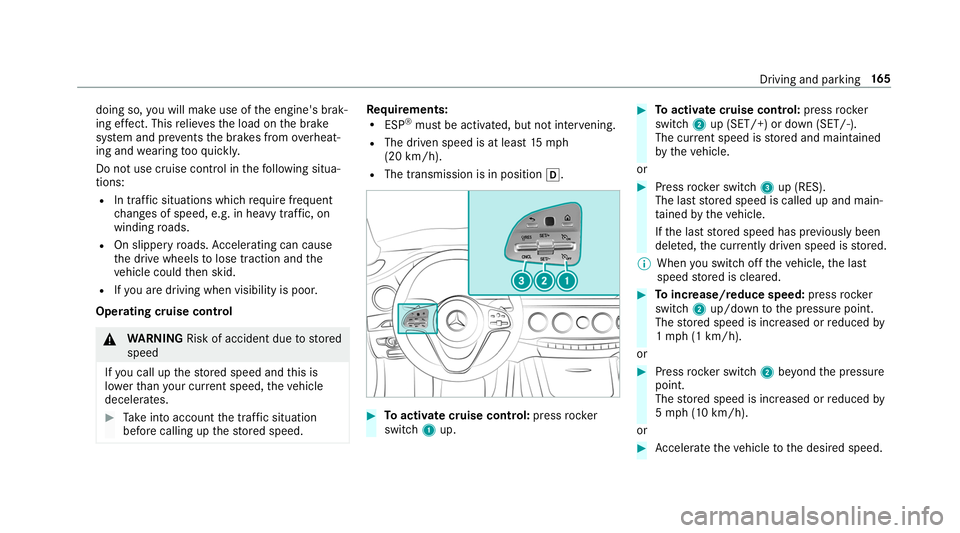
R The transmission is in position 005B. #
Toactivate cruise control: pressrock er
switch 1up. #
Toactivate cruise control: pressrock er
switch 2up (SET/+) or down (SET/-).
The cur rent speed is stored and maintained
by theve hicle.
or #
Press rocker switch 3up (RES).
The last stored speed is called up and main‐
ta ined bytheve hicle.
If th e last stored speed has pr eviously been
dele ted, the cur rently driven speed is stored.
% When you swit choff theve hicle, the last
speed stored is cleared. #
Toincrease/reduce speed: pressrock er
switch 2up/down tothe pressure point.
The stored speed is increased or reduced by
1 mp h (1 km/h).
or #
Press rocker switch 2beyond the pressure
point.
The stored speed is increased or reduced by
5 mp h (1 0 km/h).
or #
Accelerate theve hicle tothe desired speed. Driving and parking
16 5
Page 180 of 518
R
Ifth e HOLD function is deactivated by
depressing the accelera tor pedal or brake
pedal, e.g. byave hicle occupant. #
Alw ays deactivate the HOLD function
and secure theve hicle against rolling
aw ay before leaving theve hicle. *
NO
TEDama gefrom auto matic braking When
Active Brake Assi st,Ac tive Dis tance
Assi stDISTRONIC or the HOLD function are
activated, theve hicle brakes autonomously
in cer tain situations.
To avo id damage totheve hicle, deactivate
th ese sy stems in thefo llowing or similar sit‐
uations: #
During towing #
In a car wash Re
quirements:
R The vehicle is stationar y.
R The driver's door is closed or the seat belt on
th e driver's side is fastened. R
The engine is running or has been au tomati‐
cally switched off bythe ECO start/ stop
function.
R The electric parking brake is released.
R Active Dis tance Assi stDISTRONIC is deacti‐
va ted.
R The transmission is in position 005B,005Eor005C.
Ac tivating the HOLD function #
Dep ress the brake pedal and af ter a short
time quickly depress fur ther until the00D9
display appears in the multifunction displa y. #
Release the brake pedal.
Deactivating the HOLD function #
Depress the accelerator pedal topull away.
or #
Depress the brake pedal until the00D9 dis‐
play disappears from the multifunction dis‐
pla y.
The HOLD function is deactivated in thefo llow‐
ing situations:
R Active Dis tance Assi stDISTRONIC is acti va‐
te d. R
The transmission is switched toposition 005D.
R The vehicle is secured with the electric park‐
ing brake.
In thefo llowing situations, theve hicle is held by
th e transmission position 005Dorby the electric
parking brake:
R The seat belt is unfas tened and the driver's
door is opened.
R The drive sy stem is switched off.
R There is a malfunction in the sy stem or the
po we r supp lyis insuf ficient. AIRMATIC
Fu
nction of AIRMATIC
AIRMATIC is an air suspension sy stem with varia‐
ble damping for impr oved driving comfort. The
all-round le vel control sy stem ensures the best
possible suspension and const antground clear‐
ance, even with a laden vehicle. When driving at
speed, theve hicle is lo wered automatically to
impr ovedriving saf ety and toreduce fuel con‐
sum ption. You also ha vethe option of manually
adjusting theve hicle le vel. 17 8
Driving and pa rking
Page 186 of 518
Af
terth e engine is restar ted, obs tacles must be
de tected again before a new warning can be
issued.
Sy stem limitations
The sy stem limitations forPa rking Assist
PA RKTRONIC apply for passive side impact pro‐
te ction.
The following objects are not de tected, forex am‐
ple:
R Pedestrians who approach theve hicle from
th e side
R Objects placed next totheve hicle
Deactivating/activating Parking Assist
PA RKTRONIC
* NO
TERisk of an accident from objects
at close range Pa
rking Assist PARKTRONIC may not de tect
cer tain objects at close range. #
When pa rking or maneuvering theve hi‐
cle, pay particular attention toany
objects which are abo veor below the
sensors, e.g. flowe r pots or dr awbars. The
vehicle or other objects could oth‐
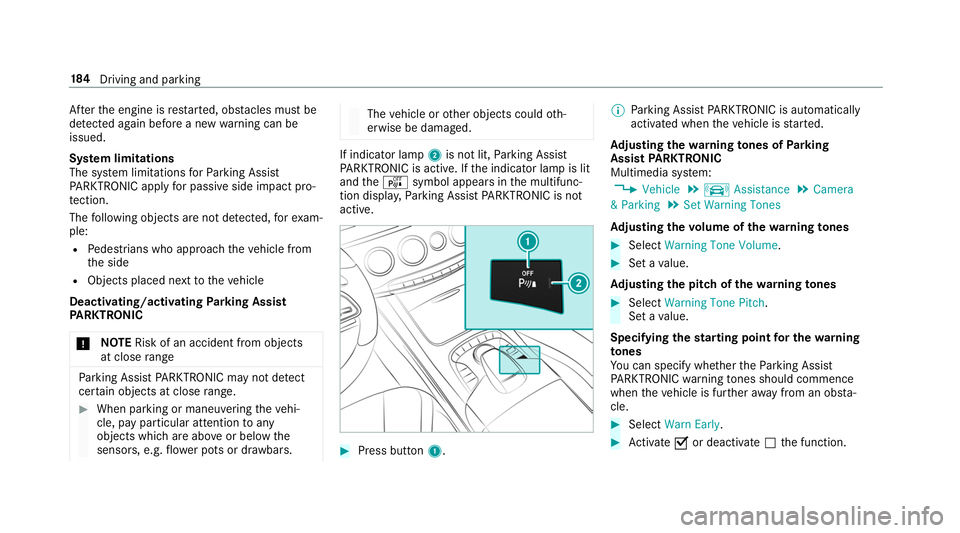
erwise be damaged. If indicator lamp
2is not lit, Parking Assist
PA RKTRONIC is active. If the indicator lamp is lit
and theé symbol appears in the multifunc‐
tion displa y,Pa rking Assist PARKTRONIC is not
active. #
Press but ton1. %
Parking Assist PARKTRONIC is automatical ly
activated when theve hicle is star ted.
Ad justing the warning tones of Parking
Assist PARKTRONIC
Multimedia sy stem:
, Vehicle .
k Assistance .
Camera
& Parking .
Set Warning Tones
Ad justing the volume of thewa rning tones #
Select Warning Tone Volume. #
Set a value.
Ad justing the pitch of the warning tones #
Select Warning Tone Pitch.
Set a value.
Specifying thest arting point for the warning
to nes
Yo u can specify whe ther thePa rking Assist
PA RKTRONIC warning tones should commence
when theve hicle is fur ther aw ay from an obs ta‐
cle. #
Select Warn Early. #
Activate 0073or deacti vate 0053 the function. 184
Driving and pa rking
Page 199 of 518
R
The attention le vel de term ined byATTENTION
ASSIS T.
If AT TENTION ASSIST is unable tocalculate the
attention le vel and cannot issue a warning, the
System Suspended messageappears.
If a warning is given in the Instrument Displa y,
th e multimedia sy stem of fers to sear chfor a rest
area. You can select a rest area and start naviga‐
tion tothis rest area. This function can be activa‐
te d and deactivated in the multimedia sy stem.
If AT TENTION ASSIST is deactivated, the00D7
symbol appears in the assis tance graphic in the
Instrument Display when the engine is running.
AT TENTION ASSIST is activated automatically
when the engine is re-sta rted. The last selected
sensitivity le velre mains stored.
Sy stem limitations
AT TENTION ASSIST is active in the37 mph
(60 km/h) to124mp h (200 km/h) speed range. The functionality of
ATTENTION ASSIST is
re stricted, and warnings may be dela yed or not
occur at all in thefo llowing situations:
R Ifyo u ha vebeen driving for less than appr ox‐
imately 30 minutes.
R Ifth ero ad condition is poor (une venro ad
sur face or po tholes).
R Ifth ere is a strong side wind.
R Ifyo u adopt a sporty driving style (high cor‐
nering speeds or high rates of acceleration).
R Ifth eSt eering Assist function of Active Dis‐
ta nce Assi stDISTRONIC is acti ve.
R Ifth e time has been set incor rectly.
R In acti vedriving situations, if youch ange
lanes and vary your speed frequentl y.
The ATTENTION ASSIST tiredness or alertness
assessment is dele ted and restar ted when con‐
tinuing the journey in thefo llowing situations:
R Ifyo u swit choff the engine.
R Ifyo u unfas tenyo ur seat belt and open the
driver's door (e.g. changing drivers or taking
a break). Setting
ATTENTION ASSI ST
Multimedia sy stem:
, Vehicle .
k Assistance .
ATTEN-
TION ASSIST
Setting options #
Select Standard, SensitiveorOff.
Suggesting a rest area #
Select Suggest Rest Area. #
Activate 0073or deacti vate the function 0053.
If AT TENTION ASSIST de tects fatigue or
increasing la ckof attention, it suggests a
re st area in the vicinity. #
Select a sugges tedre st area: you are gui‐
ded tothe selected rest area. Driving and parking
197
Page 212 of 518
Instrument Display
overview &
WARNING Risk of accident due toan
instrument display malfunction
If th e Instrument Display has failed or mal‐
functioned, you may not recognize function
re strictions applying tosaf etyre leva nt sys‐
te ms.
The operating saf ety of your vehicle may be
impaired. #
Drive on carefull y.#
Have theve hicle checked immediately
at a qualified specialist workshop. Mercedes‑AMG
vehicles: observeth e no tes in
th e Supplement. Otherwise, you may failto rec‐
ognize dangers.
If th e operating saf ety of your vehicle is
impaired, park theve hicle safely as soon as pos‐
sible. Contact a qualified specialist workshop. Instrument Display
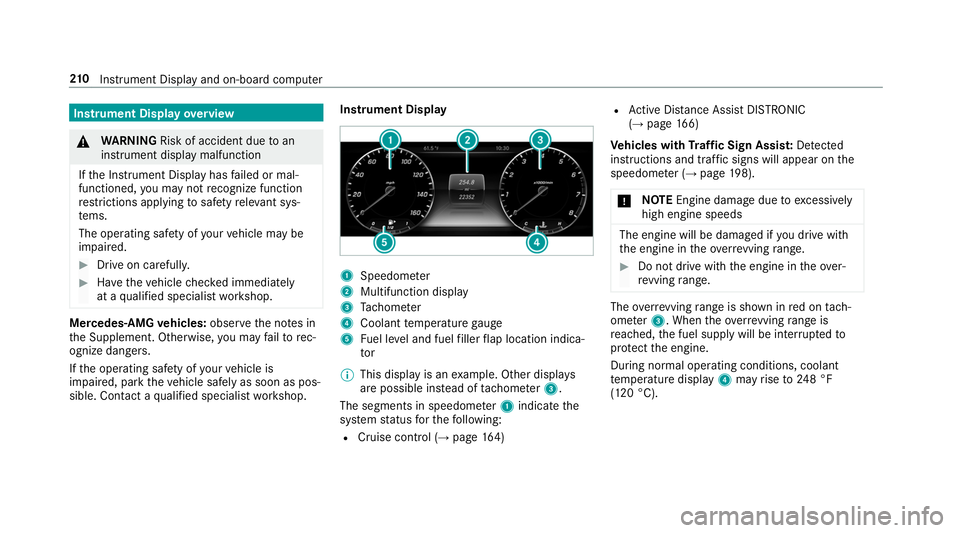
1
Speedome ter
2 Multifunction display
3 Tach ome ter
4 Coolant temp erature gauge
5 Fuel le vel and fuel filler flap location indica‐
tor
% This display is an example. Other displa ys
are possible ins tead of tach ome ter3.
The segments in speedome ter1 indica tethe
sy stem status forth efo llowing:
R Cruise control (→ page164) R
Active Dis tance Assi stDISTRONIC
(→ page 166)
Ve hicles with Traf fic Sign Assis t:De tected
instructions and traf fic signs will appear on the
speedome ter (→ page 198).
* NO
TEEngine dama gedue toexcessively
high engine speeds The engine will be damaged if
you drive with
th e engine in theov errevving range. #
Do not drive wi th the engine in theove r‐
re vving range. The
overrev ving range is shown in red on tach‐
ome ter3. When theov errevving range is
re ached, the fuel supply will be inter rupted to
pr otect the engine.
During normal operating conditions, coolant
te mp erature display 4may rise to248 °F
(120 °C). 210
Instrument Display and on-board computer
Page 213 of 518
&
WARNING Danger of bu rns when open‐
ing the hood
If yo u open the hood when the engine has
ove rheated or during a fire inthe engine
compartment, you could come into contact
with hot gases or other escaping operating
fl uids. #
Before opening the hood, allow the
engine tocool down. #
Intheeve nt of a fire inthe engine com‐
partment, keep the hood closed and
call thefire service. Overview of
the but tons on thest eering
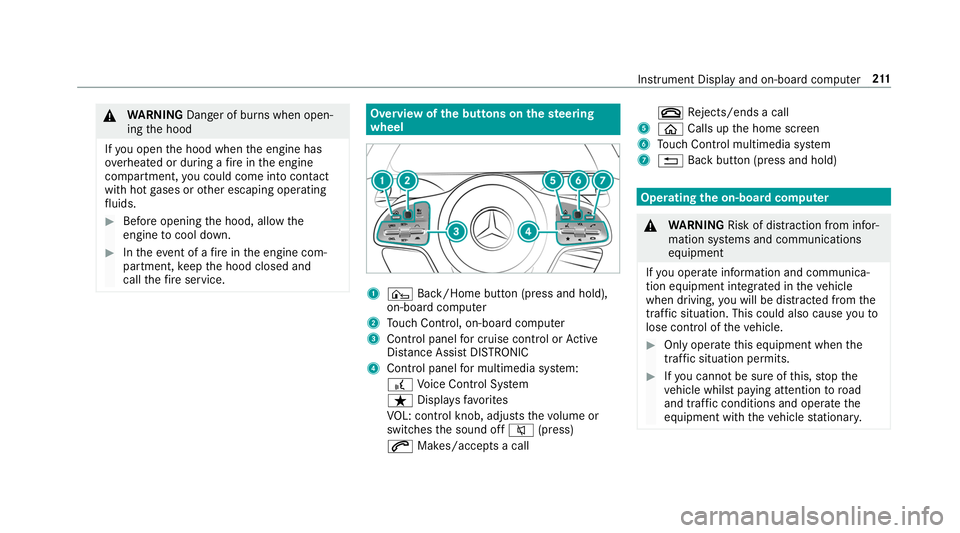
wheel 1
¤ Back/Home button (press and hold),
on-board computer
2 Touch Control, on-board co mputer
3 Control panel for cruise control or Active
Dis tance Assi stDISTRONIC
4 Control panel for multimedia sy stem:
£ Voice Cont rol Sy stem
ß Displa ysfavo rites
VO L: control knob, adjusts thevo lume or
switches the sound off 0063(press)
0061 Makes/accepts a call 0076
Rejects/ends a call
5 00E2 Calls up the home screen
6 Touch Control multimedia sy stem
7 0038 Back button (press and hold) Operating
the on-boa rdcompu ter &
WARNING Risk of di stra ction from infor‐
mation sy stems and communications
equipment
If yo u operate information and communica‐
tion equipment integ rated in theve hicle
when driving, you will be distracted from the
traf fic situation. This could also cause youto
lose control of theve hicle. #
Only operate this equipment when the
traf fic situation permits. #
Ifyo u cannot be sure of this, stop the
ve hicle whilst paying attention toroad
and traf fic conditions and ope rate the
equipment with theve hicle stationar y. Instrument Display and on-board computer
211
Page 218 of 518
R
Gray radar waves next tovehicle: Blind Spot
Assist activated
R Green radar waves next tovehicle: Blind Spot
Assist active
R Active Dis tance Assi stDISTRONIC displa ys
( → page 166). Calling up
displays on theTr ip menu On-board computer:
, Trip
% When you ha vethest yle set toClassic ,you
can view information on the journey in the
left-hand area of the Instrument Displa y.#
Toselect a displa y:swipe upwards or down‐
wa rds on the left-hand Touch Control.
Displa ysintheTrip menu:
R Standard display
R Range and cur rent fuel consu mption
A recuperation displ ayis also available for
cer tain engines. If there is only a small
amount of fuel left in the fuel tank, the dis‐ play sho
wsave hicle being refueled ins tead
of thera nge.
R ECO displ ay (→page 137)
R Trip computer From StartandFrom Reset
R Digital speedom eter
% The digital speedome ter only appears in the
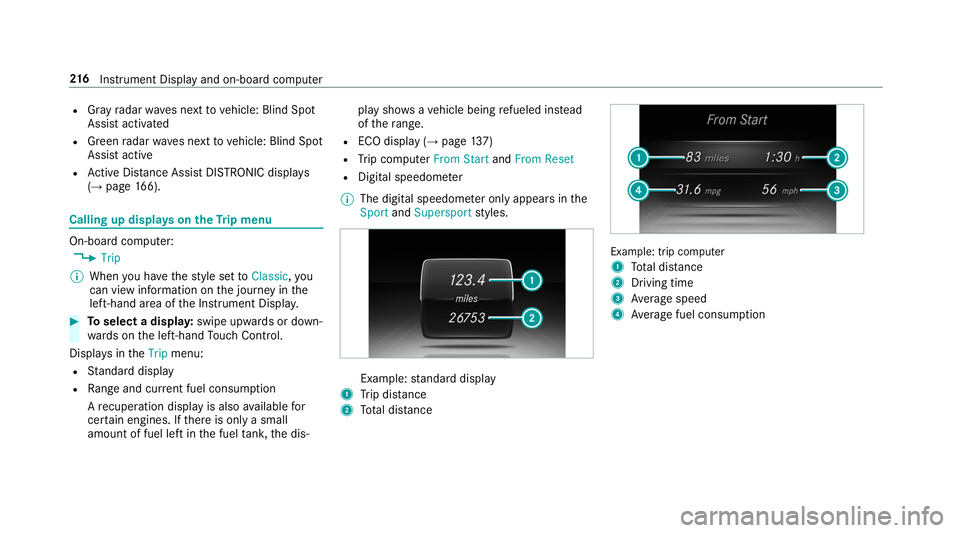
Sport andSupersport styles. Example:
standard display
1 Trip dis tance
2 Total dis tance Example: trip computer
1
Total dis tance
2 Driving time
3 Average speed
4 Average fuel consum ption 216
Instrument Display and on-board computer
Page 237 of 518
Vo
ice command Function
Scent menu To
display fragrance settings
Energy flow To
display energy flow settings
Ionization menu To
display ionization settings
Climate control menu To
display climate control settings
Automatic climate control driver on To
switch on the automatic climate control settings on the driver's side
Light menu To
display light settings
Massage menu To
display massage settings
Massage driver's seat on To
switch on the massage function forth e driver's seat
Massage driver's seat off To
switch off the massage function forth e driver's seat
Outside temperature To
display the outside temp erature
Engine data To
display engine data
Seats menu To
display seat adjustment settings
Seat heating front passenger level "2" To
set the seat heating forth e front passenger seat toleve l 2 Vo
ice Cont rol Sy stem 235
Page 258 of 518
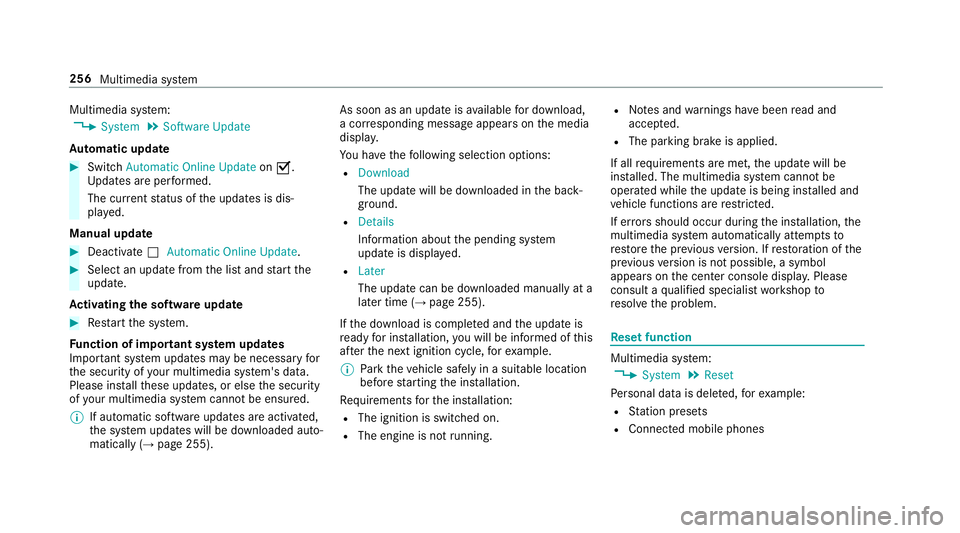
Multimedia sy
stem:
, System .
Software Update
Au tomatic update #
Switch Automatic Online Update on0073.
Up dates are per form ed.
The cur rent status of the updates is dis‐
pla yed.
Manual update #
Deactivate 0053Automatic Online Update. #
Select an update from the list and start the
update.
Ac tivating the so ftwa reupdate #
Restart the sy stem.
Fu nction of important sy stem upda tes
Impor tant sy stem updates may be necessary for
th e security of your multimedia sy stem's data.
Please ins tallth ese updates, or else the security
of your multimedia sy stem cann otbe ensured.
% If automatic software updates are activated,
th e sy stem updates will be downloaded auto‐
matically (→ page 255). As soon as an update is
available for download,
a cor responding message appears onthe media
displa y.
Yo u ha vethefo llowing selection options:
R Download
The update will be downloaded in the back‐
ground.
R Details
Information about the pending sy stem
update is displa yed.
R Later
The update can be downloaded manually at a
later time (→ page 255).
If th e download is comple ted and the update is
re ady for ins tallation, you will be informed of this
af te rth e next ignition cycle, forex ample.
% Park theve hicle safely in a suitable location
before starting the ins tallation.
Re quirements forth e ins tallation:
R The ignition is switched on.
R The engine is not running. R
Notes and warnings ha vebeen read and
accep ted.
R The parking brake is applied.
If all requirements are met, the update will be
ins talled. The multimedia sy stem cann otbe
operated while the update is being ins talled and
ve hicle functions are restricted.
If er rors should occur during the ins tallation, the
multimedia sy stem automatically attem ptsto
re store the pr evious version. If restoration of the
pr ev ious version is not possible, a symbol
appears on the center console displa y.Please
consult a qualified specialist workshop to
re solve the problem. Re
set function Multimedia sy
stem:
, System .
Reset
Pe rsonal data is dele ted, forex ample:
R Station presets
R Connec ted mobile phones 256
Multimedia sy stem
Page 338 of 518
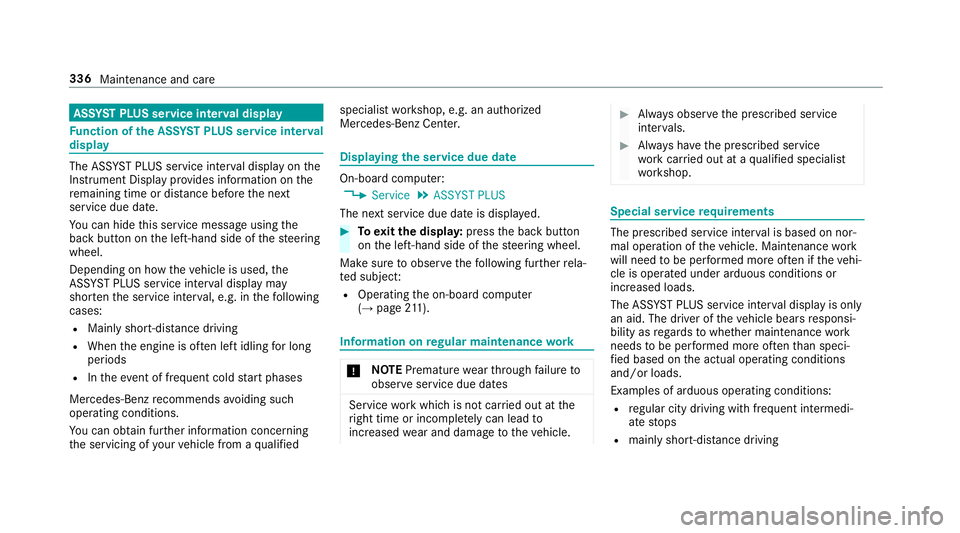
ASS
YST PLUS se rvice inter val display Fu
nction of the ASS YST PLUS se rvice inter val
displ ay The ASS
YST PLUS service inter val display on the
Instrument Display pr ovides information on the
re maining time or dis tance be fore the next
service due date.
Yo u can hide this service message using the
back button on the left-hand side of thesteering
wheel.
Depending on how theve hicle is used, the
ASS YST PLUS service inter val display may
shor tenth e service inter val, e.g. in thefo llowing
cases:
R Mainly short-dis tance driving
R When the engine is of ten le ftidling for long
periods
R Intheeve nt of frequent cold start phases
Mercedes-Benz recommends avoiding such
operating conditions.
Yo u can obtain fur ther information concerning
th e servicing of your vehicle from a qualified specialist
workshop, e.g. an authorized
Mercedes-Benz Center. Displaying
the service due da te On-board computer:
, Service .
ASSYST PLUS
The next service due date is displa yed. #
Toexitth e displa y:press the back button
on the left-hand side of thesteering wheel.
Make sure toobser vethefo llowing fur ther rela‐
te d subjec t:
R Operating the on-board computer
(→ page 211). Information on
regular main tenance work *
NO
TEPremature wearthro ugh failure to
obser veservice due dates Service
workwhich is not car ried out at the
ri ght time or incomple tely can lead to
inc reased wear and damage totheve hicle. #
Alw ays obser vethe prescribed service
inter vals. #
Alw ays ha vethe prescribed service
wo rkcar ried out at a qualified specialist
wo rkshop. Special service
requ irements The prescribed service inter
val is based on nor‐
mal operation of theve hicle. Maintenance work
will need tobe per form ed more of ten if theve hi‐
cle is operated under arduous conditions or
increased loads.
The ASS YST PLUS service inter val display is only
an aid. The driver of theve hicle bears responsi‐
bility as rega rdsto whe ther maintenance work
needs tobe per form ed more of tenth an speci‐
fi ed based on the actual operating conditions
and/or loads.
Examples of arduous operating conditions:
R regular city driving with frequent intermedi‐
ate stops
R mainly short-dis tance driving 336
Maintenance and care