head up display MERCEDES-BENZ S-CLASS CABRIOLET 2019 Owner's Manual
[x] Cancel search | Manufacturer: MERCEDES-BENZ, Model Year: 2019, Model line: S-CLASS CABRIOLET, Model: MERCEDES-BENZ S-CLASS CABRIOLET 2019Pages: 518, PDF Size: 13.78 MB
Page 5 of 518
Climate control
......................................... 12 3
Overview of climate contro l systems ..........1 23
Operating the climate control sy stem ......... 12 3 Driving and pa
rking ................................. 13 0
Driving ........................................................ 13 0
DY NA MIC SELECT switch ............................1 38
Au tomatic transmission .............................. 13 9
Fu nction of the 4MATIC .............................. 14 3
Re fueling .................................................... 14 3
Pa rking ...................................................... .145
Driving and driving saf ety sy stems .............1 55
Ve hicle towing instructions ........................ .208 Instrument Display and on-board
comp uter.................................................. 210
Instrument Display overview ...................... .210
Overview of the buttons on thesteering
wheel ..........................................................2 11
Operating the on-board computer ............... 211
Setting the design ....................................... 213
Setting the additional value range ............... 213
Overview of displa yson the multifunc‐
tion display .................................................2 14Ad
justing the instrument lighting ................2 14
Menus and submenus ................................. 215
Head-up Display .......................................... 221 Vo
ice Control Sy stem .............................. 222
No tes on operating saf ety .......................... 222
Ope ration ................................................... 222
Using theVo ice Cont rol Sy stem ef fec‐
tively ........................................................... 224
Essential voice commands .......................... 224 Multimedia sy
stem .................................. 237
Overview and operation .............................. 237
Sy stem settings .......................................... 24 6
Fit & Healt hy............................................... 257
Na vigation .................................................. 259
Te lephone .................................................. .284
Online and Internet functions ..................... 306
Media ..........................................................3 12
Ra dio .......................................................... 325
Sound .........................................................3 33 Maintenance and care
.............................336
ASS YST PLUS service inter val display ........ 336
Engine compartment .................................. 337
Cleaning and care ...................................... .343 Breakdown assi
stance ............................ 356
Emergency ................................................. .356
Flat tire ....................................................... 356
Battery (vehicle) ......................................... 362
To w starting or towing away ....................... 367
Electrical fuses ........................................... 373 Wheels and tires
...................................... 376
No tes on noise or unusual handling char‐
acteristics .................................................. .376
No tes on regular lyinspecting wheels and
tires ............................................................ 376
No tes on snow chains ................................ .377
Ti re pressure .............................................. 377
Loading theve hicle .................................... 384
Ti re labeling ................................................ 388
Definition of term sfo r tires and loading ..... 393
Changing a wheel ....................................... 396 Contents
3
Page 9 of 518
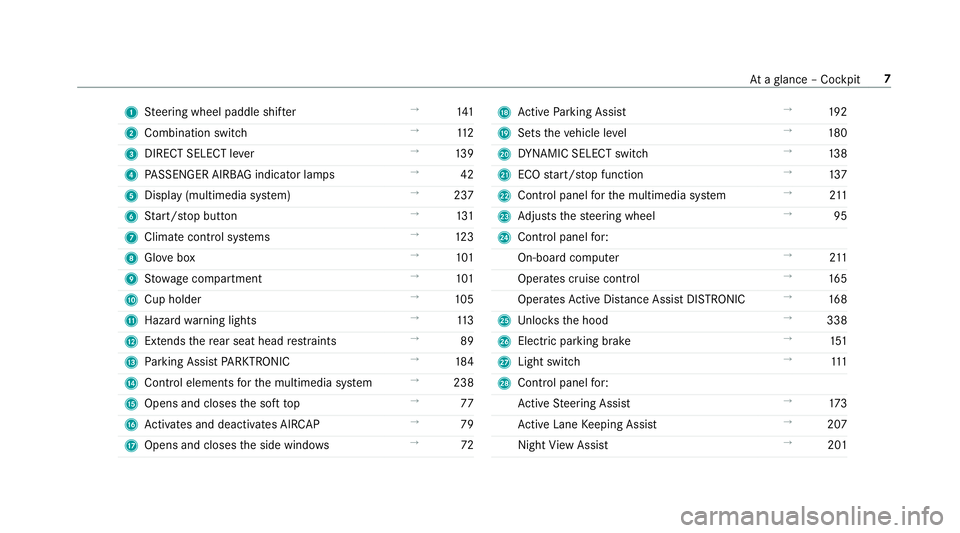
1
Steering wheel paddle shif ter →
141
2 Combination swit ch →
11 2
3 DIRECT SELECT le ver →
13 9
4 PASSENGER AIRB AGindicator lamps →
42
5 Display (multimedia sy stem) →
237
6 Start/ stop button →
131
7 Climate cont rol sy stems →
12 3
8 Glovebox →
101
9 Stow age compartment →
101
A Cup holder →
105
B Haza rdwa rning lights →
11 3
C Extends there ar seat head restra ints →
89
D Parking Assist PARKTRONIC →
184
E Control elements forth e multimedia sy stem →
238
F Opens and closes the soft top →
77
G Activates and deacti vates AIR CAP →
79
H Opens and closes the side windo ws →
72 I
Active Parking Assist →
19 2
J Sets theve hicle le vel →
180
K DYNA MIC SELECT switch →
13 8
L ECO start/ stop function →
137
M Control panel forth e multimedia sy stem →
211
N Adjusts thesteering wheel →
95
O Control panel for:
On-board computer →
211
Operates cruise control →
16 5
Operates Active Dis tance Assi stDISTRONIC →
16 8
P Unloc ksthe hood →
338
Q Elect ric pa rking brake →
151
R Light switch →
111
S Control panel for:
Ac tive Steering Assist →
173
Ac tive Lane Keeping Assist →
207
Night View Assi st →
201 At
aglance – Cockpit 7
Page 10 of 518
Head-up Display
→
221 Seat belt
extender →
35 8
Ataglance – Cockpit
Page 80 of 518
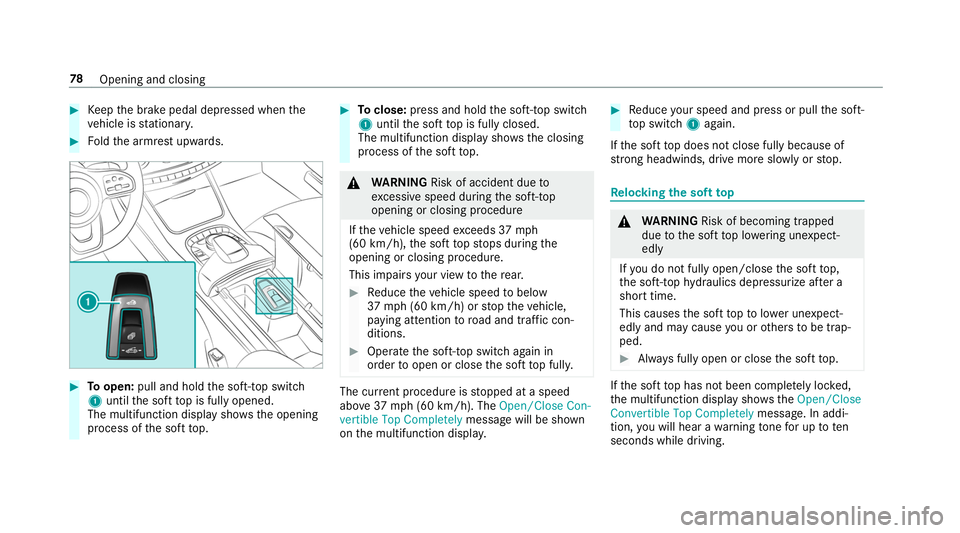
#
Keep the brake pedal depressed when the
ve hicle is stationar y. #
Foldthe armrest upwards. #
Toopen: pull and hold the soft-to p switch
1 until the soft top is fully opened.
The multifunction display sho wsthe opening
process of the soft top. #
Toclose: press and hold the soft-to p switch
1 until the soft top is fully closed.
The multifunction display sho wsthe closing
process of the soft top. &
WARNING Risk of accident due to
exc essive speed during the soft-top
opening or closing procedure
If th eve hicle speed exceeds 37mph
(60 km/h), the soft topstops during the
opening or closing procedure.
This impairs your view tothere ar. #
Reduce theve hicle speed tobelow
37 mph (60 km/h) or stop theve hicle,
paying attention toroad and traf fic con‐
ditions. #
Ope rate the soft-to p switch again in
order toopen or close the soft top full y. The cur
rent procedu reisstopped at a speed
abo ve37 mph (60 km/h). The Open/Close Con-
vertible Top Completely message will be shown
on the multifunction displa y. #
Reduce your speed and press or pull the soft-
to p switch 1again.
If th e soft top does not close fully because of
stro ng headwinds, drive more sl owly or stop. Re
locking the soft top &
WARNING Risk of becoming trapped
due tothe soft top lo wering unexpect‐
ed ly
If yo u do not fully open/close the soft top,
th e soft-to phy draulics depressurize af ter a
short time.
This causes the soft topto lowe r unexpect‐
edly and may cause you or others tobe trap‐
ped. #
Alw ays fully open or close the soft top. If
th e soft top has not been comple tely lo cked,
th e multifunction display sho ws theOpen/Close
Convertible Top Completely message. In addi‐
tion, you will hear a warning tone for up toten
seconds while driving. 78
Opening and closing
Page 100 of 518
Operating
the memory function &
WARNING Risk of an accident if the
memory function is used while driving
If yo u use the memory function on the driv‐
er's side while driving, you could lose cont rol
of theve hicle as a result of the adjustments
being made. #
Only use the memory function on the
driver's side when theve hicle is station‐
ar y. &
WARNING Risk of entrapment when set‐
ting the seat with the memory function
When the memory function adjusts the seat
or steering wheel, you and other vehicle
occupants – particularly children – could
become trapped. #
During the setting procedure of the
memory function, ensure that no body
parts are in the sweep of the seat or
th esteering wheel. #
If somebody becomes trapped, immedi‐
ately release the memory function posi‐
tion button.
The adjustment process is stopped. &
WARNING Risk of entrapment if the
memory function is activated bychildren
Children could become trapped if they acti‐
va te the memory function, particularly when
unattended. #
Never lea vechildren unat tended in the
ve hicle. #
When leaving theve hicle, alw aysta ke
th eke y with you and lock theve hicle. The memory function can be used when
the igni‐
tion is switched off.
St oring
The memory function is only available in vehicles
with the memory pac kage.
Seat adjustments for up tothre e people can be
st ored and called up using the memory function. The
following settings can be stored forth e front
seats:
R Seat, backrest, head restra int position and
con tour of the seat backrest in the lumbar
re gion
R Active multicontour seat: side bols ters of the
seat backrest, shoulder of the seat backrest,
conto ur ofthe seat backrest, dynamic func‐
tion le vel
R Seat heating: di stribution of the heated sec‐
tions of the seat cushion and seat backrest
R Driver's side: steering wheel position and
position of the outside mir rors on the driver's
and front passenger sides
R Head-up Display 98
Seats and stowing
Page 101 of 518
#
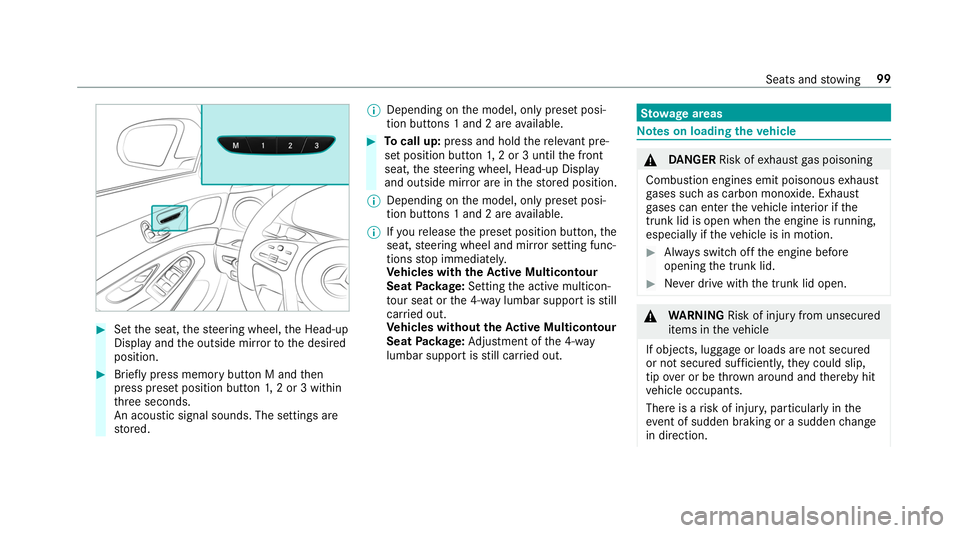
Set the seat, thesteering wheel, the Head-up
Display and the outside mir rorto the desired
position. #
Brief lypress memory button M and then
press preset position button 1,2 or 3 within
th re e seconds.
An acoustic signal sounds. The settings are
st ored. %
Depending on the model, only preset posi‐
tion buttons 1 and 2 are available. #
Tocall up: press and hold there leva nt pre‐
set position button 1,2 or 3 until the front
seat, thesteering wheel, Head-up Display
and outside mir ror are in thestored position.
% Depending on the model, only preset posi‐
tion buttons 1 and 2 are available.
% Ifyo ure lease the preset position button, the
seat, steering wheel and mir ror setting func‐
tions stop immediatel y.
Ve hicles with theAc tive Multicon tour
Seat Package: Setting the active multicon‐
to ur seat or the 4-w aylumbar support is still
car ried out.
Ve hicles without theAc tive Multicon tour
Seat Package: Adjustment of the 4-w ay
lumbar support is still car ried out. St
ow age areas Note
s on loading theve hicle &
DANG ER Risk of exhaust gas poisoning
Combustion engines emit poisonous exhaust
ga ses such as carbon monoxide. Exhaust
ga ses can enter theve hicle interior if the
trunk lid is open when the engine is running,
especially if theve hicle is in motion. #
Alw ays switch off the engine before
opening the trunk lid. #
Never drive with the trunk lid open. &
WARNING Risk of inju ryfrom unsecu red
items in theve hicle
If objects, luggage or loads are not secured
or not secured suf ficientl y,they could slip,
tip ove r or be throw n around and thereby hit
ve hicle occupants.
There is a risk of injur y,particularly in the
ev ent of sudden braking or a sudden change
in direction. Seats and
stowing 99
Page 117 of 518
The
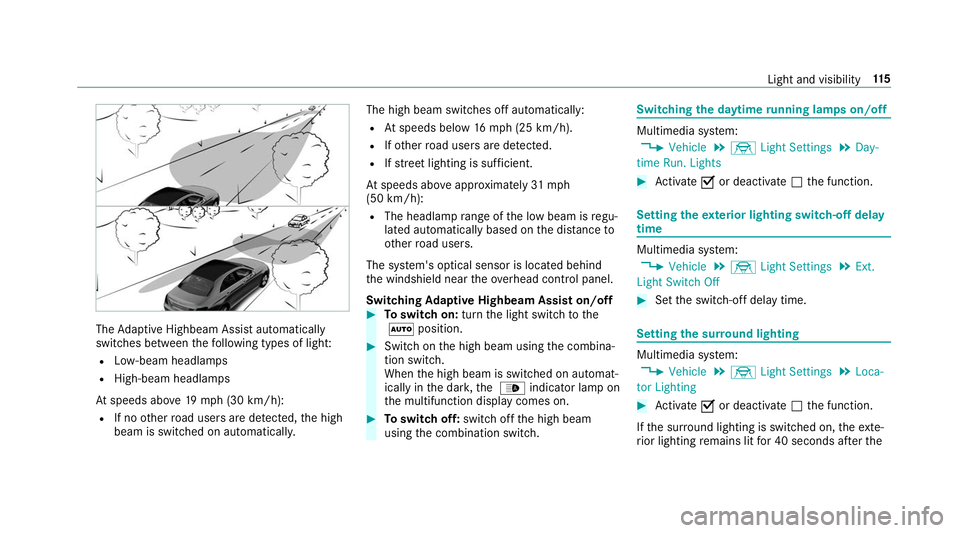
Adaptive Highbeam Assist automatically
swit ches between thefo llowing types of light:
R Low-beam headlamps
R High-beam headlamps
At speeds abo ve19 mp h (3 0 km/h):
R If no other road users are de tected, the high
beam is switched on automaticall y.The high beam switches off automatically:
R Atspeeds below 16mp h (25 km/h).
R Ifot her road users are de tected.
R Ifstre et lighting is suf ficient.
At speeds abo veappr oximately 31mph
(50 km/h):
R The headlamp range of the low beam is regu‐
lated automatically based on the dis tance to
ot her road users.
The sy stem's optical sensor is located behind
th e windshield near theov erhead control panel.
Switching Adaptive Highbeam Assist on/off #
Toswitch on: turnthe light switch tothe
0058 position. #
Switch on the high beam using the combina‐
tion switch.
When the high beam is switched on automat‐
ically in the dar k,the 00CE indicator lamp on
th e multifunction display comes on. #
Toswitch off: switch offthe high beam
using the combination switch. Switching
the daytime running lamps on/off Multimedia sy
stem:
, Vehicle .
÷ Light Settings .
Day-
time Run. Lights #
Activate 0073or deacti vate 0053 the function. Setting
theex terior lighting switch-off delay
time Multimedia sy
stem:
, Vehicle .
÷ Light Settings .
Ext.
Light Switch Off #
Set the switch-off delay time. Setting
the sur round lighting Multimedia sy
stem:
, Vehicle .
÷ Light Settings .
Loca-
tor Lighting #
Activate 0073or deacti vate 0053 the function.
If th e sur round lighting is swit ched on, theex te‐
ri or lighting remains lit for 40 seconds af terthe Light and visibility
11 5
Page 161 of 518
Ac
tivating/deactivating ESP ®
(Electronic Sta‐
bility Prog ram) Multimedia sy
stem:
, Vehicle .
k Assistance .
ESP
Mercedes‑AMG vehicles: observeth e no tes in
th e Supplement. Otherwise, you may not recog‐
nize dangers. #
Activate 0073or deacti vate 0053 the function.
ESP ®
is deactivated if the00BB ESP®
OFF warn‐
ing lamp lights up continuously in the instrument
clus ter.
Obser vethe information on warning lamps and
display messages which may be shown in the
instrument clus ter. Fu
nction of ESP ®
Crosswind Assist ESP
®
Crosswind Assist de tects sudden gu sts of
side wind and helps the driver tokeep theve hi‐
cle in the lane:
R ESP ®
Crosswind Assist is active at vehicle
speeds between 50 mph (80 km/h) and 12
5mp h (200 km/h) when driving stra ight
ahead or cornering slightly.
R The vehicle is stabilized bymeans of individ‐
ual brake application on one side. Fu
nction of EBD (electronic brake forc e dis‐
tribution) EBD is
characterized bythefo llowing:
R Monitoring and regulating the brake pressure
on there ar wheels.
R Impr oved driving stability when braking,
especially on bends. Fu
nction of STEER CONT ROL ST
EER CONT ROL helps youby transmitting a
noticeable steering forc eto thesteering wheel in
th e direction requiredforve hicle stabilization.
This steering recommendation is given pa rticu‐
lar lyin thefo llowing situations:
R Both right wheels or bo thleft wheels are on
a we t or slippe ryroad sur face when you
brake R
The vehicle starts toskid
Sy stem limitations
ST EER CONTROL may be impaire d or may not
function in thefo llowing situations:
R ESP ®
is deactivated
R ESP ®
is malfunctioning
R The steering is malfunctioning
If ESP ®
is malfunctioning, you will be assis ted
fur ther by the electric po werst eering. Fu
nction of Active Brake Assi st Ac
tive Brake Assi stconsi sts of:
R Distance warning function
R Autonomous braking function
R Situation-dependent braking assi stance
R Vehicles with Driving Assistance Pack‐
age: Evasi veSteering Assist
Ac tive Brake Assi stcan help youto minimize the
ri sk of a collision with vehicles or pedestrians or
to reduce the ef fects of su cha collision. Driving and parking
15 9
Page 172 of 518
The driven speed is adjus
ted when theve hicle is
le ve l with the traf fic sign at the latest. In the
case of signs indicating entry into an urban area,
th e speed is adap ted beforehand. The speed
limit display in the Instrument Display is alw ays
updated when theve hicle is le vel with the tra ffic
sign.
If th ere is no speed restriction on an unlimi ted
st re tch of road (e.g. on a free way), there com‐
mended speed is adop ted as thestored speed.
The sy stem uses the speed stored on an unlimi‐
te dstre tch of road as there commended speed.
If yo u do not alter thestored speed on an unlimi‐
te dstre tch of road, there commended speed is
80 mph (130 km/h).
If Ac tive Dis tance Assi stDISTRONIC has been
put into passi vemode bypressing the accelera‐
to r pedal, only speed limits which are higher
th an the set speed are adop ted.
Ac tive Speed Limit Assi stis only an aid. The
driver is responsible forke eping a safe dis tance
to theve hicle in front, forve hicle speed and for
braking in good time. The maximum permissible
speed also depends on factors su chasthero ad
sur face and traf fic conditions. Sy
stem limitations
Te mp orary speed restrictions (e.g. for a cer tain
time or due towe ather conditions) cannot be
proper ly detected bythe sy stem. The maximum
permissible speed applying for a vehicle with a
trailer is not de tected bythe sy stem. In these sit‐
uations you must adjust your speed yourself. &
WARNING Risk of accident due toActive
Speed Limit Assi stadapting theve hicle's
speed
The speed adop tedby Active Speed Limit
Assi stmay be too high or incor rect in some
individual cases, su chas:
R Inthewe t or in fog
R When towing a trailer #
Ensure that the driven speed complies
with traf fic re gulations. #
Adjust the driving speed tosuit cur rent
traf fic and weather conditions. Fu
nction of route-based speed adaptation %
The availability of thefo llowing function is
countr y-dependent.
When Dis tance Assi stDISTRONIC is acti ve,the
function adju ststh e speed depending on the
ro ute events ahead. Depending on the drive pro‐
gram selected, theve hicle negotiates thero ute
eve nt ahead in a fuel-s aving, com fortable or
dynamic manner. When thero ute event has been
passed, theve hicle accelerates again tothe
st ored speed. The set dis tance totheve hicle in
front, vehicles de tected ahead and speed restric‐
tions ahead are take n into account.
Ro ute-based speed adjustment can byconfig‐
ured in the multimedia sy stem (→ page171).
Ro ute events ahead are:
R Bends
R T-intersections, traf fic circles and tollst a‐
tions
R Turns and exits
% When theto llst ation is reached, Active Dis‐
ta nce Assi stDISTRONIC adopts the speed as
th estored speed. 17 0
Driving and pa rking
Page 174 of 518
Ac
tive Steering Assist Fu
nction of Active Steering Assist
Ac tive Steering Assist is count ry-dependent and
only available forve hicles with the Driving Assis‐
ta nce Package.
Ac tive Steering Assist is operational at speeds
up to130mp h (2 10km/h) and helps youto stay
in the center of the lane bymeans of moderate
st eering inter ventions. It uses theve hicle in front
and the lane markings as a refere nce depending
on the driven speed.
When the sy stem is actively steering, theè
symbol is shown in green in the multifunction
displa y.
Ste ering and touch de tection
The driver is requiredtokeep their hands on the
st eering wheel at all times and tobe able to
inter vene at any time. The driver mu stexpect a
ch ange from active topassive mode or vice
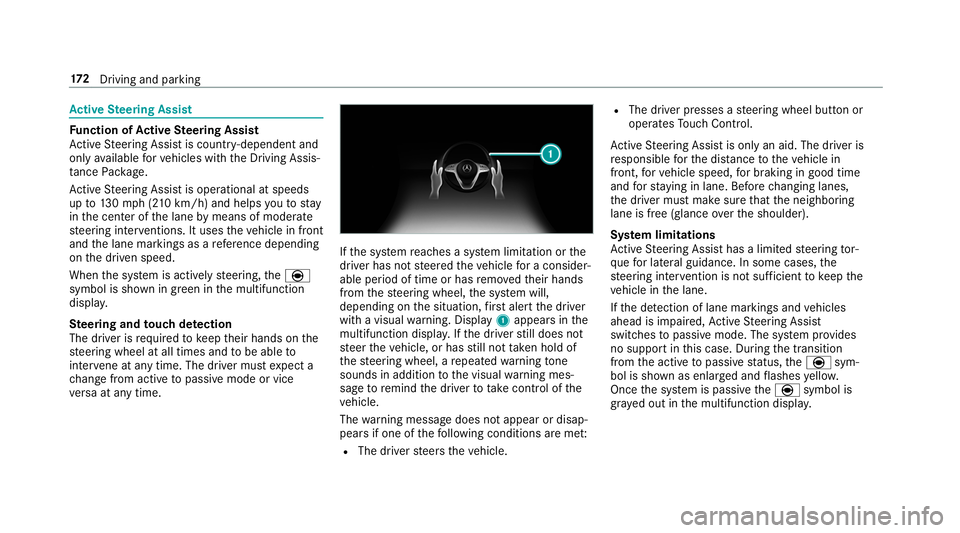
ve rsa at any time. If
th e sy stem reaches a sy stem limitation or the
driver has not steered theve hicle for a consider‐
able period of time or has remo vedth eir hands
from thesteering wheel, the sy stem will,
depending on the situation, firs t alert the driver
with a visual warning. Display 1appears in the
multifunction displa y.Ifth e driver still does not
st eer theve hicle, or has still not take n hold of
th esteering wheel, a repeated warning tone
sounds in addition tothe visual warning mes‐
sage toremind the driver totake control of the
ve hicle.
The warning message does not appear or disap‐
pears if one of thefo llowing conditions are me t:
R The driver steers theve hicle. R
The driver presses a steering wheel button or
operates Touch Control.
Ac tive Steering Assist is only an aid. The driver is
re sponsible forth e dis tance totheve hicle in
front, forve hicle speed, for braking in good time
and forst ay ing in lane. Before changing lanes,
th e driver must make sure that the neighboring
lane is free (glance over the shoulder).
Sy stem limitations
Ac tive Steering Assist has a limited steering tor‐
qu efo r lateral guidance. In some cases, the
st eering inter vention is not su fficient tokeep the
ve hicle in the lane.
If th e de tection of lane markings and vehicles
ahead is impaired, Active Steering Assist
switches topassive mode. The sy stem pr ovides
no support in this case. During the transition
from the active topassive status, theè sym‐
bol is shown as enlar ged and flashes yello w.
Once the sy stem is passive theè symbol is
gr ay ed out in the multifunction displa y.17 2
Driving and pa rking