light MERCEDES-BENZ S-CLASS COUPE 2014 User Guide
[x] Cancel search | Manufacturer: MERCEDES-BENZ, Model Year: 2014, Model line: S-CLASS COUPE, Model: MERCEDES-BENZ S-CLASS COUPE 2014Pages: 413, PDF Size: 12.76 MB
Page 18 of 413
O
Occupant safety Automatic measures after an acci-
dent .................................................60
Children in the vehicle .................... .60
Important safety notes .................... 43
Pets in the vehicle ........................... 69
PRE-SAFE ®
(anticipatory occu-
pant protection) ............................... 59
Odometer
see Total distance recorder
see Trip meter
Oil
see Engine oil
On-board computer
AMG menu .....................................2 63
Assistance graphic menu .............. .256
Assistance menu ........................... 257
Display messages .......................... 265
Displaying a service message ....... .342
DISTRONIC PLUS ........................... 198
Factory settings ............................ .263
Head-up displa y............................. 245
Important safety notes .................. 242
Instrument cluster menu ............... 261
Light menu ..................................... 260
Media menu ................................... 252
Menu overview .............................. 247
Message memory .......................... 265
Navigation menu ............................ 249
Operating the TV ............................ 254
Operating video DVD ..................... 253
Operation ....................................... 243
Radio menu ................................... 251
Service menu ................................. 256
Settings menu ............................... 257
Standard display ............................ 247
Telephone menu ............................ 254
Trip menu ...................................... 247
Vehicle menu ................................. 262
Operating instructions
Vehicle equipment ........................... 23
Operating safety
Declaration of conformity ................ 24
Important safety note ...................... 23
Operating system
see On-board computer Outside temperature display
........... 243
Overhead control panel ...................... 38
Owner's Manual
Overview .......................................... 23 P
Paint code .......................................... 402
Paintwork (cleaning instructions) ... 345
Panic alarm .......................................... 42
Panorama roof ................................... 102
Parking
Important safety notes .................. 178
Parking brake ................................ 180
Position of exterior mirror, front-
passenger side ............................... 119
Reversing camera .......................... 217
see PARKTRONIC
Parking aid
Active Parking Assist ..................... 212
see Exterior mirrors
see PARKTRONIC
Parking assistance
see PARKTRONIC
Parking brake
Display message ............................ 269
Electric parking brake .................... 180
Warning lamp ................................. 306
Parking lamps
Display message ............................ 280
Switching on/of f........................... 126
PARKTRONIC
Deactivating/activating ................. 211
Driving system ............................... 209
Function/note s............................. 209
Important safety notes .................. 209
Problem (fault) ............................... 212
Sensor range ................................. 209
Warning display ............................. 210
PASSENGER AIR BAG
Indicator lamps ................................ 43
PASSENGER AIR BAG indicator
lamp
Problem (malfunction) ................... 278
Pedestrian protection
Active bonnet (pedestrian protec-tion) ............................................... 336 Index
15
Page 19 of 413
Perfume atomizer
Operating ....................................... 146
Perfume vial ................................... 146
Problem (malfunction) ...................1 48
Petrol ................................................. .403
Pets in the vehicle ............................... 69
Plastic trim (cleaning instruc-
tions) ................................................. .349
Power closing ...................................... 92
Power socket
Boot ............................................... 324
Power windows
see Side windows
PRE-SAFE ®
(anticipatory occupant
protection)
Operation ......................................... 59
PRE-SAFE ®
(preventive occupant
safety system)
Display message ............................ 272
PRE-SAFE ®
Brake
Activating/deactivating ................. 258
Display message ............................ 273
Function/notes ................................ 77
Important safety notes .................... 78
Warning lamp ................................. 309
PRE-SAFE ®
PLUS (anticipatory
occupant protection PLUS)
Operation ......................................... 59
Program selector button .................. 171
Protection against theft
ATA (Anti-Theft Alarm system) ......... 80
Immobiliser ...................................... 80
Interior motion sensor ..................... 81
Tow-away protectio n ........................81
Protection of the environment
General notes .................................. 22
Pulling away
Automatic transmission ................. 162
General notes ................................ 162
Hill start assist ............................... 162 Q
Qualified specialist workshop ........... 25R
Radiator cover ................................... 338 Radio
Selecting a station ......................... 251
Radio-based vehicle components
Declaration of conformity ................ 24
Reading lamp ..................................... 130
Rear compartment
Setting the air vents ..................... .156
Stowage compartment .................. 317
Rear foglamp
Display message ............................ 280
Switching on/off ........................... 125
Rear lamps
see Lights
Rear seats
Overview .......................................... 40
Rear window blind ............................ 322
Rear window heating
Problem (fault) ............................... 145
Switching on/off ........................... 144
Rear-compartment seat belt sta-
tus indicator ........................................ 48
Rear-view mirror
Anti-dazzle mode (automatic) ....... .119
Dipping (manual )........................... 117
Recuperation display ........................ 247
Refuelling
Fuel gaug e....................................... 32
Important safety notes .................. 175
Refuelling process ......................... 176
see Fuel
Remote control
Auxiliary heating/ventilation .......... 150
Changing the batteries (auxiliary
heating) ......................................... 152
Garage door opener ....................... 328
Programming (garage door
opener) .......................................... 328
Replacing bulbs
General notes ................................ 131
Replacing the battery (auxiliary
heating remote control) .................... 152
Reserve (fuel tank)
see Fuel
Reserve fuel
Display message ............................ 284
Warning lamp ................................. 307
Residual heat (climate control) ........ 14616
Index
Page 22 of 413
Stowage net ................................... 317
Stowage well beneath the boot
floor .................................................... 319
Summer tyres
In winter ........................................ 378
Sun visor ............................................ 321
Suspension tuning
Active Body Control ABC ............... 205
AIRMATIC ...................................... 208
SETUP (on-board computer) .......... 264
Switching the auxiliary heating/
ventilation
On/off ........................................... 149 T
Tail lamps Display message ............................ 280
see Lights
Technical data
Capacities ...................................... 402
Information .................................... 400
Tyres/wheels ................................. 391
Vehicle data ................................... 408
Telephone
Accepting a call (multifunction
steering wheel) .............................. 255
Display message ............................ 298
Introduction ................................... 254
Menu (on-board computer) ............ 254
Number from the phone book ........ 255
Redialling ....................................... 255
Rejecting/ending a call ................. 255
Telephone compartment ................ 316
Temperature
Coolant .......................................... 242
Engine oil (on-board computer) ...... 263
Outside temperature ...................... 243
Setting (climate control )................ 142
TEMPOMAT
Function/note s............................. 186
TIREFIT kit .......................................... 357
Top Tether ............................................ 62
Total distance recorder .................... 247
Tow-away protection
Activating ......................................... 81
Deactivating ..................................... 81
Function ........................................... 81 Tow-starting
Emergency engine starting ............ 370
Important safety notes .................. 367
Towing
Important safety notes .................. 367
Notes for 4MATIC vehicles ............ 370
With the rear axle raised ................ 369
Towing away
Fitting the towing ey e.................... 369
Removing the towing eye ............... 369
With both axles on the ground ....... 369
Towing eye ......................................... 355
Traffic Sign Assist
Activating ....................................... 228
Activating/deactivating the warn-ing function .................................... 258
Display message ............................ 289
Function/note s............................. 227
Important safety notes .................. 228
Instrument cluster display ............. 228
Transmission
see Automatic transmission
Transporting the vehicle .................. 370
Trim pieces (cleaning instruc-
tions) .................................................. 350
Trip computer (on-board com-
puter) .................................................. 248
Trip meter
Calling up ....................................... 247
Resetting (on-board computer) ...... 249
Turn signals
Switching on/of f........................... 126
TV
Operating (on-board computer) ..... 254
Two-way radio
Frequencies ................................... 400
Installation ..................................... 400
Transmission output (maximum) .... 400
Windscreen (infrared reflective) ..... 334
Type identification plate
see Vehicle identification plate
Tyre pressure
Calling up (on-board computer) ..... 381
Display message ............................ 293
Important safety notes .................. 381
Not reached (TIREFIT) .................... 359
Reached (TIREFIT) .......................... 359
Recommended ............................... 380 Index
19
Page 29 of 413
Implied warranty
! Follow the instructions in this manual
about the proper operation of your vehicle
as well as about possible vehicle damage.
Damage to your vehicle that arises from
culpable contraventions against these
instructions are not covered either by
Mercedes-Benz implied warranty or by the
New or Used-Vehicle Warranty. Data stored in the vehicle
A wide range of electronic components in
your vehicle contain data memories.
These data memories temporarily or perma-
nently store technical information about:
R the vehicle's operating state
R events
R faults
In general, this technical information docu-
ments the state of a component, a module, a
system or the surroundings.
These include, for example:
R operating conditions of system compo-
nents, e.g. fluid levels
R the vehicle's status messages and those of
its individual components, e.g. number of
wheel revolutions/speed, deceleration in
movement, lateral acceleration, accelera-
tor pedal position
R malfunctions and defects in important sys-
tem components, e.g. lights, brakes
R vehicle reactions and operating conditions
in special driving situations, e.g. airbag
deployment, intervention of stability con-
trol systems
R ambient conditions, e.g. outside tempera-
ture This data is of an exclusively technical nature
and can be used to:
R assist in recognising and rectifying faults
and defects
R analyse vehicle functions, e.g. after an acci-
dent
R optimise vehicle functions
The data cannot be used to trace the vehicle's movements.
When your vehicle is serviced, technical infor-
mation can be read from the event data mem- ory and fault data memory.
Services include, for example:
R repair services
R service processes
R warranty events
R quality assurance
It is read by employees of the service network (including manufacturers) using special diag-
nostic testers. More detailed information is
obtained from it, if required.
After a fault has been rectified, the informa-
tion is deleted from the fault memory or is
continually overwritten.
When operating the vehicle, situations are
conceivable in which this technical data, in
connection with other information (if neces-
sary, under consultation with an authorised
expert), could be traced to a person.
Examples include:
R accident reports
R damage to the vehicle
R witness statements
Further additional functions that have been
contractually agreed upon with the customer
allow certain vehicle data to be conveyed by
the vehicle as well. The additional functions
include, for example, vehicle location in case of an emergency. 26
Introduction
Page 33 of 413

Cockpit
Function Page
:
Steering wheel gearshift
paddles
172
;
Combination switch 126
=
Horn
?
Instrument cluster 32
A
DIRECT SELECT lever 167
B
Overhead control panel 38
C
Control panel for:
Ü
Lowering the rear
seat head restraints 110
u
Extending/retracting
the rear roller sunblind 322
Moving the seat-belt
extender forwards 46
PASSENGER AIRBAG indi-
cator lamp
43
Adjusts the brightness of
the instrument lighting and
the COMAND display
D
Climate control systems 136
E
Ignition lock 159
Start/Stop button 159 Function Page
F
Adjusts the steering wheel 114
Steering wheel heating 115
G
Cruise control lever 186
H
Electric parking brake 180
I
Diagnostics connection 24
J
Opens the bonnet 337
K
Light switch 124
L
Control panel for:
Activating Steering Assist
and Stop&Go Pilot
200
Activating Active Lane
Keeping Assist 236
Deactivating PARKTRONIC 209
Switching on 360° camera 221
Activating Night View
Assist 230
Switching on the head-up
display
25930
CockpitAt a glance
Page 34 of 413
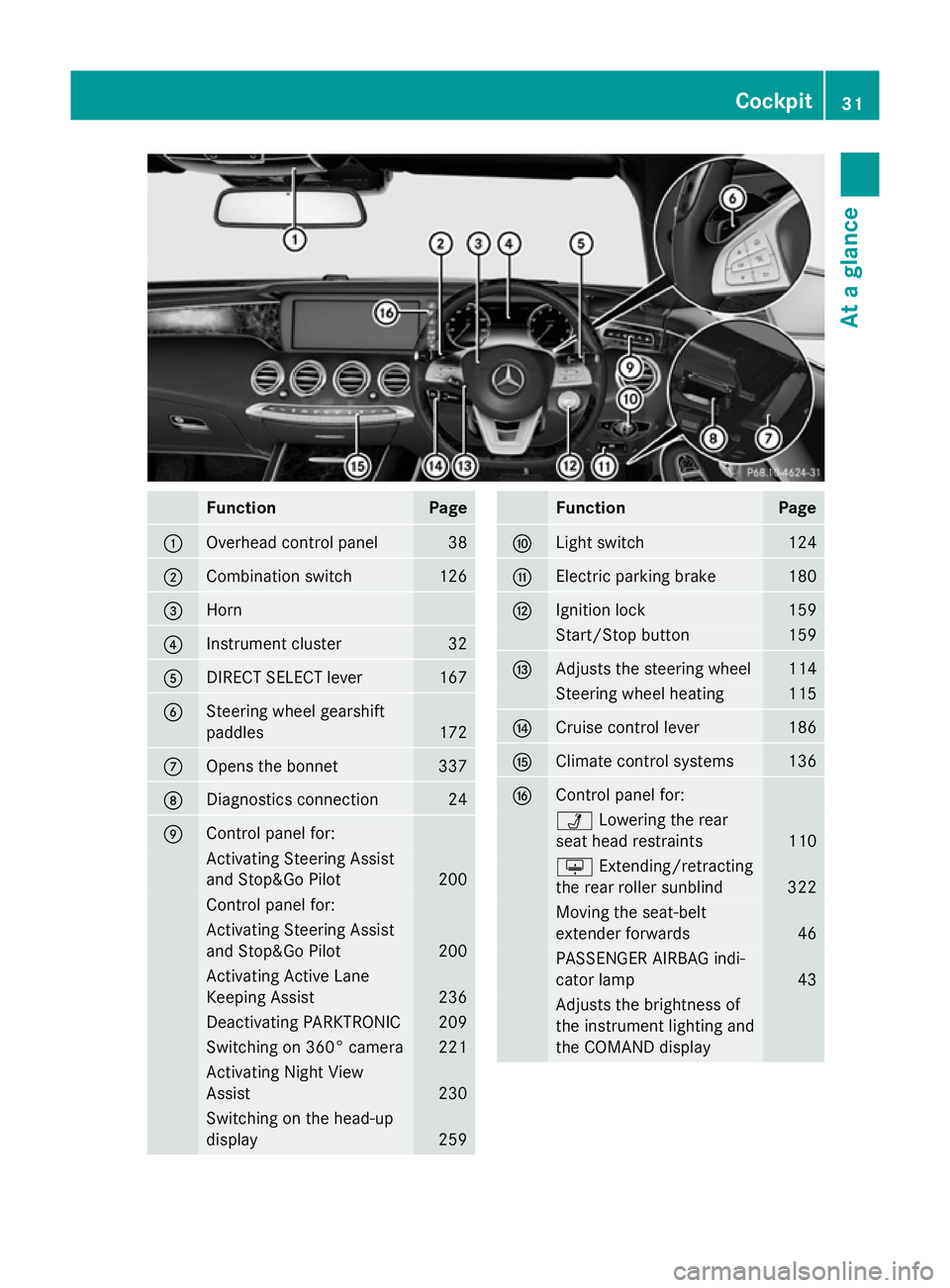
Function Page
:
Overhead control panel 38
;
Combination switch 126
=
Horn
?
Instrument cluster 32
A
DIRECT SELECT lever 167
B
Steering wheel gearshift
paddles
172
C
Opens the bonnet 337
D
Diagnostics connection 24
E
Control panel for:
Activating Steering Assist
and Stop&Go Pilot 200
Control panel for:
Activating Steering Assist
and Stop&Go Pilot
200
Activating Active Lane
Keeping Assist
236
Deactivating PARKTRONIC 209
Switching on 360° camera 221
Activating Night View
Assist
230
Switching on the head-up
display
259 Function Page
F
Light switch 124
G
Electric parking brake 180
H
Ignition lock 159
Start/Stop button 159
I
Adjusts the steering wheel 114
Steering wheel heating 115
J
Cruise control lever 186
K
Climate control systems 136
L
Control panel for:
Ü
Lowering the rear
seat head restraints 110
u
Extending/retracting
the rear roller sunblind 322
Moving the seat-belt
extender forwards
46
PASSENGER AIRBAG indi-
cator lamp
43
Adjusts the brightness of
the instrument lighting and
the COMAND display Cockpit
31At a glance
Page 36 of 413
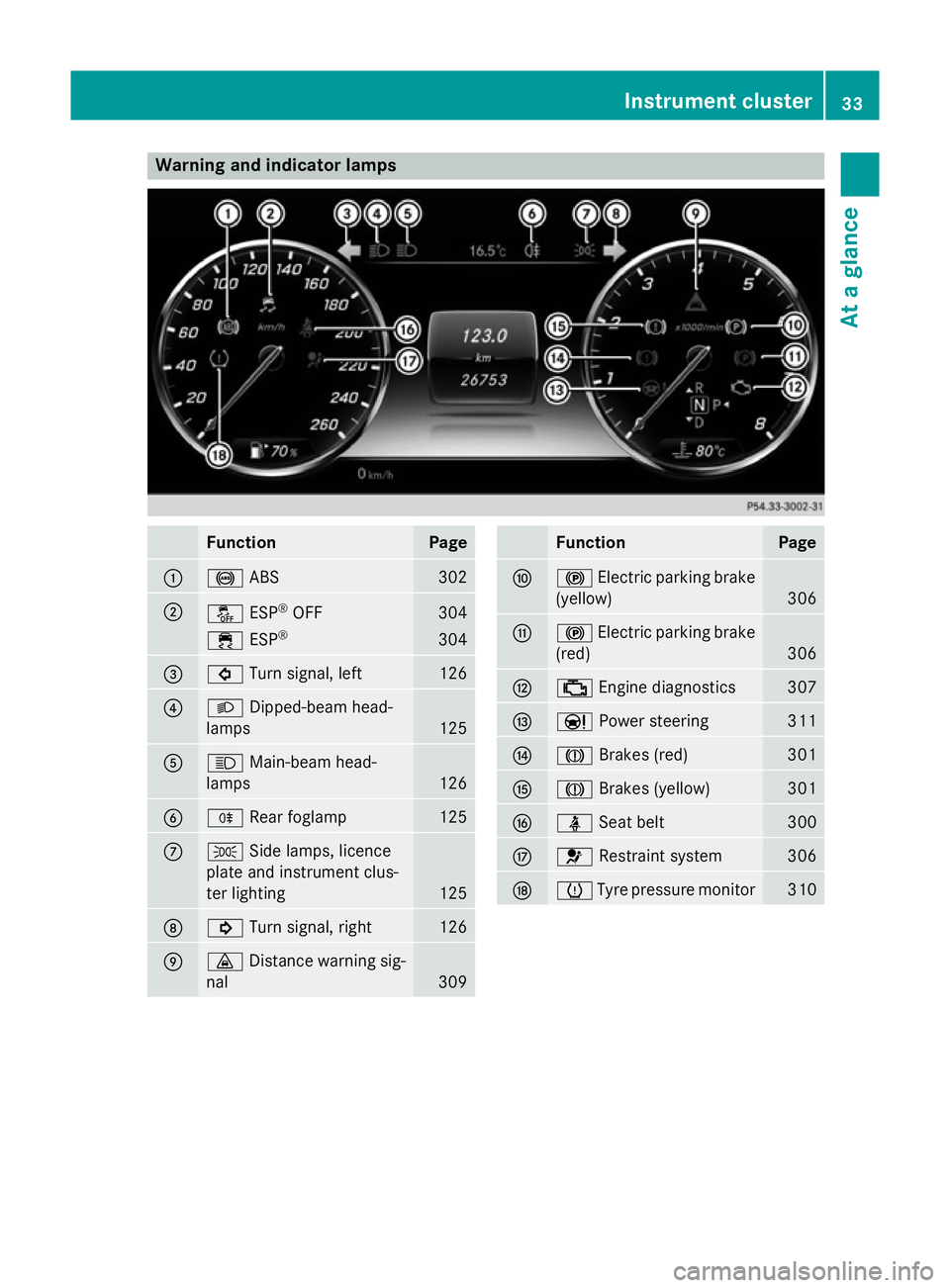
Warning and indicator lamps
Function Page
:
!
ABS 302
;
å
ESP®
OFF 304
÷
ESP® 304
=
#
Turn signal, left 126
?
L
Dipped-beam head-
lamps 125
A
K
Main-beam head-
lamps 126
B
R
Rear foglamp 125
C
T
Side lamps, licence
plate and instrument clus-
ter lighting 125
D
!
Turn signal, right 126
E
·
Distance warning sig-
nal 309 Function Page
F
!
Electric parking brake
(yellow) 306
G
!
Electric parking brake
(red) 306
H
;
Engine diagnostics 307
I
Ð
Power steering 311
J
J
Brakes (red) 301
K
J
Brakes (yellow) 301
L
ü
Seat belt 300
M
6
Restraint system 306
N
h
Tyre pressure monitor 310Instrument cluster
33At a glance
Page 37 of 413
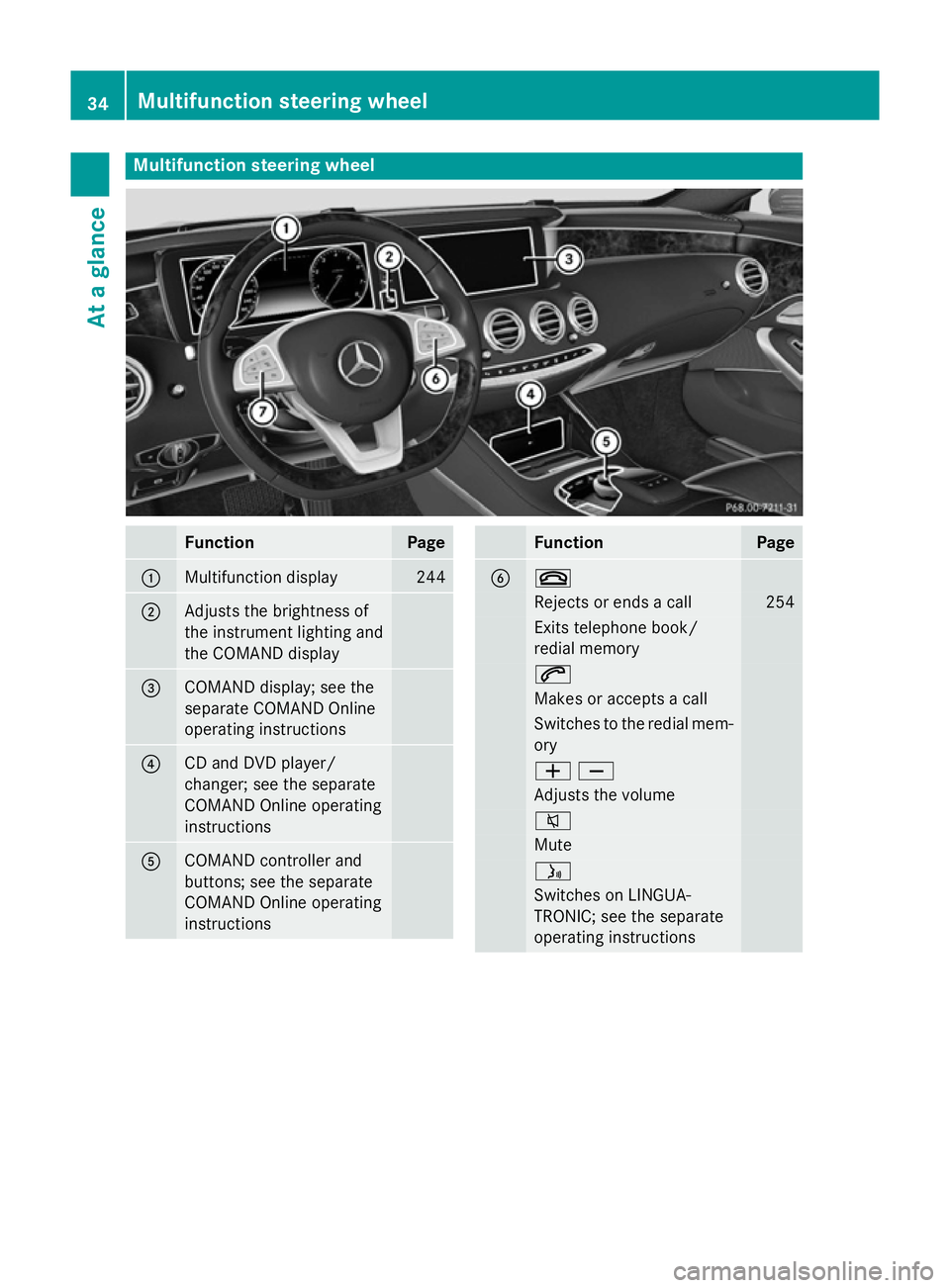
Multifunction steering wheel
Function Page
:
Multifunction display 244
;
Adjusts the brightness of
the instrument lighting and
the COMAND display
=
COMAND display; see the
separate COMAND Online
operating instructions
?
CD and DVD player/
changer; see the separate
COMAND Online operating
instructions
A
COMAND controller and
buttons; see the separate
COMAND Online operating
instructions Function Page
B ~
Rejects or ends a call 254
Exits telephone book/
redial memory 6
Makes or accepts a call
Switches to the redial mem-
ory WX
Adjusts the volume
8
Mute
ó
Switches on LINGUA-
TRONIC; see the separate
operating instructions 34
Multifunction steering wheelAt a glance
Page 41 of 413
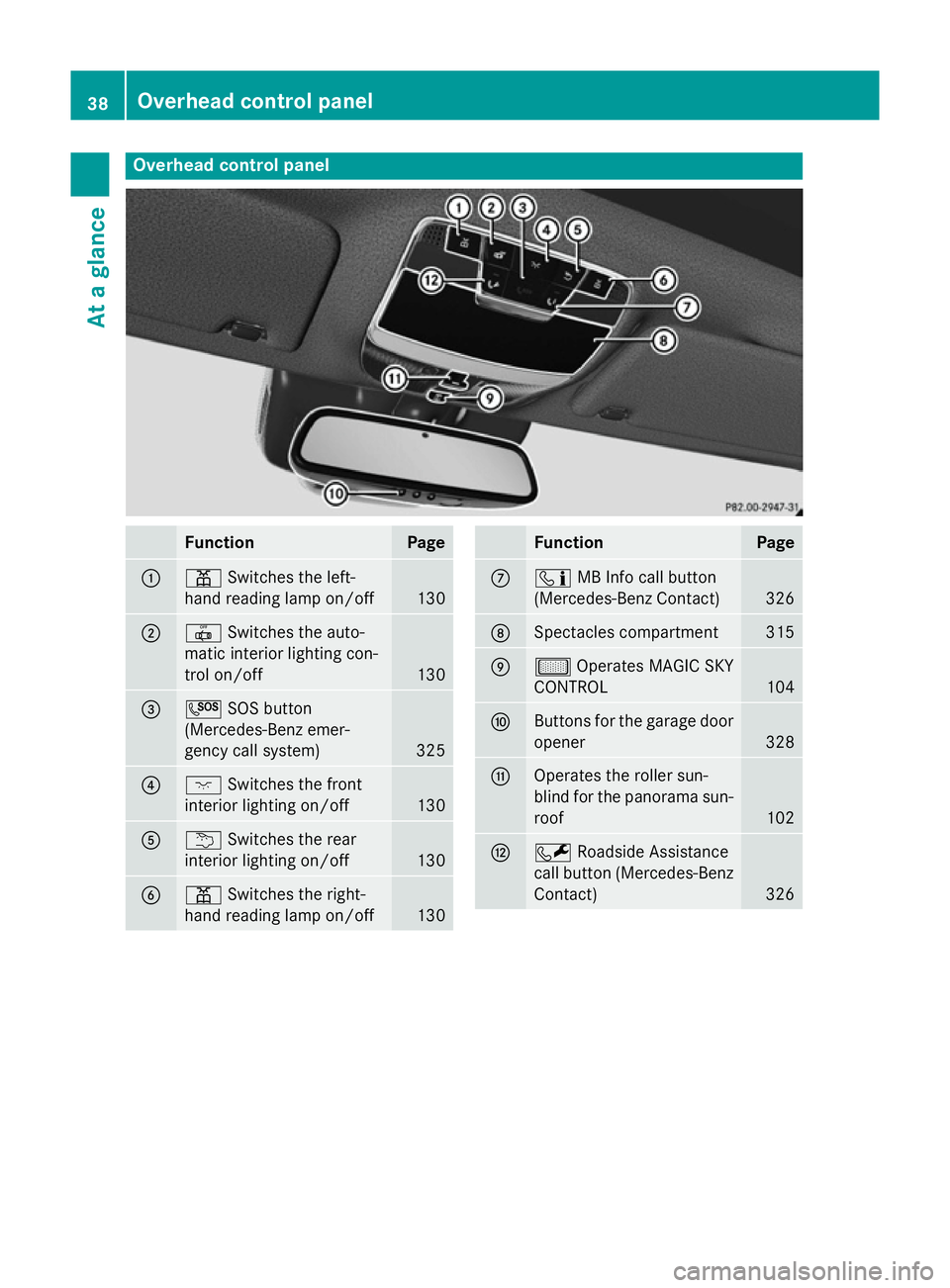
Overhead control panel
Function Page
:
p
Switches the left-
hand reading lamp on/off 130
;
|
Switches the auto-
matic interior lighting con-
trol on/off 130
=
G
SOS button
(Mercedes-Benz emer-
gency call system) 325
?
c
Switches the front
interior lighting on/off 130
A
u
Switches the rear
interior lighting on/off 130
B
p
Switches the right-
hand reading lamp on/off 130 Function Page
C
ï
MB Info call button
(Mercedes-Benz Contact) 326
D
Spectacles compartment 315
E
µ
Operates MAGIC SKY
CONTROL 104
F
Buttons for the garage door
opener 328
G
Operates the roller sun-
blind for the panorama sun-
roof 102
H
F
Roadside Assistance
call button (Mercedes-Benz
Contact) 32638
Overhead control panelAt a glance
Page 45 of 413
Useful information
i This Owner's Manual describes all mod-
els, series and optional equipment for your
vehicle that were available at the time of
going to press. National variations are pos- sible. Note that your vehicle may not be
equipped with all of the functions descri-
bed. This is also the case for systems and
functions relevant to safety.
i Read the information on qualified special-
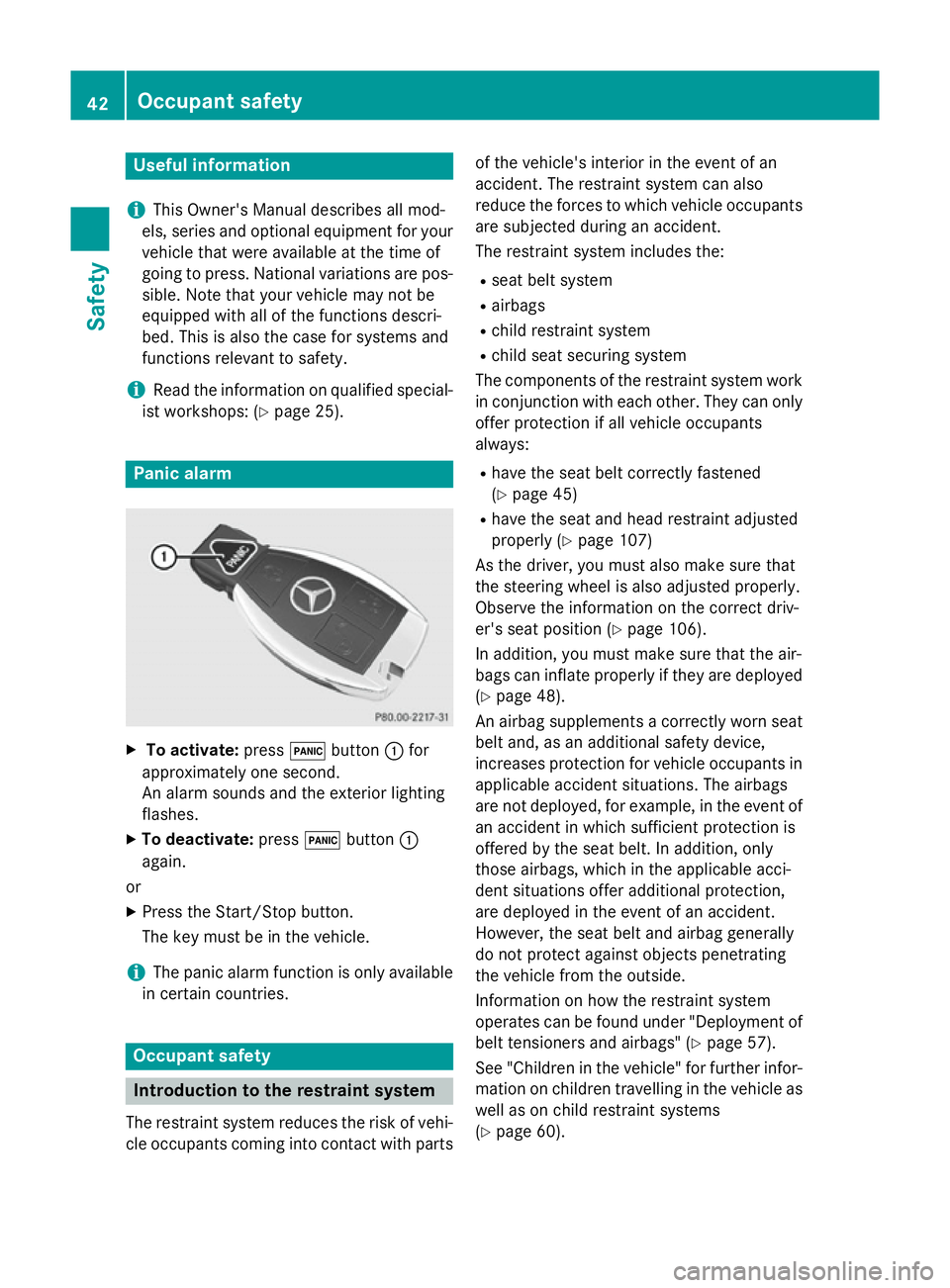
ist workshops: (Y page 25). Panic alarm
X
To activate: press!button :for
approximately one second.
An alarm sounds and the exterior lighting
flashes.
X To deactivate: press!button :
again.
or
X Press the Start/Stop button.
The key must be in the vehicle.
i The panic alarm function is only available
in certain countries. Occupant safety
Introduction to the restraint system
The restraint system reduces the risk of vehi-
cle occupants coming into contact with parts of the vehicle's interior in the event of an
accident. The restraint system can also
reduce the forces to which vehicle occupants
are subjected during an accident.
The restraint system includes the:
R seat belt system
R airbags
R child restraint system
R child seat securing system
The components of the restraint system work
in conjunction with each other. They can only
offer protection if all vehicle occupants
always:
R have the seat belt correctly fastened
(Y page 45)
R have the seat and head restraint adjusted
properly (Y page 107)
As the driver, you must also make sure that
the steering wheel is also adjusted properly.
Observe the information on the correct driv-
er's seat position (Y page 106).
In addition, you must make sure that the air-
bags can inflate properly if they are deployed (Y page 48).
An airbag supplements a correctly worn seat
belt and, as an additional safety device,
increases protection for vehicle occupants in
applicable accident situations. The airbags
are not deployed, for example, in the event of an accident in which sufficient protection is
offered by the seat belt. In addition, only
those airbags, which in the applicable acci-
dent situations offer additional protection,
are deployed in the event of an accident.
However, the seat belt and airbag generally
do not protect against objects penetrating
the vehicle from the outside.
Information on how the restraint system
operates can be found under "Deployment of
belt tensioners and airbags" (Y page 57).
See "Children in the vehicle" for further infor- mation on children travelling in the vehicle as
well as on child restraint systems
(Y page 60). 42
Occupant safetySafety