warning MERCEDES-BENZ S-CLASS COUPE 2014 User Guide
[x] Cancel search | Manufacturer: MERCEDES-BENZ, Model Year: 2014, Model line: S-CLASS COUPE, Model: MERCEDES-BENZ S-CLASS COUPE 2014Pages: 413, PDF Size: 12.76 MB
Page 20 of 413
Restraint system
Display messag e............................ 275
Introduction ..................................... 42
Warning lamp ................................. 306
Warning lamp (function) ................... 43
Rev counter ........................................ 242
Reversing camera
Cleaning instructions ..................... 347
Function/note s............................. 217
Switching on/of f........................... 218
Reversing feature
Side windows ................................... 99
Reversing function
Boot lid ............................................ 94
Roller sunblind ............................... 102
Reversing lamp (display message) .. 281
ROAD SURFACE SCAN ....................... 206
Roller sunblind
Panorama roof ............................... 102
Rear window .................................. 322
Roller sunblind of the panorama
roof
Opening and closing ...................... 103
Operating ....................................... 102
Resetting ....................................... 103
Roof lining and carpets (cleaning
instructions) ...................................... 351
Roof load (maximum) ........................ 408S
Safety Automatic front-passenger front
airbag deactivation system .............. 51
Child restraint systems .................... 61
Children in the vehicle ..................... 60
see Operating safety
Safety system
see Driving safety systems
Seat
Seat backrest display message ..... 297
Seat belt
Correct usage .................................. 45
Seat belts
Adjusting the driver's and front-
passenger seat belt ......................... 47
Cleaning ......................................... 351
Display message ............................ 274 Fastening ......................................... 46
Important safety guidelines ............. 44
Introduction ..................................... 44
Rear seat belt status indicator ......... 48
Releasing ......................................... 47
Warning lamp ................................. 300
Warning lamp (function) ................... 47
Seating
Seating comfort packag e............... 111
Seating comfort package ................. 111
Seats
Active multicontour seat ................ 111
Adjusting (electrically) ................... 108
Adjusting the 4-way lumbar sup-
port ................................................ 111
Adjusting the head restraint .......... 109
Cleaning the cover ......................... 350
Correct driver's seat position ........ 106
EASY-ENTRY/EXIT system ............. 116
Folding the backrests forward/
back ............................................... 110
Important safety notes .................. 107
Seat heating .................................. 111
Seat heating problem .................... 113
Seat ventilation .............................. 113
Seat ventilation problem ................ 114
Storing settings (memory func-
tion) ............................................... 120
Switching seat heating on/of f....... 111
Switching the seat ventilation on/ off .................................................. 113
Section
Wheels and tyres ........................... 376
Selector lever
Cleaning ......................................... 350
see Automatic transmission
Sensors (cleaning instructions) ....... 347
Service
see ASSYST PLUS
Service Centre
see Qualified specialist workshop
Service menu (on-board com-
puter) .................................................. 256
Service products
Brake fluid ..................................... 406
Coolant (engine) ............................ 406
Engine oil ....................................... 405
Fuel ................................................ 403 Index
17
Page 21 of 413
Important safety notes .................. 402
Washer fluid
................................... 407
Settings
Factory (on-board computer) ......... 263
On-board computer ....................... 257
SETUP (on-board computer) ............. 264
Side lamps
Switching on/of f........................... 125
Side windows
Convenience closing ...................... 101
Convenience opening .................... 100
Important safety notes .................... 99
Opening/closing ............................ 100
Problem (malfunction) ................... 102
Resetting ....................................... 101
Sidebag ................................................ 50
Skibag ................................................ 317
Snow chains ...................................... 379
Sockets
Centre console .............................. 323
General notes ................................ 323
Rear compartment ......................... 323
Specialist workshop ............................ 25
Spectacles compartment ................. 315
Speed, controlling
see Cruise control
Speedometer
Activating/deactivating the addi-
tional speedometer ........................ 262
Digital ............................................ 249
In the Instrument cluster ................. 32
Selecting the unit of measure-
ment .............................................. 261
see Instrument cluster
SPEEDTRONIC
Deactivating variable ..................... 191
Display message ............................ 291
Function/note s............................. 188
Important safety notes .................. 189
LIM indicator lamp ......................... 189
Permanent ..................................... 191
Selecting ........................................ 189
Storing the current speed .............. 190
Variabl e......................................... 189
Start/Stop button
Removing ....................................... 160
Starting the engine ........................ 162 Start/stop function
see ECO start/stop function
Starting (engine) ................................ 161
STEER CONTROL .................................. 79
Steering
Warning lamps ............................... 311
Steering (display message) .............. 298
Steering Assist and Stop&Go Pilot
(DISTRONIC PLUS)
Display message ............................ 291
Steering assistant STEER CON-
TROL
see STEER CONTROL
Steering wheel
Adjusting (electrically) ................... 114
Button overview ............................... 34
Buttons (on-board computer) ......... 243
Cleaning ......................................... 350
EASY ENTRY/EXIT feature ............. 116
Gearshift paddle s........................... 172
Important safety notes .................. 114
Steering wheel heating .................. 115
Storing settings (memory func-
tion) ............................................... 120
Steering wheel gearshift paddles .... 172
Steering wheel heating
Problem (malfunction) ................... 116
Switching on/of f........................... 115
Stowage areas ................................... 314
Stowage compartments
Armrest (under) ............................. 316
Centre console .............................. 315
Centre console in rear compart-
ment .............................................. 317
Cup holde r..................................... 320
Door ............................................... 316
Glove compartment ....................... 315
Important safety information ......... 314
Rear ............................................... 317
Spectacles compartment ............... 315
Under driver's seat/front-
passenger sea t.............................. 316
Stowage net ....................................... 317
Stowage space
Luggage net retainers .................... 319
Rear seat backres t......................... 317
Securing a load .............................. 319 18
Index
Page 23 of 413
Tyre pressure loss warning
General notes ................................ 384
Important safety notes .................. 384
Restarting ...................................... 385
Tyre pressure monitor
Checking the tyre pressure elec-
tronically ........................................ 382
Function/note s............................. 381
General notes ................................ 381
Important safety notes .................. 381
Radio type approval for the tyre
pressure monitor ........................... 384
Restarting ...................................... 383
Warning lamp ................................. 310
Warning message .......................... 383
Tyres
Changing a whee l.......................... 385
Checking ........................................ 377
Direction of rotation ...................... 386
Display message ............................ 293
Important safety notes .................. 376
MOExtended tyre s......................... 378
Replacing ....................................... 386
Service life ..................................... 377
Storing ........................................... 386
Summer tyres in winter ................. 378
Tyre size (data ).............................. 391
Tyre tread ...................................... 377
Wheel and tyre combinations ........ 393
see Flat tyre U
Unlocking Emergency unlocking ....................... 93
From inside the vehicle (central
unlocking button) ............................. 91 V
Vanity mirror (in sun visor) .............. 321
Vehicle
Correct use ...................................... 25
Data acquisition ............................... 26
Display message ............................ 295
Electronics ..................................... 400
Equipment ....................................... 23
Implied warranty .............................. 26
Individual settings .......................... 257 Leaving parked up ......................... 181
Locking (in an emergency) ............... 93
Locking (key) ................................... 85
Lowering ........................................ 391
Operating safety .............................. 23
Pulling away ................................... 162
Raising ........................................... 387
Registration ..................................... 25
Securing from rolling away ............ 387
Towing away .................................. 367
Transporting .................................. 370
Unlocking (in an emergency) ........... 93
Unlocking (key) ................................ 85
Vehicle data ................................... 408
Vehicle dimensions ........................... 408
Vehicle emergency locking ................ 93
Vehicle identification number
see VIN
Vehicle identification plate .............. 402
Vehicle level
Active Body Control ABC ............... 204
Display message ............................ 285
Vehicle maintenance
see ASSYST PLUS
Vehicle tool kit .................................. 355
Video
Operating the DVD ......................... 253
VIN ...................................................... 402 W
Warning and indicator lamps ABS ................................................ 302
Brakes ........................................... 301
Distance warning signal ................. 309
ESP ®
.............................................. 304
ESP ®
OFF ....................................... 305
LIM (cruise control )........................ 186
LIM (DISTRONIC PLUS) .................. 193
LIM (variable SPEEDTRONIC) ......... 189
Overview .......................................... 33
Parking brake ................................ 306
PASSENGER AIR BAG ...................... 43
Reserve fuel ................................... 307
Seat belt ........................................ 300
Steering ......................................... 311
Tyre pressure monitor ................... 310
Warning triangle ................................ 35420
Index
Page 24 of 413
Washer fluid
Display message ............................ 298
Wheel and tyre combinations
see Tyres
Wheel bolt tightening torque ........... 391
Wheel chock ...................................... 387
Wheels
Changing a wheel .......................... 385
Changing/replacing ....................... 386
Checking ........................................ 377
Cleaning ......................................... 346
Cleaning (warning) ........................ .386
Fitting a new wheel ........................ 390
Fitting a wheel ............................... 386
Important safety notes .................. 376
Removing a wheel .......................... 390
Storing .......................................... .386
Tightening torque ........................... 391
Wheel size/tyre size ..................... .391
Windowbag
Operation ......................................... 51
Windows
Cleaning ......................................... 346
see Side windows
Windscreen
Demisting ...................................... 143
Infrared reflective .......................... 334
Windscreen washer fluid
see Windscreen washer system
Windscreen washer system
Notes ............................................. 407
Topping up ..................................... 341
Windscreen wipers
Problem (malfunction) ................... 134
Replacing the wiper blades ............ 132
Switching on/off ........................... 131
Winter operation
Important safety notes .................. 378
Radiator cover ............................... 338
Slippery road surfaces ................... 185
Snow chains .................................. 379
Summer tyres ................................ 378
Winter tyres
Limiting the speed (on-board com-
puter) ............................................. 262
M+S tyres ...................................... 378
Wiper blades
Cleaning ......................................... 347 Important safety notes .................. 132
Replacing ....................................... 132
Wooden trim (cleaning instruc-
tions) ................................................. .350
Workshop
see Qualified specialist workshop Index
21
Page 26 of 413
Do not install accessories such as audio
systems in these areas. Do not carry out
repairs or welding. You could impair the
operating efficiency of the restraint sys-
tems.
Have accessories retrofitted at a qualified
specialist workshop.
You could jeopardise the operating safety of
your vehicle if you use parts, tyres and wheels
as well as accessories relevant to safety
which have not been approved by Mercedes. This could lead to malfunctions in safety-rel-
evant systems, e.g. the brake system. Use
only genuine Mercedes-Benz parts or parts of
equal quality. Only use tyres, wheels and
accessories that have been specifically
approved for your vehicle.
Mercedes-Benz tests genuine parts and con-
version parts and accessories that have been specifically approved for your vehicle for their
reliability, safety and suitability. Despite
ongoing market research, Mercedes-Benz is
unable to assess other parts. Mercedes-Benz therefore accepts no responsibility for the
use of such parts in Mercedes-Benz vehicles,even if they have been officially approved or
independently approved by a testing centre.
In Germany, certain parts are only officially
approved for installation or modification if
they comply with legal requirements. This
also applies to some other countries. All gen-
uine Mercedes-Benz parts meet the approval
requirements. The use of non-approved parts may invalidate the vehicle's general operating
permit.
This is the case:
R if they cause a change of the vehicle type
from that for which the vehicle's general
operating permit was granted
R if other road users could be endangered
R if the emission or noise levels are adversely
affected
Always specify the vehicle identification num- ber (VIN) when ordering genuine Mercedes-
Benz parts (Y page 402). Owner's Manual
Vehicle equipment
This Owner's Manual describes all models
and all standard and optional equipment
available for your vehicle at the time of pub-
lication of the Owner's Manual. Country-spe- cific differences are possible. Note that your
vehicle may not be fitted with all features
described. This is also the case for systems
and functions relevant to safety. Therefore,
the equipment on your vehicle may differ from
that in the descriptions and illustrations.
The original purchase contract documenta-
tion for your vehicle contains a list of all of the
systems in your vehicle.
Should you have any questions concerning
equipment and operation, please consult a
Mercedes-Benz Service Centre.
The Owner's Manual and Service Booklet are important documents and should kept in the
vehicle. Operating safety
Important safety notes
G
WARNING
If you do not have the prescribed service/
maintenance work or necessary repairs car-
ried out, this could result in malfunctions or
system failures. There is a risk of an accident. Always have the prescribed service/mainte-
nance work as well as necessary repairs car-
ried out at a qualified specialist workshop. G
WARNING
If you switch off the ignition while driving,
safety-relevant functions are only available
with limitations, or not at all. This could affect, for example, the power steering and the brake
boosting effect. You will require considerably
more effort to steer and brake. There is a risk of an accident.
Do not switch off the ignition while driving. Introduction
23 Z
Page 27 of 413
G
WARNING
Flammable material such as leaves, grass or
twigs may ignite if they come into contact with hot parts of the exhaust system. There is a risk of fire.
When driving off road or on unpaved roads,
check the vehicle's underside regularly. In
particular, remove parts of plants or other
flammable materials which have become
trapped. In the case of damage, contact a
qualified specialist workshop. G
WARNING
Modifications to electronic components, their software as well as wiring could affect their
function and/or the operation of other net-
worked components. This could in particular
also be the case for systems relevant to
safety. They might not function properly any-
more and/or jeopardise the operational
safety of the vehicle. There is an increased
risk of an accident and injury.
Do not attempt to modify the wiring as well as
electronic components or their software.
Always have work on electrical and electronic components carried out at a qualified special-
ist workshop.
If you make any changes to the vehicle elec-
tronics, the general operating permit is ren-
dered invalid.
! There is a risk of damage to the vehicle if:
R the vehicle becomes stuck, e.g. on a high
kerb or an unpaved road
R you drive too fast over an obstacle, e.g. a
kerb or a pothole in the road
R a heavy object strikes the underbody or
parts of the chassis
In situations like this, the body, the under-
body, chassis parts, wheels or tyres could
be damaged without the damage being visi-
ble. Components damaged in this way can
unexpectedly fail or, in the case of an acci-
dent, no longer withstand the strain they
are designed for. If the underbody panelling is damaged,
combustible materials such as leaves,
grass or twigs can gather between the
underbody and the underbody panelling. If
these materials come in contact with hot
parts of the exhaust system, they can catch fire.
In such situations, have the vehicle
checked and repaired immediately at a
qualified specialist workshop. If, upon con-
tinuing your journey, you notice that driving
safety is impaired, pull over and stop the
vehicle immediately, paying attention to
road and traffic conditions. In such cases,
consult a qualified specialist workshop. Declarations of conformity
Wireless vehicle components The following information applies to all com-
ponents of the vehicle and the information
systems and communication devices integra-
ted into the vehicle which receive and/or
transmit radio waves:
The components of this vehicle that receive
and/or transmit radio waves are compliant
with the basic requirements and all other rel- evant conditions of Directive 1999/5/EC.
You can obtain further information from any
Mercedes-Benz Service Centre.
Electromagnetic compatibility The electromagnetic compatibility of the vehi-
cle components has been checked and certi-fied according to the currently valid version of
Regulation ECE-R 10. Diagnostics connection
The diagnostics connection is only intended
for the connection of diagnostic equipment at a qualified specialist workshop. 24
Introduction
Page 28 of 413
G
WARNING
If you connect equipment to a diagnostics
connection in the vehicle, it can affect the
operation of the vehicle systems. This may
affect the operating safety of the vehicle.
There is a risk of an accident.
Do not connect any equipment to a diagnos-
tics connection in the vehicle. G
WARNING
Objects in the driver's footwell may restrict
the clearance around the pedals or block a
depressed pedal. This jeopardises the oper-
ating and road safety of the vehicle. There is a risk of an accident.
Stow all objects securely in the vehicle so that
they do not get into the driver's footwell.
Always fit the floormats securely and as pre-
scribed in order to ensure that there is always sufficient room for the pedals. Do not use
loose floormats and do not place several floor- mats on top of one another.
! If the engine is switched off and equip-
ment on the diagnostics connection is
used, the starter battery may discharge.
Connecting equipment to the diagnostics
connection can lead to emissions monitoring information being reset, for example. This
may lead to the vehicle failing to meet the
requirements of the next emissions test dur-
ing the main inspection. Qualified specialist workshop
A qualified specialist workshop has the nec-
essary special skills, tools and qualifications
to correctly carry out any necessary work on
your vehicle. This particularly applies to work
relevant to safety.
Observe the notes in the Service Booklet.
Always have the following work carried out at a qualified specialist workshop:
R work relevant to safety
R service and maintenance work R
repair work
R modifications, installations and conver-
sions
R work on electronic components
Mercedes-Benz recommends that you use a
Mercedes-Benz Service Centre. Vehicle registration
Mercedes-Benz may ask its Service Centres
to carry out technical inspections on certain
vehicles. The quality or safety of the vehicle is
improved as a result of the inspection.
Mercedes-Benz can only inform you about
vehicle checks if it has your registration data.
It is possible that your vehicle has not yet
been registered in your name in the following
cases:
R if your vehicle was not purchased at an
authorised specialist dealer.
R if your vehicle has not yet been examined at
a Mercedes-Benz Service Centre.
It is advisable to register your vehicle with a
Mercedes-Benz Service Centre.
Inform Mercedes-Benz as soon as possible
about any change in address or vehicle own-
ership. You can do this at a Mercedes-Benz
Service Centre, for example. Correct use
If you remove any warning stickers, you or
others could fail to recognise certain dangers.
Leave warning stickers in position.
Observe the following information when driv- ing your vehicle:
R the safety notes in this manual
R the technical data in this manual
R traffic rules and regulations
R laws and safety standards pertaining to
motor vehicles Introduction
25 Z
Page 36 of 413
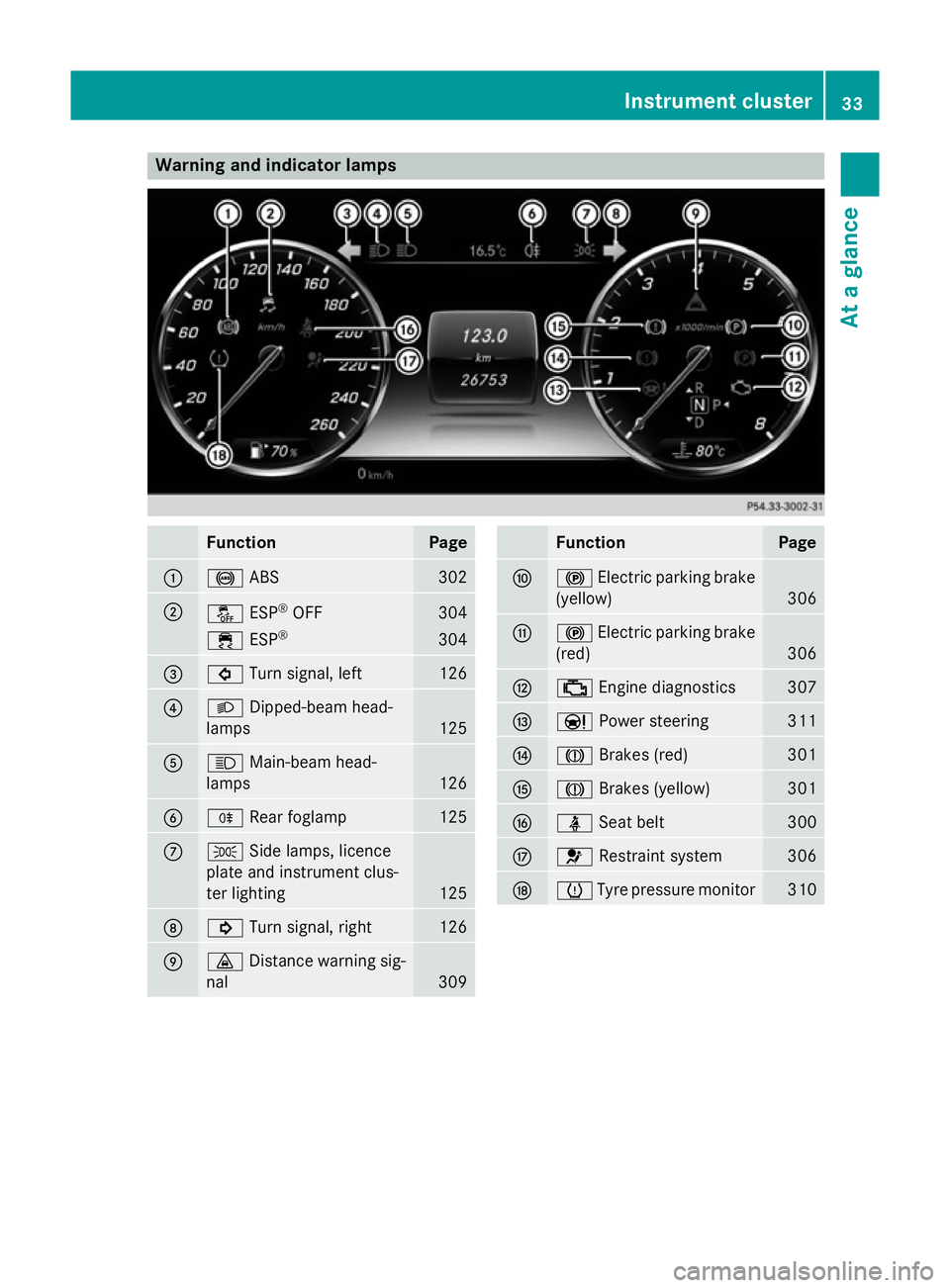
Warning and indicator lamps
Function Page
:
!
ABS 302
;
å
ESP®
OFF 304
÷
ESP® 304
=
#
Turn signal, left 126
?
L
Dipped-beam head-
lamps 125
A
K
Main-beam head-
lamps 126
B
R
Rear foglamp 125
C
T
Side lamps, licence
plate and instrument clus-
ter lighting 125
D
!
Turn signal, right 126
E
·
Distance warning sig-
nal 309 Function Page
F
!
Electric parking brake
(yellow) 306
G
!
Electric parking brake
(red) 306
H
;
Engine diagnostics 307
I
Ð
Power steering 311
J
J
Brakes (red) 301
K
J
Brakes (yellow) 301
L
ü
Seat belt 300
M
6
Restraint system 306
N
h
Tyre pressure monitor 310Instrument cluster
33At a glance
Page 39 of 413
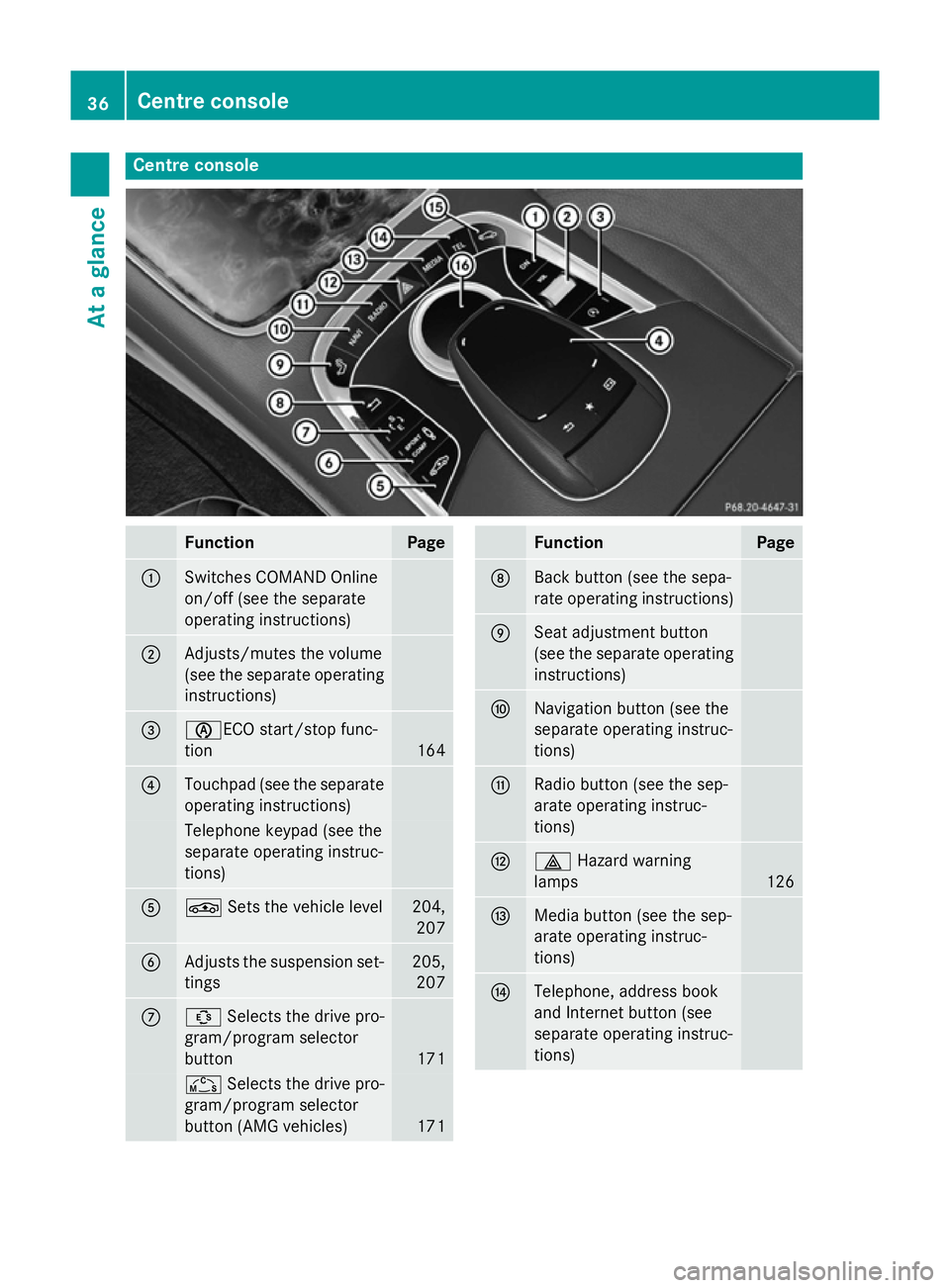
Centre console
Function Page
:
Switches COMAND Online
on/off (see the separate
operating instructions)
;
Adjusts/mutes the volume
(see the separate operating
instructions) =
èECO start/stop func-
tion
164
?
Touchpad (see the separate
operating instructions) Telephone keypad (see the
separate operating instruc-
tions)
A
É
Sets the vehicle level 204,
207 B
Adjusts the suspension set-
tings 205,
207 C
Û
Selects the drive pro-
gram/program selector
button 171
Ñ
Selects the drive pro-
gram/program selector
button (AMG vehicles) 171 Function Page
D
Back button (see the sepa-
rate operating instructions)
E
Seat adjustment button
(see the separate operating
instructions) F
Navigation button (see the
separate operating instruc-
tions)
G
Radio button (see the sep-
arate operating instruc-
tions)
H
£
Hazard warning
lamps 126
I
Media button (see the sep-
arate operating instruc-
tions)
J
Telephone, address book
and Internet button (see
separate operating instruc-
tions)36
Centre consoleAt a glance
Page 46 of 413
Important safety notes
G
WARNING
If the restraint system is modified, it may no
longer work as intended. The restraint system
may then not perform its intended protective function by failing in an accident or triggering
unexpectedly, for example. There is an
increased risk of injury, possibly even fatal.
Never modify parts of the restraint system. Do not attempt to modify the wiring as well as
electronic components or their software.
If it is necessary to modify an airbag system to
accommodate a person with disabilities, con- tact an authorised Mercedes-Benz Centre. Restraint system warning lamp
The functions of the restraint system are
checked after the ignition is switched on and at regular intervals while the engine is run-
ning. Therefore, malfunctions can be detec-
ted in good time.
The 6 restraint system warning lamp in
the instrument cluster lights up when the igni- tion is switched on. It goes out no later than afew seconds after the engine is started. The
components of the restraint system are in
operational readiness.
A malfunction has occurred if the 6
restraint system warning lamp:
R does not light up after the ignition is
switched on
R does not go out after a few seconds with
the engine running
R lights up again while the engine is running G
WARNING
If the restraint system is malfunctioning,
restraint system components may be trig-
gered unintentionally or might not be trig-
gered at all in the event of an accident with a high rate of vehicle deceleration. This can
effect belt tensioners or airbags, for example. There is an increased risk of serious or even
fatal injuries.
Have the restraint system checked and
repaired immediately at a qualified specialist
workshop.
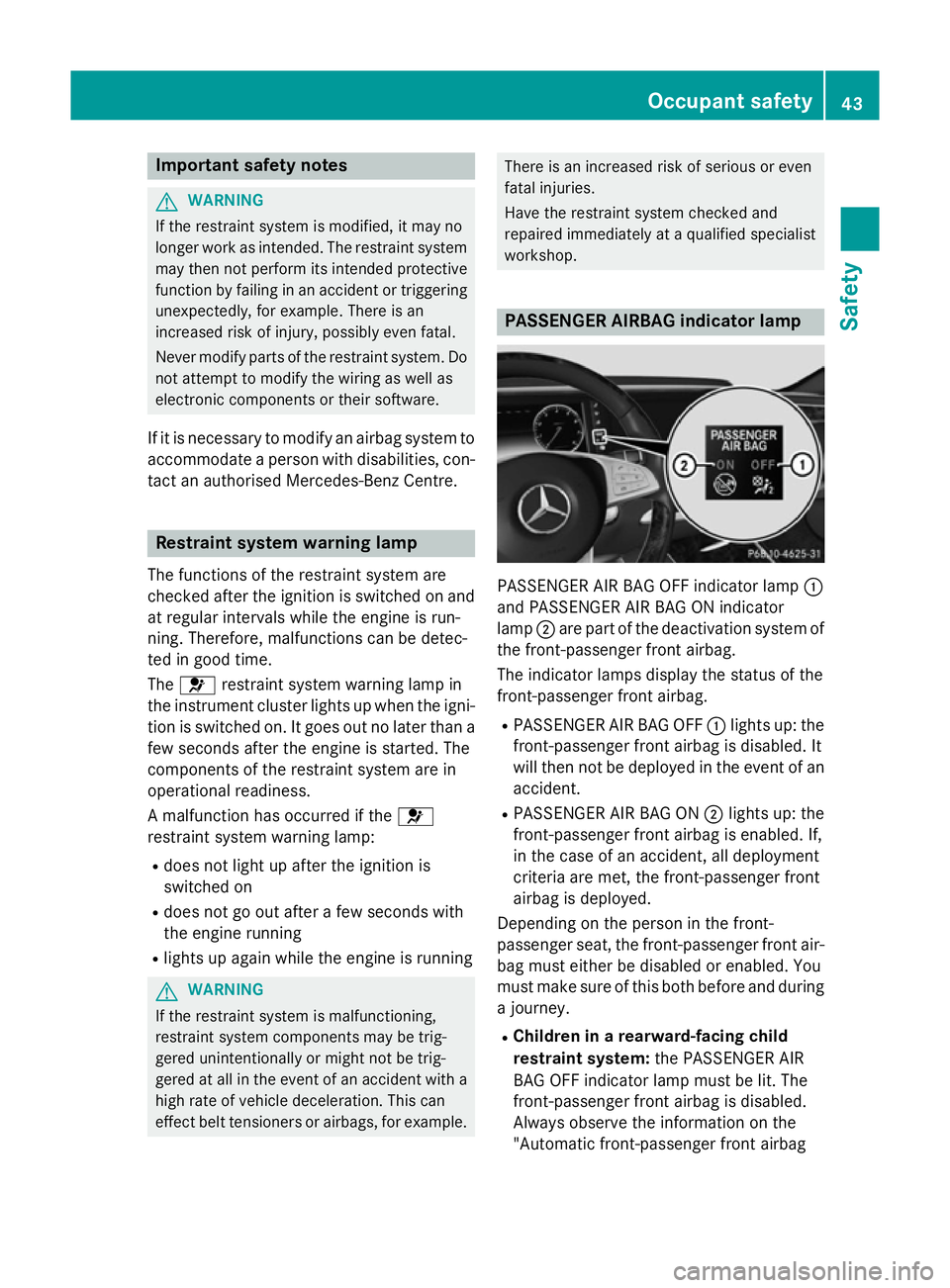
PASSENGER AIRBAG indicator lamp
PASSENGER AIR BAG OFF indicator lamp
:
and PASSENGER AIR BAG ON indicator
lamp ;are part of the deactivation system of
the front-passenger front airbag.
The indicator lamps display the status of the
front-passenger front airbag.
R PASSENGER AIR BAG OFF :lights up: the
front-passenger front airbag is disabled. It
will then not be deployed in the event of an
accident.
R PASSENGER AIR BAG ON ;lights up: the
front-passenger front airbag is enabled. If,
in the case of an accident, all deployment
criteria are met, the front-passenger front
airbag is deployed.
Depending on the person in the front-
passenger seat, the front-passenger front air-
bag must either be disabled or enabled. You
must make sure of this both before and during a journey.
R Children in a rearward-facing child
restraint system: the PASSENGER AIR
BAG OFF indicator lamp must be lit. The
front-passenger front airbag is disabled.
Always observe the information on the
"Automatic front-passenger front airbag Occupant safety
43Safety Z