wheel MERCEDES-BENZ S-CLASS COUPE 2014 User Guide
[x] Cancel search | Manufacturer: MERCEDES-BENZ, Model Year: 2014, Model line: S-CLASS COUPE, Model: MERCEDES-BENZ S-CLASS COUPE 2014Pages: 413, PDF Size: 12.76 MB
Page 24 of 413
Washer fluid
Display message ............................ 298
Wheel and tyre combinations
see Tyres
Wheel bolt tightening torque ........... 391
Wheel chock ...................................... 387
Wheels
Changing a wheel .......................... 385
Changing/replacing ....................... 386
Checking ........................................ 377
Cleaning ......................................... 346
Cleaning (warning) ........................ .386
Fitting a new wheel ........................ 390
Fitting a wheel ............................... 386
Important safety notes .................. 376
Removing a wheel .......................... 390
Storing .......................................... .386
Tightening torque ........................... 391
Wheel size/tyre size ..................... .391
Windowbag
Operation ......................................... 51
Windows
Cleaning ......................................... 346
see Side windows
Windscreen
Demisting ...................................... 143
Infrared reflective .......................... 334
Windscreen washer fluid
see Windscreen washer system
Windscreen washer system
Notes ............................................. 407
Topping up ..................................... 341
Windscreen wipers
Problem (malfunction) ................... 134
Replacing the wiper blades ............ 132
Switching on/off ........................... 131
Winter operation
Important safety notes .................. 378
Radiator cover ............................... 338
Slippery road surfaces ................... 185
Snow chains .................................. 379
Summer tyres ................................ 378
Winter tyres
Limiting the speed (on-board com-
puter) ............................................. 262
M+S tyres ...................................... 378
Wiper blades
Cleaning ......................................... 347 Important safety notes .................. 132
Replacing ....................................... 132
Wooden trim (cleaning instruc-
tions) ................................................. .350
Workshop
see Qualified specialist workshop Index
21
Page 26 of 413
Do not install accessories such as audio
systems in these areas. Do not carry out
repairs or welding. You could impair the
operating efficiency of the restraint sys-
tems.
Have accessories retrofitted at a qualified
specialist workshop.
You could jeopardise the operating safety of
your vehicle if you use parts, tyres and wheels
as well as accessories relevant to safety
which have not been approved by Mercedes. This could lead to malfunctions in safety-rel-
evant systems, e.g. the brake system. Use
only genuine Mercedes-Benz parts or parts of
equal quality. Only use tyres, wheels and
accessories that have been specifically
approved for your vehicle.
Mercedes-Benz tests genuine parts and con-
version parts and accessories that have been specifically approved for your vehicle for their
reliability, safety and suitability. Despite
ongoing market research, Mercedes-Benz is
unable to assess other parts. Mercedes-Benz therefore accepts no responsibility for the
use of such parts in Mercedes-Benz vehicles,even if they have been officially approved or
independently approved by a testing centre.
In Germany, certain parts are only officially
approved for installation or modification if
they comply with legal requirements. This
also applies to some other countries. All gen-
uine Mercedes-Benz parts meet the approval
requirements. The use of non-approved parts may invalidate the vehicle's general operating
permit.
This is the case:
R if they cause a change of the vehicle type
from that for which the vehicle's general
operating permit was granted
R if other road users could be endangered
R if the emission or noise levels are adversely
affected
Always specify the vehicle identification num- ber (VIN) when ordering genuine Mercedes-
Benz parts (Y page 402). Owner's Manual
Vehicle equipment
This Owner's Manual describes all models
and all standard and optional equipment
available for your vehicle at the time of pub-
lication of the Owner's Manual. Country-spe- cific differences are possible. Note that your
vehicle may not be fitted with all features
described. This is also the case for systems
and functions relevant to safety. Therefore,
the equipment on your vehicle may differ from
that in the descriptions and illustrations.
The original purchase contract documenta-
tion for your vehicle contains a list of all of the
systems in your vehicle.
Should you have any questions concerning
equipment and operation, please consult a
Mercedes-Benz Service Centre.
The Owner's Manual and Service Booklet are important documents and should kept in the
vehicle. Operating safety
Important safety notes
G
WARNING
If you do not have the prescribed service/
maintenance work or necessary repairs car-
ried out, this could result in malfunctions or
system failures. There is a risk of an accident. Always have the prescribed service/mainte-
nance work as well as necessary repairs car-
ried out at a qualified specialist workshop. G
WARNING
If you switch off the ignition while driving,
safety-relevant functions are only available
with limitations, or not at all. This could affect, for example, the power steering and the brake
boosting effect. You will require considerably
more effort to steer and brake. There is a risk of an accident.
Do not switch off the ignition while driving. Introduction
23 Z
Page 27 of 413
G
WARNING
Flammable material such as leaves, grass or
twigs may ignite if they come into contact with hot parts of the exhaust system. There is a risk of fire.
When driving off road or on unpaved roads,
check the vehicle's underside regularly. In
particular, remove parts of plants or other
flammable materials which have become
trapped. In the case of damage, contact a
qualified specialist workshop. G
WARNING
Modifications to electronic components, their software as well as wiring could affect their
function and/or the operation of other net-
worked components. This could in particular
also be the case for systems relevant to
safety. They might not function properly any-
more and/or jeopardise the operational
safety of the vehicle. There is an increased
risk of an accident and injury.
Do not attempt to modify the wiring as well as
electronic components or their software.
Always have work on electrical and electronic components carried out at a qualified special-
ist workshop.
If you make any changes to the vehicle elec-
tronics, the general operating permit is ren-
dered invalid.
! There is a risk of damage to the vehicle if:
R the vehicle becomes stuck, e.g. on a high
kerb or an unpaved road
R you drive too fast over an obstacle, e.g. a
kerb or a pothole in the road
R a heavy object strikes the underbody or
parts of the chassis
In situations like this, the body, the under-
body, chassis parts, wheels or tyres could
be damaged without the damage being visi-
ble. Components damaged in this way can
unexpectedly fail or, in the case of an acci-
dent, no longer withstand the strain they
are designed for. If the underbody panelling is damaged,
combustible materials such as leaves,
grass or twigs can gather between the
underbody and the underbody panelling. If
these materials come in contact with hot
parts of the exhaust system, they can catch fire.
In such situations, have the vehicle
checked and repaired immediately at a
qualified specialist workshop. If, upon con-
tinuing your journey, you notice that driving
safety is impaired, pull over and stop the
vehicle immediately, paying attention to
road and traffic conditions. In such cases,
consult a qualified specialist workshop. Declarations of conformity
Wireless vehicle components The following information applies to all com-
ponents of the vehicle and the information
systems and communication devices integra-
ted into the vehicle which receive and/or
transmit radio waves:
The components of this vehicle that receive
and/or transmit radio waves are compliant
with the basic requirements and all other rel- evant conditions of Directive 1999/5/EC.
You can obtain further information from any
Mercedes-Benz Service Centre.
Electromagnetic compatibility The electromagnetic compatibility of the vehi-
cle components has been checked and certi-fied according to the currently valid version of
Regulation ECE-R 10. Diagnostics connection
The diagnostics connection is only intended
for the connection of diagnostic equipment at a qualified specialist workshop. 24
Introduction
Page 29 of 413
Implied warranty
! Follow the instructions in this manual
about the proper operation of your vehicle
as well as about possible vehicle damage.
Damage to your vehicle that arises from
culpable contraventions against these
instructions are not covered either by
Mercedes-Benz implied warranty or by the
New or Used-Vehicle Warranty. Data stored in the vehicle
A wide range of electronic components in
your vehicle contain data memories.
These data memories temporarily or perma-
nently store technical information about:
R the vehicle's operating state
R events
R faults
In general, this technical information docu-
ments the state of a component, a module, a
system or the surroundings.
These include, for example:
R operating conditions of system compo-
nents, e.g. fluid levels
R the vehicle's status messages and those of
its individual components, e.g. number of
wheel revolutions/speed, deceleration in
movement, lateral acceleration, accelera-
tor pedal position
R malfunctions and defects in important sys-
tem components, e.g. lights, brakes
R vehicle reactions and operating conditions
in special driving situations, e.g. airbag
deployment, intervention of stability con-
trol systems
R ambient conditions, e.g. outside tempera-
ture This data is of an exclusively technical nature
and can be used to:
R assist in recognising and rectifying faults
and defects
R analyse vehicle functions, e.g. after an acci-
dent
R optimise vehicle functions
The data cannot be used to trace the vehicle's movements.
When your vehicle is serviced, technical infor-
mation can be read from the event data mem- ory and fault data memory.
Services include, for example:
R repair services
R service processes
R warranty events
R quality assurance
It is read by employees of the service network (including manufacturers) using special diag-
nostic testers. More detailed information is
obtained from it, if required.
After a fault has been rectified, the informa-
tion is deleted from the fault memory or is
continually overwritten.
When operating the vehicle, situations are
conceivable in which this technical data, in
connection with other information (if neces-
sary, under consultation with an authorised
expert), could be traced to a person.
Examples include:
R accident reports
R damage to the vehicle
R witness statements
Further additional functions that have been
contractually agreed upon with the customer
allow certain vehicle data to be conveyed by
the vehicle as well. The additional functions
include, for example, vehicle location in case of an emergency. 26
Introduction
Page 32 of 413
Cockpit
................................................. 30
Instrument cluster ..............................32
Multifunction steering wheel .............34
Centre console .................................... 36
Overhead control panel ......................38
Door control panel .............................. 39
Rear seats ............................................ 40 29At a glance
Page 33 of 413

Cockpit
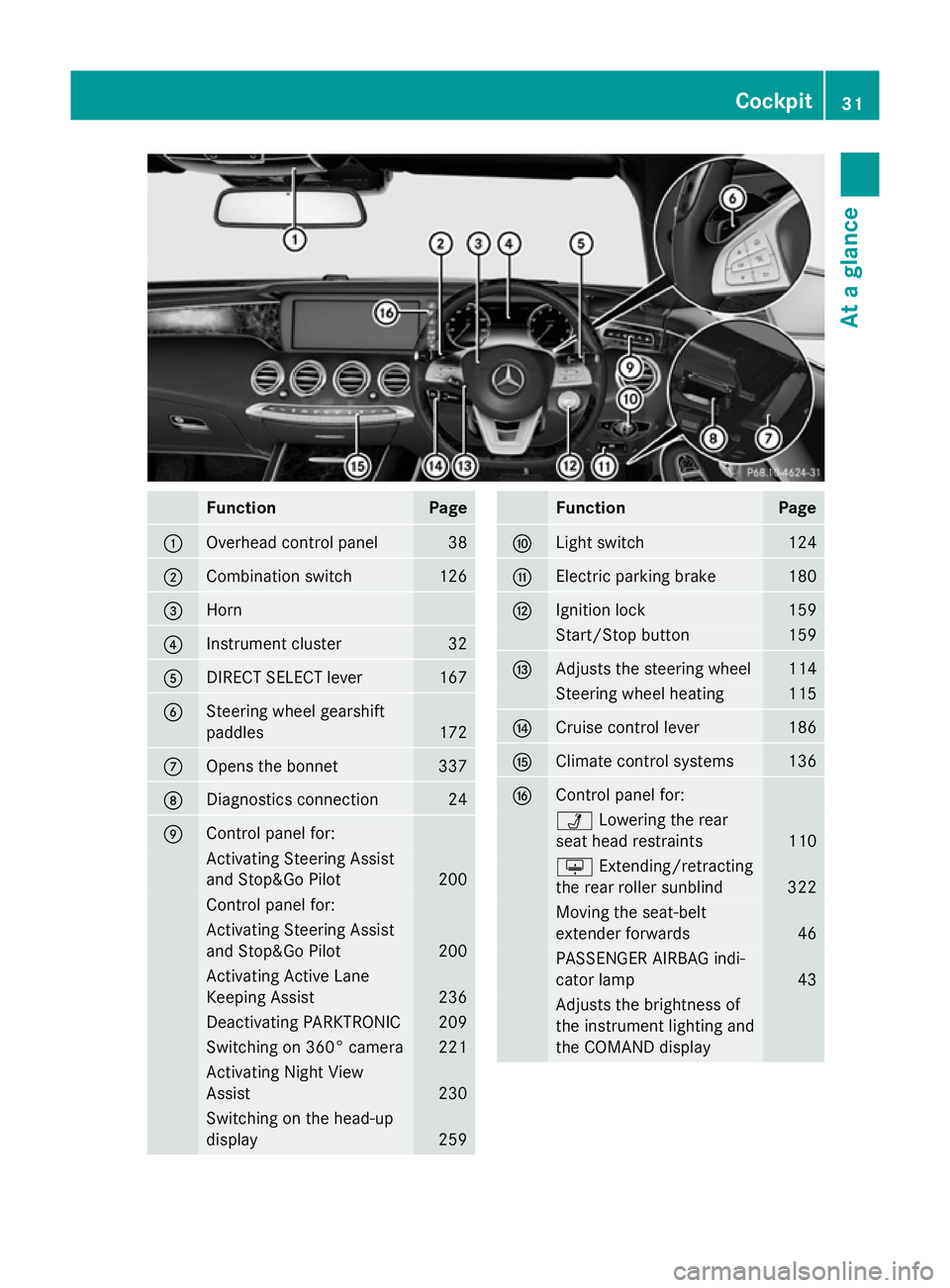
Function Page
:
Steering wheel gearshift
paddles
172
;
Combination switch 126
=
Horn
?
Instrument cluster 32
A
DIRECT SELECT lever 167
B
Overhead control panel 38
C
Control panel for:
Ü
Lowering the rear
seat head restraints 110
u
Extending/retracting
the rear roller sunblind 322
Moving the seat-belt
extender forwards 46
PASSENGER AIRBAG indi-
cator lamp
43
Adjusts the brightness of
the instrument lighting and
the COMAND display
D
Climate control systems 136
E
Ignition lock 159
Start/Stop button 159 Function Page
F
Adjusts the steering wheel 114
Steering wheel heating 115
G
Cruise control lever 186
H
Electric parking brake 180
I
Diagnostics connection 24
J
Opens the bonnet 337
K
Light switch 124
L
Control panel for:
Activating Steering Assist
and Stop&Go Pilot
200
Activating Active Lane
Keeping Assist 236
Deactivating PARKTRONIC 209
Switching on 360° camera 221
Activating Night View
Assist 230
Switching on the head-up
display
25930
CockpitAt a glance
Page 34 of 413
Function Page
:
Overhead control panel 38
;
Combination switch 126
=
Horn
?
Instrument cluster 32
A
DIRECT SELECT lever 167
B
Steering wheel gearshift
paddles
172
C
Opens the bonnet 337
D
Diagnostics connection 24
E
Control panel for:
Activating Steering Assist
and Stop&Go Pilot 200
Control panel for:
Activating Steering Assist
and Stop&Go Pilot
200
Activating Active Lane
Keeping Assist
236
Deactivating PARKTRONIC 209
Switching on 360° camera 221
Activating Night View
Assist
230
Switching on the head-up
display
259 Function Page
F
Light switch 124
G
Electric parking brake 180
H
Ignition lock 159
Start/Stop button 159
I
Adjusts the steering wheel 114
Steering wheel heating 115
J
Cruise control lever 186
K
Climate control systems 136
L
Control panel for:
Ü
Lowering the rear
seat head restraints 110
u
Extending/retracting
the rear roller sunblind 322
Moving the seat-belt
extender forwards
46
PASSENGER AIRBAG indi-
cator lamp
43
Adjusts the brightness of
the instrument lighting and
the COMAND display Cockpit
31At a glance
Page 37 of 413
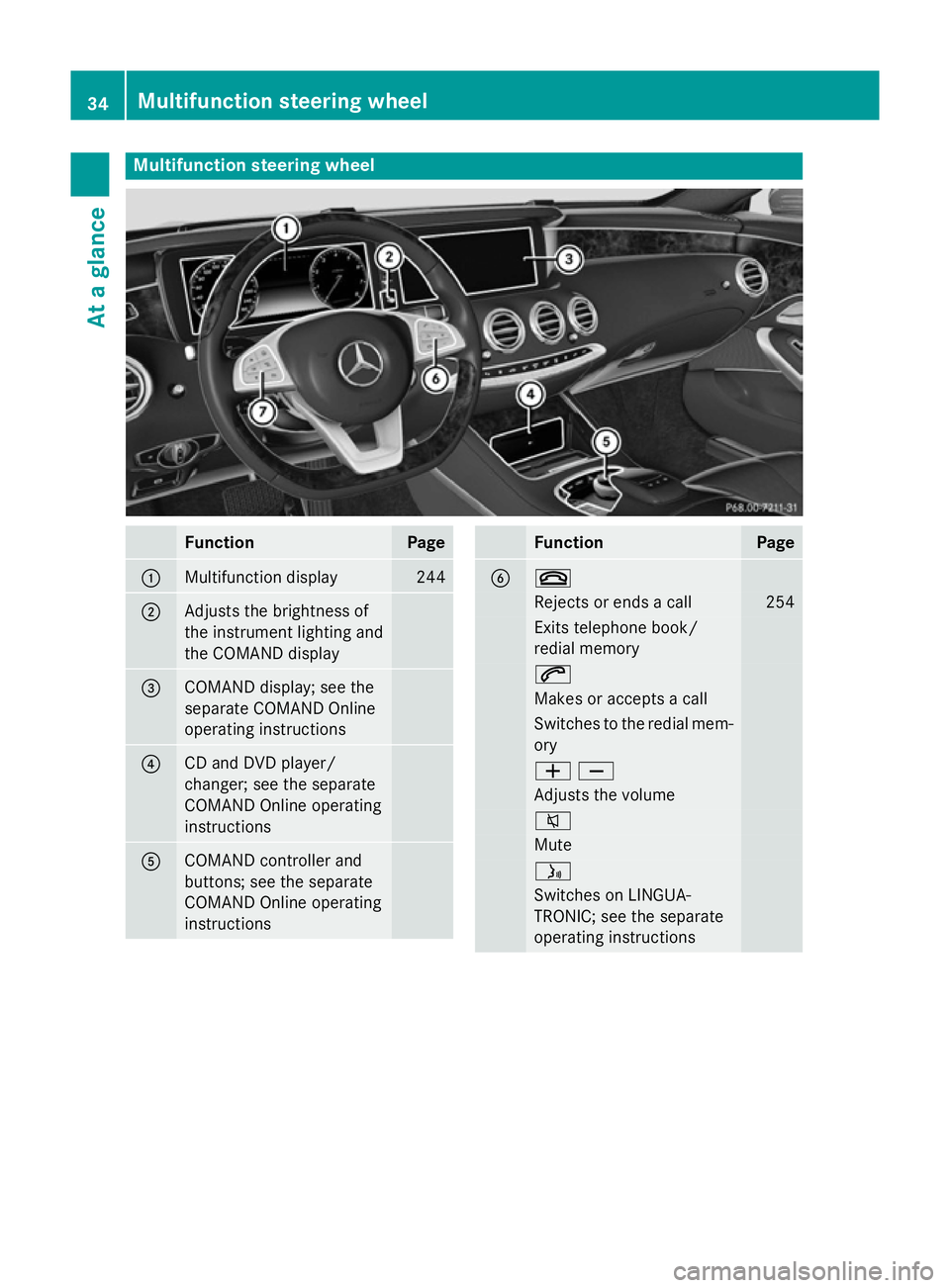
Multifunction steering wheel
Function Page
:
Multifunction display 244
;
Adjusts the brightness of
the instrument lighting and
the COMAND display
=
COMAND display; see the
separate COMAND Online
operating instructions
?
CD and DVD player/
changer; see the separate
COMAND Online operating
instructions
A
COMAND controller and
buttons; see the separate
COMAND Online operating
instructions Function Page
B ~
Rejects or ends a call 254
Exits telephone book/
redial memory 6
Makes or accepts a call
Switches to the redial mem-
ory WX
Adjusts the volume
8
Mute
ó
Switches on LINGUA-
TRONIC; see the separate
operating instructions 34
Multifunction steering wheelAt a glance
Page 38 of 413
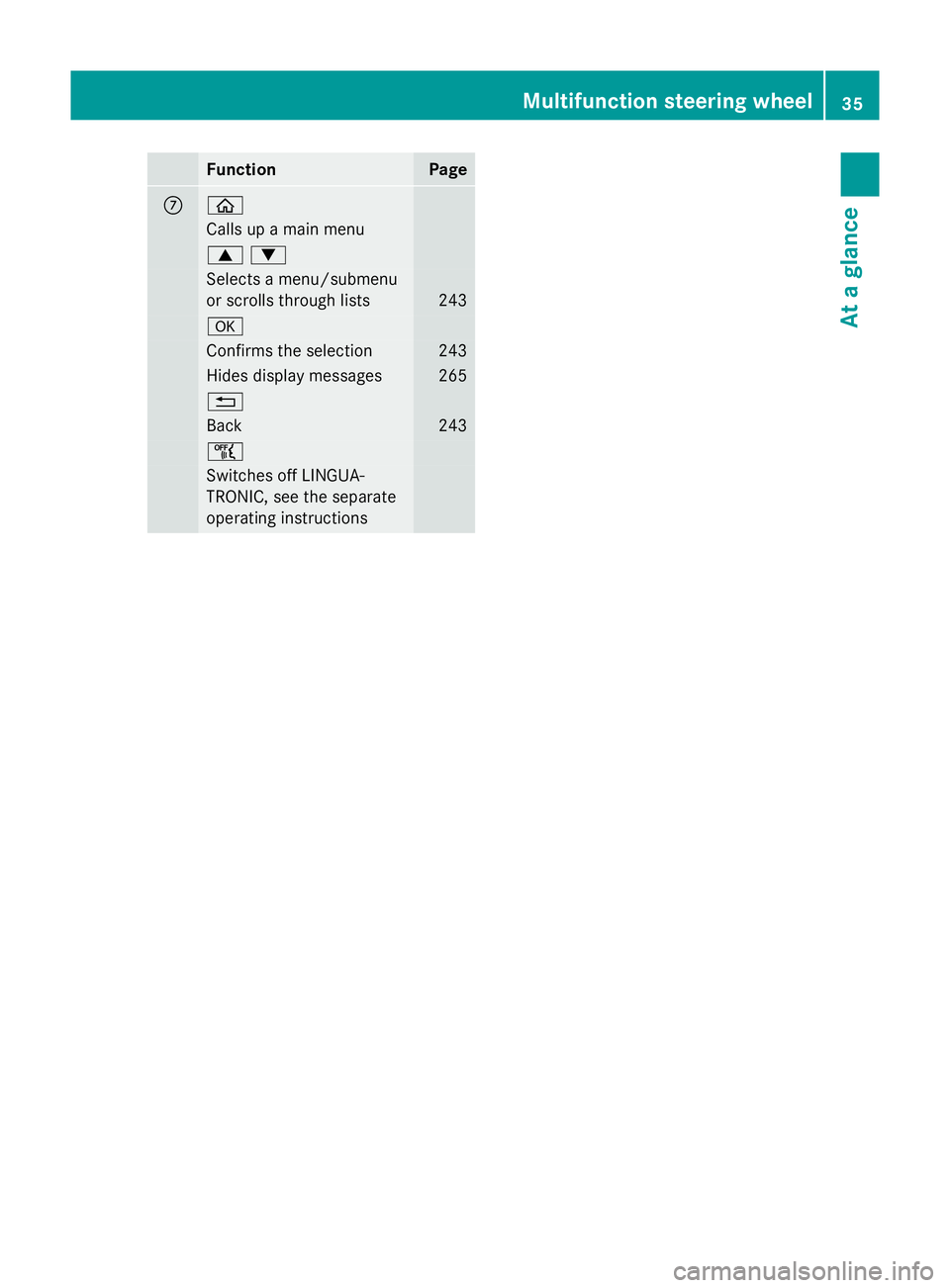
Function Page
C ò
Calls up a main menu
9:
Selects a menu/submenu
or scrolls through lists 243
a
Confirms the selection 243
Hides display messages 265
%
Back 243
ñ
Switches off LINGUA-
TRONIC, see the separate
operating instructions Multifunction steering wheel
35At a glance
Page 42 of 413
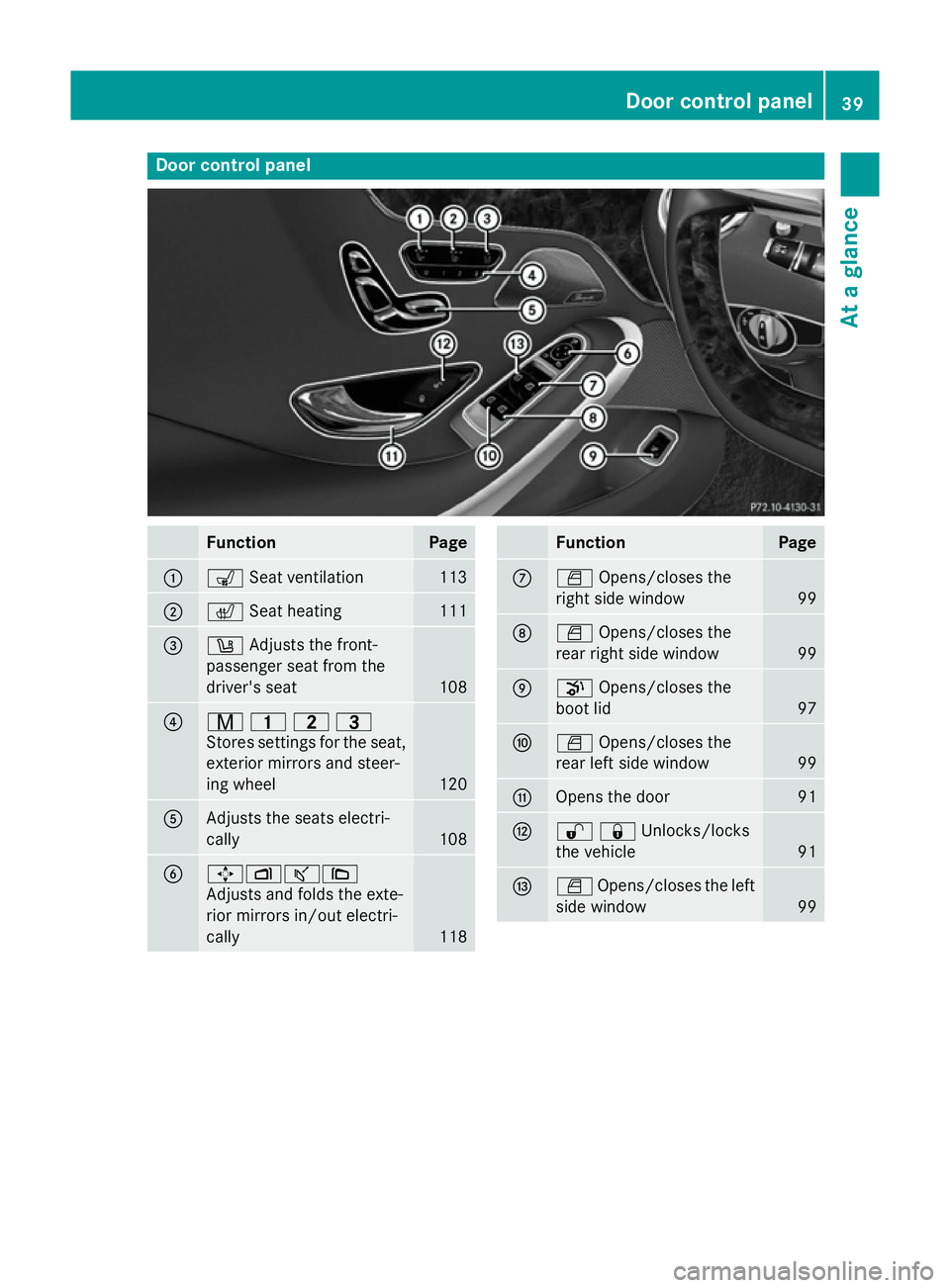
Door control panel
Function Page
:
s
Seat ventilation 113
;
c
Seat heating 111
=
w
Adjusts the front-
passenger seat from the
driver's seat 108
?
r
45=
Stores settings for the seat, exterior mirrors and steer-
ing wheel 120
A
Adjusts the seats electri-
cally
108
B
7Zª\
Adjusts and folds the exte-
rior mirrors in/out electri-
cally 118 Function Page
C
W
Opens/closes the
right side window 99
D
W
Opens/closes the
rear right side window 99
E
p
Opens/closes the
boot lid 97
F
W
Opens/closes the
rear left side window 99
G
Opens the door 91
H
%&Unlocks/locks
the vehicle
91
I
W
Opens/closes the left
side window 99Door control panel
39At a glance