ESP MERCEDES-BENZ S-CLASS COUPE 2014 Manual Online
[x] Cancel search | Manufacturer: MERCEDES-BENZ, Model Year: 2014, Model line: S-CLASS COUPE, Model: MERCEDES-BENZ S-CLASS COUPE 2014Pages: 413, PDF Size: 12.76 MB
Page 242 of 413
R
you have switched on the turn signals. In
this event, the warnings are suppressed
for a certain period of time.
R a driving safety system intervenes, such
as ABS, BAS or ESP ®
.
R you accelerate hard, e.g. kickdown.
R you brake hard.
R you steer actively, e.g. swerve to avoid an
obstacle or change lane quickly.
R you cut the corner on a sharp bend.
In order that you are warned only when nec-
essary and in good time if you cross the lane marking, the system recognises certain con-
ditions and warns you accordingly.
The warning vibration occurs earlier if:
R you approach the outer lane marking on a
bend
R the road has very wide lanes, e.g. a motor-
way
R the system recognises solid lane markings
The warning vibration occurs later if:
R the road has narrow lanes
R you cut the corner on a bend Driving syste
ms
239Driving an d parking Z
Page 256 of 413
Audio player or audio media operation
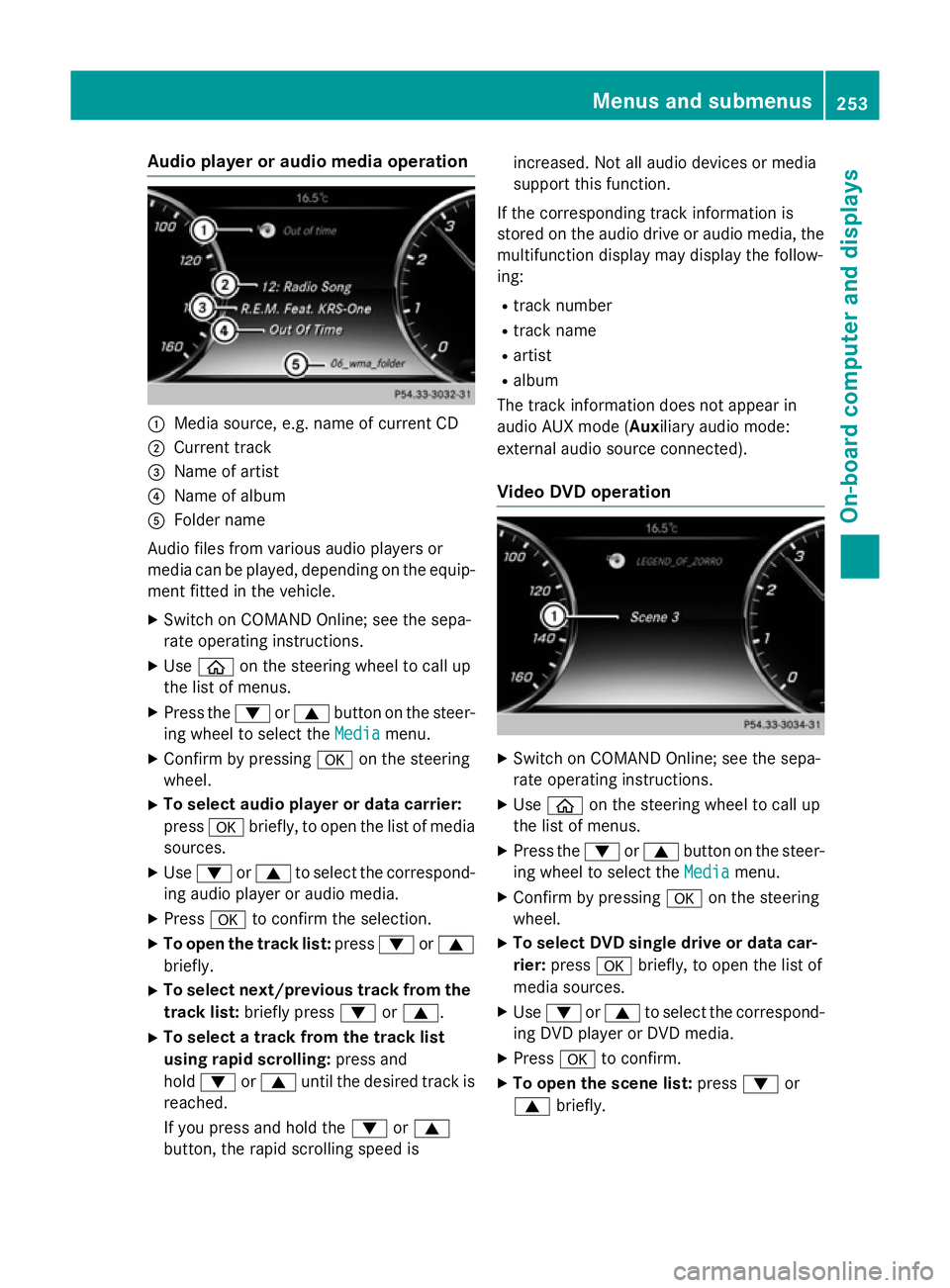
:
Media source, e.g. name of current CD
; Current track
= Name of artist
? Name of album
A Folder name
Audio files from various audio players or
media can be played, depending on the equip-
ment fitted in the vehicle.
X Switch on COMAND Online; see the sepa-
rate operating instructions.
X Use ò on the steering wheel to call up
the list of menus.
X Press the :or9 button on the steer-
ing wheel to select the Media
Media menu.
X Confirm by pressing aon the steering
wheel.
X To select audio player or data carrier:
press abriefly, to open the list of media
sources.
X Use : or9 to select the correspond-
ing audio player or audio media.
X Press ato confirm the selection.
X To open the track list: press:or9
briefly.
X To select next/previous track from the
track list: briefly press :or9.
X To select a track from the track list
using rapid scrolling: press and
hold : or9 until the desired track is
reached.
If you press and hold the :or9
button, the rapid scrolling speed is increased. Not all audio devices or media
support this function.
If the corresponding track information is
stored on the audio drive or audio media, the multifunction display may display the follow-
ing:
R track number
R track name
R artist
R album
The track information does not appear in
audio AUX mode ( Auxiliary audio mode:
external audio source connected).
Video DVD operation X
Switch on COMAND Online; see the sepa-
rate operating instructions.
X Use ò on the steering wheel to call up
the list of menus.
X Press the :or9 button on the steer-
ing wheel to select the Media
Media menu.
X Confirm by pressing aon the steering
wheel.
X To select DVD single drive or data car-
rier: press abriefly, to open the list of
media sources.
X Use : or9 to select the correspond-
ing DVD player or DVD media.
X Press ato confirm.
X To open the scene list: press:or
9 briefly. Menus and sub
menus
253On-board computer and displays Z
Page 260 of 413
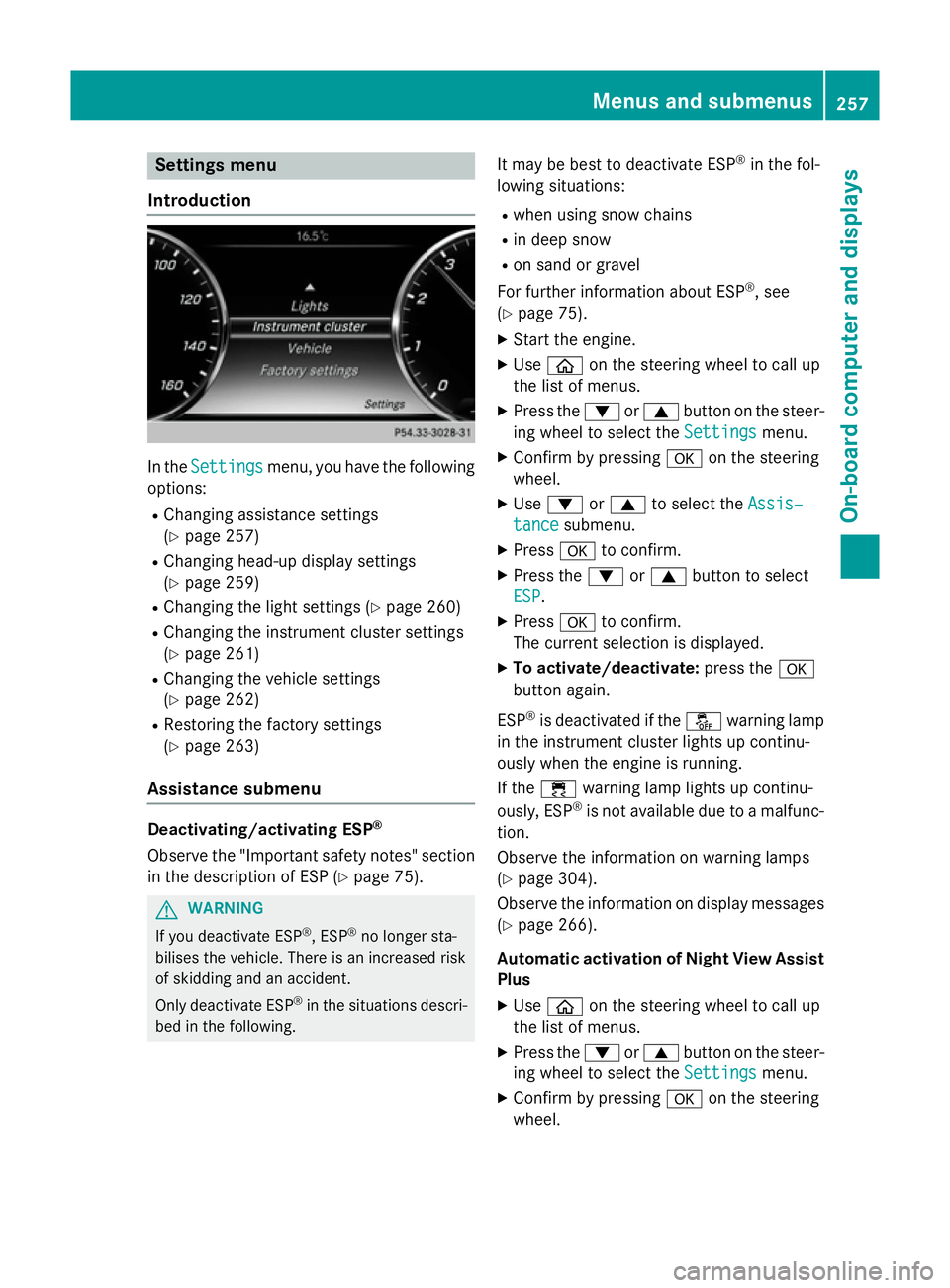
Settings menu
Introduction In the
Settings
Settings menu, you have the following
options:
R Changing assistance settings
(Y page 257)
R Changing head-up display settings
(Y page 259)
R Changing the light settings (Y page 260)
R Changing the instrument cluster settings
(Y page 261)
R Changing the vehicle settings
(Y page 262)
R Restoring the factory settings
(Y page 263)
Assistance submenu Deactivating/activating ESP
®
Observe the "Important safety notes" section
in the description of ESP (Y page 75).G
WARNING
If you deactivate ESP ®
, ESP ®
no longer sta-
bilises the vehicle. There is an increased risk
of skidding and an accident.
Only deactivate ESP ®
in the situations descri-
bed in the following. It may be best to deactivate ESP
®
in the fol-
lowing situations:
R when using snow chains
R in deep snow
R on sand or gravel
For further information about ESP ®
, see
(Y page 75).
X Start the engine.
X Use ò on the steering wheel to call up
the list of menus.
X Press the :or9 button on the steer-
ing wheel to select the Settings
Settings menu.
X Confirm by pressing aon the steering
wheel.
X Use : or9 to select the Assis‐ Assis‐
tance
tance submenu.
X Press ato confirm.
X Press the :or9 button to select
ESP
ESP.
X Press ato confirm.
The current selection is displayed.
X To activate/deactivate: press thea
button again.
ESP ®
is deactivated if the åwarning lamp
in the instrument cluster lights up continu-
ously when the engine is running.
If the ÷ warning lamp lights up continu-
ously, ESP ®
is not available due to a malfunc-
tion.
Observe the information on warning lamps
(Y page 304).
Observe the information on display messages
(Y page 266).
Automatic activation of Night View Assist Plus
X Use ò on the steering wheel to call up
the list of menus.
X Press the :or9 button on the steer-
ing wheel to select the Settings Settingsmenu.
X Confirm by pressing aon the steering
wheel. Menus and submenus
257On-board computer and displays Z
Page 267 of 413
SETUP
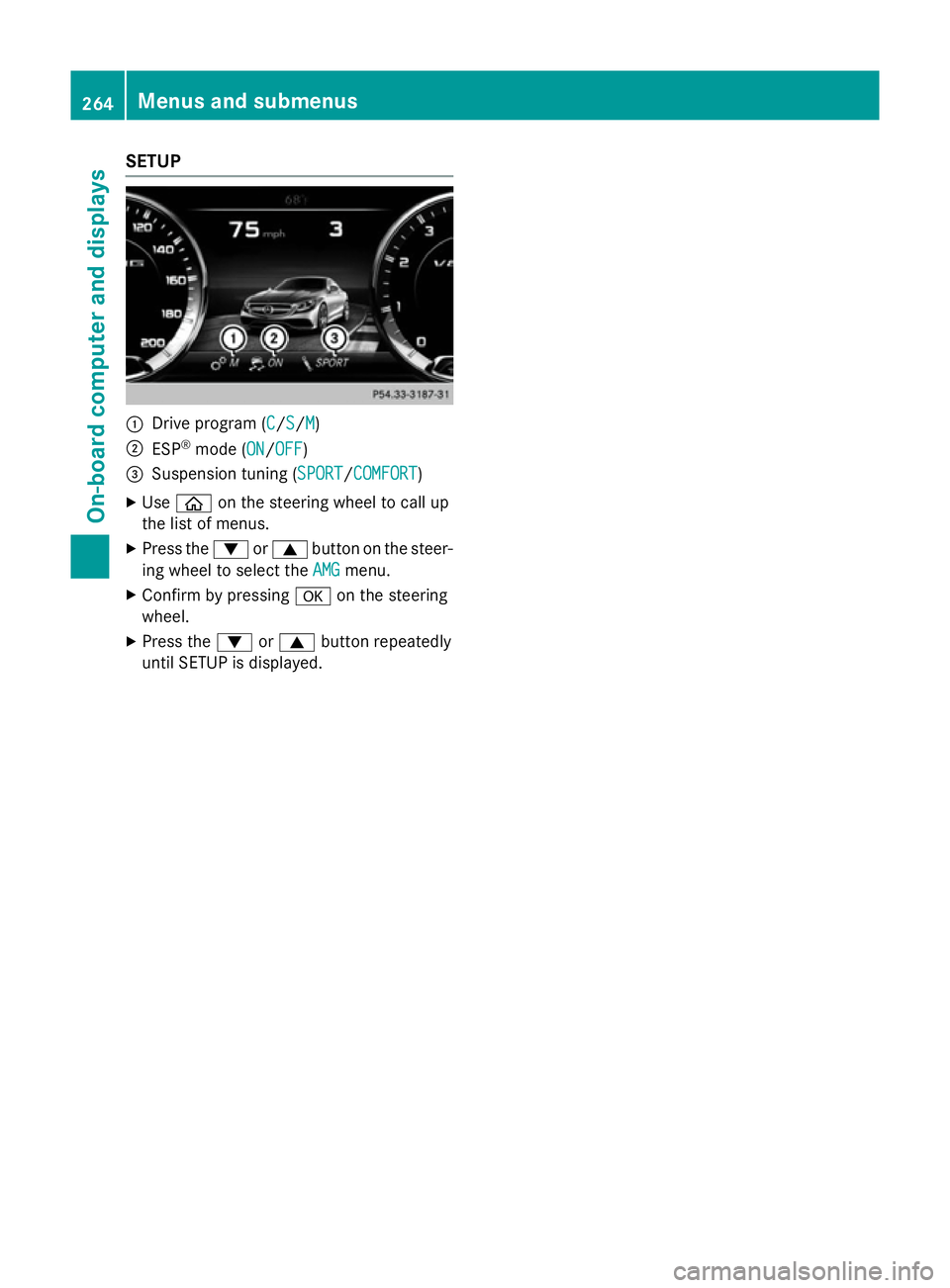
:
Drive program (C C/SS/MM)
; ESP ®
mode (ON ON/OFFOFF)
= Suspension tuning (SPORT SPORT/COMFORTCOMFORT)
X Use ò on the steering wheel to call up
the list of menus.
X Press the :or9 button on the steer-
ing wheel to select the AMG
AMG menu.
X Confirm by pressing aon the steering
wheel.
X Press the :or9 button repeatedly
until SETUP is displayed. 264
Menus and submenusOn-board computer and displays
Page 268 of 413
Display messages
Introduction
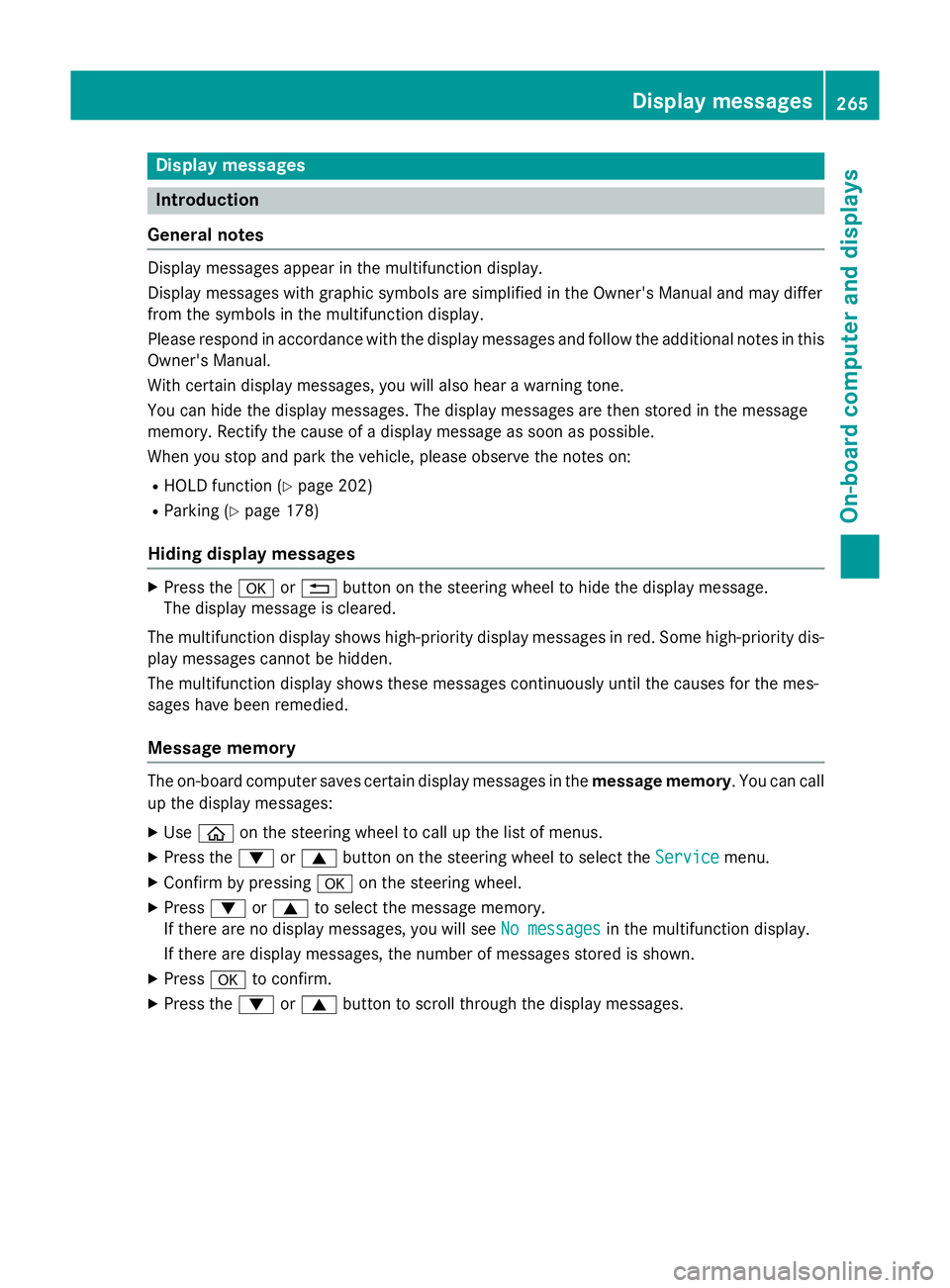
General notes Display messages appear in the multifunction display.
Display messages with graphic symbols are simplified in the Owner's Manual and may differ
from the symbols in the multifunction display.
Please respond in accordance with the display messages and follow the additional notes in this Owner's Manual.
With certain display messages, you will also hear a warning tone.
You can hide the display messages. The display messages are then stored in the message
memory. Rectify the cause of a display message as soon as possible.
When you stop and park the vehicle, please observe the notes on:
R HOLD function (Y page 202)
R Parking (Y page 178)
Hiding display messages X
Press the aor% button on the steering wheel to hide the display message.
The display message is cleared.
The multifunction display shows high-priority display messages in red. Some high-priority dis- play messages cannot be hidden.
The multifunction display shows these messages continuously until the causes for the mes-
sages have been remedied.
Message memory The on-board computer saves certain display messages in the
message memory. You can call
up the display messages:
X Use ò on the steering wheel to call up the list of menus.
X Press the :or9 button on the steering wheel to select the Service
Service menu.
X Confirm by pressing aon the steering wheel.
X Press :or9 to select the message memory.
If there are no display messages, you will see No messages
No messages in the multifunction display.
If there are display messages, the number of messages stored is shown.
X Press ato confirm.
X Press the :or9 button to scroll through the display messages. Display
messages
265On-board computer and displays Z
Page 269 of 413
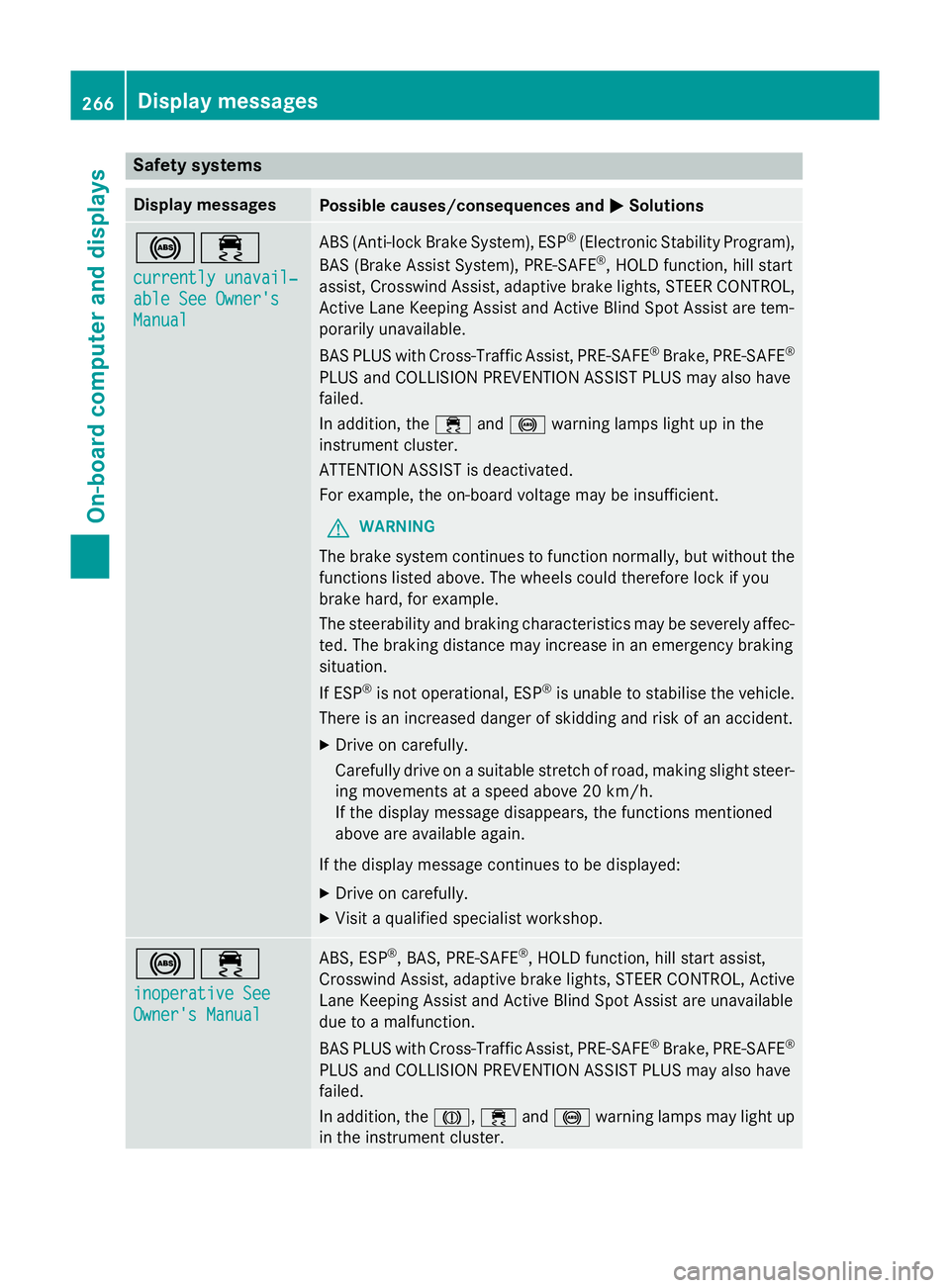
Safety systems
Display messages
Possible causes/consequences and
M
MSolutions !÷
currently unavail‐ currently unavail‐
able See Owner's able See Owner's
Manual Manual ABS (Anti-lock Brake System), ESP
®
(Electronic Stability Program),
BAS (Brake Assist System), PRE‑ SAFE®
, HOLD function, hill start
assist, Crosswind Assist, adaptive brake lights, STEER CONTROL,
Active Lane Keeping Assist and Active Blind Spot Assist are tem-
porarily unavailable.
BAS PLUS with Cross-Traffic Assist, PRE‑SAFE ®
Brake, PRE‑ SAFE®
PLUS and COLLISION PREVENTION ASSIST PLUS may also have
failed.
In addition, the ÷and! warning lamps light up in the
instrument cluster.
ATTENTION ASSIST is deactivated.
For example, the on-board voltage may be insufficient.
G WARNING
The brake system continues to function normally, but without the functions listed above. The wheels could therefore lock if you
brake hard, for example.
The steerability and braking characteristics may be severely affec-ted. The braking distance may increase in an emergency braking
situation.
If ESP ®
is not operational, ESP ®
is unable to stabilise the vehicle.
There is an increased danger of skidding and risk of an accident.
X Drive on carefully.
Carefully drive on a suitable stretch of road, making slight steer-
ing movements at a speed above 20 km/h.
If the display message disappears, the functions mentioned
above are available again.
If the display message continues to be displayed:
X Drive on carefully.
X Visit a qualified specialist workshop. !÷
inoperative See inoperative See
Owner's Manual Owner's Manual ABS, ESP
®
, BAS, PRE‑SAFE ®
, HOLD function, hill start assist,
Crosswind Assist, adaptive brake lights, STEER CONTROL, Active Lane Keeping Assist and Active Blind Spot Assist are unavailable
due to a malfunction.
BAS PLUS with Cross-Traffic Assist, PRE‑SAFE ®
Brake, PRE‑ SAFE®
PLUS and COLLISION PREVENTION ASSIST PLUS may also have
failed.
In addition, the J,÷and! warning lamps may light up
in the instrument cluster. 266
Display messagesOn-board computer and displays
Page 270 of 413
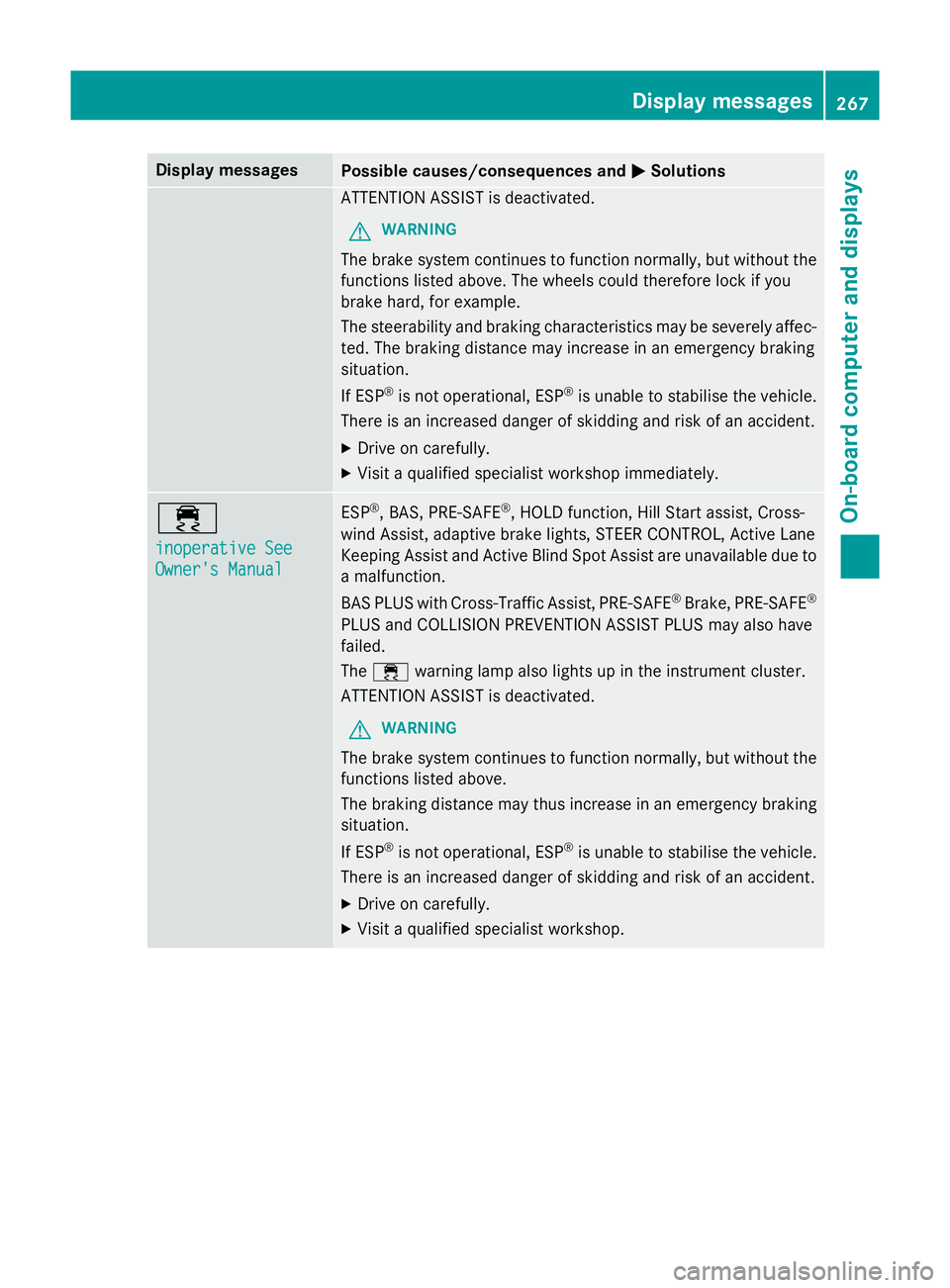
Display messages
Possible causes/consequences and
M
MSolutions ATTENTION ASSIST is deactivated.
G WARNING
The brake system continues to function normally, but without the functions listed above. The wheels could therefore lock if you
brake hard, for example.
The steerability and braking characteristics may be severely affec- ted. The braking distance may increase in an emergency braking
situation.
If ESP ®
is not operational, ESP ®
is unable to stabilise the vehicle.
There is an increased danger of skidding and risk of an accident.
X Drive on carefully.
X Visit a qualified specialist workshop immediately. ÷
inoperative See inoperative See
Owner's Manual Owner's Manual ESP
®
, BAS, PRE ‑SAFE®
, HOLD function, Hill Start assist, Cross-
wind Assist, adaptive brake lights, STEER CONTROL, Active Lane
Keeping Assist and Active Blind Spot Assist are unavailable due to
a malfunction.
BAS PLUS with Cross-Traffic Assist, PRE‑ SAFE®
Brake, PRE ‑SAFE®
PLUS and COLLISION PREVENTION ASSIST PLUS may also have
failed.
The ÷ warning lamp also lights up in the instrument cluster.
ATTENTION ASSIST is deactivated.
G WARNING
The brake system continues to function normally, but without the functions listed above.
The braking distance may thus increase in an emergency braking
situation.
If ESP ®
is not operational, ESP ®
is unable to stabilise the vehicle.
There is an increased danger of skidding and risk of an accident.
X Drive on carefully.
X Visit a qualified specialist workshop. Display
messages
267On-board computer and displays Z
Page 271 of 413
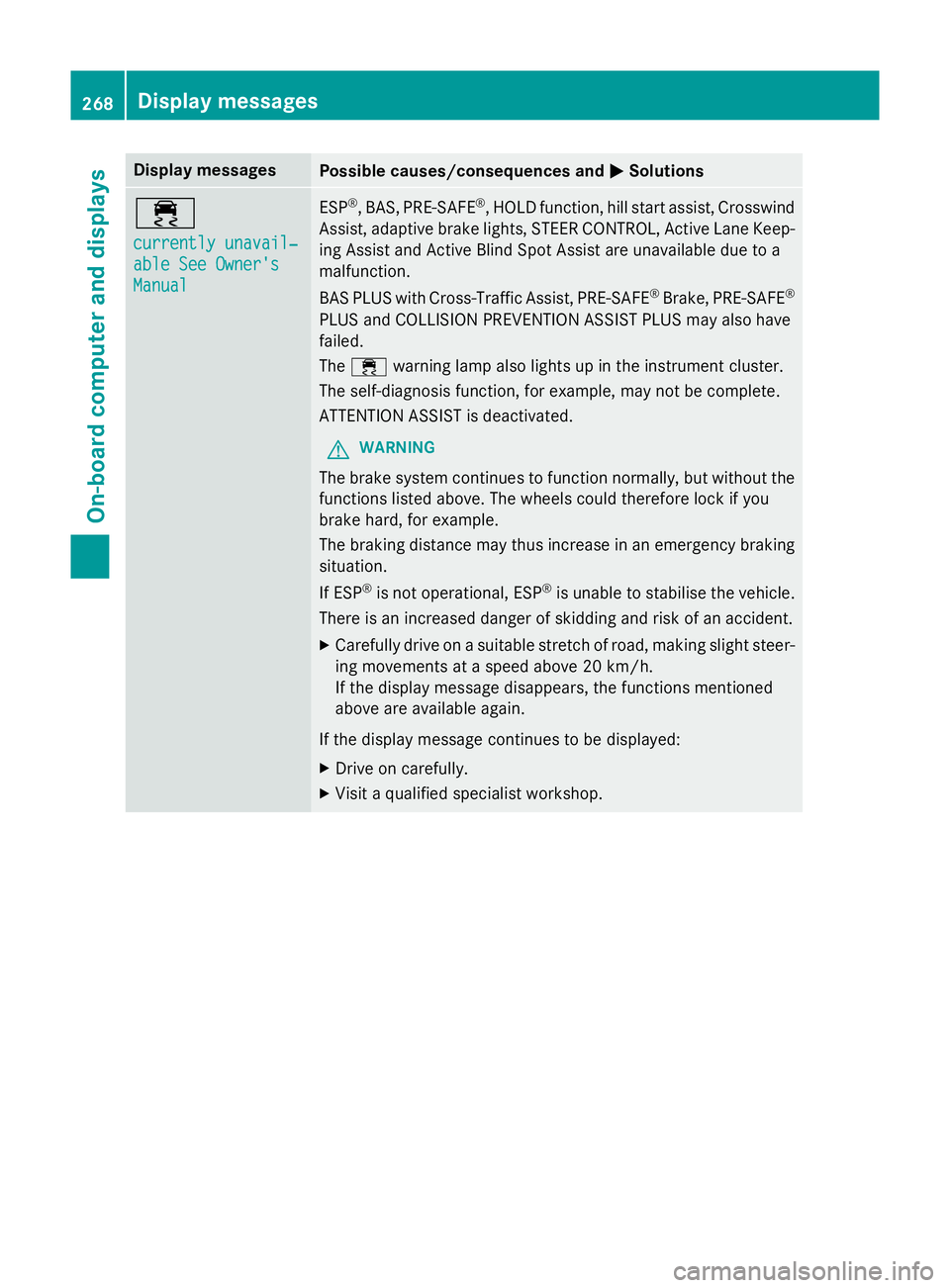
Display messages
Possible causes/consequences and
M
MSolutions ÷
currently unavail‐ currently unavail‐
able See Owner's able See Owner's
Manual Manual ESP
®
, BAS, PRE ‑SAFE®
, HOLD function, hill start assist, Crosswind
Assist, adaptive brake lights, STEER CONTROL, Active Lane Keep- ing Assist and Active Blind Spot Assist are unavailable due to a
malfunction.
BAS PLUS with Cross-Traffic Assist, PRE ‑SAFE®
Brake, PRE ‑SAFE®
PLUS and COLLISION PREVENTION ASSIST PLUS may also have
failed.
The ÷ warning lamp also lights up in the instrument cluster.
The self-diagnosis function, for example, may not be complete.
ATTENTION ASSIST is deactivated.
G WARNING
The brake system continues to function normally, but without the functions listed above. The wheels could therefore lock if you
brake hard, for example.
The braking distance may thus increase in an emergency braking
situation.
If ESP ®
is not operational, ESP ®
is unable to stabilise the vehicle.
There is an increased danger of skidding and risk of an accident.
X Carefully drive on a suitable stretch of road, making slight steer-
ing movements at a speed above 20 km/h.
If the display message disappears, the functions mentioned
above are available again.
If the display message continues to be displayed:
X Drive on carefully.
X Visit a qualified specialist workshop. 268
Display
messagesOn-board computer and displays
Page 272 of 413
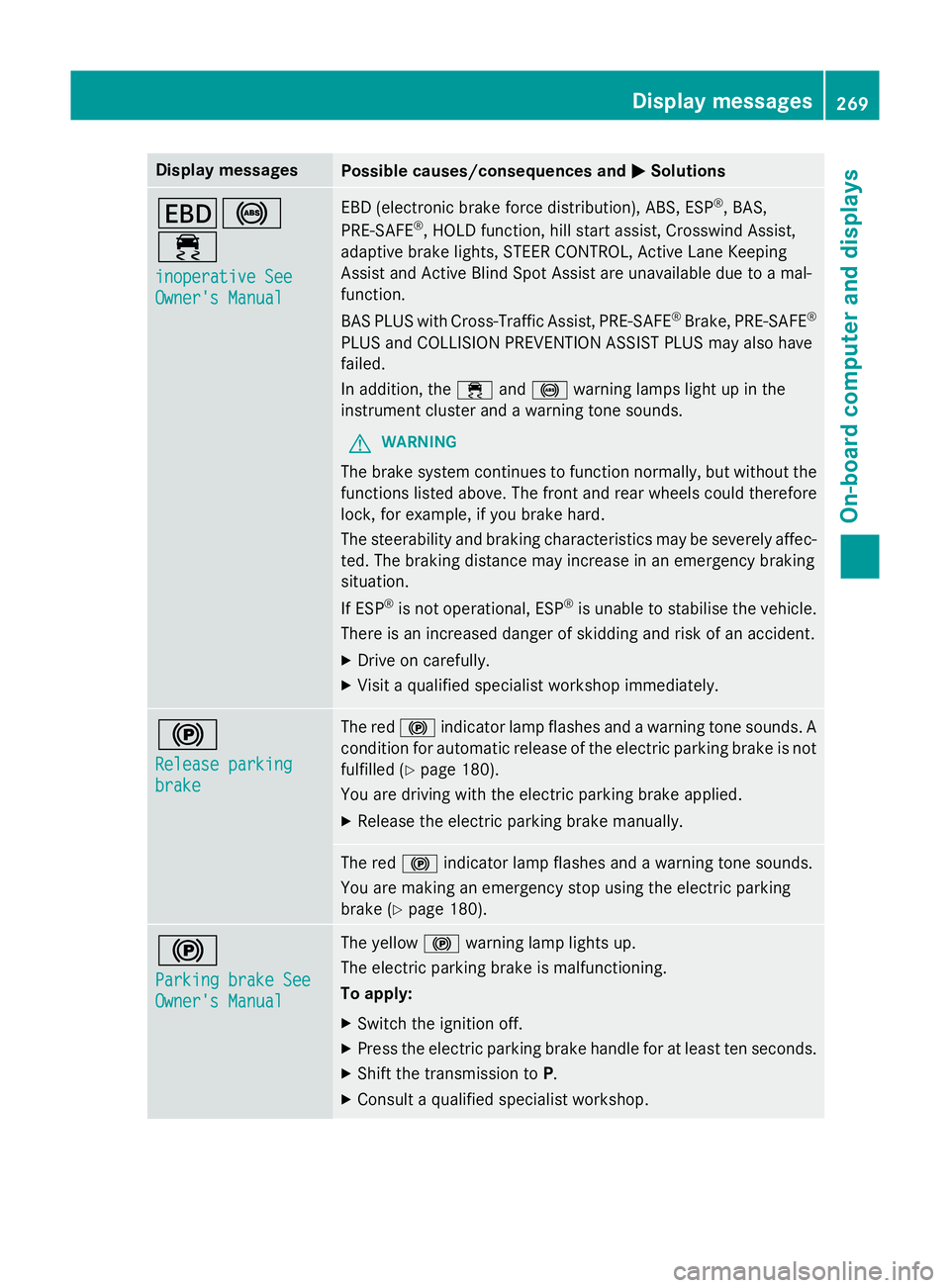
Display messages
Possible causes/consequences and
M
MSolutions T!
÷
inoperative See inoperative See
Owner's Manual Owner's Manual EBD (electronic brake force distribution), ABS, ESP
®
, BAS,
PRE ‑SAFE ®
, HOLD function, hill start assist, Crosswind Assist,
adaptive brake lights, STEER CONTROL, Active Lane Keeping
Assist and Active Blind Spot Assist are unavailable due to a mal-
function.
BAS PLUS with Cross-Traffic Assist, PRE‑ SAFE®
Brake, PRE ‑SAFE®
PLUS and COLLISION PREVENTION ASSIST PLUS may also have
failed.
In addition, the ÷and! warning lamps light up in the
instrument cluster and a warning tone sounds.
G WARNING
The brake system continues to function normally, but without the functions listed above. The front and rear wheels could therefore
lock, for example, if you brake hard.
The steerability and braking characteristics may be severely affec- ted. The braking distance may increase in an emergency braking
situation.
If ESP ®
is not operational, ESP ®
is unable to stabilise the vehicle.
There is an increased danger of skidding and risk of an accident.
X Drive on carefully.
X Visit a qualified specialist workshop immediately. !
Release parking Release parking
brake brake The red
!indicator lamp flashes and a warning tone sounds. A
condition for automatic release of the electric parking brake is not
fulfilled (Y page 180).
You are driving with the electric parking brake applied.
X Release the electric parking brake manually. The red
!indicator lamp flashes and a warning tone sounds.
You are making an emergency stop using the electric parking
brake (Y page 180). !
Parking brake See Parking brake See
Owner's Manual Owner's Manual The yellow
!warning lamp lights up.
The electric parking brake is malfunctioning.
To apply:
X Switch the ignition off.
X Press the electric parking brake handle for at least ten seconds.
X Shift the transmission to P.
X Consult a qualified specialist workshop. Display
messages
269On-board computer and displays Z
Page 291 of 413
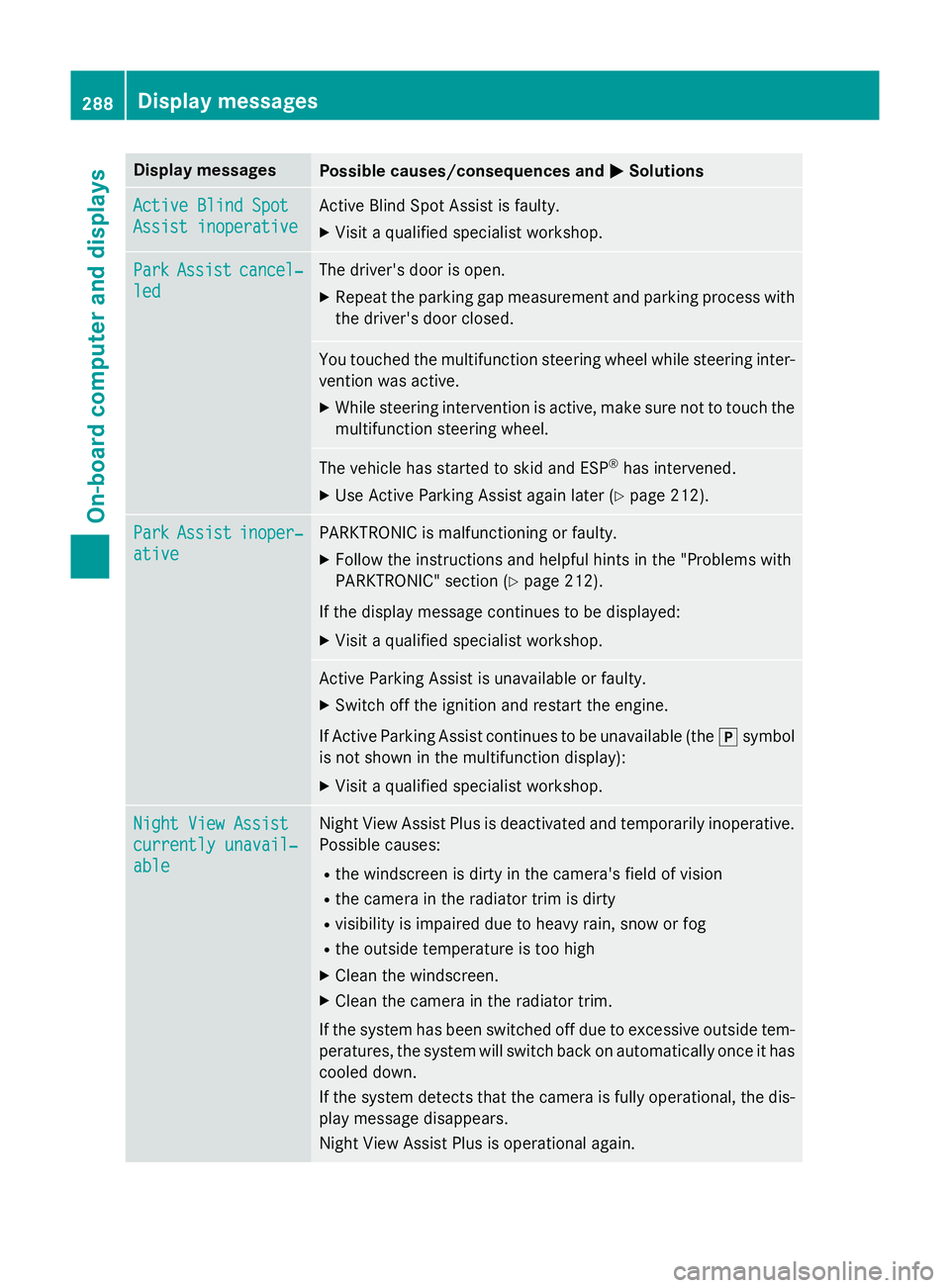
Display messages
Possible causes/consequences and
M
MSolutions Active Blind Spot
Active Blind Spot
Assist inoperative Assist inoperative Active Blind Spot Assist is faulty.
X Visit a qualified specialist workshop. Park
Park
Assist
Assist cancel‐
cancel‐
led
led The driver's door is open.
X Repeat the parking gap measurement and parking process with
the driver's door closed. You touched the multifunction steering wheel while steering inter-
vention was active.
X While steering intervention is active, make sure not to touch the
multifunction steering wheel. The vehicle has started to skid and ESP
®
has intervened.
X Use Active Parking Assist again later (Y page 212).Park
Park
Assist
Assist inoper‐
inoper‐
ative
ative PARKTRONIC is malfunctioning or faulty.
X Follow the instructions and helpful hints in the "Problems with
PARKTRONIC" section (Y page 212).
If the display message continues to be displayed: X Visit a qualified specialist workshop. Active Parking Assist is unavailable or faulty.
X Switch off the ignition and restart the engine.
If Active Parking Assist continues to be unavailable (the jsymbol
is not shown in the multifunction display):
X Visit a qualified specialist workshop. Night View Assist Night View Assist
currently unavail‐ currently unavail‐
able able Night View Assist Plus is deactivated and temporarily inoperative.
Possible causes:
R the windscreen is dirty in the camera's field of vision
R the camera in the radiator trim is dirty
R visibility is impaired due to heavy rain, snow or fog
R the outside temperature is too high
X Clean the windscreen.
X Clean the camera in the radiator trim.
If the system has been switched off due to excessive outside tem- peratures, the system will switch back on automatically once it has
cooled down.
If the system detects that the camera is fully operational, the dis- play message disappears.
Night View Assist Plus is operational again. 288
Display
messagesOn-board computer and displays