buttons MERCEDES-BENZ S-CLASS COUPE 2014 Owners Manual
[x] Cancel search | Manufacturer: MERCEDES-BENZ, Model Year: 2014, Model line: S-CLASS COUPE, Model: MERCEDES-BENZ S-CLASS COUPE 2014Pages: 413, PDF Size: 12.76 MB
Page 9 of 413
B
BAS (Brake Assist System) ................. 70
BAS PLUS (Brake Assist System
PLUS) with Cross-Traffic Assist
Function/note s................................ 71
BAS PLUS Q (Brake Assist System
PLUS) with Cross-Traffic Assist
Important safety notes .................... 71
Battery (key)
Checking .......................................... 88
Important safety notes .................... 87
Replacing ......................................... 88
Battery (vehicle)
Charging ........................................ 362
Display message ............................ 283
Important safety notes .................. 360
Jump starting ................................. 364
Belt
see Seat belts
Belt tensioner
Activation ......................................... 57
Blind Spot Assist
see Active Blind Spot Assist
Bonnet
Active bonnet (pedestrian protec-tion) ............................................... 336
Closing ........................................... 338
Display message ............................ 297
Important safety notes .................. 336
Opening ......................................... 337
Boot
Emergency release .......................... 98
Important safety notes .................... 94
Locking separately ........................... 98
Opening/closing (automatically
from inside) ...................................... 97
Opening/closing (automatically
from outside) ................................... 95
Opening/closing (from the out-
side, HANDS-FREE ACCESS) ............ 96
Power closing .................................. 92
Boot lid
Display message ............................ 296
Obstacle recognition ........................ 94
Opening dimensions ...................... 408
Opening/closing .............................. 94
Boot load (maximum) ........................ 408Brake
EBD .................................................. 77
Brake Assist
see BAS (Brake Assist System)
Brake fluid
Display message ............................ 272
Notes ............................................. 406
Brake force distribution, elec-
tronic
see EBD (electronic brake force
distribution)
Brake lamps
Adaptive ........................................... 75
Display message ............................ 280
Brakes
ABS .................................................. 70
Adaptive Brake Assist ...................... 74
BAS .................................................. 70
BAS PLUS with Cross-Traffic
Assist ............................................... 71
Brake fluid (notes) ......................... 406
Display message ............................ 266
Driving tips .................................... 182
High-performance brake system .... 184
Hill start assist ............................... 162
HOLD function ............................... 202
Important safety notes .................. 182
Parking brake ................................ 180
Warning lamp ................................. 301
Breakdown
see Flat tyre
see Towing away
Brightness control (instrument
cluster lighting) ................................... 34
Buttons on the steering column ...... 243 C
Calling up a fault see Display messages
Camera
see 360° camera
Capacities (technical data) ............... 402
Car
see Vehicle
Car key
see Key
Car wash (care) ................................. 3436
Index
Page 21 of 413
Important safety notes .................. 402
Washer fluid
................................... 407
Settings
Factory (on-board computer) ......... 263
On-board computer ....................... 257
SETUP (on-board computer) ............. 264
Side lamps
Switching on/of f........................... 125
Side windows
Convenience closing ...................... 101
Convenience opening .................... 100
Important safety notes .................... 99
Opening/closing ............................ 100
Problem (malfunction) ................... 102
Resetting ....................................... 101
Sidebag ................................................ 50
Skibag ................................................ 317
Snow chains ...................................... 379
Sockets
Centre console .............................. 323
General notes ................................ 323
Rear compartment ......................... 323
Specialist workshop ............................ 25
Spectacles compartment ................. 315
Speed, controlling
see Cruise control
Speedometer
Activating/deactivating the addi-
tional speedometer ........................ 262
Digital ............................................ 249
In the Instrument cluster ................. 32
Selecting the unit of measure-
ment .............................................. 261
see Instrument cluster
SPEEDTRONIC
Deactivating variable ..................... 191
Display message ............................ 291
Function/note s............................. 188
Important safety notes .................. 189
LIM indicator lamp ......................... 189
Permanent ..................................... 191
Selecting ........................................ 189
Storing the current speed .............. 190
Variabl e......................................... 189
Start/Stop button
Removing ....................................... 160
Starting the engine ........................ 162 Start/stop function
see ECO start/stop function
Starting (engine) ................................ 161
STEER CONTROL .................................. 79
Steering
Warning lamps ............................... 311
Steering (display message) .............. 298
Steering Assist and Stop&Go Pilot
(DISTRONIC PLUS)
Display message ............................ 291
Steering assistant STEER CON-
TROL
see STEER CONTROL
Steering wheel
Adjusting (electrically) ................... 114
Button overview ............................... 34
Buttons (on-board computer) ......... 243
Cleaning ......................................... 350
EASY ENTRY/EXIT feature ............. 116
Gearshift paddle s........................... 172
Important safety notes .................. 114
Steering wheel heating .................. 115
Storing settings (memory func-
tion) ............................................... 120
Steering wheel gearshift paddles .... 172
Steering wheel heating
Problem (malfunction) ................... 116
Switching on/of f........................... 115
Stowage areas ................................... 314
Stowage compartments
Armrest (under) ............................. 316
Centre console .............................. 315
Centre console in rear compart-
ment .............................................. 317
Cup holde r..................................... 320
Door ............................................... 316
Glove compartment ....................... 315
Important safety information ......... 314
Rear ............................................... 317
Spectacles compartment ............... 315
Under driver's seat/front-
passenger sea t.............................. 316
Stowage net ....................................... 317
Stowage space
Luggage net retainers .................... 319
Rear seat backres t......................... 317
Securing a load .............................. 319 18
Index
Page 37 of 413
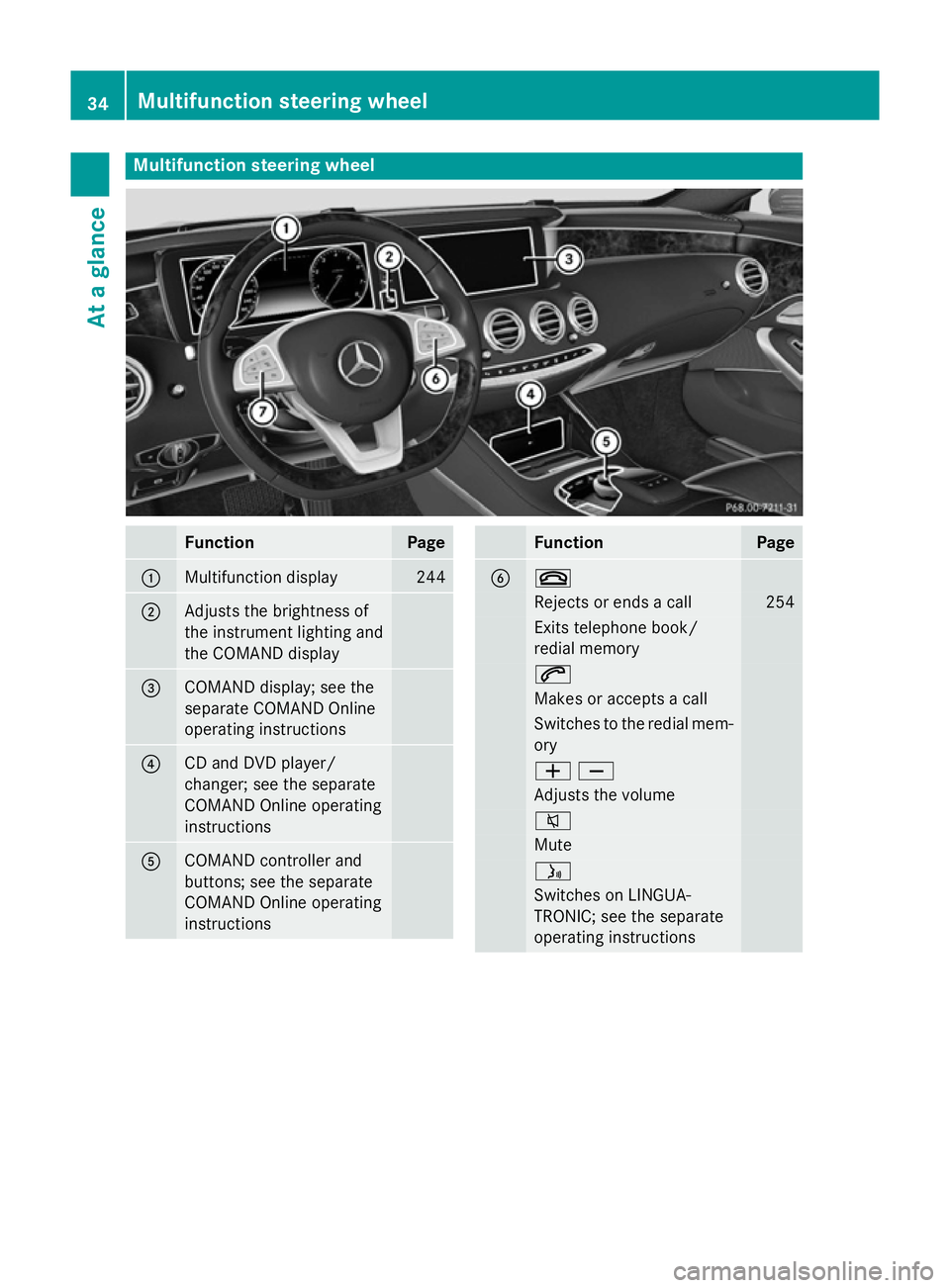
Multifunction steering wheel
Function Page
:
Multifunction display 244
;
Adjusts the brightness of
the instrument lighting and
the COMAND display
=
COMAND display; see the
separate COMAND Online
operating instructions
?
CD and DVD player/
changer; see the separate
COMAND Online operating
instructions
A
COMAND controller and
buttons; see the separate
COMAND Online operating
instructions Function Page
B ~
Rejects or ends a call 254
Exits telephone book/
redial memory 6
Makes or accepts a call
Switches to the redial mem-
ory WX
Adjusts the volume
8
Mute
ó
Switches on LINGUA-
TRONIC; see the separate
operating instructions 34
Multifunction steering wheelAt a glance
Page 41 of 413
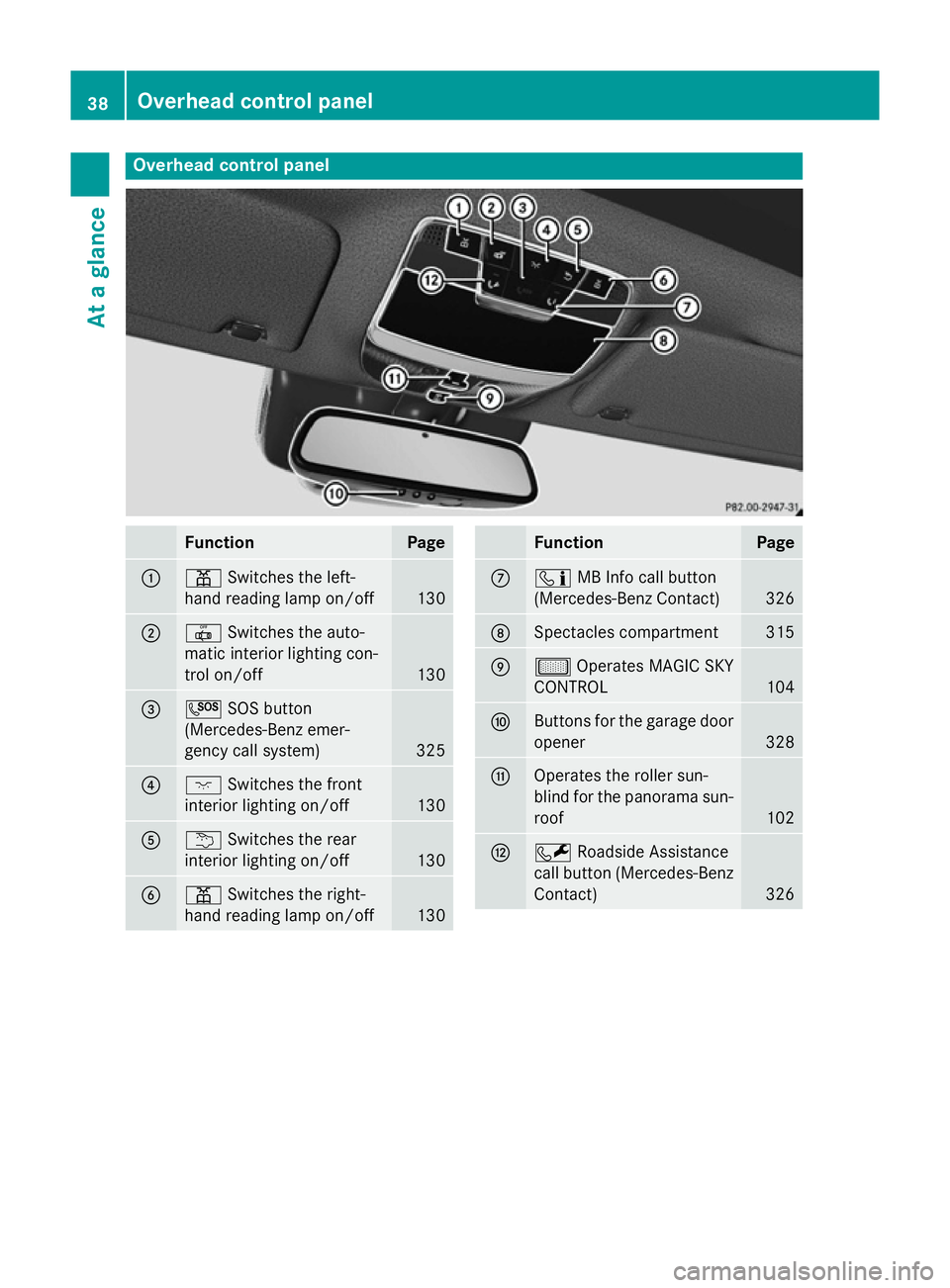
Overhead control panel
Function Page
:
p
Switches the left-
hand reading lamp on/off 130
;
|
Switches the auto-
matic interior lighting con-
trol on/off 130
=
G
SOS button
(Mercedes-Benz emer-
gency call system) 325
?
c
Switches the front
interior lighting on/off 130
A
u
Switches the rear
interior lighting on/off 130
B
p
Switches the right-
hand reading lamp on/off 130 Function Page
C
ï
MB Info call button
(Mercedes-Benz Contact) 326
D
Spectacles compartment 315
E
µ
Operates MAGIC SKY
CONTROL 104
F
Buttons for the garage door
opener 328
G
Operates the roller sun-
blind for the panorama sun-
roof 102
H
F
Roadside Assistance
call button (Mercedes-Benz
Contact) 32638
Overhead control panelAt a glance
Page 89 of 413
R
when the external door handles are
touched
R during convenience closing X
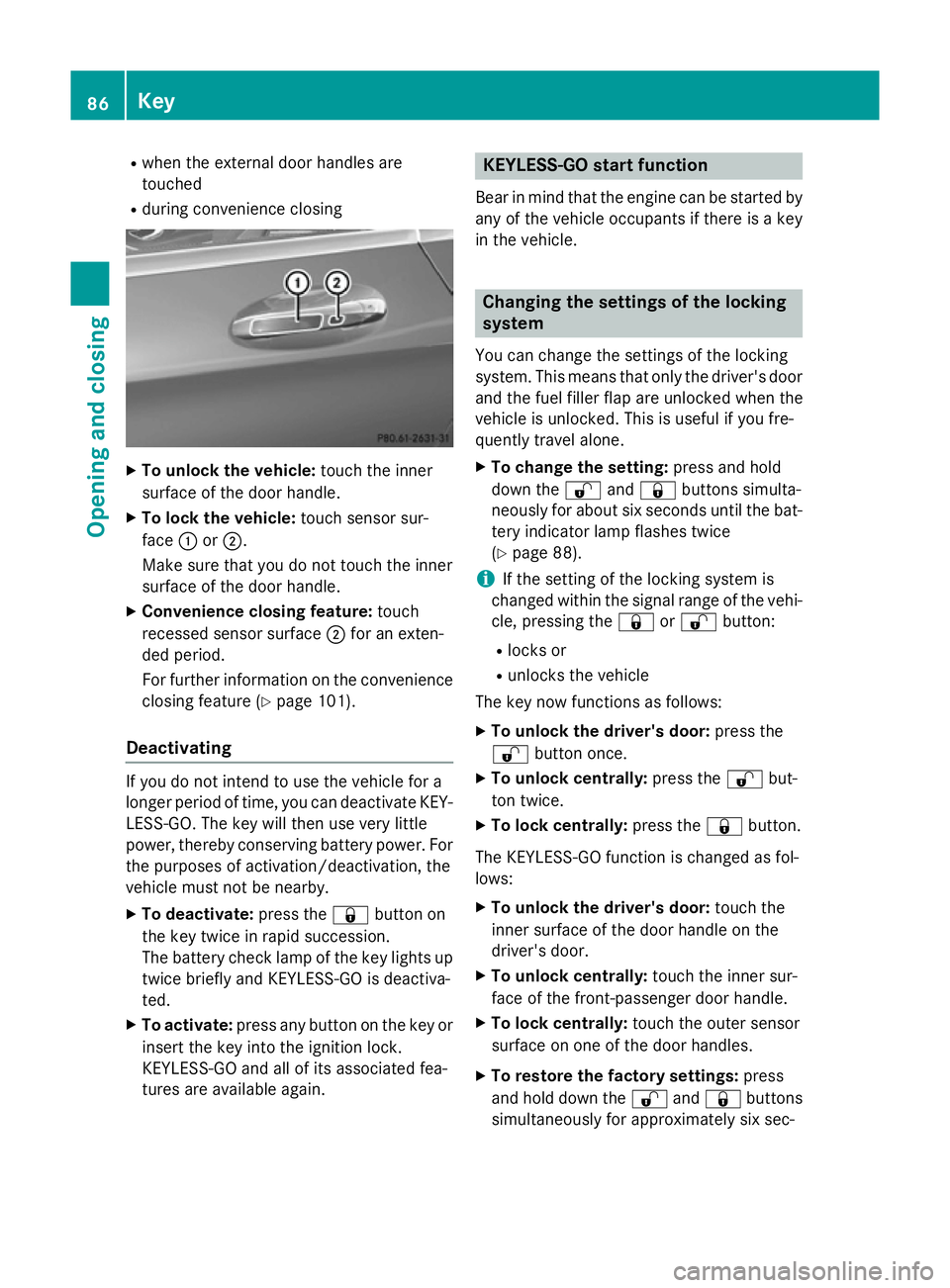
To unlock the vehicle: touch the inner
surface of the door handle.
X To lock the vehicle: touch sensor sur-
face :or;.
Make sure that you do not touch the inner
surface of the door handle.
X Convenience closing feature: touch
recessed sensor surface ;for an exten-
ded period.
For further information on the convenience closing feature (Y page 101).
Deactivating If you do not intend to use the vehicle for a
longer period of time, you can deactivate KEY- LESS-GO. The key will then use very little
power, thereby conserving battery power. For
the purposes of activation/deactivation, the
vehicle must not be nearby.
X To deactivate: press the&button on
the key twice in rapid succession.
The battery check lamp of the key lights up
twice briefly and KEYLESS-GO is deactiva-
ted.
X To activate: press any button on the key or
insert the key into the ignition lock.
KEYLESS-GO and all of its associated fea-
tures are available again. KEYLESS-GO start function
Bear in mind that the engine can be started by any of the vehicle occupants if there is a key
in the vehicle. Changing the settings of the locking
system
You can change the settings of the locking
system. This means that only the driver's door and the fuel filler flap are unlocked when the
vehicle is unlocked. This is useful if you fre-
quently travel alone.
X To change the setting: press and hold
down the %and& buttons simulta-
neously for about six seconds until the bat- tery indicator lamp flashes twice
(Y page 88).
i If the setting of the locking system is
changed within the signal range of the vehi- cle, pressing the &or% button:
R locks or
R unlocks the vehicle
The key now functions as follows:
X To unlock the driver's door: press the
% button once.
X To unlock centrally: press the%but-
ton twice.
X To lock centrally: press the&button.
The KEYLESS-GO function is changed as fol-
lows:
X To unlock the driver's door: touch the
inner surface of the door handle on the
driver's door.
X To unlock centrally: touch the inner sur-
face of the front-passenger door handle.
X To lock centrally: touch the outer sensor
surface on one of the door handles.
X To restore the factory settings: press
and hold down the %and& buttons
simultaneously for approximately six sec- 86
KeyOpening and closing
Page 91 of 413
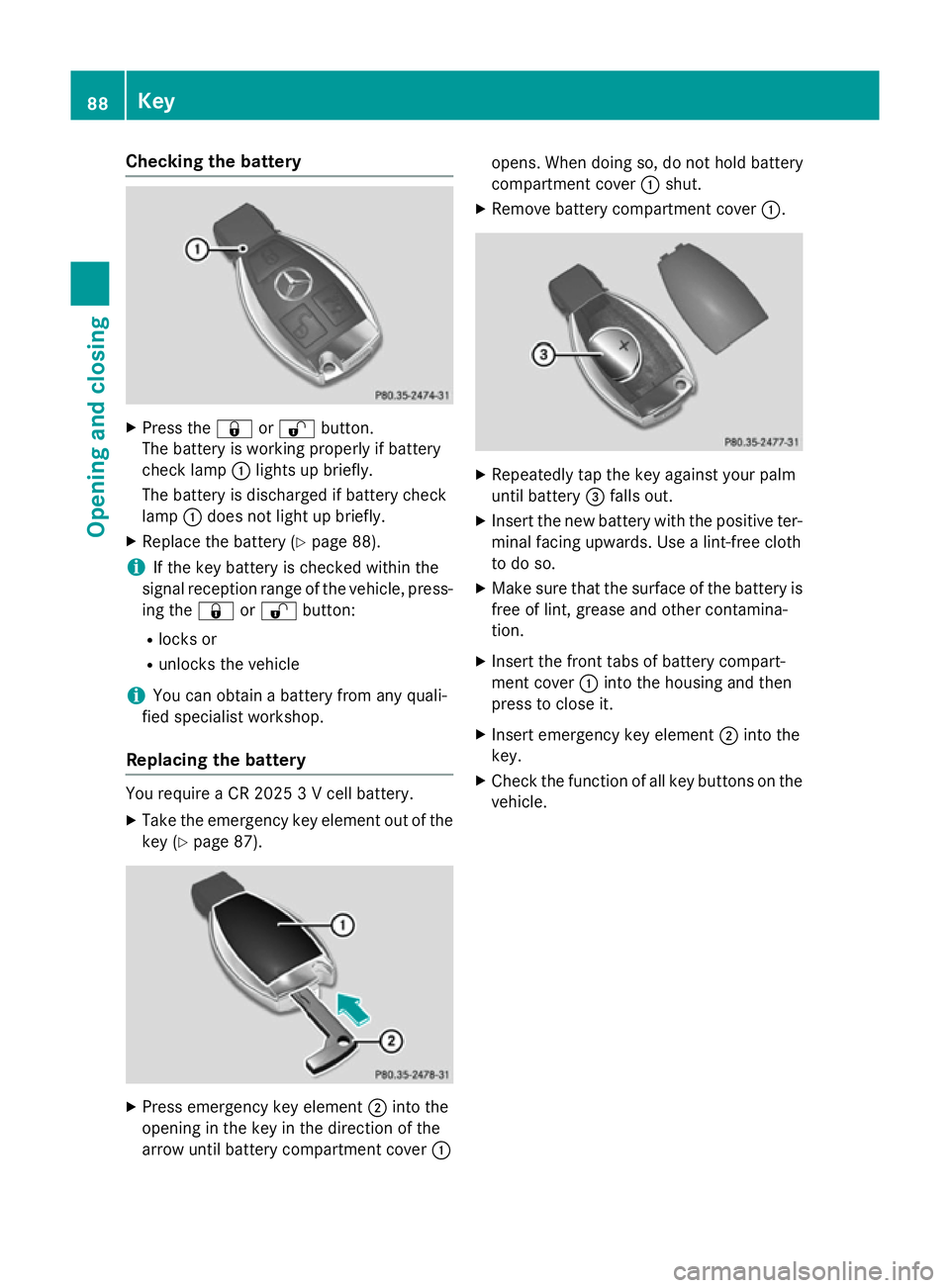
Checking the battery
X
Press the &or% button.
The battery is working properly if battery
check lamp :lights up briefly.
The battery is discharged if battery check
lamp :does not light up briefly.
X Replace the battery (Y page 88).
i If the key battery is checked within the
signal reception range of the vehicle, press- ing the &or% button:
R locks or
R unlocks the vehicle
i You can obtain a battery from any quali-
fied specialist workshop.
Replacing the battery You require a CR 2025 3 V cell battery.
X Take the emergency key element out of the
key (Y page 87). X
Press emergency key element ;into the
opening in the key in the direction of the
arrow until battery compartment cover :opens. When doing so, do not hold battery
compartment cover
:shut.
X Remove battery compartment cover :. X
Repeatedly tap the key against your palm
until battery =falls out.
X Insert the new battery with the positive ter-
minal facing upwards. Use a lint-free cloth
to do so.
X Make sure that the surface of the battery is
free of lint, grease and other contamina-
tion.
X Insert the front tabs of battery compart-
ment cover :into the housing and then
press to close it.
X Insert emergency key element ;into the
key.
X Check the function of all key buttons on the
vehicle. 88
KeyOpening and closing
Page 94 of 413
The doors can then be opened from the inside
after the vehicle has been locked from the
outside. The anti-theft alarm system is trig-
gered if the door is opened from the inside.
Switch off the alarm .
All countries: G
WARNING
If children are left unsupervised in the vehicle, they can:
R open doors and endanger other persons or
road users
R climb out and be injured by the traffic
R operate vehicle equipment and, for exam-
ple, trap themselves.
Children could also set the vehicle in motion, for example by:
R releasing the parking brake
R shifting the automatic transmission out of
park position P
R starting the engine.
There is a risk of an accident and injury.
When leaving the vehicle, always take the key
with you and lock the vehicle. Never leave
children unattended in the vehicle. Always
keep the key out of reach of children.
Stow luggage or loads preferably in the boot. Observe the loading guidelines (Y page 314).Unlocking and opening the doors
from the inside
i When a door is opened, the side window
on that side opens slightly. When the door
is closed, the side window is raised again.
! The side windows will not open/close if
the battery is discharged or if the side win-
dows have iced up. It will then not be pos-
sible to close the door. Do not attempt to
force the door to close. You could other-
wise damage the door or the side window.
Only for the United Kingdom: if the vehicle
has been locked with the key or with KEY-
LESS-GO, the double lock function is activa- ted as standard. It is then not possible to open
the doors from inside the vehicle. You can
deactivate the double lock function by deac-
tivating the interior motion sensor . The doors can then be opened from the inside after thevehicle has been locked from the outside. The
anti-theft alarm system is triggered if the door
is opened from the inside. Switch off the
alarm (Y page 80).
For all countries except the United King-
dom:
You can open a door from inside the vehicle
even if it has been locked. If the vehicle has
previously been locked with the key or with
KEYLESS-GO, opening a door from the inside will trigger the anti-theft alarm system.
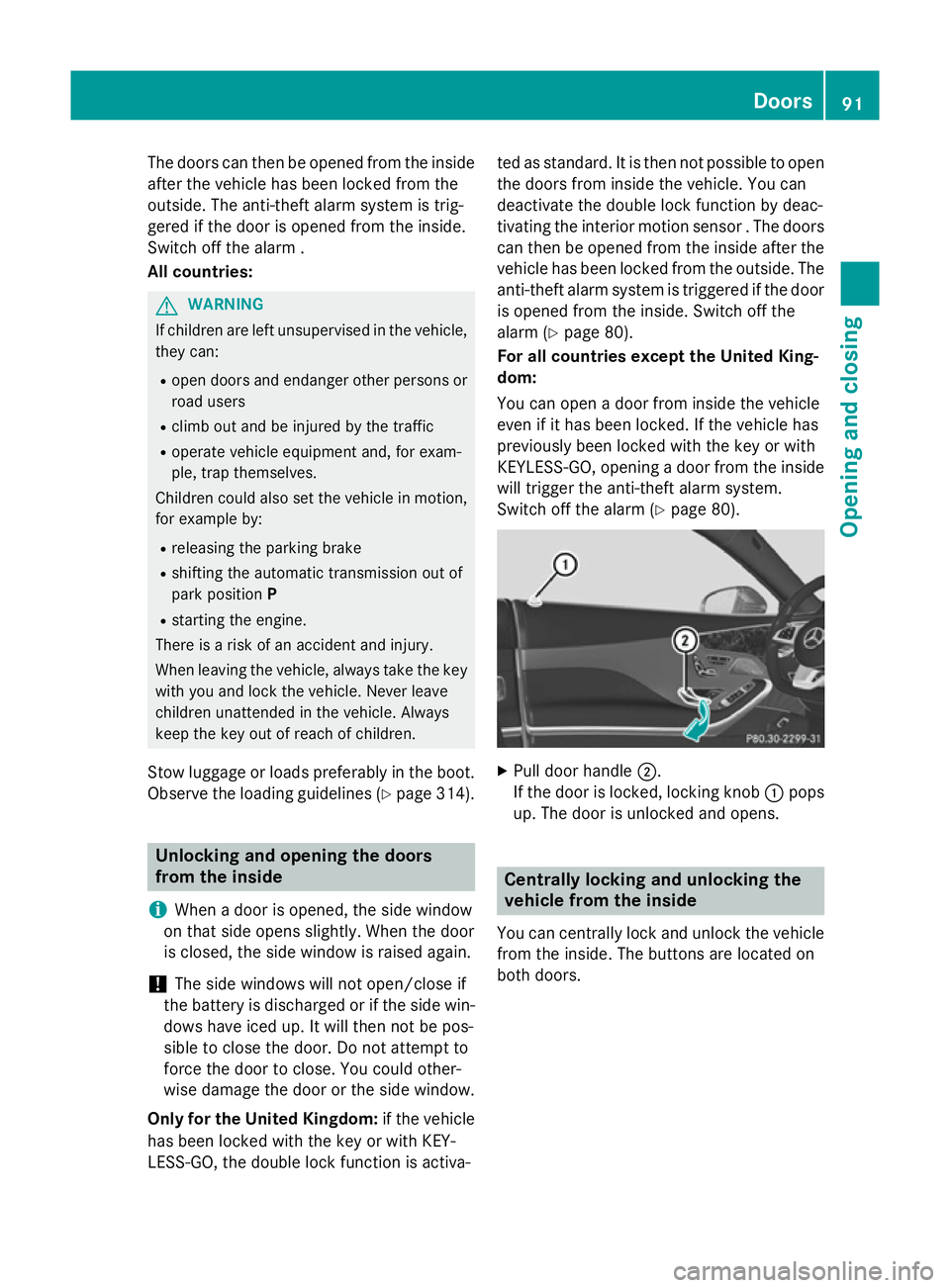
Switch off the alarm (Y page 80). X
Pull door handle ;.
If the door is locked, locking knob :pops
up. The door is unlocked and opens. Centrally locking and unlocking the
vehicle from the inside
You can centrally lock and unlock the vehicle from the inside. The buttons are located on
both doors. Doors
91Opening and closing Z
Page 95 of 413
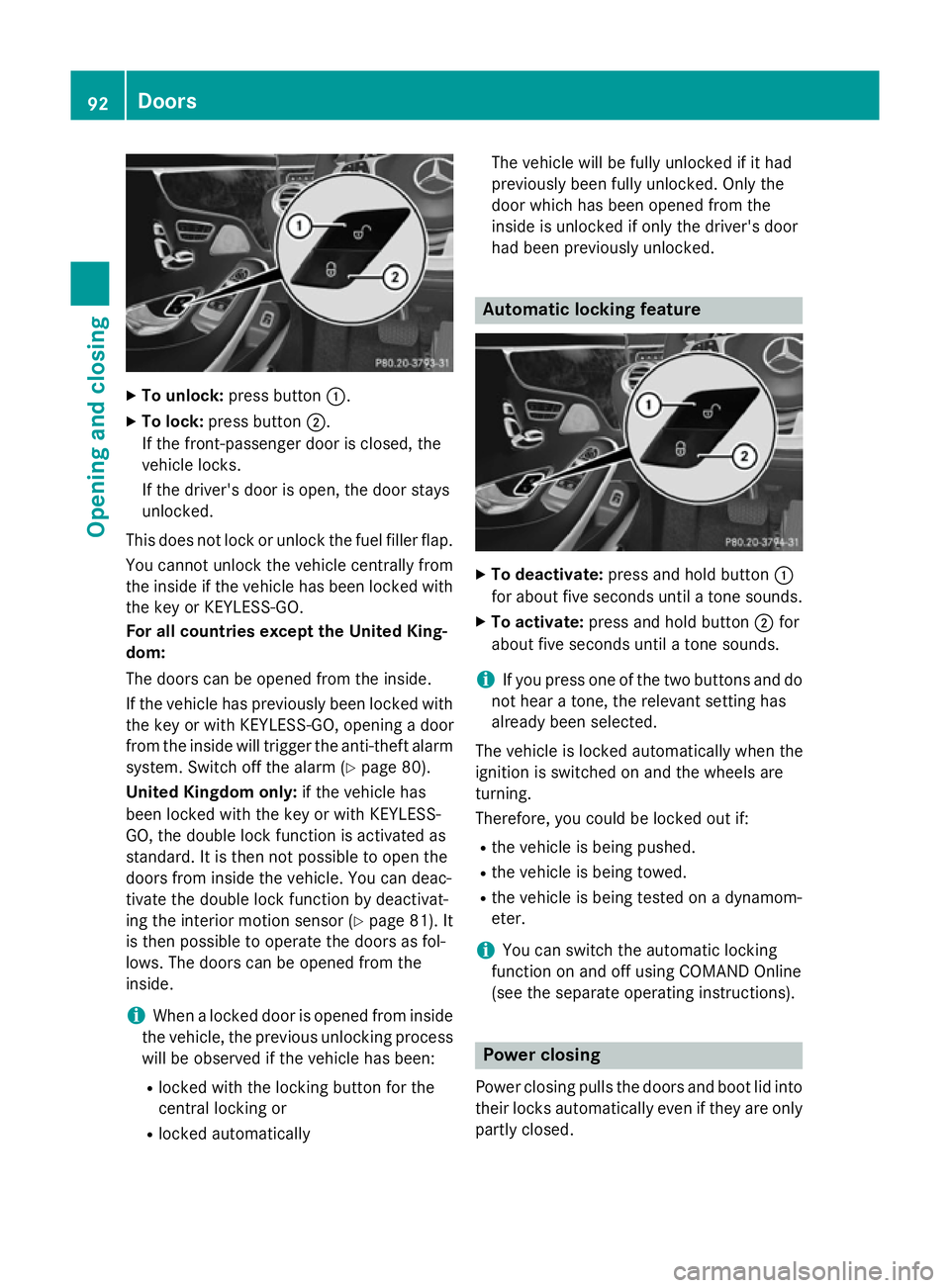
X
To unlock: press button :.
X To lock: press button ;.
If the front-passenger door is closed, the
vehicle locks.
If the driver's door is open, the door stays
unlocked.
This does not lock or unlock the fuel filler flap. You cannot unlock the vehicle centrally from
the inside if the vehicle has been locked with
the key or KEYLESS-GO.
For all countries except the United King-
dom:
The doors can be opened from the inside.
If the vehicle has previously been locked with the key or with KEYLESS-GO, opening a door
from the inside will trigger the anti-theft alarmsystem. Switch off the alarm (Y page 80).
United Kingdom only: if the vehicle has
been locked with the key or with KEYLESS-
GO, the double lock function is activated as
standard. It is then not possible to open the
doors from inside the vehicle. You can deac-
tivate the double lock function by deactivat-
ing the interior motion sensor (Y page 81). It
is then possible to operate the doors as fol-
lows. The doors can be opened from the
inside.
i When a locked door is opened from inside
the vehicle, the previous unlocking process
will be observed if the vehicle has been:
R locked with the locking button for the
central locking or
R locked automatically The vehicle will be fully unlocked if it had
previously been fully unlocked. Only the
door which has been opened from the
inside is unlocked if only the driver's door
had been previously unlocked. Automatic locking feature
X
To deactivate: press and hold button :
for about five seconds until a tone sounds.
X To activate: press and hold button ;for
about five seconds until a tone sounds.
i If you press one of the two buttons and do
not hear a tone, the relevant setting has
already been selected.
The vehicle is locked automatically when the
ignition is switched on and the wheels are
turning.
Therefore, you could be locked out if:
R the vehicle is being pushed.
R the vehicle is being towed.
R the vehicle is being tested on a dynamom-
eter.
i You can switch the automatic locking
function on and off using COMAND Online
(see the separate operating instructions). Power closing
Power closing pulls the doors and boot lid into
their locks automatically even if they are only partly closed. 92
DoorsOpening and closing
Page 110 of 413
have a good view of road and traffic condi-
tions (Y page 118).
X Store the seat, steering wheel and exterior
mirror settings using the memory function
(Y page 120). Seats
Important safety notes
G
WARNING
If children adjust the seats, they could
become trapped, especially if they are unat-
tended. There is a risk of injury.
When leaving the vehicle, always take the key with you and lock the vehicle. Never leave
children unattended in the vehicle. G
WARNING
You could lose control of the vehicle while
driving if you:
R adjust the driver's seat, steering wheel or
mirrors
R fasten the seat belt
There is a risk of an accident.
Adjust the driver's seat, head restraint, steer-
ing wheel and mirrors and fasten your seat
belt before starting the engine. G
WARNING
If you adjust the seat height carelessly, you or other vehicle occupants could be trapped andthereby injured. Children in particular could
accidentally press the electrical seat adjust-
ment buttons and become trapped. There is a
risk of injury.
While moving the seats, make sure that your
hands or other body parts do not get under the
lever assembly of the seat adjustment sys-
tem. G
WARNING
When adjusting a seat, you or another vehicle occupant could become trapped by the guide rail of the seat, for instance. There is a risk of
injury.
Make sure that no one has any part of their
body within the sweep of the seat when
adjusting it. G
WARNING
The head restraints cannot provide the inten-
ded protection unless they are fitted and
adjusted correctly. There is an increased risk of injury to the head and neck in the event of
an accident or sudden braking, for example.
Always drive with the head restraints fitted.
Ensure that the centre of the head restraints
support the back of each vehicle occupant's
head at eye level before driving off. G
WARNING
The seat belt does not offer the intended level of protection if you have not moved the back-
rest to an almost vertical position. When brak-
ing or in the event of an accident, you could
slide underneath the seat belt and sustain
abdomen or neck injuries, for example. This
poses an increased risk of injury or even fatal injury.
Adjust the seat properly before beginning
your journey. Always ensure that the backrest
is in an almost vertical position and that the
shoulder section of your seatbelt is routed
across the centre of your shoulder.
! To avoid damage to the seats and the seat
heating, observe the following information:
R do not spill any liquids on the seats. If
liquid is spilled on the seats, dry them as
soon as possible.
R if the seat covers are damp or wet, do not
switch on the seat heating. The seat
heating should also not be used to dry
the seats.
R clean the seat covers as recommended;
see "Interior care".
R do not transport heavy loads on the
seats. Do not place sharp objects on the
seat cushions, e.g. knives, nails or tools. Seats
107Seats, steering wheel and mirrors Z
Page 116 of 413
Problems with the seat heating
Problem
Possible causes/consequences and
M
MSolutions The seat heating has
switched off prema-
turely or cannot be
switched on. The on-board voltage is too low because too many electrical con-
sumers are switched on.
X Switch off electrical consumers that you do not need, such as
the rear window heating or interior lighting.
Once the battery is sufficiently charged, the seat heating can be
switched back on manually. Switching the seat ventilation on/off
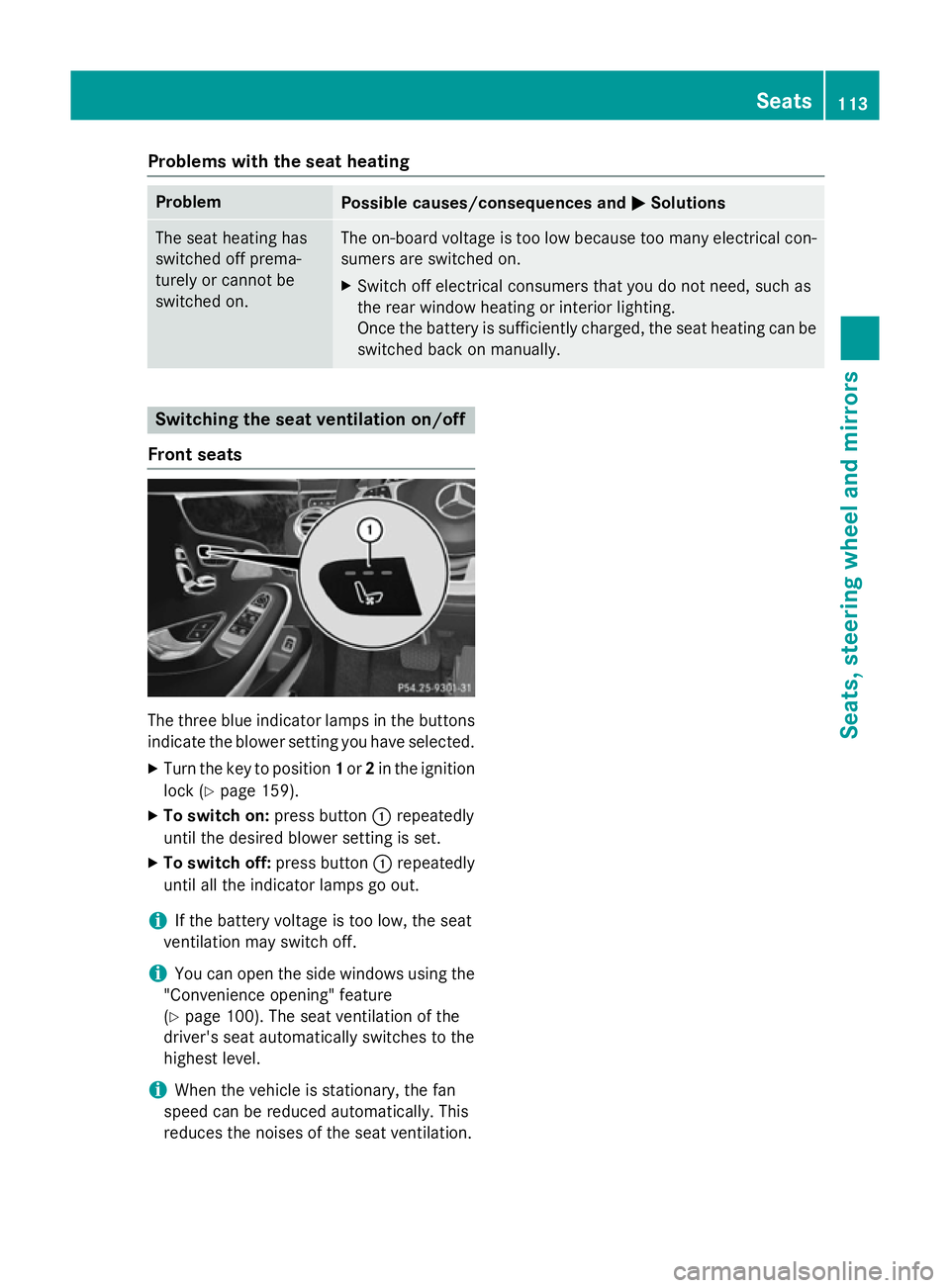
Front seats The three blue indicator lamps in the buttons
indicate the blower setting you have selected.
X Turn the key to position 1or 2in the ignition
lock (Y page 159).
X To switch on: press button:repeatedly
until the desired blower setting is set.
X To switch off: press button:repeatedly
until all the indicator lamps go out.
i If the battery voltage is too low, the seat
ventilation may switch off.
i You can open the side windows using the
"Convenience opening" feature
(Y page 100). The seat ventilation of the
driver's seat automatically switches to the
highest level.
i When the vehicle is stationary, the fan
speed can be reduced automatically. This
reduces the noises of the seat ventilation. Seats
113Seats, steering wheel and mirrors Z