climate settings MERCEDES-BENZ S-CLASS COUPE 2014 Owners Manual
[x] Cancel search | Manufacturer: MERCEDES-BENZ, Model Year: 2014, Model line: S-CLASS COUPE, Model: MERCEDES-BENZ S-CLASS COUPE 2014Pages: 413, PDF Size: 12.76 MB
Page 15 of 413
Opening/closing the garage door .. 330
Programming (button in the rear-
view mirror) ................................... 328
Gear indicator (on-board com-
puter) .................................................. 263
Gearshift program
SETUP (on-board computer) ..........2 64
Genuine Mercedes-Benz parts ........... 22
Glove compartment .......................... 315H
Handbrake see Parking brake
HANDS-FREE ACCESS .......................... 96
Hazard warning lamps ......................126
Head restraints
Adjusting ....................................... 109
Adjusting (manually) ..................... .109
Adjusting (rear) .............................. 110
Head-up display
Adjusting the brightness ................ 260
Function/notes ............................ .245
Important safety notes .................. 245
Setting the position ....................... 260
Storing settings (memory func-
tion) ............................................... 120
Switching on or off ......................... 245
Switching the display on/off ......... 259
Headbag
Display message ............................ 276
Headlamp flasher .............................. 126
Headlamps
Misting up ...................................... 130
see Automatic headlamp mode
Heater booster function ................... 152
Heating
see Climate control
High-pressure cleaners .................... 345
Hill start assist .................................. 162
HOLD function
Activating ....................................... 203
Deactivating ................................... 203
Display message ............................ 289
Function/notes ............................ .202
Horn ...................................................... 30 I
Ignition lock see Key positions
Immobiliser .......................................... 80
Indicator and warning lamp
Restraint system ............................ 306
Indicator and warning lamps
COLLISION PREVENTION ASSIST
PLUS .............................................. 309
Coolant .......................................... 307
Engine diagnostics ......................... 307
Indicator lamps
Display message ............................ 279
see Warning and indicator lamps
Indicators
see Turn signals
Insect protection on the radiator .... 338
Instrument cluster
Overview .......................................... 32
Warning and indicator lamps ........... 33
Instrument cluster lighting ................ 34
Intelligent Light System
Activating/deactivating ................. 260
Display message ............................ 281
Overview ........................................ 127
Setting the dipped-beam head-
lamps for driving on the right/left .. 261
Interior lighting
Control .......................................... .130
Emergency lighting ........................ 131
Overview ........................................ 130
Reading lamp ................................. 130
Interior motion sensor
Deactivating ..................................... 82
Function .......................................... .81
Priming ............................................ 81
Switching off .................................... 82
ISOFIX child seat securing system ....62 J
Jack Storage location ............................3 55
Using ............................................. 387
Jump starting (engine) ......................364 12
Index
Page 139 of 413
Useful information
i This Owner's Manual describes all mod-
els, series and optional equipment for your
vehicle that were available at the time of
going to press. National variations are pos- sible. Note that your vehicle may not be
equipped with all of the functions descri-
bed. This is also the case for systems and
functions relevant to safety.
i Read the information on qualified special-
ist workshops: (Y page 25). Overview of climate control systems
Important safety notes
Keep the settings recommended on the fol-
lowing pages. The windows could otherwise
mist up.
To prevent the windows from misting up:
R switch off climate control only briefly
R switch on air-recirculation mode only
briefly
R switch on the cooling with air dehumidifi-
cation function
R switch on the "demist windscreen" function
briefly, if required
Climate control regulates the temperature
and air humidity in the vehicle interior. The air filter cleans the air, thus improving the inte-
rior climate.
The cooling with air dehumidification function is only available when the engine is running.
Optimum climate control is only achieved
with the side windows and roof closed.
The residual heat function can only be acti-
vated or deactivated with the ignition
switched off (Y page 146).
i Ventilate the vehicle for a brief period
during warm weather, e.g. using the con-
venience opening feature (Y page 100).
This will speed up the cooling process and
the desired interior temperature will be
reached more quickly. i
The integrated filter filters out most par-
ticles of dust and soot and completely fil-
ters out pollen. It also reduces gaseous pol-
lutants and odours. A clogged filter reduces the amount of air supplied to the vehicle
interior. For this reason, you should alwaysobserve the interval for replacing the filter,
which is specified in the Service Booklet. As this depends on environmental conditions,
e.g. heavy air pollution, the interval may be shorter than stated in the Service Booklet.
i It is possible that the blower may be acti-
vated automatically 60 minutes after the
key has been removed depending on vari-
ous factors, e.g. the outside temperature.
The vehicle is then ventilated for
30 minutes to dry the automatic climate
control. 136
Overview of climate control systemsClimate control
Page 145 of 413
or
X Set the air distribution using COMAND
Online (see the separate operating instruc-
tions).
The indicator lamp in rocker switch Ã
goes out.
In automatic mode, if you adjust the airflow or
air distribution manually, the indicator lamp
on the Ãrocker switch goes out. The func-
tion which has not been changed manually,
however, continues to be controlled automat- ically. When the manually set function
switches back to automatic mode, the indi-
cator lamp on the Ãrocker switch lights
up again. Setting the climate mode
In automatic mode you can select the follow-
ing airflow settings for the driver's and front- passenger areas:
FOCUS high airflow that is set slightly cooler
MEDIUM medium airflow, standard setting
DIFFUSE low airflow that is set slightly warmer and with less of a draught
X To set: set the climate mode using
COMAND Online (see the separate operat- ing instructions). Setting the temperature
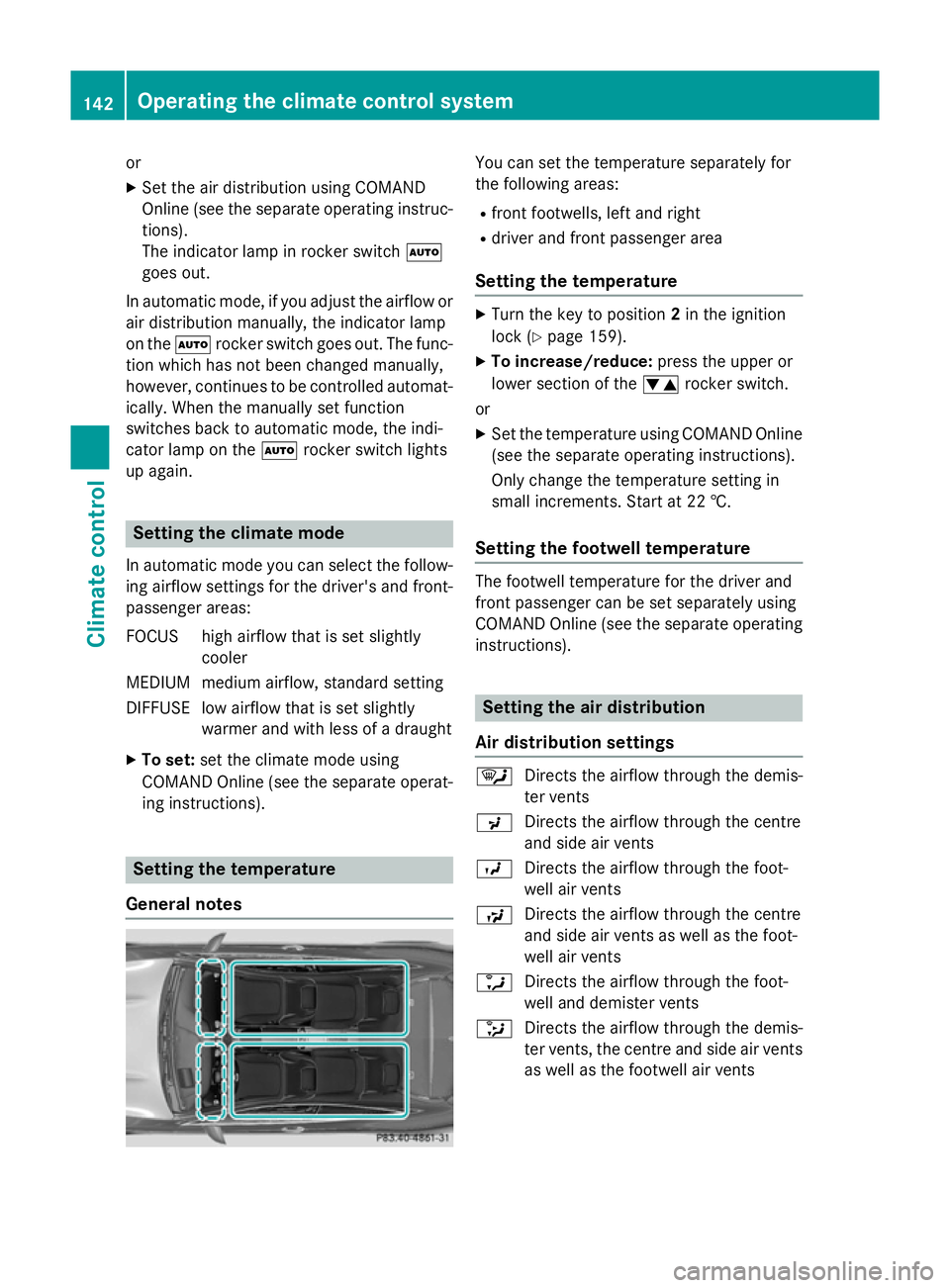
General notes You can set the temperature separately for
the following areas:
R front footwells, left and right
R driver and front passenger area
Setting the temperature X
Turn the key to position 2in the ignition
lock (Y page 159).
X To increase/reduce: press the upper or
lower section of the wrocker switch.
or X Set the temperature using COMAND Online
(see the separate operating instructions).
Only change the temperature setting in
small increments. Start at 22 †.
Setting the footwell temperature The footwell temperature for the driver and
front passenger can be set separately using
COMAND Online (see the separate operating
instructions). Setting the air distribution
Air distribution settings ¯
Directs the airflow through the demis-
ter vents
P Directs the airflow through the centre
and side air vents
O Directs the airflow through the foot-
well air vents
S Directs the airflow through the centre
and side air vents as well as the foot-
well air vents
a Directs the airflow through the foot-
well and demister vents
_ Directs the airflow through the demis-
ter vents, the centre and side air vents
as well as the footwell air vents 142
Operating the climate control systemClimate control
Page 146 of 413
b
Directs the airflow through the centre
and side air vents as well as the demis-
ter vents
W Sets the air distribution to automatic
Setting the air distribution using
COMAND Online The air distribution for the left and right sides
of the driver and front passenger area can be adjusted using COMAND Online (see the sep-
arate operating instructions). Setting the airflow
General notes You can select different airflow settings for
the driver's and front-passenger sides.
Setting the airflow X
Turn the key to position 2in the ignition
lock (Y page 159).
X To increase/reduce: press the upper or
lower section of the Krocker switch.
or X Set the airflow using COMAND Online (see
the separate operating instructions). Activating/deactivating the synchro-
nisation function
Climate control can be set centrally using the synchronisation function. The settings for
temperature, air distribution and airflow on
the driver's side are adopted for the front-
passenger side.
X To activate/deactivate: switch the syn-
chronisation function on or off using
COMAND Online (see the separate operat- ing instructions).
The synchronisation function switches off, if
the settings for the front-passenger side are
changed. Demisting the windscreen
You can use this function to defrost the wind-
screen or to demist the inside of the wind-
screen and the front side windows.
Switch off the windscreen demisting function
as soon as the windscreen is clear again.
X Turn the key to position 2in the ignition
lock (Y page 159).
X To activate: press the¬rocker switch
on the front control unit up or down.
The indicator lamp in the ¬rocker
switch lights up.
The climate control system switches to the
following functions:
R high airflow
R high temperature
R air distribution to the windscreen and
front side windows
R air-recirculation mode off
R windscreen heating on
X To deactivate: press the¬rocker
switch up or down.
The indicator lamp in the ¬rocker
switch goes out. The previous settings are
reactivated. Air-recirculation mode
remains deactivated.
or
X Press the Ãrocker switch up or down.
or
X Vehicles with auxiliary heating: call up
the COMAND Online climate control menu
using the !rocker switch.
X Vehicles without auxiliary heating: call
up the COMAND Online climate control
menu using the trocker switch. Demisting the windows
Windows misted up on the inside X
Vehicles with auxiliary heating: activate
the "Cooling with air dehumidification" Operating the climate control system
143Climate control
Page 158 of 413
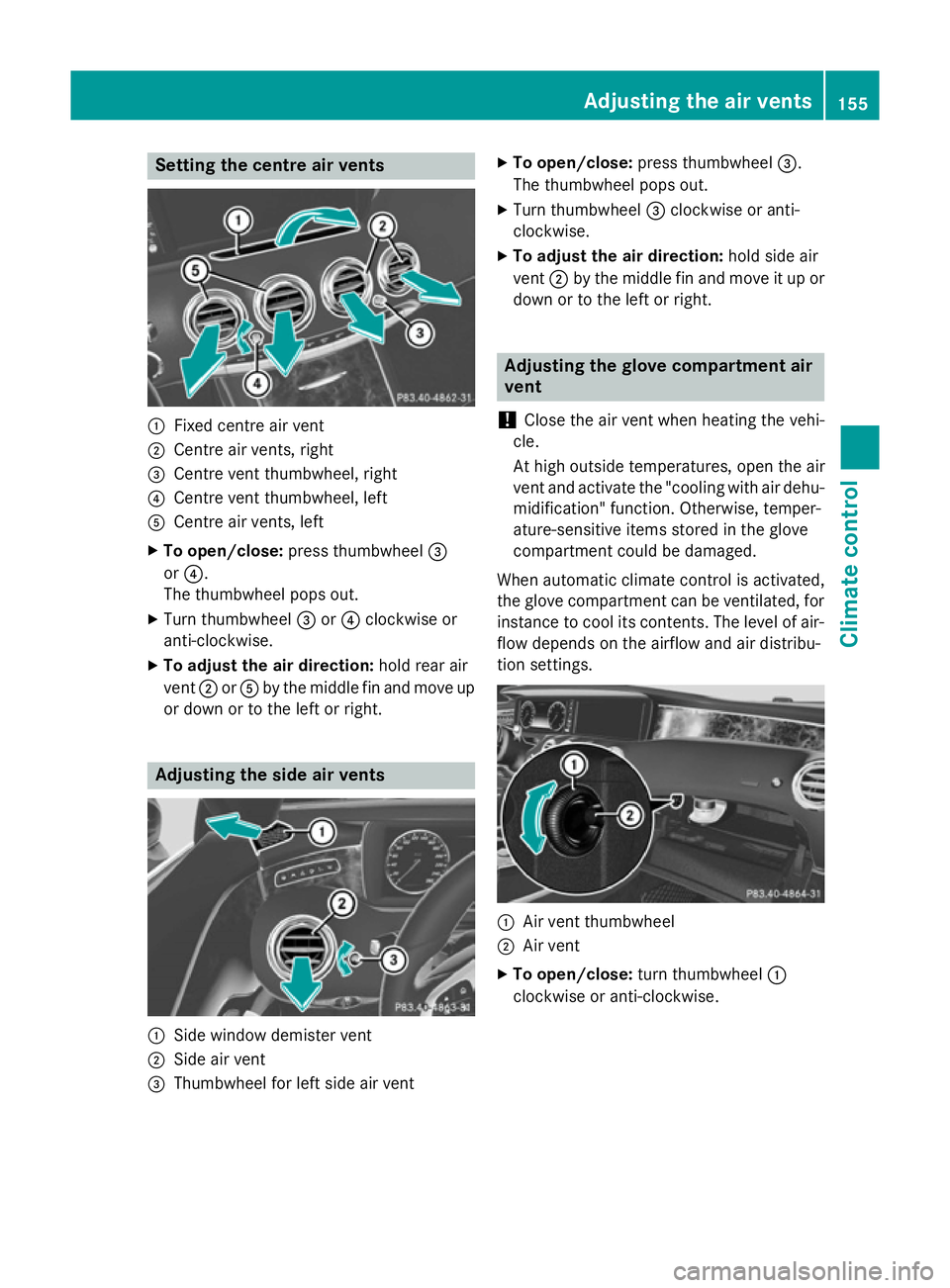
Setting the centre air vents
:
Fixed centre air vent
; Centre air vents, right
= Centre vent thumbwheel, right
? Centre vent thumbwheel, left
A Centre air vents, left
X To open/close: press thumbwheel =
or ?.
The thumbwheel pops out.
X Turn thumbwheel =or? clockwise or
anti-clockwise.
X To adjust the air direction: hold rear air
vent ;orA by the middle fin and move up
or down or to the left or right. Adjusting the side air vents
:
Side window demister vent
; Side air vent
= Thumbwheel for left side air vent X
To open/close: press thumbwheel =.
The thumbwheel pops out.
X Turn thumbwheel =clockwise or anti-
clockwise.
X To adjust the air direction: hold side air
vent ;by the middle fin and move it up or
down or to the left or right. Adjusting the glove compartment air
vent
! Close the air vent when heating the vehi-
cle.
At high outside temperatures, open the air
vent and activate the "cooling with air dehu- midification" function. Otherwise, temper-
ature-sensitive items stored in the glove
compartment could be damaged.
When automatic climate control is activated,
the glove compartment can be ventilated, for
instance to cool its contents. The level of air- flow depends on the airflow and air distribu-
tion settings. :
Air vent thumbwheel
; Air vent
X To open/close: turn thumbwheel :
clockwise or anti-clockwise. Adjusting the air vents
155Climate control Z