keyless MERCEDES-BENZ S-CLASS COUPE 2015 User Guide
[x] Cancel search | Manufacturer: MERCEDES-BENZ, Model Year: 2015, Model line: S-CLASS COUPE, Model: MERCEDES-BENZ S-CLASS COUPE 2015Pages: 417, PDF Size: 13.42 MB
Page 95 of 417
X
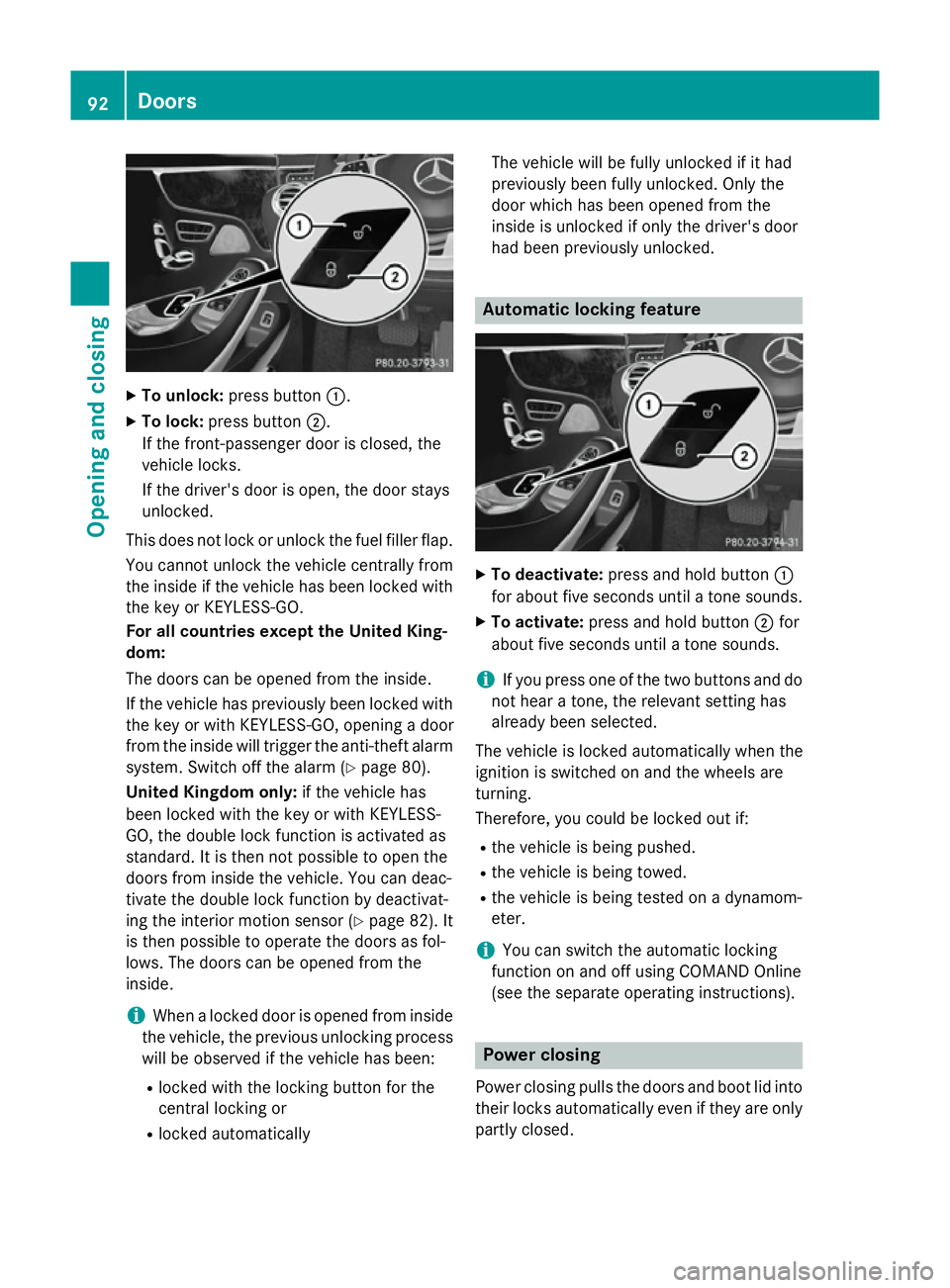
To unlock: press button :.
X To lock: press button ;.
If the front-passenger door is closed, the
vehicle locks.
If the driver's door is open, the door stays
unlocked.
This does not lock or unlock the fuel filler flap. You cannot unlock the vehicle centrally from
the inside if the vehicle has been locked with
the key or KEYLESS-GO.
For all countries except the United King-
dom:
The doors can be opened from the inside.
If the vehicle has previously been locked with the key or with KEYLESS-GO, opening a door
from the inside will trigger the anti-theft alarmsystem. Switch off the alarm (Y page 80).
United Kingdom only: if the vehicle has
been locked with the key or with KEYLESS-
GO, the double lock function is activated as
standard. It is then not possible to open the
doors from inside the vehicle. You can deac-
tivate the double lock function by deactivat-
ing the interior motion sensor (Y page 82). It
is then possible to operate the doors as fol-
lows. The doors can be opened from the
inside.
i When a locked door is opened from inside
the vehicle, the previous unlocking process
will be observed if the vehicle has been:
R locked with the locking button for the
central locking or
R locked automatically The vehicle will be fully unlocked if it had
previously been fully unlocked. Only the
door which has been opened from the
inside is unlocked if only the driver's door
had been previously unlocked. Automatic locking feature
X
To deactivate: press and hold button :
for about five seconds until a tone sounds.
X To activate: press and hold button ;for
about five seconds until a tone sounds.
i If you press one of the two buttons and do
not hear a tone, the relevant setting has
already been selected.
The vehicle is locked automatically when the
ignition is switched on and the wheels are
turning.
Therefore, you could be locked out if:
R the vehicle is being pushed.
R the vehicle is being towed.
R the vehicle is being tested on a dynamom-
eter.
i You can switch the automatic locking
function on and off using COMAND Online
(see the separate operating instructions). Power closing
Power closing pulls the doors and boot lid into
their locks automatically even if they are only partly closed. 92
DoorsOpening and closing
Page 96 of 417
X
To power close a door: push the door into
the lock up to the first detent position.
Power closing will pull the door fully closed.
X To power close the boot lid: lightly push
the boot lid closed.
The power closing function pulls the boot
lid closed. Unlocking the driver's door (emer-
gency key element)
If the vehicle can no longer unlocked with the key or KEYLESS-GO, use the emergency key
element.
X Take the emergency key element out of the
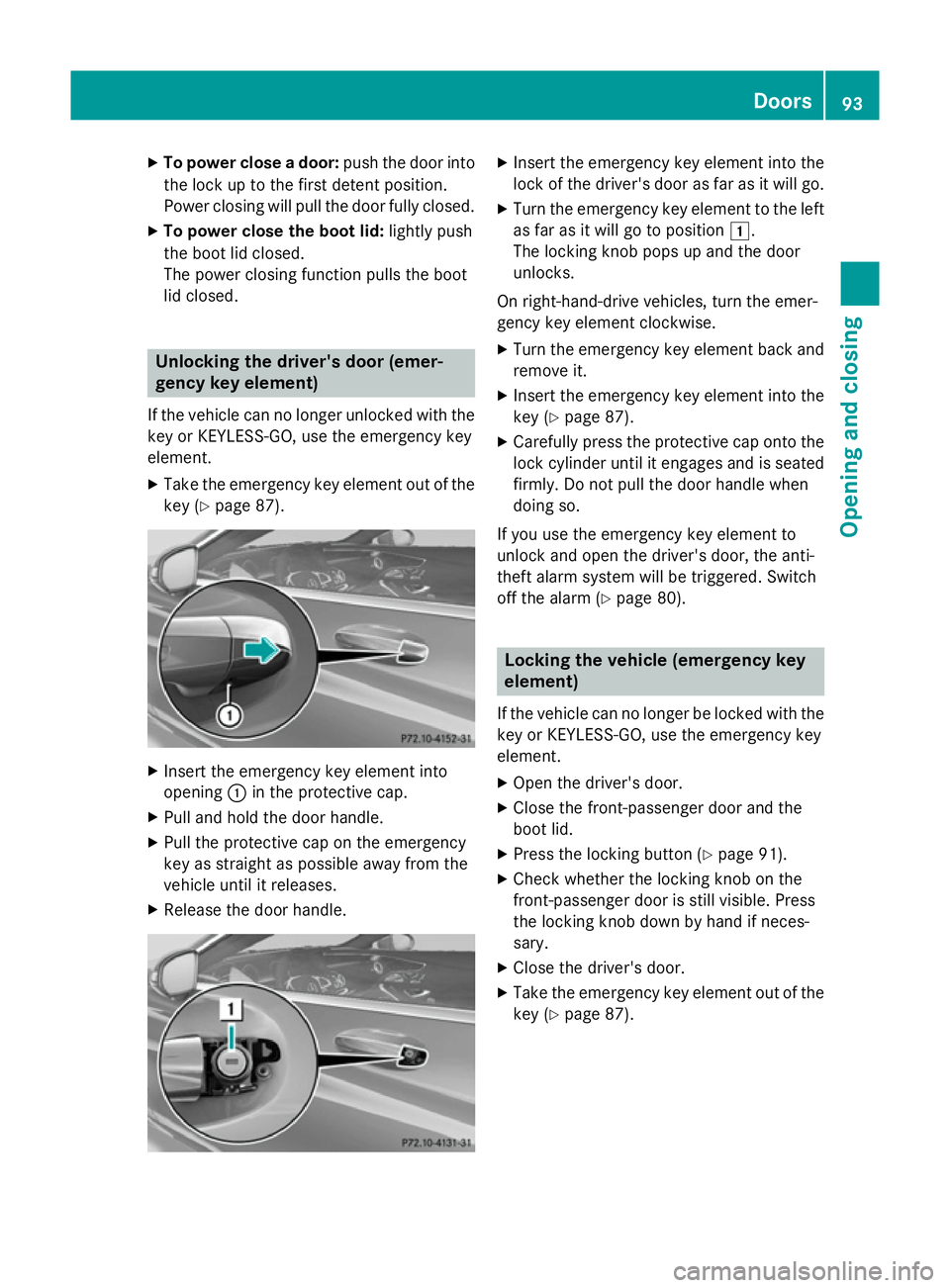
key (Y page 87). X
Insert the emergency key element into
opening :in the protective cap.
X Pull and hold the door handle.
X Pull the protective cap on the emergency
key as straight as possible away from the
vehicle until it releases.
X Release the door handle. X
Insert the emergency key element into the
lock of the driver's door as far as it will go.
X Turn the emergency key element to the left
as far as it will go to position 1.
The locking knob pops up and the door
unlocks.
On right-hand-drive vehicles, turn the emer-
gency key element clockwise. X Turn the emergency key element back and
remove it.
X Insert the emergency key element into the
key (Y page 87).
X Carefully press the protective cap onto the
lock cylinder until it engages and is seated
firmly. Do not pull the door handle when
doing so.
If you use the emergency key element to
unlock and open the driver's door, the anti-
theft alarm system will be triggered. Switch
off the alarm (Y page 80). Locking the vehicle (emergency key
element)
If the vehicle can no longer be locked with the
key or KEYLESS-GO, use the emergency key
element.
X Open the driver's door.
X Close the front-passenger door and the
boot lid.
X Press the locking button (Y page 91).
X Check whether the locking knob on the
front-passenger door is still visible. Press
the locking knob down by hand if neces-
sary.
X Close the driver's door.
X Take the emergency key element out of the
key (Y page 87). Doors
93Opening and closing Z
Page 99 of 417
R
Press the remote operating switch on the
driver's door, or
R In vehicles with HANDS-FREE ACCESS:
kick into the sensor detection range
under the bumper with your foot.
i If the
F button on the key is pressed or
HANDS-FREE ACCESS is initiated after the
closing process is stopped, the boot lid
opens.
Vehicles with boot lid remote closing fea- ture and KEYLESS-GO: when all the doors
are closed, you can simultaneously close the
boot lid and lock the vehicle. The key must be located to the rear of the vehicle.
X Press and release locking button ;on the
boot lid.
If a KEYLESS-GO key is detected outside
the vehicle, the boot lid closes and the vehi-
cle locks.
i If KEYLESS-GO detects a key in the boot,
the boot lid opens again after it is closed.
If KEYLESS-GO detects a second key out-
side the vehicle, the boot lid remains
closed. HANDS-FREE ACCESS
Important safety notes G
WARNING
The vehicle exhaust system can become very
hot. If you use HANDS-FREE ACCESS, you
could burn yourself by touching the exhaust
system. There is a risk of injury. Always
ensure that you only make a leg movement
within the detection range of sensors.
! If the key is within the rear detection
range of KEYLESS-GO, the following situa-
tions, for example, could lead to the boot lid opening unintentionally:
R using a car wash
R using a high-pressure cleaner
Make sure that the key is at least 3 m away
from the vehicle. General notes With KEYLESS-GO and HANDS-FREE
ACCESS, you can open or close the boot lid or
stop the procedure without using your hands. This is useful if you have your hands full. To do
this, make a kicking movement under the
bumper with your foot.
Observe the following points:
R Carry your KEYLESS-GO key about your
person. The KEYLESS-GO key must be in
the rear detection range of the vehicle.
R When making the kicking movement, make
sure that you are standing firmly on the
ground and that there is sufficient clear-
ance to the rear of the vehicle. You could
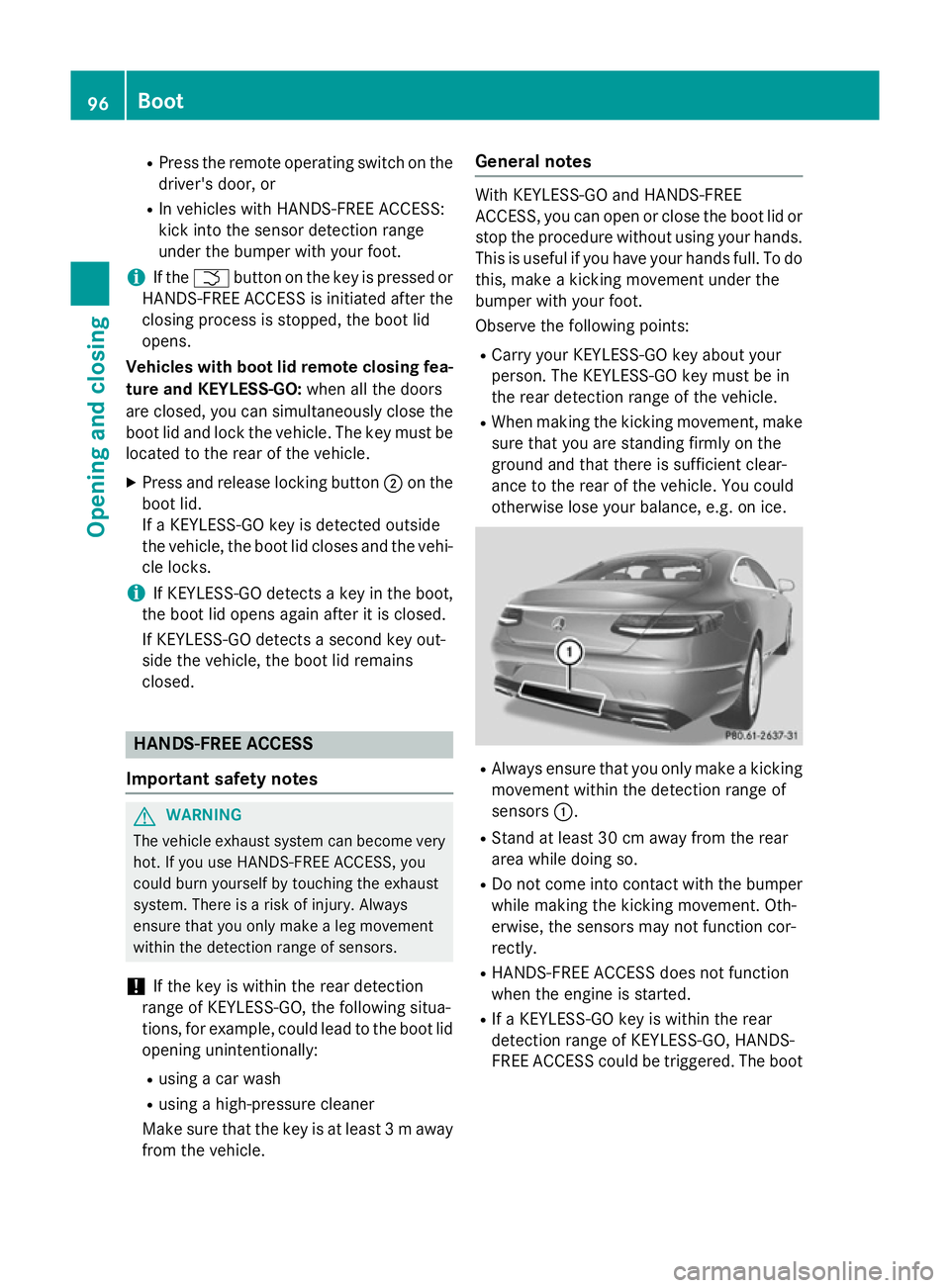
otherwise lose your balance, e.g. on ice. R
Always ensure that you only make a kicking
movement within the detection range of
sensors :.
R Stand at least 30 cm away from the rear
area while doing so.
R Do not come into contact with the bumper
while making the kicking movement. Oth-
erwise, the sensors may not function cor-
rectly.
R HANDS-FREE ACCESS does not function
when the engine is started.
R If a KEYLESS-GO key is within the rear
detection range of KEYLESS-GO, HANDS-
FREE ACCESS could be triggered. The boot 96
BootOpening and closing
Page 100 of 417

lid could thus be opened or closed unin-
tentionally, for example, if you:
- sit on the edge of the boot
- set down or lift up an object behind the
vehicle
- polish the rear of the vehicle
Do not carry the KEYLESS-GO key about
your person in such situations. This will
prevent the unintentional opening/closing
of the boot.
R Dirt caused by road salt around sensors :
may restrict functionality.
R Using HANDS-FREE ACCESS with a pros-
thetic leg may restrict functionality.
Operation X
To open/close: kick into sensor detection
range :under the bumper with your leg.
You will hear a warning tone while the boot lid is opening or closing.
X If the boot lid does not open after sev-
eral attempts: wait at least ten seconds
then kick under the bumper once again.
i If you hold your foot under the bumper for
too long, the boot lid does not open or
close. Repeat the kicking movement more
quickly if this occurs.
Stopping the opening or closing procedure:
R kick with your leg in the sensor detection
range :under the bumper or
R press the closing button in the boot lid, or
R press the Fbutton on the key If the boot lid closing procedure has been
stopped:
R move your foot under the bumper again and
the boot lid will open
If the boot lid opening procedure has been
stopped:
R move your foot under the bumper again and
the boot lid will close Opening/closing automatically from
the inside
Important safety notes G
WARNING
Parts of the body could become trapped dur-
ing automatic closing of the boot lid. More-
over, people, e.g. children, may be standing in the closing area or may enter the closing area
during the closing process. There is a risk of
injury.
Make sure that nobody is in the vicinity of the closing area during the closing process.
Use one of the following options to stop the
closing process:
R press the Fbutton on the key.
R pull or press the remote operating switch
on the driver's door.
R press the closing or locking button on the
boot lid.
! The boot lid swings upwards when
opened. Therefore, make sure that there is sufficient clearance above the boot lid.
i The opening dimensions of the boot lid
can be found in the "Vehicle data" section
(Y page 410). Boot
97Opening and closing Z
Page 104 of 417
Convenience opening feature
X
Keep the %button pressed until the
side windows are in the desired position.
X To interrupt convenience opening:
release the %button. Convenience closing feature
Important safety notes G
WARNING
When using convenience closing, you could
become trapped within the sweep of the clos- ing window. There is a risk of injury.
Monitor the entire closing procedure when
using convenience closing. When closing,
make sure that no one has any parts of the
body within the closing area.
When you lock the vehicle, you can close the
windows at the same time.
You can then close the roller sunblinds.
i Notes on the automatic reversing feature
for:
R the side windows (Y page 99)
R the roller sunblind (Y page 103)
Using the key X
Press and hold the &button until the
side windows are fully closed.
X Make sure that all the side windows are
closed.
X Press and hold the &button again until
the roller sunblinds of the panorama roof
close.
X To interrupt convenience closing:
release the &button.
Using KEYLESS-GO The key must be outside the vehicle. All the
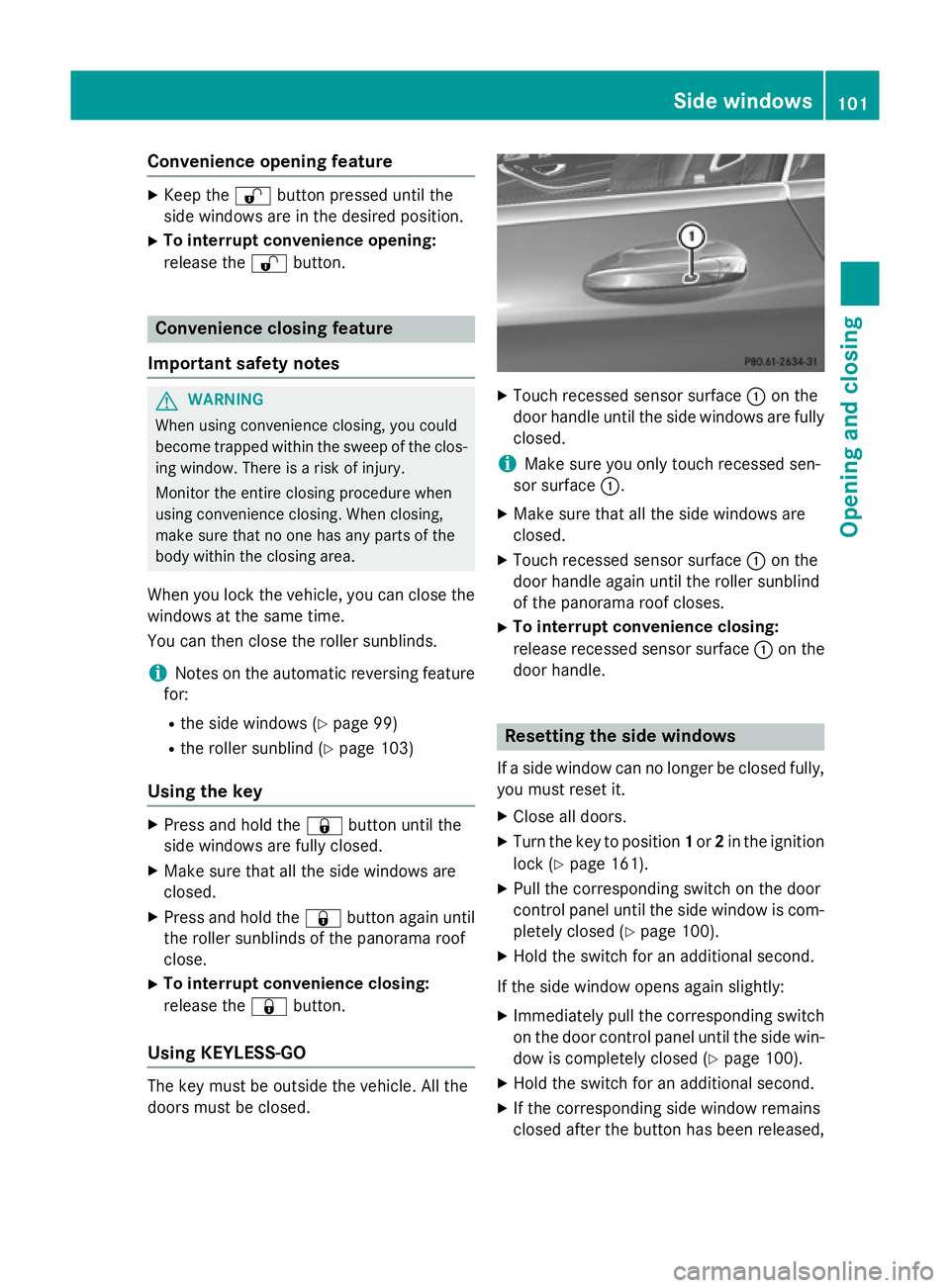
doors must be closed. X
Touch recessed sensor surface :on the
door handle until the side windows are fully
closed.
i Make sure you only touch recessed sen-
sor surface :.
X Make sure that all the side windows are
closed.
X Touch recessed sensor surface :on the
door handle again until the roller sunblind
of the panorama roof closes.
X To interrupt convenience closing:
release recessed sensor surface :on the
door handle. Resetting the side windows
If a side window can no longer be closed fully, you must reset it.
X Close all doors.
X Turn the key to position 1or 2in the ignition
lock (Y page 161).
X Pull the corresponding switch on the door
control panel until the side window is com- pletely closed (Y page 100).
X Hold the switch for an additional second.
If the side window opens again slightly: X Immediately pull the corresponding switch
on the door control panel until the side win-
dow is completely closed (Y page 100).
X Hold the switch for an additional second.
X If the corresponding side window remains
closed after the button has been released, Side windows
101Opening and closing Z
Page 120 of 417
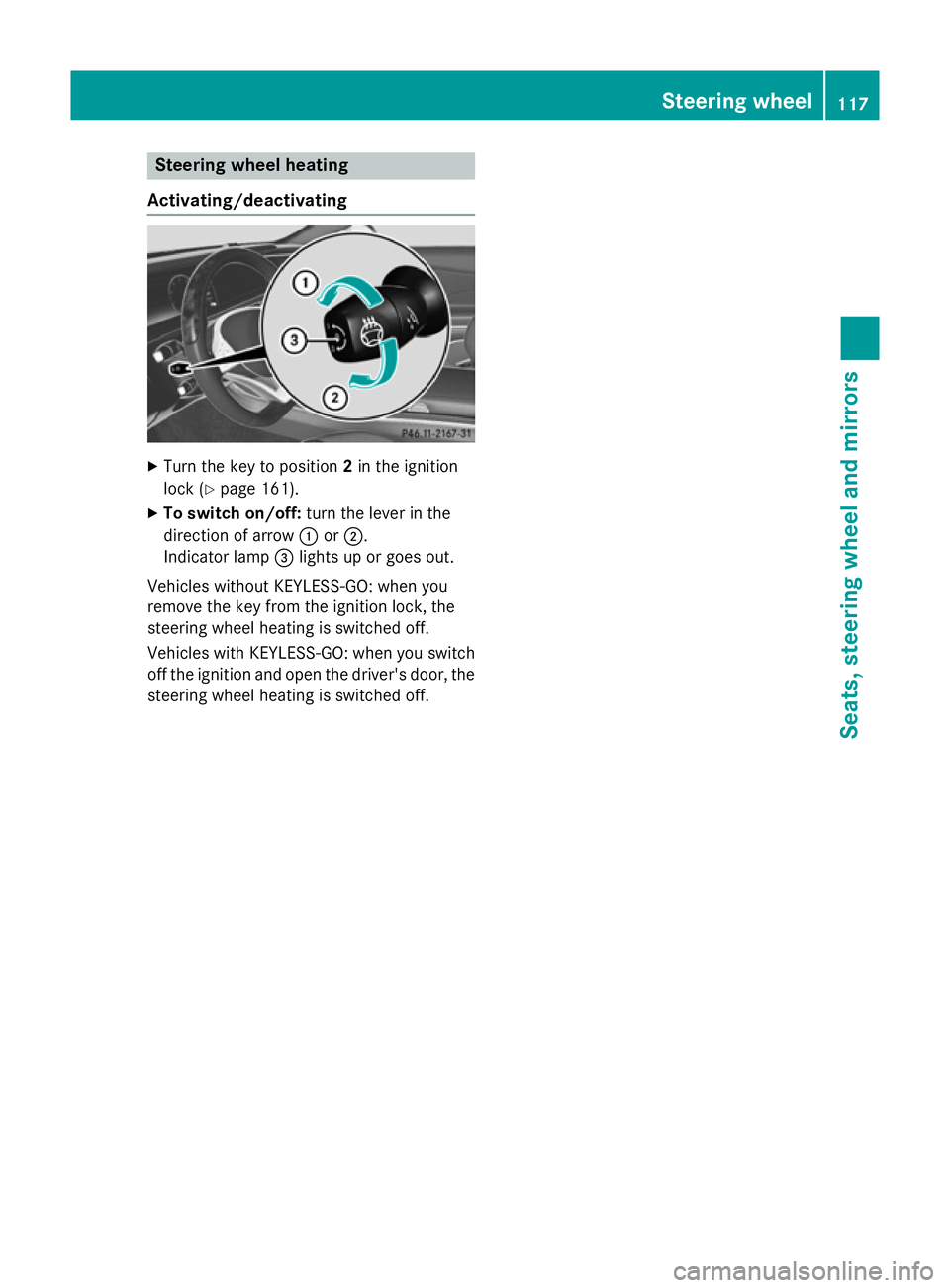
Steering wheel heating
Activating/deactivating X
Turn the key to position 2in the ignition
lock (Y page 161).
X To switch on/off: turn the lever in the
direction of arrow :or;.
Indicator lamp =lights up or goes out.
Vehicles without KEYLESS-GO: when you
remove the key from the ignition lock, the
steering wheel heating is switched off.
Vehicles with KEYLESS-GO: when you switch
off the ignition and open the driver's door, the steering wheel heating is switched off. Steering wheel
117Seats, steering wheel and mirrors Z
Page 121 of 417
Problems with the steering wheel heating
Problem
Possible causes/consequences and
M
MSolutions The steering wheel
heating has switched
itself off prematurely or
cannot be switched on. The on-board voltage is too low because too many electrical con-
sumers are switched on.
X Switch off electrical consumers that you do not need, such as
the rear window heating or interior lighting. EASY-ENTRY/EXIT feature
Important safety notes G
WARNING
When the EASY-ENTRY/EXIT feature adjusts
the steering wheel and the driver's seat, you
and other vehicle occupants – particularly
children – could become trapped. There is a
risk of injury.
While the EASY-ENTRY/EXIT feature is mak-
ing adjustments, make sure that no one has
any body parts in the sweep of the seat and
the steering wheel.
If there is a risk of becoming trapped by
R the steering wheel: move the steering
wheel adjustment lever.
R the seat: press the switch for seat adjust-
ment.
The adjustment process is stopped.
Press one of the memory function position
switches. The adjustment process is stopped. G
WARNING
If children activate the EASY-ENTRY/EXIT fea- ture, they can become trapped, particularly
when unattended. There is a risk of injury.
When leaving the vehicle, always take the key with you and lock the vehicle. Never leave
children unattended in the vehicle. G
WARNING
If you drive off while the EASY-ENTRY/EXIT
feature is making adjustments, you could lose
control of the vehicle. There is a risk of an
accident. Always wait until the adjustment process is
complete before driving off.
The EASY-ENTRY/EXIT feature makes getting in and out of your vehicle easier.
You can activate and deactivate the EASY-
ENTRY/EXIT feature using COMAND Online
(see the separate operating instructions).
Position of the steering wheel and the
driver's seat when the EASY-ENTRY/
EXIT feature is active The steering wheel tilts upwards and the driv-
er's seat moves backwards if you:
R remove the key from the ignition lock
R with KEYLESS-GO: open the driver's door;
KEYLESS-GO must be in position 1
R with the key: open the driver's door; the
key must be in position 0or 1in the ignition
lock (Y page 161)
R open the driver's door when the ignition is
switched off
i The steering wheel only tilts upwards and
the driver's seat only moves backwards if
the driving position is stored after seat or
steering wheel adjustment.
The last position of the steering wheel or seat is stored if:
R the ignition is switched off
R the setting is stored using the memory
function (Y page 123)
i The steering wheel only moves upwards if
it has not already reached the upper stop. 118
Steering wheelSeats, steering wheel and mirrors
Page 122 of 417
The driver's seat moves backwards unless
it is already in the rearmost position.
Position of the steering wheel and the
driver's seat for driving The steering wheel and the driver's seat are
moved to the previously set position if:
R the driver's door is closed and you insert
the key into the ignition lock
R you close the driver's door when the igni-
tion is switched on
R you press the Start/Stop button once on
vehicles with KEYLESS-GO
i The steering wheel and the driver's seat
only return to the last set position when the
driving position is stored after seat or steer-
ing wheel adjustment.
The last position of the steering wheel or seat is stored if:
R the ignition is switched off
R the setting is stored using the memory
function (Y page 123)
Crash-responsive EASY-EXIT feature If the crash-responsive EASY-EXIT feature is
triggered in an accident, the steering column
will move upwards when the driver's door is
opened or the key is removed from the igni-
tion lock. This makes it easier to exit the vehi-
cle and rescue the occupants.
The crash-responsive EASY-EXIT feature is
only operational if the EASY-EXIT/ENTRY fea-
ture is activated in COMAND Online (see the
separate operating instructions). Mirrors
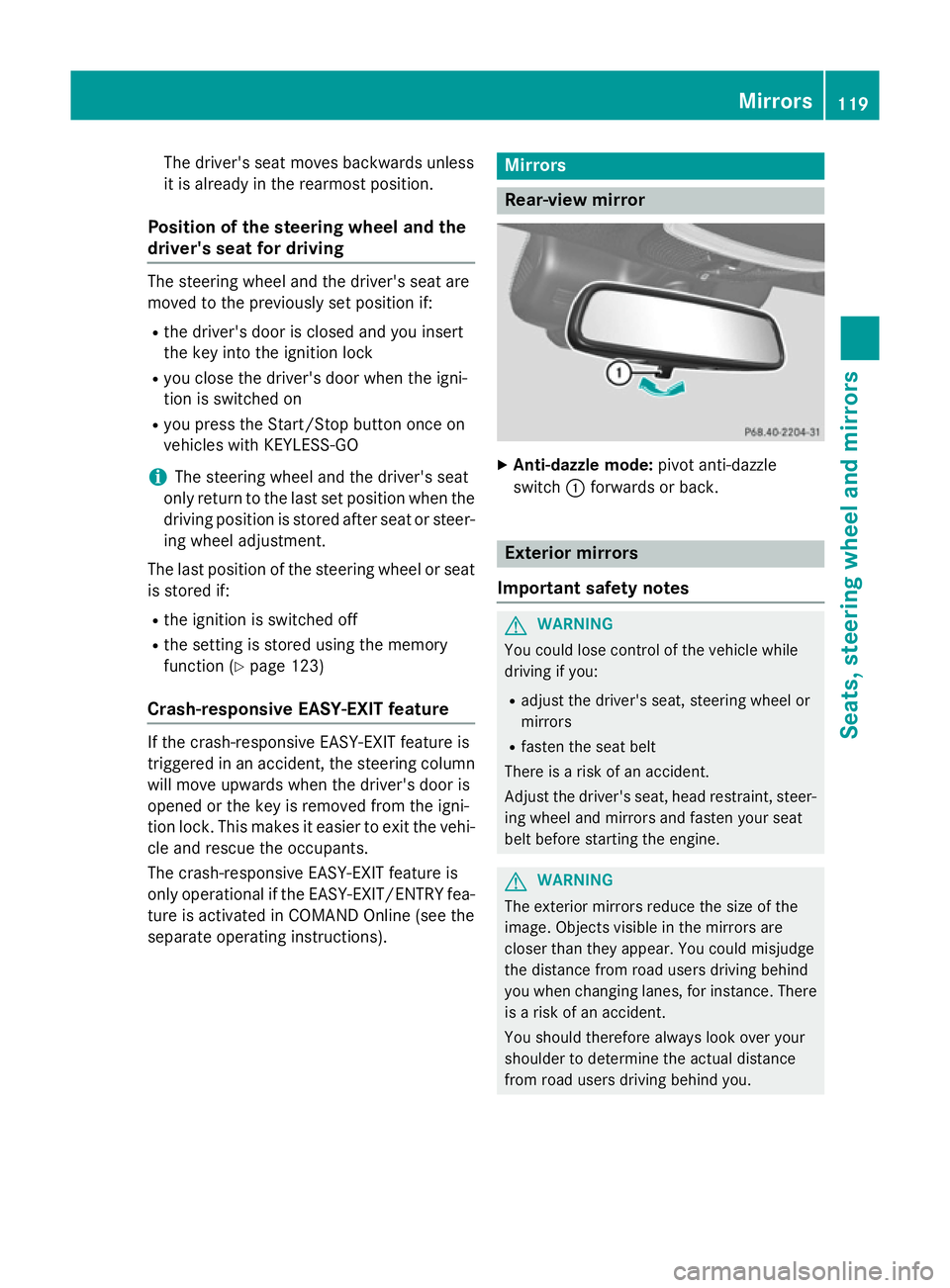
Rear-view mirror
X
Anti-dazzle mode: pivot anti-dazzle
switch :forwards or back. Exterior mirrors
Important safety notes G
WARNING
You could lose control of the vehicle while
driving if you:
R adjust the driver's seat, steering wheel or
mirrors
R fasten the seat belt
There is a risk of an accident.
Adjust the driver's seat, head restraint, steer-
ing wheel and mirrors and fasten your seat
belt before starting the engine. G
WARNING
The exterior mirrors reduce the size of the
image. Objects visible in the mirrors are
closer than they appear. You could misjudge
the distance from road users driving behind
you when changing lanes, for instance. There is a risk of an accident.
You should therefore always look over your
shoulder to determine the actual distance
from road users driving behind you. Mirrors
119Seats, steering wheel and mirrors Z
Page 138 of 417
Replacing the wiper blades
Moving the wiper blades to a vertical posi-
tion
On vehicles without KEYLESS-GO:
X Turn the key to position 0in the ignition
lock (Y page 161).
X Set the windscreen wipers to the °
position.
X Turn the key to position 1in the ignition
lock (Y page 161).
X As soon as the wiper arms are vertical to
the bonnet, turn the key to position 0in the
ignition lock (Y page 161).
X Remove the key.
X Fold the wiper arms away from the wind-
screen until you feel them snap into place.
On vehicles with KEYLESS-GO: X Switch off the engine.
X Remove your foot from the brake pedal.
X Set the windscreen wipers to position
°.
X Press the Start/Stop button repeatedly
until the windscreen wipers start.
X When the wiper arms have reached the ver-
tical position, press the Start/Stop button
repeatedly until the windscreen wipers
stop.
X Fold the wiper arms away from the wind-
screen until you feel them snap into place.
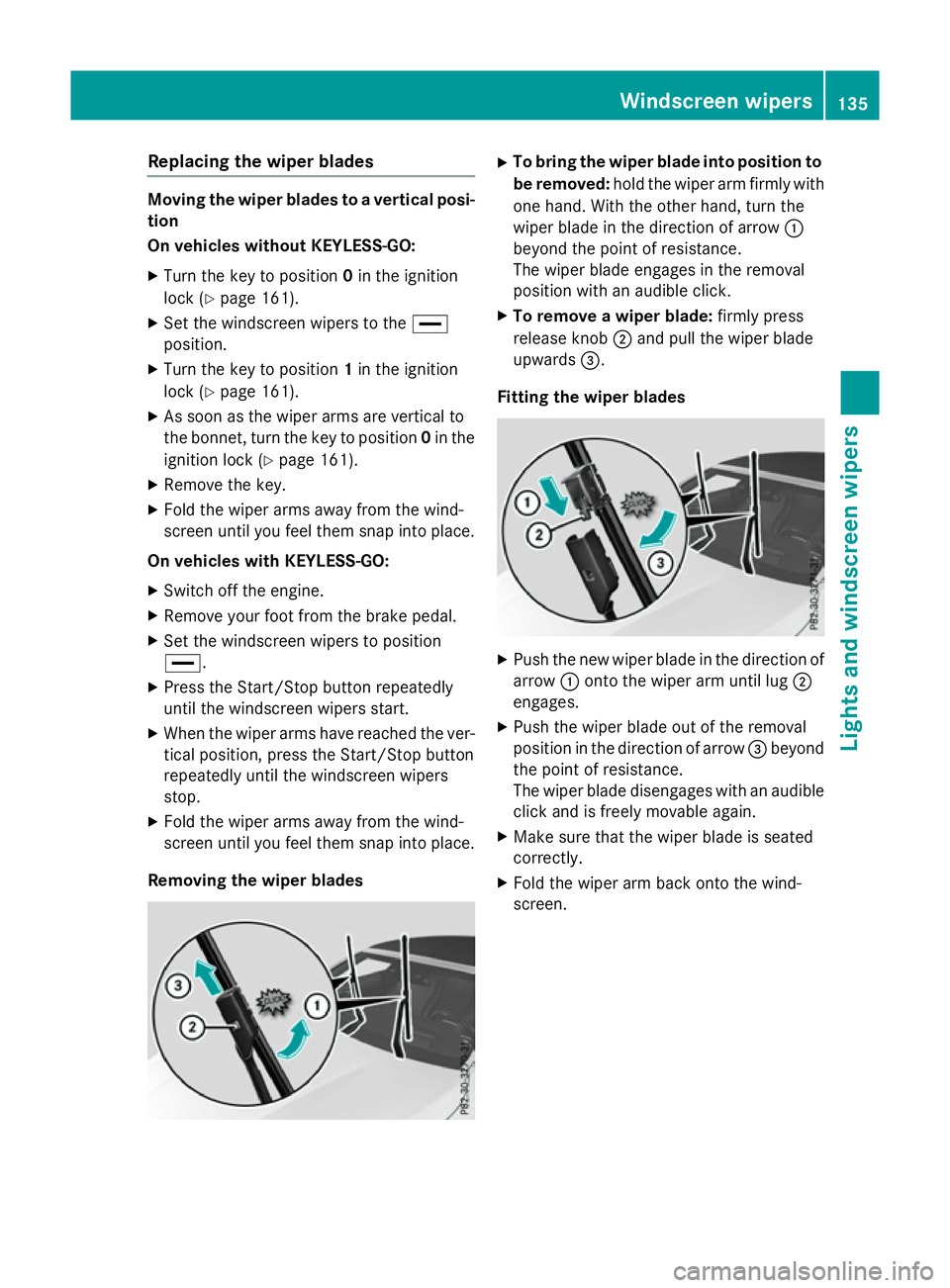
Removing the wiper blades X
To bring the wiper blade into position to
be removed: hold the wiper arm firmly with
one hand. With the other hand, turn the
wiper blade in the direction of arrow :
beyond the point of resistance.
The wiper blade engages in the removal
position with an audible click.
X To remove a wiper blade: firmly press
release knob ;and pull the wiper blade
upwards =.
Fitting the wiper blades X
Push the new wiper blade in the direction of
arrow :onto the wiper arm until lug ;
engages.
X Push the wiper blade out of the removal
position in the direction of arrow =beyond
the point of resistance.
The wiper blade disengages with an audible
click and is freely movable again.
X Make sure that the wiper blade is seated
correctly.
X Fold the wiper arm back onto the wind-
screen. Windscreen wipers
135Lights and windscreen wipers Z
Page 165 of 417
the case if you are not depressing the brake
pedal.
If you depress the brake pedal and press the
Start/Stop button, the engine starts immedi-
ately.
A check which periodically establishes a radio
connection between the vehicle and the key
determines whether a valid key is in the vehi- cle. This occurs, for example, when starting
the engine.
To start the vehicle without actively using the
key:
R the Start/Stop button must be inserted in
the ignition lock
R the key must be in the vehicle
R the vehicle must not be locked with the key
or KEYLESS-GO (Y page 85)
Do not keep the key:
R with electronic devices, e.g. a mobile
phone or another key
R with metallic objects, e.g. coins or metal
film
R inside metallic objects, e.g. a metal case
This can affect the key's functionality.
If you lock the vehicle with the key's remote
control or with KEYLESS-GO, after a short
time:
R you will not be able to switch on the ignition
with the Start/Stop button
R you will not be able to start the engine with
the Start/Stop button until the vehicle is
unlocked again
If you lock the vehicle centrally using the but- ton on the front door (Y page 91), you can
continue to start the engine with the Start/
Stop button.
The engine can be switched off while the vehi-
cle is in motion by pressing and holding the
Start/Stop button for three seconds. This
function operates independently of the ECO
start/stop automatic engine switch-off func-
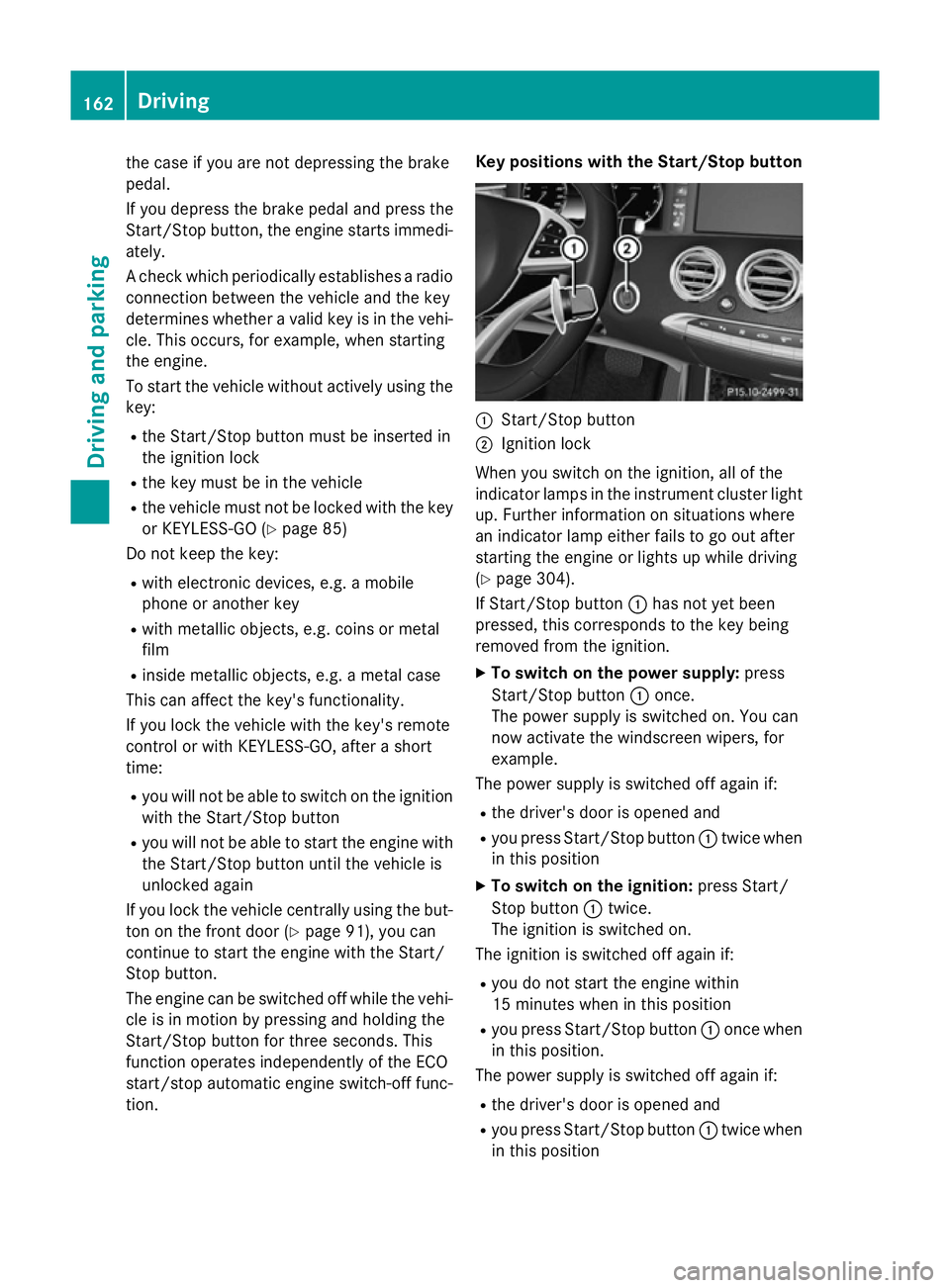
tion. Key positions with the Start/Stop button
:
Start/Stop button
; Ignition lock
When you switch on the ignition, all of the
indicator lamps in the instrument cluster light up. Further information on situations where
an indicator lamp either fails to go out after
starting the engine or lights up while driving
(Y page 304).
If Start/Stop button :has not yet been
pressed, this corresponds to the key being
removed from the ignition.
X To switch on the power supply: press
Start/Stop button :once.
The power supply is switched on. You can
now activate the windscreen wipers, for
example.
The power supply is switched off again if:
R the driver's door is opened and
R you press Start/Stop button :twice when
in this position
X To switch on the ignition: press Start/
Stop button :twice.
The ignition is switched on.
The ignition is switched off again if:
R you do not start the engine within
15 minute s when inthis position
R you press Start/Stop button :once when
in this position.
The power supply is switched off again if:
R the driver's door is opened and
R you press Start/Stop button :twice when
in this position 162
DrivingDriving an
d parking