check engine light MERCEDES-BENZ S-CLASS COUPE 2015 Owners Manual
[x] Cancel search | Manufacturer: MERCEDES-BENZ, Model Year: 2015, Model line: S-CLASS COUPE, Model: MERCEDES-BENZ S-CLASS COUPE 2015Pages: 417, PDF Size: 13.42 MB
Page 11 of 417
Convenience opening feature
.......... 100
Convenience opening/closing (air-
recirculation mode) ...........................146
Coolant (engine)
Checking the level ......................... 342
Display message ............................ 283
Important safety notes .................. 409
Temperature gauge ........................ 245
Warning lamp ................................. 310
Coolbox .............................................. 326
Cooling
see Climate control
Copyright ............................................. 28
Cornering light function
Display message ............................ 280
Function/notes ............................ .129
Crash-responsive emergency light-
ing ....................................................... 133
Crosswind Assist (vehicles with
MAGIC BODY CONTROL) ................... 207
Crosswind Assist (vehicles with-
out MAGIC BODY CONTROL) ...............77
Cruise control
Calling up the speed last store d.... 190
Cruise control lever ....................... 189
Deactivating ................................... 191
Display message ............................ 293
Driving system ............................... 189
General notes ................................ 189
Important safety notes .................. 189
LIM indicator lamp ......................... 189
Selecting ........................................ 190
Setting a speed .............................. 191
Storing and maintaining current
speed ............................................. 190
Cup holder
Centre console .............................. 322
Important safety notes .................. 322
Rear compartment ......................... 323 D
Data see Technical data
Data carrier
Selecting ........................................ 254
Daytime driving lights
Display message ............................ 282 Function/note
s............................. 127
Dealership
see Qualified specialist workshop
Declarations of conformity ................. 25
Diagnostics connection ...................... 25
Digital speedometer ......................... 251
Dipped-beam headlamps
Display message ............................ 280
Setting for driving abroad (sym-
metrical) ........................................ 126
Setting for driving on the right/
left ................................................. 263
Switching on/of f........................... 127
DIRECT SELECT lever
Automatic transmission ................. 169
Display
see Display message
see Warning and indicator lamps
Display message
Driving system s............................. 287
Display messages
ASSYST PLU S................................ 344
Calling up (on-board computer) ..... 266
Engine ............................................ 283
General information ....................... 266
Hiding (on-board computer) ........... 266
Introduction ................................... 266
Key ................................................ 301
Lights ............................................. 280
Safety systems .............................. 267
Tyres .............................................. 295
Vehicle ........................................... 297
Distance warning function
Function/note s................................ 73
Distance warning signal (warning
lamp) .................................................. 312
DISTRONIC PLUS
Activating ....................................... 196
Activation conditions ..................... 196
Cruise control lever ....................... 196
Deactivating ................................... 201
Display message ............................ 291
Displays in the instrument cluster .. 200 Driving tip s.................................... 202
Driving with DISTRONIC PLUS ....... 197
Function/note s............................. 194
Important safety notes .................. 195
Selecting ........................................ 196 8
Index
Page 16 of 417
Using ............................................. 387
Jump starting (engine) ......................366 K
Key Changing the battery ....................... 88
Checking the battery ....................... 88
Convenience closing feature .......... 101
Convenience opening feature ....... .100
Display message ............................ 301
Door central locking/unlocking ....... 85
Emergency key element ................... 87
Important safety notes .................... 84
KEYLESS-GO start function .............. 86
Loss ................................................. 89
Modifying the programming ............. 86
Overview .......................................... 84
Positions (ignition lock) ................. 161
Problem (malfunction) ..................... 89
Starting the engine ........................ 163
Key positions
Key ................................................ 161
Start/Stop button .......................... 161
KEYLESS-GO
Convenience closing ..................... .101
Deactivation ..................................... 85
General notes .................................. 85
Locking ............................................ 85
Start function ................................... 86
Unlocking ......................................... 85
Kickdown
Driving tips ................................... .173
Kneebag ............................................... 50 L
Lamps see Warning and indicator lamps
Lane Keeping Assist
see Active Lane Keeping Assist
Licence plate lamp (display mes-
sage) ................................................... 281
Light sensor (display message) ....... 282
Lighting
see Lights Lights
Activating/deactivating the Intel-
ligent Light System ........................ 262
Active light function ....................... 129
Adaptive Highbeam Assist PLUS .... 130
Automatic headlamp mode ............ 127
Cornering light function ................. 129
Dipped-beam headlamps .............. .127
Driving abroad ............................... 126
Foglamps (extended range) ........... 130
General notes ................................ 126
Hazard warning lamps ................... 128
Headlamp flasher ........................... 128
Intelligent Light System (func-
tion) ............................................... 129
Light switch ................................... 126
Main-beam headlamps ................... 128
Misted up headlamps .................... 132
Motorway mode ............................ .130
Parking lamps ................................ 128
Rear foglamp ................................. 127
Setting exterior lighting ................. 126
Side lamps ..................................... 127
Switching the spotlight on/off ....... 263
Turn signals ................................... 128
see Interior lighting
see Replacing bulbs
LIM indicator lamp
Cruise control ................................ 189
DISTRONIC PLUS ........................... 196
Variable SPEEDTRONIC ................. 192
Limiting the speed
see SPEEDTRONIC
Loading guidelines ............................ 316
Locking
see Central locking
Locking (doors)
Automatic ........................................ 92
Emergency locking ........................... 93
From inside (central locking but-
ton) ................................................. .91
Locking centrally
see Central locking
Luggage net hooks ............................ 321
Lumbar support
Adjusting the 4-way lumbar sup-
port ................................................ 113 Index
13
Page 46 of 417
Important safety notes
G
WARNING
If the restraint system is modified, it may no
longer work as intended. The restraint system
may then not perform its intended protective function by failing in an accident or triggering
unexpectedly, for example. There is an
increased risk of injury, possibly even fatal.
Never modify parts of the restraint system. Do not attempt to modify the wiring as well as
electronic components or their software.
If it is necessary to modify an airbag system to
accommodate a person with disabilities, con- tact a Mercedes-Benz Service Centre for
details. Restraint system warning lamp
The functions of the restraint system are
checked after the ignition is switched on and
at regular intervals while the engine is run-
ning. Therefore, malfunctions can be detec-
ted in good time.
The 6 restraint system warning lamp in
the instrument cluster lights up when the igni- tion is switched on. It goes out no later than afew seconds after the vehicle is started. The
components of the restraint system are in
operational readiness.
A malfunction has occurred if the 6
restraint system warning lamp:
R does not light up after the ignition is
switched on
R does not go out after a few seconds with
the engine running
R lights up again while the engine is running G
WARNING
If the restraint system is malfunctioning,
restraint system components may be trig-
gered unintentionally or might not be trig-
gered at all in the event of an accident with a high rate of vehicle deceleration. This can
effect belt tensioners or airbags, for example. There is an increased risk of serious or even
fatal injuries.
Have the restraint system checked and
repaired immediately at a qualified specialist
workshop.
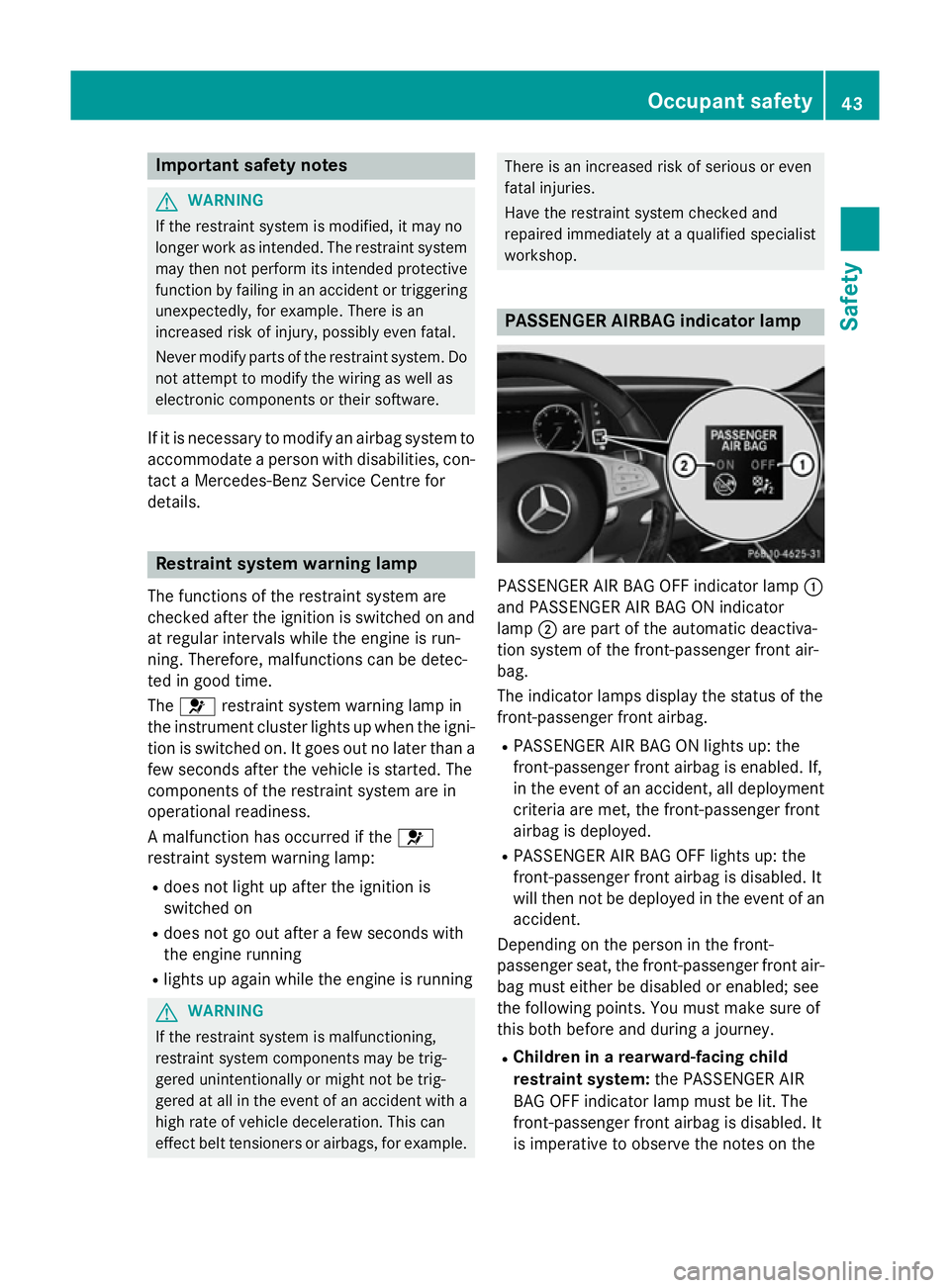
PASSENGER AIRBAG indicator lamp
PASSENGER AIR BAG OFF indicator lamp
:
and PASSENGER AIR BAG ON indicator
lamp ;are part of the automatic deactiva-
tion system of the front-passenger front air-
bag.
The indicator lamps display the status of the
front-passenger front airbag.
R PASSENGER AIR BAG ON lights up: the
front-passenger front airbag is enabled. If,
in the event of an accident, all deployment
criteria are met, the front-passenger front
airbag is deployed.
R PASSENGER AIR BAG OFF lights up: the
front-passenger front airbag is disabled. It
will then not be deployed in the event of an
accident.
Depending on the person in the front-
passenger seat, the front-passenger front air-
bag must either be disabled or enabled; see
the following points. You must make sure of
this both before and during a journey.
R Children in a rearward-facing child
restraint system: the PASSENGER AIR
BAG OFF indicator lamp must be lit. The
front-passenger front airbag is disabled. It
is imperative to observe the notes on the Occupant safety
43Safety Z
Page 73 of 417
override the laws of physics. Driving safety
systems are merely aids designed to assist
driving. You are responsible for maintaining
the distance to the vehicle in front, for vehicle
speed, for braking in good time, and for stay- ing in lane. Always adapt your driving style to
suit the prevailing road and weather condi-
tions and maintain a safe distance from the
vehicle in front. Drive carefully.
The driving safety systems described only
work as effectively as possible when there is
adequate contact between the tyres and the
road surface. Please pay special attention to
the notes on tyres, recommended minimum
tyre tread depths etc. (Y page 376).
In wintry driving conditions, always use winter
tyres (M+S tyres) and, if necessary, snow
chains. Only in this way will the driving safety
systems described in this section work as
effectively as possible. ABS (Anti-lock Braking System)
General notes ABS regulates brake pressure in such a way
that the wheels do not lock when you brake.
This allows you to continue steering the vehi- cle when braking.
The ! ABS warning lamp in the instrument
cluster lights up when the ignition is switched on. It goes out when the engine is running.
ABS works from a speed of about 8 km/h,
regardless of road-surface conditions. ABS
works on slippery surfaces, even when you
only brake gently.
Important safety notes i
Observe the "Important safety notes" sec-
tion (Y page 69). G
WARNING
If ABS is faulty, the wheels could lock when
braking. The steerability and braking charac-
teristics may be severely impaired. Addition-
ally, further driving safety systems are deac- tivated. There is an increased danger of skid-
ding and accidents.
Drive on carefully. Have ABS checked imme-
diately at a qualified specialist workshop.
If ABS is malfunctioning, other systems,
including driving safety systems, will also
become inoperative. Observe the information on the ABS warning lamp (Y page 305) and
display messages which may be shown in the
instrument cluster (Y page 267).
Brakes X
If ABS intervenes: continue to depress the
brake pedal with force until the braking sit- uation is over.
X To make a full brake application:
depress the brake pedal with full force.
If ABS intervenes when braking, you will feel a
pulsing in the brake pedal.
The pulsating brake pedal can be an indica-
tion of hazardous road conditions; this serves as a reminder to take extra care while driving. BAS (Brake Assist)
General notes BAS operates in emergency braking situa-
tions. If you depress the brake pedal quickly,
BAS automatically boosts the braking force,
thus shortening the stopping distance.
Important safety notes i
Observe the "Important safety notes" sec-
tion (Y page 69). G
WARNING
If BAS is malfunctioning, the braking distance
in an emergency braking situation is
increased. There is a risk of accident.
In an emergency braking situation, depress
the brake pedal with full force. ABS prevents
the wheels from locking. 70
Driving safety systemsSafety
Page 79 of 417
Important safety notes
G
WARNING
If ESP ®
is malfunctioning, ESP ®
is unable to
stabilise the vehicle. In addition, other driving
safety systems are switched off. This increa-
ses the risk of skidding and an accident.
Drive on carefully. Have ESP ®
checked at a
qualified specialist workshop.
Vehicles without 4MATIC: when towing your
vehicle with the rear axle raised, observe the
notes on ESP ®
(Y page 371).
When ESP ®
is deactivated, the åESP®
OFF warning lamp lights up continuously.
If the ÷ warning lamp lights up continu-
ously, ESP ®
is not available due to a malfunc-
tion.
Observe the information on warning lamps
(Y page 307) and display messages which
may be shown in the instrument cluster
(Y page 267).
Only use wheels with the recommended tyre
sizes. Only then will ESP ®
function properly.
Characteristics of ESP ®General notes
If the
÷ ESP warning lamp goes out before
beginning the journey, ESP ®
is automatically
active.
If ESP ®
intervenes, the ÷ESP®
warning
lamp flashes in the instrument cluster.
If ESP ®
intervenes:
X Do not deactivate ESP ®
under any circum-
stances.
X When pulling away, only depress the accel-
erator pedal as far as is necessary.
X Adapt your driving style to suit the prevail-
ing road and weather conditions.
ECO start/stop function
The ECO start/stop function switches the
engine off automatically if the vehicle stops
moving. When pulling away again, the engine starts automatically. ESP
®
remains in its pre-
viously selected status. Example:if ESP®
was deactivated before the engine was
switched off, ESP ®
remains deactivated when
the engine is switched on again.
Deactivating/activating ESP ® Important safety notes
i Observe the "Important safety notes" sec-
tion (Y page 69).
You can select between the following sta-
tuses of ESP ®
:
R ESP ®
is activated
R ESP ®
is deactivated G
WARNING
If you deactivate ESP ®
, ESP ®
no longer sta-
bilises the vehicle. There is an increased risk
of skidding and an accident.
Only deactivate ESP ®
in the situations descri-
bed in the following.
It may be best to deactivate ESP ®
in the fol-
lowing situations:
R when using snow chains
R in deep snow
R on sand or gravel
i Activate ESP ®
as soon as the situations
described above no longer apply. ESP ®
will
otherwise not be able to stabilise the vehi-
cle if the vehicle starts to skid or a wheel
starts to spin.
Deactivating/activating ESP ®
You can deactivate or activate ESP ®
via the
on-board computer (Y page 258).
ESP ®
deactivated:
The å ESP®
OFF warning lamp in the
instrument cluster lights up.
ESP ®
activated:
The å ESP®
OFF warning lamp in the
instrument cluster goes out. 76
Driving safety systemsSafety
Page 88 of 417
the boot. Otherwise, the key may not be
detected, e.g. when starting the engine using
the Start/Stop button.
A check which periodically establishes a radio
connection between the vehicle and the key
determines whether a valid key is in the vehi- cle. This occurs, for example:
R when starting the engine
R whilst driving
R when using HANDS-FREE ACCESS
R when the external door handles are
touched
R during convenience closing Key functions
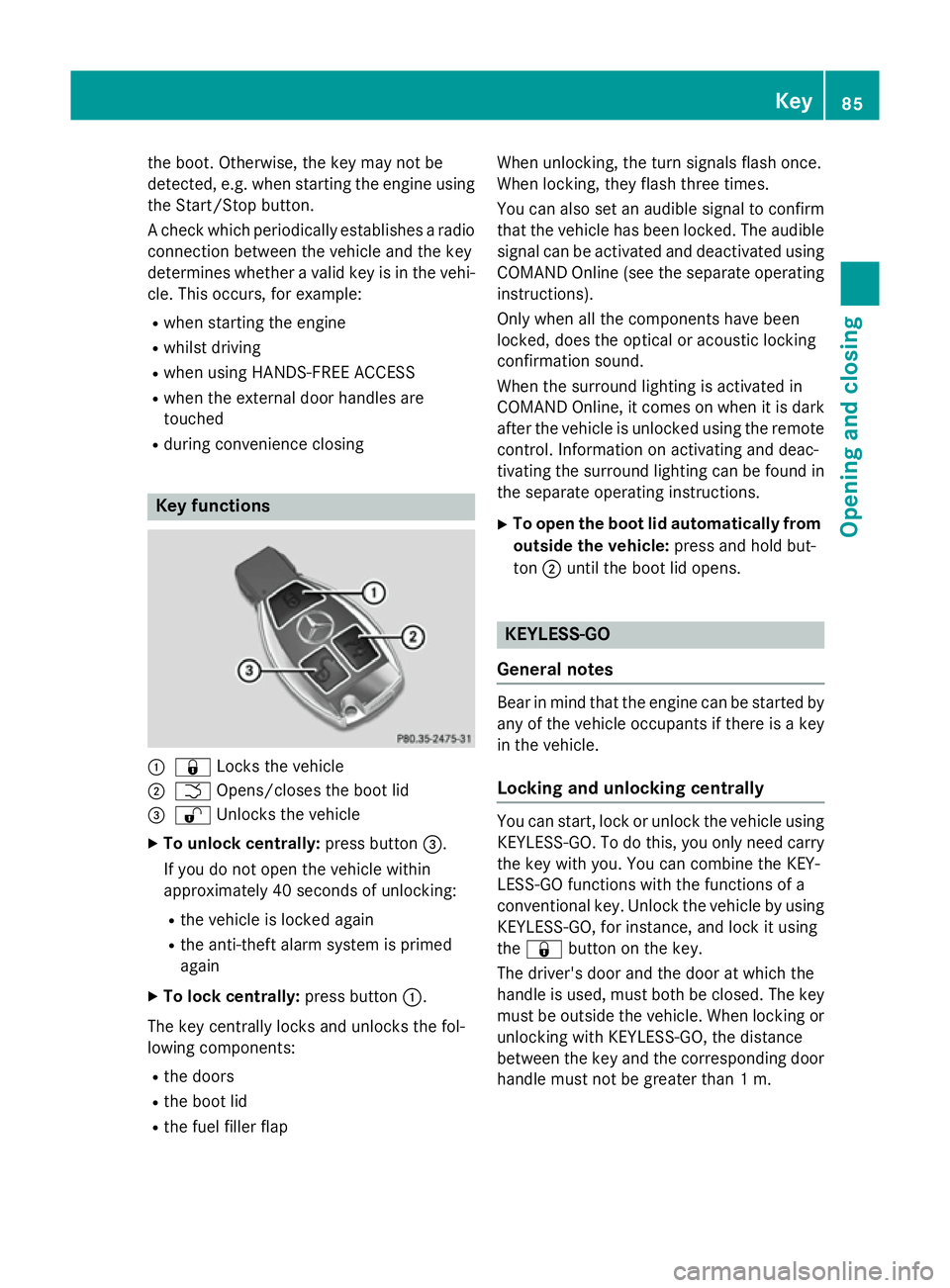
:
& Locks the vehicle
; F Opens/closes the boot lid
= % Unlocks the vehicle
X To unlock centrally: press button=.
If you do not open the vehicle within
approximately 40 second s of unlocking:
R the vehicle is locked again
R the anti-theft alarm system is primed
again
X To lock centrally: press button:.
The key centrally locks and unlocks the fol-
lowing components:
R the doors
R the boot lid
R the fuel filler flap When unlocking, the turn signals flash once.
When locking, they flash three times.
You can also set an audible signal to confirm
that the vehicle has been locked. The audible
signal can be activated and deactivated using COMAND Online (see the separate operating
instructions).
Only when all the components have been
locked, does the optical or acoustic locking
confirmation sound.
When the surround lighting is activated in
COMAND Online, it comes on when it is dark after the vehicle is unlocked using the remotecontrol. Information on activating and deac-
tivating the surround lighting can be found in
the separate operating instructions.
X To open the boot lid automatically from
outside the vehicle: press and hold but-
ton ;until the boot lid opens. KEYLESS-GO
General notes Bear in mind that the engine can be started by
any of the vehicle occupants if there is a key
in the vehicle.
Locking and unlocking centrally You can start, lock or unlock the vehicle using
KEYLESS-GO. To do this, you only need carry
the key with you. You can combine the KEY-
LESS-GO functions with the functions of a
conventional key. Unlock the vehicle by using KEYLESS-GO, for instance, and lock it using
the & button on the key.
The driver's door and the door at which the
handle is used, must both be closed. The key
must be outside the vehicle. When locking or unlocking with KEYLESS-GO, the distance
between the key and the corresponding door
handle must not be greater than 1 m. Key
85Opening and closing Z
Page 89 of 417

A check which periodically establishes a radio
connection between the vehicle and the key
determines whether a valid key is in the vehi- cle. This occurs, for example:
R when starting the engine
R whilst driving
R when using HANDS-FREE ACCESS
R when the external door handles are
touched
R during convenience closing X
To unlock the vehicle: touch the inner
surface of the door handle.
X To lock the vehicle: touch sensor sur-
face :or;.
Make sure that you do not touch the inner
surface of the door handle.
X Convenience closing feature: touch
recessed sensor surface ;for an exten-
ded period.
For further information on the convenience closing feature (Y page 101).
Deactivating If you do not intend to use a key for an exten-
ded period of time, you can deactivate the
KEYLESS-GO function of the key. The key will
then use very little power, thereby conserving battery power. For the purposes of activa-
tion/deactivation, the vehicle does not have
to be nearby. X
To deactivate: press the&button on
the key twice in rapid succession.
The battery check lamp of the key flashes
twice briefly and lights up once, then KEY-
LESS-GO is deactivated .
X To activate: press any button on the key or
insert the key into the ignition lock.
KEYLESS-GO and all of its associated fea-
tures are available again. KEYLESS-GO start function
Bear in mind that the engine can be started by any of the vehicle occupants if there is a key
in the vehicle. Changing the settings of the locking
system
You can change the settings of the locking
system. This means that only the driver's door and the fuel filler flap are unlocked when the
vehicle is unlocked. This is useful if you fre-
quently travel alone.
X To change the setting: press and hold
down the %and& buttons simulta-
neously for about six seconds until the bat- tery indicator lamp flashes twice
(Y page 88).
i If the setting of the locking system is
changed within the signal range of the vehi- cle, pressing the &or% button:
R locks or
R unlocks the vehicle
The key now functions as follows:
X To unlock the driver's door: press the
% button once.
X To unlock centrally: press the%but-
ton twice.
X To lock centrally: press the&button. 86
KeyOpening and closing
Page 93 of 417
Problem
Possible causes/consequences and
M
MSolutions The engine cannot be
started using the key. the on-board voltage is too low
X Switch off non-essential consumers, e.g. seat heating or interior
lighting, and try to start the engine again.
If this does not work: X Check the starter battery and charge it if necessary
(Y page 364).
or
X Jump-start the vehicle (Y page 366).
or
X Consult a qualified specialist workshop. The engine cannot be
started using the Start/
Stop button. The key is
in the vehicle. The vehicle is locked.
X Unlock the vehicle and try to start the vehicle again. The key battery is discharged or nearly discharged.
X Check the key battery (Y page 88) and replace it if necessary
(Y page 88).
If this does not work: X Start your vehicle with the key in the ignition lock. There is interference from a powerful source of radio waves.
X Start your vehicle with the key in the ignition lock. You have lost a key. X
Have the key deactivated at a qualified specialist workshop.
X Report the loss immediately to the vehicle insurers.
X If necessary, have the locks changed as well. You have lost the emer-
gency key element. X
Report the loss immediately to the vehicle insurers.
X If necessary, have the locks changed as well. Doors
Important safety notes
United Kingdom only: G
WARNING
When the double locks are activated, the
doors can no longer be opened from the
inside. People in the vehicle can no longer get out, e.g. in hazardous situations. There is a
risk of injury. Therefore, do not leave any people unsuper-
vised in the vehicle, particularly children, eld- erly people or people in need of special assis-
tance. Do not activate the double lock when
people are in the vehicle.
If the vehicle has been locked from the out-
side, the double lock function is activated as
standard. It is then not possible to open the
doors from inside the vehicle. You can deac-
tivate the double lock function by deactivat-
ing the interior motion sensor (Y page 82).90
DoorsOpening and closing
Page 103 of 417
G
WARNING
The reversing function does not react:
R to soft, light and thin objects, e.g. small fin-
gers
R while resetting
This means that the reversing feature cannot
prevent someone being trapped in these sit-
uations. There is a risk of injury.
When closing, make sure that no parts of the
body are in the closing area. If someone
becomes trapped, press the switch to open
the side window again. Opening and closing the side win-
dows
The switches for all side windows are located
on the driver's door. There is also a switch for
the front-passenger side window on the front- passenger door.
The switches on the driver's door take prec-
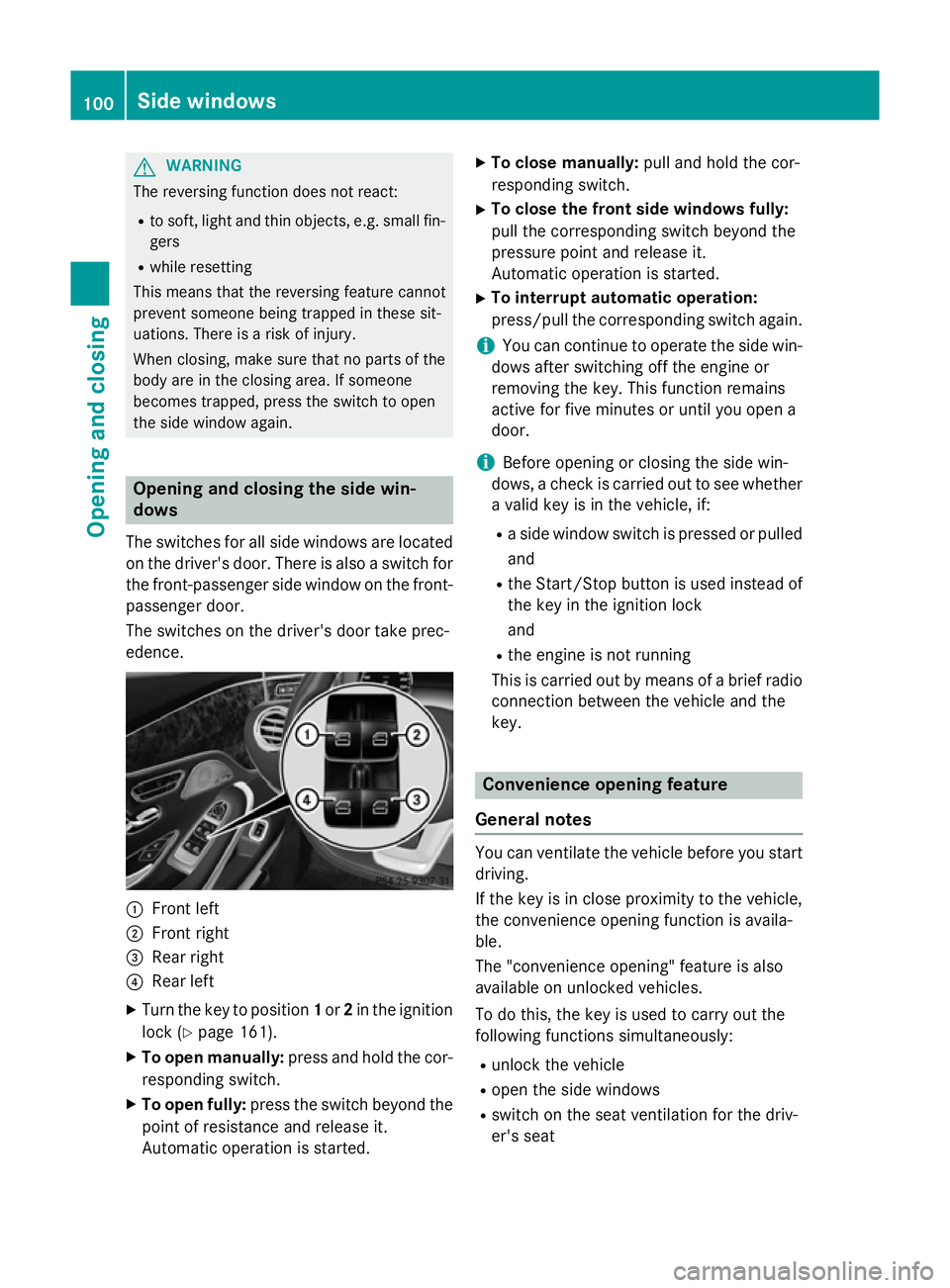
edence. :
Front left
; Front right
= Rear right
? Rear left
X Turn the key to position 1or 2in the ignition
lock (Y page 161).
X To open manually: press and hold the cor-
responding switch.
X To open fully: press the switch beyond the
point of resistance and release it.
Automatic operation is started. X
To close manually: pull and hold the cor-
responding switch.
X To close the front side windows fully:
pull the corresponding switch beyond the
pressure point and release it.
Automatic operation is started.
X To interrupt automatic operation:
press/pull the corresponding switch again.
i You can continue to operate the side win-
dows after switching off the engine or
removing the key. This function remains
active for five minutes or until you open a
door.
i Before opening or closing the side win-
dows, a check is carried out to see whether a valid key is in the vehicle, if:
R a side window switch is pressed or pulled
and
R the Start/Stop button is used instead of
the key in the ignition lock
and
R the engine is not running
This is carried out by means of a brief radio
connection between the vehicle and the
key. Convenience opening feature
General notes You can ventilate the vehicle before you start
driving.
If the key is in close proximity to the vehicle,
the convenience opening function is availa-
ble.
The "convenience opening" feature is also
available on unlocked vehicles.
To do this, the key is used to carry out the
following functions simultaneously:
R unlock the vehicle
R open the side windows
R switch on the seat ventilation for the driv-
er's seat 100
Side windowsOpening and closing
Page 111 of 417
Useful information
i This Owner's Manual describes all mod-
els, series and optional equipment for your
vehicle that were available at the time of
going to press. National variations are pos- sible. Note that your vehicle may not be
equipped with all of the functions descri-
bed. This is also the case for systems and
functions relevant to safety.
i Read the information on qualified special-
ist workshops: (Y page 26). Correct driver's seat position
G
WARNING
You could lose control of the vehicle while
driving if you:
R adjust the driver's seat, steering wheel or
mirrors
R fasten the seat belt
There is a risk of an accident.
Adjust the driver's seat, head restraint, steer-
ing wheel and mirrors and fasten your seat
belt before starting the engine. X
Observe the safety guidelines on seat
adjustment (Y page 109).
X Make sure that seat =is correctly adjus-
ted (Y page 110).
When adjusting the seat, make sure that:
R you are as far away from the driver's airbag
as possible
R you are sitting in a normal upright position
R you can fasten the seat belt properly
R you have moved the backrest to an almost
vertical position
R you have set the seat angle so that your
thighs are gently supported
R you can depress the pedals properly
X Check whether the head restraint is adjus-
ted correctly.
When doing so, make sure that you have
adjusted the head restraint so that the back
of your head is supported at eye level by the centre of the head restraint.
X Observe the safety guidelines on steering
wheel adjustment (Y page 116).
X Make sure that steering wheel :is adjus-
ted correctly (Y page 116).
When adjusting the steering wheel, make
sure that:
R you can hold the steering wheel with your
arms slightly bent
R you can move your legs freely
R you can see all the displays in the instru-
ment cluster clearly
X Observe the safety guidelines for seat belts
(Y page 44).
X Check whether you have fastened seat
belt ;properly (Y page 46).
The seat belt should:
R fit snugly across your body
R be routed across the middle of your shoul-
der
R be routed across your hips in the pelvic
area
X Before starting off, adjust the rear-view mir-
ror and the exterior mirrors so that you 108
Correct driver's seat positionSeats, steering wheel and mirrors