break MERCEDES-BENZ S-Class COUPE 2016 C217 User Guide
[x] Cancel search | Manufacturer: MERCEDES-BENZ, Model Year: 2016, Model line: S-Class COUPE, Model: MERCEDES-BENZ S-Class COUPE 2016 C217Pages: 410, PDF Size: 8.62 MB
Page 180 of 410
AMG high-performance and ceramic
brakes
The high-performanc ebrak esystem is only
available on Mercedes-AM Gvehicles.
The AM Gbrak esystems are designed for
heav yloads .This may lead to noise when
braking .This will depend on :
RSpeed
RBraking force
REnvironmental conditions, suc has temper-
atur eand humidit y
The wear of individual component sof th e
brak esystem, suc has th ebrak epads/lining s
or brak ediscs, depend son th eindividual driv -
ing style and operating conditions.
Fo rthis reason ,it is impossible to state a
mileage that will be valid under all circum -
stances. An aggressive driving style will lead
to high wear .You can obtain further informa-
tion about this from your authorize d
Mercedes-Benz Center.
New and replace dbrak epads and disc sonly
reac htheir optimum braking effec tafter sev -
eral hundre dkilometers of driving .Compen -
sat efor this by applyin ggreate rforce to th e
brak epedal .Kee pthis in mind, and adapt
your driving and braking accordingly during
this break-in period.
Excessive heav ybraking result sin corre-
spondingly high brak ewear . Observ eth e
brak ewear warning lamp in th einstrumen t
cluste rand note any brak estatus message s
in th emultifunction display. Especially for
high performance driving ,it is important to
maintai nand hav
eth eb
rak esystem checke d
regularly.
Driving onwet roads
Hydroplaning
If water has accumulated to acertain dept h
on th eroad surface, there is adanger of
hydroplaning occurring, eve nif:
Ryou driv eat low speeds.
Rth etires hav eadequat etread depth.
Fo rthis reason ,in th eevent of heav yrain or in
condition sin whic hhydroplaning may occur ,
you mus tdriv ein th efollowin gmanner:
Rlower your speed.
Ravoi druts.
Ravoi dsudde nsteering movement s.
Rbrakecarefully.
Driving onflooded roads
!Do no tdriv ethroug hflooded areas .
Chec kth edept hof any water before driving
throug hit.Drive slowly throug h standing
water. Otherwise, water may ente rth e
vehicl einterior or th eengin ecompartment.
This can damag eth eelectronic compo -
nent sin th eengin eor th eautomatic trans -
mission .Water can also be drawn in by th e
engine's air suction nozzles and this can
caus eengin edamage.
Winter driving
GWARNIN G
If you shif tdown on aslipper yroad surfac ein
an attemp tto increas eth eengine's braking
effect, th edrive wheels could lose their grip.
There is an increased danger of skiddin gand
accidents .
Do no tshif tdown for additional engin ebrak -
ing on aslipper yroad surface.
GDANGER
If th eexhaust pipe is blocke dor adequat e
ventilation is no tpossible, poisonous gase s
suc has carbon monoxide (CO) may ente rth e
vehicle. This is th ecase, e.g. if th evehicl e
178Driving tips
Driving and parking
Page 217 of 410
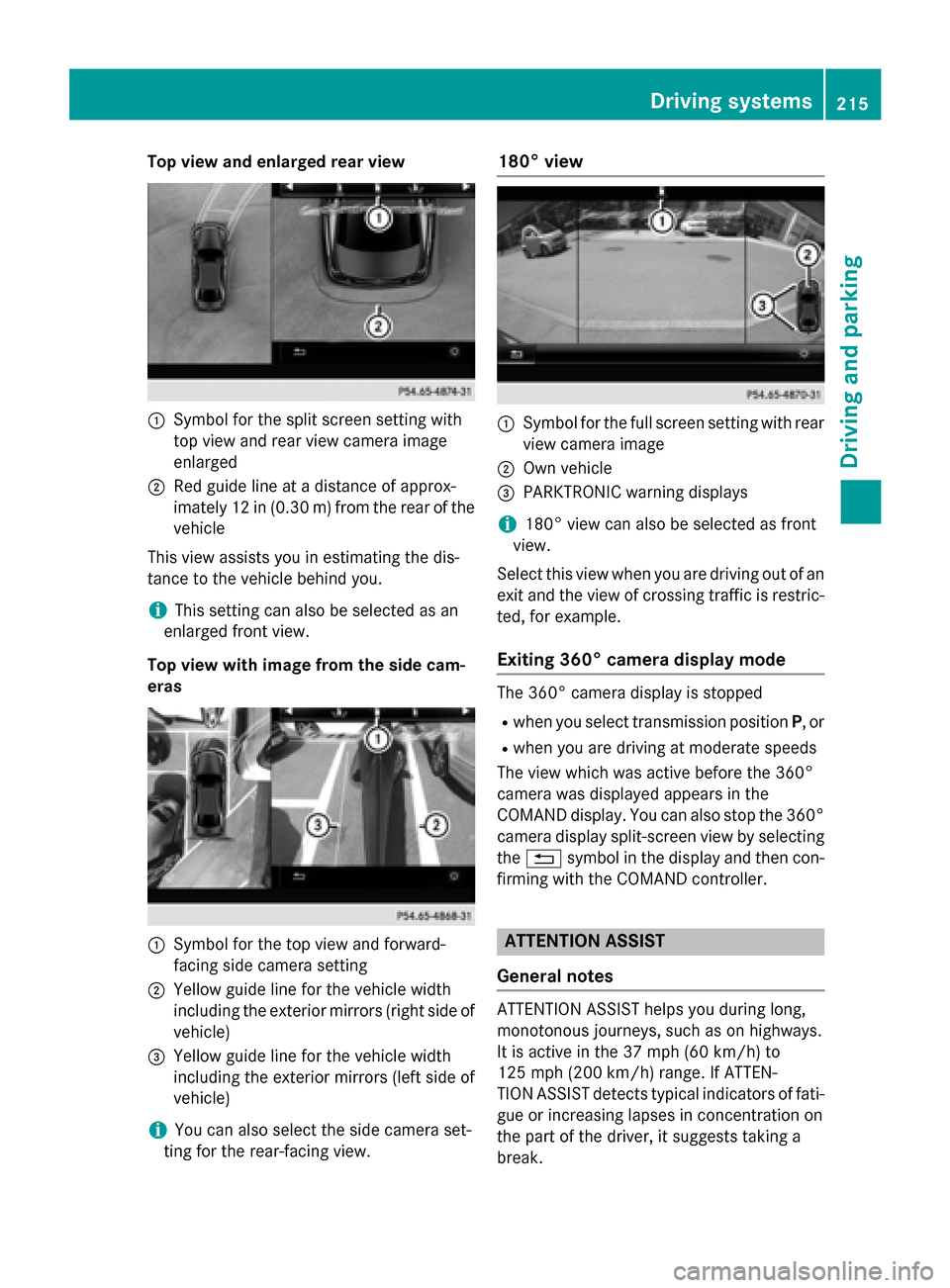
Top view and enlarged rear view
:Symbol for the split screen setting with
top view and rear view camera image
enlarged
;Red guide line at a distance of approx-
imately 12 in (0.30m) fromthe rear of the
vehicle
This view assists you in estimating the dis-
tance to the vehicle behind you.
iThis setting can also be selected as an
enlarged front view.
Top view with image from the side cam-
eras
:Symbol for the top view and forward-
facing side camera setting
;Yellow guide line for the vehicle width
including the exterior mirrors (right side of
vehicle)
=Yellow guide line for the vehicle width
including the exterior mirrors (left side of
vehicle)
iYou can also select the side camera set-
ting for the rear-facing view.
180° view
:Symbol for the full screen setting with rear
view camera image
;Own vehicle
=PARKTRONIC warning displays
i180° view can also be selected as front
view.
Select this view when you are driving out of an
exit and the view of crossing traffic is restric-
ted, for example.
Exiting 360° camera display mode
The 360° camera display is stopped
Rwhen you select transmission position P, or
Rwhen you are driving at moderate speeds
The view which was active before the 360°
camera was displayed appears in the
COMAND display. You can also stop the 360°
camera display split-screen view by selecting
the % symbol in the display and then con-
firming with the COMAND controller.
ATTENTION ASSIST
General notes
ATTENTION ASSIST helps you during long,
monotonous journeys, such as on highways.
It is active in the 37 mph (60 km/h) to
125 mph (200 km/h) range. If ATTEN-
TION ASSIST detects typical indicators of fati-
gue or increasing lapses in concentration on
the part of the driver, it suggests taking a
break.
Driving system s215
Driving an d parking
Z
Page 218 of 410
Important safety notes
ATTENTION ASSIST isonlyan aid to the
driv er.Itmight not always recogniz e fatigue
or increasing inattentiveness in time or fail to
recogniz e them at all. The system is not a
substitute for a well-rested and attentive
driv er.
The functionalit y of ATTENTION AS SIST is
restricted and warnings may bedelayed or
not occur at all:
Rifthe length of the journey isless than
appr oximately 30 minutes
Rifthe road cond ition ispoor, e.g. ifthe sur-
face isuneven or if there are potholes
Rifthere isa strong side wind
Rifyou have adopted a sporty driving style
wit h high cornering speeds or high rates of
acceleration
Rif you are predominantly driving slower
than 37 mph (60 km/h) or faster than
125 mph (200 km/h)
Rif you are driving with the active Steer
Assist of DI STRONIC PLUS
Rifthe time has been set incorrectly
Rin active driving situations, such as when
you change lanes or change your speed
The ATTENTION AS SISTtiredness assess-
ment isdeleted and restarted when continu-
ing the journey, if:
Ryou switch off the engine
Ryou take off your seat belt and open the
driver's door, e.g. for a change of drivers or
to take a break
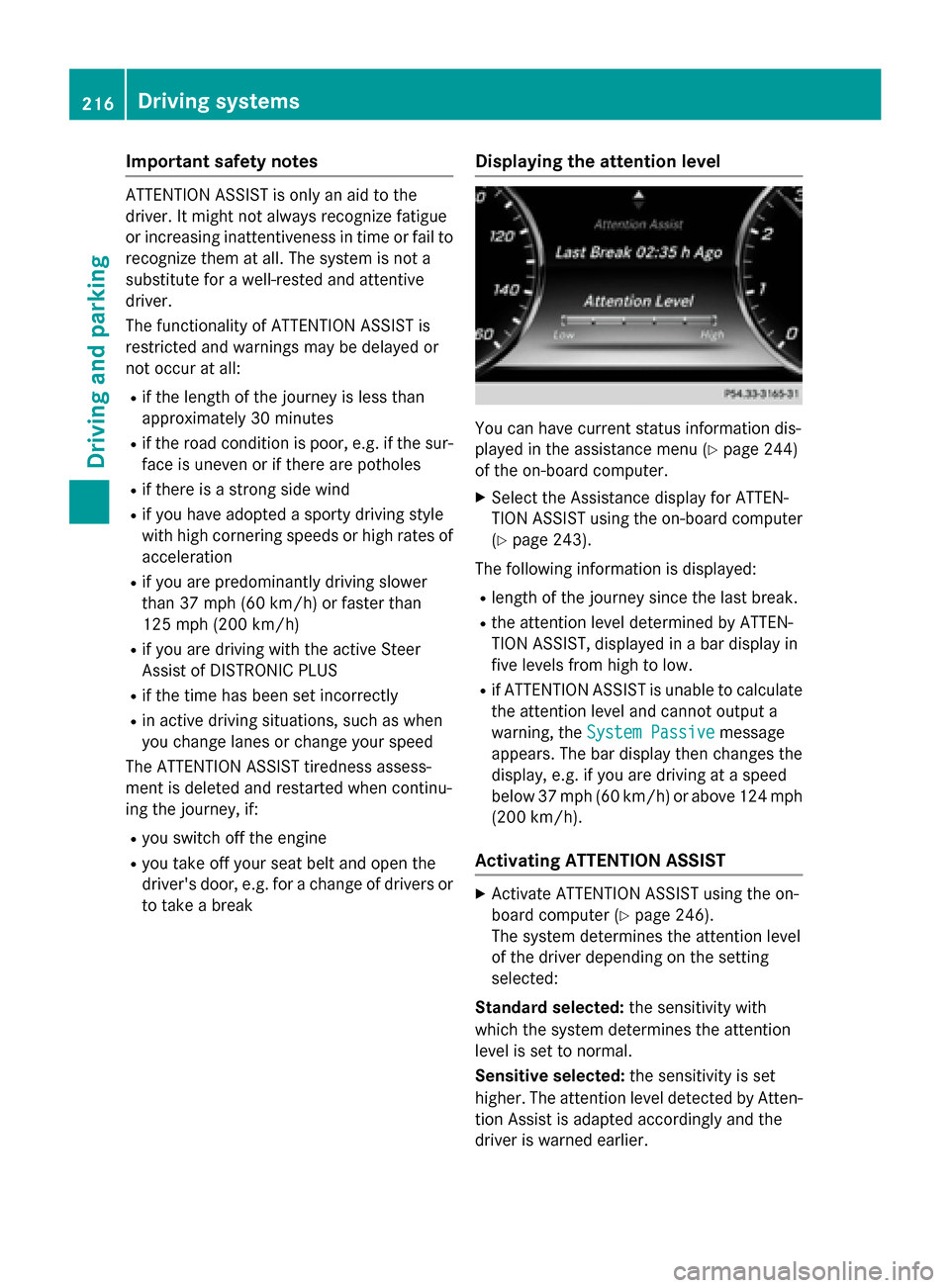
Displaying the attention level
You can have current status information dis-
played inthe assistance menu (
Ypage 244)
of the on-board computer.
XSe lect the Assistance display for ATTEN-
TION AS SISTusing the on-board computer
(
Ypage 243).
The following information is displayed:
Rlength of the journey since the last break.
Rthe attention level determined byATTEN-
TION AS SIST,disp layed ina bar display in
five levels from high to low.
Rif ATTENTION AS SIST isunableto calculate
the attention level and cannot output a
warning, the System Passive
message
appears. The bar display then changes the
display, e.g. ifyou are driving at a speed
below 37 mph (60 km/h)or above 124 mph
(200 km/h) .
Activating ATTENTION ASSIST
XActivateATTENTION ASSIST usin gth eon -
boar dcomputer (
Ypage 246).
The system determine sth eattention level
of th edriver depending on th e setting
selected:
Standar dselected: thesensitivit ywit h
whic hth esystem determine sth eattention
level is set to normal.
Sensit iveselected: thesensitivit yis set
higher. The attention level detecte dby Atten-
tion As sistis adapted accordingly and th e
driver is warned earlier .
216Driving systems
Driving and parking
Page 219 of 410
When ATTENTION ASSIST is deactivated, the
ésymbol appears in the multifunction
display in the assistance graphic display.
When ATTENTION ASSIST has been deactiva-
ted, it is automatically reactivated after the
engine has been stopped. The sensitivity
selected corresponds to the last selection
activated (standard/sensitive).
Warning in the multifunction display
If fatigue or increasing lapses in concentra-
tion are detected, a warning appears in the
multifunction display: Attention Assist:
Take a Break!
In addition to the message shown in the mul-
tifunction display, you will then hear a warn-
ing tone.
XIf necessary, take a break.
XConfirm the message by pressing the a
button on the steering wheel.
On long journeys, take regular breaks in good
time to allow yourself to rest properly. If you
do not take a break and ATTENTION ASSIST
continues to detect increasing lapses in con-
centration, you will be warned again after
15 minutes at the earliest. This will only hap-
pen if ATTENTION ASSIST still detects typical
indicators of fatigue or increasing lapses in
concentration.
If a warning is output in the multifunction dis-
play, COMAND performs a service station
search. You can select a service station and
navigation to this service station will then
begin. This function can be activated and
deactivated in COMAND.
Traffic Sign Assist
General notes
Traffic Sign Assist displays the maximum
speed permitted to the driver in the instru-
ment cluster. The data and general traffic reg-
ulations stored in the navigation system are
used to determine the current speed limit. As Traffic Sign Assist is a map-based system,
traffic signs put up temporarily (e.g. near
roadworks) are not detected.
If a traffic sign that is relevant to your vehicle
is passed, the display of the speed limits is
updated.
Traffic signs with a restriction indicated by an
additional sign (e.g. in wet conditions) are
also shown.
The traffic signs are only displayed with the
restrictions if:
Rthe regulation must be observed with the
restriction, or
RTraffic Sign Assist is unable to determine
whether the restriction applies
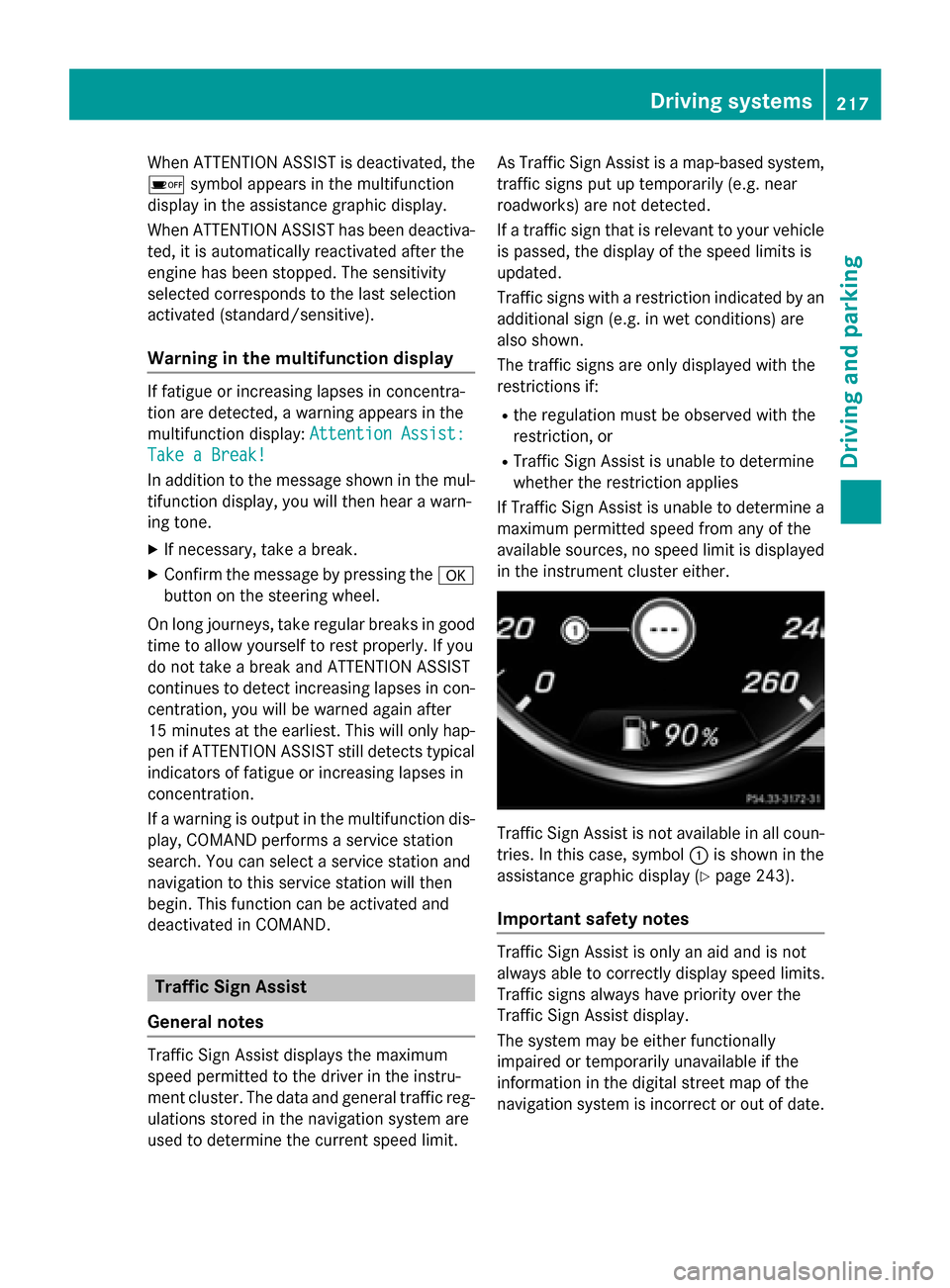
If Traffic Sign Assist is unable to determine a maximum permitted speed from any of the
available sources, no speed limit is displayed
in the instrument cluster either.
Traffic Sign Assist is not available in all coun-
tries. In this case, symbol :is shown in the
assistance graphic display (
Ypage 243).
Important safety notes
Traffic Sign Assist is only an aid and is not
always able to correctly display speed limits.
Traffic signs always have priority over the
Traffic Sign Assist display.
The system may be either functionally
impaired or temporarily unavailable if the
information in the digital street map of the
navigation system is incorrect or out of date.
Driving systems217
Driving and parking
Z
Page 274 of 410
Drivingsystems
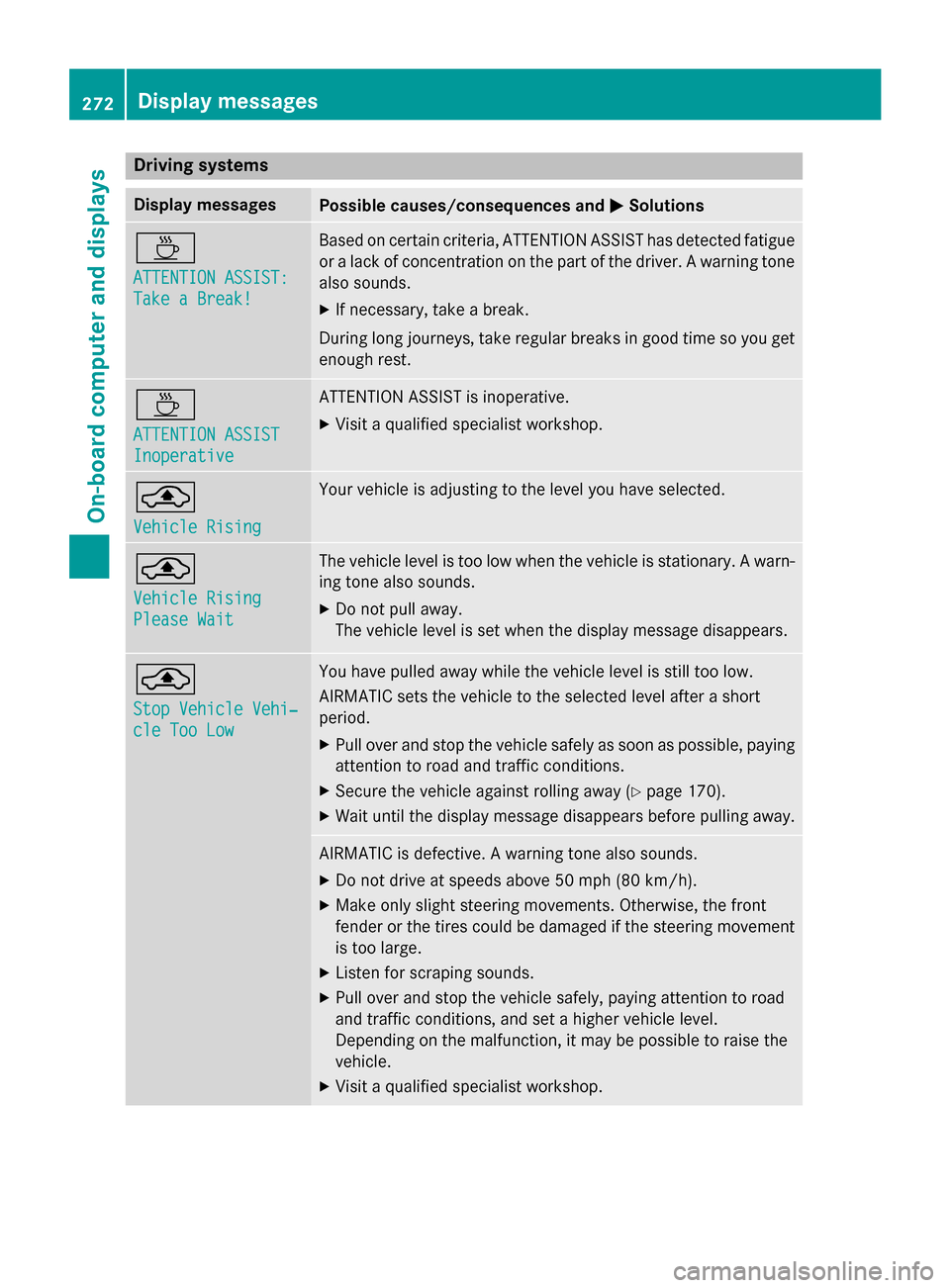
Display messagesPossible causes/consequences an dMSolutions
À
ATTENTION ASSIST :
Take a Break!
Based on certain criteria, ATTENTION ASSIST has detecte dfatigue
or alac kof concentration on th epar tof th edriver . Awarnin gtone
also sounds.
XIf necessary, take abreak .
Durin glon gjourneys, take regular break sin goo dtime so you get
enough rest.
À
ATTENTION ASSIST
Inoperative
ATTENTION ASSIST is inoperative .
XVisitaqualified specialist workshop .
¨
VehicleRising
Your vehicle is adjustin gto th elevel you hav eselected.
¨
Vehicl eRising
Please Wai t
The vehicle level is to olow when th evehicle is stationary. Awarn -
in g tone also sounds.
XDo no tpull away.
The vehicle level is set when th edisplay message disappears .
¨
StopVehicl eVehi‐
cle Too Low
You hav epulle daway whil eth evehicle level is still to olow.
AIRMATIC set sth evehicle to th eselecte dlevel after ashort
period.
XPull over and stop th evehicle safely as soo nas possible, payin g
attention to road and traffic conditions.
XSecur eth evehicle against rollin gaway (Ypage 170).
XWait until th edisplay message disappears befor epulling away.
AIRMATIC is defective. Awarnin gtone also sounds.
XDo no tdrive at speeds abov e50 mph (80 km/h).
XMak eonly slight steerin gmovements .Otherwise ,th efron t
fender or th etires could be damaged if th esteerin gmovemen t
is to olarge.
XListe nfo rscrapin gsounds.
XPull over and stop th evehicle safely, payin gattention to road
and traffic conditions, and set ahigher vehicle level.
Dependin gon th emalfunction ,it may be possible to rais eth e
vehicle.
XVisit aqualified specialist workshop .
272Display messages
On-board computer and displays
Page 283 of 410
Vehicle
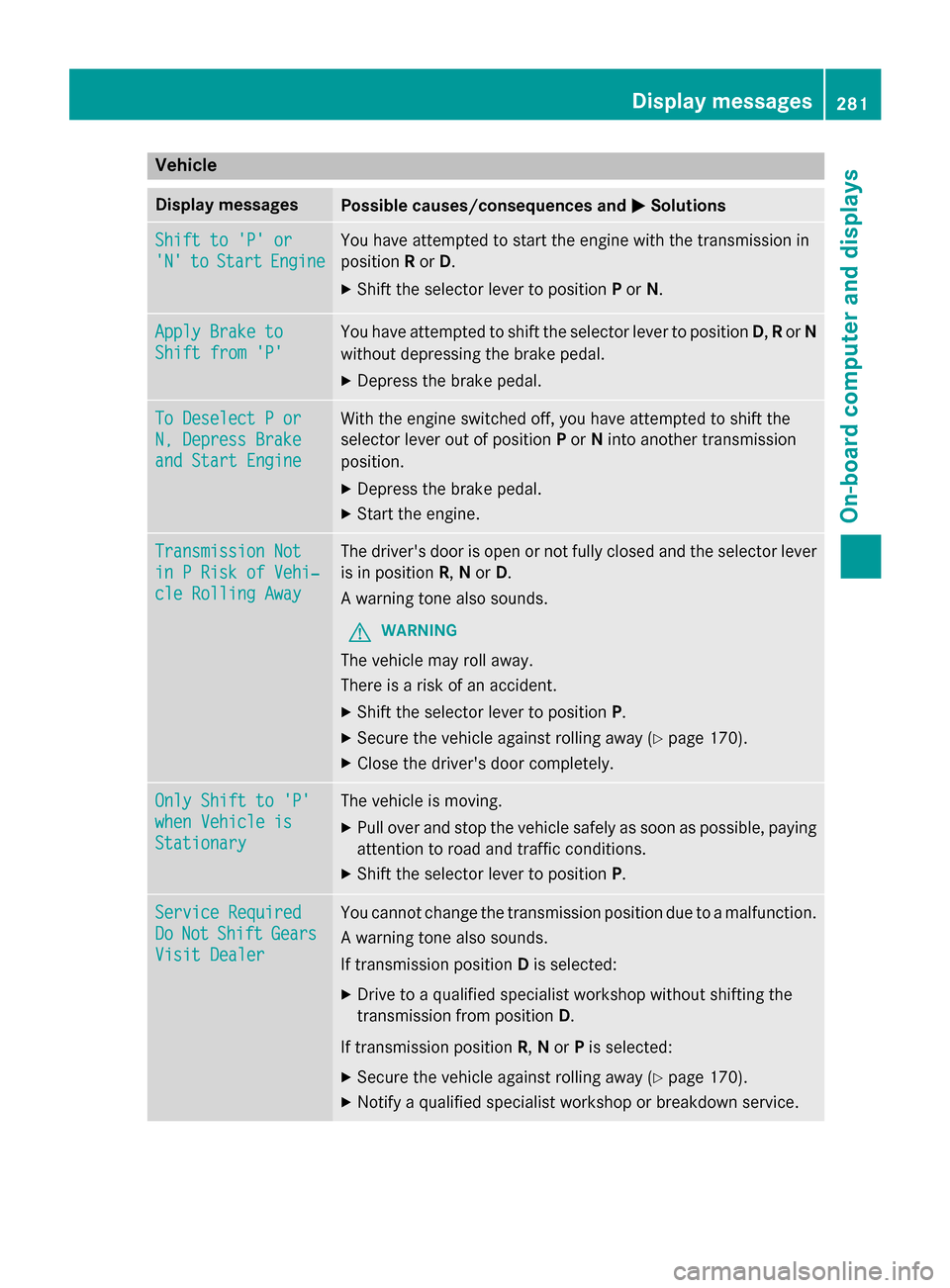
Display messagesPossible causes/consequences andMSolutions
Shift to 'P' or
'N'toStartEngine
You have attempted to start the engine with the transmission in
positionRor D.
XShift the selector lever to position Por N.
Apply Brake to
Shift from 'P'
You have attempted to shift the selector lever to position D,R or N
without depressing the brake pedal.
XDepress the brake pedal.
To Deselect P or
N, Depress Brake
and Start Engine
With the engine switched off, you have attempted to shift the
selector lever out of position Por Ninto another transmission
position.
XDepress the brake pedal.
XStart the engine.
Transmission Not
in P Risk of Vehi‐
cle Rolling Away
The driver's door is open or not fully closed and the selector lever
is in position R,N or D.
A warning tone also sounds.
GWARNING
The vehicle may roll away.
There is a risk of an accident.
XShift the selector lever to position P.
XSecure the vehicle against rolling away (Ypage 170).
XClose the driver's door completely.
Only Shift to 'P'
when Vehicle is
Stationary
The vehicle is moving.
XPull over and stop the vehicle safely as soon as possible, paying
attention to road and traffic conditions.
XShift the selector lever to positionP.
Service Required
DoNotShiftGears
Visit Dealer
You cannot change the transmission position due to a malfunction.
A warning tone also sounds.
If transmission positionDis selected:
XDrive to a qualified specialist workshop without shifting the
transmission from position D.
If transmission position R,Nor Pis selected:
XSecure the vehicle against rolling away (Ypage 170).
XNotify a qualified specialist workshop or breakdown service.
Display messages281
On-board computer and displays
Z
Page 284 of 410
Display messagesPossible causes/consequences andMSolutions
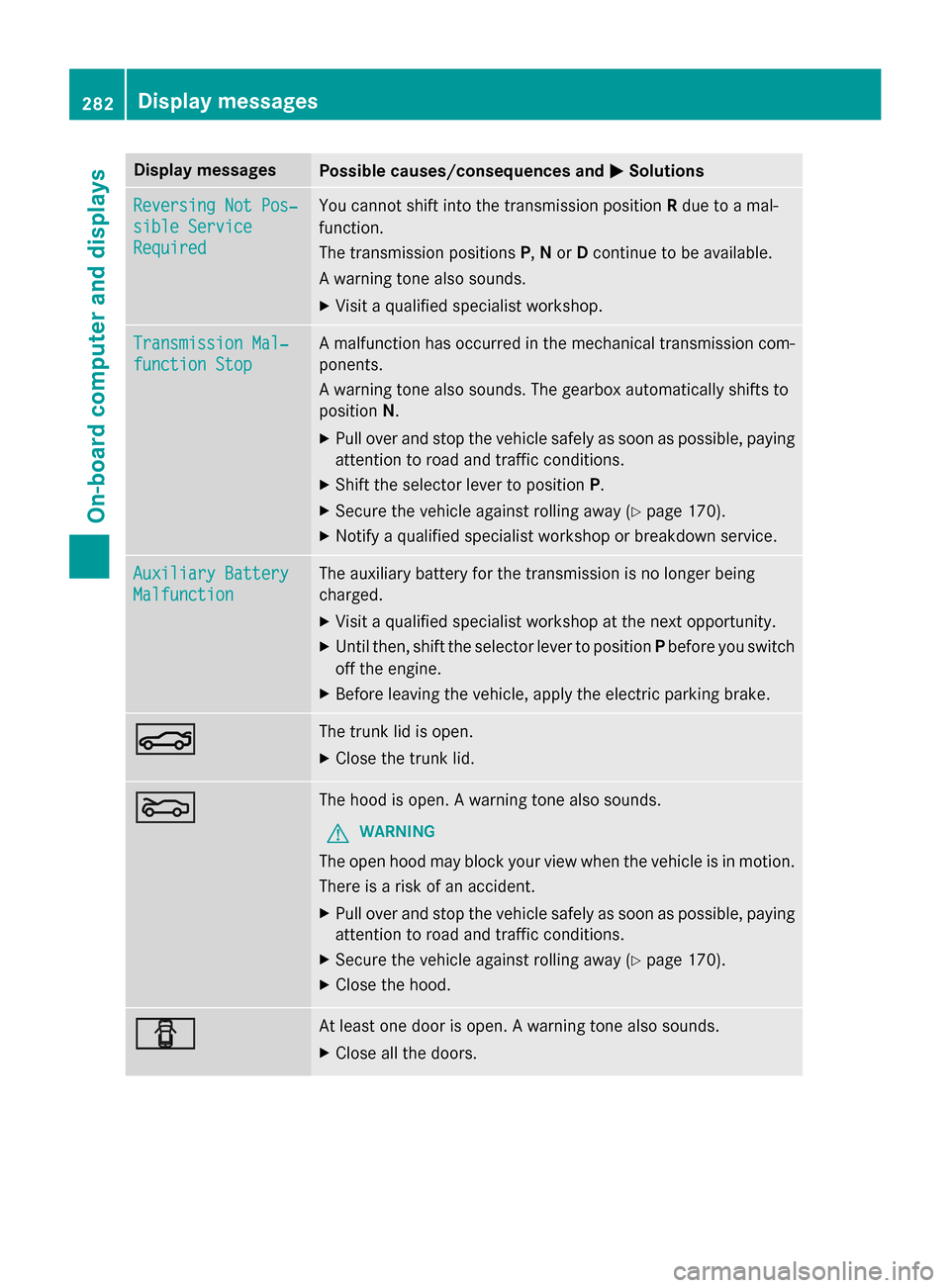
Reversing Not Pos‐
sible Service
Required
You cannotshift into th etransmissio nposition Rdue to amal-
function .
The transmissio nposition sP, Nor Dcontinue to be available.
A warnin gtone also sounds.
XVisit aqualified specialist workshop .
Transmission Mal‐
function Stop
Amalfunction has occurred in th emechanica ltransmissio ncom-
ponents .
A warnin gtone also sounds. The gearbox automatically shift sto
position N.
XPull ove rand stop th evehicl esafely as soo nas possible, payin g
attention to roa dand traffic conditions.
XShift th eselector lever to position P.
XSecureth evehicl eagainst rollin gaway (Ypage 170).
XNotify aqualified specialist workshop or breakdown service.
Auxiliary Batter y
Malfunction
The auxiliarybattery fo rth etransmissio nis no longer bein g
charged.
XVisit aqualified specialist workshop at th enext opportunity.
XUnti lthen ,shift th eselector lever to position Pbefore you switch
of fth eengine.
XBefore leavin gth evehicle, apply th eelectric parkin gbrake.
NThe trunk lid is open .
XCloseth etrunk lid.
MThe hoo dis open . Awarnin gtone also sounds.
GWARNIN G
The open hoo dmay bloc kyour vie wwhen th evehicl eis in motion .
There is aris kof an accident.
XPull ove rand stop th evehicl esafely as soo nas possible, payin g
attention to roa dand traffic conditions.
XSecur eth evehicl eagainst rollin gaway (Ypage 170).
XCloseth ehood.
CAt leas ton edoo ris open . Awarnin gtone also sounds.
XClos eall th edoors .
282Display messages
On-board computer and displays
Page 321 of 410
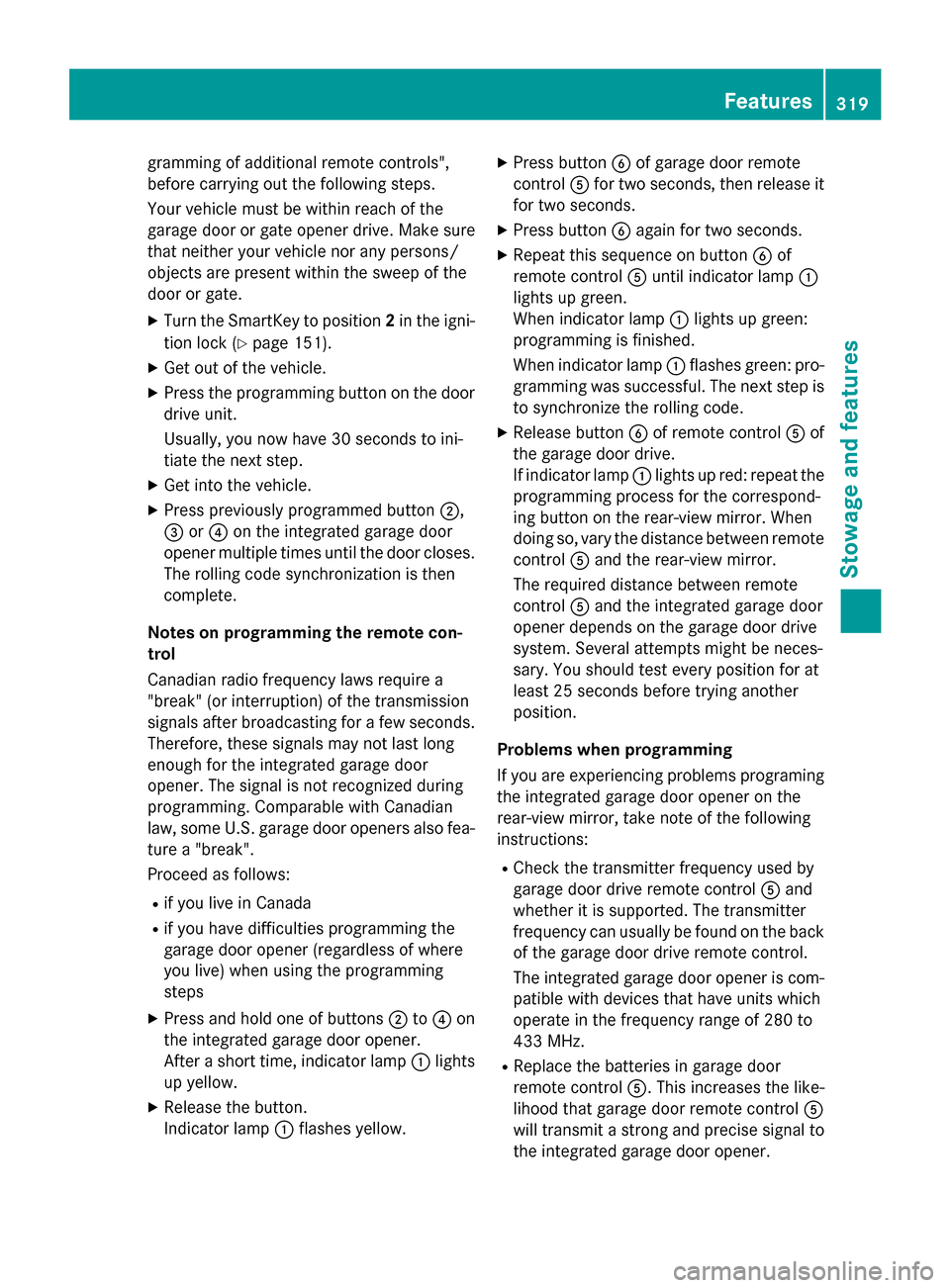
gramming of additional remote controls",
before carrying out the following steps.
Your vehicle must be within reach of the
garage door or gate opener drive. Make sure
that neither your vehicle nor any persons/
objects are present within the sweep of the
door or gate.
XTurn the SmartKey to position2in the igni-
tion lock (
Ypage 151).
XGet out of the vehicle.
XPress the programming button on the door drive unit.
Usually, you now have 30 seconds to ini-
tiate the next step.
XGet into the vehicle.
XPress previously programmed button ;,
= or? on the integrated garage door
opener multiple times until the door closes.
The rolling code synchronization is then
complete.
Notes on programming the remote con-
trol
Canadian radio frequency laws require a
"break" (or interruption) of the transmission
signals after broadcasting for a few seconds. Therefore, these signals may not last long
enough for the integrated garage door
opener. The signal is not recognized during
programming. Comparable with Canadian
law, some U.S. garage door openers also fea-
ture a "break".
Proceed as follows:
Rif you live in Canada
Rif you have difficulties programming the
garage door opener (regardless of where
you live) when using the programming
steps
XPress and hold one of buttons ;to? on
the integrated garage door opener.
After a short time, indicator lamp :lights
up yellow.
XRelease the button.
Indicator lamp :flashes yellow.
XPress button Bof garage door remote
control Afor two seconds, then release it
for two seconds.
XPress button Bagain for two seconds.
XRepeat this sequence on button Bof
remote control Auntil indicator lamp :
lights up green.
When indicator lamp :lights up green:
programming is finished.
When indicator lamp :flashes green: pro-
gramming was successful. The next step is
to synchronize the rolling code.
XRelease button Bof remote control Aof
the garage door drive.
If indicator lamp :lights up red: repeat the
programming process for the correspond-
ing button on the rear-view mirror. When
doing so, vary the distance between remote
control Aand the rear-view mirror.
The required distance bet
ween remote
control Aand the integrated garage door
opener depends on the garage door drive
system. Several attempts might be neces-
sary. You should test every position for at
least 25 seconds before trying another
position.
Problems when programming
If you are experiencing problems programing
the integrated garage door opener on the
rear-view mirror, take note of the following
instructions:
RCheck the transmitter frequency used by
garage door drive remote control Aand
whether it is supported. The transmitter
frequency can usually be found on the back
of the garage door drive remote control.
The integrated garage door opener is com-
patible with devices that have units which
operate in the frequency range of 280 to
433 MHz.
RReplace the batteries in garage door
remote control A. This increases the like-
lihood that garage door remote control A
will transmit a strong and precise signal to
the integrated garage door opener.
Features319
Stowage and features
Z
Page 343 of 410
Useful information............................342
Where will I find...? ...........................342
Flat tire .............................................. 342
Battery (vehicle) ................................ 347
Jump-starting .................................... 351
Towing and tow-starting ..................354
Fuses .................................................. 356
341
Breakdown assistance
Page 344 of 410
Useful information
i
This Operator's Manual describes all
models and all standard and optional equip-
ment of your vehicle available at the time of
publication of the Operator's Manual.
Country-specific differences are possible.
Please note that your vehicle may not be
equipped with all features described. This
also applies to safety-related systems and
functions.
iRead the information on qualified special-
ist workshops (
Ypage 26).
Where will I find...?
Vehicle tool kit
General notes
Apart from certain country-specific varia-
tions, the vehicles are not equipped with a
tire-change tool kit. If the vehicle is equipped
with tire-changing tools, these are located in
the stowage well under the trunk floor. Some
tools for changing a wheel are specific to the
vehicle. For more information on which tire
changing tools are required and approved to
perform a wheel change on your vehicle, con-
sult a qualified specialist workshop.
Tools required for changing a wheel may
include, for example:
RJack
RWheel chock
RLug wrench
RRatchet wrench
RAlignment bolt
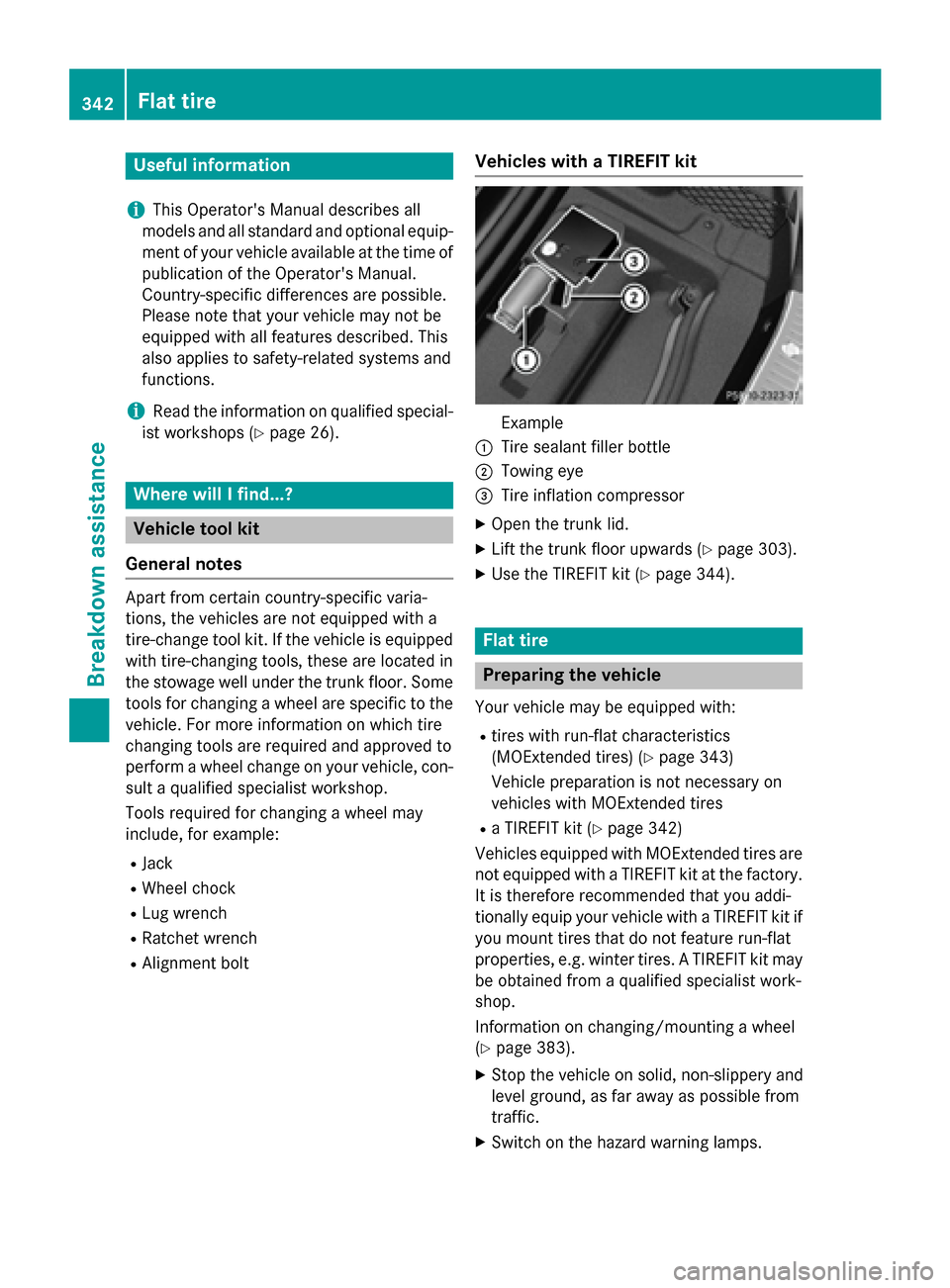
Vehicles with a TIREFIT kit
Example
:Tire sealant filler bottle
;Towing eye
=Tire inflation compressor
XOpen the trunk lid.
XLift the trunk floor upwards (Ypage 303).
XUse the TIREFIT kit (Ypage 344).
Flat tire
Preparing the vehicle
Your vehicle may be equipped with:
Rtires with run-flat characteristics
(MOExtended tires) (
Ypage 343)
Vehicle preparation is not necessary on
vehicles with MOExtended tires
Ra TIREFIT kit (Ypage 342)
Vehicles equipped with MOExtended tires are
not equipped with a TIREFIT kit at the factory.
It is therefore recommended that you addi-
tionally equip your vehicle with a TIREFIT kit if you mount tires that do not feature run-flat
properties, e.g. winter tires. A TIREFIT kit may
be obtained from a qualified specialist work-
shop.
Information on changing/mounting a wheel
(
Ypage 383).
XStop the vehicle on solid, non-slippery and
level ground, as far away as possible from
traffic.
XSwitch on the hazard warning lamps.
342Flat tire
Breakdown assistance