sensor MERCEDES-BENZ S-Class COUPE 2016 C217 Owner's Guide
[x] Cancel search | Manufacturer: MERCEDES-BENZ, Model Year: 2016, Model line: S-Class COUPE, Model: MERCEDES-BENZ S-Class COUPE 2016 C217Pages: 410, PDF Size: 8.62 MB
Page 126 of 410
Useful information
i
This Operator's Manual describes all
models and all standard and optional equip-
ment of your vehicle available at the time of
publication of the Operator's Manual.
Country-specific differences are possible.
Please note that your vehicle may not be
equipped with all features described. This
also applies to safety-related systems and
functions.
iRead the information on qualified special-
ist workshops (
Ypage 26).
Exterior lighting
General notes
For reasons of safety, Mercedes-Benz recom-
mends that you drive with the lights switched
on even during the daytime. In some coun-
tries, operation of the headlamps varies due
to legal requirements and self-imposed obli-
gations.
Setting the exterior lighting
Setting options
Exterior lighting can be set using:
Rthe light switch
Rthe combination switch (Ypage 126)
Rthe on-board computer (Ypage 247)
Light switch
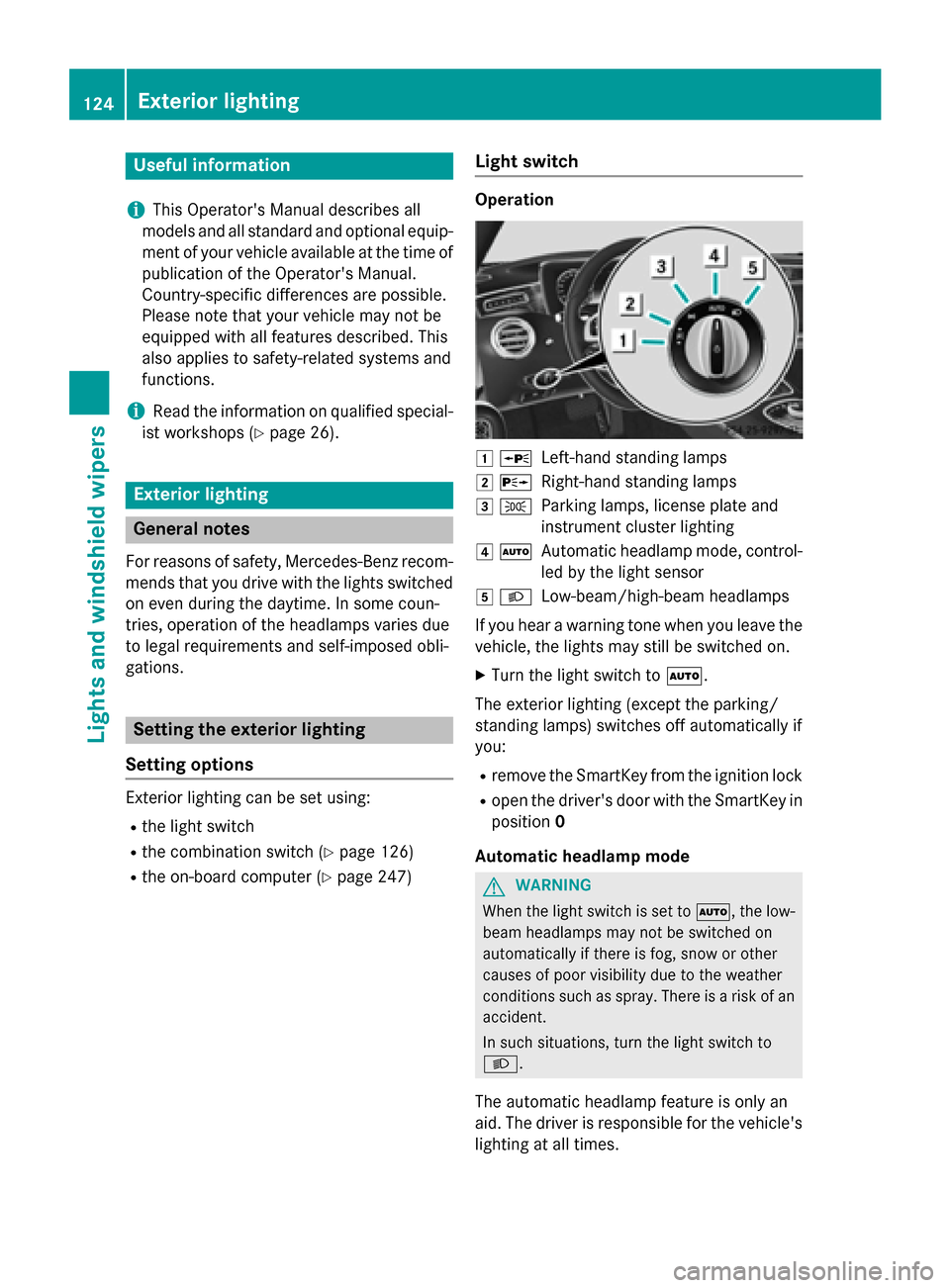
Operation
1 WLeft-hand standing lamps
2XRight-hand standing lamps
3TParking lamps, license plate and
instrument cluster lighting
4ÃAutomatic headlamp mode, control-
led by the light sensor
5LLow-beam/high-beam headlamps
If you hear a warning tone when you leave the
vehicle, the lights may still be switched on.
XTurn the light switch to Ã.
The exterior lighting (except the parking/
standing lamps) switches off automatically if
you:
Rremove the SmartKey from the ignition lock
Ropen the driver's door with the SmartKey in position 0
Automatic headlamp mode
GWARNING
When the light switch is set to Ã, the low-
beam headlamps may not be switched on
automatically if there is fog, snow or other
causes of poor visibility due to the weather
conditions such as spray. There is a risk of an
accident.
In such situations, turn the light switch to
L.
The automatic headlamp feature is only an
aid. The driver is responsible for the vehicle's
lighting at all times.
124Exterior lighting
Lights and windshield wipers
Page 127 of 410
Canada only:
The daytime running lamps improve the visi-
bility of your vehicle during the day. The day-
time running lamps function is required by law
in Canada. It cannot therefore be deactivated.
When the engine is running and the vehicle is
stationary: if you move the selector lever from
a drive position to P, the daytime running
lamps/low-beam headlamps go out after
three minutes.
When the engine is running, the vehicle is
stationary and in bright ambient light: if you
turn the light switch to T, the daytime
running lamps and parking lamps switch on.
If the engine is running and you turn the light
switch to L, the manual settings take
precedence over the daytime running lamps.
USA only:
The daytime running lamps improve the visi-
bility of your vehicle during the day. To do this,
the daytime running lamps function must be
switched on using the on-board computer
(
Ypage 248).
If the engine is running and you turn the light
switch to TorL, the manual settings
take precedence over the daytime running
lamps.
à is the favored light switch setting. The
light setting is automatically selected accord-
ing to the brightness of the ambient light
(exception: poor visibility due to weather con-
ditions such as fog, snow or spray):
RSmartKey in position 1in the ignition lock:
the parking lamps are switched on or off
automatically depending on the brightness
of the ambient light.
RWith the engine running: if you have acti-
vated the "daytime running lamps" function
via the on-board computer, the daytime
running lamps or the parking lamps and the
low-beam headlamps are switched on or off
automatically depending on the brightness
of the ambient light.
XTo switch on automatic headlamp
mode: turn the light switch to Ã.Low-beam headlamps
Even if the light sensor does not detect that it
is dark, the parking lamps and low-beam
headlamps switch on when the ignition is
switched on and the light switch is set to the
L
position. This is a particularly useful
function in the event of rain and fog.
XTo switch on the low-beam headlamps:
turn the SmartKey in the ignition lock to
position 2or start the engine.
XTurn the light switch to L.
The green Lindicator lamp in the instru-
ment cluster lights up.
Parking lamps
!If the battery has been excessively dis-
charged, the parking lamps or standing
lamps are automatically switched off to
enable the next engine start. Always park
your vehicle safely and sufficiently lit
according to legal standards. Avoid the
continuous use of the Tparking lamps
for several hours. If possible, switc
h on the
X right or the Wleft standing lamp.
XTo switch on: turn the light switch to T.
The green Tindicator lamp in the instru-
ment cluster lights up.
Standing lamps
Switching on the standing lamps ensures the
corresponding side of the vehicle is illumina-
ted.
XTo switch on the standing lamps: the
SmartKey is not in the ignition lock or it is in
position 0.
XTurn the light switch to W(left-hand side
of the vehicle) or X(right-hand side of
the vehicle).
Exterior lighting125
Lights and windshield wipers
Z
Page 129 of 410
The hazard warning lamps automatically
switch on if:
Ran air bag is deployed or
Rthe vehicle decelerates rapidly from a
speed of above 45 mph (70 km/h) and
comes to a standstill
The hazard warning lamps switch off auto-
matically if the vehicle reaches a speed of
above 6 mph (10 km/h) again after a full
brake application.
The hazard warning lamps still operate if the
ignition is switched off.
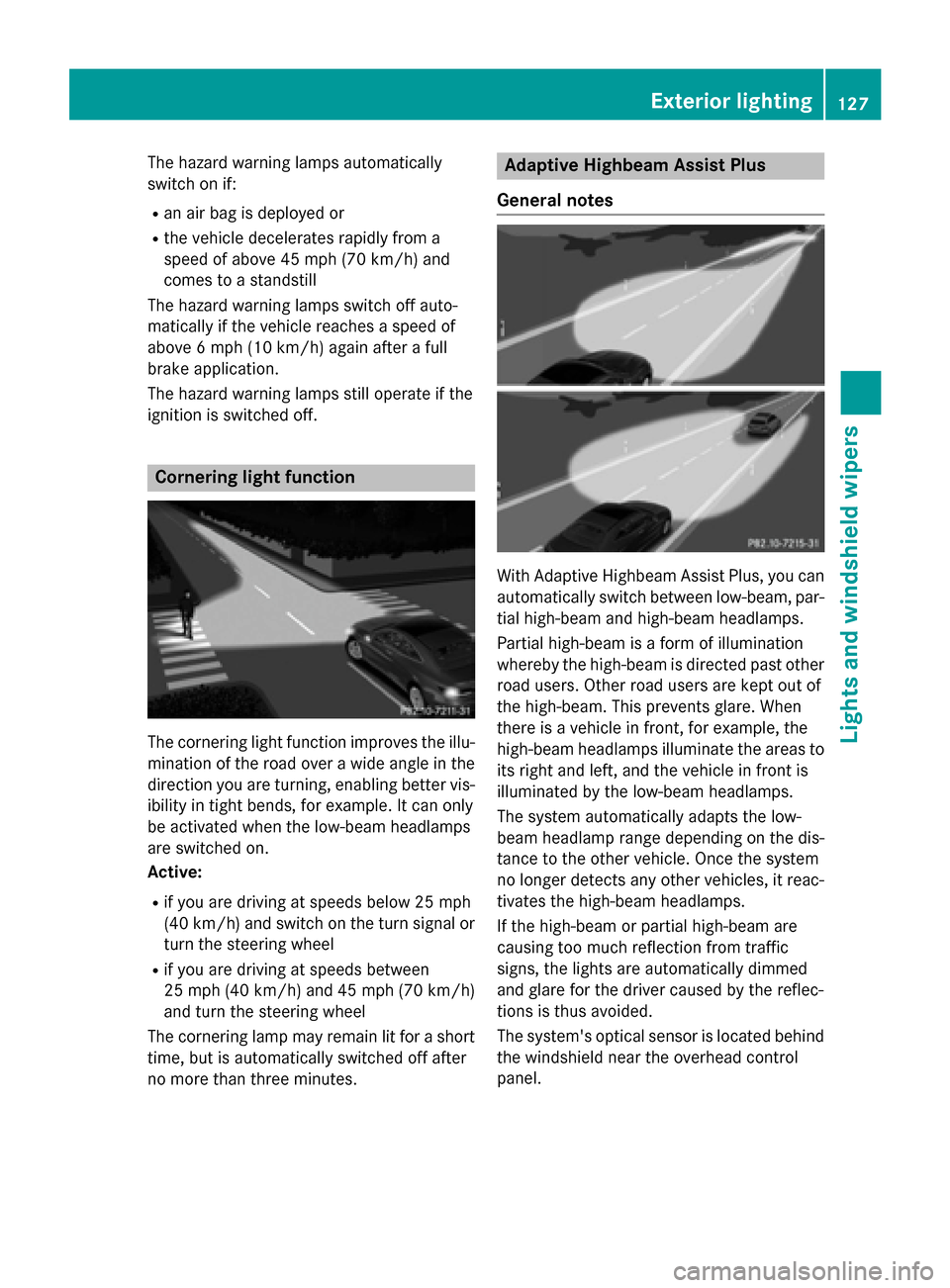
Cornering light function
The cornering light function improves the illu-
mination of the road over a wide angle in the
direction you are turning, enabling better vis-
ibility in tight bends, for example. It can only
be activated when the low-beam headlamps
are switched on.
Active:
Rif you are driving at speeds below 25 mph
(40 km/h) and switch on the turn signal or
turn the steering wheel
Rif you are driving at speeds between
25 mph (40 km/ h)and 45 mph (70 km/h)
and turn the steering wheel
The cornering lamp may remain lit for a short
time, but is automatically switched off after
no more than three minutes.
Adaptive Highbeam Assist Plus
General notes
With Adaptive Highbeam Assist Plus, you can
automatically switch between low-beam, par-
tial high-beam and high-beam headlamps.
Partial high-beam is a form of illumination
whereby the high-beam is directed past other
road users. Other road users are kept out of
the high-beam. This prevents glare. When
there is a vehicle in front, for example, the
high-beam headlamps illuminate the areas to
its right and left, and the vehicle in front is
illuminated by the low-beam headlamps.
The system automatically adapts the low-
beam headlamp range depending on the dis-
tance to the other vehicle. Once the system
no longer detects any other vehicles, it reac-
tivates the high-beam headlamps.
If the high-beam or partial high-beam are
causing too much reflection from traffic
signs, the lights are automatically dimmed
and glare for the driver caused by the reflec-
tions is thus avoided.
The system's optical sensor is located behind the windshield near the overhead control
panel.
Exterior lighting127
Lights and windshield wipers
Z
Page 130 of 410
Important safety notes
GWARNING
Adaptive Highbeam Assist Plus does no trec -
ognize road users:
Rwho hav eno lights ,e.g. pedestrian s
Rwho havepoor lighting ,e.g. cyclist s
Rwhoselighting is blocked, e.g. by abarrier
In ver yrar ecases, Adaptive Highbeam Assist
Plus may no trecognize road user swho do
hav elights ,or may recognize them to olate. In
this or similar situations, th eautomatic high -
beam headlamps will no tbe deactivated or
will be activated regardless .Ther eis aris kof
an accident.
Always carefully observ eth etraffic condition s
and switch off th ehigh-beam headlamps in
goo dtime.
Adaptive Highbeam Assist Plus cannot take
into account road, weather or traff iccond i-
tions. Adaptive Highbeam Assist Plus isonly
an aid. You are responsible for adjusting the
vehicle's lighting to the prevailing light, visi-
bilit y and traff icconditions.
In particular, the detection of obstacles can
be restricted ifthere is:
Rpoor vis ibility, e.g. due to fog, heavy rain or
snow
Rdirt on the sensors or the sensors are
obscured
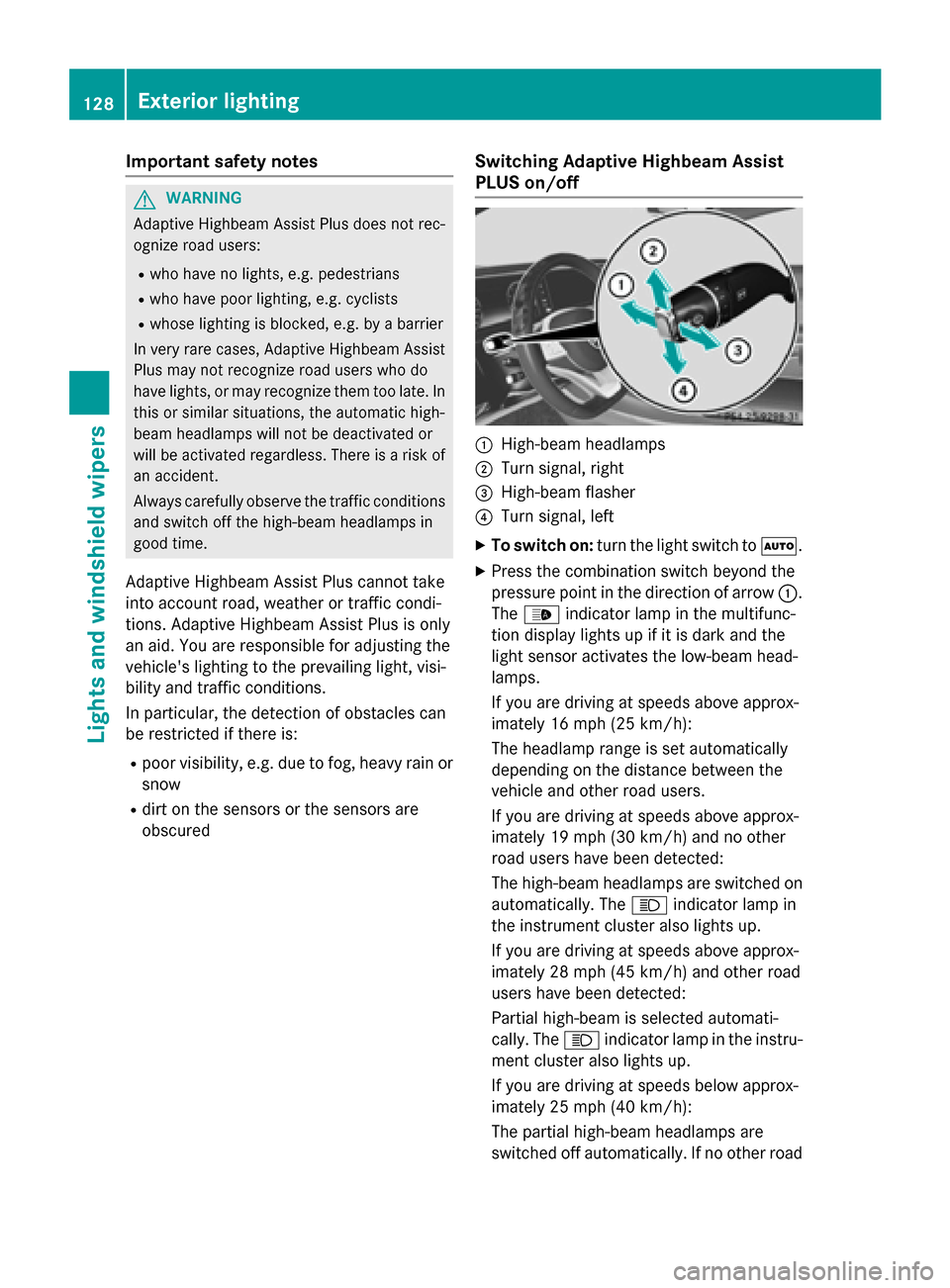
Switching Adaptive Highbeam Assist
PLUS on/off
:High-beam headlamps
;Turn signal, right
=High-beam flasher
?Turn signal, left
XTo switch on: turn thelight switch to Ã.
XPress the combination switch beyond the
pressure point inthe direction of arrow :.
The _ indicator lamp inthe multifunc-
tion display lights up if it is dark and the
ligh t sensor act ivates the low-beam head-
lamps.
If you are driving at speeds above approx-
imately 16 mph (25 km/h):
The headlamp range isset automatical ly
depe nding on the distance between the
vehicle and other road users.
If you are driving at speeds above approx-
imately 19 mph (30 km/h) and no other
road users have been detecte d:
The high-beam headlamps are switched on
automatically. The Kindicator lamp in
the instrument cluster also lights up.
If you are driving at speeds above approx-
imately 28 mph (45 km/h)and other road
users have been detected:
Partial high-beam is selected automati-
cally. The Kindicator lamp in the instru-
ment cluster also lights up.
If you are driving at speeds below approx-
imately 25 mph (40 km/h):
The partial high-beam headlamps are
switched off automatically. If no other road
128Exterior lighting
Lights and windshield wipers
Page 133 of 410
after washing the vehicle in an automatic
car wash.
!Vehicles with a rain sensor: if the wind-
shield becomes dirty in dry weather condi- tions, the windshield wipers may be activa-
ted inadvertently. This could then damage
the windshield wiper blades or scratch the
windshield.
For this reason, you should always switch
off the windshield wipers in dry weather.
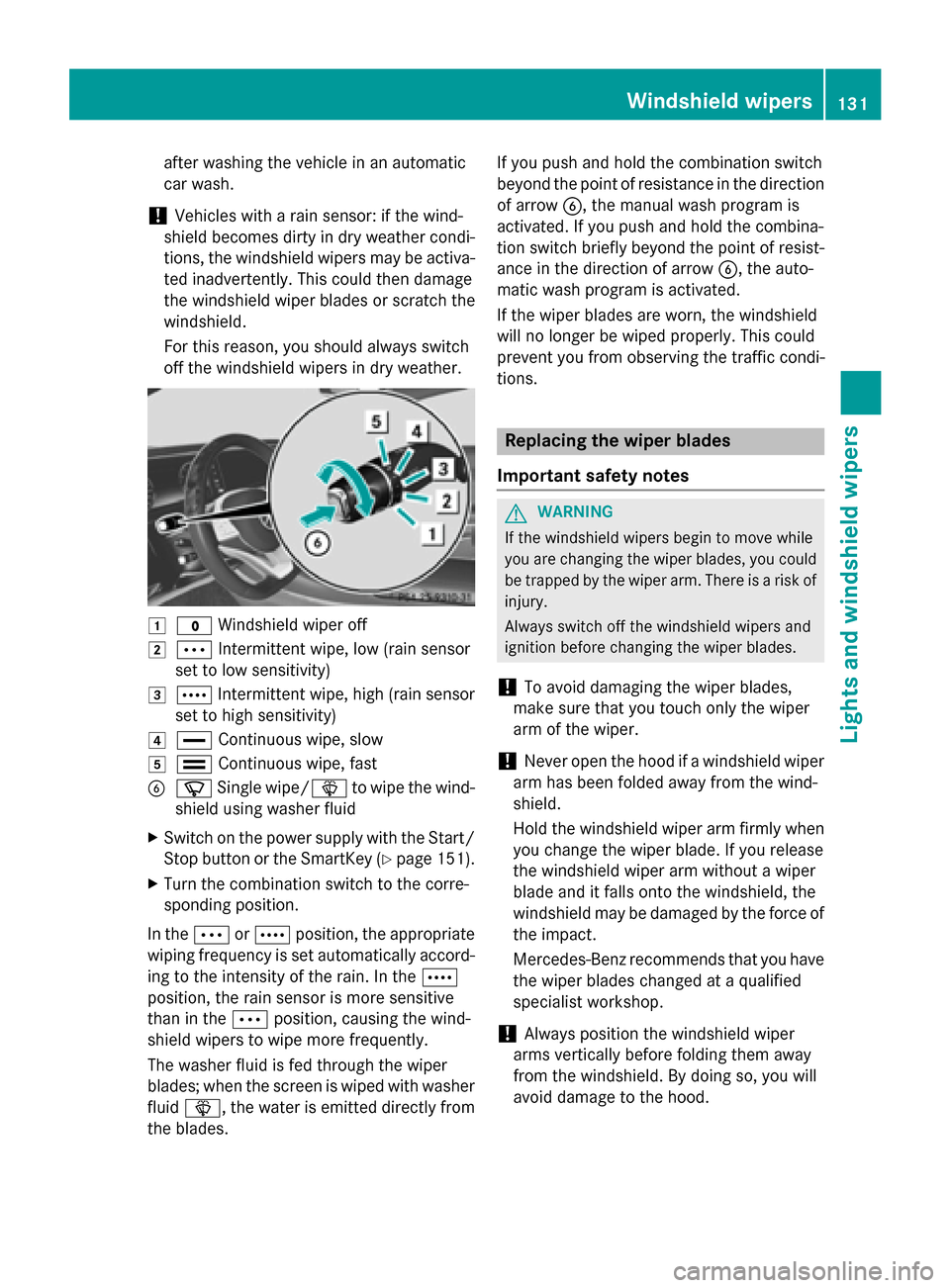
1$ Windshield wiper off
2ÄIntermittent wipe, low (rain sensor
set to low sensitivity)
3Å Intermittent wipe, high (rain sensor
set to high sensitivity)
4° Continuous wipe, slow
5¯Continuous wipe, fast
BíSingle wipe/ îto wipe the wind-
shield using washer fluid
XSwitch on the power supply with the Start/ Stop button or the SmartKey (
Ypage 151).
XTurn the combination switch to the corre-
sponding position.
In the ÄorÅ position, the appropriate
wiping frequency is set automatically accord-
ing to the intensity of the rain. In the Å
position, the rain sensor is more sensitive
than in the Äposition, causing the wind-
shield wipers to wipe more frequently.
The washer fluid is fed through the wiper
blades; when the screen is wiped with washer
fluid î, the water is emitted directly from
the blades. If you push and hold the combination switch
beyond the point of resistance in the direction
of arrow
B, the manual wash program is
activated. If you push and hold the combina-
tion switch briefly beyond the point of resist-
ance in the direction of arrow B, the auto-
matic wash program is activated.
If the wiper blades are worn, the windshield
will no longer be wiped properly. This could
prevent you from observing the traff ic c
ondi-
tions.
Replacing the wiper blades
Important safety notes
GWARNING
If the wind shield wipers begin to move while
you are changing the wiperblades, you could
be trapped by the wiper arm. There isa risk of
injury.
Always switch off the windshield wipers and
ignition before changing the wiper blades.
!To avoid damaging the wiper blades,
make sure that you touch only the wiper
arm of the wiper.
!Never open the hood if a windshield wiper
arm has been folded away from the wind-
shield.
Hold the windshield wiper arm firmly when
you change the wiper blade. If you release
the windshield wiper arm without a wiper
blade and it falls onto the windshield, the
windshield may be damaged by the force of
the impact.
Mercedes-Benz recommends that you have
the wiper blades changed at a qualified
specialist workshop.
!Always position the windshield wiper
arms vertically before folding them away
from the windshield. By doing so, you will
avoid damage to the hood.
Windshield wipers131
Lights and windshield wipers
Z
Page 152 of 410
Useful information
i
This Operator's Manual describes all
models and all standard and optional equip-
ment of your vehicle available at the time of
publication of the Operator's Manual.
Country-specific differences are possible.
Please note that your vehicle may not be
equipped with all features described. This
also applies to safety-related systems and
functions.
iRead the information on qualified special-
ist workshops (
Ypage 26).
Notes on breaking-in a new vehicle
Important safety notes
The sensor system of some driving and driv-
ing safety systems adjusts automatically
while a certain distance is being driven after
the vehicle has been delivered or after
repairs. Full system effectiveness is not
reached until the end of this teach-in proce-
dure.
New and replaced brake pads and discs only
reach their optimum braking effect after sev-
eral hundred kilometers of driving. Compen-
sate for this by applying greater force to the
brake pedal.
The first 1000 miles (1500 km)
The more you look after the engine when it is
new, the more satisfied you will be with its
performance in the future.
RYou should therefore drive at varying vehi-
cle and engine speeds for the first
1000 miles (1500 km).
RAvoid heavy loads, e.g. driving at full throt-
tle, during this period.
RWhen shifting gears manually, upshift in
good time, before the tachometer needle
reaches Ôof the way to the red area of the
tachometer.
RDo not manually shift to a lower gear to
brake the vehicle.
RTry to avoid depressing the accelerator
pedal beyond the point of resistance (kick- down).
RAll vehicles (except Mercedes-AMG
vehicles): ideally, for the first 1,000 miles
(1,500 km), drive in drive program E.
Additional breaking-in notes for Mercedes-
AMG vehicles:
RDo not drive faster than 85 mph
(140 km/ h)for the first 1,000 miles
(1,500 km).
ROnly allow the engine to reach a maximum
engine speed of 4,500 rpm briefly.
RChange gear in good time.
RIdeally, for the first 1,000 miles (1,500 km),
drive in program C.
After 1000 mile s(1500 km), you can increase
the engine speed gradually and accelerate
the vehicle to full speed.
You should also observe these notes on
breaking in if the engine or parts of the drive
train on your vehicle have been replaced.
Always observe the maximum permissible
speed.
Driving
Important safety notes
GWARNING
Objects in the driver's footwell can restrict the pedal travel or obstruct a depressed pedal.
The operating and road safety of the vehicle is
jeopardized. There is a risk of an accident.
Make sure that all objects in the vehicle are
stowed correctly, and that they cannot enter
the driver's footwell. Install the floormats
securely and as specified in order to ensure
sufficient clearance for the pedals. Do not use
loose floormats and do not place floormats on
top of one another.
150Driving
Driving and parking
Page 184 of 410
DISTRONICPLUS
General notes
DISTRONIC PLU Sregulates th espeed and
automatically help syou maintain th edis -
tanc eto th evehicle detecte din front. Vehi-
cles are detecte dwit hth eaid of th eradar
sensor system. DISTRONIC PLU Sbrake s
automatically so that th eset speed is no t
exceeded .
Change into alowe rgear in goo dtime on lon g
and steep downhill gradients .Thi sis espe-
cially important if th evehicle is laden .By
doin gso, you will mak euse of th ebraking
effect of th eengine. Thi srelieves th eload on
th ebrake system and prevents th ebrake s
from overheatin gand wearin gto oquickly.
If DISTRONIC PLU Sdetects that there is aris k
of acollision ,you will be warned visually and
acoustically. DISTRONIC PLU Scanno tpre -
ven t acollision without your intervention .An
intermittent warnin gtone will then soun dand
th edistanc ewarnin glamp will ligh tup in th e
instrumen tcluster. Brak eimmediately in
order to increase th edistanc eto th evehicle
in fron tor take evasiv eaction provided it is
saf eto do so.
DISTRONIC PLU Soperates in range between
0 mph (0 km/h) and 12 0mph (20 0km/h).
Do no tuse DISTRONIC PLU Swhil edri vin
go
n
roads wit hsteep gradients .
As DISTRONIC PLU Stransmit sradar waves, it
can resemble th eradar detectors of th e
responsible authorities .You can refer to th e
relevant chapter in th eOperator's Manual if
question sare asked about this.
iUS Aonly: Thi sdevic ehas been approved
by th eFCC as a"Vehicular Radar System".
The radar sensor is intended fo ruse in an
automotive radar system only. Removal,
tampering, or altering of th edevic ewill void
any warranties ,and is no tpermitte dby th e
FCC. Do no ttampe rwith, alter, or use in
any non-approved way. An
yunauthorized modification to this
devic ecould void th euser's authorit yto
operat eth eequipment.
iCanada only: Thi sdevic ecomplies wit h
RSS-210 of Industry Canada. Operation is
subjec tto th efollowing tw oconditions:
1. Thi sdevic emay no tcaus eharmful inter-
ference ,and
2. Thi sdevic emus taccept any interferenc e
received, includin ginterferenc ethat may
caus eundesired operation of th edevice.
Removal, tampering, or altering of th e
devic ewill void any warranties ,and is no t
permitted. Do no ttampe rwith, alter, or use
in any non-approved way.
An yu
nauthorized modification to this
devic ecould void th euser's authorit yto
operat eth eequipment.
Important safet ynotes
GWARNING
DISTRONIC PLU Sdoe sno treact to :
Rpeople or animals
Rstationary obstacles on th eroad, e.g. stop-
ped or parke dvehicles
Roncomin gand crossin gtraffic
As aresult ,DISTRONIC PLU Smay neither giv e
warnings no rinterven ein suc hsituations.
There is aris kof an accident.
Always pay careful attention to th etraffic sit -
uation and be ready to brake .
GWARNING
DISTRONIC PLU Scanno talways clearly iden -
tify other road user sand complex traffic sit -
uations.
In suc hcases, DISTRONIC PLU Smay:
Rgiv ean unnecessary warnin gand then
brake th evehicle
Rneither giv e awarnin gno rinterven e
Raccelerat eor brake unexpectedly
There is aris kof an accident.
182Driving systems
Driving an d parking
Page 185 of 410
Continue todrive carefully and beready to
brake, inparticular when warned to dosoby
DI ST RONIC PLU S.
GWARNING
DI ST RONIC PLUS brakes your veh icle with up
to 50 %of the maximum possible deceleration.
If this braking force is insufficient, DISTRONIC
PLUS warns you visually and audibly. There is a risk of an accident.
In such cases, apply the brakes yourself and
try to take evasive action.
!If DISTRONIC PLUS or the HOLD function
is activated, the vehicle brakes automati-
cally in certain situations.
To prevent damage to the vehicle, deacti-
vate DISTRONIC PLUS and the HOLD func- tion in the following or other similar situa-
tions:
Rwhen towing the vehicle
Rin the car wash
If you fail to adapt your driving style,
DISTRONIC PLUS can neither reduce the risk
of accident nor override the laws of physics.
DISTRONIC PLUS cannot take into account
the road, traffic and weather conditions.
DISTRONIC PLUS is only an aid. You are
responsible for the distance to the vehicle in
front, for vehicle speed, for braking in good
time and for staying in your lane.
Do not use DISTRONIC PLUS:
Rin road and traffic conditions which do not
allow you to maintain a constant speed e.g.
in heavy traffic or on winding roads
Ron slippery road surfaces. Braking or accel-
erating could cause the drive wheels to lose
traction and the vehicle could then skid
Rwhen there is poor visibility, e.g. due to fog,
heavy rain or snow
DISTRONIC PLUS may not detect narrow
vehicles driving in front, e.g. motorcycles, or
vehicles driving on a different line. In particular, the detection of obstacles can
be impaired if:
Rthere is dirt on the sensors or anything else
covering the sensors
Rthere is snow or heavy rain
Rthere is interference by other radar sources
Rthere are strong radar reflections, for
example, in parking garages
If DISTRONIC PLUS no longer detects a vehi- cle in front, DISTRONIC PLUS may unexpect-
edly accelerate the vehicle to the stored
speed.
This speed may:
Rbe too high if you are driving in a filter lane
or an exit lane
Rbe so high in the right lane that you pass
vehicles driving on the left (left-hand drive
countries)
Rbe so high in the left lane that you pass
vehicles driving on the right (right-hand
drive countries)
If there is a change of drivers, advise the new
driver of the speed stored.
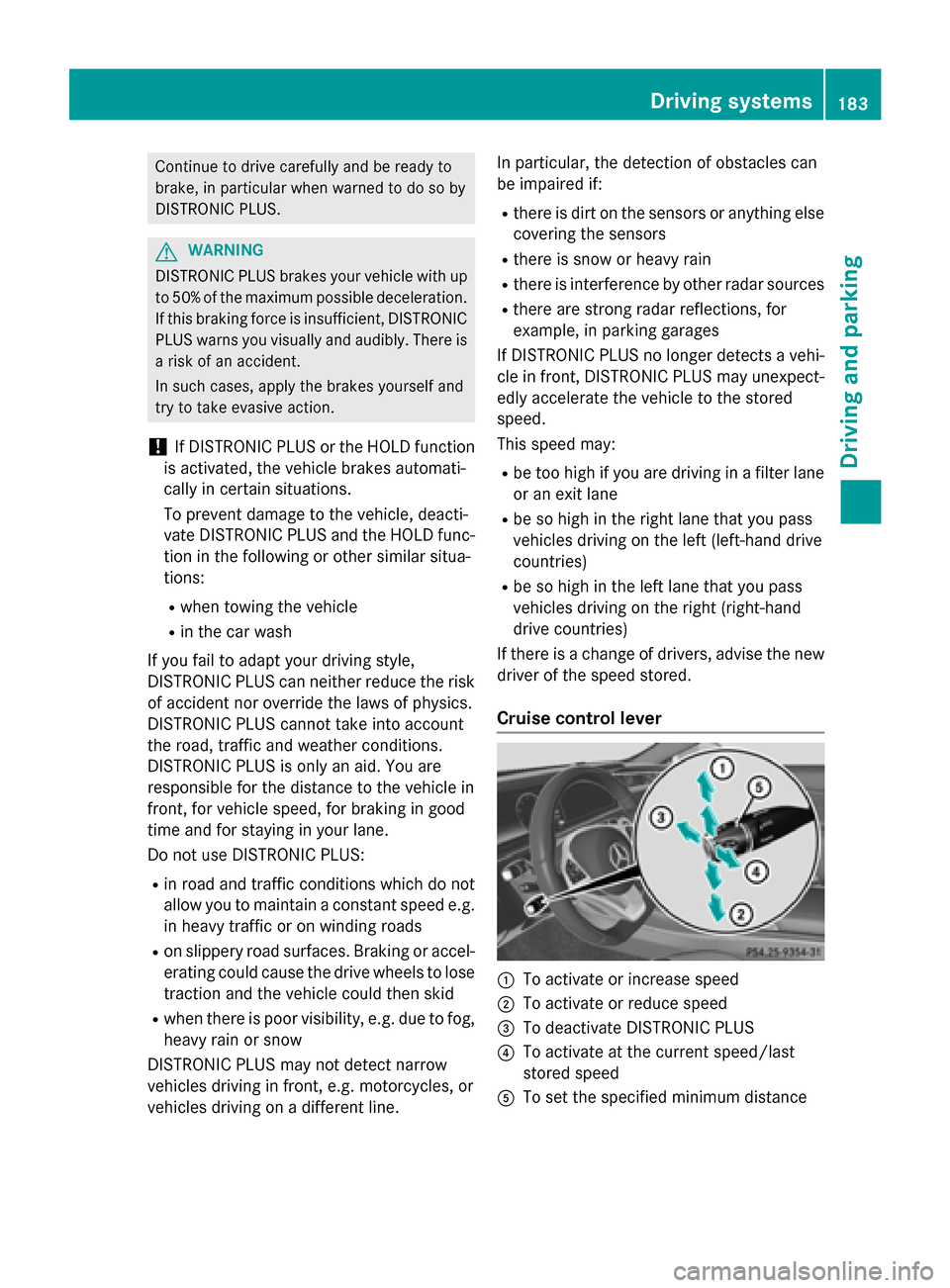
Cruise control lever
:To activate or increase speed
;To activate or reduce speed
=To deactivate DISTRONIC PLUS
?To activate at the current speed/last
stored speed
ATo set the specified minimum distance
Driving systems183
Driving and parking
Z
Page 201 of 410
4MATIC (permanent four-wheel drive)
4MATIC ensures that all four wheels are per-
manently driven. Together with ESP®, it
improves the traction of your vehicle when-
ever a drive wheel spins due to insufficient
grip.
If you fail to adapt your driving style, 4MATIC can neither reduce the risk of accident nor
override the laws of physics. 4MATIC cannot
take account of road, weather and traffic con-
ditions. 4MATIC is only an aid. You are
responsible for the distance to the vehicle in
front, for vehicle speed, for braking in good
time and for staying in your lane.
If a drive wheel spins due to insufficient grip:
ROnly depress the accelerator pedal as far as
necessary when pulling away.
RAccelerate less when driving.
!Never tow the vehicle with one axle
raised. This may damage the transfer case. Damage of this sort is not covered by the
Mercedes-Benz Limited Warranty. All
wheels must remain either on the ground or
be fully raised. Observe the instructions fortowing the vehicle with all wheels in full
contact with the ground.
iIn wintry driving conditions, the maximum
effect of 4MATIC can only be achieved if
you use winter tires (M+S tires), with snow
chains if necessary.
PARKTRONIC
Important safety notes
PARKTRONIC is an electronic parking aid with ultrasonic sensors. It monitors the area
around your vehicle using six sensors in the
front bumper and six sensors in the rear
bumper. PARKTRONIC indicates visually and
audibly the distance between your vehicle
and an object.
PARKTRONIC is only an aid. It is not a replace-
ment for your attention to your immediate
surroundings. You are always responsible for safe maneuvering, parking and exiting a park-
ing space. When maneuvering, parking or
pulling out of a parking space, make sure that
there are no persons, animals or objects in
the area in which you are maneuvering.
!When parking, pay particular attention to
objects above or below the sensors, such
as flower pots or trailer drawbars.
PARKTRONIC does not detect such objects
when they are in the immediate vicinity of
the vehicle. You could damage the vehicle
or the objects.
The sensors may not detect snow and other
objects that absorb ultrasonic waves.
Ultrasonic sources such as an automatic
car wash, the compressed-air brakes on a
truck or a pneumatic drill could cause
PARKTRONIC to malfunction.
PARKTRONIC may not function correctly on
uneven terrain.
PARKTRONIC is activated automatically when
you:
Rswitch on the ignition
Rshift the transmission to position D,Ror N
PARKTRONIC is deactivated at speeds above
11 mph (18 km/h). It is reactivated at lower
speeds.
Range of the sensors
General notes
PARKTRONIC does not take objects into con-
sideration that are:
Rbelow the detection range, e.g. people, ani-
mals or objects.
Rabove the detection range, e.g. overhang-
ing loads, truck overhangs or loading
ramps.
Driving systems199
Driving and parking
Z
Page 202 of 410
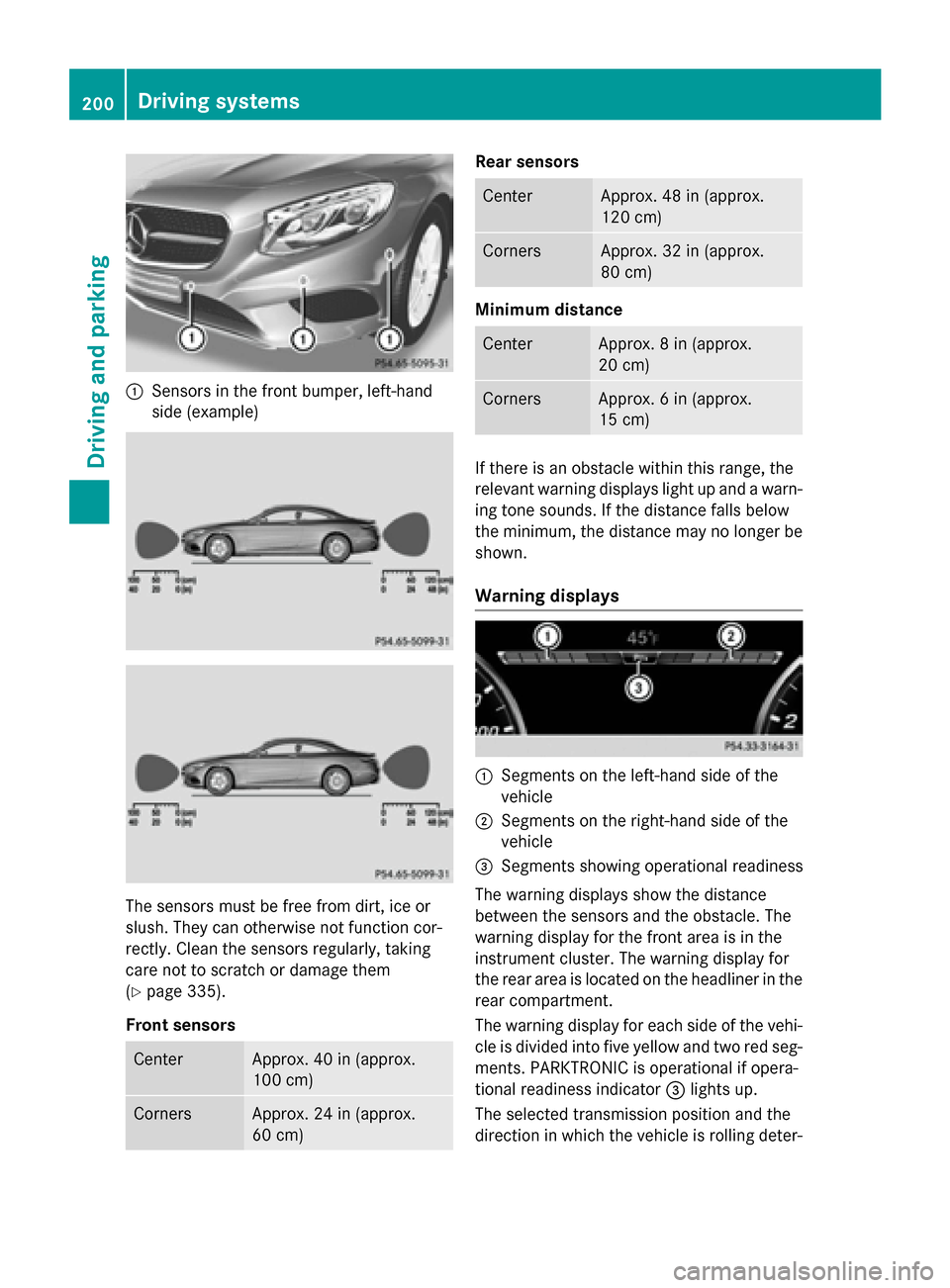
:Sensors in the front bumper, left-hand
side (example)
The sensors must be free from dirt, ice or
slush. They can otherwise not function cor-
rectly. Clean the sensors regularly, taking
care not to scratch or damage them
(
Ypage 335).
Front sensors
CenterApprox. 40 in (approx.
100 cm)
CornersApprox. 24 in (approx.
60 cm)
Rear sensors
CenterApprox. 48 in (approx.
120 cm)
CornersApprox. 32 in (approx.
80 cm)
Minimum distance
CenterApprox. 8 in (approx.
20 cm)
CornersApprox. 6 in (approx.
15 cm)
If there is an obstacle within this range, the
relevant warning displays light up and a warn-
ing tone sounds. If the distance falls below
the minimum, the distance may no longer be
shown.
Warning displays
:Segments on the left-hand side of the
vehicle
;Segments on the right-hand side of the
vehicle
=Segments showing operational readiness
The warning displays show the distance
between the sensors and the obstacle. The
warning display for the front area is in the
instrument cluster. The warning display for
the rear area is located on the headliner in the
rear compartment.
The warning display for each side of the vehi- cle is divided into five yellow and two red seg-
ments. PARKTRONIC is operational if opera-
tional readiness indicator =lights up.
The selected transmission position and the
direction in which the vehicle is rolling deter-
200Driving systems
Driving and parking