heating MERCEDES-BENZ S-Class COUPE 2017 C217 Owner's Manual
[x] Cancel search | Manufacturer: MERCEDES-BENZ, Model Year: 2017, Model line: S-Class COUPE, Model: MERCEDES-BENZ S-Class COUPE 2017 C217Pages: 338, PDF Size: 8.16 MB
Page 13 of 338
Folding in/out (automatically) ....... 101
Folding in/out (electrically) ........... 101
Out of position (troubleshooting) ... 101
Setting ........................................... 101
Storing settings (memory func-
tion) ............................................... 103
Storing the parking position .......... 102
External audio source
Connecting .................................... 252
Eyeglasses compartment ................. 254
F
Favorites
Overview ........................................ 246
Features ............................................. 257
Filling capacities (Technical data) ... 330
Flat tire
Changing a wheel/mounting the
spare wheel ................................... 321
MOExtended tires .......................... 289
Preparing the vehicle ..................... 288
TIREFIT kit ...................................... 289
Floormats ........................................... 271
Frequencies
Mobile phone ................................. 328
Two-way radio ................................ 328
Fuel
Additives ........................................ 332
Consumption statistics .................. 191
Displaying the current consump-
tion ................................................ 190
Displaying the range ...................... 190
Driving tips .................................... 141
Fuel gauge ....................................... 34
Grade (gasoline) ............................ 331
Important safety notes .................. 331
Problem (malfunction) ................... 137
Refueling ........................................ 135
Tank content/reserve fuel ............. 331
Fuel filler flap
Closing ........................................... 137
Fuel level
Calling up the range (on-board
computer) ...................................... 190
Fuel tank
Capacity ........................................ 331
Problem (malfunction) ................... 137 Fuses
Allocation chart ............................. 301
Before changing ............................. 301
Dashboard fuse box ....................... 301
Fuse box in the engine compart-
ment .............................................. 302
Fuse box in the front-passenger
footwell .......................................... 301
Fuse box in the trunk ..................... 302
Important safety notes .................. 301
G
Garage door openerClearing the memory ..................... 271
General notes ................................ 268
Important safety notes .................. 269
Opening/closing the garage doo r..2 71
Problems when programming ........2 70
Programming (button in the rear-
view mirror) ................................... 269
Synchronizing the rolling code ....... 270
Gasoline ............................................. 331
Gear indicator (on-board com-
puter, Mercedes-AMG vehicles) ....... 202
Genuine parts ...................................... 25
Glove box ...........................................2 54
Google™ Local Search
see also Digital Operator's Man-
ual ..................................................2 42
H
Handbrake
see Parking brake
HANDS-FREE ACCESS .......................... 82
Handwriting recognition
Switching text reader function
on/off ............................................ 245
Touchpad ....................................... 245
Hazard warning lamps ......................106
Head level heating (AIRSCARF) .......... 97
Head restraints
Adjusting ......................................... 93
Adjusting (manually) ........................ 94
Adjusting (rear) ................................ 94
Head-up display
Adjusting the brightness ................ 200
Index11
Page 14 of 338
Displays and operating .................. 189
Function/notes ............................. 188
Important safety notes .................. 188
Selecting displays .......................... 200
Setting the position ....................... 200
Storing settings (memory func-
tion) ............................................... 103
Headlamps
Fogging up ..................................... 107
see Automatic headlamp mode
Heating
see Climate control
High beam flasher ............................. 105
High-beam headlamps
Adaptive Highbeam Assist PLUS .... 106
Display message ............................ 215
Switching on/off ........................... 105
Hill start assist .................................. 124
HOLD function
Activating ....................................... 155
Activation conditions ..................... 155
Deactivating ................................... 155
Display message ............................ 223
Function/notes ............................. 154
General notes ................................ 154
Home address
see also Digital Operator's Man-
ual .................................................. 242
Hood
Closing ........................................... 274
Display message ............................ 229
Important safety notes .................. 273
Opening ......................................... 273
Horn ...................................................... 33
HUD
see Head-up display
Hydroplaning ..................................... 144
I
Ignition lock
see Key positions
Immobilizer .......................................... 71
Indicator and warning lamps
COLLISION PREVENTION ASSIST
PLUS .............................................. 239
Indicator lamps
see Warning and indicator lamps Indicators
see Turn signals
Insect protection on the radiator .... 274
Instrument cluster
Overview .......................................... 34
Warning and indicator lamps ........... 34
Instrument cluster lighting .............. 186
Interior lighting
Automatic control .......................... 108
Control ........................................... 108
Manual control ............................... 108
Overview ........................................ 108
Reading lamp ................................. 108
iPod
®
see also Digital Operator's Man-
ual .................................................. 242
J
Jack Using ............................................. 323
Jump starting (engine) ...................... 295
K
Key positions
SmartKey ....................................... 121
Start/Stop button .......................... 121
KEYLESS-GO
Activating ......................................... 73
Convenience closing feature ............ 87
Deactivation ..................................... 73
Locking ............................................ 73
Start function ................................... 74
Unlocking ......................................... 73
Kickdown
Driving tips .................................... 131
Knee bag .............................................. 48
L
Lamps
see Warning and indicator lamps
Lane Keeping Assist
see Active Lane Keeping Assist
LATCH-type (ISOFIX) child seat
anchors ................................................ 59
License plate lamp (display mes-
sage) ................................................... 215
12Index
Page 20 of 338
Seat backrest display message ..... 229
Seat heating .................................... 96
Seat heating problem ...................... 97
Seat ventilation ................................ 96
Storing settings (memory func-
tion) ............................................... 103
Switching AIRSCARF on/off ............ 97
Switching seat heating on/off ......... 96
Switching seat ventilation on/off .... 96
Section
Wheels and tires ............................ 303
Securing a load
see Securing cargo
Securing cargo .................................. 256
Selector lever
Cleaning ......................................... 286
see Automatic transmission
Sensors (cleaning instructions) ....... 284
Service menu (on-board com-
puter) .................................................. 197
Service message
see ASSYST PLUS
Service products
Brake fluid ..................................... 333
Coolant (engine) ............................ 333
Engine oil ....................................... 332
Fuel ................................................ 331
Important safety notes .................. 330
Refrigerant (air-conditioning sys-
tem) ............................................... 334
Washer fluid ................................... 334
Setting the date/time format
see also Digital Operator's Man-
ual .................................................. 242
Setting the language
see also Digital Operator's Man-
ual .................................................. 242
Setting the time
see also Digital Operator's Man-
ual .................................................. 242
Settings
Factory (on-board computer) ......... 202
On-board computer ....................... 197
SETUP (on-board computer) ............. 202
Side impact air bag ............................. 48
Side marker lamp (display mes-
sage) ................................................... 215 Side windows
Cleaning ......................................... 283
Convenience closing feature ............ 87
Convenience opening feature .......... 86
Important safety information ........... 85
Opening/closing .............................. 86
Problem (malfunction) ..................... 88
Resetting ......................................... 87
Reversing feature ............................. 85
SIRIUS services
see also Digital Opera
tor's Man-
ual .................................................. 242
SmartKey
Changing the battery ....................... 75
Changing the programming ............. 74
Checking the battery ....................... 75
Convenience closing feature ............ 87
Convenience opening feature .......... 86
Display message ............................ 230
Door central locking/unlocking ....... 72
Important safety notes .................... 72
KEYLESS-GO start function .............. 74
Loss ................................................. 76
Mechanical key ................................ 74
Overview .......................................... 72
Positions (ignition lock) ................. 121
Problem (malfunction) ..................... 76
Starting the engine ........................ 123
Smartphone
Starting the engine ........................ 123
SMS
see also Digital Operator's Man-
ual .................................................. 242
Snow chains ...................................... 305
Sockets
Center console .............................. 260
General notes ................................ 260
Rear compartment ......................... 260
Trunk ............................................. 260
Sound
Switching on/off ........................... 243
Special seat belt retractor .................. 57
Specialist workshop ............................ 29
Speed, controlling
see Cruise control
Speedometer
Activating/deactivating the addi-
tional speedometer ........................ 201
18Index
Page 21 of 338
Digital ............................................ 191
In the Instrument cluster ................. 34
Segments ...................................... 186
Selecting the display unit ............... 201
Standing lamps
Display message ............................ 215
Switching on/off ........................... 105
Start/Stop button
General notes ................................ 121
Key positions ................................. 122
Removing ....................................... 122
Starting the engine ........................ 123
Start/stop function
see ECO start/stop function
Starting (engine) ................................ 122
STEER CONTROL .................................. 70
Steering
Display message ............................ 229
Warning lamps ............................... 241
Steering Assist
see DISTRONIC PLUS
Steering Assist and Stop&Go Pilot
(DISTRONIC PLUS)
Display message ............................ 225
Steering assistant STEER CON-
TROL
see STEER CONTROL
Steering wheel
Adjusting (electrically) ..................... 98
Button overview ............................... 35
Buttons (on-board computer) ......... 187
Cleaning ......................................... 286
EASY ENTRY/EXIT feature ............... 99
Important safety notes .................... 98
Paddle shifters ............................... 132
Steering wheel heating .................... 98
Storing settings (memory func-
tion) ............................................... 103
Steering wheel heating
Problem (malfunction) ..................... 99
Switching on/off .............................. 98
Steering wheel paddle shifters ........ 132
Stop&Go Pilot
see DISTRONIC PLUS
Stowage areas ................................... 253
Stowage compartments
Armrest (under) ............................. 255
Center console .............................. 254 Center console in rear compart-
ment .............................................. 255
Cup holders ................................... 257
Door ............................................... 255
Eyeglasses compartment ............... 254
Glove box ....................................... 254
Important safety information ......... 253
Rear ............................................... 255
Rear seat backrest ......................... 255
Stowage net ................................... 256
see Stowage areas
Stowage net ....................................... 256
Sto
wage space
Parcel net retainers ....................... 256
Securing a load .............................. 256
Stowage well beneath the trunk
floor .................................................... 256
Summer tires
In winter ........................................ 305
Sun visor ............................................ 258
Suspension mode
Active Body Control ABC ............... 157
Suspension setting
AIRMATIC ...................................... 159
Suspension settings
SETUP (on-board computer) .......... 202
Switching air-recirculation mode
on/off ................................................. 116
Switching on media mode
Via the device list .......................... 251
T
Tachometer ........................................ 186
Tail lamps
Display message ............................ 215
Tank content
Fuel gauge ....................................... 34
Technical data
Capacities ...................................... 330
Information .................................... 328
Tires/wheels ................................. 326
Vehicle data ................................... 335
Telephone
Accepting a call (multifunction
steering wheel) .............................. 196
Authorizing a mobile phone (con-
necting) ......................................... 250
Index19
Page 35 of 338
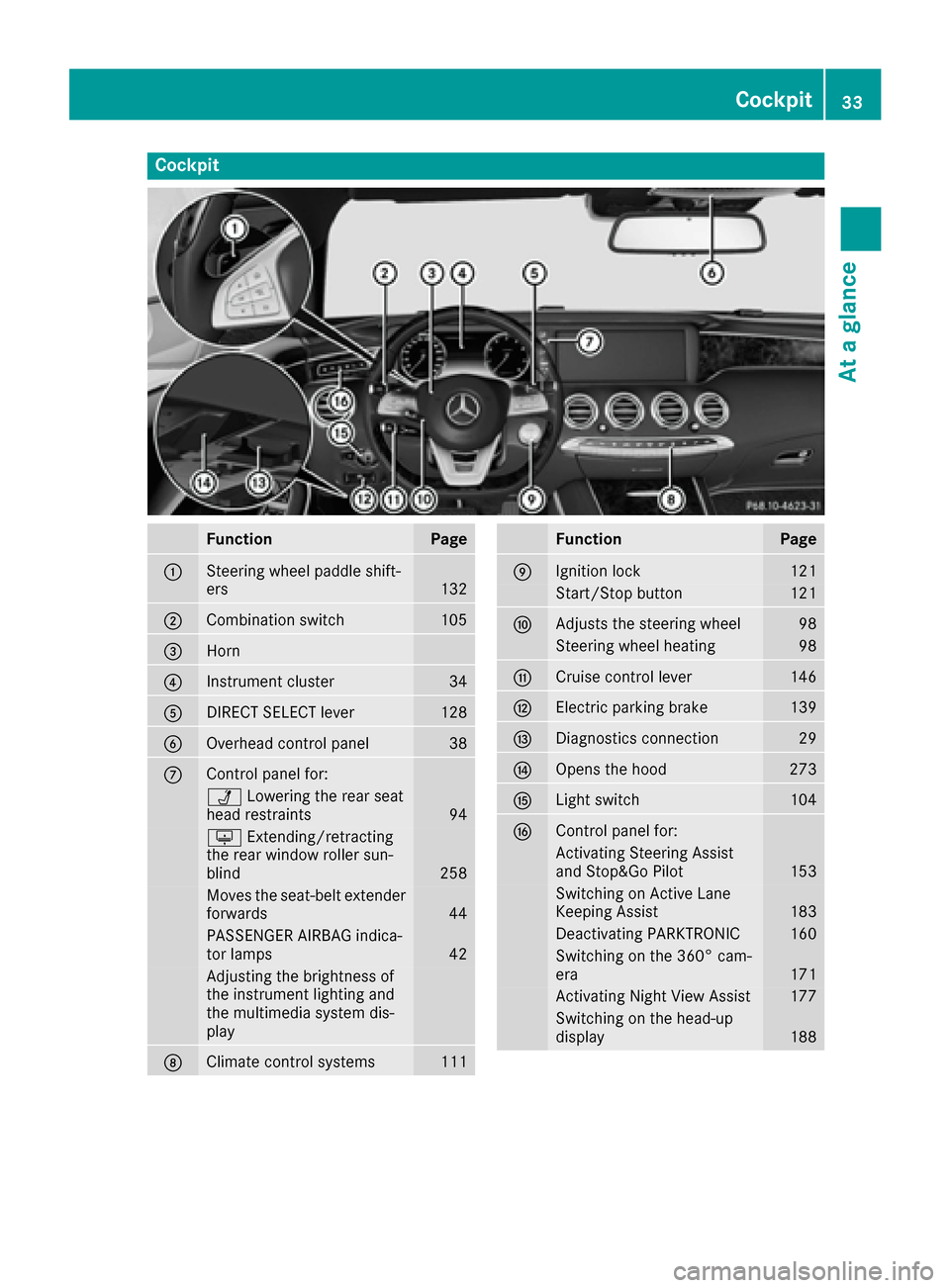
Cockpit
FunctionPage
0043Steering wheel paddle shift-
ers132
0044Combination switch105
0087Horn
0085Instrument cluster34
0083DIRECT SELECT lever128
0084Overhead control panel38
006BControl panel for:
00CALowering the rear seat
head restraints94
0094 Extending/retracting
the rear window roller sun-
blind
258
Moves the seat-belt extender
forwards44
PASSENGER AIRBAG indica-
tor lamps42
Adjusting the brightness of
the instrument lighting and
the multimedia system dis-
play
006CClimate control systems111
FunctionPage
006DIgnition lock121
Start/Stop button121
006EAdjusts the steering wheel98
Steering wheel heating98
006FCruise control lever146
0070Electric parking brake139
0071Diagnostics connection29
0072Opens the hood273
0073Light switch104
0074Control panel for:
Activating Steering Assist
and Stop&Go Pilot153
Switching on Active Lane
Keeping Assist183
Deactivating PARKTRONIC160
Switching on the 360° cam-
era171
Activating Night View Assist177
Switching on the head-up
display188
Cockpit33
At a glance
Page 79 of 338
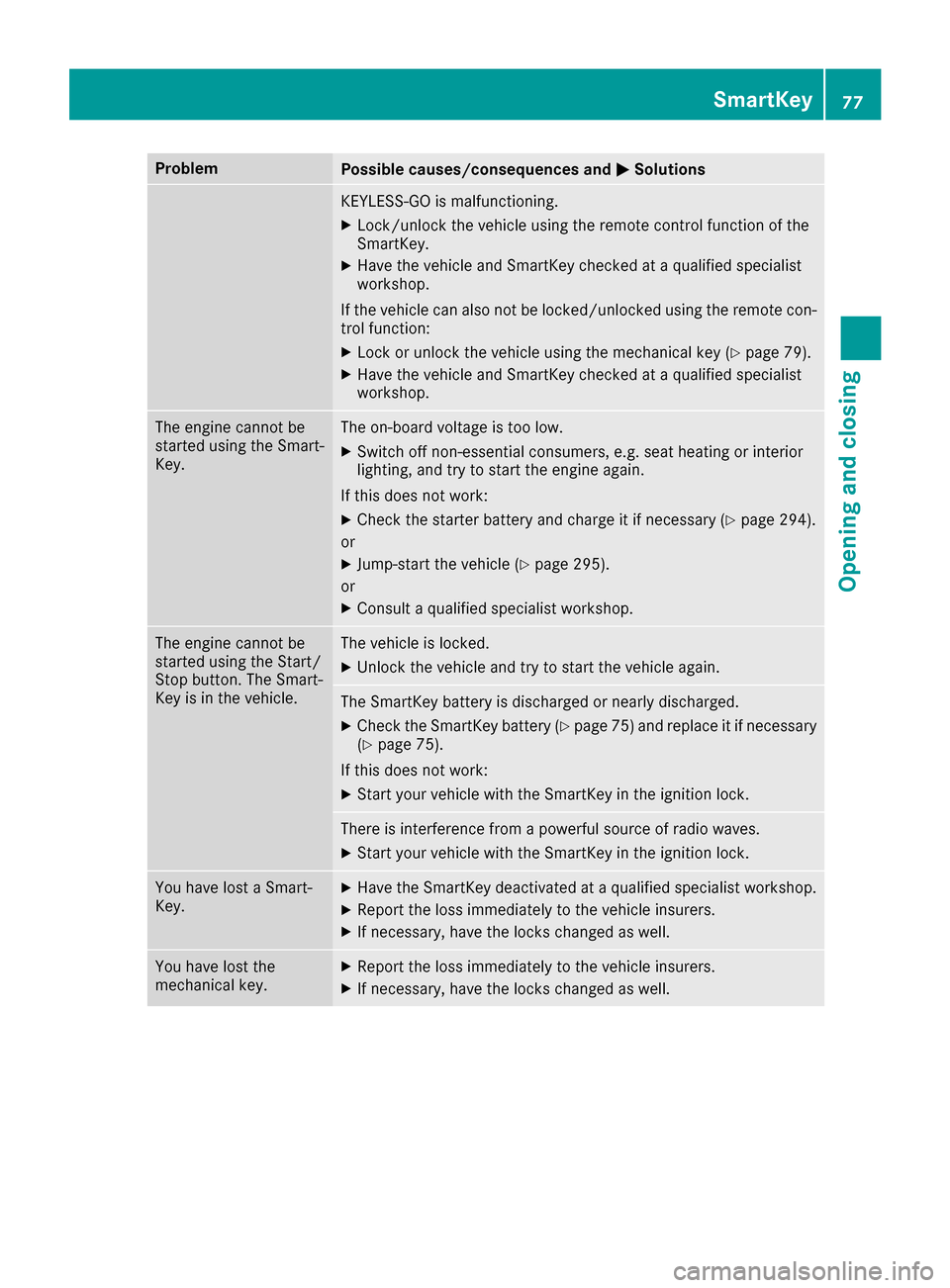
ProblemPossible causes/consequences and0050Solutions
KEYLESS-GO is malfunctioning.
XLock/unlock the vehicle using the remote control function of the
SmartKey.
XHave the vehicle and SmartKey checked at a qualified specialist
workshop.
If the vehicle can also not be locked/unlocked using the remote con-
trol function:
XLock or unlock the vehicle using the mechanical key (Ypage 79).
XHave the vehicle and SmartKey checked at a qualified specialist
workshop.
The engine cannot be
started using the Smart-
Key.The on-board voltage is too low.
XSwitch off non-essential consumers, e.g. seat heating or interior
lighting, and try to start the engine again.
If this does not work:
XCheck the starter battery and charge it if necessary (Ypage 294).
or
XJump-start the vehicle (Ypage 295).
or
XConsult a qualified specialist workshop.
The engine cannot be
started using the Start/
Stop button. The Smart-
Key is in the vehicle.The vehicle is locked.
XUnlock the vehicle and try to start the vehicle again.
The SmartKey battery is discharged or nearly discharged.
XCheck the SmartKey battery (Ypage 75) and replace it if necessary
(Ypage 75).
If this does not work:
XStart your vehicle with the SmartKey in the ignition lock.
There is interference from a powerful source of radio waves.
XStart your vehicle with the SmartKey in the ignition lock.
You have lost a Smart-
Key.XHave the SmartKey deactivated at a qualified specialist workshop.
XReport the loss immediately to the vehicle insurers.
XIf necessary, have the locks changed as well.
You have lost the
mechanical key.XReport the loss immediately to the vehicle insurers.
XIf necessary, have the locks changed as well.
SmartKey77
Opening and closing
Z
Page 94 of 338
Always drive with the head restraints instal-
led. Before driving off, make sure for every
vehicle occupant that the center of the head
restraint supports the back of the head at
about eye level.
Do not rotate the head restraints of the front and
rear seats. Otherwise, you cannot adjust the
height and angle of the head restraints to the
correct position.
Using the fore-and-aft adjustment, adjust the
head restraint so that it is as close as possible to
your head.
GWARNING
You could lose control of your vehicle if you do the following while driving:
Radjust the driver's seat, head restraint,
steering wheel or mirrors
Rfasten the seat belt
There is a risk of an accident.
Adjust the driver's seat, head restraint, steer-
ing wheel and mirror and fasten your seat belt before starting the engine.
GWARNING
If you adjust the seat height carelessly, you or
other vehicle occupants could be trapped and
thereby injured. Children in particular could
accidentally press the electrical seat adjust-
ment buttons and become trapped. There is a
risk of injury.
While moving the seats, make sure that your
hands or other body parts do not get under the
lever assembly of the seat adjustment sys-
tem.
GWARNING
The seat belt does not offer the intended level of protection if you have not moved the back-
rest to an almost vertical position. When brak-
ing or in the event of an accident, you could
slide underneath the seat belt and sustain
abdomen or neck injuries, for example. This
poses an increased risk of injury or even fatal injury.
Adjust the seat properly before beginning
your journey. Always ensure that the backrest
is in an almost vertical position and that the
shoulder section of your seat belt is routed
across the center of your shoulder.
!To avoid damage to the seats and the seat
heating, observe the following information:
Rkeep liquids from spilling on the seats. If
liquid is spilled on the seats, dry them as
soon as possible.
Rif the seat covers are damp or wet, do not
switch on the seat heating. The seat heat-
ing should also not be used to dry the seats.
Rclean the seat covers as recommended;
see "Interior care".
Rdo not transport heavy loads on the seats.
Do not place sharp objects on the seat
cushions, e.g. knives, nails or tools. The
seats should only be occupied by passen-
gers, if possible.
Rwhen the seat heating is in operation, do
not cover the seats with insulating materi-
als, e.g. blankets, coats, bags, seat covers,
child seats or booster seats.
!Make sure that there are no objects in the
footwell under or behind the seats when mov-
ing the seats back. There is a risk that the
seats and/or the objects could be damaged.
Adjusting the seats
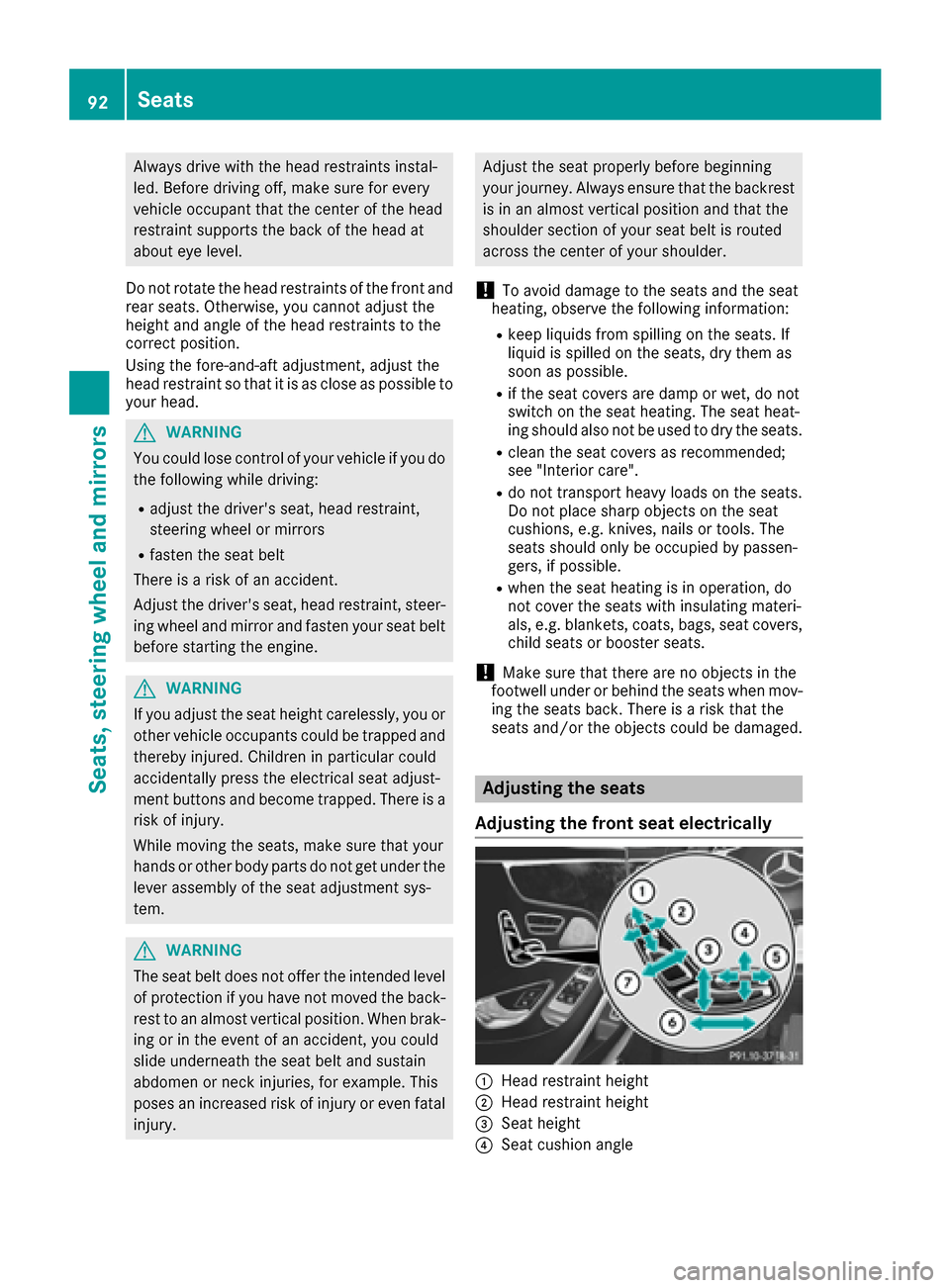
Adjusting the front seat electrically
0043Head restraint height
0044Head restraint height
0087Seat height
0085Seat cushion angle
92Seats
Seats, steering wheel and mirrors
Page 95 of 338
0083Seat cushion length
0084Seat fore-and-aft adjustment
006BBackrest angle
iIf PRE-SAFE®is triggered, the front-
passenger seat will be moved to a better posi- tion if it was previously in an unfavorable posi-
tion (
Ypage 55).
iYou can store the seat settings using the
memory function (Ypage 103).
iTo ensure the largest possible range of seat
settings, certain seat adjustment functions
will also adjust other settings.
iThe head restraint height is adjusted auto-
matically when you adjust the seat height or
the seat fore-and-aft position.
Adjusting the front-passenger seat
from the driver’s seat
Important safety notes
GWARNING
When you adjust a seat, you or other vehicle
occupants could become trapped, e.g. on the seat guide rail. There is a risk of injury.
Make sure when adjusting a seat that no one
has any body parts in the sweep of the seat.
Observe the safety notes on "Air bags"
(
Ypage 46) and "Children in the Vehicle"
(Ypage 57).
GWARNING
The front-air bags for could also injure the
vehicle occupants in the front If the front
seats are positioned too close to the dash-
board or steering wheel. This poses an
increased risk of injury or even fatal injury.
Always adjust the front seats so that they are
as far from the front air bags as possible. Also
observe the notes on the correct adjustment
of the seats.
GWARNING
Children could become trapped if they adjust
the seats, particularly when unattended.
There is a risk of injury.
When leaving the vehicle, always take the
SmartKey with you and lock the vehicle. Never
leave children unsupervised in the vehicle.
!Do not move the front-passenger seat fully
forwards if there are objects in the parcel net
in the front-passenger footwell. The objects
could otherwise be damaged.
Adjusting the front-passenger seat
The power supply or the ignition must be
switched on so that the front-passenger seat
can be selected (
Ypage 122).
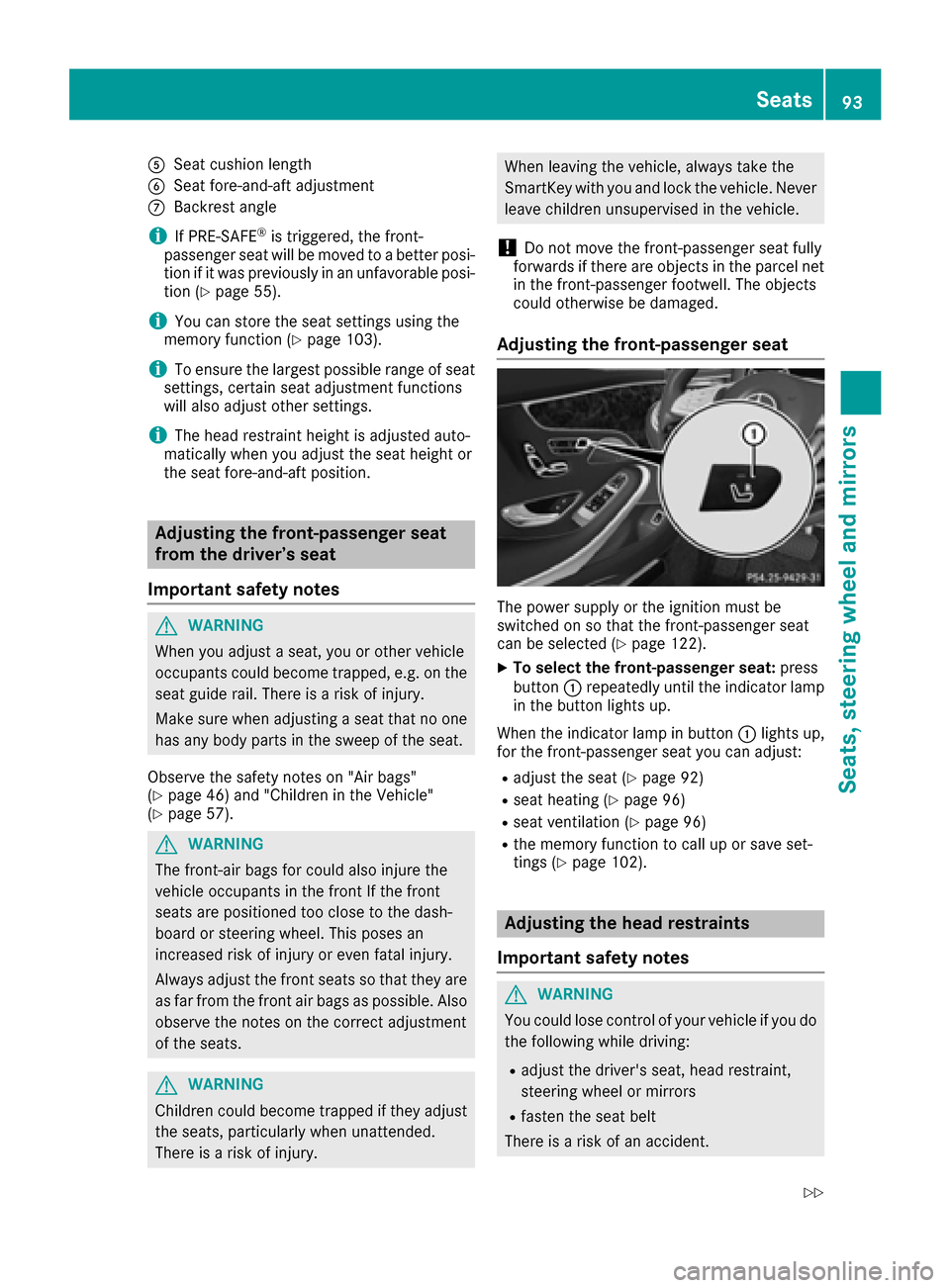
XTo select the front-passenger seat: press
button 0043repeatedly until the indicator lamp
in the button lights up.
When the indicator lamp in button 0043lights up,
for the front-passenger seat you can adjust:
Radjust the seat (Ypage 92)
Rseat heating (Ypage 96)
Rseat ventilation (Ypage 96)
Rthe memory function to call up or save set-
tings (Ypage 102).
Adjusting the head restraints
Important safety notes
GWARNING
You could lose control of your vehicle if you do the following while driving:
Radjust the driver's seat, head restraint,
steering wheel or mirrors
Rfasten the seat belt
There is a risk of an accident.
Seats93
Seats, steering wheel and mirrors
Z
Page 98 of 338
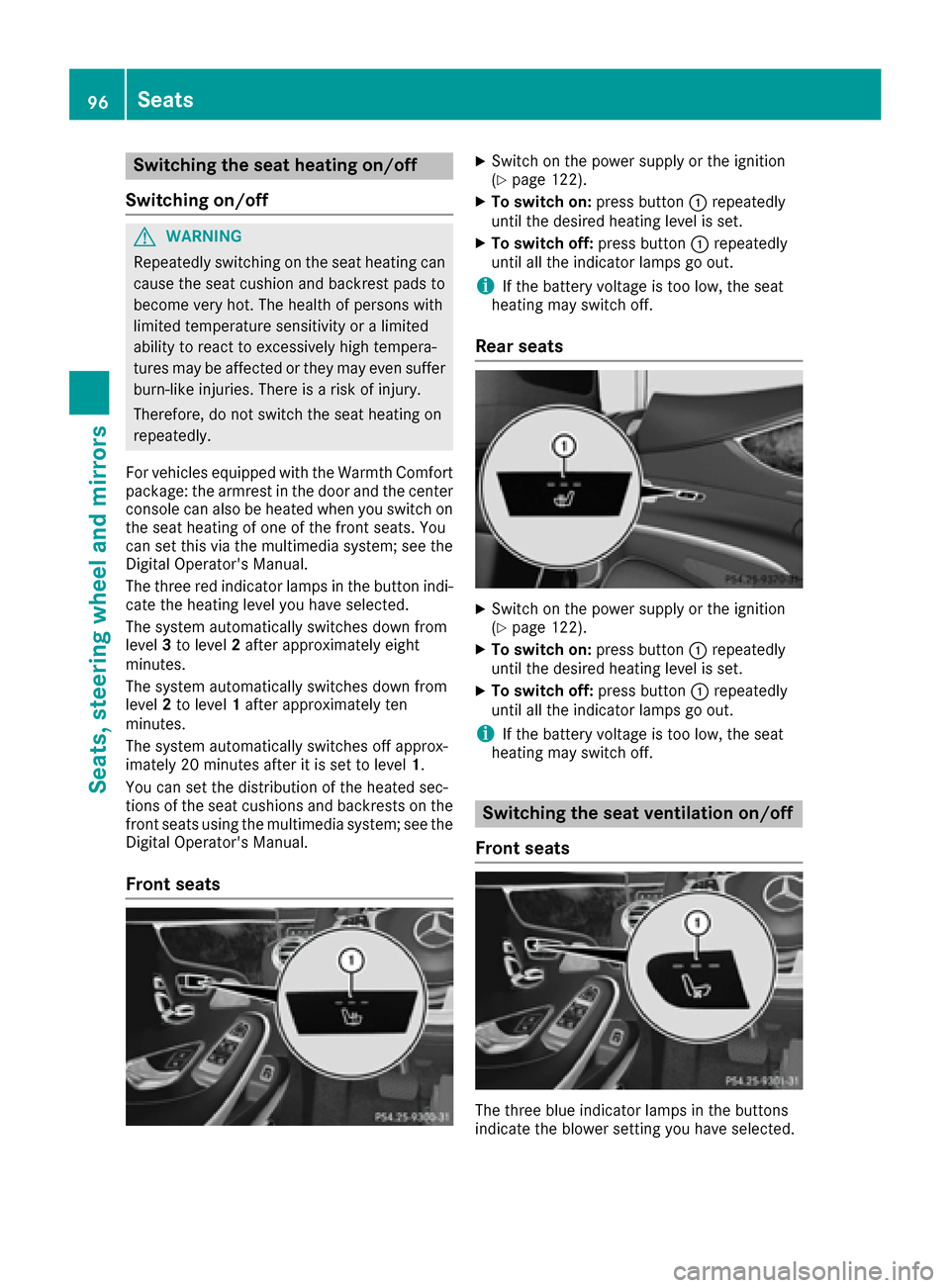
Switching the seat heating on/off
Switching on/off
GWARNING
Repeatedly switching on the seat heating can
cause the seat cushion and backrest pads to
become very hot. The health of persons with
limited temperature sensitivity or a limited
ability to react to excessively high tempera-
tures may be affected or they may even suffer
burn-like injuries. There is a risk of injury.
Therefore, do not switch the seat heating on
repeatedly.
For vehicles equipped with the Warmth Comfort
package: the armrest in the door and the center
console can also be heated when you switch on
the seat heating of one of the front seats. You
can set this via the multimedia system; see the
Digital Operator's Manual.
The three red indicator lamps in the button indi-
cate the heating level you have selected.
The system automatically switches down from
level 3to level 2after approximately eight
minutes.
The system automatically switches down from
level 2to level 1after approximately ten
minutes.
The system automatically switches off approx-
imately 20 minutes after it is set to level 1.
You can set the distribution of the heated sec-
tions of the seat cushions and backrests on the
front seats using the multimedia system; see the
Digital Operator's Manual.
Front seats
XSwitch on the power supply or the ignition
(Ypage 122).
XTo switch on: press button0043repeatedly
until the desired heating level is set.
XTo switch off: press button0043repeatedly
until all the indicator lamps go out.
iIf the battery voltage is too low, the seat
heating may switch off.
Rear seats
XSwitch on the power supply or the ignition
(Ypage 122).
XTo switch on: press button0043repeatedly
until the desired heating level is set.
XTo switch off: press button0043repeatedly
until all the indicator lamps go out.
iIf the battery voltage is too low, the seat
heating may switch off.
Switching the seat ventilation on/off
Front seats
The three blue indicator lamps in the buttons
indicate the blower setting you have selected.
96Seats
Seats, steering wheel and mirrors
Page 99 of 338
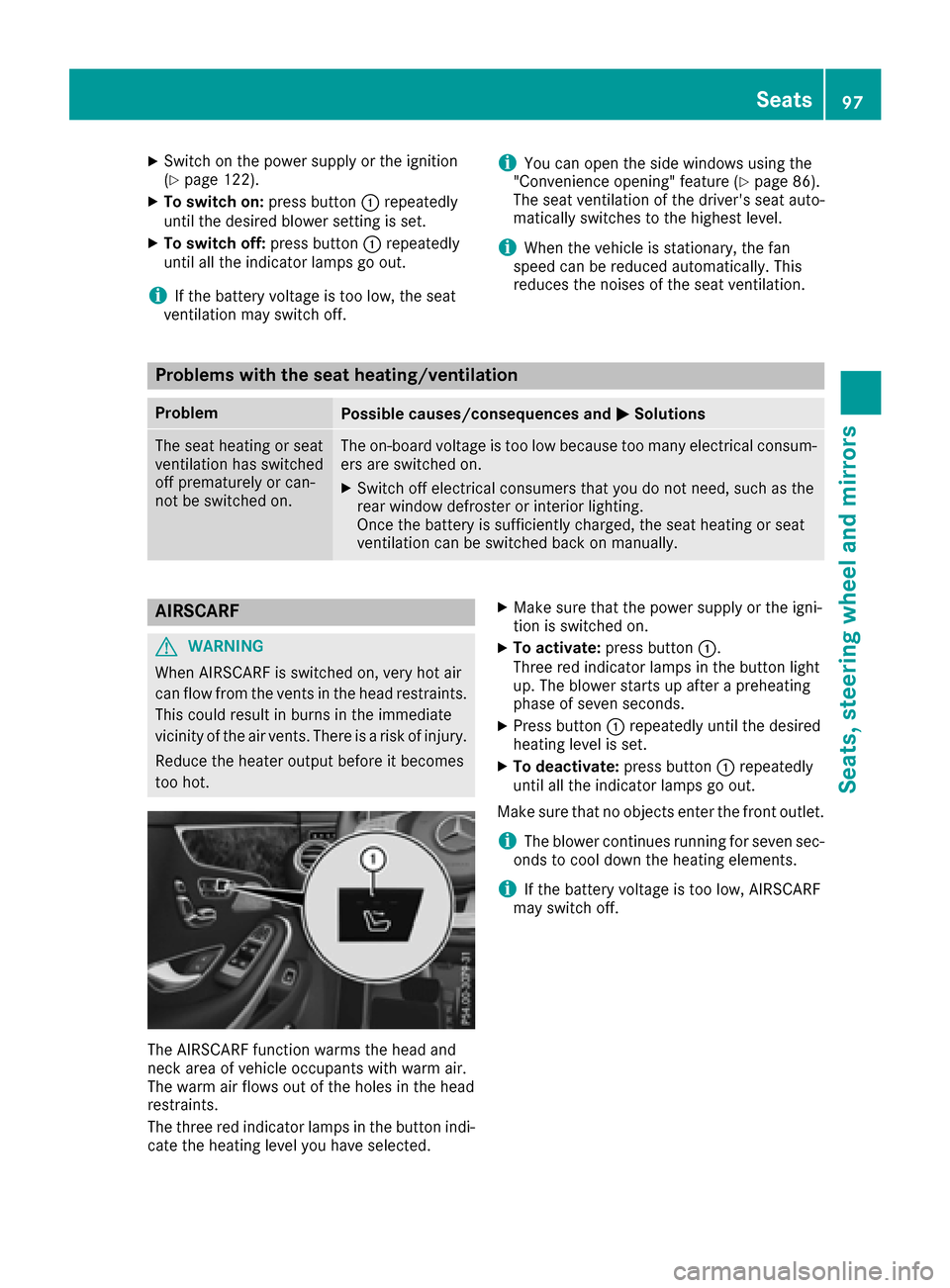
XSwitch on the power supply or the ignition
(Ypage 122).
XTo switch on:press button0043repeatedly
until the desired blower setting is set.
XTo switch off: press button0043repeatedly
until all the indicator lamps go out.
iIf the battery voltage is too low, the seat
ventilation may switch off.
iYou can open the side windows using the
"Convenience opening" feature (Ypage 86).
The seat ventilation of the driver's seat auto-
matically switches to the highest level.
iWhen the vehicle is stationary, the fan
speed can be reduced automatically. This
reduces the noises of the seat ventilation.
Problems with the seat heating/ventilation
ProblemPossible causes/consequences and 0050Solutions
The seat heating or seat
ventilation has switched
off prematurely or can-
not be switched on.The on-board voltage is too low because too many electrical consum-
ers are switched on.
XSwitch off electrical consumers that you do not need, such as the
rear window defroster or interior lighting.
Once the battery is sufficiently charged, the seat heating or seat
ventilation can be switched back on manually.
AIRSCARF
GWARNING
When AIRSCARF is switched on, very hot air
can flow from the vents in the head restraints. This could result in burns in the immediate
vicinity of the air vents. There is a risk of injury.
Reduce the heater output before it becomes
too hot.
The AIRSCARF function warms the head and
neck area of vehicle occupants with warm air.
The warm air flows out of the holes in the head
restraints.
The three red indicator lamps in the button indi-
cate the heating level you have selected.
XMake sure that the power supply or the igni-
tion is switched on.
XTo activate: press button 0043.
Three red indicator lamps in the button light
up. The blower starts up after a preheating
phase of seven seconds.
XPress button 0043repeatedly until the desired
heating level is set.
XTo deactivate: press button0043repeatedly
until all the indicator lamps go out.
Make sure that no objects enter the front outlet.
iThe blower continues running for seven sec-
onds to cool down the heating elements.
iIf the battery voltage is too low, AIRSCARF
may switch off.
Seats97
Seats, steering wheel and mirrors
Z