display MERCEDES-BENZ S-CLASS COUPE 2017 User Guide
[x] Cancel search | Manufacturer: MERCEDES-BENZ, Model Year: 2017, Model line: S-CLASS COUPE, Model: MERCEDES-BENZ S-CLASS COUPE 2017Pages: 533, PDF Size: 10.75 MB
Page 151 of 533
app:
them obile phone is in thes towa ge com‐
partment (→ page150). #
Shif tthe transmission toposition jori. #
Depress theb rake pedal and push button 1
once. #
Ifth ev ehicle does no tstart:s witc hoffnon-
essential consumer sand press button 1
once. #
Ifth ev ehicle still does no tstart and the
Place the key in the marked space See Own-
er's Manual displaymessag ealso appear sin
th em ultifunction display: star tt he vehicle in
emer gency operation mode.
Yo uc an swit chofft he engine while driving by
pressing button 1fora bout thre es econds. Be
sur etoo bservethes afet yn otes under "Driving
instructions".
St arting avehicle using amobilep hone
Re quirements:
R thev ehicle is equipped wit hthe "Digital Vehi‐
cle Key" function. R
the" Digital Vehicle Key" function is activated
via theM ercedes me connect weba pp:
http://www.mercedes.me.
R suitable mobile phone wit hNFC aerial (Near
Field Communication) and Secur eElement.
R Suf ficient charge status of them obile
phone. On some mobile phones, thef unction
is also available when theb atter yisd is‐
ch arge d.
% Youc an checkt he suitability of your mobile
phon ebye ntering thep hone number at
http://www.mercedes.me.
Information about suitable mobile phones
can be obtained from your Mercedes-Benz
servic ecentr eorath ttp://www.mercedes-
benz.com/connect.
% Mercedes-Ben zrecommends that youc arry
th ee mer gency keye lemen tincaseoff unc‐
tion restrictions.
% The function is only available in combination
wit hM ercedes me connec tand on lyin cer‐
ta in countries. %
Protectiv ecases around them obile phone
can impair thef unctionality. #
Mak esuret hat thec har gestatus of the
mobil ephone is suf ficient. If necessar y,
ch arge them obile phone befor estartin gt he
journe y.
St arting thev ehicle fort he firs tt ime af ter
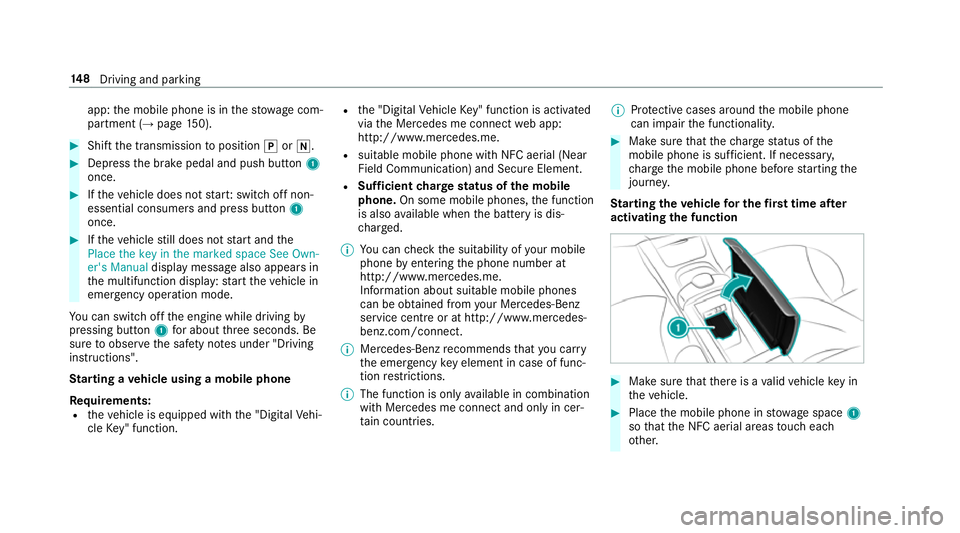
activating the function #
Mak esuret hat ther eisav alidvehicle keyin
th ev ehicle. #
Place them obile phone in stowages pace 1
so that theN FC aerial areas touc he ach
ot her. 14 8
Driving and pa rking
Page 157 of 533
Switch off the ignition before exiting
display
messa gealso appear sinthe multifunction dis‐
pla y.Ifyo udon otswit chofft he ignition, the
ignition is automaticall yswitched of fafter one
minu te.
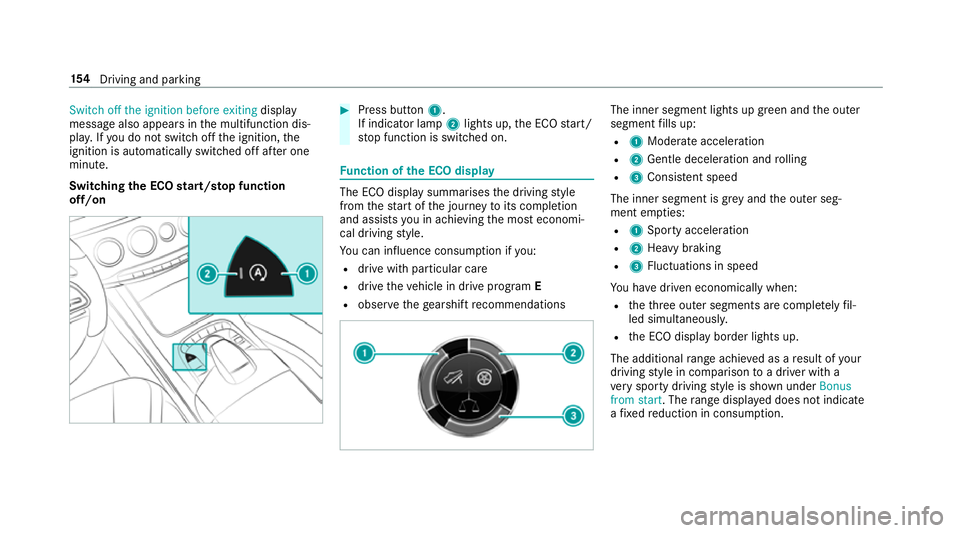
Switching theE CO start/s topf unction
off/on #
Press button 1.
If indicator la mp2light sup,theE CO start/
st op function is switched on. Fu
nction of theE CO display The EC
Odispla ysummarises thed riving style
from thes tart of thej ourne ytoits completion
and assists youina chievin gthe mos teconomi‐
cal driving style.
Yo uc an influence consum ption if you:
R driv ewithp articular care
R driv ethe vehicle in driv eprogram E
R obser vetheg earshif trecommendations The inner segment light
supgreen and theo uter
segment fills up:
R 1 Moderat eacceleration
R 2 Gentle decele ratio na nd rolling
R 3 Consis tent speed
The inne rsegment is gr eyand theo uter seg‐
ment em pties:
R 1 Sporty acceleration
R 2 Heavy braking
R 3 Fluctuation sinspeed
Yo uh ave driven economicall ywhen:
R thet hree outer segments ar ecomple tely fil‐
led simultaneousl y.
R theE CO displa yborder lights up.
The additional rang ea chieve dasar esult of your
drivin gstyle in co mparison toad rive rw itha
ve ry sporty driving styleiss hown under Bonus
from start.T herang ed ispl ay ed does no tindicate
af ixed reduction in consum ption. 15 4
Driving and pa rking
Page 158 of 533
DY
NA MIC SELECT switch Fu
nction of theD YNAMI CSELECT switch Mercedes-AMG
vehicles: observet he no tesin
th eS upplement .Otherwise, youm ayfailto rec‐
ognise dangers.
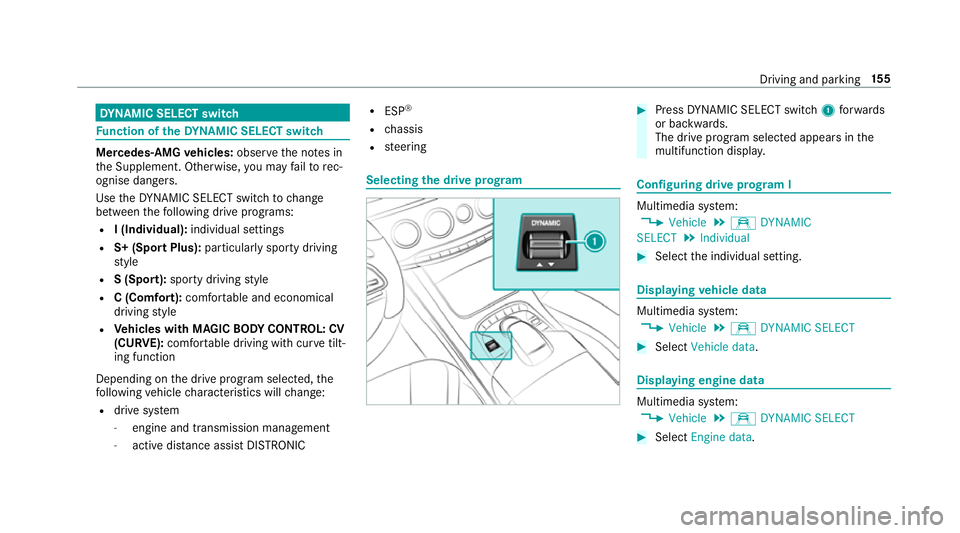
Use theD YNAMI CSELECT switc htochange
between thef ollowing driv eprograms:
R I(Individual): individual settings
R S+ (Spor tPlus): particular lysporty driving
st yle
R S(Sport): sporty driving style
R C(Comfort): comfortable and economical
drivin gstyle
R Vehicles with MAGIC BODY CONT ROL: CV
(CURVE): comfortable drivin gwithc urve tilt‐
ing function
Depending on thed rive program selected, the
fo llowing vehicle characteristic swillch ange:
R driv esystem
- engine and transmission management
- activ edista nce assi stDISTRONIC R
ESP ®
R chassis
R steering Selecting
thed rive prog ram #
Press DYNA MIC SELECT switch 1forw ards
or backwards.
The driv eprogram selected appea rsinthe
multifunction displa y. Configuring driv
eprogram I Multimedia sy
stem:
, Vehicle .
e DYNAMIC
SELECT .
Individual #
Select thei ndividual setting. Displaying
vehicl edata Multimedi
asystem:
, Vehicle .
e DYNAMIC SELECT #
Select Vehicle data . Displaying engine data
Multimedia sy
stem:
, Vehicle .
e DYNAMIC SELECT #
Select Engine data. Driving and parking
15 5
Page 184 of 533
nor
override thel aws of ph ysics. It canno ttake
int oa ccount road, weather or traf ficc onditions.
Cruise control is only an aid. Youa re re sponsible
fo rt he dis tance tothev ehicle in front, forv ehi‐
cle speed, forb raking in good time and fors tay‐
ing in lane.
Displa ysinthem ultifunction display
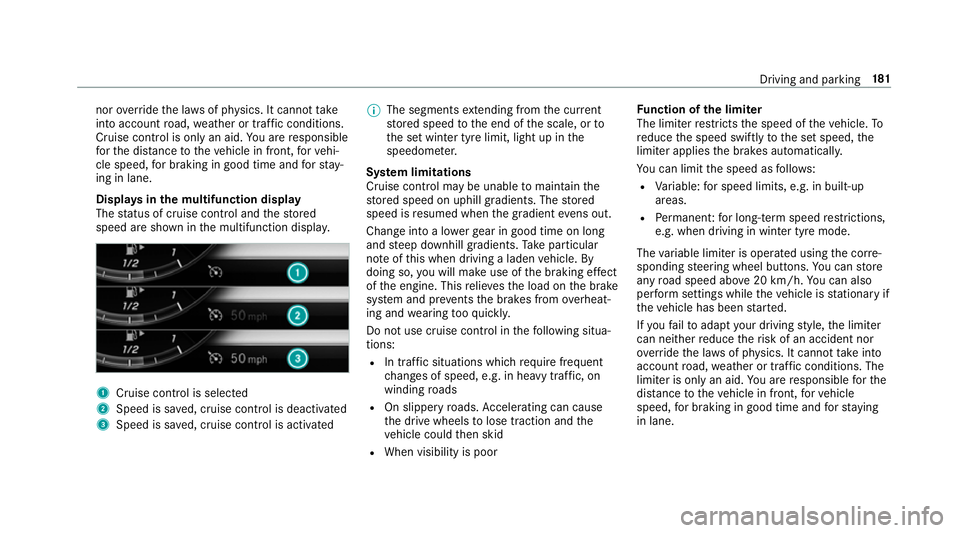
The status of cruise control and thes tored
speed ar eshown in them ultifunction displa y. 1
Cruise cont roliss elected
2 Spee diss aved, cruise control is deactivated
3 Speed is sa ved, cruise control is activated %
The segments extending from thec urrent
st ored speed tothee nd of thes cale, or to
th es etwinter tyr elimit, light up in the
speedome ter.
Sy stem limitations
Cruise control ma ybeunable tomaintain the
st ored speed on uphill gradients. The stored
speed is resumed when theg radient evens out.
Chang eintoal owergear in good time on long
and steep downhill gradients. Take particular
no te ofthis when drivin galaden vehicle. By
doing so, youw ill mak euse of theb raking ef fect
of thee ngine. This relie vest he load on theb rake
sy stem and pr events theb rake sf romo verheat‐
ing and wearing tooq uickl y.
Do no tuse cruise control in thef ollowing situa‐
tions:
R In traf fics ituations whi chrequ iref requ ent
ch anges of speed, e.g .inheavy traf fic, on
winding roads
R On slippe ryroads. Accelerating can cause
th ed rive wheels tolose traction and the
ve hicle could then skid
R When visibility is poor Fu
nction of thel imiter
The limiter restricts thes peed of thev ehicle. To
re duce thes peed swiftl ytothe se tspeed, the
limiter applies theb rake sa utomatically.
Yo uc an limit thes peed as follo ws:
R Variable: fors pee dlimits, e.g. in built-up
areas.
R Perm anen t:forl ong-ter mspee drestrictions,
e.g .whend riving in winter tyr emode.
The variable limiter is operated usin gthe cor re‐
sponding steering wheel buttons. Youc an store
an yr oad speed abo ve20 km/h. Youc an also
per form settings while thev ehicle is stationar yif
th ev ehicle has been star ted.
If yo uf ail toadap tyour driving style, thel imiter
can neither reduce ther isk of an accident nor
ov erride thel aw sofp hysics. It canno ttak ei nto
account road, weather or traf ficc onditions .The
limiter is only an aid. Youa re re sponsible fort he
dis tance tothev ehicle in front, forv ehicle
speed, forb raking in good time and fors taying
in lane. Drivin
gand parking 181
Page 185 of 533
Displa
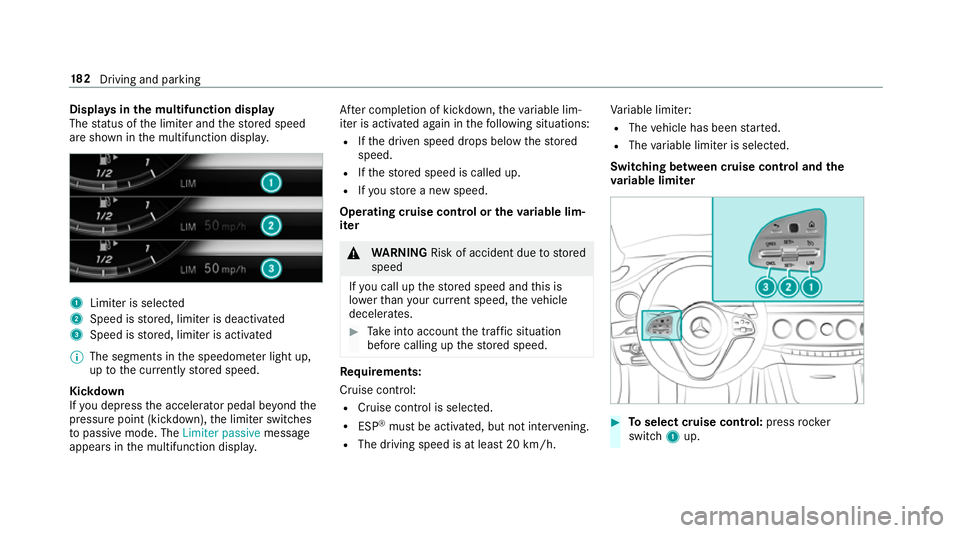
ysinthem ultifunction display
The status of thel imiter and thes tore ds peed
ar es hown in them ultifunction displa y.1
Limiter is selected
2 Speed is stored, limiter is deactivated
3 Speed is stored, limiter is activated
% The segment sinthe speedome terl ight up,
up tothec urrentl ys tore ds peed.
Kickdown
If yo ud epress thea ccelerator pedal be yond the
pressur epoint (kickdown), thel imiter switches
to passiv emode. The Limiter passive message
appear sinthe multifunction displa y.Af
terc ompletion of kickdown, thev ariable lim‐
iter is activated again in thef ollowing situations:
R Ifth ed rive ns peed drops belo wthe stored
speed.
R Ifth es tore ds peed is called up.
R Ifyo us tore an ew speed.
Operating cruise control or thev ariable lim‐
iter &
WARNING Risk of accident du etostored
speed
If yo uc all up thes tore ds peed and this is
lo we rthan your cur rent speed ,the vehicle
decelerates. #
Take intoa ccount thet raffic situation
befor ecallin gupt hestored speed. Re
quirements:
Cruise control:
R Cruise control is selected.
R ESP ®
mus tbea ctivated, but no tinter vening.
R The driving speed is at leas t20k m/h. Va
riable limiter:
R The vehicle has been star ted.
R The variable limiter is selec ted.
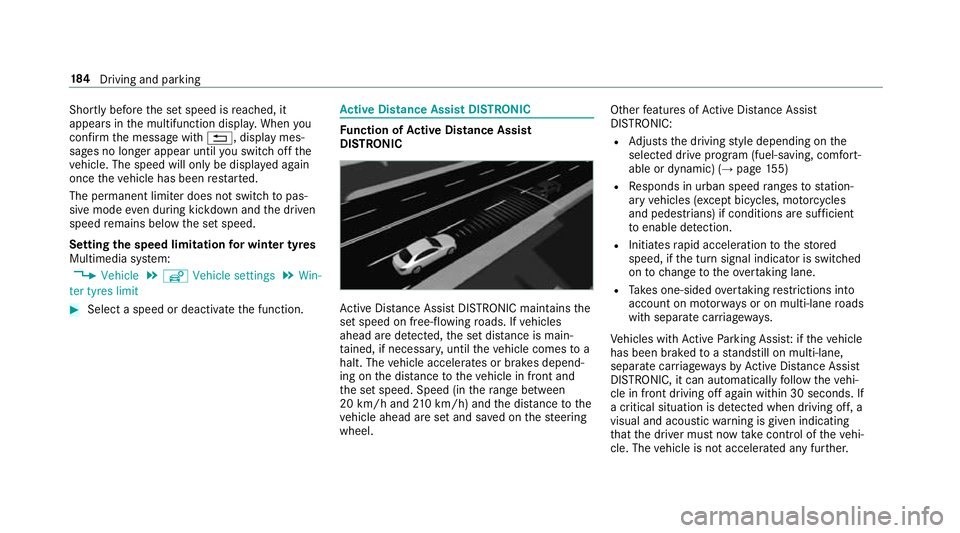
Switching between cruise control and the
va riable limi ter #
Toselect cruise control: pressrocker
switch 1up. 18 2
Driving and pa rking
Page 187 of 533
Shortly befor
ethe se tspeed is reached, it
appear sinthe multifunction displa y.When you
confir mthe messag ewith%,d isplaymes‐
sages no longer appear until yous wit ch offt he
ve hicle. The speed will onl ybedisplayeda gain
onc ethe vehicle has been restar ted.
The permanen tlimiter does no tswitc htop as‐
siv em ode evendurin gkickdown and thed riven
speed remains belo wthe se tspeed.
Setting thes peed limitation forw inte rt yres
Multimedia sy stem:
, Vehicle .
î Vehicle settings .
Win-
ter tyres limit #
Select aspeed or deactivat ethe function. Ac
tiv eD ista nce Assis tDISTR ON IC Fu
nction of Activ eD ista nce Assist
DISTRO NIC Ac
tiveD ista nce Assi stDISTRONI Cmaintains the
se ts peed on free-flowing roads. If vehicles
ahead ar edetected, thes etdis tance is main‐
ta ined, if necessar y,until thev ehicle comes to a
halt. The vehicle accelerates or brakes depend‐
ing on thed ista nce tothev ehicle in front and
th es etspeed. Speed (in ther ang ebetwe en
20 km/h and 210k m/h )and thed ista nce tothe
ve hicle ahead ar esetand sa vedont hesteering
wheel. Other
features of ActiveD ista nce Assi st
DISTRONIC:
R Adjusts thed riving styled epending on the
selected driv eprogram (fuel-saving, comfort‐
able or dynamic) (→ page155)
R Responds in urban speed ranges tostation‐
ar yv ehicles (e xcep tb icycles, mo torcyc les
and pedestrians) if condition saresuf ficient
to enable de tection.
R Initiates rapid acceleration tothes tored
speed, if thet urns ignal indicator is switched
on tochang etot heovertak ing lane.
R Take so ne-sided overtakin grestrictions into
account on mo torw aysoronm ulti-laneroads
wit hs eparat ecarriag ewa ys.
Ve hicles wit hActiv eParking Assis t:ifth ev ehicle
has been braked toas tandstil lonm ulti-lane,
separat ecarriag ewa ysby ActiveD ista nce Assi st
DISTRONIC, it can au tomatically follo wt he vehi‐
cle in front driving of fagain within 30 seconds. If
ac ritical situation is de tected whe ndriving off, a
visua land acoustic warning is given indicating
th at thed rive rm ustn ow take control of thev ehi‐
cle. The vehicle is no taccelerated an yfurther. 184
Driving and pa rking
Page 194 of 533
If
th es ystemr eaches asysteml imitation or the
driver has no tsteered thev ehicle forac onsider‐
ablep eriod of time or has remo vedt heir hands
from thes teering wheel, thes ystemw ill,
depending on thes ituation ,first aler tthe driver
wit hav isual warning. Display 1appear sinthe
multifunction displa y.Ifth ed rive rs tilld oes not
st eer thev ehicle himself or herself, or still has
no ttaken hold of thes teering wheel, arepeated
wa rning tone sounds in additio ntothe visual
wa rning messag etoremind thed rive rtot ake
cont roloft hevehicle.
The warning messag edoes no tappear or disap‐
pear sifo ne of thef ollowing condition sareme t:
R The driver steer sthe vehicle.
R The driver presses asteering wheel button or
operates Touc hC ontrol.
Ac tiveS teering Assis tisonlyana id. The driver is
re sponsible fort he dis tance tothev ehicle in
front, forv ehicle speed, forb raking in good time
and fors taying in lane. Befor echanging lanes,
th ed rive rm ustm akes uret hat then eighbouring
lane is free (glance over thes houlder). Sy
stem limitations
Ac tiveS teering Assis thas alimited steering tor‐
qu efor lateral guidance. In some cases ,the
st eering inter ventio nisn otsufficien ttok eepthe
ve hicle in thel ane or todriv epaste xits. Active
St eering Assis tcann otprov ide thed rive rw ith
st eering assis tance at roundabouts, T-junctions,
junctions, tollst ations or turns ,for example.
The sy stem ma ybeimpaired or ma ynotfunction
in thef ollowing ins tances:
R In sno w,rain, fog, heavy spr ay,ift hereis
gl ar eord irect sunlight or if ther ea regreatly
va rying light condition sorreflections, or
stro ng shado wsonthec arriag ewa y.
R Insuf ficient road illumination.
R The windsc reen in thea reaoft he camer ais
dirty ,miste du p, damaged or co vered.
R Absence of lane markings, or se veralu nclear
lane markings, or if them arkings chang erap‐
idly.
R The dista ncetot hevehicle in front is too
small and thel ane markings thus canno tbe
de tected.
R The car riag ewa yisn arrow and winding. R
Obs tacle sont he lane or projecting out into
th el ane.
The sy stem does no tprovide assis tance in the
fo llowing conditions:
R On tigh tbends ,roundabouts and when turn‐
ing.
R Ifyo ua ctivel ychang elane without swit ching
on thet urns ignal indicator. &
WARNING Risk of accident if Active
St eering Assis tunexpectedl ystops func‐
tioning
If th es ysteml imitations of ActiveS teering
Assis tare re ached ther eisnog uarantee that
th es ystemw illremain activ eorwillk eep the
ve hicle in lane. #
Alw aysk eep your hands on thes teering
wheel and obser vethet raffic carefull y. #
Alw ayss teer thev ehicle paying atten‐
tion totraf ficc onditions. Driving and pa
rking 191
Page 197 of 533
sag
eiss hown in them ultifunction displa y.The
ve hicle is decelerated in stages toas tandstill. At
speeds belo w60km/h theh azar dwarning
light sswitc hona utomaticall y.
When thev ehicle is stationar y,thef ollowing
actions ar ecarried out:
R The vehicle is secured wit hthe electric park‐
ing brake.
R ActiveD ista nce Assi stDISTRONI Cisended.
R The vehicle is unloc ked.
R If possible, an emer gency cal lisplace dto
th eM ercedes-Benz emer gency cal lcentre.
The driver can cance lthe deceleration at any
time byper form ing one of thef ollowing actions:
R Steering
R Depressing theb rake or accelera torp edal
R Pressing asteering wheel button or operat‐
ing Touc hC ontrol
R Activating or deacti vating ActiveD ista nce
Assi stDISTRONIC Overvi
ewofActiv eD ista nce Assist
DISTRO NIC displa ysinthei nstrument clus‐
ter The assis
tance graphi cand thes tatus display
sho wthe status of thef ollowing function sinthe
instrument clus ter:
R ActiveD ista nce Assi stDISTRONIC
R Route-based spee dadjustment
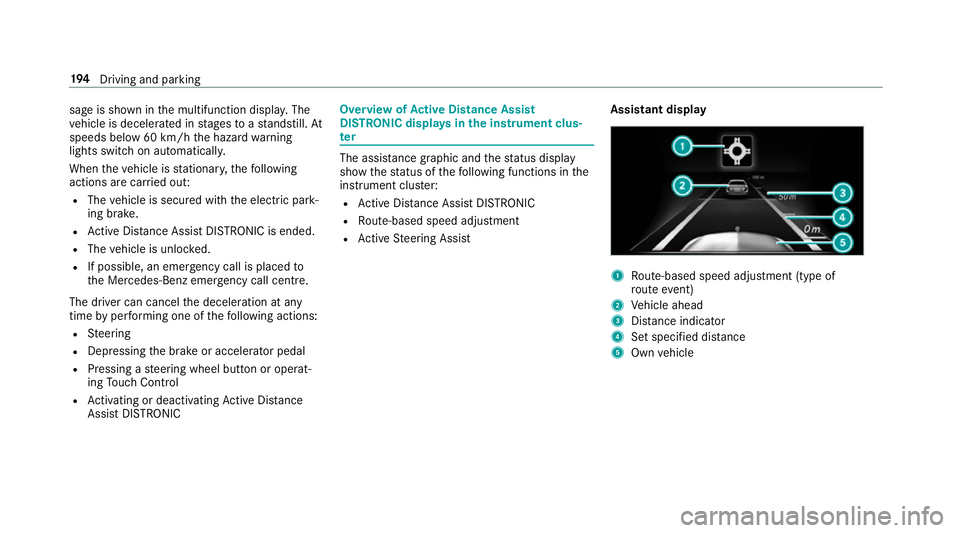
R ActiveS teering Assist Assistant display 1
Route-based spee dadjustmen t(type of
ro utee vent)
2 Vehicle ahead
3 Distance indica tor
4 Setspecifie ddista nce
5 Own vehicle 194
Driving and pa rking
Page 198 of 533
Ac
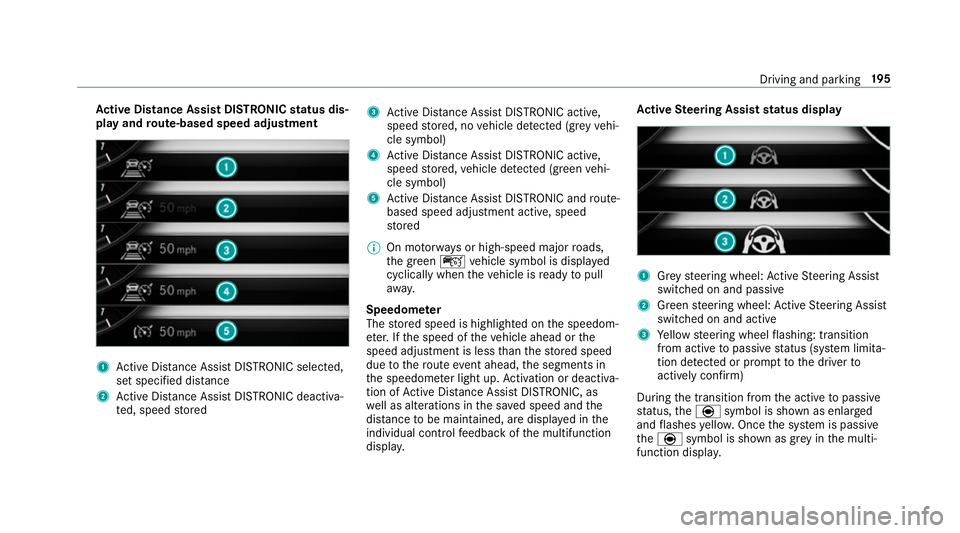
tiv eD ista nce Assis tDISTR ON ICstatus dis‐
pla yand route-base dspee dadjustment 1
ActiveD ista nce Assi stDISTRONI Cselected,
se ts pecified dis tance
2 ActiveD ista nce Assi stDISTRONI Cdeacti va‐
te d, speed stored 3
ActiveD ista nce Assi stDISTRONI Cactive,
speed stored, no vehicle de tected (gr eyvehi‐
cle symbol)
4 ActiveD ista nce Assi stDISTRONI Cactive,
speed stored, vehicle de tected (green vehi‐
cle symbol)
5 ActiveD ista nce Assi stDISTRONI Candroute-
based spee dadjustmen tactive, speed
st ored
% On mo torw aysorh igh-speed major roads,
th eg reen ç vehicle symbol is displa yed
cyclically whe nthe vehicle is ready topull
aw ay.
Speedome ter
The stored speed is highlighted on thes peedom‐
et er.Ift he speed of thev ehicle ahead or the
speed adjustment is less than thes tore ds peed
due tother out eevent ahead, thes egment sin
th es peedome terl ight up. Activation or deacti va‐
tio nofA ctiveDista nce Assi stDISTRONIC, as
we ll as alteration sinthe sa veds peed and the
dis tance tobe maintained, ar edispla yedint he
individual control feedbac kofthe multifunction
displa y. Ac
tiv eS teering Assis tstatus display 1
Grey steering wheel: ActiveS teering Assist
switched on and passive
2 Green steering wheel: ActiveS teering Assist
switched on and active
3 Yello ws teering wheel flashing: transition
from activ etopassivestatus (s ystem limita‐
tion de tected or prom pttothed rive rto
activel yconfirm)
During thet ransition from thea ctiv etop assive
st atus ,the è symbol is shown as enlarged
and flashes yello w. Once thes ystemisp assive
the è symbol is shown as gr eyinthem ulti‐
function displa y. Driving and pa
rking 19 5
Page 219 of 533
play: select
thec orresponding transmission
position.
The vehicle drives int othe selected parking
space.
On completion of thep arking procedure, the
Active Parking Assist finished, take contro lof
the vehicle. displaymessa geappears. Further
manoeuvring ma ystillben ecessar y. #
Afterc ompletion of thep arking procedure,
safeguar dthe vehicle agains trolling away.
When requ ired bylegal requirements or local
conditions: tur nthe wheels towa rdst he kerb.
% Youc an stop thev ehicle and chang ethe
transmiss ionp osit iond urin gthe parking pro‐
cedure. The sy stem then calculates anew
ve hicle path. The parking procedur ecan
th en be continued. If no ne wvehicle pat his
av ailable, thet ransmission position will be
ch anged again. If thev ehicle has no tyet
re ached thep arking space, thep arking pro‐
cedur ewill be cancelled, should agear be
ch anged. Exiting
aparki ng space wit hActive Parking
Assist
Re quirement:
Yo uc an on lyex itap arkin gspace wit hActive
Pa rking Assis tifyou ha veprev iousl yparke dt he
ve hicle wit hActiv eParking Assist.
Please no tethat youa re re sponsible fort he vehi‐
cle and sur rounding sduring thee ntir eparking
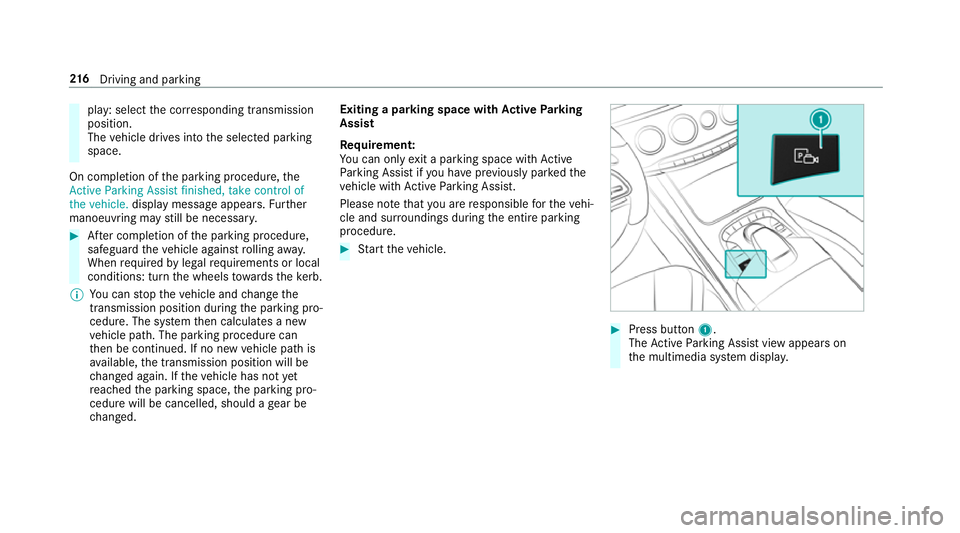
procedure. #
Startt he vehicle. #
Press button 1.
The ActiveP arking Assis tviewa ppear son
th em ultimedia sy stem displa y. 216
Driving and pa rking