ignition MERCEDES-BENZ S-CLASS COUPE 2017 User Guide
[x] Cancel search | Manufacturer: MERCEDES-BENZ, Model Year: 2017, Model line: S-CLASS COUPE, Model: MERCEDES-BENZ S-CLASS COUPE 2017Pages: 533, PDF Size: 10.75 MB
Page 155 of 533
&
WARNING Risk of accident if thei gnition
is switched of fwhile driving
If yo us wit ch offt he ignition while driving,
functionsr elevant tosaf etya re re stricted or
no longer available. This ma yeffect, for
ex ample, thep owe rsteering sy stem and the
brak eforce boosting.
Yo uw illthen need touse considerabl ymore
fo rc etos teer and brake. #
Do no tswitc hoffthei gnition while driv‐
ing. &
WARNING Risk ofexhaus tgas poisoning
Combustio nengines emit poisonous exhaust
ga ses suc hascarbon monoxide. Inhaling
th ese exhaus tgases causes poisoning. #
Neverlea ve thee ngine running in an
enclose dspace wi thout suf ficient venti‐
lation. &
WARNING Risk of skidding and of an
accident du etoshifting down on slippery
ro ad sur faces
If yo us hiftd ow nons lipperyroad sur faces to
inc rease thee ngine braking ef fect, thed rive
wheels ma ylose traction. #
Do no tshif td ow nons lipperyroad sur‐
fa ces toinc rease thee ngine braking
ef fect. &
DANG ER Risk of fata linjuries due topoi‐
sonous exhaus tgases
If th et ailpipe is bloc kedors ufficient ventila‐
tio nisn otpossible, poisonou sexhau stgases
suc hasc arbon monoxide ma yenter thev ehi‐
cle. This is thec ase, fore xamp le, if thev ehi‐
cle is stuc kins now. #
When thee ngine or thes tationary
heater ar erunning, keep thet ailpipe
and thea reaa round thev ehicle clear of
sno w. #
Open awindo wont he side of thev ehi‐
cle facing thew ind toensur eana de‐
qu ates uppl yoff resh air. &
WARNING Risk of accident du etothe
brak esystemo verheating
If yo ul eave your foot on theb rake pedal
when driving, theb rake system ma yover‐
heat.
This increases theb raking dis tance and the
brak esystemm ayeve nfail. #
Neveru se theb rake pedal as afootrest. #
Do no tdepress theb rake pedal and the
accelerator pedal at thes ame time
while driving. *
NO
TECausing wearto theb rake linings
by permanentl ydepressing theb rake
pedal #
Do no tpermanentl ydepress theb rake
pedal while driving. 15 2
Driving and pa rking
Page 157 of 533
Switch off the ignition before exiting
display
messa gealso appear sinthe multifunction dis‐
pla y.Ifyo udon otswit chofft he ignition, the
ignition is automaticall yswitched of fafter one
minu te.
Switching theE CO start/s topf unction
off/on #
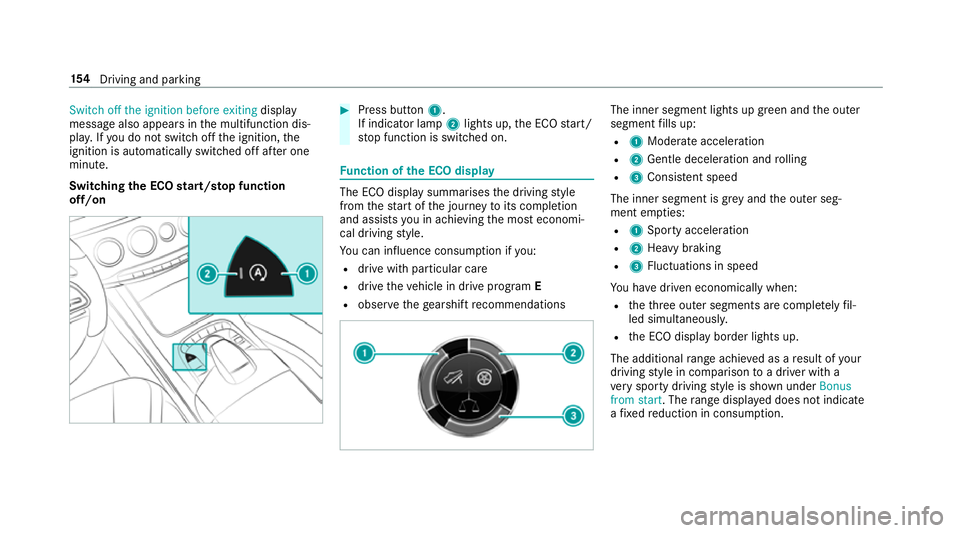
Press button 1.
If indicator la mp2light sup,theE CO start/
st op function is switched on. Fu
nction of theE CO display The EC
Odispla ysummarises thed riving style
from thes tart of thej ourne ytoits completion
and assists youina chievin gthe mos teconomi‐
cal driving style.
Yo uc an influence consum ption if you:
R driv ewithp articular care
R driv ethe vehicle in driv eprogram E
R obser vetheg earshif trecommendations The inner segment light
supgreen and theo uter
segment fills up:
R 1 Moderat eacceleration
R 2 Gentle decele ratio na nd rolling
R 3 Consis tent speed
The inne rsegment is gr eyand theo uter seg‐
ment em pties:
R 1 Sporty acceleration
R 2 Heavy braking
R 3 Fluctuation sinspeed
Yo uh ave driven economicall ywhen:
R thet hree outer segments ar ecomple tely fil‐
led simultaneousl y.
R theE CO displa yborder lights up.
The additional rang ea chieve dasar esult of your
drivin gstyle in co mparison toad rive rw itha
ve ry sporty driving styleiss hown under Bonus
from start.T herang ed ispl ay ed does no tindicate
af ixed reduction in consum ption. 15 4
Driving and pa rking
Page 160 of 533
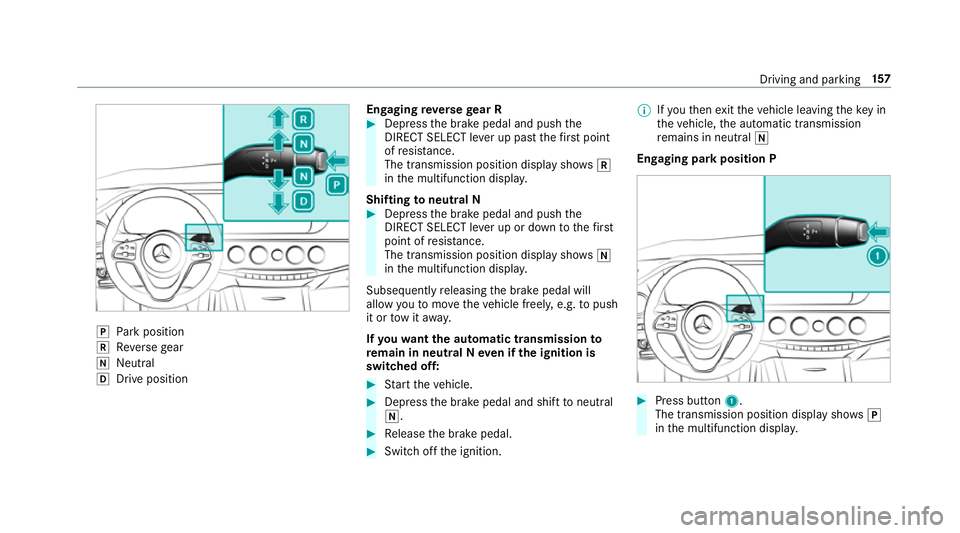
j
Park position
k Reverseg ear
i Neutral
h Driv eposit ion En
gaging reve rseg ear R #
Depres sthe brak epedal and push the
DIRECT SELEC Tleve rupp astthe firs tp oint
of resis tance.
The transmission positio ndispl ay sho wsk
in them ultifunction displa y.
Shifting toneutral N #
Depress theb rake pedal and push the
DIRECT SELEC Tleve rupord owntot hefirst
point of resis tance.
The transmission positio ndispl ay sho wsi
in them ultifunction displa y.
Subsequently releasing theb rake pedal will
allo wyoutomo vethev ehicle freel y,e.g. topush
it or towita way.
If yo uw ant thea utomatic transmission to
re main in neutral Nevenift he ignition is
switched off: #
Startt he vehicle. #
Depress theb rake pedal and shif ttoneutral
i. #
Release theb rake pedal. #
Switc hoffthei gnition. %
Ifyo ut hen exitth ev ehicle leaving thek eyin
th ev ehicle, thea utomatic transmission
re mains in neutral i
Engaging par kpositio nP #
Press button 1.
The transmission position displa yshows j
in them ultifunction displa y. Driving and pa
rking 157
Page 164 of 533
Do no
trefuel using:
R diesel
R E85, E100
R petrol containing me thano l(M15, M30,
M85 ,M100)
R petrol wit hadditives con tainin gm etal
If yo ua cciden tally refuel wit hthe wrong fuel: #
do no tswitc hthe ignition on. #
consult aqualified specialis tworks hop. *
NO
TEDo no tuse diese ltorefuel vehi‐
cles wit hapetro le ngine. If
yo ua cciden tally refuel wit hthe wrong fuel:
R Do no tswitc hont he ignition. Otherwise
fuel can enter thee ngine.
Even small amounts of thew rong fuel
could result in damag etothe fuel sy stem
and thee ngine. The repair costs ar ehigh. #
Contact aqualified specialis tworks hop. #
Have thef uel tank and fue llin es
drained compl etely. *
NO
TEDama getothef uel sy stem caused
by ove rfilled fuel tanks. #
Only fill th ef uel tank unti lthe pump
nozzle switches off. *
NO
TEFuel ma yspray out when you
re mo vethef uel pum pnozzle. #
Onlyfillthef uel tank unti lthe pump
nozzle switches off. Re
quirements:
R unloc kthe vehicle.
% Do no tget intot he vehicle again during the
re fuelling process. Otherwise, electros tatic
ch arge could buil dupagain.
Please also obser vethen otes on service prod‐
ucts and fuels (→ page423). Re
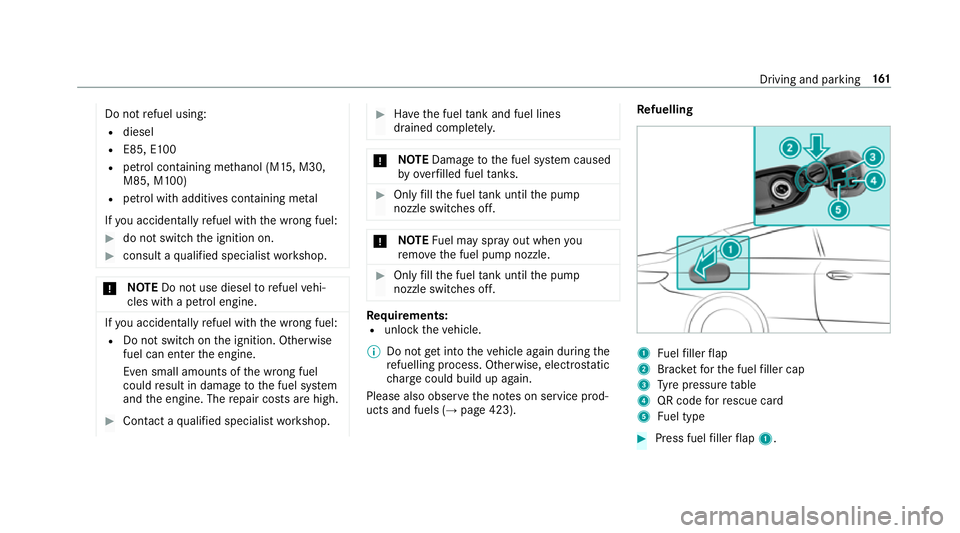
fuelling 1
Fuelfiller flap
2 Brac ketfor thef uel filler cap
3 Tyre pressur etable
4 QR code forr escue card
5 Fuel type #
Press fuel filler flap 1. Drivin
gand parking 161
Page 227 of 533
1
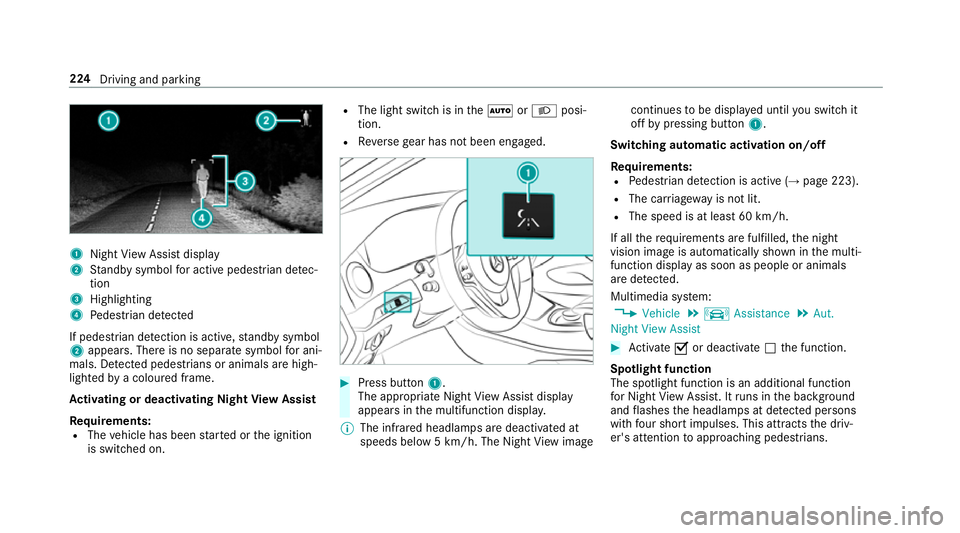
Night View Assi stdisplay
2 Standb ysymbo lfor activ epede strian de tec‐
tion
3 Highlighting
4 Pedestrian de tected
If pedestria ndetection is active, standb ysymbol
2 appears. Ther eisnoseparatesymbo lfor ani‐
mals. De tected pedestrians or animal sarehigh‐
lighted byac oloured frame.
Ac tivatin gordeactivatin gNight View Assist
Re quirements:
R The vehicle has been star tedort he ignition
is switched on. R
The light switc hisintheà orL posi‐
tion.
R Reverseg ear has no tbeen engaged. #
Press button 1.
The appropriat eNightViewA ssistdisplay
appear sinthe multifunction displa y.
% The infrared headlamps ar edeactivated at
speeds belo w5km/h. The Night View image continues
tobe displa yedu ntil yous wit ch it
of fbyp ressing button 1.
Switching automatic activation on/off
Re quirements:
R Pedestrian de tection is acti ve (→pag e223).
R The car riag ew ay is no tlit.
R The speed is at leas t60k m/ h.
If all ther equirements ar efulfilled, then ight
vision imag eisautomaticall yshown in them ulti‐
function displa yassoon as people or animals
ar ed etected.
Multimedia sy stem:
, Vehicle .
k Assistance .
Aut.
Night View Assist #
Activate Oor deacti vate ª thef unction.
Spotlight function
The spotlight function is an additional function
fo rN ight View Assi st.Itr uns in theb ackg round
and flashes theh eadlamps at de tected persons
wi th four sho rtimpulses. This att racts thed riv‐
er's attention toapproachin gpedestrians. 224
Drivingand parking
Page 244 of 533
Note
sono perating saf ety &
WARNING Risk of di stra ction from infor‐
mation sy stems and communications
equipment
If yo uo perat einformation and communica‐
tio ne quipment integ ratedint hevehicle
when driving, youw ill be distracted from the
traf fics ituation. Thi scould also cause youto
lose control of thev ehicle. #
Onlyoperat ethis equipment when the
traf fics ituation permits. #
Ifyo uc anno tbes ureoft his,stop the
ve hicle whils tpaying attention toroad
and traf ficc onditions and ope rate the
equipment wit hthe vehicle stationar y. &
WARNING Risk of di stra ction from oper‐
ating mobil ecommunication equipment
while thev ehicle is in motion
If yo uo perat ecommun icationequipment
integrated in thev ehicle when driving, you
will be distracted from thet raffic situation. This could also cause
youtol ose control of
th ev ehicle.
Onl yoperat ethis equipment when thev ehi‐
cle is stationar y. Fo
ry our owns afet y, alwa ys obser vethef ollow‐
ing points when operating mobile communica‐
tions equipment and especiall yyour voice con‐
trol sy stem:
R Obser vethel egal requ irements fort he coun‐
tr yinw hichyou ar edriving.
R While driving, on ly operatem obile communi‐
cation sequipment and your voice control
sy stem when thet raffic condition spermit it.
Yo um ayotherwise be distracted from the
traf ficc onditions and cause an accident,
inju ring yourself and others.
R Do no tuse thev oice control sy stem in an
emer gency as your voice can chang eand
yo ur telephon ecall can be unnecessarily
dela yed.
R Familiarise yourself wit hthe voice control
sy stem function sbefor estartin gt he journe y. Operation
Multifunction
steering wheel operation over‐
vi ew LINGU
ATRO NIC is operational appr oximately
th irty seconds af tert he ignition is switched on. LINGU
ATRO NIC 241
Page 272 of 533
Data impor
tand export Dat
aimp ort/expor tfunction
The following function sarepossible:
R transfer ring da tafrom one sy stem or vehicle
to ano ther sy stem or vehicle.
R creating abacku pc opyofy our personal data
and loading it again.
R protecting your personal dat aagains tunw an‐
te de xpo rtwit hP IN pr otection.
% Please no tethat theN TFS file sy stem is not
suppor ted. The FAT32 file sy stem is recom‐
mended.
Importing/exporting data
* NO
TEDat aloss #
Do no tremo vethed atas tora ge
medium when dat aisbeingexpor ted.
Mercedes-Ben zisnotliable fora ny loss of
data. Re
quirements:
R The vehicle is stationar y. R
The ignition is switched on or thev ehicle has
been star ted.
R The SD car disinserted( →pag e335) or the
USB device is connecte d(→ pag e337).
Multimedia sy stem:
, System .
System backup #
Select Import data orExport data.
Importing #
Select adatas torage medium.
Ap romp tappear sasking whe ther your eally
wish to overwrit ethe cur rent da ta.Ifd ata
originates from an other vehicle, this is recog‐
nise ddurin gdatar eading.
The multimedia sy stem is restar tedo ncet he
dat ahas been impor ted.
% Current vehicle settings can be edited af ter
th ei mp ort.
Exporting
If PIN pr otection is activated, your PIN is reques‐
te d. #
Ente rthe four-digit PIN. #
Select adatas torage medium.
The dat aisexported. The dat aexpo rtmay
ta ke severalm inutes. Ac
tivating/deactivatin gPINprotection Multimedia sy
stem:
, System .
PIN protection
Setting theP IN #
Select Set PIN. #
Enteraf our-digit PIN. #
Enter thef our-digit PIN again.
If bo thPINs match, PIN pr otection is active.
Changing theP IN
Re quiremen t:
R Acurrent PIN mu stbe set. #
Select Change settings. #
Ente rthe cur rent PIN. #
Select ChangePIN. #
Setan ewPIN. Multimedia sy
stem 269
Page 276 of 533
R
Details
Informatio nabout thep ending sy stem
updat eisdisplayed.
R Later
The updat ecan be downloaded manually at a
later time (→ page272).
If th ed ownload is comple teda nd theu pdat eis
re ady fori ns tallation ,you will be informed of this
af te rt he next ignition cycle, fore xamp le.
Re quirements fort he ins tallation:
R The ignition is switched off.
R Notesa nd warnings ha vebeen read and
accep ted.
R The elect ricp arkin gb rake is applied.
If all requ irements ar emet,t he updat ewill be
ins talled. The multimedia sy stem cann otbe
operated while theu pdat eisb eing ins talled and
ve hicle functions ar erestricted. If er
rors should occur during thei nstallation ,the
multimedia sy stem automaticall yattem ptsto
re stor et he pr evious version. If restoration of the
pr ev ious version is no tpossible ,asymbol
appear sonthe centre console displ ay.P lease
consult aqualified specialis tworks hop to
re sol vethep roblem. Re
setfunction Multimedia sy
stem:
, System .
Reset
Pe rsonal dat aisdeleted, fore xamp le:
R statio npresets
R connec tedm obile phones #
Select Yes. If PIN pr
otection is activated, apromp tappears
asking if youa lso wish torestor et his tothef ac‐
to ry settings during areset. #
Select Yes #
Enter thec urrent PIN.
The PIN is reset.
Or #
Select No.
The cur rent PIN stay st he same af terr eset‐
ting.
% Ifyo uh ave forg otteny our PIN ,aMercedes-
Ben zServic eCentr ecan deactivat eyour PIN
pr otection fory ou.
Ap romp tappear sagain asking whe ther you
re all yw ish toreset. #
Select Yes.
The multimedia sy stem is rese ttot hefactory
settings. Multimedia sy
stem 273
Page 278 of 533
Prog
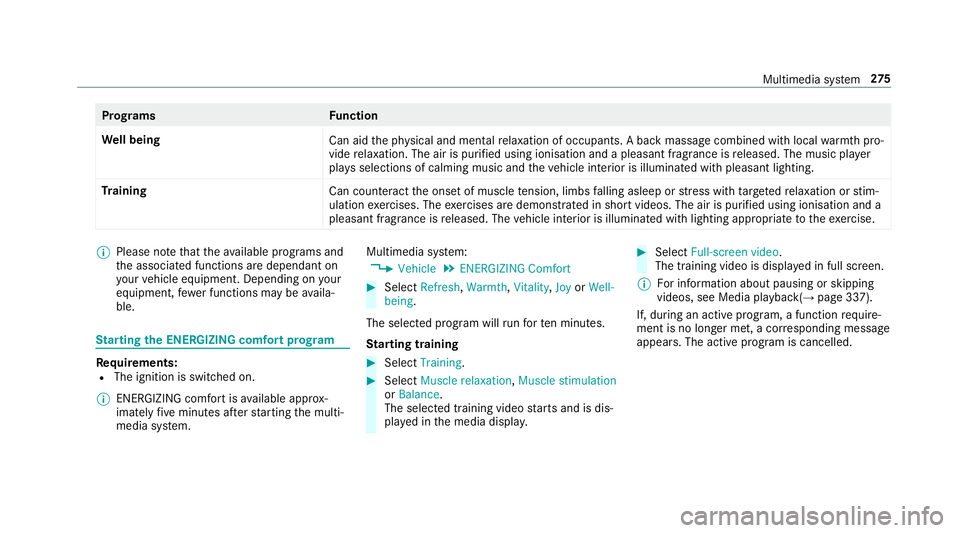
rams Function
We ll being
Can aidthep hysical and mental relaxation of occupants. Abackm assag ecombined wit hlocal warmthpro‐
vide relaxation .The air is purified using ionisation and apleasant fragranc eisreleased. The music pla yer
pla ysselections of calming music and thev ehicle interior is illuminated wit hpleasant lighting.
Tr aining
Cancounteract theo nse tofm uscletension, limbs falling asleep or stre ss wit htarge tedr elaxation or stim‐
ulation exercises. The exercises ar edemon stra tedins hortvideos. The air is purified using ionisation and a
pleasant fragrance is released. The vehicle interior is illuminated wit hlighting appropriat etotheexercise. %
Please no tethat thea vailable prog rams and
th ea ssociated function saredependant on
yo ur vehicle equipment. Depending on your
equipment ,few er function smaybe availa‐
ble. St
arting theE NERGIZIN Gcomfor tprogram Re
quirements:
R The ignition is switched on.
% ENE RGIZING comfor tisavailable appr ox‐
imatel yfivem inutes af ters tartin gt he multi‐
media sy stem. Multimedia sy
stem:
, Vehicle .
ENERGIZING Comfort #
Select Refresh, Warmth,Vitality ,Joy orWell-
being.
The selected prog ramw illr un fort en minutes.
St arting training #
Select Training. #
Select Muscle relaxation, Muscle stimulation
or Balance.
The selected training vide ostartsa nd is dis‐
pla yedint he media displa y. #
Select Full-screen video.
The training video is displ ayed in full screen.
% Forinformation about pausing or skipping
videos, see Medi aplayback( →pag e337).
If, during an activ eprogram, afunction require‐
men tisnol onger met, acorresponding message
appears .The acti veprogram is cancelled. Multimedia sy
stem 275
Page 321 of 533
Po
sition data:
R Coordinates
R Speed
R Compass direction
R Acceleration di rection
Thi sd ataiso nlyt ransfer redw hile then avigation
sy stem is activ einorder toimpr oveit (e.g. so it
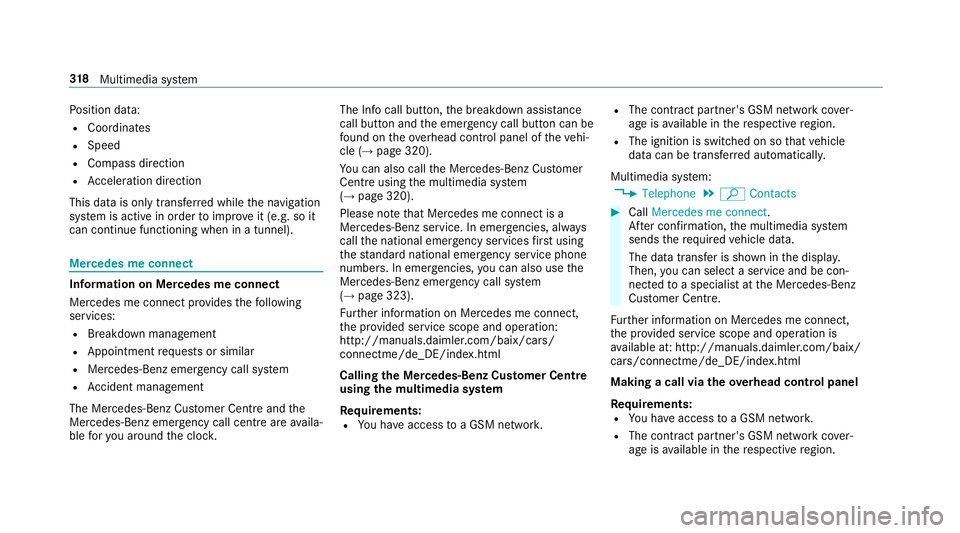
can continue functioning when in atunnel). Mercedes me connect
Information on Mercedes me connect
Mercedes me connec
tprovide sthe following
services:
R Breakdown management
R Appointmen trequests or similar
R Mercedes-Benz emer gency cal lsystem
R Accident mana gement
The Mercedes-Benz Cust omer Centreand the
Mercedes-Benze mergency cal lcentr eareavaila‐
ble fory ou around thec lock. The Inf
ocall button, theb reakdown assis tance
cal lbuttona nd thee mer gency cal lbuttonc an be
fo und on theo verhead control panel of thev ehi‐
cle (→ page320).
Yo uc an also call theM ercedes-Benz Cus tomer
Centr eusing them ultimedia sy stem
(→ pag e320).
Please no tethat Mercedes me connec tisa
Mercedes-Ben zservice. In emer gencies, al ways
cal lthe national emer gency service sfirst using
th es tandar dnational emer gency service phone
numbe rs.Ine mergencies, youc an also use the
Mercedes-Benze mergency cal lsyst em
(→ pag e323).
Fu rther information on Mercedes me connect,
th ep rovide dservice scope and operation:
http://manuals.daimler.com/baix/cars/
connectme/de_DE/index.html
Calling theM ercedes-Benz Cus tomer Centre
using the multimedi asystem
Requ irements:
R Youh ave access toaG SM networ k. R
The contra ct partner' sGSM networ kcove r‐
ag eisa vailable in ther espectiv eregion.
R The ignition is switched on so that vehicle
dat acan be transfer reda utomaticall y.
Multimedia sy stem:
, Telephone .
ª Contacts #
Call Mercedes me connect.
Af terc onfirmation, them ultimedia sy stem
sends ther equired vehicle data.
The dat atransfer is shown in thed ispla y.
Then, youc an select aservic eand be con‐
nected toas pecialis tatthe Mercedes-Benz
Cus tomer Centre.
Fu rther information on Mercedes me connect,
th ep rovide dservice scope and operation is
av ailable at :http://ma nuals.daimler.com/baix/
cars/connectme/de_DE/ind ex.html
Making acallv ia the overhead control panel
Re quirements:
R Youh avea ccess toaG SM networ k.
R The contra ct partner' sGSM networ kcove r‐
ag eisa vailable in ther espectiv eregion. 318
Multimedia sy stem