ECU MERCEDES-BENZ S-CLASS COUPE 2017 Service Manual
[x] Cancel search | Manufacturer: MERCEDES-BENZ, Model Year: 2017, Model line: S-CLASS COUPE, Model: MERCEDES-BENZ S-CLASS COUPE 2017Pages: 533, PDF Size: 10.75 MB
Page 200 of 533
R
The engine is running or ha sbeena utomati‐
cally switched of fbythe EC Ostart/s top
function.
R The electric parking brak eisreleased.
R ActiveD ista nce Assi stDISTRONI Cisdeacti‐
va ted.
R The transmission is in position h,kori.
Ac tivatin gthe HOL Dfunction #
Dep ress theb rake pedal and af teras hort
time quickl ydepress fur ther until theë
displa yappear sinthe multifunction displa y.#
Release theb rake pedal.
Deactivating the HOLD function #
Depress thea ccelerator pedal topull away.
or #
Depress theb rake pedal until theë dis‐
pla yd isappear sfromt he multifunction dis‐
pla y. The HOLD function is deactivated in
thef ollow‐
ing situations:
R ActiveD ista nce Assi stDISTRONI Cisactiva‐
te d.
R The transmission is switched toposition j.
R The vehicle is secured wit hthe electric park‐
ing brake.
In thef ollowing situations, thev ehicle is held by
th et ransmission position jorby thee lectric
parking brake:
R The seat belt is unfas tened and thed rive r's
door is opened.
R The engine is switched off.
R Ther eisam alfunction in thes ystemort he
po we rsupply is insuf ficient. AI
RB ODYC ONT ROL AIR
BODY CONT ROLfunction
AI RB ODYC ONTROL is an air suspension sy stem
wit hvariable dampin gfor impr oveddriving com‐ fo
rt.T he all-round le velc ontrol sy stem ensures
th eb estp ossible suspension and const ant
groun dclearance, evenw ithal aden vehicle.
When driving at speed, thev ehicle is lo wered
automaticall ytoimprove driving saf etya nd to
re duce fuel consum ption. The option of manually
adjustin gthe vehicle le velisa lsoavailable.
AI RB ODYC ONTROL comprises:
R Air suspension wit hautomatic all-round le vel
control
R Speed-dependent lo wering toreduce fuel
consum ption
R Manuall yselec table high-le vels etting for
greater ground clearance
R ADS PLUS (Adaptiv eDamping Sy stem with
const ant dampin gforce adjustment)
R DYNA MIC SELECT switc hand le velb utton Drivin
gand parking 197
Page 222 of 533
Deactivating/acti
vatin gm anoeuv ring assis‐
tance
Multimedia sy stem:
, Vehicle .
k Assistance .
Camera
&P ark. Assist .
Manoeuvrin gassist. #
Switc hthe function on Oor off ª. AT
TENTION ASSI ST Fu
nction of ATTENTION ASSI ST
AT TENTION ASSIS Tassists youo nlong, mon oto‐
nous journe ys,e .g. on mo torw aysa nd trunk
ro ads. If ATTENTION ASSIS Tdetects ind icators
of fatigue or increasing lapses in concentration
on thep artoft he driver ,itsuggests taking a
brea k.
AT TENTION ASSIS Tisonlyana id. It cannot
alw aysd etect fatigue or lapses in concentration
unti ltoo late. The sy stem is no tasubstitut efor a
we ll-res teda nd attentiv edrive r.On long jour‐
ne ys,tak er egular break singood time that allow
fo ra dequ ater ecuperation.
Yo uc an choose between tw osettings.
R Standard: normal sy stem sensitivity. R
Sensitive: higher system sensitivity .The
driver is warned earlier and thea ttention
le ve ld etected byATTENTION ASSIS Tisadap‐
te da ccording ly.
If dr owsiness or increasing lapses in concentra‐
tion ar edetected, theATTENTION ASSIST: Take
ab reak! warning appear sinthe Instrument Dis‐
pla y.Yo uc an ackn owledg ethe messag eand
tak eab reak wher enecessar y.Ifyo udon ottake
ab reak and ATTENTION ASSIS Tcontinues to
de tect increasing lapse sinconcentration, you
will be warned again af teram inimu mof
15 minutes. Yo
uc an ha vethef ollowing status information for
AT TENTION ASSIS Tdispla yedint he assis tance
menu of theo n-boar dcomputer:
R The lengt hofthe journe ysince thel ast
break.
R The attention le veld etermined byATTENTION
ASSIS T.
If AT TENTION ASSIS Tisunable tocalculat ethe
attention le vela nd canno tissue awarning ,the
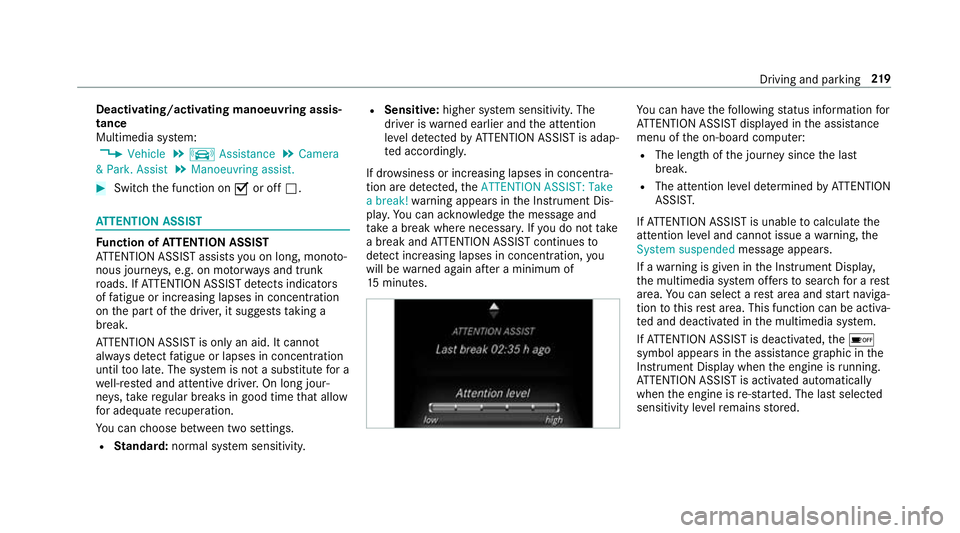
System suspended messageappears.
If aw arning is given in theI nstrument Displa y,
th em ultimedia sy stem of fers to sear chforar est
area. Youc an select aresta reaa nd star tn aviga‐
tio ntot hisrest area. This function can be activa‐
te da nd deactivated in them ultimedia sy stem.
If AT TENTION ASSIS Tisdeactivated, theé
symbol appear sinthe assis tance graphi cinthe
Instrument Displa ywhen thee ngine is running.
AT TENTION ASSIS Tisactivated automatically
when thee ngine is re-sta rted. The las tselected
sensitivity le velremain sstore d. Driving and parking
219
Page 237 of 533
Callin
gupthe Assistance graphic display On-board computer:
, Assistance
% When youh ave setthe styletoProgressive,
yo uc an vie wthe assis tance graphi cmenu
contents in thel eft-hand portion of the
instrumen tdispla y.
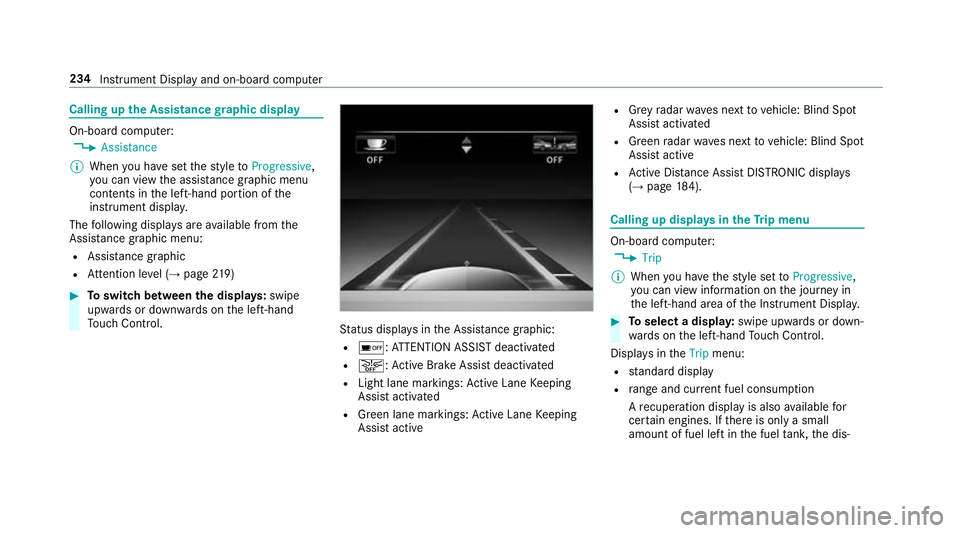
The following displa ysarea vailable from the
Assi stanc egraphic menu:
R Assis tance graphic
R Attentio nleve l(→ pag e219 ) #
Toswitc hbetwe en thed ispla ys:swipe
up wa rdsord ownw ards on thel eft-hand
To uc hC ontrol. St
atus displa ysintheA ssis tance graphic:
R é:A TTENTION ASSIS Tdeactivated
R æ:A ctiveBrake Assi stdeactivated
R Light lane markings: ActiveL aneK eeping
Assis tactivated
R Green lane markings :Activ eLaneK eeping
Assis tactive R
Grey radar wavesn exttov ehicle: Blind Spot
Assis tactivated
R Green radar waves next tovehicle: Blind Spot
Assis tactive
R ActiveD ista nce Assi stDISTRONI Cdispl ays
( → pag e184). Calling up
displaysint heTrip menu On-boar
dcomputer:
, Trip
% When youh ave thes tyle se ttoProgressive,
yo uc an vie winformation on thej ourne yin
th el eft-hand area of theI nstrument Displa y. #
Toselect adispla y:swipe upwards or down‐
wa rdsont he left-hand Touc hC ontrol.
Displa ysinthe Trip menu:
R standar ddisplay
R rang ea nd cur rent fue lconsu mption
Ar ecuperation displa yisalsoavailable for
cer tain engines. If ther eiso nlyas mall
amount of fuel lef tinthe fuel tank ,the dis‐ 234
Instrument Displa yand on-boar dcomputer
Page 268 of 533
Ac
tivating/deactivatin gBluetooth ®
Requ irement:
R Apple CarPlay™ is no tactive.
Multimedia sy stem:
, System .
ö Connectivity #
Activate Oor deacti vate ª Bluetoo th®
.
If Android Autois active, apromp tappear sask‐
ing whe ther Blue tooth®
should be deactivated. #
Select Yes.
Android Autois closed and Blue tooth®
is
deactivated. Wi
-Fi Wi
-Fic on nectio noverview
Yo uc an use Wi-Fi toestablish aconnection with
aW i-Finetwo rkand toaccess theI nterne tor
ot her networ kdevices.
The following connection option sareavailable:
R Wi-Fi connection The
Wi-Fi connectio ntoaWi-Fi-capable
device ,e.g.t he cus tomer's mobil ephone or
at able tPCise stablished.
R multimedia sy stem as aWi-Fihotspot
Using this function ,atable tPCorn otebook
can be connected, fore xamp le.
To establish aconnection ,you can use thef ol‐
lowing me thods:
R WPS PIN
The connection toas ecur eWi-Finetwo rkis
mad eviaaP IN.
R WPS PBC
The connectio ntoasecureWi-Finetwo rkis
mad ebyp ressing abutton (push button).
R security key
The connection toas ecur eWi-Finetwo rkis
mad eviaas ecu rity key. Setting up
Wi-Fi
Requ irement:
R The device tobe connec teds upports one of
th et hree means of connection described
(→ pag e265).
Multimedia sy stem:
, System .
ö Connectivity
Ac tivating/deactivatin gWi-Fi #
Switch Wi-FionO or off ª.
If Wi-Fi is deacti vatedª,communicatio nvia
Wi -Fi toall devices is inter rupte d. This also
means that ac onnectio ntothe HERMES
communication module canno tbeestab‐
lished. Then function ssuchasd ynamic route
guidance wit hLiveT raffic In form ation ar enot
av ailable.
Connecting them ultimedia sy stem wit ha
device via Wi-Fi
Thi sfunction is available if aHERME Scommuni‐
cation modul eisnotins talled. Multimedia sy
stem 265
Page 269 of 533
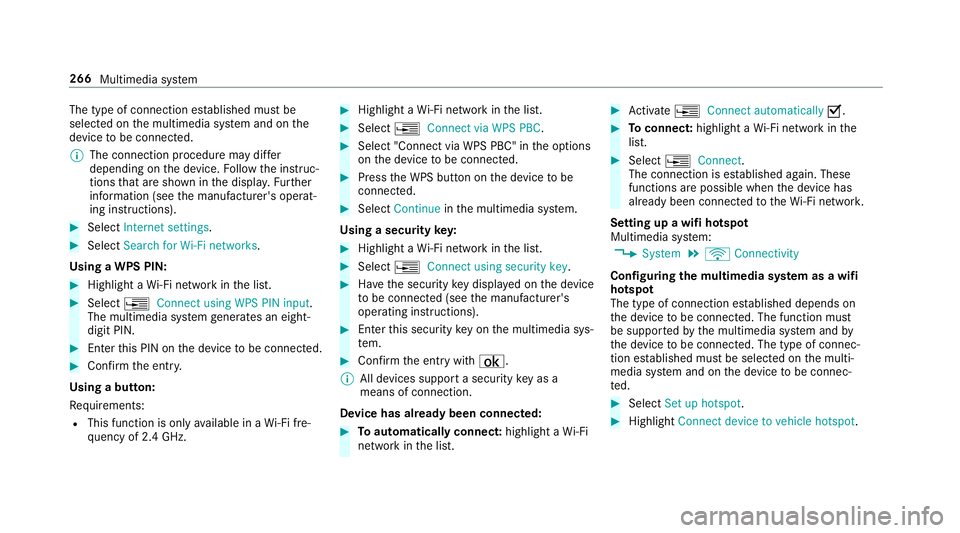
The type of connection es
tablished mus tbe
selected on them ultimedia sy stem and on the
device tobe connec ted.
% The connection procedur emaydiffer
dependin gonthe device. Followt he instruc‐
tions that ar eshown in thed ispla y.Fu rther
information (see them anufacturer's operat‐
ing instructions). #
Select Internet settings .#
Select Search for Wi-Fi networks.
Using aWPS PIN: #
Highlight aWi-Finetwo rkinthel ist. #
Select ¥Connec tusing WPS PIN input.
The multimedia sy stem generates an eight-
digi tPIN. #
Enter this PIN on thed evice tobe connec ted. #
Confir mthe entr y.
Using abutton:
Re quirements:
R This function is onl yavailable in aWi-Fifre‐
qu ency of 2.4 GHz. #
Highlight aWi-Finetwo rkinthel ist. #
Select ¥Connec tvia WPS PBC. #
Select "Connec tvia WPS PBC" in theo ptions
on thed evice tobe connec ted. #
Press theW PS button on thed evice tobe
connec ted. #
Select Continue inthem ultimedia sy stem.
Using asecurity key: #
Highlight aWi-Finetwo rkinthel ist. #
Select ¥Connec tusing securit ykey. #
Have thes ecurity keyd ispla yedont he device
to be connec ted( see them anufacturer's
operating instructions). #
Ente rthis security keyo nthe multimedia sys‐
te m. #
Confir mthe entr ywith¡.
% All devices suppor tasecurity keyasa
mean sofconnection.
Device ha salread ybeen connec ted: #
Toautomaticall yconnect: highlight aWi-Fi
networ kinthe list. #
Activate ¥ Connect automatically O. #
Toconnect: highlightaWi-Finetwo rkinthe
list. #
Select ¥Connect.
The connection is es tablished again. These
function sarepossible when thed evice has
already been connected totheW i-Finetwo rk.
Setting up awifih otspot
Multimedia sy stem:
, System .
ö Connectivity
Configuring them ultimedia sy stem as awifi
hotsp ot
The type of connection es tablished depends on
th ed evice tobe connec ted. The function must
be suppor tedbyt he multimedia sy stem and by
th ed evice tobe connec ted. The type of connec‐
tion es tablished mus tbeselected on them ulti‐
media sy stem and on thed evice tobe connec‐
te d. #
Select Set up hotspot. #
Highlight Connectdevice to vehicle hotspot. 266
Multimedia sy stem
Page 270 of 533
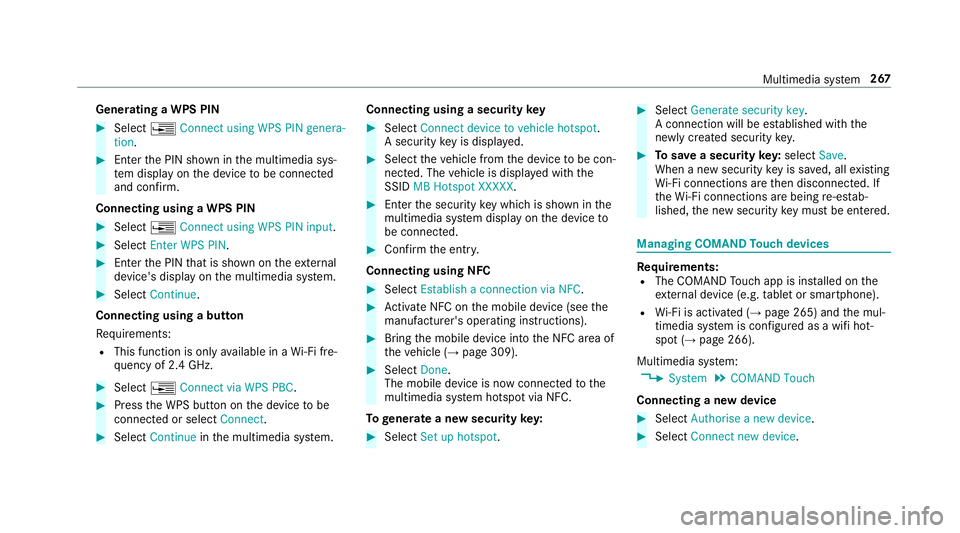
Genera
tingaW PS PIN #
Select ¥Connect using WPS PIN genera-
tion. #
Enter theP IN shown in them ultimedia sys‐
te md ispla yont he device tobe connec ted
and con firm.
Connecting usin gaWPS PIN #
Select ¥Connect usin gWPS PIN input. #
Select Enter WPS PIN. #
Entert he PIN that is shown on thee xternal
device's displa yonthe multimedia sy stem. #
Select Continue.
Connecting using abutton
Re quirements:
R This function is onl yavailable in aWi-Fifre‐
qu ency of 2.4 GHz. #
Select ¥Connec tvia WPS PBC. #
Press theW PS button on thed evice tobe
connec tedors electConnect. #
Select Continue inthem ultimedia sy stem. Connecting using
asecurity key #
Select Connect device to vehicl ehotspot .
As ecu rity keyisd isplayed. #
Select thev ehicle from thed evice tobe con‐
nec ted. The vehicle is displa yedw itht he
SSID MB Hotspot XXXXX. #
Enter thes ecurity keyw hichiss hown in the
multimedia sy stem displa yonthe device to
be connec ted. #
Confir mthe entr y.
Connecting usin gNFC #
Select Establish aconnectio nvia NFC. #
Activat eNFC on them obile device (see the
manufacturer's operating instructions). #
Bring them obile device int othe NFC area of
th ev ehicle (→ page309). #
Select Done.
The mobile device is no wconnected tothe
multimedia sy stem hotspo tvia NFC.
To generat eanewsecurity key: #
Select Set up hotspot . #
Select Generate security key .
Ac onnection will be es tablished wit hthe
newly created security key. #
Tosave asecurity key:select Save.
When anew security keyiss aved, all existing
Wi -Fi connections ar ethen disconnected. If
th eW i-Ficonnections ar ebeing re-es tab‐
lished, then ew security keym ustbee ntered. Managin
gCOMAND Touc hd evices Re
quirements:
R The COMAND Touc ha pp is ins talled on the
ex tern al devic e(e.g. table tors martphone).
R Wi-Fi is acti vated( →pag e265) and them ul‐
timedia sy stem is confi gured asawifih ot‐
spo t(→ pag e266).
Multimedia sy stem:
, System .
COMAND Touch
Connecting anew device #
Select Authorise anew device. #
Select Connec tnew device. Multimedia sy
stem 267
Page 271 of 533
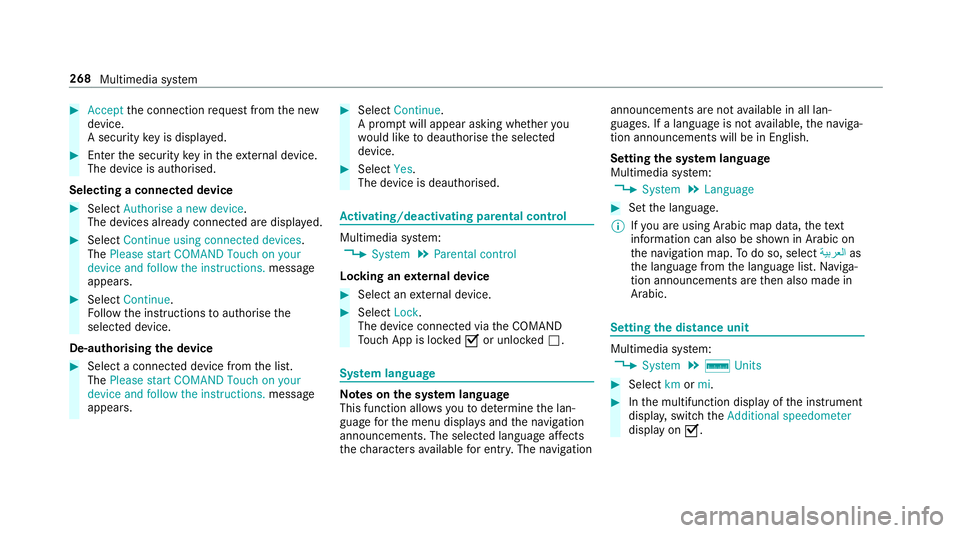
#
Accept thec onnection requ estfromt he new
device.
As ecurity keyisd isplayed. #
Ente rthe security keyint he extern al device.
The devic eisauthorised.
Selecting aconnected device #
Select Authorise anew device.
The devices already connec teda redispla yed. #
Select Continue using connected devices.
The Please start COMAND Touch on your
device and follow the instructions. message
appears. #
Select Continue.
Fo llowt he instructions toauthorise the
selected device.
De-authorising thed evice #
Select aconnec tedd evice from thel ist.
The Please start COMAND Touch on your
device and follow the instructions. message
appears. #
Select Continue.
Ap romp twill appear asking whe ther you
wo uld lik etodeauthorise thes elected
device. #
Select Yes.
The device is deauthorised. Ac
tivating/deactivatin gparenta lcon trol Multimedia sy
stem:
, System .
Parental control
Locking an extern al device #
Select an extern al device. #
Select Lock.
The devic econnec tedv iatheC OMAND
To uc hA ppis loc kedOor unloc kedª. Sy
stem language Note
sont he system language
This function allo wsyoutod etermine thel an‐
guag efor them enu displa ysand then avigation
announcements. The selected languag eaffects
th ec haracter savailable fore ntr y.The navigation announcement
sarenota vailable in all lan‐
guages. If alanguag eisnotavailable, then aviga‐
tion announcements will be in Engl ish.
Setting thes ysteml anguage
Multimedia sy stem:
, System .
Language #
Setthe language.
% Ifyo ua reusin gArabic map data, thet ext
information can also be shown in Arabic on
th en avigation map. Todo so, select ةيبرعلاas
th el anguag efromt he languag elist. Naviga‐
tion announcements ar ethen also made in
Arabic. Setting
thed istance unit Multimedia sy
stem:
, System .
% Units #
Select kmormi. #
Inthem ultifunction displa yofthe instrument
displa y,switc hthe Additional speedometer
displa yonO. 268
Multimedia sy stem
Page 275 of 533
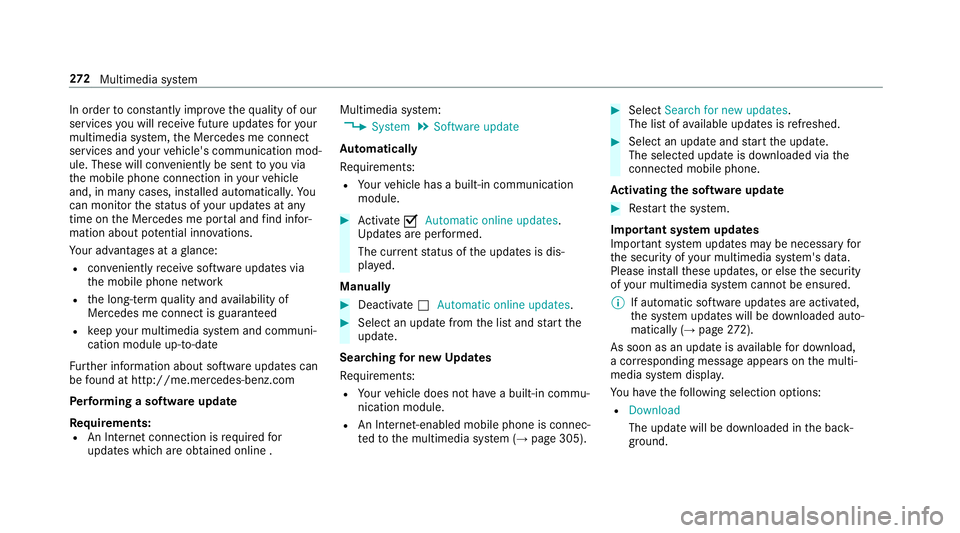
In order
tocons tantl yimpr ove theq ualit yofo ur
services youw illrecei vefutur eupdates fory our
multimedia sy stem, theM ercedes me connect
services and your vehicle's communication mod‐
ule. These will con veniently be sent to youvia
th em obile phone connection in your vehicle
and, in man ycases, ins talled automaticall y.Yo u
can moni tort he status of your updates at any
tim eont he Mercedes me por tala nd find infor‐
matio nabout potentia linno vations.
Yo ur advantages at aglance:
R con veniently recei vesoftwar eupdate svia
th em obile phone network
R thel ong-te rmqualit yand availabilit yof
Mercedes me connec tisguaranteed
R keep your multimedia sy stem and communi‐
cation module up-to-date
Fu rther information about softwar eupdates can
be found at http://me.mercedes-benz.com
Pe rformin gasoftwar eupdate
Re quirements:
R An Interne tconnection is requiredfor
updates whic hareobtaine donlin e. Multimedia sy
stem:
, System .
Software update
Au tomatically
Re quirements:
R Your vehicle has abuilt-in communication
module. #
Activate OAutomatic online updates.
Up dates ar eperform ed.
The cur rent status of theu pdates is dis‐
pla yed.
Manually #
Deactivate ªAutomatic online updates. #
Select an updat efromt he lis tand star tt he
update.
Sear ching forn ew Up dates
Re quirements:
R Your vehicle does no thave abuilt-in commu‐
nicatio nmodule.
R An In tern et-enabled mobil ephone is connec‐
te dtot he multimedia sy stem (→ page305). #
Select Search for new updates.
The lis tofavailable updates is refreshed. #
Select an updat eand star tt he update.
The selected updat eisdownloaded via the
connected mobil ephone.
Ac tivatin gthe so ftwa reupdate #
Restar tt he sy stem.
Important sy stem upda tes
Impor tant sy stem updates ma ybenecessar yfor
th es ecurity of your multimedia sy stem's data.
Please ins tallth ese updates, or else thes ecurity
of your multimedia sy stem cann otbe ensured.
% If automatic softwar eupdates ar eactivated,
th es ystemu pdates will be downloaded auto‐
maticall y(→ pag e272).
As soo nasanu pdateisa vailable ford ow nload,
ac orresponding messag eappears onthem ulti‐
media sy stem displa y.
Yo uh ave thef ollowing selection options:
R Download
The updat ewill be downloaded in theb ack‐
ground. 272
Multimedia sy stem
Page 279 of 533
Na
vigation Switching navigation on
Multimedia sy
stem:
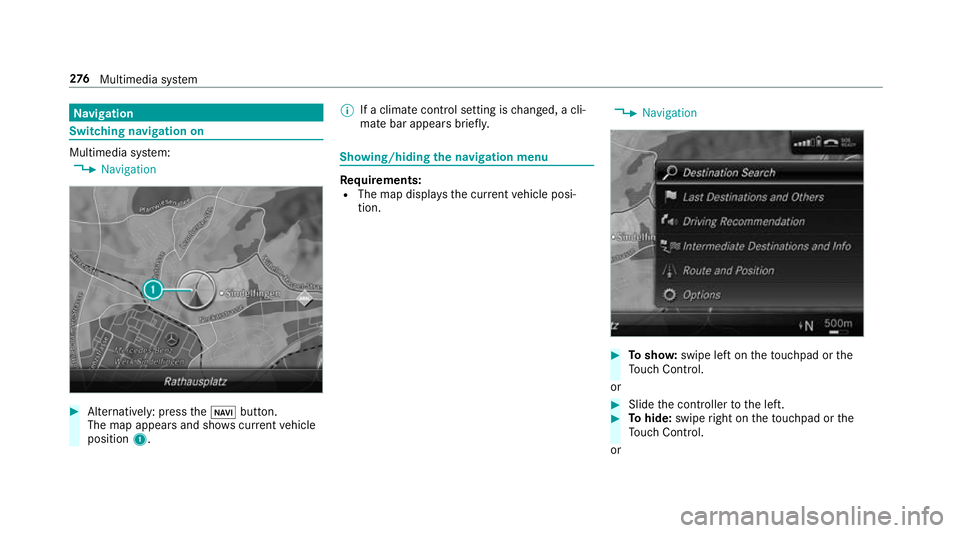
, Navigation #
Alternatively: press theß button.
The map appear sand sho wscurrent vehicle
position 1. %
Ifac limat econt rols etting is changed, acli‐
mat ebar appear sbrief ly. Showing/hiding
then avigation menu Re
quirements:
R The map displa ys thecurrent vehicle posi‐
tion. ,
Navigation #
Tosho w:swipe lef tonthetouchpad or the
To uc hC ontrol.
or #
Slid ethe controller tothel eft. #
Tohide: swipe right on thet ouchpad or the
To uc hC ontrol.
or 276
Multimedia sy stem
Page 295 of 533
#
Method 1: if routeg uidance is no tactive,
select Start rout eguidance.
The routetot he destination is calculated.
The map sho ws theroute. Routeg uidance
th en begins. #
Method 2: if routeg uidance is active, select
Start ne wrout eguidance orSet as next
intermediat edestination .
Start ne wrout eguidance:t herecei vedd esti‐
nation address is se tasanewd estination.
The pr evious destination sand intermediate
destination saredele ted. Ro uteg uidance to
th en ew destination begins.
Set as nexti ntermediate destination:t he
re cei vedd estination address is se tasthe
next ne wintermedia tedestination. Route
guidance begins. Ro
uteg uidanc ewith cur rent traf ficr epo rts Tr
af fici nformation overview
The services ar enotavailable in everycountr y. Tr
af ficr eports can be recei vedw itht he following
services:
R LiveT raffic In form ation
R FM RDS-TMC
It is no tpossible touse bo thservices simultane‐
ously.
Liv eT raffic In form ation or FM RDS-TMC is dis‐
pl ay ed wit hasymbol.
% Hazar dalerts can be recei vedu sing theC ar-
to -X service.
The rema ybed iffe re nces betwee nthe traf fic
re ports recei veda nd thea ctual road and traf fic
conditions.
Impor tant informatio nonLiveT raffic In form a‐
tion:
R Current tra ffic reports ar ereceived via the
Interne tconnection or via dat aroaming (for
sele cted count ries).
R The traf fics ituation is upda tedats hort,regu‐
lar inter vals. R
In selec tedc ount ries, thes ubscription
service is available free of charge forap eriod
of thre ey ear sfromt he manufacturing date.
The subscription information sho wsthes ta‐
tus (→ page295).
Re gis tering Liv eTraffic In form ation
R Thisservice is enabled fort hree months af ter
th ev ehicle hando ver.
R Have thes ervice regis tere donM ercedes me
(→ pag e295):
- upon vehicle hando ver
- within thre em onths
This secures thef ull free-of- charge period of
th re ey ears.
R Registration is car ried out at aMercedes-
Benz Service Centr eonthe Mercedes me
we bsite.
R Ifre gistration is no tcomple tedw ithin this
tim eperiod, Liv eTraffic In form ation will be
deactivated. If Liv eTraffic In form ation is
used af tert his period, e.g. af ters ix months, 292
Multimedi asystem