climate control MERCEDES-BENZ S-CLASS COUPE 2017 Owners Manual
[x] Cancel search | Manufacturer: MERCEDES-BENZ, Model Year: 2017, Model line: S-CLASS COUPE, Model: MERCEDES-BENZ S-CLASS COUPE 2017Pages: 533, PDF Size: 10.75 MB
Page 5 of 533
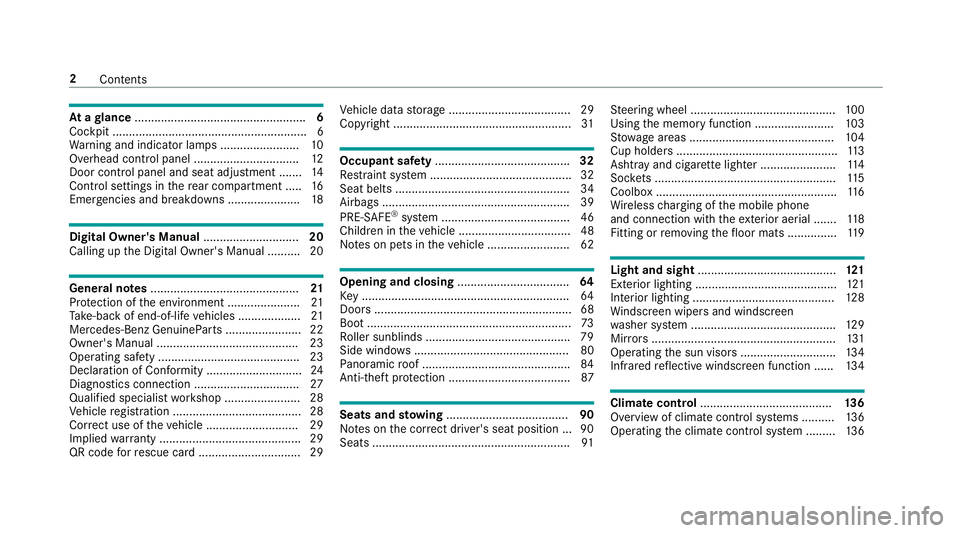
At
ag lance .................................................... 6
Cockpit ........................................................... 6
Wa rning and indicator lamps ........................ 10
Overhead contro lpanel ................................ 12
Doo rcontrol panel and sea tadjustment ....... 14
Control setting sintherear compartment .... .16
Emergencies and breakdowns ...................... 18Digita
lOwner's Manual ............................. 20
Callin gupt he Digital Owner's Manual ..........20 Genera
lnotes ............................................. 21
Pr otection of thee nvironmen t......................21
Ta ke -ba ckof end-of-lif evehicles ...................21
Mercedes-BenzG enuineParts ....................... 22
Owner's Manual ...........................................23
Operating saf ety. .......................................... 23
Declarat ionofC onform ity ............................. 24
Diagno stics connection ................................ 27
Qualified specialis tworks hop ....................... 28
Ve hicle registration ....................................... 28
Cor rect us eoft hevehicle ............................29
Impliedw arrant y. .......................................... 29
QR code forr escue car d...............................29 Ve
hicle dat astorage .....................................29
Copyright ...................................................... 31 Occupant saf
ety......................................... 32
Re stra int sy stem ...........................................32
Sea tbelts ..................................................... 34
Airbag s......................................................... 39
PRE-SAFE ®
sy stem ....................................... 46
Children in thev ehicle ..................................48
No tesonp etsint hevehicle .........................62 Opening and closing
.................................. 64
Ke y............................................................... 64
Doo rs............................................................ 68
Boo t.............................................................. 73
Ro ller sunblinds ............................................ 79
Side windo ws............................................... 80
Pa noramic roof ............................................. 84
Anti-thef tprotection .....................................87 Seats and
stowing ..................................... 90
No tesont he cor rect driver's sea tposition ... 90
Seats ............................................................ 91St
eering wheel ............................................ 100
Using them emor yfunction ........................ 103
St ow agea reas ............................................ 104
Cup holder s................................................. 11 3
Ashtr ayand cigar ette lighter ...................... .114
Soc kets ....................................................... 11 5
Coolbo x....................................................... 11 6
Wi reless chargin goft he mobile phone
and connection wit hthe exterior aerial .......1 18
Fitting or removing thef loor mats ............... 11 9 Light and sight
.......................................... 121
Exterio rlighting ........................................... 121
Interior lighting ........................................... 12 8
Wi ndsc reen wiper sand windscreen
wa sher sy stem ............................................ 12 9
Mir rors ........................................................ 131
Operating thes un visor s............................. 13 4
Infrared reflectiv ewindscreen function ...... 13 4 Climat
econtrol ........................................ 13 6
Overvie wofclimatecontro lsystems ..........1 36
Operating thec limat econtrol sy stem ......... 13 6 2
Contents
Page 129 of 533
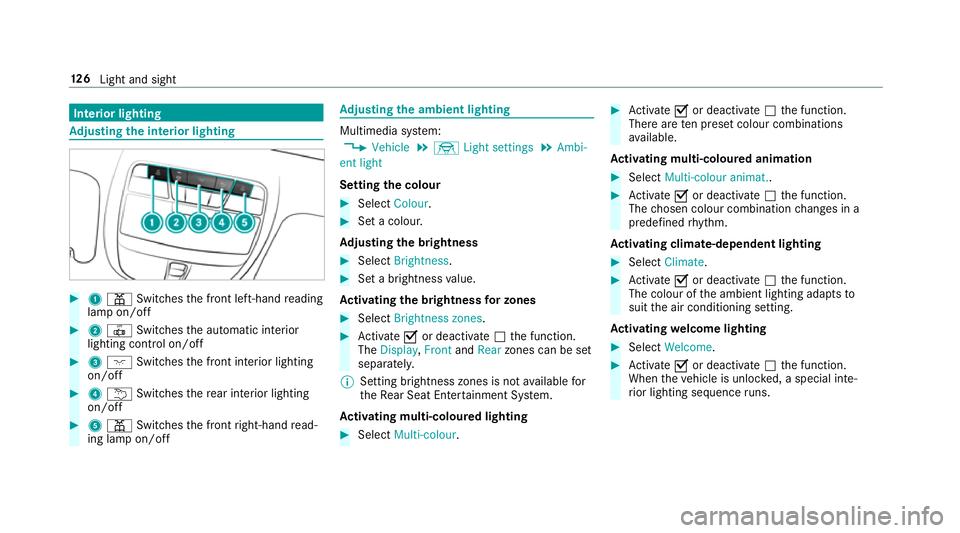
Interior lighting
Ad
justin gthe in terior lighting #
1 p Switches thef ront left-hand reading
lam pon/off #
2 | Switches thea utomatic interior
lighting control on/off #
3 c Switches thef ront interior lighting
on/off #
4 u Switches ther ear interior lighting
on/off #
5 p Switches thef ront right-hand read‐
ing lam pon/off Ad
justin gthe ambien tlighting Multimedia sy
stem:
, Vehicle .
÷ Light settings .
Ambi-
ent light
Setting thec olour #
Select Colour. #
Setac olour.
Ad justin gthe brightness #
Select Brightness . #
Setab righ tness value.
Ac tivatin gthe brightness forz ones #
Select Brightness zones . #
Activate Oor deacti vate ª thef unction.
The Display ,Front andRear zones can be set
separately.
% Setting brightness zones is no tavailable for
th eR ear Seat Ente rtainment Sy stem.
Ac tivatin gmulti-coloured lighting #
Select Multi-colour. #
Activate Oor deacti vate ª thef unction.
Ther earetenp rese tc olou rcombinations
av ailable.
Ac tivatin gmulti-coloured animation #
Select Multi-colou ranimat.. #
Activate Oor deacti vate ª thef unction.
The chosen colour combination changes in a
predefine drhythm.
Ac tivatin gclimate-dependen tlighting #
Select Climate. #
Activate Oor deacti vate ª thef unction.
The colour of thea mbient lighting adapts to
suit thea ir conditionin gsetting.
Ac tivatin gwelcome lighting #
Select Welcome. #
Activate Oor deacti vate ª thef unction.
When thev ehicle is unloc ked, as pecial inte‐
ri or lighting sequence runs. 12 6
Light and sight
Page 137 of 533
Overvie
wofclimatecontrol sy stems Note
sonc limatecontrol An interior air
filter mus talway sbeu sed so that
th ea ir conditionin gsystem, thep ollution le vel
monitoring and thea irfiltering function work
cor rectl y.Mak esuret hat thef ilter is ins talled
cor rectl ya nd thef ilter housin ginthe engine
compartment is closed cor rectl yu sing thec ap
and alw ayst ightl ysealed when in operation. Use
fi lter srecommende dand appr ovedby
Mercedes-Benz. Alw aysh ave service workcar‐
ri ed out at aqualified specialis tworks hop. Overvie
wofthe ope rating unit fora utomatic
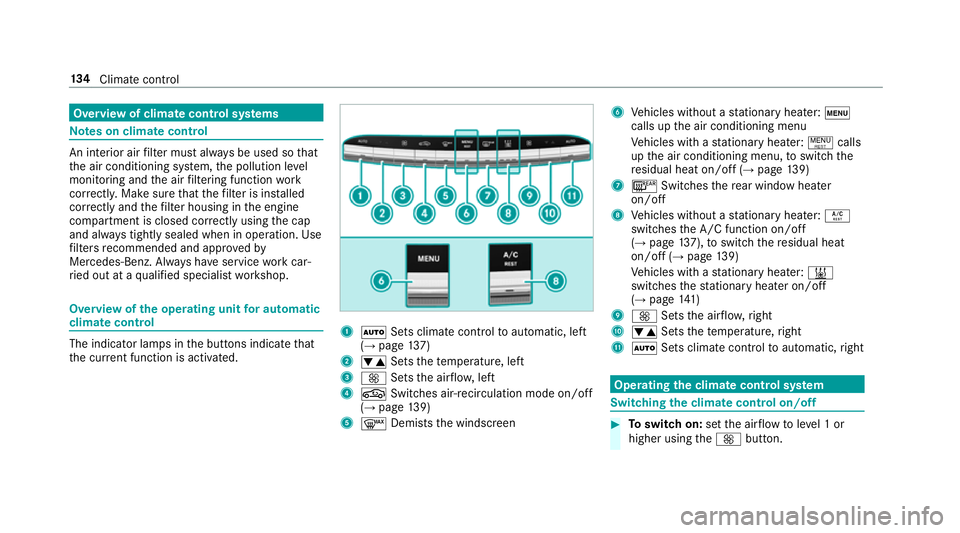
climat econtrol The indica
torlamps in theb uttons indicat ethat
th ec urrent functio nisa ctivated. 1
à Sets climat econtrol toautomatic, left
(→ pag e137)
2 w Setsthet emperature, left
3 K Setsthea irflow ,left
4 g Switches air-recirculation mode on/off
(→ pag e139)
5 ¬ Demists thew indscreen 6
Vehicles without astationar yheater: t
calls up thea ir conditionin gmenu
Ve hicles wit hastationar yheater: !calls
up thea ir conditionin gmenu, toswitc hthe
re sidualh eat on/of f(→ pag e139)
7 ¤ Switches ther ear windo wheater
on/off
8 Vehicles without astationar yheater: Á
swit ches theA /C function on/off
(→ pag e137),to switc hthe residualh eat
on/of f(→pag e139)
Ve hicles wit hastationar yheater: &
swit ches thes tationar yheater on/off
(→ pag e141 )
9 K Setsthea irflow ,right
A w Setsthet emperature, right
B Ã Sets climat econt roltoa utomatic, right Operating
thec lima tecont rols ystem Switching
thec lima tecont rolo n/off #
Toswitc hon:setthe air flow toleve l1or
higher using theK button. 134
Climat econtrol
Page 138 of 533
#
Toswitc hoff:setthe air flow toleve l0u sing
the K button.
% If climat econtrol is switched off, thew in‐
do ws maym istu pm oreq uickl y.Switc hoff
climat econtrol only brie fly. Ac
tivating/deactivatin gthe A/ Cfunction via
the control panel The A/C functio
nheats, cools and dehumidifies
th ev ehicle's interior air. #
Press theÁ button.
Deactivat ethe A/C function onl ybriefly other‐
wise thew indo wscan mis tupm oreq uickl y.
Condensation ma ydripf romt he underside of
th ev ehicle when cooling mode is active. This is
no tas ignthat ther eisam alfunction. Ac
tivating/deactivatin gthe A/ Cfunction
using the multimedi asystem Multimedia sy
stem:
, Vehicle .
b Climate control .
A/C
The A/C function heats, cools and dehumidifies
th ev ehicle's interior air. #
Switc hthe function on Oor off ª. Setting climat
econtrol toautomatic mode In auto
matic mode, thes ettemp eratur eisregu‐
lated bythet emperatur eofthe dispensed air
and thea irflow. #
Press theà button. #
Toswitc htom anual mode: pressthe K
button. Climat
estyle Clima
testylef unction
In automatic mode, youc an select thef ollowing
climat estyle settings fort he driver's and front
passenger areas:
R FOCUS: high air flow ,slightly cooler setting
R MEDIUM: medium air flow ,standar dsetting
R DIFFUSE: lowa irflow ,slightly warmer and
draught-f rees etting
Setting thec lima testyle
Multimedia sy stem:
, Vehicle .
b Climate control .
Cli-
mate mode #
Select FOCUS, MEDIUM orDIFFUSE .
% In order to feelthee ffect of thec limate
st yle, the à function mus tbeactive
(→ pag e135). Clima
tecontrol 13 5
Page 139 of 533
Overvie
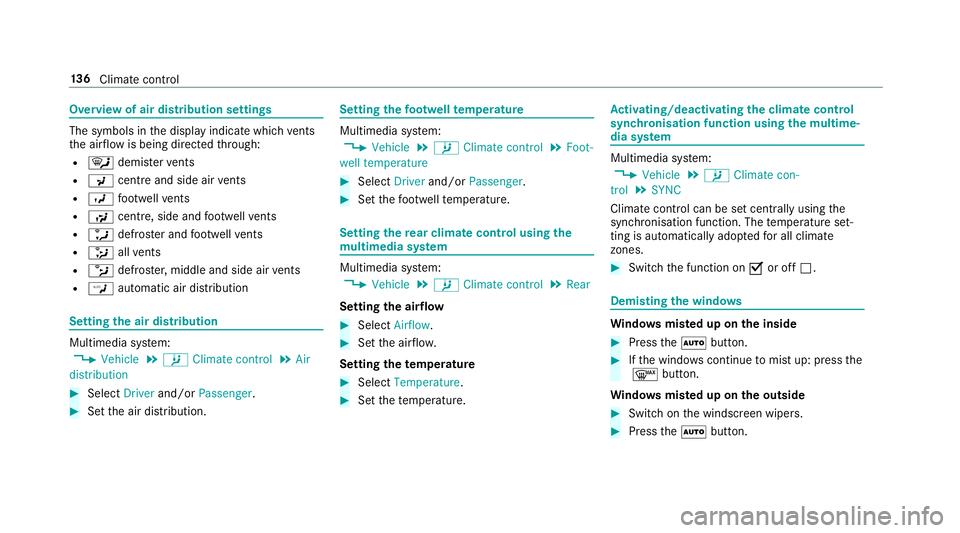
wofair distribution settings The symbols in
thed ispla yindicat ewhichvents
th ea irflow is being directed thro ugh:
R ¯ demis terv ents
R P centre and side ai rvents
R O foot we llve nts
R S centre, side and foot we llve nts
R a defros tera nd foot we llve nts
R _ allv ents
R b defros ter,middl eand side air vents
R W automatic air distribution Setting
thea ir distribution Multimedia sy
stem:
, Vehicle .
b Climate control .
Air
distribution #
Select Driverand/or Passenger. #
Setthe air distribution. Setting
thef ootwell temperature Multimedia sy
stem:
, Vehicle .
b Climate control .
Foot-
well temperature #
Select Driverand/or Passenger. #
Setthe foot we llte mp erature. Setting
ther ear climat econtrol usin gthe
mu ltimedia sy stem Multimedia sy
stem:
, Vehicle .
b Climate control .
Rear
Setting thea irflow #
Select Airflow . #
Setthe air flow.
Setting thet em peratu re #
Select Temperature. #
Setthe temp erature. Ac
tivating/deactivatin gthe climat econtrol
syn chro nisation function using them ultime‐
dia sy stem Multimedia sy
stem:
, Vehicle .
b Climate con-
trol .
SYNC
Climat econtrol can be se tcent rally using the
synchronisation function. The temp eratur eset‐
ting is automaticall yadop tedf or all climate
zones. #
Switch thef unction on Oor off ª. Demisting
thew indo ws Wi
ndo wsmis tedupo nthe inside #
Press theà button. #
Ifth ew indo wscontinu etomistu p: press the
¬ button.
Wi ndo wsmis tedupo nthe outside #
Switc hont he windscreen wipers. #
Press theà button. 13 6
Climat econtrol
Page 140 of 533
Switching air-recirculation mode on/off
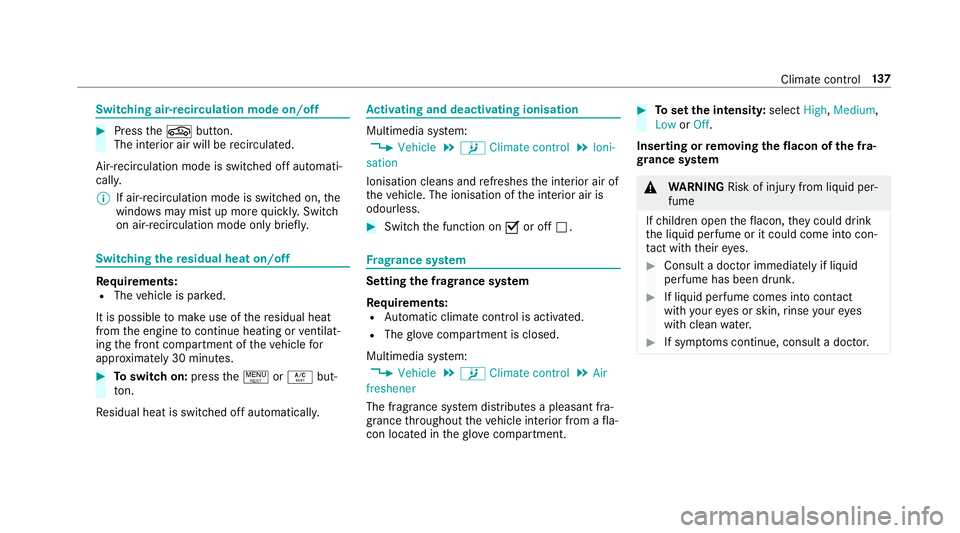
#
Press theg button.
The interior air will be recirculated.
Air-reci rculation mod eisswitched of fautomati‐
cally.
% If air-recirculation mode is switched on, the
windo wsmaym istu pm oreq uickl y.Switch
on ai r-re circulation mod eonly brie fly. Switching
ther esidual heat on/off Re
quirements:
R The vehicle is par ked.
It is possible tomak euse of ther esidual heat
from thee ngine tocontinu eheating or ventilat‐
ing thef ront compartmen tofthevehicle for
appr oximatel y30m inutes. #
Toswitc hon:press the! orÁ but‐
to n.
Re sidualh eat is switched of fautomaticall y. Ac
tivatin gand deactivatin gionis ation Multimedia sy
stem:
, Vehicle .
b Climate control .
Ioni-
sation
Ionisation cleans and refreshes thei nterior air of
th ev ehicle. The ionisation of thei nterior air is
odourless. #
Switc hthe function on Oor off ª. Fr
ag rance sy stem Setting
thef ragr ance sy stem
Re quirements:
R Automatic clima tecontrol is acti vated.
R The glove compa rtment is closed.
Multimedi asystem:
, Vehicle .
b Climate control .
Air
freshener
The fragrance sy stem distributes apleasant fra‐
grance thro ughout thev ehicle interior from afla‐
con located in theg love compa rtment. #
Tosetthe intensity: selectHigh,Medium,
Low orOff.
Inserting or removing the flacon ofthef ra‐
gr ance sy stem &
WARNING Risk of inju ryfrom liquid per‐
fume
If ch ildren open thef lacon ,the yc ould drink
th el iquid perfume or it could come int ocon‐
ta ct wi th theireyes. #
Consult adoctor immediately if liquid
perfume has been drunk. #
If liquid perfume comes int ocontact
wi th your eyes or skin ,rins eyour eyes
wit hc lean water. #
If sym ptoms continue, consult adoctor. Climat
econt rol 137
Page 143 of 533
#
Afterh eating or ventilating thev ehicle
twice, driv efor alonger period of time. Re
quirements:
R The fuel tank is filled toat leas treser vefuel
le ve l. #
Setthe desired temp eratur eusing thew
button. #
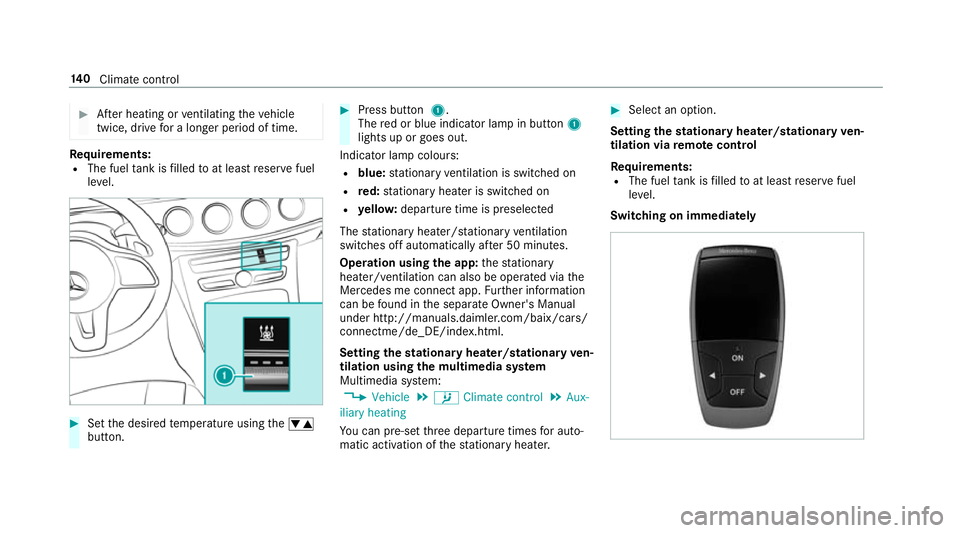
Press button 1.
The redorb lue indicator lam pinbutton 1
lights up or goes out.
Indicator lam pcolours:
R blue: stationar yventilation is switche don
R red: stationar yheater is swit ched on
R yello w: departur etime is preselected
The stationar yheater/ stationar yventilation
switche soffau tomatically af ter50m inutes.
Operation using thea pp: thes tationary
heater/ ventilation can also be operated via the
Mercedes me connect app. Further information
can be found in thes eparat eOwner's Manual
under http://manuals.daimler.com/baix/cars/
connectme/de_DE/index.html.
Setting thes tationar yheater/stationar yven‐
tilation using them ultimedia sy stem
Multimedia sy stem:
, Vehicle .
b Climate control .
Aux-
iliary heating
Yo uc an pre-se tthree departur etimes fora uto‐
matic activation of thes tationar yheater. #
Select an option.
Setting thes tationar yheater/stationar yven‐
tilation via remo tecont rol
Re quirements:
R The fuel tank is filled toat leas treser vefuel
le ve l.
Switching on immedia tely 14 0
Climat econtrol
Page 256 of 533
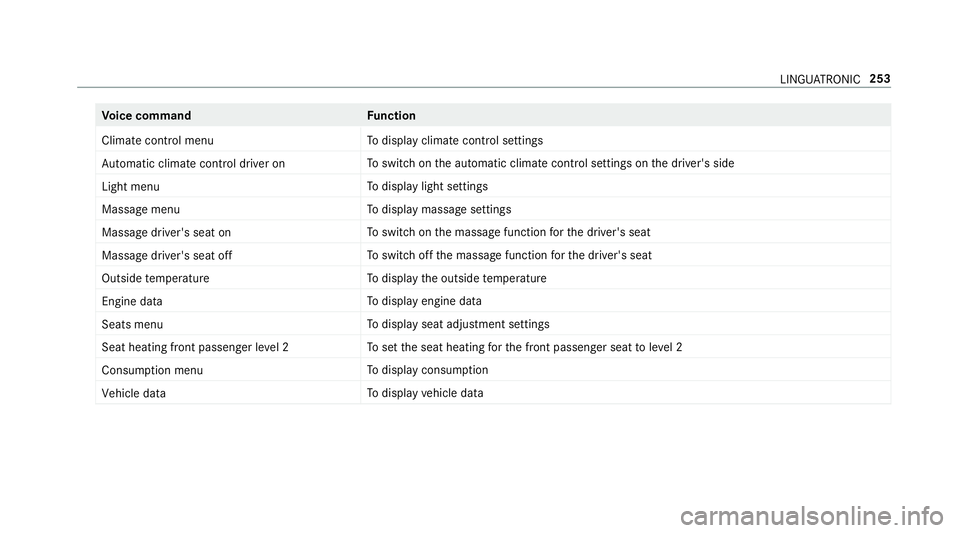
Vo
ice command Function
Climate control menu To
displa yclimat econtrol settings
Automatic climate control driver on To
switc hont he automatic climat econtrol settings on thed rive r's side
Light menu To
displa ylight settings
Massage menu To
displa ymassag esettings
Massage driver' sseat on To
switc hont he massag efunction fort he driver's seat
Massage driver's seat off To
switc hoffthem assag efunction fort he driver's seat
Outside temperature To
displa ythe outside temp erature
Engine data To
displa yengin edata
Seats menu To
displa yseat adjustmen tsettings
Seat heating fron tpassenger level 2 To
setthe seat heating fort he front passenger seat toleve l2
Consumption menu To
displa yconsum ption
Vehicle data To
displa yvehicle data LINGU
ATRO NIC 253
Page 301 of 533
R
area name
Geo-coordinates displays thefollowing infor‐
mation:
R longitude and latitude
R elevation
The el evatio nshown ma ydeviat ef rom
th ea ctual ele vation.
R numbe rofsatellitesf romw hichas ignal
can be recei ved
When them ap is mo ved, this information
does no tappear.
Climate control displays thecurrent climate
control settings.
None switches thed ispla yoff.
Switching mo torw ay information on/off
Multimedia sy stem:
, Navigation .
Z Options #
Switch Motorway information onO or off
ª.
The function is switched on O:during a
journe y,additional information on upcoming fa
cilities appea rson ther ight side of the
screen. These include car par ks,s ervice sta‐
tions and mo torw ay ex its,fore xamp le.
Displ aying then extintersectin gstreet
Re quirements:
R Routeg uidance is no tactive.
Multimedia sy stem:
, Navigation .
Z Options #
Activate ONext intersecting street .
The nam eofthe next intersecting stre et will
be displa yedatt he upper edg eofthe displa y.
Displaying them apversion
Multimedia sy stem:
, Navigation .
Z Options #
Select Map version . #
Select Details.
% Information about ne wversions of thed igital
map can be obtained from aMercedes-Benz
Service Centre. Av
oiding an area
Yo uc an define areas alon garoutethat you
wo uld lik etoavoid.
Av oiding anew area
Multimedia sy stem:
, Navigation .
À Route and posi-
tion .
Avoid options .
Areas #
Select Avoid new area. #
Tosear chforana reav iathe map: select
Using map. #
Movethem ap
or #
Tosear chforana reau sing an address:
select Addres sentry . #
Enter thea ddress. #
Select Select destination.
The map appears. #
Todispl ayan area: presstheT ouc hControl,
th et ouchpad or thec ontroller.
Ar ed rectangle appea rs.T hisd esignates the
area that shoul dbeavoided. 298
Multimedia sy stem