ESP MERCEDES-BENZ S-CLASS COUPE 2018 User Guide
[x] Cancel search | Manufacturer: MERCEDES-BENZ, Model Year: 2018, Model line: S-CLASS COUPE, Model: MERCEDES-BENZ S-CLASS COUPE 2018Pages: 502, PDF Size: 6.29 MB
Page 69 of 502
your foot in a kicking motion under there ar
bumper.
Yo u ha vethefo llowing options toclose the trunk
lid:
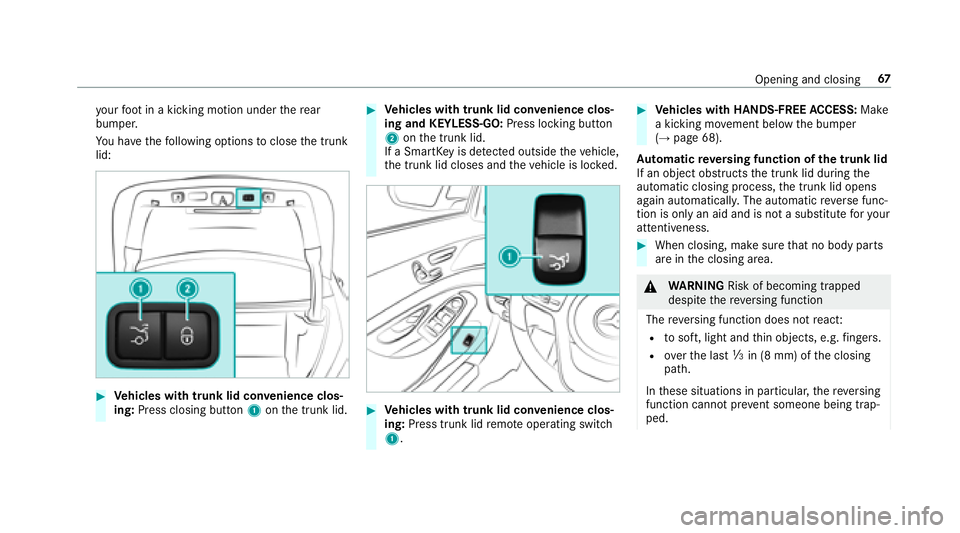
#Ve hicles with trunk lid co nvenience clos‐
ing: Press closing button 1onthe trunk lid.
#Ve hicles with trunk lid co nvenience clos‐
ing and KEYLESS-GO: Press locking button
2 onthe trunk lid.
If a SmartK eyis de tected outside theve hicle,
th e trunk lid closes and theve hicle is loc ked.
#Ve hicles with trunk lid co nvenience clos‐
ing: Press trunk lid remo teoperating switch
1.
#Ve hicles with HANDS-FREE ACCESS: Make
a kicking mo vement below the bumper
(
→page 68).
Au tomatic reve rsing function of the trunk lid
If an object obstructs the trunk lid during the
automatic closing process, the trunk lid opens
again automaticall y.The automatic reve rse func‐
tion is only an aid and is not a substitute foryo ur
attentiveness.
#When closing, make sure that no body parts
are in the closing area.
&
WARNING Risk of becoming trapped
despite there ve rsing function
The reve rsing function does not react:
Rto soft, light and thin objects, e.g. fingers.
Rove rth e last Óin (8 mm) of the closing
path.
In these situations in particular, there ve rsing
function cannot pr event someone being trap‐
ped.
Opening and closing 67
Page 75 of 502
&WARNING Risk of becoming trapped
despite there being reve rsing pr otection
on the side window
The reve rsing function does not react:
Rto soft, light and thin objects, e.g. small
fi ngers
Rdu ring resetting
This means that there ve rse function cannot
pr eve nt someone from becoming trapped in
th ese situations.
#When closing, make sure that no body
parts are in the closing area.
#If someone becomes trapped, press the
W button toopen the side window
again.
Con venience opening (ventilating theve hicle
before starting a journey)
&
WARNING Risk of entrapment when
opening a side window
When opening a side windo w,parts of the
body could be dr awn in or become trapped
between the side window and window frame.
#When opening, make sure that nobody
is touching the side windo w.
#Release the button immediately if
somebody becomes trapped.
& WARNING Risk of becoming trapped
when opening/closing the soft top .
When opening or closing the soft top, there
is a risk that parts of the body could become
trapped bymoving parts such as thero of
mechanism, the trunk lid, or the side win‐
do ws .
#When opening or closing, make sure
that no body parts are in the vicinity of
moving components.
#Re lease the button if somebody
becomes trapped.
#Press and hold the% button on the
SmartK ey.
The following functions are per form ed:
RThe vehicle is unloc ked.
RThe side windo wsare opened when the
trunk pa rtition is open.
RThe soft top is opened when the trunk
partition is closed.
RThe seat ventilation of the driver's seat is
switched on.
#To inter rupt convenience opening: release
th e% button.
Opening and closing 73
Page 77 of 502
ProblemPossible causes/consequences and MSolutions
& WARNING Risk of becoming trapped or fata lly injured if reve rsing pr otection is not activated
If yo u close a side windowagain immediately af ter it has been bloc ked or reset, the side window closes
with increased or maximum forc e. The reve rsing feature is then not active.
Pa rts of the body could become trapped in the closing area in the process.
#Make sure that no parts of the body are in the closing area.
#To stop the closing process, release the button or press the button again toreopen the side win‐
do w.
#Close the soft top.
If a side window is obstructed during closing and reopens again slightly:
#Immediately af terth e window bloc ks, pull the cor responding button again until the side window has
closed, and hold the button for an additional second.
The side window is closed with increased forc e.
If a side window is obstructed again during closing and reopens again slightly:
#Re peat the pr evious step.
The side window is closed without the automatic reve rsing function.
The side windo wscannot be opened or
closed using the con venience opening
fe ature. The SmartK
eybattery is dischar ged or nearly dischar ged.
#Check the battery using the battery check lamp and replace if necessary .
Opening and closing 75
Page 100 of 502
#Tocall up: press and hold there leva nt pre‐
set position button 1,2 or 3 until the front
seat, thesteering wheel, head-up display and
outside mir ror are in thestored position.
% Ifyo ure lease the preset position button, the
seat, steering wheel and mir ror setting func‐
tions stop immediatel y.
Ve hicles with an Active Multicon tour
Seat Package: The setting of the active mul‐
ticon tour seat or the 4-w aylumbar support
is still car ried out.
Ve hicles without theAc tive Multicon tour
Seat Package: Adjustment of the 4-w ay
lumbar support is still car ried out.
St ow age areas
Note s on loading theve hicle
&
WARNING Risk ofexhaust gas poisoning
Combustion engines emit poisonous exhaust
ga ses such as carbon monoxide. Exhaust
ga ses can enter theve hicle interior if the
trunk lid is open when the engine is running,
especially if theve hicle is in motion.
#Alw ays switch off the engine before
opening the trunk lid.
#Ne ver drive with the trunk lid open.
&
WARNING Risk of injury from unsecured
items in theve hicle
If objects, luggage or loads are not secured
or not secured suf ficientl y,they could slip,
tip ove r or be throw n around and thereby hit
ve hicle occupants.
There is a risk of injur y,particularly in the
ev ent of sudden braking or a sudden change
in direction.
#Alw aysstow objects in such a wayth at
th ey cannot be thro wn around.
#Before the journe y,secure objects, lug‐
ga ge or loads against slipping or tipping
ove r.
&
WARNING Risk of injury from incorrectly
stowe d objects
If objects in theve hicle interior are stowed
incor rectly, they can slide or be throw n
around and hit vehicle occupants. In addi‐
tion, cup holders, open stowage spaces and
mobile phone brac kets cann otalw aysre tain
all objects they contain.
There is arisk of injur y,particularly in the
ev ent of sudden braking or a sudden change
in direction.
#Alw aysstow objects so that they can‐
not be throw n around in such situa‐
tions.
#Alw ays make sure that objects do not
pr otru de from stowage spaces, luggage
nets or stowage nets.
#Close the loc kable stow age spaces
before starting a journe y.
#Alwaysstow and secure heavy, hard,
pointe d, sharp-edged, fragile or bulky
objects in the trunk.
98
Seats and stowing
Page 109 of 502
#Closethe loc kable stow age spaces
before starting a journe y.
#Alwaysstow and secure heavy, hard,
pointe d, sharp-edged, fragile or bulky
objects in the trunk.
Obser vethe no tes on loading theve hicle.
&
WARNING Risk offire from placing
objects in the mobile phone stowage
compartment
If yo uplac e objects inthe mobile phone
stow age compartment, they may heat up
exc essively and even catch fire .
#Do not place additional objects, espe‐
cially those mode of me tal, in the
mobile phone stowage compartment.
* NO
TEDama getoobjects caused by
placing them in the mobile phone stow‐
age compartment
If yo u place objects in the mobile phone
stow age compartment, these may be dam‐
aged byelectromagnetic fields.
#Do not place credit cards, storage
media or other objects sensitive to
electromagnetic fields in the mobile
phone stowage compartment.
* NO
TEDama getothe mobile phone
stow age compartment caused byliquids
If liquids enter the mobile phone stowage
compartment, the compartment may be
damaged.
#Ensure that no liquids enter the mobile
phone stowage compartment.
RDepending on theve hicle equipment, the
mobile phone is connected totheve hicle's
ex terior aerial via thech arging module.
RThe charging function and wireless connec‐
tion of the mobile phone totheve hicle's
ex terior aerial are only available if the ignition
is switched on.
RSmall mobile phones may not be able tobe
ch arge d in everyposition of the mobile
phone stowage compartment.
RLargemobile phones which do not rest flat in
th e mobile phone stowage compartment may
not be able tobe charge d or connec ted with
th eve hicle's exterior aerial.
RThe mobile phone may heat up during the
ch arging process. This depends on the appli‐
cations (apps) cur rently running.
RTo ensure more ef ficient charging and con‐
nection with theve hicle's exterior aerial,
re mo vethe pr otective co ver from the mobile
phone. Pr otective co vers which are designed
fo r wireless charging are excluded.
RWhen charging, the mat should be used if
possible.
Seats and stowing 10
7
Page 111 of 502
Exterior lighting
Lighting systems and your responsibility
The various lighting sy stems of theve hicle are
only aids. The driver of theve hicle is responsible
fo r cor rect vehicle illumination in accordance
with the pr evailing light and visibility conditions,
legal requirements and traf fic situation.
Light switch
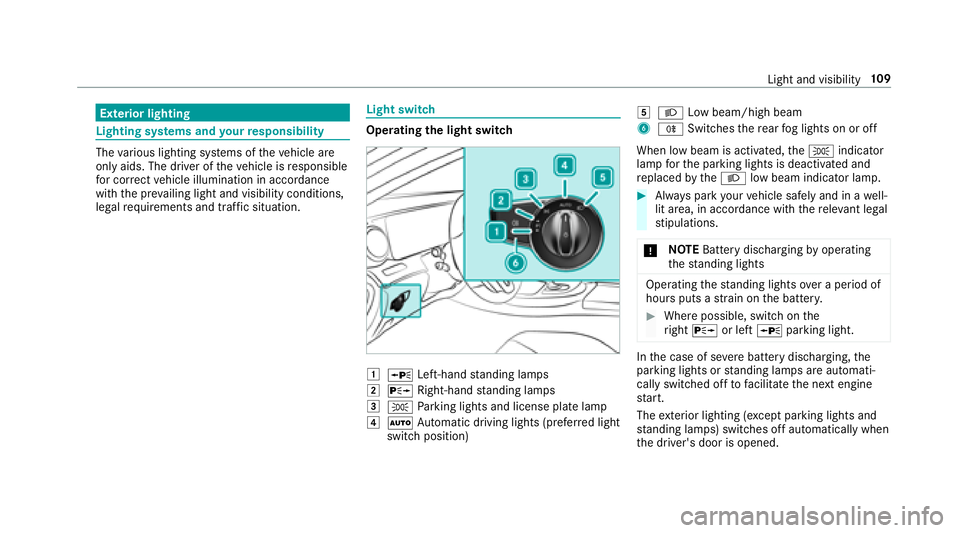
Opera ting the light switch
1WLeft-hand standing lamps
2X Right-hand standing lamps
3T Parking lights and license plate lamp
4Ã Automatic driving lights (prefer red light
switch position)
5L Low beam/high beam
6RSwitches there ar fog lights on or off
When low beam is activated, theT indicator
lamp forth e parking lights is deactivated and
re placed bytheL low beam indicator lamp.
#Always park your vehicle safely and in a well-
lit area, in accordance with there leva nt le gal
st ipulations.
* NO
TEBattery discharging byoperating
th est anding lights
Operating thest anding lights over a period of
hours puts a stra in on the batter y.
#Where possible, switch on the
ri ght X or left Wparking light.
Inthe case of se vere battery discharging, the
parking lights or standing lamps are automati‐
cally switch ed offtofacilitate the next engine
st art.
The exterior lighting (e xcept parking lights and
st anding lamps) switch es off automatically when
th e driver's door is opened.
Light and visibility 10
9
Page 112 of 502
RObservethe no tes on sur round lighting
(→page 113).
Au tomatic driving lights function
The pa rking lights, low beam and daytime run‐
ning la mps are switched on automatically
depending on the ignition status, whe ther the
engine is running and the ambient light.
&
WARNING Risk of accident when the low
beam is switched off in poor visibility
When the light switch is set toÃ, the low
beam may not be switched on automatically
if th ere is fog, snow or other causes of poor
visibility such as spr ay.
#In such cases, turn the light switch to
L.
The automatic driving lights are only an aid. You
are responsible forve hicle lighting.
Ac tivating/deactivating the rear fog light
Re quirements
RThe light switch is in the L orà posi‐
tion.
#Press the R button.
Please obser vethe count ry-specific la wsonthe
use of rear fog lights.Operating the combination switch for the
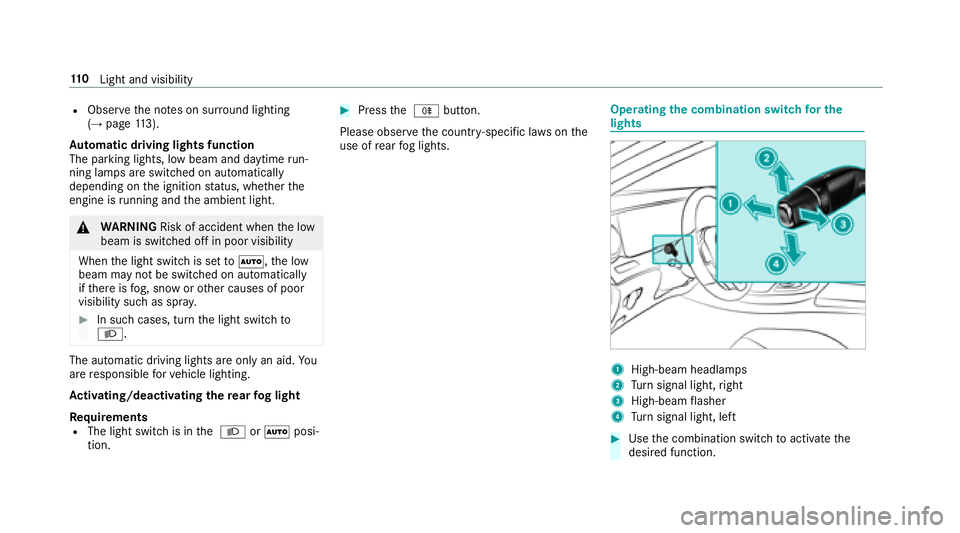
lights
1High-beam headla mps
2Turn signal light, right
3High-beam flasher
4Tu rn signal light, left
#Use the combination switch toactivate the
desired function.
11 0
Light and visibility
Page 113 of 502
High-beam headlamps
#Toswitch on: turnthe light switch tothe
L orà position.
#Press the combination switch be yond the
point of resis tance in the direction of ar row
1.
When the high beam is activated, theL
indicator lamp for low beam is deactivated
and replaced bytheK indicator lamp for
th e high beam.
#To switch off: movethe combination switch
back toits starting position.
High-beam flasher
#Pull the combination switch in the direction
of ar row3.
Tu rn signal lights
#To indicate briefl y:press the combination
switch briefly tothe point of resis tance in the
direction of ar row2or4.
The cor responding turn signal light flashes
th re e times.
#To indicate permanentl y:press the combi‐
nation switch be yond the point of resis tance
in the direction of ar row2or4.
Ve hicles with Active Lane Change Assi st:
Ac tive Lane Change Assi stcan:
Rlengthen turn signal ope ration forth e
duration of the lane change if the driver
has activated the turn signal indicator.
Rautomatically activate the turn signal indi‐
cator if the driver indicated toturn in that
direction immediately before but a lane
ch ange was not immediately possible.
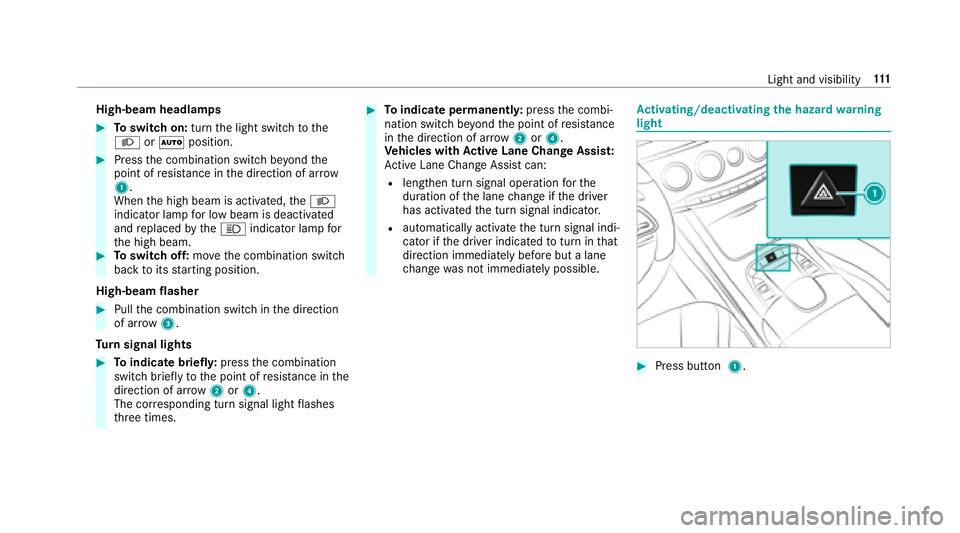
Activating/deactivating the hazard warning
light
#Press button 1.
Light and visibility 111
Page 114 of 502
Cornering light
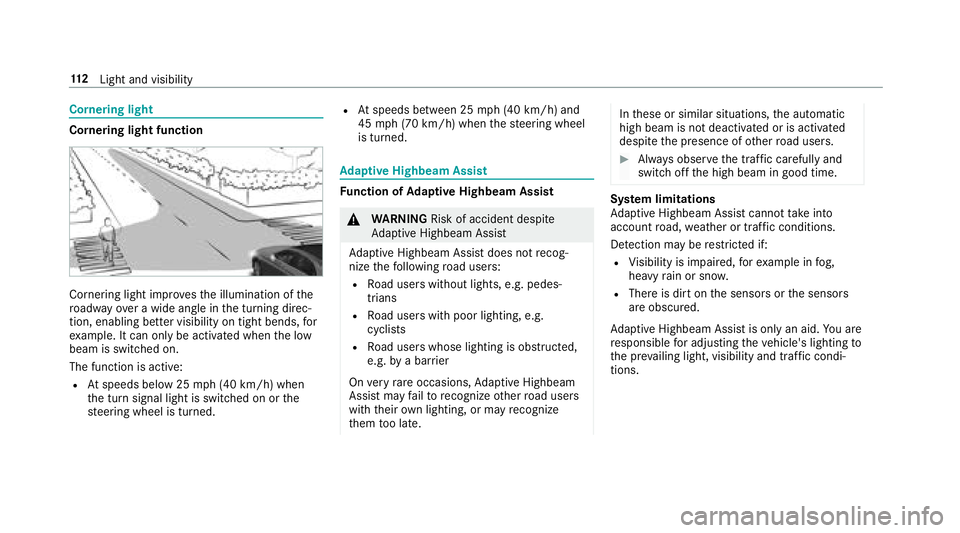
Cornering light function
Cornering light improvesth e illumination of the
ro adw ayove r a wide angle in the turning direc‐
tion, enabling better visibility on tight bends, for
ex ample. It can only be activated whenthe low
beam is switched on.
The function is active:
RAt speeds below 25 mph (40 km/h) when
th e turn signal light is switched on or the
st eering wheel is turned.
RAt speeds between 25 mph (40 km/h) and
45 mph (70 km/h) when thesteering wheel
is turned.
Ad aptive Highbeam Assist
Function of Adaptive Highbeam Assist
&
WARNING Risk of accident despite
Ad aptive Highbeam Assist
Ad aptive Highbeam Assist does not recog‐
nize thefo llowing road users:
RRo ad users without lights, e.g. pedes‐
trians
RRo ad users with poor lighting, e.g.
cyclists
RRo ad users whose lighting is obstructed,
e.g. bya bar rier
On very rare occasions, Adaptive Highbeam
Assist may failto recognize other road users
with their own lighting, or may recognize
th em too late.
In these or similar situations, the automatic
high beam is not deactivated or is activated
despite the presence of other road users.
#Alw ays obser vethe tra ffic carefully and
switch off the high beam in good time.
Sy stem limitations
Ad aptive Highbeam Assist cannot take into
account road, weather or traf fic conditions.
De tection may be restricted if:
RVi sibility is impaired, forex ample in fog,
heavy rain or sno w.
RThere is dirt on the sensors or the sensors
are obscured.
Ad aptive Highbeam Assist is only an aid.You are
re sponsible for adju sting theve hicle's lighting to
th e pr evailing light, visibility and traf fic condi‐
tions.
11 2
Light and visibility
Page 120 of 502
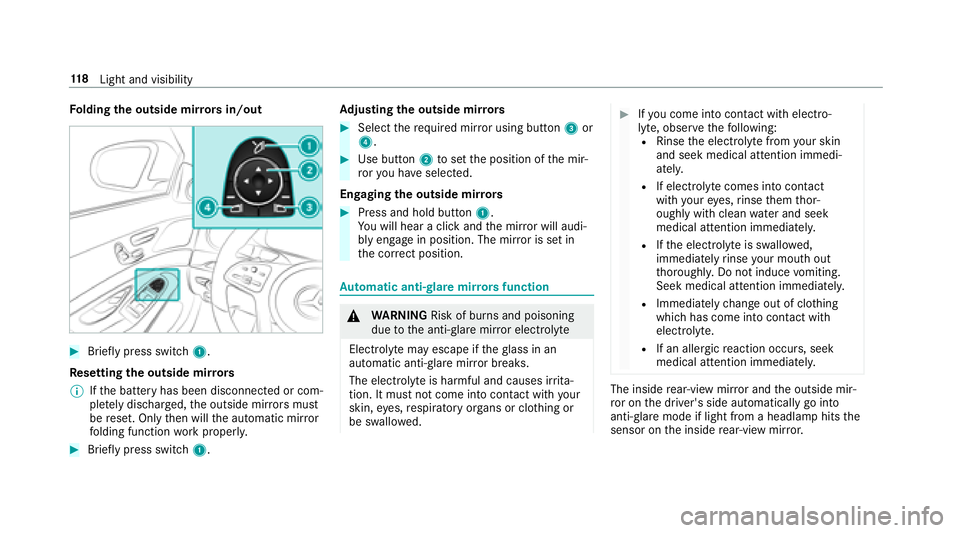
Folding the outside mir rors in/out
#Brief lypress switch 1.
Re setting the outside mir rors
% Ifth e battery has been disconnected or com‐
ple tely discharged ,th e outside mir rors must
be reset. Only then will the automatic mir ror
fo lding function workproperly.
#Brief lypress switch 1. Ad
justing the outside mir rors
#Select there qu ired mir ror using button 3or
4.
#Use button 2toset the position of the mir‐
ro ryo u ha veselected.
Engaging the outside mir rors
#Press and hold button 1.
Yo uwill hear a click and the mir ror will audi‐
bly engage in position. The mir ror is set in
th e cor rect position.
Au tomatic anti-glare mir rorsfunction
&
WARNING Risk of burn s and poisoning
due tothe anti- glare mir ror electrolyte
Electrolyte may escape if theglass in an
automatic anti-glare mir ror breaks.
The electrolyte is harmful and causes ir rita ‐
tion. It must not come into contact wi thyour
skin, eyes,respiratory organs or clo thing or
be swallo wed.
#Ifyo u come into contact with electro‐
ly te , obser vethefo llowing:
RRinse the electrolyte from your skin
and seek medical attention immedi‐
atel y.
RIf electrolyte comes into contact
with your eyes, rinse them thor‐
oughly with clean water and seek
medical attention immediately.
RIf th e electrolyte is swallo wed,
immediately rinse your mouth out
th oroughly. Do not induce vomiting.
Seek medical attention immediately.
RImmediate lych ange out of clo thing
which has come into con tact wi th
electrolyte.
RIf an allergic reaction occurs, seek
medical attention immediatel y.
The insiderear-view mir ror and the outside mir‐
ro r on the driver's side automatically go into
anti- glare mode if light from a headlamp hits the
sensor on the inside rear-view mir ror.
11 8
Light and visibility