radio MERCEDES-BENZ S-CLASS COUPE 2018 Owner's Guide
[x] Cancel search | Manufacturer: MERCEDES-BENZ, Model Year: 2018, Model line: S-CLASS COUPE, Model: MERCEDES-BENZ S-CLASS COUPE 2018Pages: 502, PDF Size: 6.29 MB
Page 320 of 502
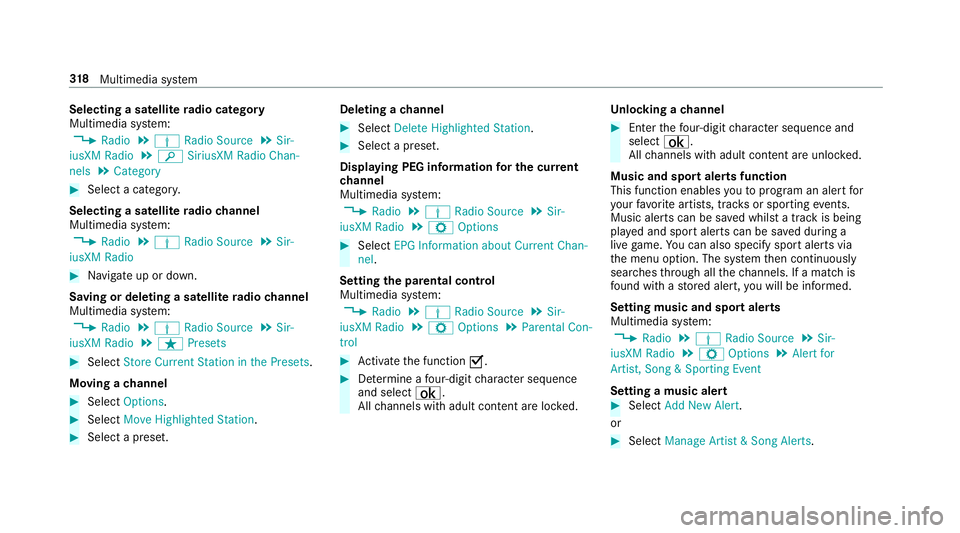
Selecting a satelliteradio category
Multimedia sy stem:
,Radio.Þ Radio Source.Sir-
iusXM Radio.è SiriusXM Radio Chan-
nels.Category
#Select a categor y.
Selecting a satellite radio channel
Multimedia sy stem:
,Radio.Þ Radio Source.Sir-
iusXM Radio
#Na vigate up or down.
Saving or deleting a satellite radio channel
Multimedia sy stem:
,Radio.Þ Radio Source.Sir-
iusXM Radio.ß Presets
#Select Store Current Station in the Presets .
Moving a channel
#Select Options.
#SelectMove Highlighted Station.
#Select a preset. Deleting a
channel
#Select Delete Highlighted Station .
#Select a preset.
Displaying PEG information for the cu rrent
ch annel
Multimedia sy stem:
,Radio.Þ Radio Source.Sir-
iusXM Radio.Z Options
#Select EPG Information about Current Chan-
nel.
Setting the pa rental control
Multimedia sy stem:
,Radio.Þ Radio Source.Sir-
iusXM Radio.Z Options.Parental Con-
trol
#Ac tivate the function O.
#Determ ine a four-digit character sequence
and select ¡.
All channels with adult con tent are lo cked. Un
locking a channel
#Enter thefo ur-digit character sequence and
select ¡.
All channels with adult con tent are unloc ked.
Music and sport alerts function
This function enables youto prog ram an ale rtfor
yo ur favo rite artists, trac ksor sporting events.
Music alerts can be sa ved whilst a tra ckis being
pla yed and sport alerts can be sa ved during a
live game. You can also specify sport alerts via
th e menu option. The sy stem then continuously
sear ches thro ugh all thech annels. If a match is
fo und with a stored alert, youwill be informed.
Se tting music and spo rtalerts
Multimedia sy stem:
,Radio.Þ Radio Source.Sir-
iusXM Radio.Z Options.Alert for
Artist, Song & Sporting Event
Setting a music alert
#Select Add New Alert.
or
#Select Manage Artist & Song Alerts .
318
Multimedia sy stem
Page 321 of 502
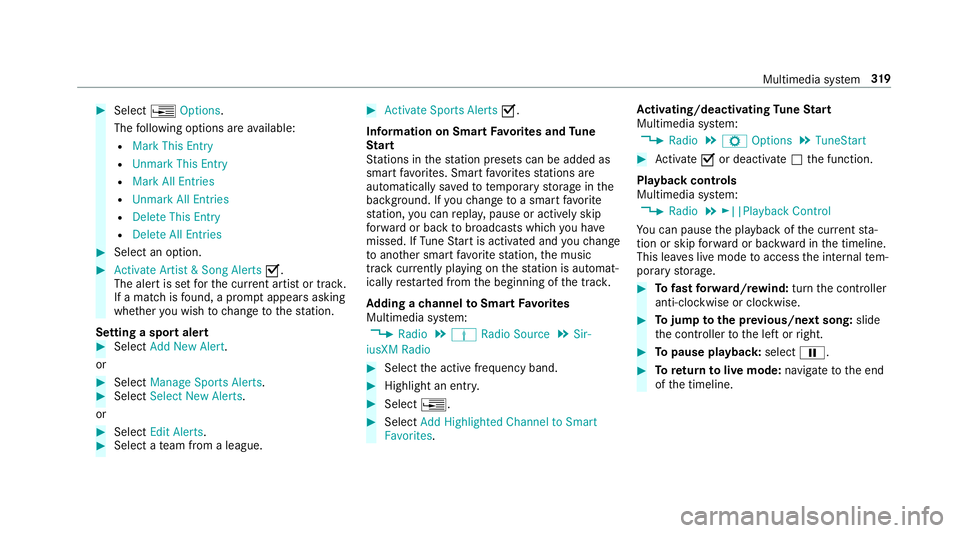
#Select¥Options .
The following options are available:
RMark This Entry
RUnmark This Entry
RMark All Entries
RUnmark All Entries
RDelete This Entry
RDelete All Entries
#Select an option.
#Activate Artist & Song Alerts O.
The alert is set forth e cur rent artist or trac k.
If a match is found, a prom ptappears asking
whe ther you wish tochange tothest ation.
Setting a sport alert
#Select Add New Alert.
or
#Select Manage Sports Alerts.#SelectSelect New Alerts.
or
#Select Edit Alerts .#Select ateam from a league.
#Activate Sports Alerts O.
Information on Smart Favorite s and Tune
St art
St ations in thest ation presets can be added as
smart favo rite s. Smart favo rite sst ations are
automatically sa vedto temp orary storage in the
bac kground. Ifyo uch ange toa smart favo rite
st ation, you can repla y,pause or actively skip
fo rw ard or back tobroadcasts which you ha ve
missed. If Tune Start is activated and youch ange
to ano ther smart favo rite station, the music
tra ck cur rently pl aying on thest ation is automat‐
ically restar ted from the beginning of the tra ck.
Ad ding a channel toSmart Favorite s
Multimedia sy stem:
,Radio.Þ Radio Source.Sir-
iusXM Radio
#Select the active frequency band.
#Highlight an ent ry.
#Select ¥.
#SelectAdd Highlighted Channel to Smart
Favorites. Ac
tivating/deactivating Tune Start
Multimedia sy stem:
,Radio.Z Options.TuneStart
#Activate Oor deacti vate ª the function.
Playback controls
Multimedia sy stem:
,Radio.►||Playback Control
Yo u can pause the playback of the cur rent sta‐
tion or skip forw ard or backward in the timeline.
This lea ves live mode toaccess the internal tem‐
porary storage.
#To fast forw ard/r ewind: turn the controller
anti-clockwise or clockwise.
#To jump tothe pr evious/next song: slide
th e controller tothe left or right.
#To pause playback: selectË.
#Toreturn tolive mode: navigatetothe end
of the timeline.
Multimedia sy stem 31
9
Page 322 of 502
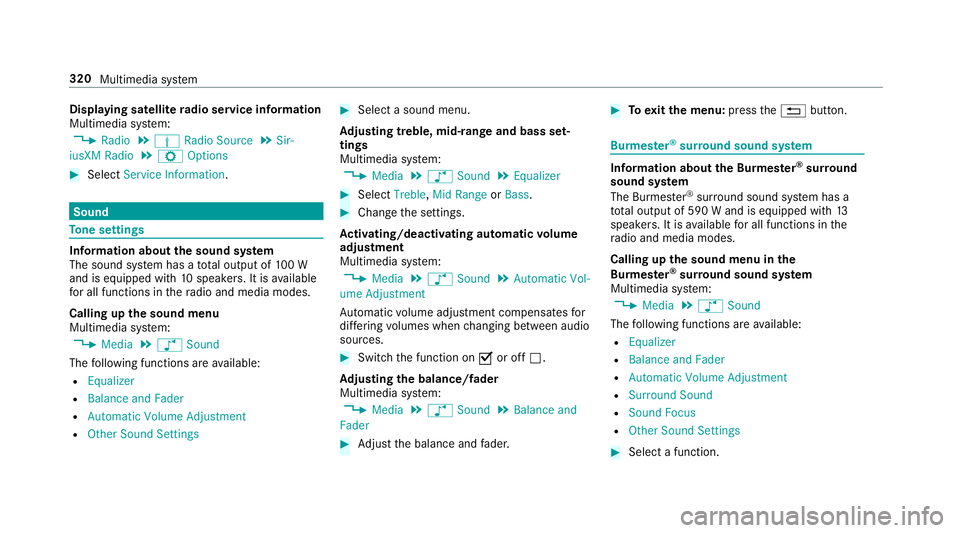
Displaying satellitera dio serv ice information
Multimedia sy stem:
,Radio.Þ Radio Source.Sir-
iusXM Radio.Z Options
#Select Service Information .
Sound
Tone settings
Information about the sound sy stem
The sound sy stem has a total output of 100 W
and is equipped with 10speakers. It is available
fo r all functions in thera dio and media modes.
Calling up the sound menu
Multimedia sy stem:
,Media.à Sound
The following functions are available:
REqualizer
RBalance and Fader
RAutomatic Volume Adjustment
ROther Sound Settings
#Select a sound menu.
Ad justing treble, mid- range and bass set‐
tings
Multimedia sy stem:
,Media.à Sound.Equalizer
#Select Treble, Mid Range orBass.
#Change the settings.
Ac tivating/deactivating automatic volume
adjustment
Multimedia sy stem:
,Media.à Sound.Automatic Vol-
ume Adjustment
Au tomatic volume adjustment compensates for
dif fering volumes when changing between audio
sources.
#Swit chthe function on Oor off ª.
Ad justing the balance/ fader
Multimedia sy stem:
,Media.à Sound.Balance and
Fader
#Ad just the balance and fader.
#To exitth e menu: pressthe% button.
Burmes ter®sur round sound sy stem
Information about the Bu rmester®sur round
sound sy stem
The Burmes ter
®sur round sound sy stem has a
to ta l output of 590 W and is equipped with 13
speakers. It is available for all functions in the
ra dio and media modes.
Calling up the sound menu in the
Bu rm ester
®sur round sound sy stem
Multimedia sy stem:
,Media.à Sound
The following functions are available:
REqualizer
RBalance and Fader
RAutomatic Volume Adjustment
RSurround Sound
RSound Focus
ROther Sound Settings
#Select a function.
320
Multimedia sy stem
Page 370 of 502
Make suretoobser vethefo llowing fur ther rela‐
te d subjec t:
RNotes on tire pressure (→page 363)
Rest arting the tire pressure moni toring sys‐
te m
Requ irements
RTherecommended tire pressure is cor rectly
set forth ere spective operating condition on
each of thefo ur wheels (
→page 363).
Re start the tire pressure monitoring sy stem in
th efo llowing situations:
RThe tire pressure has changed.
RThe wheels or tires ha vebeen changed or
newly fitted.
On-boa rdcompute r:
,Service.Tires
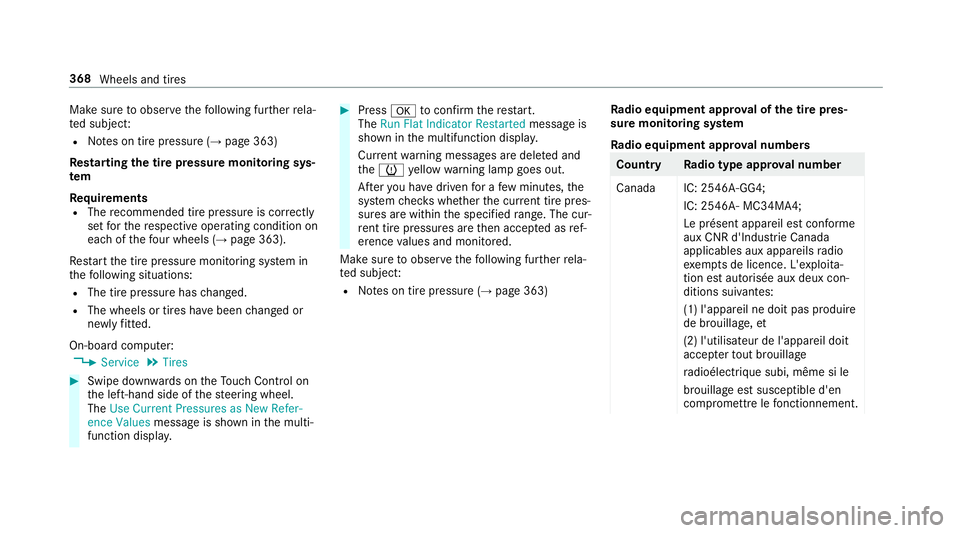
#Swipe down wards on theTo uch Control on
th e left-hand side of thesteering wheel.
The Use Current Pressures as New Refer-
ence Values message is shown in the multi‐
function displa y.
#Pressatoconfirm there start.
The Run Flat Indicator Restarted message is
shown in the multifunction displa y.
Cur rent wa rning messages are dele ted and
th eh yellow warning lamp goes out.
Af teryo u ha vedriven for a few minutes, the
sy stem checks whe ther the cur rent tire pres‐
sure s are within the specified range. The cur‐
re nt tire pressures are then accep ted as ref‐
erence values and monitored.
Make sure toobser vethefo llowing fur ther rela‐
te d subjec t:
RNotes on tire pressure (→page 363) Ra
dio equipment appr oval of the tire pres‐
sure moni toring sy stem
Ra dio equipment appr oval numbers
Countr yRadio type appr oval number
Canada IC: 2546A-GG4; IC: 2546A- MC34MA4;
Le présent appareil est conforme
aux CNR d'Indust rie Canada
applicables aux appareils radio
exe mpts de licence. L'exploi ta‐
tion est au torisée aux deux con‐
ditions suivantes:
(1) l'appare il ne doit pas produire
de brouillage, et
(2) l'utilisateur de l'appareil doit
accep terto ut brouillage
ra dioélectrique subi, même si le
brouillage est susceptible d'en
compromett relefonctionnement.
368
Wheels and tires
Page 371 of 502
CountryRadio type appr oval number
US AF CC ID: MRXGG4
FCC ID: MRXMC34MA4
This device co mplies with Part15
of the FCC Rules. Operation is
subject tothefo llowing two con‐
ditions:
(1) This device may not cause
harmful inter fere nce, and
(2) This device must accept any
inter fere nce receive d, including
inter fere nce that may cause
undesired operation.Loading theve hicle
Tire and Loading Information placard
&
WARNING Risk of accident from overloa‐
ded tires
Overloaded tires may overheat and bur stas a
consequence. Overloaded tires can also
impair thesteering and handling characteris‐
tics and lead tobrake failure.
#Obser vethe load rating of the tires.
#The load rating must be at least half the
permissible axle load of theve hicle.
#Ne verove rload the tires by exceeding
th e maximum load.
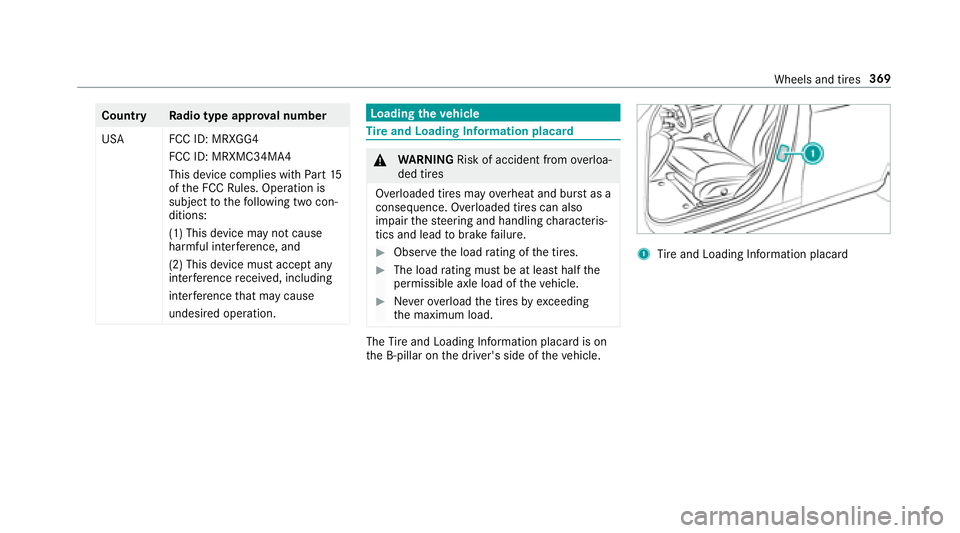
The Tire and Loading Info rmation placard is on
th e B-pillar on the driver's side of theve hicle.
1Tire and Loading Info rmation placard
Wheels and tires 369
Page 393 of 502
Notes ontech nical data
Mercedes-AMG vehicles: observeth e no tes in
th e Supplement. Otherwise, you may not recog‐
nize dangers.
The data stated only appliestovehicles with
st andard equipment. You can obtain fur ther
information from an authorized Mercedes-Benz
Center.
Ve hicle electronics
Tw o-w ayradios
Note s on installing two-w ayradios
&
WARNING Risk of accident due to
improper workon two-w ayradios
The electro magneticradiation from two-w ay
ra dios can inter fere with the on-board elec‐
tronics if RF transmit ters are manipulated or
re trofitted inco rrectly.
This could jeopardize the operating saf etyof
th eve hicle.
#Yo u should ha veall workon electrical
and electronic components car ried out
at a qualified specialist workshop.
&
WARNING Risk of accident from incor‐
re ct ope ration of two-w ayradios
If yo u operate two-wa yra dios incor rectly in
th eve hicle, the electromagnetic radiation
could inter fere with the on-board electronics,
e.g.:
Rif th e two-w ayradio is not connec tedto
an exterior antenna
Rif th eex terior antenna is not cor rectly
mounted or is not of low reflection
This could jeopardies the operating saf etyof
th eve hicle.
#Ha ve the lo w-reflection exterior
antenna ins talled at a qualified special‐
ist workshop.
#When operating two-w ayradios in the
ve hicle, alw ays connect them tothe
lo w- reflection exterior antenna.
* NO
TEInva lidation of the operating per‐
mit due tofailure tocomply wi th the
instructions for ins tallation and use
The operating permit may be in validated if
th e instructions for ins tallation and use of
two-w ayradios are not obser ved.
#Only use appr oved frequency bands.
#Obser vethe maximum permissible out‐
put po wer in these frequency bands.
#Only use appr oved antenna positions.
Tech nical da ta391
Page 394 of 502
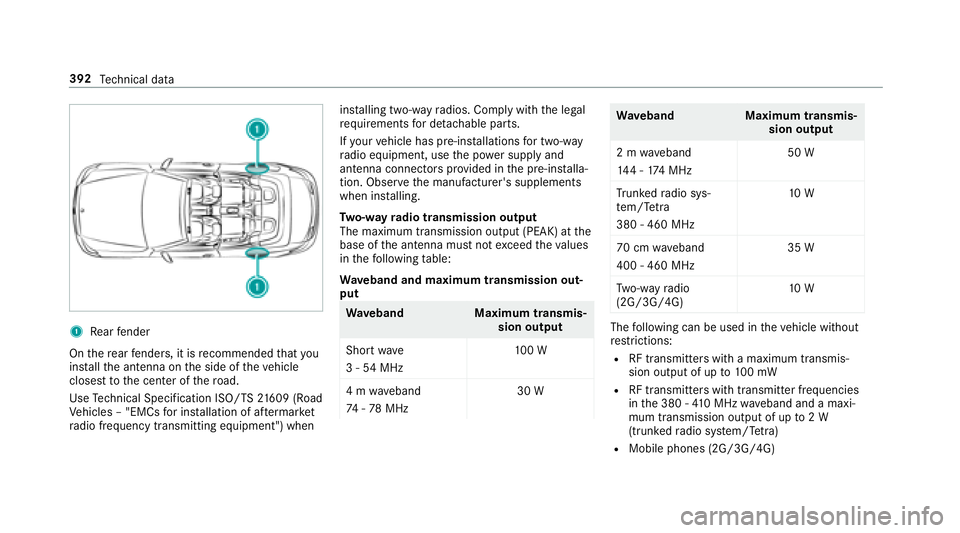
1Rear fender
On there ar fende rs, it is recommended that you
ins tallth e antenna on the side of theve hicle
closest tothe center of thero ad.
Use Tech nical Specification ISO/TS 21609 (Road
Ve hicles – "EMCs for ins tallation of af term arke t
ra dio frequency transmitting equipment") when ins
talling two-w ayradios. Comply with the legal
re qu irements for de tach able parts.
If yo ur vehicle has pre-ins tallations for two-w ay
ra dio equipment, use the po wer supp lyand
antenna connec tors prov ided in the pre-ins talla‐
tion. Obser vethe manufacturer's supplements
when ins talling.
Tw o-w ayradio transmission output
The maximum transmission output (PEAK) at the
base of the antenna must not exceed theva lues
in thefo llowing table:
Wa veband and maximum transmission out‐
put
Wa veband Maximum transmis‐
sion output
Short wave
3 - 54 MHz 10
0 W
4 m waveband
74 -78 MHz 30 W
Wa
veband Maximum transmis‐
sion output
2 m waveband
14 4 - 174 MHz 50 W
Tr unked radio sys‐
te m/T etra
380 - 460 MHz 10
W
70 cm waveband
400 - 460 MHz 35 W
Tw o-w ayradio
(2G/3G/4G) 10
W
The following can be used in theve hicle without
re strictions:
RRF transmitters wi tha maximum transmis‐
sion output of up to100 mW
RRF transmitters with transmitter frequencies
inthe 380 - 410 MHz waveband and a maxi‐
mum transmission output of up to2 W
(trunked radio sy stem/T etra )
RMobile phones (2G/3G/4G)
392
Tech nical da ta
Page 395 of 502
There are norestrictions when positioning the
antenna on the outside of theve hicle for some
wav ebands.
This applies tothefo llowing wavebands:
RTrunked radio sy stem/T etra
R70 cm waveband
R2G/3G/4G
Vehicle identification plate, VIN and engine
number overview
Ve hicle identification plate
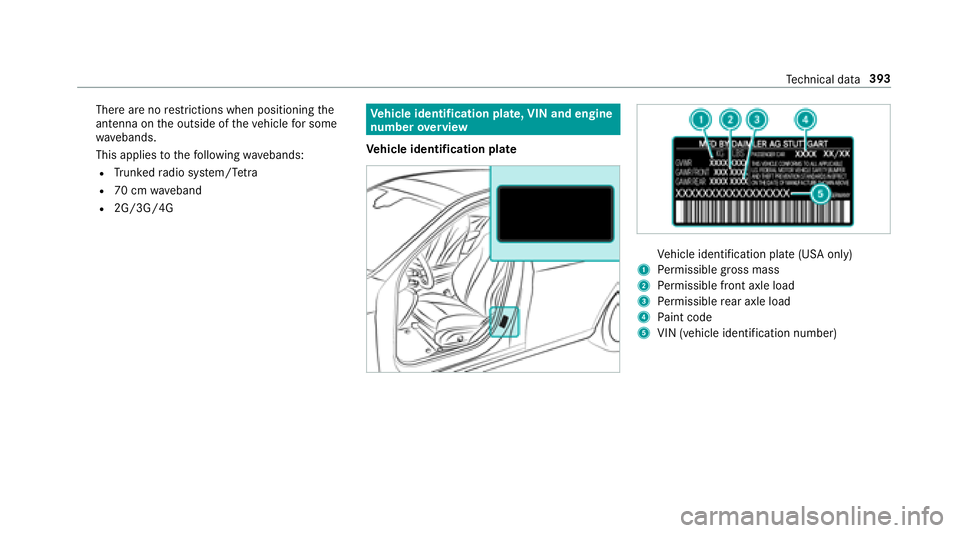
Vehicle identification plate (USA only)
1Perm issible grossmass
2Pe rm issible front axle load
3Perm issible rear axle load
4Pa int code
5VIN (vehicle identification number)
Tech nical da ta393
Page 433 of 502
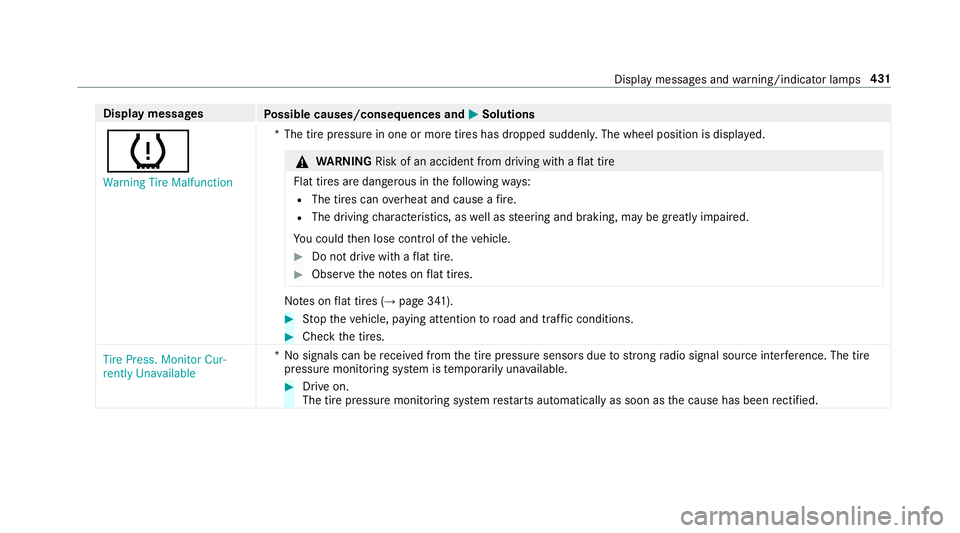
Displaymessages
Possible causes/consequences and MSolutions
h
Warning Tire Malfunction*T
he tire pressure in one or more tires has dropped suddenly. The wheel position is displa yed.
&
WARNING Risk of an accident from driving wi thaflat tire
Flat tires are dangerous in thefo llowing ways:
RThe tires can overheat and cause a fire .
RThe driving characteristics, as well as steering and braking, may be greatly impaired.
Yo u could then lose control of theve hicle.
#Do not drive with a flat tire.
#Observ eth e no tes on flat tires.
No tes on flat tires (→page 341).
#St op theve hicle, paying attention toroad and traf fic conditions.
#Check the tires.
Tire Press. Monitor Cur-
rently Unavailable *N
o signals can be receive d from the tire pressure sensors due tostro ngradio signal source inter fere nce. The tire
pressure monito ring sy stem is temp orarily una vailable.
#Drive on.
The tire pressure monitoring sy stem restarts automatically as soon as the cause has been rectified.
Display messages and warning/indicator lamps 431
Page 436 of 502
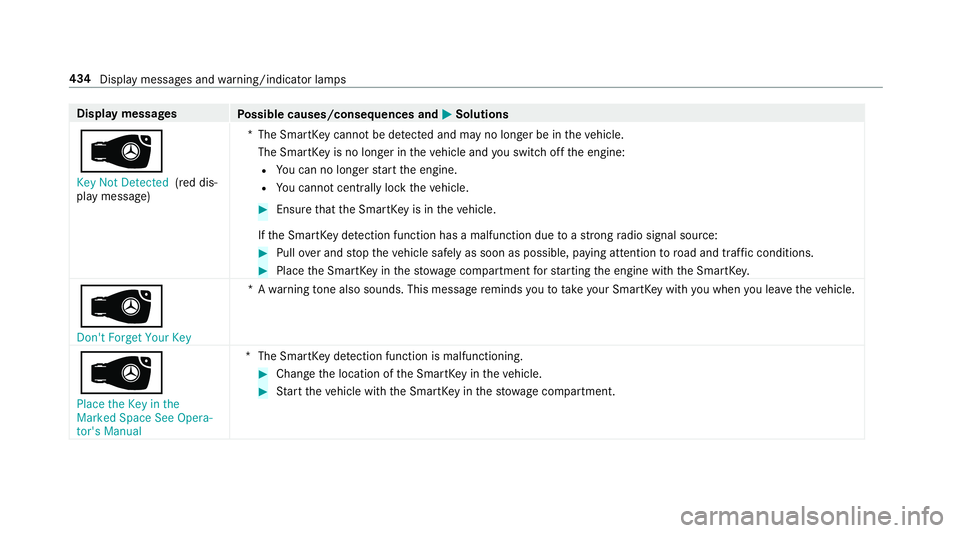
Displaymessages
Possible causes/consequences and MSolutions
Â
Key Not Detected(red dis‐
play message) *T
he SmartK eycannot be de tected and may no longer be in theve hicle.
The SmartK eyis no longer in theve hicle and youswit choff the engine:RYo u can no longe rst art the engine.
RYo u cannot centrally lock theve hicle.
#Ensure that the SmartK eyis in theve hicle.
If th e SmartK eydetection function has a malfunction due toast ro ng radio signal source:
#Pull over and stop theve hicle safely as soon as possible, paying attention toroad and traf fic conditions.
#Place the SmartK eyinthestow age compartment forst arting the engine with the SmartK ey.
Â
Don't Forget Your Key *A
warning tone also sounds. This message reminds youto take your SmartK eywith you when you lea vetheve hicle.
Â
Place the Key in the
Marked Space See Opera-
tor's Manual *T
he SmartK eydetection function is malfunctioning.
#Change the location of the SmartK eyintheve hicle.
#Start theve hicle with the SmartK eyinthestow age compartment.
434
Display messages and warning/indicator lamps