fog light MERCEDES-BENZ S-CLASS COUPE 2019 User Guide
[x] Cancel search | Manufacturer: MERCEDES-BENZ, Model Year: 2019, Model line: S-CLASS COUPE, Model: MERCEDES-BENZ S-CLASS COUPE 2019Pages: 518, PDF Size: 43.51 MB
Page 192 of 518
Sy
stem limita tions
The 360°Camera willnotfun ction orwill only
par tiall yfun ction inthefo llo wing situat ions:
R The door sar eopen .
R The side mirrors arefo lded in.
R The trunk lidisopen .
R Ther eis hea vyrain, sno wor fog.
R The ambient lightcondit ionsarepoor ,e.g. at
night.
R The camer alens isobs truct ed, dirtyor fog‐
ge dup.
R Ifcamera sor vehicle component sin whic h
th ecamer asareins talled aredamag ed.In th
is eve nt,have thecamer as,their position s
and their setting checkedat aqu alif ied spe‐
cialis two rkshop.
Do notuse the360° Camer aunder suchcir cum‐
st anc es.Youco uld other wise injureot her sor
collide withobject swhen parking ormaneuv er‐
ing theve hicle.
On vehicles withheight-adjus table suspension or
if th eve hicle iscar rying ahea vyload, leavingth e
st andar dheigh tcan result ininaccur aciesinthe
guide linesandinthedispla yof thege ner ated
ima ges,depending ontech nica lcond itions.
The field ofvision andother funct ionsofthe
came rasystem maybe restrict ed dueto addi‐
tio nal attachme ntson theve hicle (e.g.license
plat ebr ac ket,bicy cle rack ).
See theno teson cleaning the360° Camer a
(0013 page349).
Selecting avie wforthe 360° Camer a
Re quirement s:
R The Auto.Rear View Cam. function isselec‐
te din themultimedia system. 0007
Engage reve rsege ar. 0007
Inthemultimedia system, select thedesir ed
vie w.
Opening thecam eraco verof the rear vie w
camer a
Mul timedi asy stem:
0018 Vehicle 0019
k Assist ance
0019 Camera &Parkin g 0007
Select OpenCamera Cover.
0009 The camer aco vercloses automatical lyafte r
some timeorafte ran ignitio ncy cle.
Se tting thecam eraas afa vo rite
Yo ucan callupthecamer avie wdir ect lyin the
multime diasystem bysettin git as afa vo rite . 0007
Press the00E2 buttonon thecon trol ele‐
ment .
The main functionsar edispla yed. 0007
Navig atedo wn wardstwice.
The Favorite smenu appears. 0007
Select New Favorite. 0007
Select Veh icle. 0007
Select Camera. 19
0
Driving and parking
Page 201 of 518
R
When avillag eor city boundar ywhic his
st or ed inthedigit almap ispassed.
The camer aalso detects traf fic sig ns with a
re striction indicated byan addit ionalsign (e.g.in
we tcond itions ).
Tr af fic Sign Assistisonl yan aid. Thedriver is
re sponsible forke eping asaf edis tance tothe
ve hicle infront, forve hicle speed andforbr aking
in good time. Themaximu mper missi blespee d
als odepe ndsonfact or ssu ch asthero ad sur‐
fa ce and traf fic condi tions.
Wa rning when thema xim um permis sible
speed isexc eeded
The system can warnyouif yo uunin tentio nally
ex ceed themaximum permissible speed.Todo
th is, youcan spec ifyinthemultimedia system
by howmuc hth emaximum permissible speed
can beexceed edbef oreawa rning isissued. You
can specify whether thewa rning isto be justa
visual warning oran acous ticone aswell.
Displa yin theIns trum ent Displa y
Tr af fic Sign Assistisno tav ailable inall coun ‐
tr ies. Ifit is una vailable, display1 issho wnin
th espeedome ter. Sy
stem limita tions
The system maybe impair edorma yno tfunc tion
in thefo llo wing situat ions:
R Ifth er eis poor visibility ,e.g. due toinsuf fi‐
cie ntillu mina tionofthero ad, ifth er ear e
highly variable shade condition sor inrain,
sno w,fogor hea vyspr ay.
R Ifth er eis glar e, e.g .fr om oncom ingtraf fic,
di re ct sunli ght orreflect ions.
R Ifth ewindshield inthear ea ofthemultifunc ‐
tion camer ais dir ty,or ifth ecamer ais fog‐
ge dup, damag edorcovered.
R Ifth etra ffic sign sar ehar dto detect, e.g. due
to dir tor sno w,orbecause they areco vered
or due toinsuf ficie ntlighti ng.
R Ifth einf ormation inthena vig ation system's
digit almap isincor rect or out-of-da te.
R Ifth esigns areambiguous, e.g.traf fic sig ns
on cons tructi onsites orinad jacent lanes.
R Ifyo utur nshar plywhen traffic sig ns areou t‐
sid eth ecamer a'sfield ofvision. Se
tting Traf fic Sign Assis t
Mult imed iasystem:
0018 Vehicle 0019
k Assist ance
0019 Traffic SignAssist
Ac tiv atin g/deac tivatin gaut omati cadop tion
of spe edlimits
Re quiremen ts:
R ActiveDis tance AssistDIS TRONI Cis acti va‐
te d. 0007
Select LimitAdopt ion. 0007
Activate0073 ordeacti vate 0053 thefunc tion.
The speed limitsdetected byTraf fic Sign
Assi stareaut omat icallyadop tedby Active
Dis tance AssistDIS TRONI C.
Di spl aying detected traf fic signs inthe
med iadis pla y 0007
Select Display inCOMA ND. 0007
Activate0073 ordeacti vate 0053 thefunc tion.
0009 When DISTRONIC orcruise control areacti‐
va ted, thespeed detected can bemanu ally
ad op tedas thespeed limit
(0013 page16 3). Dr
iving andparking 19
9
Page 202 of 518
Ad
jus tingthe type ofwa rning 0007
Selec tVisual &Audible ,Visual orNon e.
Ad jus tingthe warning threshold
This value determ ines thespeed atwhic ha
wa rning isissued whenexceeded. 0007
Select Warning Threshold. 0007
Setth edesir edspeed. Night
View Assis t Fu
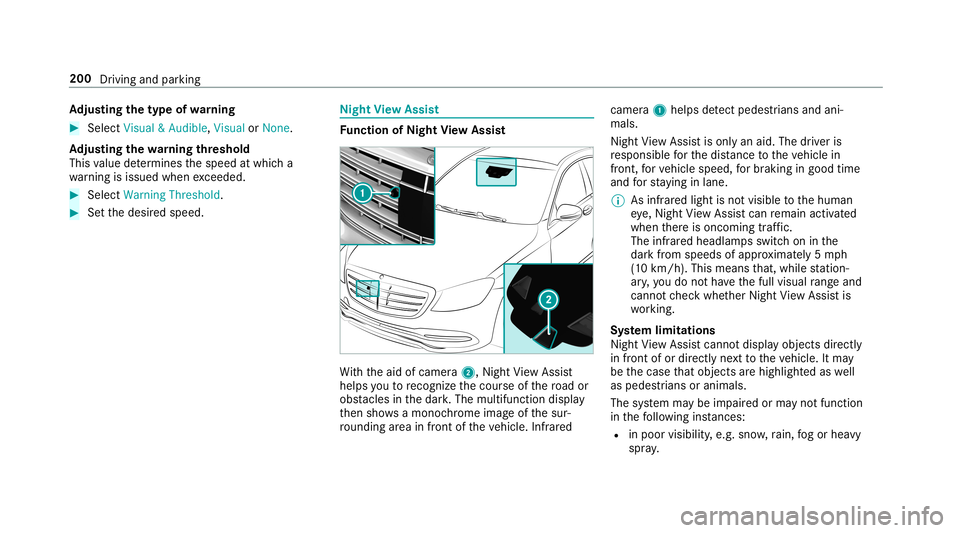
nction ofNight View Assis t Wi
th theaid ofcamer a2, Night View Assi st
helps youto recogni zethecour seofthero ad or
obs tacle sin thedar k.The multifunct iondispla y
th en sho wsamon ochrome imageof thesur‐
ro und ingarea infron tof theve hicle. Infrared camer
a1 helps detect ped estria ns and ani‐
mal s.
Nig htView Assi stisonl yan aid. Thedriver is
re sponsible forth edis tance totheve hicle in
fr ont, forve hicle speed, forbr aking ingood time
and forst ay ing inlane.
0009 Asinfrare dlight isno tvisible tothehuman
ey e, Night View Assi stcan remain activated
when ther eis onc oming traf fic.
The infrared headlam psswi tchon inthe
dar kfrom speeds ofappr oximat ely5 mp h
(1 0 km/ h).This means that, while statio n‐
ar y, yo udo notha ve thefull visual rang eand
canno tch eckwhe ther Night View Assi stis
wo rking.
Sy stem limita tions
Night View Assi stcanno tdi spl ayobject sdir ectl y
in front ofor directl yne xt to theve hicle. Itma y
be thecase that obj ect sar ehigh light edaswell
as pedes trians oranimals .
The system maybe impair edorma yno tfunc tion
in thefo llo wing instances:
R inpo or vis ibility ,e.g .sno w,rain, fogor hea vy
spr ay. 200
Driving andparking
Page 203 of 518
R
thewindshield isdir tyinthevicinit yof the
came ra.
R thecamer ais fogg ed up, damag edorcov‐
er ed.
R theinfr ared camer ain thera diat orgrill is
damag ed,dirty,fo gg ed up orcovered.
R onbends, onhillt ops orindips.
R athigh ambient temp eratur es.
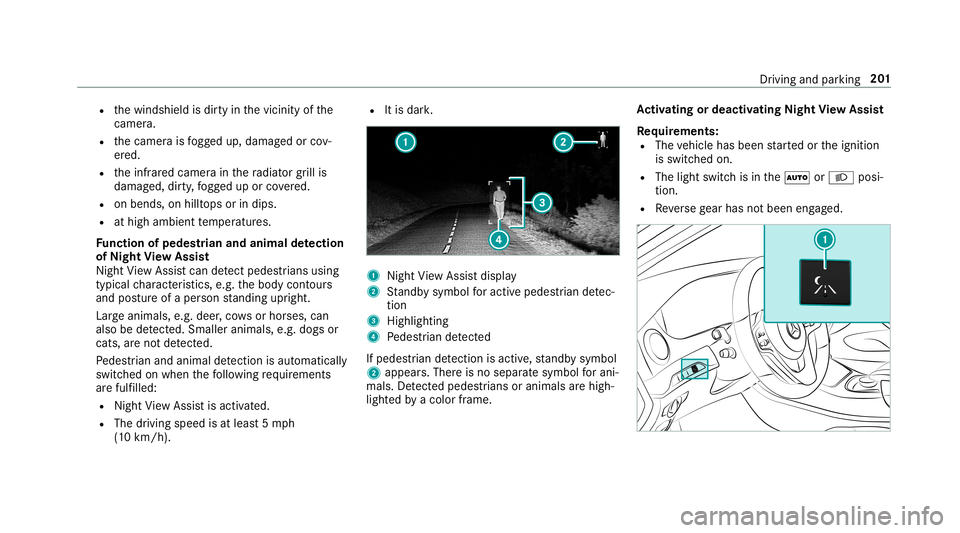
Fu nction ofpedes trian and anima lde tection
of Nig htView Assis t
Nigh tVi ew Assi stcan detect ped estria ns using
typ icalch aract eristic s,e.g .th ebody contour s
and postureof aper son standi ngupr ight .
Lar geanim als,e.g.deer ,co ws orhor ses, can
also bedetected. Smal lerani mal s,e.g. dogsor
cats, areno tde tected.
Pe des trian and animal detection isau tomatical ly
switc hedonwhen thefo llo wing requ iremen ts
ar efulf illed:
R Night View Assi stisact ivat ed.
R The drivin gspeed isat leas t5 mp h
(1 0 km/ h). R
Itis dar k. 1
Night View Assi stdispla y
2 Standb ysymbo lfo ractiv epede strian detec‐
tion
3 High lighti ng
4 Pedes trian detected
If ped estria n de tection isacti ve,st andb ysymbo l
2 appear s.Ther eis no separ atesymbo lfo rani‐
mals .De tected ped estria ns orani mal sar ehig h‐
li ght edbyacol orframe. Ac
tiv atin gor deac tivatin gNig htView Assis t
Re quirement s:
R The vehicle hasbeen star tedor theignition
is switc hedon.
R The light switc his in the0058 or0058 posi‐
tion .
R Reversege ar has notbeen engaged. Dr
ivin gand parking 20
1
Page 464 of 518

Disp
laymes sages
Possible causes/conseq uencesand0050 0050
Solutions
Adaptive Highbeam Assist
Currently Unavailable See
Operator' sManual 0007
Drive on.
Onc eth ecause ofthepr oblem isno long erpresent ,th esy stem will beavailable again. TheAdap tiveHig hbeam
As sist Now Available displaymes sageappear s.
Adap tiveHig hbeam Assist
Camer aView Restricted
See Oper ator'sMan ual *T
hecamer avie wisrestrict ed. Possible causes are:
R Dirton thewindshield inthecamer a'sfield ofvision
R Hea vyrain, sno wor fog
Dr iving systems anddriving safetysy stems maybe malfunct ioningortemp orarily una vailable.
Onc eth ecause ofthepr oblem isno long erpresent ,dr iving systems anddriving safetysy stems willbeavailable
ag ain.
If th edispla ymessag edoes notdisappear : 0007
Pull overand stop theve hicle safely assoon aspossible, paying attention toroad and traf fic condi tions. 0007
Clea nth ewindshield. Wa
rning and indicat orlam ps Ov
ervie wof wa rning and indicat orlam ps Som
esy stems willperform aself -tes twhen the
ignit ionisswitc hedon.Som ewa rning and indi‐
cat orlam psma ybr ief lylight uporflash. This
beha viorisno n-cr itical. Thes ewa rning and indi‐ cat
orlam psindic ateamalfun ction onlyif th ey
light uporflash afte rth eengine hasbeen star‐
te dor dur ing ajour ney. 462
Displa ymessag esand warning/ indic ator lam ps
Page 465 of 518
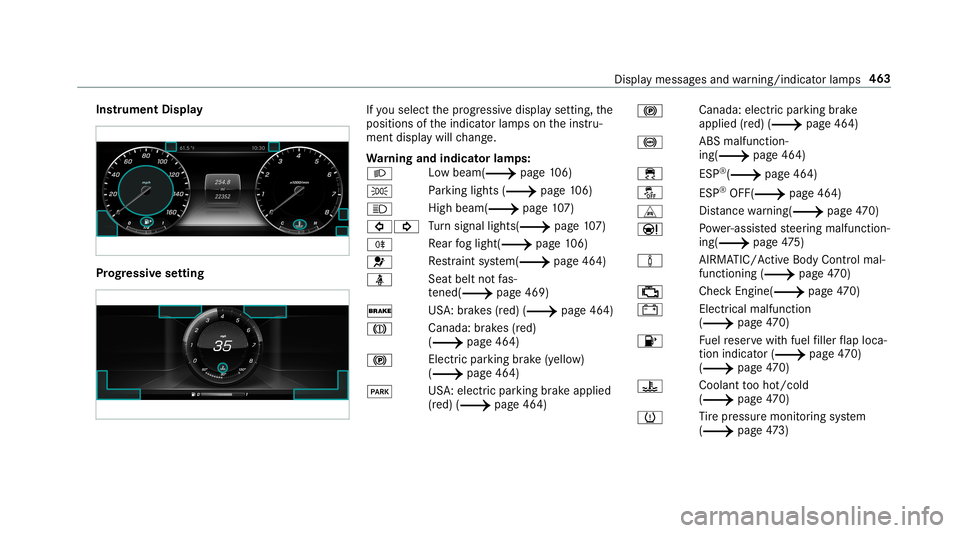
Ins
trum ent Disp lay Pr
og ressiv ese tting If
yo usele ctthepr ogr essiv edispla yse tting, the
position sof theindicat orlam pson theins tru‐
ment displa ywill chang e.
Wa rning and indicat orlam ps:
0058 Lo
wbeam (0013 page10 6)
0060 Pa
rking light s(0013 page10 6)
0057 Hi
gh beam (0013 page107 )
003E003D Tu
rn signal lights(0013 page10 7)
005E Re
ar foglight (0013 page10 6)
0075 Re
stra int system(0013 page46 4)
00E9 Seat
beltnotfa s‐
te ned (0013 page 469)
0027 US
A:brak es (red) (0013 page46 4)
004D Ca
nada :br ak es (red)
(0013 page46 4)
0024 Electr
icpar king brak e(yell ow )
( 0013 page46 4)
0049 US
A:elect ric pa rking brak eapplied
(r ed) (0013 page46 4) 0024
Canada:
electric pa rking brak e
applied (red) (0013 page46 4)
0025 AB
Smalfun ction‐
ing(0013 page46 4)
00E5 ESP®
(0013 page46 4)
00BB ESP®
OFF (0013 page46 4)
L Distance warning(0013 page47 0)
00CC Po
we r-assis tedsteer ing malfunct ion‐
ing(0013 page47 5)
00CC AIRMA
TIC/ActiveBody Controlmal ‐
functioni ng(0013 page47 0)
00B9 Che
ckEngi ne(0013 page 470)
003D Ele
ctrica lma lfunctio n
(0013 page 470)
00B6 Fu
elreser vewit hfuel filler flap loca‐
tio nind icat or(0013 page47 0)
(0013 page47 0)
00AC Coo
lant tooho t/c old
(0013 page47 0)
0077 Ti
re pressur emonit oring system
(0013 page47 3) Displ
aymessa gesand warning/ indic ator lam ps 463
Page 496 of 518
Kic
kdow n............... ..................................1 38
Using ............................ .......................138
Knee airbag ................................................ 35 L
Label ing(tires)
see Tire labeling
Lam p
see Interior light ing
Lam ps(Ins trum ent Displa y)
see Warning/ indic ator lam ps
Lane detection (automatic )
se eAc tiveLa ne Keeping Assist
Lane Keeping Assist
see ActiveLa ne Keeping Assist
Languag e............... ..................................2 52
No tes .................. ................................ 252
Se ttin g.................................................2 52
LA TC H-type (ISOFI X)child seat secur‐
ing system
In stallin g................................................ 49
Le velcontr olsystem
see AIRMA TIC see
MAGIC BODY CONTR OL
Light switch
Ov ervie w ........................................ .....1 06
Lig hting
see Interior lighting
see Ligh ts
Lig hts ....................................................... 106
Ad aptiveHig hbeam Assis t.............. .....1 09
Ad jus ting theins trument lighting ......... 214
Au tomatic driving lights..... .................. 107
Comb inationswit ch<0011001100110011001100110011001100110011001100110011001100110011
0011001100110011001100110011001100110011001100110011> 107
Cor nering light func tion<0011001100110011001100110011001100110011001100110011001100110011
0011001100110011001100110011> 109
Haza rdwa rning light s.................... ...... 108
High beam............ ...............................107
High -beamflasher ...............................1 07
Light switch..... .............................. ......1 06
Lo w-beam headlam ps.................... .....1 06
Pa rking light s.................................. .....1 06
Re ar foglam p................................. ..... 106
Re sponsibili tyforlig hting systems ...... 106
Se tting theex terior lighting switch-
of fdela ytime ................................. ...... 110
Se tting thesur round lighting.......... ...... 110
St andi nglight s................................ .....1 06
Tu rn signals .................................... ..... 107 Limit
edWa rranty
Ve hicle .................................................. 23
Liv eTr af fic Inf orma tion
Dis playing subsc ript ion informatio n.... 277
Dis play ing thetra ffic map ...................2 77
Dis play ing traffic inci dents <0011001100110011001100110011001100110011001100110011001100110011
00110011> 278
Ext end ingasu bs criptio n............ ......... 277
Issui nghazar dale rts ........................... 278
Load index(tir es) .................................... 389
Load -bearing capacit y(tir es) ................. 389
Loading Definition s...........................................3 92
No tes ..................................................... 92
St ow agespac eunde rth etrunk floor ..... 97
Load ingguid elines .................................... 92
Load inginforma tion table ...................... 382
Load s
Sec uring ................................................ 92
Locat orlight ing
see Surround lighting
Loc king /unl ocking
Ac tivati ng/d eactiv ating theaut o‐
matic locking featur e.............................6 1 49
4
Inde x
Page 503 of 518
Sea
rching forst atio ns.........................3 27
Se tting ach ann el................................ 327
Se tting thewa veband .......................... 327
St or ing radio statio ns.......................... 327
Swit ching on .......................................3 25
Switc hingtheHD radio func tion
on/ off.... .............................................3 27
Ta gging music trac ks <0011001100110011001100110011001100110011001100110011001100110011
00110011001100110011001100110011001100110011> 328
Vo ice com mand s(V oice ControlSy s‐
te m) ..................................................... 230
Ra dio station s
Dial ing(on-boa rdcom puter) ...... .......... 218
Ra nge
Displa ying............................................ 216
Re ading light
see Interior lighting
Re alwo od (Car e).....................................3 50
Re ar climat eco ntr ol
Se tting ................................................. 121
Re ar foglam p
Switc hingon/off............................ .....1 07
Re ar vie wcamer a....... .............................186
Ca re <0011001100110011001100110011001100110011001100110011001100110011
0011001100110011001100110011001100110011001100110011001100110011
0011001100110011001100110011001100110011001100110011001100110011
0011001100110011> 349Fu
nctio n<0011001100110011001100110011001100110011001100110011001100110011
0011001100110011001100110011001100110011> <0011001100110011001100110011001100110011001100110011001100110011
0011001100110011>186
Opening thecamer aco ver(360°
Ca mer a)..... ........................................ ..190
Se tting favo rite s(360° Camer a)...... ....1 90
Re ar windo w
Ro ller sunblin d...................................... 69
Re fle ctive sa fety vest <0011001100110011001100110011001100110011001100110011001100110011
0011001100110011001100110011001100110011001100110011> 353
Re frig er ant (air conditioni ngsystem)
No tes ................................................... 413
Re frig er ator box
Re mo ving/ins talling ............................ 103
Using ................................................... 101
Re fueli ng
Re fuel ingtheve hicle ........................ ... 139
Re mo teOnline
Char ging thebatt ery ........................ ....1 29
Coo ling orhea ting theve hicle inte‐
ri or ................................................... ....1 28
St artin gth eve hicle ........................ ..... 129
Re por ting malfun ctionsre leva nt to
saf ety .... ...................................................... 23
Re scue card............................................... 23 Re
ser ve
Fu el ...................................................... 410
Re setfunction (multimedia system) .....2 57
Re sidual heat...........................................1 21
Re stor ing (fact oryse ttings)
see Resetfunction (multimedia system)
Re stra int system .......................................2 8
Basi cins tructi ons forch ildr en ...............4 4
Fu nctio nin an acci dent <0011001100110011001100110011001100110011001100110011001100110011
00110011001100110011001100110011> .29
Fu nctio nality <0011001100110011001100110011001100110011001100110011001100110011
00110011001100110011001100110011> <0011001100110011001100110011001100110011001100110011001100110011
00110011>29
Ma lfunctio n<0011001100110011001100110011001100110011001100110011001100110011
00110011001100110011001100110011> <0011001100110011001100110011001100110011001100110011001100110011
001100110011>29
Pr otect ion ..............................................2 8
Re duced protect ion ...............................2 8
Sel f-tes t<0011001100110011001100110011001100110011001100110011001100110011
0011001100110011001100110011001100110011001100110011001100110011
0011001100110011001100110011001100110011001100110011001100110011
0011> 29
Wa rning lam p........................................ 29
Re versege ar
Inser ting.............................................. 136
Rims (Care) <0011001100110011001100110011001100110011001100110011001100110011
001100110011001100110011001100110011001100110011> <0011001100110011001100110011001100110011001100110011001100110011
00110011>349
RO AD SUR FACE SCAN
Mult ifunction cam era .......................... 179
Ro adside Assistan ce ....... .......................... 19
Ro adside Assistan cecall
see Mercedes meconnect Inde
x50
1