radio MERCEDES-BENZ S-CLASS COUPE 2021 Owner's Manual
[x] Cancel search | Manufacturer: MERCEDES-BENZ, Model Year: 2021, Model line: S-CLASS COUPE, Model: MERCEDES-BENZ S-CLASS COUPE 2021Pages: 506, PDF Size: 41.2 MB
Page 5 of 506
Wi
ndsh ield wipe rand windsh ield wa sher
sy stem ........................................................ 116
Mir rors <0011001100110011001100110011001100110011001100110011001100110011
0011001100110011001100110011001100110011001100110011001100110011
0011001100110011001100110011001100110011001100110011001100110011
00110011001100110011001100110011> 118
Ar ea perm eable toradio wav eson the
winds hield...................................................1 21
Infr ared-r eflectiv ewindshi eldfunction ........ 121 Clim
atecontr ol......................................... 12 2
Ov ervie wof climat econt rolsy stems ..........1 22
Oper ating theclimat econ trol system ......... 122 Dr
ivin gand parking ................................. 128
Dr iving ............ ........................ ............ ........128
DY NA MIC SELE CTswitc h... .........................1 38
Au tomatic transmiss ion.............................. 139
Fu nctio nof the4MA TIC.............................. 143
Re fuel ing...... .............................................. 143
Pa rking .......................................................1 46
Dr iving anddriving safetysy stems .............1 53
Ve hicle towing instruct ions .........................2 03 Ins
trument Displa yand on-b oard
co mp uter ...... ............................................205
Ins trument Displayove rview ...................... 205
Ov ervie wof thebutt ons onthesteer ing
wheel ..........................................................2 06
Oper ating theon- boar dcom puter.............. 206
Se tting thedesign ...................................... 208
Se tting thear ea foradd itional values .........2 08
Ov ervie wof disp lays on themultifunc ‐
tion displa y... .................................... ..........2 09
Ad jus ting theins trument lighting ............... 209
Menus andsubmenus ................................. 210
Hea d-up Display ............ ..............................215 Vo
ice Contr olSy stem ............................... 21 8
No teson oper ating safety...........................2 18
Oper ation .......................................... ..........2 18
Using theVo ice Cont rolSy stem effec‐
tiv ely <0011001100110011001100110011001100110011001100110011001100110011
001100110011001100110011001100110011001100110011> <0011001100110011001100110011001100110011001100110011001100110011
001100110011001100110011001100110011001100110011>...220
Essenti alvoice com mand s.........................2 20 Multimedi
asy stem .................................. 232
Ov ervie wand oper ation .................. ............ 232
Sy stem settings .............................. ............ 241 Fit
&Hea lthy <0011001100110011001100110011001100110011001100110011001100110011
0011001100110011001100110011001100110011001100110011001100110011
001100110011001100110011001100110011001100110011001100110011> 252
Na vig ation .................................................. 253
Te lephon e...................................................2 78
Online andInterne tfunctions ..................... 303
Media ......................................................... 306
Ra dio ...........................................................3 19
Sou nd<0011001100110011001100110011001100110011001100110011001100110011
0011001100110011001100110011001100110011001100110011001100110011
0011001100110011001100110011001100110011001100110011001100110011
001100110011001100110011001100110011> 327 Main
tenance andcare............................. 330
ASS YSTPL US service interva ldispla y........ 330
En gine compartment .................................. 331
Cleanin gand care.......................................3 37 Br
eak down assista nc e<0011001100110011001100110011001100110011001100110011001100110011
001100110011001100110011001100110011001100110011> 344
Emerg ency............. .................................... 344
Fla ttir e............. ..........................................345
Batt ery(v eh icle) ............ ..............................351
To w star tin gor towing away <0011001100110011001100110011001100110011001100110011001100110011
0011001100110011001100110011> 356
Elec trica lfus es<0011001100110011001100110011001100110011001100110011001100110011
0011001100110011001100110011001100110011001100110011001100110011
00110011001100110011001100110011001100110011> 362 Whe
elsand tires <0011001100110011001100110011001100110011001100110011001100110011
0011001100110011001100110011001100110011001100110011001100110011
001100110011001100110011> 365
No teson noise orunusua lhandling char‐
act eristic s...................................................3 65 Cont
ents 3
Page 27 of 506
*
NO
TEDama getotheve hicle In
thefo llo wing situat ions,in par ticular ,th er e
is arisk ofdamag eto theve hicle:
R The vehicle becomes grounded, e.g.ona
high curb oran unpavedro ad
R The vehicle isdriven toofa st over an
obs tacle ,e.g. acurb ,spe edbump orpot‐
hole
R Ahea vyobject strike sth eunderbody or
ch assis components
In situatio nssuc has this, thebody ,th e
und erbody ,ch assis components,wheels or
tir es coul dbe damag edwithout thedamag e
being visible. Componen tsdamag edinthis
wa ycan unexpec tedly failor ,in thecase of
an acciden t,ma yno tabsorb theloads that
ar ise asintend ed.
If th eunderbody panelingisdamag ed,flam‐
mable materials suchas lea ves, grass or
twigs cancollect between theunderbody and
th eunderbody paneling.Thesematerials may
ignit eif th ey come intocont actwith hot
par tson theex haus tsy stem. #
Have theve hicle checkedand repair ed
immediat elyat aqu alif ied spec ialist
wo rkshop.
or #
Ifdr iving safetyis im pair edwhile con‐
ti nui ng your jour ne y,pull over and stop
th eve hicle immediat elyin accor dance
wit hth etraf fic condi tions,and cont act
a qu alif ied spec ialistwo rkshop. Dec
laration ofconf ormity forwi reless vehi‐
cle comp onent s
US A:"Radio based devic es ofthis vehicle com‐
ply withPa rt15 oftheFCC Rules. Opera tionis
subje ctto thefo llo wing twocon dition s:1) These
de vice sma yno tcause harmful interfere nce, and
2) The sedevice smu stacc eptan yint erfere nce
re cei ved, includin gint erfere nce that ma ycaus e
unde sired oper ation.Chan gesor modif ications
no tex pressl yappr ovedby thepar tyresponsible
fo rcom pliance could void theuser's author ityto
oper ateth eeq uipment. " Canada
:"This vehicle contains license-e xemp t
tr ans mitter( s)/r ece iver( s)that com plywit hInno ‐
va tio n,Scie nceand Econo micDe velopmen tCan‐
ada ’sRSS (s).Operatio nis subj ectto thefo llo w‐
ing twocon dition s:(1) These device sma yno t
cause interfere nce, and(2)The sedevice smu st
acc eptan yint erfere nce, including interfere nce
th at ma ycaus eunde sired oper ationof the
de vice. "
US A:"W ireless chargin gsy stem formobil ede vi‐
ces (Mod el:D-WMI20 15A): this De vice complies
wit hPa rt18 oftheFCC Rules."
The name andaddr essofthere sponsible party
is:
Continent alAu tomo tiveSy stems USInc.
24 00 Executiv eHill sDr ive
Au bur nHills, MI483 26-298 0
Uni tedSt ates ofAm erica Diagn
ostics connect ion
The diagn ostic scon nectionis on lyinte nde dfo r
th econ nect ionofdiagnos ticdevices ataqu ali‐
fi ed specialis two rkshop. Gener
alno tes 25
Page 34 of 506
eq
uipment, suchas law enf orcemen t,can read
th einf ormation byacc essi ngtheve hicle orthe
EDR.
EDR data ma ybe used incivil andcrimina lmat‐
te rs as ato ol inaccident recons tructi on,acci ‐
dent claims and vehicle safety. Since theCr ash
Dat aRe trie va l(CDR) tool that isused toextract
da ta from theED Ris comm erciall yav ailable,
Mer cedes-Ben zUS A,LLC("MBUS A")expressl y
disclaims anyand allliability arising from the
ex tracti onofthis inf ormatio nby unaut horized
Mer cedes-Ben zper son nel.
MB USAwill notshar eED Rdat awit hot her swit h‐
out thecon sent oftheve hicle owner or,if th e
ve hicle isleased, without thecon sent oftheles‐
see. Excep tion sto this repr esent ation include
re sponses tosubpoenas bylaw enf orcem ent;by
fe der al,stat eor loc algo vernment ;in connection
wit hor arising outoflitig ation invo lvin g MBUS A
or its subsidia ries and affiliat es; or,as requ ired
by law.
Wa rning: TheEDRis acom pone ntofthe
Re stra int System Module. Tamp ering with,alt er‐
ing, modifying orremo ving theED Rcom ponen tma
yre sult inamalfunction oftheRe stra int Sys‐
te m Modu leand other systems.
St atelaws orregulations rega rding EDRs that
con flict withfe der alregulation arepr e-em pted.
This means that intheev ent ofsuc hcon flict ,th e
fe der alregulation governs. As ofDecember
20 16 ,17 stat es have enact edlaws relatin gto
EDRs . Co
pyright Fr
ee and open sourcesof tware In
fo rm atio non lice nsefo rfr ee and open-sou rce
sof twareused inyour vehicle canbefound on
th edat acar rier inyour vehicle document wallet
and withupdat eson thefo llo wing websit e:
htt ps:/ /www .mercedes- benz.com/open source Re
gis tere dtrademar ks R
Bluetoo th®
is are gis tere dtra demar kof Blue‐
to othSIG, Inc.
R DTS™ isare gis tere dtra demar kof DT S,Inc. R
Dolb y®
and MLP ™arere gis tere dtra demar ks
of DOLB YLabor ator ies.
R Bab ySmar t™,ESP®
and PRE-S AFE®
arere g‐
is te re dtra demar ksofMer cedes-B enzAG.
R HomeL ink®
is are gis tere dtra demar kof Gen‐
te xCo rporation.
R iPod ®
and iTune s®
arere gis tere dtra demar ks
of Apple Inc.
R Burmes ter®
is are gis tere dtra demar kof
Bur mes terAu diosy steme GmbH.
R Micr osoft®
and Windo wsMedia ®
arere gis‐
te re dtra demar ksofMicr osoftCor poration.
R SIRIUS ®
is are gis tere dtra demar kof Sir ius
XM Radio Inc.
R HD Radio™ isare gis tere dtrademar kof iBiq‐
uity Digital Corporation.
R Graceno te®
is are gis tere dtra demar kof
Gr aceno te,Inc .
R ZAGA TSurve y®
and relat ed brands arere gis‐
te re dtra demar ksofZag atSur vey, LL C. 32
Gener alno tes
Page 64 of 506
#
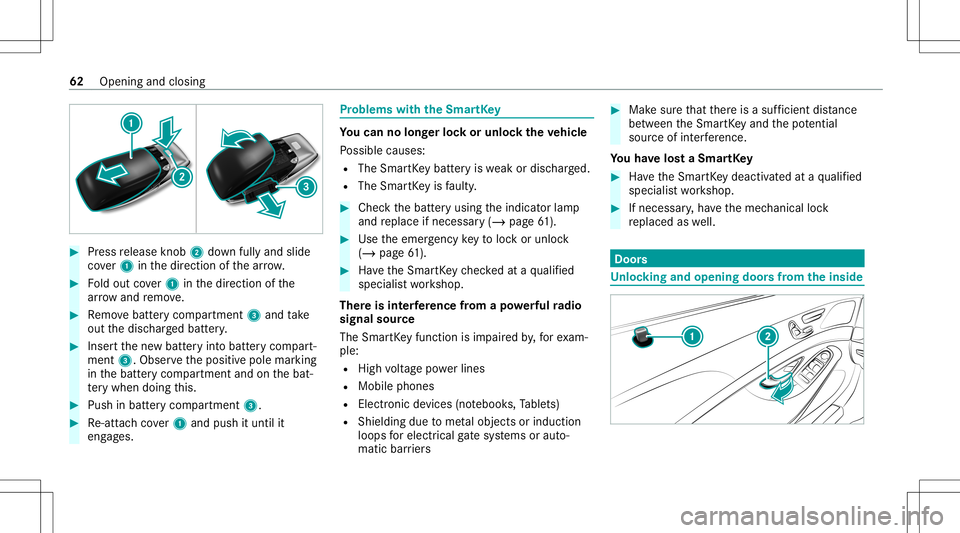
Press release knob 2 down fullyand slide
co ver1 inthedir ect ion ofthear row . #
Foldout cover1 inthedir ect ion ofthe
ar row and remo ve. #
Remo vebatt erycom partmen t3 and take
out thedisc hargedbatt ery. #
Inser tth ene wbatt eryint obatt erycom part‐
ment 3.Obser vethepositiv epole marking
in thebatt erycom partmen tand onthebat‐
te ry when doingth is. #
Push inbatt erycom partment 3. #
Re-att achco ver1 and push ituntil it
eng ages. Pr
obl ems with theSm artK ey Yo
ucan nolon gerlo ck orunloc kth eve hicl e
Po ssible causes:
R The Smar tKey batt eryis we ak ordisc harged.
R The Smar tKey isfaulty . #
Chec kth ebatt eryusing theindicat orlam p
and replace ifnec essar y(/ page61 ). #
Use theemer gency keyto loc kor unloc k
(/ page61 ). #
Have theSmar tKey checkedat aqu alif ied
spec ialistwo rkshop.
Ther eis int erfere nce from apo we rful radio
sig nal source
The Smar tKey function isim pai redby ,fo rex am‐
ple:
R Highvo ltag epo we rlines
R Mobi lephones
R Electr onicdevices (notebook s,Table ts)
R Shielding duetome talobje ctsor induc tion
loops forelectr icalgate systems oraut o‐
matic barrier s #
Mak esur eth at ther eis asuf ficie ntdist anc e
be tween theSmar tKey and thepo tentia l
sou rceof interfere nce.
Yo uha ve los ta Sma rtKe y #
Have theSmar tKey deactiv ated ataqu alif ied
spec ialistwo rkshop. #
Ifnecessar y,ha ve themec hanical lock
re placed aswell. Door
s Un
loc king andopening doorsfrom theinsid e 62
Openingand closing
Page 66 of 506
#
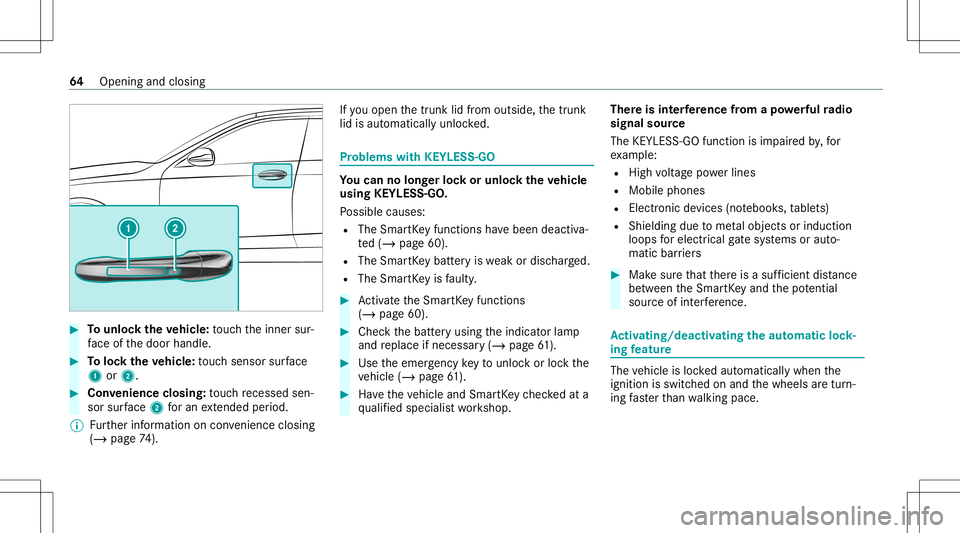
Tounlo cktheve hicl e:touc hth einner sur‐
fa ce ofthedoor handle. #
Toloc kth eve hicl e:touc hsen sor surface
1 or2. #
Convenience closing:touc hre cess edsen‐
sor surface 2foran extende dpe riod.
% Further information oncon venie nce closing
(/ page 74). If
yo uopen thetrunk lidfrom outside, thetrunk
lid isaut omaticall yunloc ked. Pr
oblems withKEYLE SS-GO Yo
ucan nolon gerlo ck orunloc kth eve hicl e
using KEYLESS-GO .
Po ssible causes:
R The Smar tKey functions have been deactiv a‐
te d(/ page60).
R The Smar tKey batt eryis we ak ordisc harged.
R The Smar tKey isfaulty . #
Activateth eSmar tKey functions
(/ page60). #
Che ckthebatt eryusing theindicat orlam p
and replace ifnec essar y(/ page61 ). #
Use theemer gency keyto unlo ckorloc kth e
ve hicle (/page61 ). #
Have theve hicle andSmar tKey checkedat a
qu alif ied spec ialistwo rkshop. Ther
eis int erfere nce from apo we rful radio
sig nal source
The KEYLESS-G Ofuncti onisim pa ired by,fo r
ex am ple:
R Highvo ltag epo we rlines
R Mobi lephones
R Electr onicdevices (notebook s,table ts)
R Shielding duetome talobje ctsor induc tion
loops forelectr icalgate systems oraut o‐
matic barrier s #
Mak esur eth at ther eis asuf ficie ntdist anc e
be tween theSmar tKey and thepo tentia l
sou rceof interfere nce. Ac
tiv atin g/deac tivatin gthe automati clo ck ‐
ing featur e The
vehicle isloc kedaut omatic allywhen the
ignit ionisswitc hedonand thewheels aretur n‐
ing faster than walkin gpace. 64
Opening andclosing
Page 123 of 506
Ar
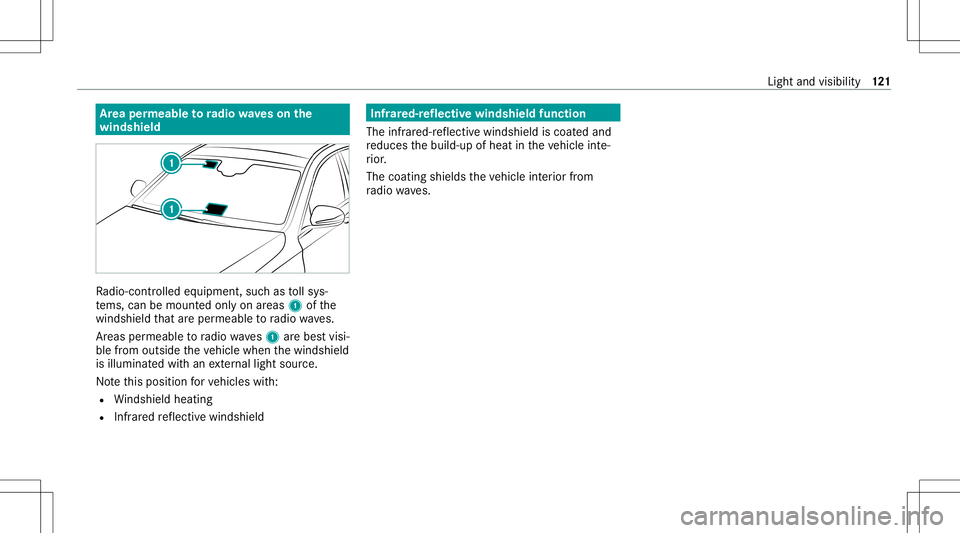
ea per mea bletoradio wav eson the
wind shield Ra
dio-co ntro lled equipmen t,suc has tollsy s‐
te ms, can bemount edonly onareas 1ofthe
winds hieldthat areper meabl eto radio wav es.
Ar eas permeable toradio wav es1 arebes tvisi‐
ble from outside theve hicle when thewindshield
is illuminat edwithan extern al light source.
No tethis posit ionforve hicles with:
R Windsh ield hea ting
R Infrared reflect ive windshield Infr
ared-r eflectiv ewindshield function
The infra red-r eflectiv ewindshield iscoat edand
re duces thebuild-up ofheat intheve hicle inte‐
ri or .
The coating shieldstheve hicle interior from
ra dio waves. Light
andvisibil ity12
1
Page 209 of 506
and
traffic condi tions andoperate the
eq uipment withth eve hicle statio nary. Obser
vetheleg alrequ iremen tsforth ecount ry
in whic hyo uar ecur rently drivi ng when operat‐
ing theon- boar dcom puter.
% The on-boar dcom puterdispla yswill appear
on themultifunc tiondispla y(/ page209). The
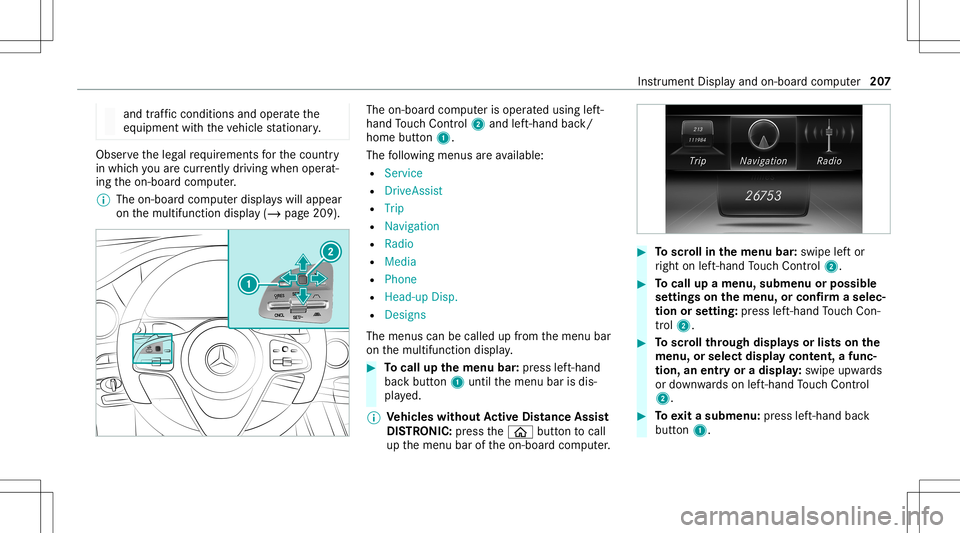
on-boar dcom puterisoper ated using left-
hand Touc hCon trol 2 and left-han dbac k/
hom ebut ton1.
The follo wing menusareav ailable:
R Service
R DriveA ssist
R Trip
R Navi gation
R Radio
R Media
R Phon e
R Head -upDisp.
R Design s
The men uscan becalle dup from themenu bar
on themultifunc tiondispla y. #
Tocall upthemenu bar:press left-hand
bac kbutt on1 untilth emenu barisdis‐
pla yed.
% Ve
hicl eswithout Activ eDi stance Assist
DI ST RO NIC :pr ess the00E2 buttontocal l
up themenu baroftheon- boar dcom puter. #
Toscr ollinthemenu bar:swipe leftor
ri ght onleft-h and Touc hCon trol 2. #
Tocall upamen u,sub men uor pos sible
se ttings onthemenu ,or conf irm aselec‐
tion orsetting: press left-hand Touc hCon ‐
tr ol 2. #
Toscr ollthrough displa ysorlists on the
menu ,or select displaycont ent,afun c‐
tion, anentr yor adisp lay: swipe upwards
or down wardson left-hand Touc hCon trol
2. #
Toexitasubm enu:press left-hand back
butt on1. Ins
trument Displayand on-boar dcom puter 20
7
Page 215 of 506
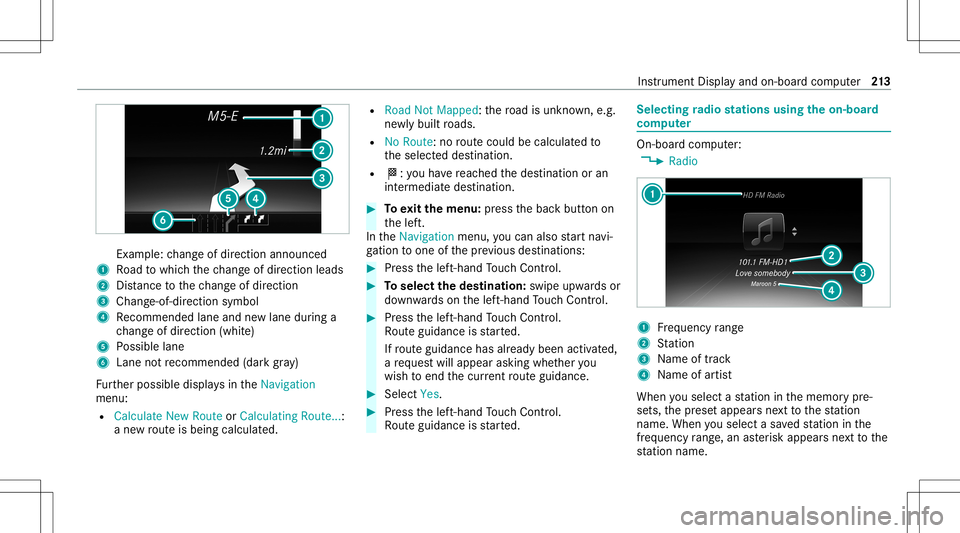
Ex
am ple: chang eof dir ect ion ann oun ced
1 Road towhic hth ech ang eof dir ect ion leads
2 Distance tothech ang eof dir ect ion
3 Chan ge-of-d irection symbo l
4 Recomme ndedlane and newlane during a
ch ang eof dir ect ion (whit e)
5 Possible lane
6 Lane notre comme nded(darkgray )
Fu rther possible displaysintheNavigation
menu:
R Calculate NewRoute orCalculating Route...:
a ne wrouteis bein gcalc ulated. R
Road NotMappe d:th ero ad isunk nown, e.g.
ne wlybuilt roads.
R NoRout e:no routeco uld becalc ulatedto
th eselect eddes tinat ion.
R 004B: youha ve reac hed thedes tinat ionoran
int ermediat edes tinat ion. #
Toexitth emenu :pr ess thebac kbutt onon
th elef t.
In theNavigation menu,youcan also star tna vi‐
ga tio nto one ofthepr ev ious destination s: #
Press thelef t-hand Touc hCon trol. #
Toselect thedes tina tion: swipe upwards or
do wn wardson thelef t-hand Touc hCon trol. #
Press thelef t-hand Touc hCon trol.
Ro uteguidan ceisstar ted.
If ro uteguidan cehas already been activat ed,
a re qu estwill appear askingwhether you
wish toend thecur rent routeguidan ce. #
Select Yes. #
Press thelef t-hand Touc hCon trol.
Ro uteguidan ceisstar ted. Selecting
radio station susin gth eon-boa rd
com puter On-boar
dcom puter:
4 Radio 1
Freq uency rang e
2 Statio n
3 Name oftrac k
4 Name ofartis t
When yousele ctast atio nin thememor ypr e‐
se ts, thepr ese tappear sne xt to thest atio n
nam e.When yousele ctasa ve dstatio nin the
fr eq uency rang e, an asterisk appea rsnext to the
st atio nnam e. In
stru ment Displa yand on-boar dcom puter 21
3
Page 221 of 506
3
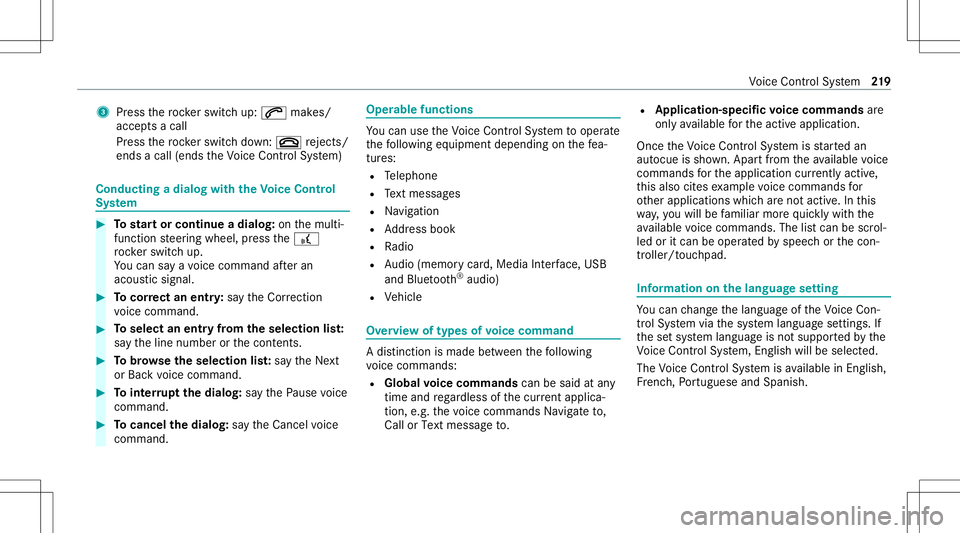
Press thero ck er switc hup: 0061 makes/
accep tsacall
Pr ess thero ck er switc hdo wn: 0076 rejects /
end sa cal l(e nds theVo ice Cont rolSy stem) Conducting
adialog withth eVo ice Contr ol
Sy stem #
Tostar tor continue adialo g:on themulti‐
func tion steer ing wheel, press the£
ro ck er switc hup.
Yo ucan saya vo ice com mand afte ran
acou stic sign al. #
Tocor rect an ent ry:sa yth eCorrect ion
vo ice com mand . #
Toselect anentr yfrom theselecti onlist:
sa yth eline number orthecon tents. #
Tobrows eth eselection list:sa yth eNext
or Back voice com mand . #
Tointerru pt thedia log: sayth ePause voice
com mand . #
Tocancel thedia log: sayth eCancel voice
com mand . Oper
ablefunct ions Yo
ucan usetheVo ice Cont rolSy stem tooper ate
th efo llo wing equipmen tdepen dingonthefe a‐
tur es:
R Telephon e
R Text mes sage s
R Navig ation
R Address book
R Radio
R Audio (memor ycar d,Media Interface, USB
and Bluetoo th®
audio)
R Vehicle Ov
ervie wof types ofvoice comm and A
dis tinction ismade between thefo llo wing
vo ice com mand s:
R Global voice comm andscan besaid atany
time andrega rdless ofthecur rent applica ‐
tio n,e.g .th evo ice com mand sNavigat eto,
Call orText mess ageto. R
App licat ion-sp ecificvo ice comm andsar e
onl yav ailable forth eactiv eapplication.
Onc eth eVo ice Cont rolSy stem isstar tedan
aut ocue issho wn. Apar tfr om theav ailable voice
com mand sfo rth eapplication currently active,
th is also cites exam ple voice com mand sfo r
ot her appli cations whichar eno tactiv e.In this
wa y,yo uwill befamili armor equ ickl ywit hth e
av ailable voice com mand s.The listcan bescrol‐
led oritcan beopera tedby speec hor thecon ‐
tr oller/t ouchpad. Inf
ormat iononthelangu agese tting Yo
ucan chang eth elanguag eof theVo ice Con‐
tr ol Sy stem viathesy stem languag ese ttings. If
th ese tsy stem languag eis no tsuppor tedby the
Vo ice Cont rolSy stem, English will beselec ted.
The Voice Cont rolSy stem isavailable inEn glish,
Fr enc h,Po rtuguese andSpan ish. Vo
ice Cont rolSy stem 21
9
Page 223 of 506
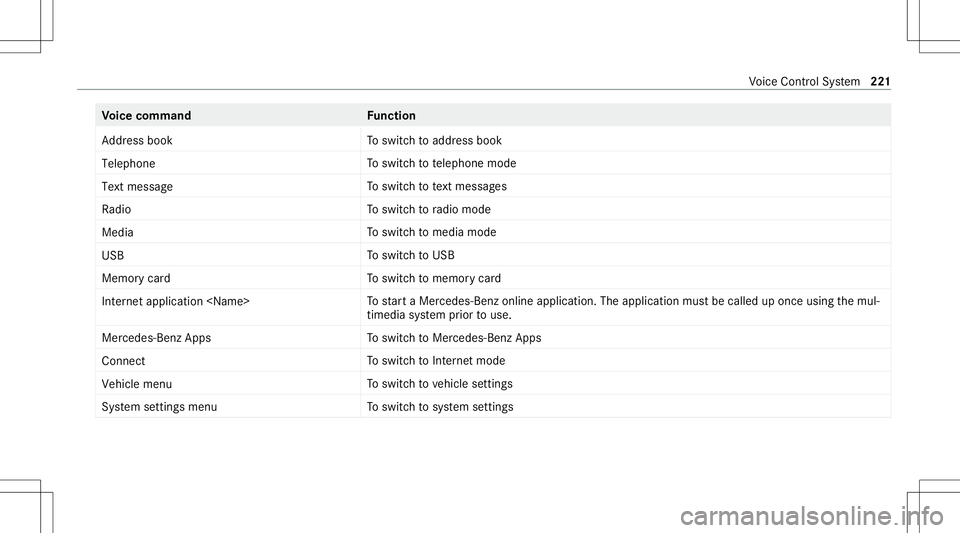
Vo
ice comm and Function
Address book To
switc hto addr essbook
Telep hone To
switc hto telephon emode
Text mess age To
switc hto text mes sage s
Radio To
switc hto radio mode
Media To
switc hto media mode
USB To
switc hto USB
Memory card To
switc hto memor ycar d
Internet application
star ta Mer cedes-Ben zon line applic ation.The applic ationmus tbe calle dup once usin gth emul‐
timedia system prior touse.
Mer cedes-Ben zAp ps To
switc hto Mer cedes-Ben zApps
Connect To
switc hto Interne tmode
Vehicle menu To
switc hto vehicle settin gs
System settingsmenu To
switc hto system settings Vo
ice Cont rolSy stem 22
1