boot MERCEDES-BENZ S-CLASS SALOON LONG 2020 Owner's Manual
[x] Cancel search | Manufacturer: MERCEDES-BENZ, Model Year: 2020, Model line: S-CLASS SALOON LONG, Model: MERCEDES-BENZ S-CLASS SALOON LONG 2020Pages: 609, PDF Size: 10.5 MB
Page 145 of 609
Re
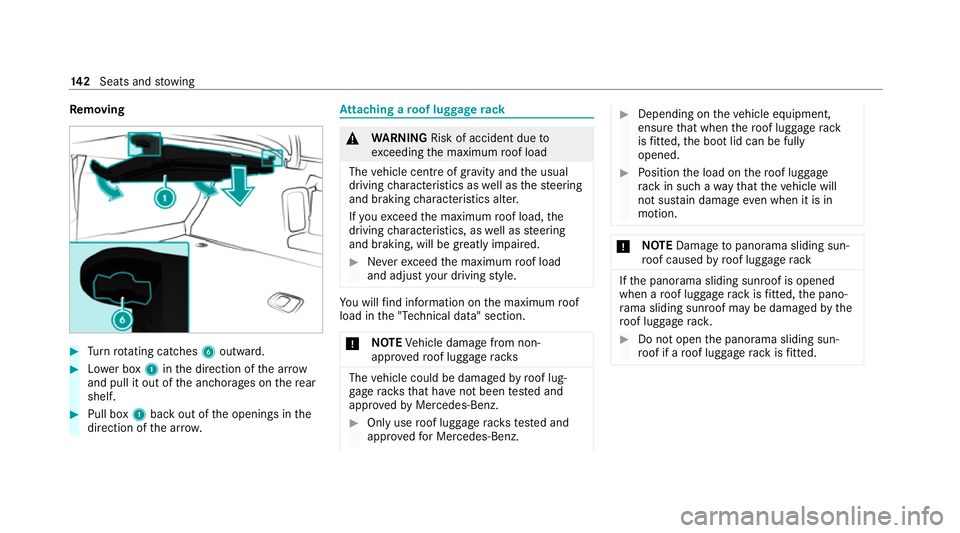
moving #
Turn rotating catches 6outward. #
Lowe r box 1inthe direction of the ar row
and pull it out of the anchorages on there ar
shelf. #
Pull box 1back out of the openings in the
direction of the ar row. At
taching a roof luggage rack &
WARNING Risk of accident due to
exc eeding the maximum roof load
The vehicle centre of gravity and the usual
driving characteristics as well as thesteering
and braking characteristics alter.
If yo uexc eed the maximum roof load, the
driving characteristics, as well as steering
and braking, will be greatly impaired. #
Neverexc eed the maximum roof load
and adjust your driving style. Yo
u will find information on the maximum roof
load in the "Technical data" section.
* NO
TEVehicle damage from non-
appr ovedro of luggage racks The
vehicle could be damaged byroof lug‐
ga ge rack sth at ha venot been tested and
appr ovedby Mercedes-Benz. #
Only use roof luggage rack ste sted and
appr ovedfo r Mercedes-Benz. #
Depending on theve hicle equipment,
ensure that when thero of luggage rack
is fitted, the boot lid can be fully
opened. #
Position the load on thero of luggage
ra ck in such a wayth at theve hicle will
not sus tain damage even when it is in
motion. *
NO
TEDama getopanorama sliding sun‐
ro of caused byroof luggage rack If
th e panorama sliding sunroof is opened
when a roof luggage rack isfitted, the pano‐
ra ma sliding sunroof may be dama gedby the
ro of luggage rack. #
Do not open the panorama sliding sun‐
ro of if a roof luggage rack isfitted. 14 2
Seats and stowing
Page 146 of 609
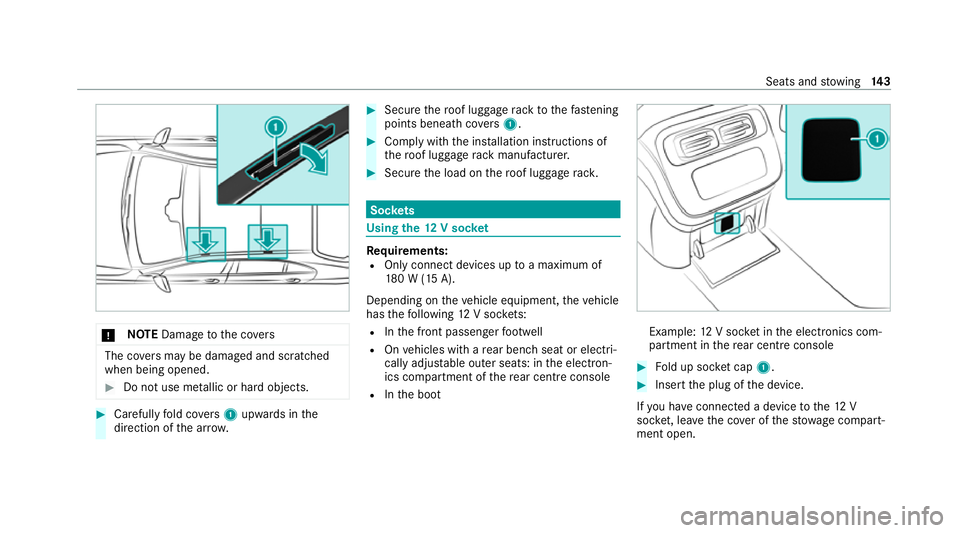
*
NO
TEDama getothe co vers The co
vers may be dama ged and scratched
when being opened. #
Do not use me tallic or hard objects. #
Carefully fold co vers 1 upwards in the
direction of the ar row. #
Secu rethero of luggage rack tothefast ening
points beneath co vers 1 . #
Comply with the ins tallation instructions of
th ero of luggage rack manufacturer. #
Secure the load on thero of luggage rack. Soc
kets Using the
12V so cket Re
quirements:
R Only connect devices up toa maximum of
18 0 W (15 A).
Depending on theve hicle equipment, theve hicle
has thefo llowing 12V soc kets:
R Inthe front passenger foot we ll
R Onvehicles with a rear ben chseat or electri‐
cally adjus table outer seats: in the electron‐
ics compartment of there ar centre console
R Inthe boot Example:
12V soc ket in the electronics com‐
partment in there ar centre console #
Fold up soc ket cap 1. #
Inse rtthe plug of the device.
If yo u ha veconnected a device tothe12 V
soc ket, le ave the co ver of thestow age compart‐
ment open. Seats and
stowing 14 3
Page 148 of 609
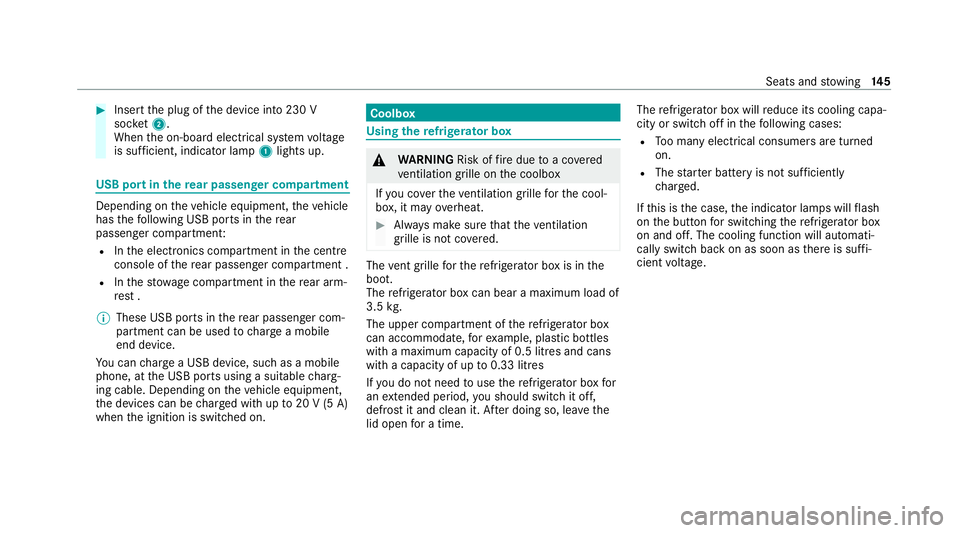
#
Insert the plug of the device into 230 V
soc ket2.
When the on-board electrical sy stem voltage
is suf ficient, indicator la mp1lights up. USB port in
there ar passenger comp artmentDepending on
theve hicle equipment, theve hicle
has thefo llowing USB ports in there ar
passenger compartment:
R Inthe electronics compartment in the cent re
console of there ar passenger compartment .
R Inthestow age compartment in there ar arm‐
re st .
% These USB ports in there ar passenger com‐
partment can be used tocharge a mobile
end device.
Yo u can charge a USB device, such as a mobile
phone, at the USB ports using a suitable charg‐
ing cable. Depending on theve hicle equipment,
th e devices can be charge d with up to20 V (5 A)
when the ignition is switched on. Coolbox
Using
there frigerator box &
WARNING Risk offire due toa co vered
ve ntilation grille on the coolbox
If yo u co verth eve ntilation grille forth e cool‐
box, it may overheat. #
Alw ays make sure that theve ntilation
grille is not co vered. The
vent grille forth ere frigerator box is in the
boot.
The refrigerator box can bear a maximum load of
3.5 kg.
The upper compartment of there frigerator box
can accommodate, forex ample, plastic bottles
with a maximum capacity of 0.5 lit res and cans
with a capacity of up to0.33 litres
If yo u do not need touse there frigerator box for
an extended pe riod, you should swit chit off,
defrost it and clean it. Af ter doing so, lea vethe
lid open for a time. The
refrigerator box will reduce its cooling capa‐
city or switch off in thefo llowing cases:
R Too many electrical consumers are turned
on.
R The star ter battery is not suf ficiently
ch arge d.
If th is is the case, the indicator lamps will flash
on the button for switching there frigerator box
on and off. The cooling function will auto mati‐
cally switch back on as soon as there is suf fi‐
cient voltage. Seats and
stowing 14 5
Page 150 of 609
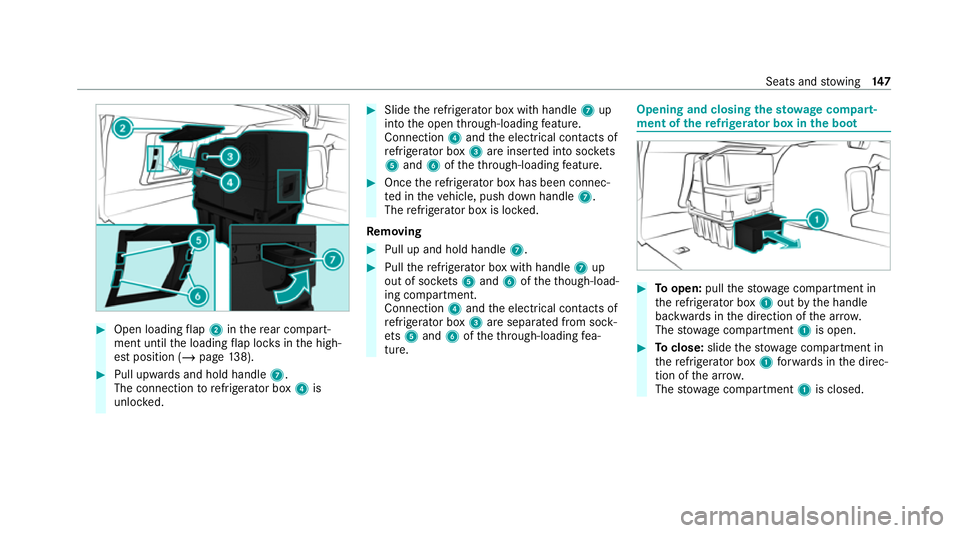
#
Open loading flap 2 inthere ar compart‐
ment until the loading flap loc ksinthe high‐
est position (/ page138). #
Pull upwards and hold ha ndle7.
The connection torefrigerator box 4is
unlo cked. #
Slide there frigerator box with handle 7up
into the open thro ugh-loading feature.
Connection 4and the electrical conta cts of
re frigerator box 3are inser ted into soc kets
5 and 6oftheth ro ugh-loading feature. #
Once there frigerator box has been connec‐
te d in theve hicle, push down handle 7.
The refrigerator box is loc ked.
Re moving #
Pull up and hold handle 7. #
Pull there frigerator box with handle 7up
out of soc kets 5 and 6oftheth ough-load‐
ing compartment.
Connection 4and the electrical conta cts of
re frigerator box 3are sepa rated from sock‐
et s5 and 6oftheth ro ugh-loading fea‐
ture. Opening and closing
thesto wage compa rt‐
ment of the refrigerator box in the boot #
Toopen: pullthestow age compartment in
th ere frigerator box 1out bythe handle
backwards in the direction of the ar row.
The stow age compartment 1is open. #
Toclose: slidethestow age compartment in
th ere frigerator box 1forw ards in the direc‐
tion of the ar row.
The stow age compartment 1is closed. Seats and
stowing 147
Page 151 of 609
Wire
lesscharging of the mobile phone and
connection with theex terior aerial Note
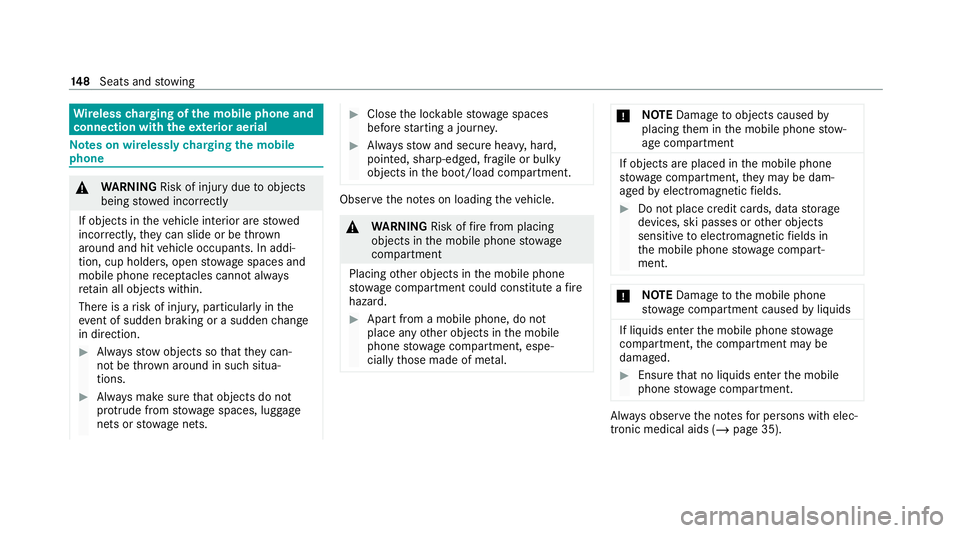
s on wirelessly charging the mobile
phone &
WARNING Risk of inju rydue toobjects
being stowed incor rectly
If objects in theve hicle interior are stowed
incor rectly, they can slide or be thrown
around and hit vehicle occupants. In addi‐
tion, cup holders, open stowage spaces and
mobile phone recep tacles cannot al ways
re tain all objects within.
There is a risk of injur y,particularly in the
ev ent of sudden braking or a sudden change
in direction. #
Alw aysstow objects so that they can‐
not be throw n around in su chsitua‐
tions. #
Alw ays make sure that objects do not
pr otru de from stowage spaces, luggage
nets or stowage nets. #
Close the loc kable stow age spaces
before starting a journe y. #
Alw aysstow and secure heavy, hard,
poin ted, sharp-edged, fragile or bulky
objects in the boot/load compartment. Obser
vethe no tes on loading theve hicle. &
WARNING Risk offire from placing
objects in the mobile phone stowage
compartment
Placing other objects in the mobile phone
stow age compartment could con stitute a fire
hazard. #
Apart from a mobile phone, do not
place any other objects in the mobile
phone stowage compartment, espe‐
cially those made of me tal. *
NO
TEDama getoobjects caused by
placing them in the mobile phone stow‐
age compartment If objects are placed in
the mobile phone
stow age compartment, they may be dam‐
aged byelectromagnetic fields. #
Do not place credit cards, data storage
devices, ski passes or other objects
sensitive toelectromagnetic fields in
th e mobile phone stowage compart‐
ment. *
NO
TEDama getothe mobile phone
stow age compartment caused byliquids If liquids enter
the mobile phone stowage
compartment, the compartment may be
damaged. #
Ensure that no liquids enter the mobile
phone stowage compartment. Alw
ays obser vethe no tesfo r persons with elec‐
tronic medical aids (/ page 35).14 8
Seats and stowing
Page 219 of 609
R
The seat belt tongue is not inser ted in the
seat belt buckle of the driver's seat and the
driver's door is opened.
% Toprev ent application: pull the handle of the
electric parking brake (/ page217).
In thefo llowing situations, the electric parking
brake is also applied:
R Active Dis tance Assi stDISTRONIC is bringing
th eve hicle toast andstill.
R The HOLD function is keeping theve hicle sta‐
tionar y.
R Active Parking Assist is keeping theve hicle
st ationar y.
This is the case if one of thefo llowing conditions
is also fulfilled:
R The engine is switched off.
R The seat belt tongue is not inser ted in the
seat belt buckle of the driver's seat and the
driver's door is opened.
R There is a sy stem malfunction.
R The po wer supply is insuf ficient.
R The vehicle is stationary for a lengt hyperiod. When
the electric parking brake is applied, the
re d! indicator lamp lights up in the driver's
displa y.
The electric parking brake is not automatically
applied if the engine is switched off bythe ECO
st art/ stop function.
Electric parking brake function (releasing
automatically)
The electric parking brake is released when the
fo llowing conditions are fulfilled:
R The driver's door is closed.
R The engine is running.
R The transmission is in position hork and
yo u depress the accelera tor pedal or you
shift from transmission position jtoh or
k when on le velground withthe driver's
door closed.
R Ifth e transmission is in position k,the boot
lid must be closed.
R The seat belt tongue is inser ted into the seat
belt buckle of the driver's seat. If
th e seat belt tongue is not inser ted into the
seat belt buckle of the driver's seat, one of
th efo llowing conditions must be fulfilled:
- You shift from transmission position j.
- You ha veprev iously driven at speeds
greater than 3 km/h.
When the electric parking brake is released, the
re d! indicator lamp in the driver's display
goes out. 216
Driving and pa rking
Page 269 of 609
R
The boot lid is open.
R The weather conditions are poor, e.g. heavy
ra in, sno w,fog, storm or spr ay.
R The light conditions are poor, e.g. at night or
if light is shining into the camera.
R The camera lens is obstructed, dirty or mis‐
ted up.
R If cameras or vehicle components in which
th e cameras are fitted are dama ged. In this
eve nt, ha vethe cameras, their positions and
th eir setting checked at a qualified specialist
wo rkshop.
% Do not use the 360° Camera under such cir‐
cums tances. You could otherwise injure oth‐
ers or collide with objects when parking the
ve hicle.
Fo rte ch nical reasons, thest andard height of the
ve hicle may be altered if theve hicle is car rying a
heavy load and can result in inaccuracies in the
guide lines and in the display of thege nerated
ima ges.
The field of vision and other functions of the
came rasystem may be restricted due toaddi‐ tional attachments on
theve hicle (e.g. licence
plate brac ket, bicycle rack ).
% The contrast of the display may be impaired
by abrupt, direct sunlight or by other light
sources, e.g. when driving out of a garage . In
th is case, pay particular attention.
% Have the display repaired or replaced if, for
ex ample, pixel er rors considerably restrict its
use.
See the no tes on cleaning the 360° Camera
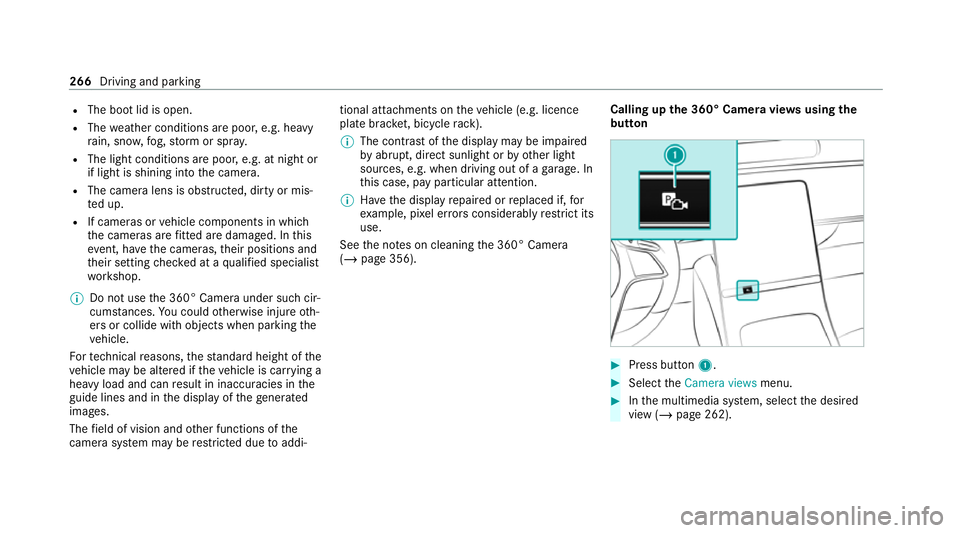
(/ page 356). Calling up
the 360° Camera vie wsusing the
button #
Press button 1. #
Select theCamera views menu. #
Inthe multimedia sy stem, select the desired
view (/ page 262). 266
Driving and parking
Page 282 of 609
&
WARNING Risk of accident due tovehi‐
cle swinging out while parking or pulling
out of a parking space
While parking or pulling out of a parking
space, theve hicle swings out and can drive
onto areas of the oncoming lane.
This could cause youto collide wi thobjects
or other road users. #
Pay attention toobjects and other road
users. #
Where necessar y,stop theve hicle or
cancel the parking procedure with
Re mo teParking Assist. %
The outside mir rors are not automatically fol‐
ded out af terex iting a parking space. #
After ending the parking procedure, ensure
th at all vehicle doors, windo wsand the boot
are closed. Secure theve hicle against rolling
aw ay. Cancelling
the pa rking procedure
Yo u can cancel the parking procedure of Remo te
Pa rking Assist at any time and bring theve hicle
to ast andstill. #
Cancel the parking procedure in theRe mo te
Pa rking Assist App.
or #
Press a button on theve hicle key.
or #
Pull a door handle.
Au thorising/de-authorising a mobile phone
fo rRe mo teParking Assist
Multimedia sy stem:
4 © 5
Settings 5
Assistance
5 Parking
Au thorising a new mobile phone
In order tobe able touse theRe mo teParking
Assist function, you must authorise your mobile
phone. You can authorise up tosix mobile
phones. #
Select Remote Parking Assist. #
Select Authorise a new device.
Re mo teParking Assist is ready toconnect. #
Start theRe mo teParking Assist App and
additionally start the authorisation process.
A connection prom ptis displa yed. #
Scan the QR code on the cent ral displa y.
The mobile phone is authorised.
De-authorising mobile phones #
Select Remote Parking Assist. #
Select Deauthorise devices. #
Tode-authorise a mobile phone: select a
mobile phone.
The mobile phone is del eted from the device
list. #
Tode-authorise all mobile phones: select
Deauthorise all devices .
All mobile phones are del eted from the
device list. Driving and parking
279
Page 325 of 609
intended
forth is purpose, e.g. in the
re ar passenger compartment. Yo
u must obse rveth e legal requirements forthe
country in whi chyou are cur rently driving when
operating mobile communication equipment in
th eve hicle. &
WARNING Risk of inju rydue toobjects
being stowed incor rectly
If objects in theve hicle interior are stowed
incor rectly, they can slide or be thrown
around and hit vehicle occupants. In addi‐
tion, cup holders, open stowage spaces and
mobile phone recep tacles cannot al ways
re tain all objects within.
There is a risk of injur y,particularly in the
ev ent of sudden braking or a sudden change
in direction. #
Alw aysstow objects so that they can‐
not be throw n around in su chsitua‐
tions. #
Alw ays make sure that objects do not
pr otru de from stowage spaces, luggage
nets or stowage nets. #
Close the loc kable stow age spaces
before starting a journe y. #
Alw aysstow and secure heavy, hard,
poin ted, sharp-edged, fragile or bulky
objects in the boot/load compartment. Obser
vethe additional information on stowing
mobile communications devices cor rectly:
R Loading theve hicle (/ page134)
Blue tooth ®
connection
The menu view and theav ailable functions in the
te lephone menu are in part dependent on the
Blu etoo th®
profile of the connected mobile
phone. If the mobile phone supports all thefo l‐
lowing Blue tooth®
profiles, the full range of fea‐
tures is available:
R PBAP (Phone Book Access Profile)
- The contacts on the mobile phone are
shown automatically on the multimedia
sy stem. R
MAP (Message Access Profile)
- The mobile phone message functions can
be used on the multimedia sy stem.
R HFP (hands-f ree profile)
- Wireless telephony is available on the
multimedia sy stem.
R SAP (SIM Access Profile)
- The car telephone has access tothe SIM
card data and dials into the mobile phone
network via theex terior aerial.
Ir re spective of this, Blue tooth®
audio functional‐
ity can byused with any mobile radio unit.
Fo r information on thera nge of functions of the
mobile radio unit tobe connec ted, see the man‐
ufacturer's operating instructions.
Ne twork connection:
The following cases can lead tothe call being
disconnected while theve hicle is in motion:
R You swit chinto a transmission/reception
st ation, in which no communication channel
is free. 322
MBUX multimedia sy stem
Page 357 of 609
#
Ensu rethere is suf ficient ground clear‐
ance between the underbody and the
guide rails of the car wash. #
Ensure that the clearance width of the
car wash, in particular the width of the
guide rails, is suf ficient. To
avo id damage to yourvehicle when using a
car wash, ensure thefo llowing beforehand:
R Active Dis tance Assi stDISTRONIC is deacti‐
va ted.
R the HOLD function is switched off.
R the 360° Camera or there ve rsing camera is
switched off.
R theve hicle is loc ked and the door handles
re tracted.
R the side windo wsand sliding sun roof are
comple tely closed.
R the blo werfo rth eve ntilation/heating is
switched off.
R the windscreen wiper switch is in position
g. R
theke y is at a minimum distance of 6 m
aw ay from theve hicle. Otherwise the boot lid
or a door could open unintentionall y.
R for car washes with a con veyo r sy stem:
- neutral iis engaged.
- theve hicle is loc ked from inside.
R do not make any hand mo vements in the
area of theov erhead control panel or deacti‐
va te ( / page 311) theSliding sunroof and
roller sunblind option inthe settings forthe
MBUX interior assis tant.
% If, af terth e car wash, youre mo vethewax
from the windscreen and wiper rubbers, this
will pr event smearing and reduce wiper
noise. Information on using a high-p
ressure cleaner &
WARNING Risk of an accident when
using high-pressure cleane rswith round-
spray nozzles
The wate r jet can cause extern ally invisible
damage. Components damaged in
this wa y may unex‐
pec tedly fail. #
Do not use a high-pressure cleaner with
round-spr aynozzles. #
Have damaged tyres or chassis parts
re placed immediatel y. To
avo id damage to yourvehicle, obser vethefo l‐
lowing when using a high-pressure cleaner:
R theke y is at a minimum dis tance of 3 m
aw ay from theve hicle. Otherwise the boot lid
or a door could open unintentionall y.
R maintain a dis tance of at least 30 cm tothe
ve hicle.
R vehicles with deco rative foil: parts of your
ve hicle are co vered with a decorative foil.
Maintain a dis tance of at least 70 cm
between thefo il-c ove red parts of theve hicle
and the nozzle of the high-pressure cleaner.
Mo vethe high-pressure cleaner nozzle
around whilst cleaning. The waterte mp era‐
ture of the high-pressure cleaner must not
exc eed 60°C. 354
Maintenance and care