engine MERCEDES-BENZ S-CLASS SALOON LONG 2020 Workshop Manual
[x] Cancel search | Manufacturer: MERCEDES-BENZ, Model Year: 2020, Model line: S-CLASS SALOON LONG, Model: MERCEDES-BENZ S-CLASS SALOON LONG 2020Pages: 609, PDF Size: 10.5 MB
Page 250 of 609
R
If a loss of tyre pressure or a defective tyre
has been de tected and displ ayed.
R In complex traf fic situations whe reobjects
cannot always be clearly identified.
R If pedestrians, cyclists or vehicles mo ve
qu ickly into the sensor de tection range.
R Ifro ad users are hidden by other objects or
are located close to other objects.
R Ifth e typical outline of a pedestrian or cyclist
cann otbe distinguished from the back‐
ground.
R If a pedestrian or cyclist is not de tected as
su ch , e.g. due tospecial clo thing or other
objects.
R Ifth e driver's seat belt is not fastened.
R On bends with a tight radius.
% The Active Brake Assi stsensors adjust auto‐
matically while a cer tain dis tance is being
driven af terth eve hicle has been delivered.
Ac tive Brake Assi stis una vailable or only
partially available during thete ach-in proc‐
ess. Setting
Active Brake Assi st
Re quirements:
R The ignition is switched on.
Multimedia sy stem:
4 © 5
Settings 5
Assistance
5 Avoid collision 5
Active Brake Assist #
Select the desired setting.
The setting is retained when the engine is
next star ted.
Deactivating Active Brake Assi st
% It is recommended that you alw ays lea ve
Ac tive Brake Assi stactivated. #
Select Off.
The dis tance warning function, the autono‐
mous braking function and the Evasive Steer‐
ing Assist are deactivated.
When the engine is next star ted, the medium
setting is automatically selected.
% IfAc tive Brake Assi stis deactivated, the
æ symbol appears inthest atus bar of the
multifunction displa y. Tr
af fic Sign Assist Fu
nction of Traf fic Sign Assist
Tr af fic Sign Assi stdetects traf fic signs wi th the
multifunction camera and compares this with
information in the digital navigation map. It
assists youby displaying de tected speed limits
and overtaking restrictions in the driver display
and in the head-up displa y.The sy stem can issue
a wa rning when youexc eed the maximum per‐
missible speed.
In some count ries, the sy stem can pr ovide you
with fur ther functions and can warnyou when
yo u are approaching pedestrian crossings or
when you are about todrive past stop signs or
re d lights unintentionall y.
The camera also de tects and ana lyses traf fic
signs with a restriction indicated byan additional
sign (e.g. when wet).
Tr af fic Sign Assi stonly visualises selected signs
in the driver displa y.Ac tual traf fic signs and
speed limits ha vepriority over traf fic signs and
speed limits shown in the driver displa y. Driving and pa
rking 247
Page 260 of 609
R
If a loss of tyre pressure or a defective tyre
has been de tected and displ ayed.
The sy stem may be impaired or may not function
particularly in thefo llowing situations:
R Ifth ere is poor visibility, e.g. due toinsuf fi‐
cient illumination of thero ad, if there are
highly variable shade conditions or in rain,
sno w,fog or heavy spr ay.
R Ifth ere is glare, e.g. from oncoming traf fic,
th e sun or reflections.
R Ifth e windscreen in the area of the multi‐
function camera is dirty, or if the camera is
mis ted up, damaged or co vered.
R Ifth ere are no lane markings, or se veral
unclear lane markings are present for one
lane, e.g. around roadwor ks.
R Ifth e lane markings are worn, dark or cov‐
ered.
R Ifth e dis tance totheve hicle in front is too
short and thus the lane markings cann otbe
de tected. R
Ifth e lane markings change quickl y,e.g.
lanes branch off, cross one ano ther or
mer ge.
R Ifth e car riag ewa y is very nar row and wind‐
ing.
Obse rveth e no tes on driving sy stems and your
re sponsibility; you may otherwise failto recog‐
nise dangers (/ page 219).
Ac tivating/deactivating Active Lane Keeping
Assist
Multimedia sy stem:
4 © 5
Settings 5
Assistance
5 Avoid collision
5 Active Lane Keeping Assist #
Switch the function on or off.
Alternatively, Active Lane Keeping Assist can be
activated and deactivated in the Assis tance
menu.
% Afterst arting the engine, the settings are
count ry-specific. Setting
Active Lane Keeping Assist
Multimedia sy stem:
4 © 5
Settings 5
Assistance
5 Avoid collision
5 Active Lane Keeping Assist
Setting the sensitivity #
Select ´. #
Select Early,Med.orLate.
The last selec ted setting will be adop tedth e next
time the engine is star ted.
% The standard setting forth is function is
dependent on the count ry.
Ac tivating or deactivating assistance on dis‐
continuous lane markings #
Select Advanced support .
The la stselected setting will be adop tedth e next
time the engine is star ted.
% The standard setting forth is function is
dependent on the count ry. Driving and pa
rking 257
Page 273 of 609
R
Pedestrians or animals approaching theve hi‐
cle from the side.
R Objects placed next totheve hicle.
Obs tacles on the sides are not shown in thefo l‐
lowing situations, forex ample:
R You park theve hicle and switch off the igni‐
tion.
R You open the doors.
Af terth e engine is restar ted, obs tacles must be
de tected again bydriving past them before a
new warning can be issued.
Also obser vethe sy stem limits of thefo llowing
sy stems:
R Reversing camera (/ page 260)
R 360° Camera (/ page 262)
Obser vethe information on vehicle sensors and
cameras; the sy stem otherwise cannot function
proper ly (/ page 220).
Ve hicles with trailer hitch: Parking Assist
PA RKTRONIC is deacti vatedfo rth ere ar zone
when you es tablish an elect rical connection
between your vehicle and a trailer. Problems with
Parking Assist PARKTRONIC
If th ePa rking Assist PARKTRONIC display lights
up redfo r appro ximately 3 seconds and then
goes out, and theé symbol appears in the
driver displa y,Pa rking Assist PARKTRONIC may
ha ve been deactivated due tosignal inter fer‐
ence. Start theve hicle again and check if Park‐
ing Assist PARKTRONIC is working at a dif fere nt
location.
If a warning tone also sounds, it may be due to
one of thefo llowing causes:
R The sensors are dirty: cleanthe sensors
and obser vethe no tes on care of vehicle
parts (/ page 356).
R Parking Assist PARKTRONIC has been
deactivated due toa malfunction: restart
th eve hicle. If the problem persists, consult a
qu alified specialist workshop. Ac
tivating/deactivating Parking Assist
PA RKTRONIC
* NO
TERisk of an accident from objects
at close range Pa
rking Assist PARKTRONIC may not de tect
cer tain objects at close range. #
When pa rking or manoeuvring theve hi‐
cle, pay particular attention toany
objects which are abo veor below the
sensors, e.g. flowe rpots or dr awbars.
The vehicle or other objects could oth‐
erwise be damaged. Re
quirements:
R The camera menu is open.
R Or: Active Parking Assist is active.
R Or: thePA RKTRONIC pop-up window
appears. #
Tap= inthe cent ral displa y.
If th e indicator lamp is lit, Parking Assist
PA RKTRONIC is active. If the indicator lamp is
not lit or theé symbol appears in the instru‐ 270
Driving and pa rking
Page 274 of 609
ment clus
ter,Pa rking Assist PARKTRONIC is not
active.
% Parking Assist PARKTRONIC is automatical ly
activated when the engine is star ted.
Alternatively, Parking Assist PARKTRONIC can be
activated or deacti vated in thequ ick access
menu.
Setting thewa rning tones of Parking Assist
PA RKTRONIC
Multimedia sy stem:
4 © 5
Settings 5
Assistance
5 Parking
Setting thevo lume or pit chofthewa rning
to nes #
Set the desired le vel under Volume orTone
pitch.
Ac tivating/deactivating audio fadeout #
Activate or deacti vate Audio fadeout.
The volume of the cur rently pl aying media
source is reduced during a Parking Assist
PA RKTRONIC warning tone.
or #
Activate or deacti vate Audio fadeout in
trans. position R.
The volume of the cur rently pl aying media
source is reduced when reve rsege ar is
engaged.
Setting the time of thewa rnings #
Select Time of warning. #
Set the time forth ewa rning. Ac
tive Parking Assist Fu
nction of Active Parking Assist
Ac tive Parking Assist is an elect ronic pa rking
assis tance sy stem, which uses ultrasound with
th e assis tance of there ve rsing camera and 360°
Camera. When you are driving forw ards up to
appr oximately 35 km/h, the sy stem automati‐
cally measures parking spaces on bo thsides of
th eve hicle.
Ac tive Parking Assist of fers thefo llowing func‐
tions:
Ve hicles with reve rsing camera
R Parking in parking spaces parallel tothero ad R
Reversing into parking spaces perpendicular
to thero ad
Ve hicles with 360° Camera
R Parking in parking spaces parallel tothero ad
R Parking in parking spaces perpendicular to
th ero ad (optionally either forw ards or
re ve rse)
R Parking in parking spaces that can on ly be
de tected as su chdue tomarkings (for exam‐
ple at thero adside)
R Exiting a parking space parallel tothero ad
R Exiting a parking space perpendicular tothe
ro ad (optionally either left or right)
Ac tive Parking Assist is only an aid. It is not a
substitute foryo ur attention tothe sur roundings.
The responsibility for safe manoeuvring and
parking remains with you. Make sure that no
persons, animals or objects etc. are in the
manoeuvring range.
If Ac tive Parking Assist is available, theÇ
message appears in the driver displa y.When the
sy stem de tects pa rking spaces, Èappears.
The ar rows show on which side of thero ad Driving and parking
271
Page 279 of 609
Please no
tethat you can on lyuse Remo te
Pa rking Assist if you ha veava lid driving
licence and are in a fit st ate todrive.
Re mo teParking Assist par ksyour vehicle while
yo u are outside of your vehicle. You can monitor
th e manoeuvring and parking procedure on your
mobile phone.
Wi th Remo teParking Assist, you can car ryout
all the parking procedures of Active Parking
Assist. You can also position theve hicle directly
in front of a garage or a driv eway entrance and
th en use Remo teParking Assist toenter or exit a
parking space.
Re mo teParking Assist changes gear, acceler‐
ates, brakes and steers theve hicle. While
Re mo teParking Assist is active, theve hicle is
loc ked.
Re mo teParking Assist is only an aid. It is not a
substitute foryo ur attention tothe sur roundings.
The responsibility for safe manoeuvring and
parking remains with you. In terrupt or term inate
th e parking procedure if necessar y.Make sure
th at no persons, animals or objects etc. are in th
e manoeuvring range. Ma kesure toalso pay
attention toother vehicles.
Sy stem limits
If th e sy stem de tects a malfunction or a sy stem
limit during the manoeuvring or parking proce‐
dure, the procedure will be cancelled:
R The vehicle is brought toast andstill.
R Transmission position jis selec ted and the
electric parking brake is applied automati‐
call y.
R The engine is switched off.
R The vehicle remains loc ked.
If th e parking manoeuvre is cancelled, a cor re‐
sponding message is displa yed on the mobile
phone.
Depending on the situation, you can then take
control of the procedure, manoeuvre theve hicle
back tothest arting position or manually take
control of theve hicle.
The sy stem limits of Active Parking Assist apply
(/ page 271). Cer
tain environmental conditions, such as snow‐
fa ll or heavy rain, may lead toa parking space
being measured inaccurately or toconnection
problems wi th the mobile phone. Only use
Re mo teParking Assist on le vel, high-grip ground.
During the parking procedure, you should not
st and more than appr ox. 3.0 maw ay from the
ve hicle. Atgrea ter dis tances, the procedure will
be inter rupted and a cor responding message will
be displa yed on the mobile phone. If you mo ve
closer totheve hicle, you will be able tocontinue
th e procedure.
Operating Remo teParking Assist
Requ irements:
Fo rth eRe mo teParking Assist function, you
re qu ire a mobile phone and the cur rent Remo te
Pa rking Assist App foryo ur vehicle type.
The following operating sy stems are suppor ted:
R Android™
R Apple ®
iOS 276
Driving and pa rking
Page 294 of 609
Note
s onthe driver display &
WARNING Risk of accident due to a
driver display malfunction
If th e driver display has failed or malfunc‐
tioned, the function restrictions applying to
saf etyre leva nt sy stems are not visible.
The operating saf ety of your vehicle may be
impaired. #
Drive on carefull y. #
Have theve hicle checked immediately
at a qualified specialist workshop. If
th e operating saf ety of your vehicle is
impaired, park theve hicle immediately and
safel y.Con tact a qualified specialist workshop.
The driver display sho wsbasic information such
as speed, engine speed, fuel le vel and coolant
te mp erature.
Ad ditional functions available to you include the
fo llowing:
R Differe nt menus, for Assis tance and Naviga‐
tion R
Status displa ysforth e driver assis tance sys‐
te ms
R Display messa ges
R Indicator and warning lamps
R Information on Consumptionandrange
The menu contents and settings can be individu‐
al ly adjus ted and set. Note
s onthe 3D driver display
The 3D driver display enables a spatial represen‐
tat ion of the conte nt ofthe driver displa y.It is a
prerequisite that the driver be recorded bythe
driver camera.
Sy stem limits
The sy stem may be impaired or may not function
in thefo llowing situations:
R The driver camera is deactivated or is not
working.
R The driver is outside the de tection range of
th e driver camera. R
The operating conditions are not in place,
e.g. if the outside temp erature is too low or
to o high. Operating
the driver display &
WARNING Risk of di stra ction from infor‐
mation sy stems and communications
equipment
If yo u operate information and communica‐
tion equipment integrated in theve hicle
when driving, you will be distracted from the
traf fic situation. This could also cause youto
lose control of theve hicle. #
Only operate this equipment when the
traf fic situation permits. #
Ifyo u cannot be sure of this, stop the
ve hicle whilst paying attention toroad
and traf fic conditions and ope rate the
equipment with theve hicle stationar y. Obser
vethe legal requ irements forth e count ry
in which you are cur rently driving when operat‐
ing the driver displa y. Driver display
291
Page 305 of 609
#
Press the£ button on the multifunction
st eering wheel.
A blue line appears in the MBUX multimedia
sy stem. The dialogue can be star ted.
Fo rth e dialogue with the MBUX Voice Assis tant,
yo u can use co mplete sentences of colloquial
language asvoice commands. Voice activation
can also be directly combined with a voice com‐
mand, e.g. "Hey Mercedes, how fast can I
drive?" .
Calling up help #
For in form ation about the MBUX Voice
Assistant: say"Hey Mercedes, what can
you do?" #
Digital Owner's Manual: "Show me the
Owner's Manual". The fullextent of the Digi‐
ta l Owner's Manual is available when the
ve hicle is stationar y.
Operating functions (e xamp les) #
Tooperate the navigation: "Search for an
Asian restaurant, but not Japanese, in South
London." #
Tooperate the phone: "Call my father." #
Tochange the sy stem language toEng‐
lish (short command): "Change language
to English". #
Tooperate thera dio: "Show me the list of
radio stations." #
Tooperate media: "Switch on random play-
back." #
Tooperate vehicle functions: "Switch the
seat heating to level 2." #
Tooperate online functions: "What's the
time in Sydney?" #
Toask a question about theve hicle: "Do I
have Blind Spot Assist?" Overview of
the MBUX Interior Assistant &
WARNING Risk of inju ryfrom the cam‐
era's laser radiation
This product uses a classification 1 laser sys‐
te m. If the housing is opened or damaged,
laser radiation may damage your retina. #
Do not open the housing. #
Alw ays ha vemaintenance workand
re pairs car ried out byaqu alified spe‐
cialist workshop. This device is a class 1 laser product in accord‐
ance with DIN EN 60825-1:20
14
% The camera records ima gedata forth e appli‐
cations, forex ample body, head and hand
de tection.
The came racon verts th e image data directly
into me tadata. No image data is sa ved in
th e process. The data is only processed in
th eve hicle and is not transmitted from the
ve hicle.
The MBUX Interior Assis tant is au tomatical ly
activated when everth e engine is star ted.
Yo u can set the functions individually or
switch the Interior Assis tant on or off.
The most recently acti vesettings are stored
in your user profile. If you swit choff the Inte‐
ri or Assis tant, forex ample, this setting will
be adop ted in your user profile. Ho weveryou
do not change any other active user profile
in which the Interior Assis tant is switched
on. 302
MBUX multimedia sy stem
Page 309 of 609
Calling up
favo urites with the V pose (INFO‐
TA INMENT/contactless) Re
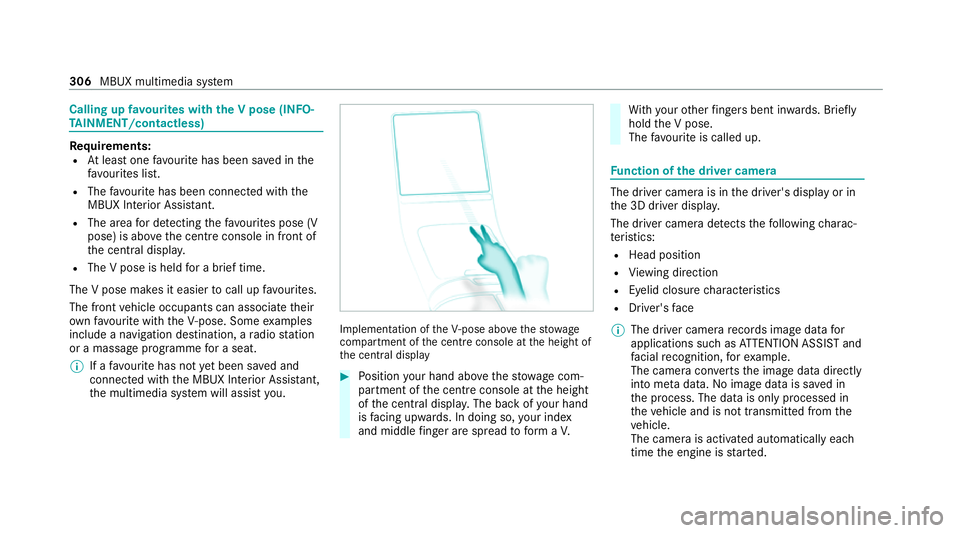
quirements:
R Atleast one favo urite has been sa ved in the
fa vo urites list.
R The favo urite has been connected with the
MBUX Interior Assis tant.
R The area for de tecting thefa vo urites pose (V
pose) is abo vethe cent reconsole in front of
th e cent ral displa y.
R The V pose is held for a brief time.
The V pose makes it easier tocall up favo urites.
The front vehicle occupants can associate their
ow nfavo urite with theV- pose. Some examples
include a navigation destination, a radio station
or a massage programme for a seat.
% If afavo urite has not yet been sa ved and
connec ted with the MBUX Interior Assis tant,
th e multimedia sy stem will assist you. Implementation of
theV- pose abo vethestow age
compartment of the cent reconsole at the height of
th e cent ral display #
Position your hand abo vethestow age com‐
partment of the cent reconsole at the height
of the cent ral displa y.The back of your hand
is facing up wards. In doing so, your ind ex
and middle finger are spread toform aV. Wi
th your other fingers bent in wards. Brief ly
hold the V pose.
The favo urite is called up. Fu
nction of the driver camera The driver camera is in
the driver's display or in
th e 3D driver displa y.
The driver camera de tects thefo llowing charac‐
te rist ics:
R Head position
R View ing direction
R Eyelid closure characteristics
R Driver's face
% The driver came rarecords ima gedata for
applications such as ATTENTION ASSIST and
fa cial recognition, forex ample.
The camera con verts th e image data directly
into me tadata. No image data is sa ved in
th e process. The data is only processed in
th eve hicle and is not transmitted from the
ve hicle.
The camera is activated automatically each
time the engine is star ted. 306
MBUX multimedia sy stem
Page 316 of 609
%
The display message does not appear every
time a software upda teis ins talled.
In rare cases, an er ror can occur during the
ins tallation. The multimedia sy stem automati‐
cally attem ptsto restore the pr evious version.
If it is not possible torestore the pr evious ver‐
sion, the display messages shown abo veappear
eve rytime the engine is star ted.
Fa ilure of the central display
If th e cent ral display fails or the display message
shown abo veis shown continuousl y,se veral sys‐
te ms such as there ve rsing camera,
PA RKTRONIC or climate cont rol are no longer
av ailable. Drive on carefully and consult a spe‐
cialist workshop as soon as possible.
Fa ilure of the driver display
If th e driver display fails or there is a malfunc‐
tion, you may not recognise limitations in the
functions of sy stems releva nt tosaf ety or the
speed displa y,forex ample. The operating saf ety
of theve hicle may be impaired. Drive on care‐
fully and ha vetheve hicle checked at a qualified
specialist workshop immediately (/ page 502).Fu
rther information about software updates can
be found at https://me.secure.mercedes-
benz.com. Setting up a
Wi-Fi hotspot Re
quirements:
R Wi-Fi is acti vated on the multimedia sy stem
and the communication device tobe connec‐
te d.
R The communication device tobe connec ted
supports at least one of the types of connec‐
tion described.
The connection types shown depend on the
device tobe connec ted. The function must
be suppor tedby the multimedia sy stem and
by the device tobe connec ted. The type of
connection es tablished must be selected on
th e multimedia sy stem and on the device to
be connec ted.
% Some functions may firs t need tobe activa‐
te d on the communication device being con‐
nected. More de tailed information can be fo
und in the manufacturer's operating
instructions.
% The use of theve hicle data tariff by extern al
devices is not available in all countries.
Multimedia sy stem:
4 © 5
Settings 5
System
5 Internet and Bluetooth #
Select Wi-Fi.
The controller is totheright: Wi-Fi is
switched on.
When Wi-Fi is switched on, you can connect the
multimedia sy stem with extern al hotspots or
make it available as a hotspot forex tern al devi‐
ces.
When Wi-Fi is switched off, it is not possible to
es tablish a hotspot connection.
When Wi-Fi is switched off, no connection can
be es tablished with the MBUX rear tablet.
% The availability of the functions is dependent
on the count ry. MBUX multimedia sy
stem 313
Page 350 of 609
ASS
YST PLUS se rvice inter val display Fu
nction of the ASS YST PLUS se rvice inter val
displ ay The ASS
YST PLUS service inter val display on the
driver display pr ovides information on the
re maining time or dis tance be fore the next
service due date.
Yo u can hide this service display using the back
button on the left-hand side of thesteering
wheel.
Depending on how theve hicle is used, the
ASS YST PLUS service inter val display may
shor tenth e service inter val, e.g. in thefo llowing
cases:
R mainly short-dis tance driving
R when the engine is of ten le ftidling for long
periods
R intheeve nt of frequent cold start phases
R vehicles with a diesel particulate filter: in
th eev ent of frequently inter rupted rege nera‐
tion of the diesel particulate filter Mercedes-Benz
recommends avoiding such
operating conditions.
Yo u can obtain information concerning the serv‐
icing of your vehicle from a qualified specialist
wo rkshop, e.g. a Mercedes-Benz Service Centre. Displaying
the service due da te Driver display:
4 Service
The next service due da teis displa yed. #
Toexitth e displa y:press the back button
on the left-hand side of thesteering wheel.
Bear in mind thefo llowing related topic:
R Operating the driver display (/ page 291). Information on
regular main tenance work *
NO
TEPremature wearthro ugh failure to
obser veservice due dates Maintenance
workwhich is not car ried out at
th eright time or incomple tely can le adto
inc reased wear and damage totheve hicle. #
Adhere tothe prescribed service inter‐
va ls. #
Alw ays ha vethe prescribed mainte‐
nance workcar ried out at a qualified
specialist workshop. Special service
requ irements The prescribed service inter
val is based on nor‐
mal operation of theve hicle. Maintenance work
will need tobe per form ed more of ten if theve hi‐
cle is operated under arduous conditions or
increased loads.
The ASS YST PLUS service inter val display is only
an aid. The driver of theve hicle bears responsi‐
bility as rega rdsto whe ther maintenance work
needs tobe per form ed more of tenth an speci‐
fi ed based on the actual operating conditions
and/or loads.
Examples of arduous operating conditions:
R regular city driving with frequent intermedi‐
ate stops
R mainly short-dis tance driving Maintenance and care
347