ESP MERCEDES-BENZ S-CLASS SALOON LONG 2020 Repair Manual
[x] Cancel search | Manufacturer: MERCEDES-BENZ, Model Year: 2020, Model line: S-CLASS SALOON LONG, Model: MERCEDES-BENZ S-CLASS SALOON LONG 2020Pages: 609, PDF Size: 10.5 MB
Page 259 of 609
ous lane markings or only continuous lane mark‐
ings (/
page 257).
St atus displa ysforAc tive Lane Keeping
Assist
ï White:Ac tive Lane Keeping Assist is
deactivated.
ï Yello w: there is a malfunction. Please
also obser vethe display messages.
ð Grey:Ac tive Lane Keeping Assist is acti‐
va ted, but not operating.
ð Green: Active Lane Keeping Assist is
activated and operating. If the sy stem is
operational on only one side, the lane
marking is shown in green on the cor re‐
sponding side.
ð Red:Active Lane Keeping Assist has gui‐
ded you back into your lane with a
course-co rrecting steering inter vention.
The status display will flash if there is
also a haptic warning in thesteering
wheel. The lane marking is shown in red
only on the side for which there is a
wa rning. Ve
hicles without Driving Assistance
Pa ckage: if bothlane markings are
simultaneously shown in red in thest atus
displa y,Ac tive Lane Keeping Assist has
initiated an emer gency stop
(/ page 239).
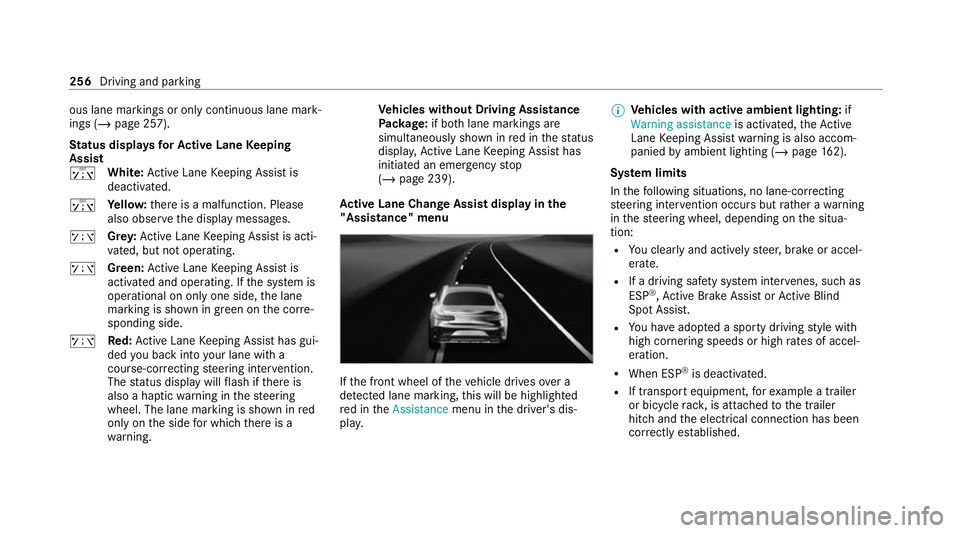
Ac tive Lane Change Assi stdispl ayinthe
"Assistance" menu If
th e front wheel of theve hicle drives over a
de tected lane marking, this will be highligh ted
re d in theAssistance menu inthe driver's dis‐
pla y. %
Vehicles with active ambient lighting: if
Warning assistance is activated,theAc tive
Lane Keeping Assist warning is also accom‐
panied byambient lighting (/ page162).
Sy stem limits
In thefo llowing situations, no lane-cor recting
st eering inter vention occu rsbut rath er a warning
in thesteering wheel, depending on the situa‐
tion:
R You clear lyand actively steer, brake or accel‐
erate.
R If a driving saf ety sy stem inter venes, su chas
ESP ®
,Ac tive Brake Assi stor Active Blind
Spot Assi st.
R You ha veadop ted a sporty driving style with
high cornering speeds or high rates of accel‐
eration.
R When ESP ®
is deactivated.
R If transport equipment, forex ample a trailer
or bicycle rack , is attached tothe trailer
hitch and the electrical connection has been
cor rectly es tablished. 256
Driving and parking
Page 261 of 609
AIRM
ATIC Fu
nction of AIRMATIC
AIRMATIC is an air suspension sy stem with varia‐
ble damping for impr oved driving comfort. The
all-round le vel control sy stem ensures the best
possible suspension and const ant ground clear‐
ance, even wi tha laden vehicle. When driving at
speed, theve hicle is lo wered automatically to
impr ove driving saf ety and toreduce fuel con‐
sum ption. You also ha vethe option of manually
adjusting theve hicle le vel.
AIRMATIC includes thefo llowing components
and functions:
R air suspension with automatic all-round le vel
control
R speed-dependent lo wering toreduce fuel
consum ption
R increased vehicle le velfo r greater ground
clea rance, selected via the multimedia sys‐
tem
R ADS PLUS (Ada ptive Damping Sy stem with
const ant damping forc e adjustment) Suspension setting depending on
the drive
prog ram
Drive program CandB:
R The suspension setting is firm er.
R The vehicle is set tolow le vel -1.
R The vehicle is lo weredto low le vel -2 when
driving at speeds abo ve120 km/h.
R When driving at speeds bel ow80 km/h, the
ve hicle is raised again tolow le vel -1.
Drive prog ram A and;:
R The suspension setting is comfor table.
R The vehicle is set tothe normal le vel.
R The vehicle is lo weredto low le vel -1 when
driving at speeds abo ve120 km/h.
R The vehicle is lo weredto low le vel -2 when
driving at speeds abo ve160 km/h.
R When driving at speeds bel ow120 km/h, the
ve hicle is raised again tolow le vel -1.
R When driving at speeds below 80 km/h, the
ve hicle is raised again tothe normal le vel. %
Operation with a trailer or bicycle rack:if
transport equipment, such as a trailer or a
bicycle rack , is attached tothe trailer hitch
and the electrical connection has been cor‐
re ctly es tablished, theve hicle remains at
normal le vel ir respective of speed or the
drive prog ram selected.
Setting theve hicle le vel &
WARNING Risk of accident because
ve hicle le vel is too high
Driving characteristics may be impaired.
The vehicle can drift outwards, forex ample,
when steering or cornering. #
Choose a vehicle le vel which is suited
to the driving style and thero ad sur face
conditions. &
WARNING Risk of entrapment from vehi‐
cle lo wering
When lo wering theve hicle, other people
could become trapped if their limbs are 258
Driving and parking
Page 263 of 609
%
Inthe Sport drive program, only the normal
ve hicle le vel is possible when the trailer
soc ket is contacted (trailer/bicycle rack ). Re
versing camera Fu
nction of there ve rsing camera
The reve rsing camera monitors the area behind
yo ur vehicle. If this function is activated
(/ page 267), the image from there ve rsing
camera is automatically displa yed in the cent ral
display when reve rsege ar is selec ted.
The reve rsing camera is only an aid. It is not a
substitute foryo ur attention tothe sur roundings.
The responsibility for safe manoeuvring and
parking remains with you. Make sure that there
are no persons, animals or objects etc., in the
manoeuvring area while manoeuvring and park‐
ing.
% The area behind theve hicle is displa yed as a
mir ror image, as in the inside rearview mir‐
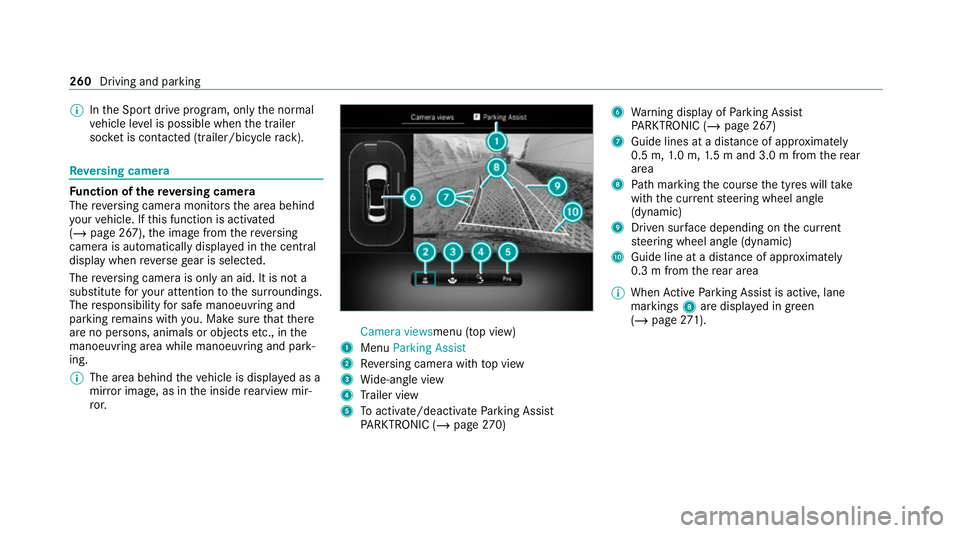
ro r. Camera views
menu (top view)
1 Menu Parking Assist
2 Reversing camera with top view
3 Wide-angle view
4 Trailer view
5 Toactivate/deactivate Parking Assist
PA RKTRONIC (/ page270) 6
Warning display of Parking Assist
PA RKTRONIC (/ page 267)
7 Guide lines at a dis tance of appr oximately
0.5 m, 1.0 m, 1.5 m and 3.0 m from there ar
area
8 Path marking the course the tyres will take
with the cur rent steering wheel angle
(dynamic)
9 Driven sur face depending on the cur rent
st eering wheel angle (dynamic)
A Guide line at a dis tance of appr oximately
0.3 m from there ar area
% When Active Parking Assist is active, lane
markings 8are displa yed in green
(/ page 271). 260
Driving and pa rking
Page 270 of 609
Selecting a view
for the 360° Camera
(r eve rsege ar)
Re quirements:
R The Rear camera image or3D view setting is
activated in the multimedia sy stem
(/ page 267). #
Shift toreve rsege ar. #
Select the desired view in the multimedia
sy stem (/ page 262).
Setting there ve rsing camera or 360° Cam‐
era
The reve rsing camera is only an aid. It is not a
substitute foryo ur attention tothe sur roundings.
The responsibility for safe manoeuvring and
parking remains with you. Make sure that no
persons, animals or objects etc. are in the
manoeuvring range. Pay attention to your sur‐
ro undings and be ready tobrake at all times.
Multimedia sy stem:
4 © 5
Settings 5
Assistance
5 Camera #
Select Rear camera image orSystem off. 360° Camera with GPS - managing activation
positions
Multimedia sy stem:
4 © 5
Settings 5
Assistance
5 Camera
Re naming an activation position
% You can de term ine activation positions in the
Camera views menu. (/page 262) #
Select an activation position. #
Select ´. #
Enter a name and confirm.
The activation position is sa ved under the
new name.
Deleting an acti vation position #
Select Manage activation positions. #
Select an acti vation position. #
Select E. #
Confirm the prom pt.
The activation position is dele ted. Opening
the camera co ver of the reve rsing
camera
Multimedia sy stem:
4 © 5
Settings 5
Assistance
5 Camera #
Select Open camera cover.
% The camera co ver closes auto maticallyafter
some time or af ter an ignition cycle. Pa
rking Assist PARKTRONIC Fu
nction of Parking Assist PARKTRONIC
Pa rking Assist PARKTRONIC is an electronic
parking assi stance sy stem which monitors the
area sur rounding your vehicle and sho wsyouthe
dis tance between theve hicle and a de tected
obs tacle visually and audibly.
The passi veside impact pr otection also warns
yo u of obs tacles tothe side. These must be
de tected beforehand bythe sensors in the front
or rear bumper while driving bythem. If you
st eer in the direction of a de tected obs tacle and
th ere is a risk of a lateral collision, a warning is
issued. The passive side impact pr otection can Driving and parking
267
Page 271 of 609
be activated and deactivated via
the multimedia
sy stem.
In order for front or rear obs tacles tothe side to
be displa yed, theve hicle must firs t tr ave l a dis‐
ta nce of at least half a vehicle length. Once the
ve hicle has tr avelled one vehicle length, obs ta‐
cles on all sides can be shown.
Pa rking Assist PARKTRONIC is on lyan aid. It is
not a substitute foryo ur attention tothe sur‐
ro undings. The responsibility for safe manoeu‐
vring and parking remains with you. Make sure
th at there are no persons, animals or objects in
th e manoeuvring area while manoeuvring and
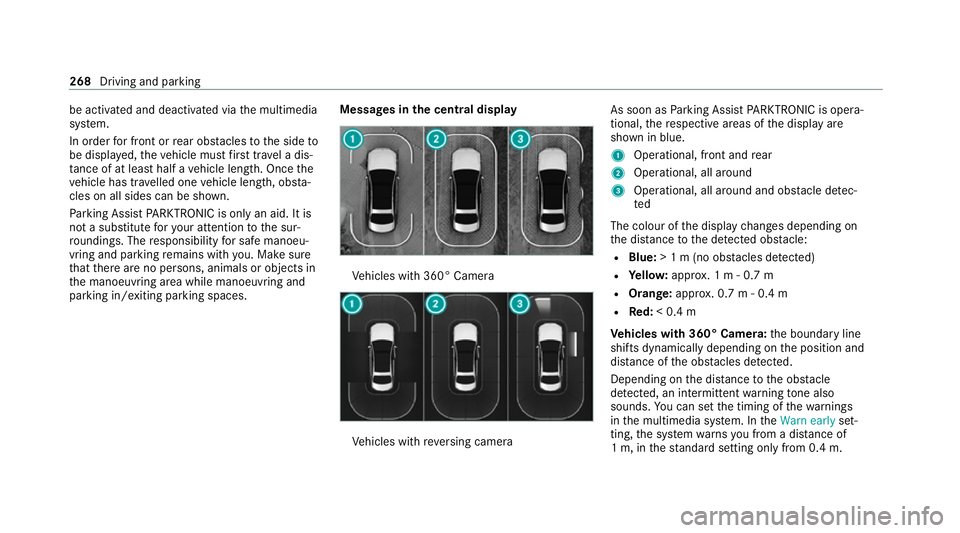
parking in/exiting parking spaces. Messages in
the central display Ve
hicles with 360° Camera Ve
hicles with reve rsing camera As soon as
Parking Assist PARKTRONIC is opera‐
tional, there spective areas of the display are
shown in blue.
1 Operational, front and rear
2 Operational, all around
3 Operational, all around and obs tacle de tec‐
ted
The colour of the display changes depending on
th e dis tance tothe de tected obs tacle:
R Blue: > 1 m (no obs tacles de tected)
R Yello w: appr ox. 1 m - 0.7 m
R Orange: approx. 0.7 m- 0.4 m
R Red:< 0.4 m
Ve hicles with 360° Camera: the boundary line
shifts dynamically depending on the position and
dis tance of the obs tacles de tected.
Depending on the dis tancetothe obs tacle
de tected, an intermittent warning tone also
sounds. You can set the timing of thewa rnings
in the multimedia sy stem. In theWarn early set‐
ting, the sy stem warnsyo u from a distance of
1 m, in thest andard setting on ly from 0.4 m.268
Driving and parking
Page 274 of 609
ment clus
ter,Pa rking Assist PARKTRONIC is not
active.
% Parking Assist PARKTRONIC is automatical ly
activated when the engine is star ted.
Alternatively, Parking Assist PARKTRONIC can be
activated or deacti vated in thequ ick access
menu.
Setting thewa rning tones of Parking Assist
PA RKTRONIC
Multimedia sy stem:
4 © 5
Settings 5
Assistance
5 Parking
Setting thevo lume or pit chofthewa rning
to nes #
Set the desired le vel under Volume orTone
pitch.
Ac tivating/deactivating audio fadeout #
Activate or deacti vate Audio fadeout.
The volume of the cur rently pl aying media
source is reduced during a Parking Assist
PA RKTRONIC warning tone.
or #
Activate or deacti vate Audio fadeout in
trans. position R.
The volume of the cur rently pl aying media
source is reduced when reve rsege ar is
engaged.
Setting the time of thewa rnings #
Select Time of warning. #
Set the time forth ewa rning. Ac
tive Parking Assist Fu
nction of Active Parking Assist
Ac tive Parking Assist is an elect ronic pa rking
assis tance sy stem, which uses ultrasound with
th e assis tance of there ve rsing camera and 360°
Camera. When you are driving forw ards up to
appr oximately 35 km/h, the sy stem automati‐
cally measures parking spaces on bo thsides of
th eve hicle.
Ac tive Parking Assist of fers thefo llowing func‐
tions:
Ve hicles with reve rsing camera
R Parking in parking spaces parallel tothero ad R
Reversing into parking spaces perpendicular
to thero ad
Ve hicles with 360° Camera
R Parking in parking spaces parallel tothero ad
R Parking in parking spaces perpendicular to
th ero ad (optionally either forw ards or
re ve rse)
R Parking in parking spaces that can on ly be
de tected as su chdue tomarkings (for exam‐
ple at thero adside)
R Exiting a parking space parallel tothero ad
R Exiting a parking space perpendicular tothe
ro ad (optionally either left or right)
Ac tive Parking Assist is only an aid. It is not a
substitute foryo ur attention tothe sur roundings.
The responsibility for safe manoeuvring and
parking remains with you. Make sure that no
persons, animals or objects etc. are in the
manoeuvring range.
If Ac tive Parking Assist is available, theÇ
message appears in the driver displa y.When the
sy stem de tects pa rking spaces, Èappears.
The ar rows show on which side of thero ad Driving and parking
271
Page 275 of 609
de
tected pa rking spaces are located. They are
th en shown in the cent ral displa y.
The parking space can be selected as desired.
Depending on the location of the parking space,
th e parking direction (rear wards or forw ards)
can also be selec ted as desired.
When Active Parking Assist is activated, the turn
signal indicators are activated based on the cal‐
culated path of your vehicle. When you are
en tering or exiting a parking space, the proce‐
dure is assis tedby acceleration, braking, steer‐
ing and gear changes.
To start the parking procedure, press thec
button (/ page273).
Ac tive Parking Assist will be cancelled in thefo l‐
lowing situations:
R You deactivate Parking Assist PARKTRONIC.
R You press thec button again.
R You begin steering.
R You en gage transmission position j.
R ESP ®
inter venes.
R You open the driver's door. Sy
stem limits
If th eex terior lighting is malfunctioning, Active
Pa rking Assist is not available.
Also obse rveth e sy stem limits of thefo llowing
sy stems:
R Reversing camera (/ page 260)
R 360° Camera (/ page 262)
Objects located abo veor below the de tection
ra nge of Active Parking Assist, such as over‐
hanging loads, overhangs or loading ramp s of
goods vehicles or the borders of parking spaces,
are not de tected du ring measu rement of the
parking space. These are also then not taken
into account when calculating the parking proce‐
dure. In some circums tances, Active Parking
Assist may therefore guide you into the parking
space prematurely or brake too late.
Cer tain environmental conditions, such as snow‐
fa ll or heavy rain, may lead toa parking space
being measured inaccuratel y.Pa rking spaces
th at are partial lyoccupied bytrailer dr awbars
might not be identified as such or be measured
inco rrectly . Only use Active Parking Assist on
le ve l, high- grip ground. &
WARNING Risk of accident due to
objects located abo veor below the
de tection range of Active Parking Assist
If th ere are objects abo veor below the
de tection range, thefo llowing situations may
arise:
R Active Parking Assist may steer too ear ly.
R The vehicle may not stop in front of these
objects.
This could cause a collision. #
Inthese situations, do not use Active
Pa rking Assist. Ac
tive Parking Assist can also display unsuitable
parking spaces, e.g. parking spaces in which
parking is not permit ted or parking spaces on
unsuitable sur faces.
Do not use Active Parking Assist in thefo llowing
situations:
R Inextreme weather conditions such as ice,
pac ked snow or in heavy rain. 272
Driving and pa rking
Page 277 of 609
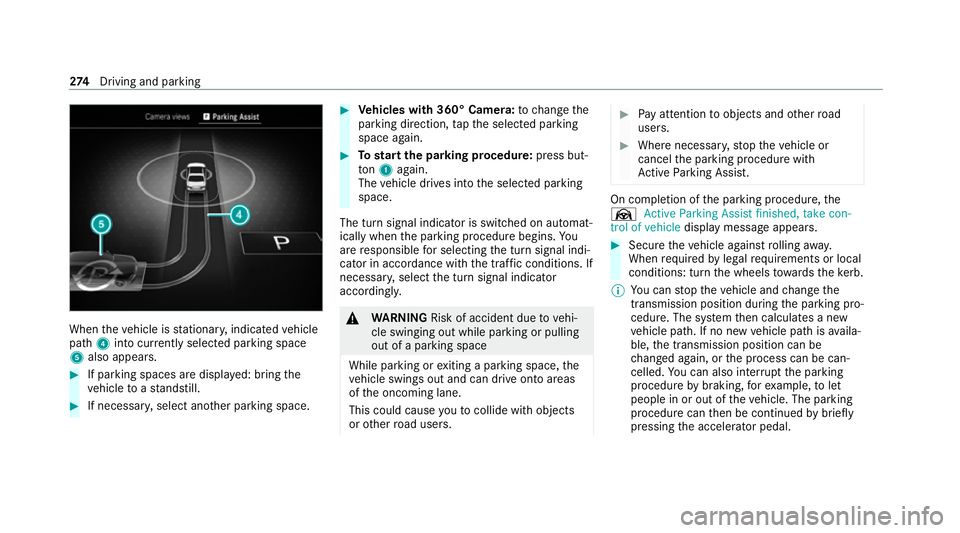
When
theve hicle is stationar y,indicated vehicle
path 4into cur rently selected pa rking space
5 also appears. #
If parking spaces are displa yed: bring the
ve hicle toast andstill. #
If necessar y,select ano ther parking space. #
Vehicles with 360° Camera: tochange the
parking direction, tapth e selected parking
space again. #
Tostart the pa rking procedure: press but‐
to n1 again.
The vehicle drives into the selected parking
space.
The turn signal indicator is switched on automat‐
ically when the parking procedure begins. Yo u
are responsible for selecting the turn signal indi‐
cator in accordance with the traf fic conditions. If
necessar y,select the turn signal indicator
accordingly. &
WARNING Risk of accident due tovehi‐
cle swinging out while parking or pulling
out of a parking space
While parking or exiting a parking space, the
ve hicle swings out and can drive onto areas
of the oncoming lane.
This could cause youto collide wi thobjects
or other road users. #
Pay attention toobjects and other road
users. #
Where necessar y,stop theve hicle or
cancel the parking procedure with
Ac tive Parking Assist. On completion of
the parking procedure, the
Ø Active Parking Assist finished, take con-
trol of vehicle displaymessa geappears. #
Secure theve hicle against rolling away.
When requ ired bylegal requirements or local
conditions: turn the wheels towa rdsth eke rb.
% You can stop theve hicle and change the
transmission position du ring the parking pro‐
cedure. The sy stem then calculates a new
ve hicle path. If no new vehicle path is availa‐
ble, the transmission position can be
ch anged again, or the process can be can‐
celled. You can also inter rupt the parking
procedure bybraking, forex ample, tolet
people in or out of theve hicle. The parking
procedure can then be continued bybriefly
pressing the accelerator pedal. 274
Driving and pa rking
Page 279 of 609
Please no
tethat you can on lyuse Remo te
Pa rking Assist if you ha veava lid driving
licence and are in a fit st ate todrive.
Re mo teParking Assist par ksyour vehicle while
yo u are outside of your vehicle. You can monitor
th e manoeuvring and parking procedure on your
mobile phone.
Wi th Remo teParking Assist, you can car ryout
all the parking procedures of Active Parking
Assist. You can also position theve hicle directly
in front of a garage or a driv eway entrance and
th en use Remo teParking Assist toenter or exit a
parking space.
Re mo teParking Assist changes gear, acceler‐
ates, brakes and steers theve hicle. While
Re mo teParking Assist is active, theve hicle is
loc ked.
Re mo teParking Assist is only an aid. It is not a
substitute foryo ur attention tothe sur roundings.
The responsibility for safe manoeuvring and
parking remains with you. In terrupt or term inate
th e parking procedure if necessar y.Make sure
th at no persons, animals or objects etc. are in th
e manoeuvring range. Ma kesure toalso pay
attention toother vehicles.
Sy stem limits
If th e sy stem de tects a malfunction or a sy stem
limit during the manoeuvring or parking proce‐
dure, the procedure will be cancelled:
R The vehicle is brought toast andstill.
R Transmission position jis selec ted and the
electric parking brake is applied automati‐
call y.
R The engine is switched off.
R The vehicle remains loc ked.
If th e parking manoeuvre is cancelled, a cor re‐
sponding message is displa yed on the mobile
phone.
Depending on the situation, you can then take
control of the procedure, manoeuvre theve hicle
back tothest arting position or manually take
control of theve hicle.
The sy stem limits of Active Parking Assist apply
(/ page 271). Cer
tain environmental conditions, such as snow‐
fa ll or heavy rain, may lead toa parking space
being measured inaccurately or toconnection
problems wi th the mobile phone. Only use
Re mo teParking Assist on le vel, high-grip ground.
During the parking procedure, you should not
st and more than appr ox. 3.0 maw ay from the
ve hicle. Atgrea ter dis tances, the procedure will
be inter rupted and a cor responding message will
be displa yed on the mobile phone. If you mo ve
closer totheve hicle, you will be able tocontinue
th e procedure.
Operating Remo teParking Assist
Requ irements:
Fo rth eRe mo teParking Assist function, you
re qu ire a mobile phone and the cur rent Remo te
Pa rking Assist App foryo ur vehicle type.
The following operating sy stems are suppor ted:
R Android™
R Apple ®
iOS 276
Driving and pa rking
Page 283 of 609
Manoeuvring assistant
Fu
nction of Drive Away Assist
Drive AwayAssi stcan reduce the se verity of an
impact when pulling away. If the sy stem de tects
an obs tacle in the direction of tr avel,th eve hi‐
cle's speed is brief lyreduced toappr oximately
2 km/h.
A risk of collision may arise in thefo llowing sit‐
uations, forex ample:
R Ifth e driver mixes up the accelera tor and
brake pedals.
R Ifth e driver engages an incor rect gear.
R Ifth e driver depresses the accelera tor pedal
with too much forc e.
Drive AwayAssi stis active under thefo llowing
conditions:
R Ifth eve hicle wasst ationary and the trans‐
mission position wasch anged tok orh.
R Ifth eve hicle has rolled less than appr ox‐
imately 1.0 m since being at a standstill.
R Ifth e de tected obs tacle is less than appr ox.
1. 0 m away. %
You can activate and deactivate Drive-away
Assist (/page 282).
If a critical situation is de tected, thefo llowing
symbol appears red in the selected view in the
Camera & parking menu: %
If Drive AwayAssi stis not available, the
same symbol appears in grey. If theCamera
& parking menu is not opened in the cent ral
displa y,the symbol and pop-up of Parking
Assist PARKTRONIC bo thappear.
Drive AwayAssi stis only an aid. It is not a sub‐
st itute foryo ur attention tothe sur roundings.
The responsibility for safe manoeuvring and
parking remains with you. Make sure that no
persons, animals or objects etc. are in the
manoeuvring range. &
WARNING Risk of accident caused by
limited de tection per form ance of Drive
Aw ayAssi st
Drive AwayAssi stcannot al ways clearly iden‐
tify objects and traf fic situations. #
Alw ays pay careful attention tothe traf‐
fi c situation; do not rely on Drive Away
Assi stalone. #
Be prepared tobrake or swer veas nec‐
essar y,prov ided the tra ffic situation
permits and that it is safe totake eva‐
sive action. Sy
stem limits
The sy stem limits of Active Parking Assist apply
(/ page 271).
On uphill gradients, the per form ance of Drive
Aw ayAssi stisrestricted.
If transport equipment is secu redto the trailer
hitch, such as a trailer or bicycle rack , Drive
Aw ayAssi stis not available when you are reve rs‐
ing. 280
Driving and parking