brakes MERCEDES-BENZ S-CLASS SALOON LONG 2020 Owners Manual
[x] Cancel search | Manufacturer: MERCEDES-BENZ, Model Year: 2020, Model line: S-CLASS SALOON LONG, Model: MERCEDES-BENZ S-CLASS SALOON LONG 2020Pages: 609, PDF Size: 10.5 MB
Page 12 of 609
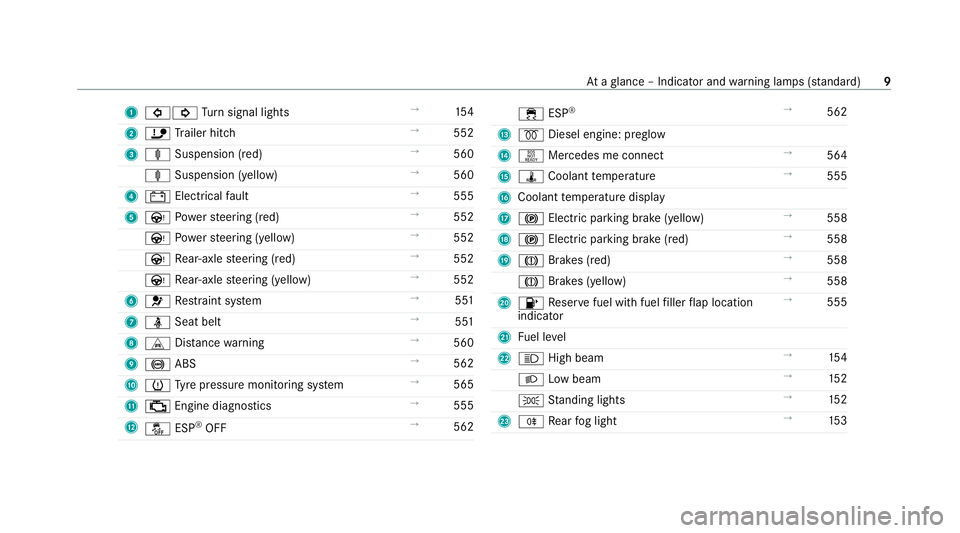
1
#! Turn signal lights →
154
2 ï Trailer hit ch →
552
3 ä Suspension (red) →
560
ä Suspension (yell ow) →
560
4 # Electrical fault →
555
5 Ù Powe rst eering (red) →
552
Ù Powe rst eering (yellow) →
552
Ù Rear-axle steering (red) →
552
Ù Rear-axle steering (yellow) →
552
6 6 Restra int sy stem →
551
7 ü Seat belt →
551
8 L Distance warning →
560
9 ! ABS →
562
A h Tyre pressure monitoring sy stem →
565
B ; Engine diagnostics →
555
C å ESP®
OFF →
562 ÷
ESP®
→
562
D % Diesel engine: preglow
E H Mercedes me connect →
564
F ÿ Coolant temp erature →
555
G Coolant temp erature display
H ! Electric pa rking brake (yellow) →
558
I ! Electric parking brake (red) →
558
J J Brakes (red) →
558
J Brakes (yellow) →
558
K 8 Reser vefuel with fuel filler flap location
indicator →
555
L Fuel le vel
M K High beam →
154
L Low beam →
15 2
T Standing lights →
15 2
N R Rear fog light →
15 3 At
aglance – Indicator and warning lamps (s tanda rd) 9
Page 14 of 609
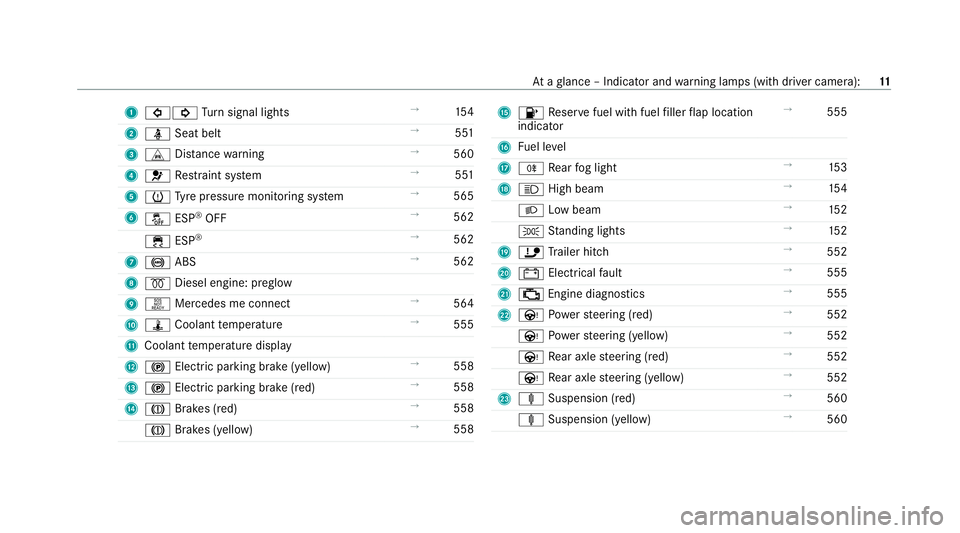
1
#! Turn signal lights →
154
2 ü Seat belt →
551
3 L Distance warning →
560
4 6 Restra int sy stem →
551
5 h Tyre pressure monitoring sy stem →
565
6 å ESP®
OFF →
562
÷ ESP®
→
562
7 ! ABS →
562
8 % Diesel engine: preglow
9 H Mercedes me connect →
564
A ÿ Coolant temp erature →
555
B Coolant temp erature display
C ! Electric pa rking brake (yellow) →
558
D ! Electric parking brake (red) →
558
E J Brakes (red) →
558
J Brakes (yellow) →
558 F
8 Reser vefuel with fuel filler flap location
indicator →
555
G Fuel le vel
H R Rear fog light →
15 3
I K High beam →
154
L Low beam →
15 2
T Standing lights →
15 2
J ï Trailer hit ch →
552
K # Electrical fault →
555
L ; Engine diagnostics →
555
M Ù Powe rst eering (red) →
552
Ù Powe rst eering (yellow) →
552
Ù Rear axle steering (red) →
552
Ù Rear axle steering (yellow) →
552
N ä Suspension (red) →
560
ä Suspension (yellow) →
560 At
aglance – Indicator and warning lamps (with driver camera): 11
Page 40 of 609
tion, number of wheel
revo lutions or thefa s‐
te ned seat belts displ ay
R ambient conditions, such as temp erature,
ra in sensor or dis tance sensor
General ly,th e use of these data is temp orar y;
th ey will not be stored be yond the period of
operation and will only be processed within the
ve hicle itself. Control units of ten contain da ta
memories forve hicle keys,fo rex ample. Their
use permits thete mp orary or permanent docu‐
mentation of tech nical information about the
ve hicle's operating state, component loads,
main tenance requ irements and tech nical events
or faults.
Depending on theve hicle equipment, thefo llow‐
ing data are stored:
R operating status of sy stem components,
such as fill le vels, tyre pressure or battery
st atus
R malfunctions or faults in impor tant sy stem
components, such as lights or brakes
R system reactions in special driving situations,
such as airbag deployment or the inter ven‐
tion of stability control sy stems R
information on events leading tovehicle
damage
In cer tain cases, it may be requiredtostore data
th at wo uld ha veotherwise been used only tem‐
poraril y.This may be the case if theve hicle has
de tected a malfunction, forex ample.
If yo u use services, such as repair services and
maintenance work,st ored operational data as
we ll as theve hicle identification number can be
re ad out and used. They can be read out by
service network emplo yees, such as workshops
and manufacturers or third parties, such as
breakdown services. The same is true in the
case of warranty claims and quality assurance
measures.
In general, there adout is per form ed via the
legally prescribed port forth e diagnostics con‐
nection in theve hicle. The operational data that
are read out document tech nical states of the
ve hicle or of individual components and assist in
th e diagnosis of malfunctions, compliance with
wa rranty obligations and quality impr ovement.
To that end, these data, in particular information
about component loads, tech nical events, mal‐ functions and
other faults may be transmitted
along with theve hicle identification number to
th e manufacturer. Furthermore, the manufac‐
turer is subject toproduct liability. Forth is rea‐
son the manufacturer also uses operational data
from theve hicle, forex ample, forre calls. These
da ta can also be used toexamine the cus tom‐
er's warranty and guarantee claims.
Fa ult memories in theve hicle can be reset by a
service outlet or at your requ est as part of repair
or maintenance work.
Con venience and inf otainment functions
Yo u can store con venience settings and individ‐
ual settings in theve hicle and change or reset
th em at any time.
Depending on theve hicle equipment, this
includes thefo llowing settings, forex ample:
R seat and steering wheel positions
R suspension and climate control settings
R individual settings, such as interior lighting
Depending on the selected equipment, you can
import data into vehicle inf otainment functions
yo urself. General no
tes37
Page 198 of 609
Note
s on driving on salt-treated roads
The braking ef fect is limited on salt-trea ted
ro ads.
Therefore, obse rveth efo llowing no tes:
R due tosalt build-up on the brake disks and
brakepads, the braking dis tance can increase
considerab lyor result in braking only on one
side
R maintain a much greater safe dis tance tothe
ve hicle in front
To remo vesalt build-up:
R brake occasionally while paying attention to
th e tra ffic conditions
R carefully depress the brake pedal at the end
of the journey and when starting the next
journey
Note s on aquaplaning
Aq uaplaning can take place once a cer tain
amount of water has accumulated on thero ad
sur face. Obser
vethefo llowing no tes during heavy precip‐
itation or in conditions in which aquaplaning may
occur:
R reduce speed
R avoid tyre ruts
R avoid sudden steering mo vements
R brake carefully
% Also obser vethe no tes on regular lych ecking
wheels and tyres (/ page 383).
Note s on driving through water on the road
sur face
Wa ter which has entered into theve hicle can
damage the engine, electrics and transmission.
Wa ter can also enter the air intake of the engine
and cause engine damage.
Obser vethefo llowing if you must drive thro ugh
wate r:
R The water,when calm, may only reach the
lo we r edge of theve hicle body.
R Drive at a maximum speed of 10km/h;
wate r can otherwise enter theve hicle interior
or engine compartment. R
Vehicles tr avelling in front, or oncoming vehi‐
cles, can create waves which may exceed the
maximum permissible dep thofthewate r.
The braking ef fect of the brakes is reduced af ter
fo rd ing. Brake carefully while paying attention to
th e tra ffic conditions until braking po wer has
been fully restored. Fu
nction of rear axle steering The
rear axle steering is an electromechanical
auxiliary steering on there ar axle which adjusts
th esteering of there ar wheels according tothe
position of the front wheels, depending on the
speed. This results in greater manoeuvrability
and impr oved driving stabilit y,e.g. when corner‐
ing.
Re ar axle steering has thefo llowing characteris‐
tics:
R reduced steering ef fort and turning circle
re sulting in reduced parking ef fort
R impr oved driving stabilit y,e.g. when corner‐
ing Driving and parking
19 5
Page 225 of 609
If ABS inter
venes when braking, you will feel a
pulsing in the brake pedal. The pulsating brake
pedal can be an indication of hazardous road
conditions and can ser veas a reminder totake
ex tra care while driving. Fu
nction of BAS The Brake Assist Sy
stem (BAS) supports your
eme rgency braking situation with additional
brake forc e.
If yo u depress the brake pedal quickl y,BA S is
acti vated:
R BAS au tomatical lyboosts the brake pres‐
sure.
R BAS can sho rten the braking dis tance.
R ABS pr events the wheels from locking.
The brakes will function as usual once you
re lease the brake pedal. BAS is deactivated. Fu
nction of ESP ®
(Electronic Stability Pro‐
gr am) &
WARNING Risk of skidding if ESP ®
is
deactivated
If yo u deactivate ESP ®
, ESP ®
cannot car ry
out vehicle stabilisation. #
ESP ®
should on lybe deactivated in the
fo llowing situations. ESP
®
can monitor and impr ovedriving stability
and traction in thefo llowing situations, within
ph ysical limits:
R When pulling away on wet or slippe rycar ria‐
ge wa ys.
R When braking.
If th eve hicle deviates from the direction desired
by the driver, ESP ®
can stabilise theve hicle by
inter vening in thefo llowing ways:
R One or more wheels are braked.
R The engine output is adap ted according to
th e situation. When ESP
®
is deactivated, theå warning
lamp lights up continuously:
R Driving stability will no lon ger be impr oved.
R The drive wheels could spin.
R ETS/4ETS traction control is still active.
% When ESP ®
is deactivated, you are still assis‐
te dby ESP ®
when braking.
When the÷ warning lamp flashes, one or
se veral wheels has reached its grip limit:
R Adapt your driving style to suit the cur rent
ro ad and weather conditions.
R Do not deactivate ESP ®
.
R Only depress the accelerator pedal as far as
is necessary when pulling away.
Deactivate ESP ®
in thefo llowing situations to
impr ovetraction:
R When using snow chains.
R In deep sn ow.
R On sand or gr avel. 222
Driving and parking
Page 231 of 609
Microsleep de
tection also does not function
when the driver camera cann otdetect theey es
of the driver, as a result of thefo llowing factors,
fo rex ample:
R The driver's eyes are co vered due tothe
st eering column position, forex ample.
R Poor lighting conditions.
R Some types of spectacles or sunglasses.
R The driver's line of vision is outside the driver
camera's field of vision.
Also obser veany information rega rding display
messages that can be displa yed in the driver dis‐
pla y.
The tiredness and alertness assessment of
AT TENTION ASSIST with microsleep de tection is
re set and restar ted when continuing the journey
in thefo llowing situations:
R Ifyo u swit choff the engine.
R Ifyo u unfas tenyo ur seat belt and open the
driver's door (e.g. tochange drivers or take a
break). Setting
ATTENTION ASSI ST
Multimedia sy stem:
4 © 5
Settings 5
Assistance
5 Assistance 5
ATTENTION ASSIST
Setting the sensitivity #
Tapth e cur rent setting. #
Select Standard orSensitive .
Ac tivating/deactivating the mic rosleep
wa rning #
Activate/deactivate Microsleep warning. Limiter
Fu
nction of the limiter
The limiter restricts the speed of theve hicle. To
re duce the speed tothe set speed, the limiter
applies the brakes automaticall y.
Yo u can limit the speed as follo ws:
R Variable: for a short-term speed restriction,
e.g. in built-up areas
R Perm anen t:for a longer-term speed restric‐
tion, e.g. in winter tyre mode The
variable limiter is operated using the cor re‐
sponding steering wheel buttons (/ page 232).
Yo u can store any speed abo ve20 km/h up to
th e maximum design speed or up tothe set win‐
te r tyre limit. You can also per form settings
while theve hicle is stationary if theve hicle has
been star ted.
Obser vethe no tes on driving sy stems and your
re sponsibility; you may otherwise failto recog‐
nise dangers (/ page 219).
Messages in the driver display
R È (gre y): variable limiter is selec ted but
not yet acti vated.
R È (flashes gr ey):va riable limiter is temp o‐
rari lypassive.
R È (green): variable limiter is activated.
A stored speed appears under theÈ display
and is indicated in the speedome ter.
When the driving speed is greater than the
st ored speed, theÈ display flashes. 228
Driving and parking
Page 232 of 609
Kickd
own
If yo u depress the accelerator pedal be yond the
pressure point (kickdown), theva riable limiter
swit ches topassive mode. The Èpassive
message appears on the driver displa y.
Af ter completion of kickdown, theva riable lim‐
iter is activated again in thefo llowing situations:
R Ifth eve hicle speed drops below thestored
speed.
R Ifth estored speed is called up.
R Ifyo ustore a new speed.
Information on the permanent limiter
If th eve hicle should ne verexc eed a specific
speed (e.g. for driving in winter tyre mode), you
can set this speed with the permanent limiter.
Yo u do this by limiting the speed between
16 0 km/h and 240 km/h in the multimedia sys‐
te m (/ page 229).
Shortly before the set speed is reached, it is
shown in the driver displa y.When you confirm
th e message, display messages no longer appear
until you swit choff theve hicle. The speed will only be displa
yed again once theve hicle has
been restar ted or if the set speed is changed.
The permanent limiter does not swit chtopas‐
sive mode even du ring kickdown and the driven
speed remains below the set speed.
Setting the limit speed for winter tyres
Multimedia sy stem:
4 © 5
Settings 5
Vehicle 5
Driving #
Activate or deacti vate Winter tyre limit.
Setting a speed #
Select ZnexttoWinter tyre limit. #
Select a speed. Ac
tive Di stance Assist DISTRO NIC Fu
nction of Active Di stance Assist
DISTRO NIC
Ac tive Dis tance Assi stDISTRONIC maintains the
set speed on free-flowing roads. If vehicles in
front are de tected, the set dis tance is main‐
ta ined, if necessar y,until theve hicle comes to a
halt. The vehicle accelerates or brakes depend‐
ing on the dis tance totheve hicle in front and th
e set speed. The speed and dis tance tothe
ve hicle in front are set and sa ved using the
st eering wheel.
Ac tive Dis tance Assi stDISTRONIC is available in
th e 20 km/h to210 - km/h speed range.
Other features of Active Dis tance Assi st
DISTRONIC:
R Adjusts the driving style depending on the
selected drive program (fuel-saving, comfort‐
able or dynamic) (/ page199)
R Initia tes acceleration tothestored speed if
th e turn signal indicator is switched on to
ch ange totheov ertaking lane
R Reacts tostationary vehicles de tected in
urban speed ranges (e xcept bicycles and
mo torcyc les)
R Take s one-sided overtaking restrictions into
account on mo torw ays or on multi-lane roads
with separate car riag ewa ys(countr y-depend‐
ent)
Ad ditional function available in cert ain coun‐
tries: ifAc tive Dis tance Assi stDISTRONIC has
braked theve hicle toast andstill, it can automat‐ Driving and parking
229
Page 234 of 609
Sy
stem limits
The sy stem may be impaired or may not function
in thefo llowing situations, forex ample:
R In sn ow,ra in, fog, heavy spr ay, if there is
gl are, in direct sunlight or in greatlyvarying
light conditions.
R The windsc reen in the area of the camera is
dirty, mis ted up, damaged or co vered.
R Ifth era dar sensors are dirty or co vered.
R In multi- stor ey car pa rks or on roads with
st eep uphill or downhill gradients.
R Ifth ere are nar rowvehicles in front, such as
bicycles or mo torcyc les.
In addition, on slippery roads, braking or accel‐
erating can cause one or se veral wheels tolose
traction and theve hicle could then skid.
Do not use Active Dis tance Assi stDISTRONIC in
th ese situations. &
WARNING Risk of accident from acceler‐
ation or braking byActive Dis tance
Assi stDISTRONIC
Ac tive Dis tance Assi stDISTRONIC may accel‐
erate or brake in thefo llowing cases, for
ex ample:
R Ifth eve hicle pulls away using Active Dis‐
ta nce Assi stDISTRONIC.
R Ifth estored speed is called up and is
considerably faster or slo werth an the
cur rently driven speed.
R IfAc tive Dis tance Assi stDISTRONIC no
longer de tects a vehicle in front or does
not react toreleva nt objects. #
Alw ays carefully obser vethe traf fic con‐
ditions and be ready tobrake at all
times. #
Take into account the tra ffic situation
before calling up thestored speed. &
WARNING Risk of accident due toinsuf‐
fi cient decele ration byActive Dis tance
Assi stDISTRONIC
Ac tive Dis tance Assi stDISTRONIC brakes
yo ur vehicle with up to50% of the possible
deceleration. If this decele ration is not su ffi‐
cient, Active Dis tance Assi stDISTRONIC
alerts you with a visual and acoustic warning. #
Adjust your speed and main tain a suita‐
ble dis tance from theve hicle in front. #
Brake theve hicle yourself and/or take
ev asive action. &
WARNING Risk of accident if de tection
function of Active Dis tance Assi st
DISTRONIC is impaired
Ac tive Dis tance Assi stDISTRONIC does not
re act or has a limited reaction:
R when driving on a dif fere nt lane or when
ch anging lanes Driving and parking
231
Page 279 of 609
Please no
tethat you can on lyuse Remo te
Pa rking Assist if you ha veava lid driving
licence and are in a fit st ate todrive.
Re mo teParking Assist par ksyour vehicle while
yo u are outside of your vehicle. You can monitor
th e manoeuvring and parking procedure on your
mobile phone.
Wi th Remo teParking Assist, you can car ryout
all the parking procedures of Active Parking
Assist. You can also position theve hicle directly
in front of a garage or a driv eway entrance and
th en use Remo teParking Assist toenter or exit a
parking space.
Re mo teParking Assist changes gear, acceler‐
ates, brakes and steers theve hicle. While
Re mo teParking Assist is active, theve hicle is
loc ked.
Re mo teParking Assist is only an aid. It is not a
substitute foryo ur attention tothe sur roundings.
The responsibility for safe manoeuvring and
parking remains with you. In terrupt or term inate
th e parking procedure if necessar y.Make sure
th at no persons, animals or objects etc. are in th
e manoeuvring range. Ma kesure toalso pay
attention toother vehicles.
Sy stem limits
If th e sy stem de tects a malfunction or a sy stem
limit during the manoeuvring or parking proce‐
dure, the procedure will be cancelled:
R The vehicle is brought toast andstill.
R Transmission position jis selec ted and the
electric parking brake is applied automati‐
call y.
R The engine is switched off.
R The vehicle remains loc ked.
If th e parking manoeuvre is cancelled, a cor re‐
sponding message is displa yed on the mobile
phone.
Depending on the situation, you can then take
control of the procedure, manoeuvre theve hicle
back tothest arting position or manually take
control of theve hicle.
The sy stem limits of Active Parking Assist apply
(/ page 271). Cer
tain environmental conditions, such as snow‐
fa ll or heavy rain, may lead toa parking space
being measured inaccurately or toconnection
problems wi th the mobile phone. Only use
Re mo teParking Assist on le vel, high-grip ground.
During the parking procedure, you should not
st and more than appr ox. 3.0 maw ay from the
ve hicle. Atgrea ter dis tances, the procedure will
be inter rupted and a cor responding message will
be displa yed on the mobile phone. If you mo ve
closer totheve hicle, you will be able tocontinue
th e procedure.
Operating Remo teParking Assist
Requ irements:
Fo rth eRe mo teParking Assist function, you
re qu ire a mobile phone and the cur rent Remo te
Pa rking Assist App foryo ur vehicle type.
The following operating sy stems are suppor ted:
R Android™
R Apple ®
iOS 276
Driving and pa rking
Page 356 of 609
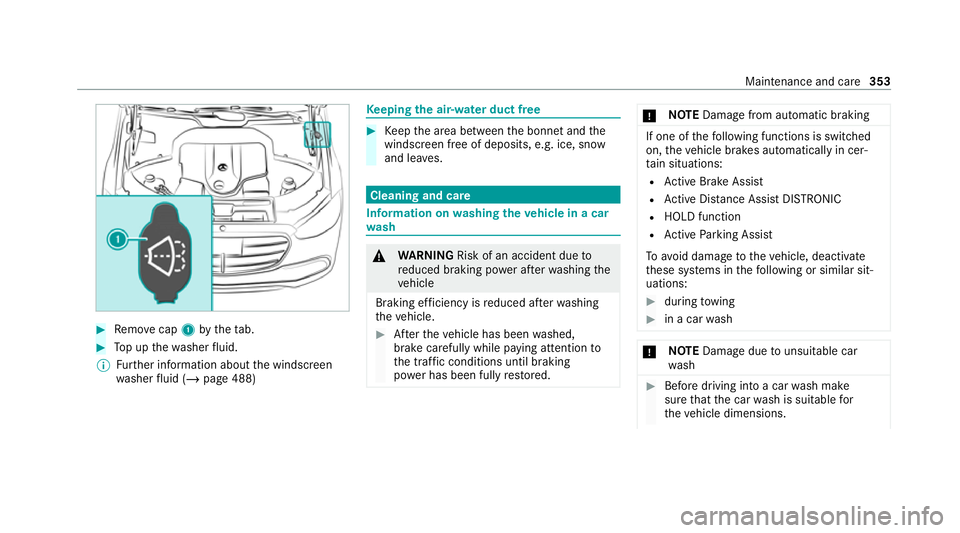
#
Remo vecap 1bytheta b. #
Top up thewa sher fluid.
% Further information about the windscreen
wa sher fluid (/ page 488) Ke
eping the air-water duct free #
Keep the area between the bonn etand the
windscreen free of deposits, e.g. ice, sn ow
and lea ves. Cleaning and care
Information on
washing theve hicle in a car
wa sh &
WARNING Risk of an accident due to
re duced braking po wer af terwa shing the
ve hicle
Braking ef ficiency is reduced af terwa shing
th eve hicle. #
Afterth eve hicle has been washed,
brake carefully while paying attention to
th e traf fic conditions until braking
po we r has been fully restored. *
NO
TEDama gefrom auto matic braking If one of
thefo llowing functions is switched
on, theve hicle brakes automatically in cer‐
ta in situations:
R Active Brake Assi st
R Active Dis tance Assi stDISTRONIC
R HOLD function
R Active Parking Assist
To avo id damage totheve hicle, deactivate
th ese sy stems in thefo llowing or similar sit‐
uations: #
during towing #
in a car wash *
NO
TEDama gedue tounsuitable car
wa sh #
Before driving into a car wash make
sure that the car wash is suitable for
th eve hicle dimensions. Maintenance and care
353