phone MERCEDES-BENZ S-CLASS SALOON LONG 2020 Owners Manual
[x] Cancel search | Manufacturer: MERCEDES-BENZ, Model Year: 2020, Model line: S-CLASS SALOON LONG, Model: MERCEDES-BENZ S-CLASS SALOON LONG 2020Pages: 609, PDF Size: 10.5 MB
Page 5 of 609
Symbols
........................................................ 5At
agl ance .................................................... 6
Cockpit ........................................................... 6
Indica tor and warning lamps (s tandard) .........8
Indicator and warning lamps (with driver
camera): ...................................................... .10
Overhead contro l panel ................................ 12
Door operating unit and seat adjustment ..... 14
Control settings in there ar passenger
compartment ................................................ 16
Emergencies and breakdowns ...................... 18Digital Owner's Manual
.............................20
Calling up the Digital Owner's Manual ..........20 Genera
l notes............................................. 21
Pr otection of the environment ......................21
Ta ke -ba ckof end-of-life vehicles ...................21
Mercedes-Benz GenuineParts ....................... 22
Owner's Manual ...........................................23
To uch-sensitive cont rols .............................. .23
Operating saf ety .......................................... .24Declaration of conformity ............................. 25
Diagno stics connection ................................ 32
Qualified specialist workshop ....................... 34
Ve hicle registration ....................................... 34
Cor rect use of theve hicle ............................34
Information on the REA CHregulation ........... 34
No tesfo r persons with electronic medi‐
cal aids ......................................................... 35
Implied warranty .......................................... .35
QR code forre scue card ...............................36
Data storage .................................................36
Copyright ...................................................... 39 Occupant saf
ety......................................... 40
Re stra int sy stem ...........................................40
Seat belts ..................................................... 42
Airbags ......................................................... 47
PRE-SAFE ®
sy stem ....................................... 55
Au tomatic measu res af ter an accident ......... 56
Safely transporting children in theve hi‐
cle ................................................................. 57
No tes on pets in theve hicle .......................... 76 Opening and closing
.................................. 77
Ke y .............................................................. .77
Doo rs............................................................ 81
Boot ............................................................. .87
Side windo ws............................................... 93
Sliding sunroof .............................................. 97
Ro ller sunblinds .......................................... 102
Anti-theft pr otection ................................... 104 Seats and
stowing .................................... 107
No tes on the cor rect driver's seat posi‐
tion ............................................................. 107
Seats .......................................................... 107
St eering wheel ............................................ 127
Easy entry and exitfeature ........................ .129
Memory function ........................................ 13 0
Memory function in there ar compart‐
ment .......................................................... .131
St ow age areas ............................................ 13 4
Soc kets ....................................................... 14 3
Coolbox ...................................................... 14 5
Wi reless charging of the mobile phone
and connection with theex terior aerial ...... 14 8
Fitting and removing thefloor mats ............ 15 02
Contents
Page 6 of 609
Light and sight
......................................... 15 2
Exterior lighting .......................................... 15 2
Interior lighting ............................................ 161
Wi ndsc reen wipers and windscreen
wa sher sy stem ............................................ 16 4
Mir rors ........................................................ 16 8
Area pe rmeable toradio wav es on the
windscreen ................................................ .171
Infrared-reflective windscreen function ....... 171Climate control
......................................... 17 2
Overview of climate contro l systems ..........1 72
Operating the climate control sy stem ......... 173 Driving and pa
rking ................................. 18 8
Driving ........................................................ 188
DY NA MIC SELECT switch ............................1 99
Au tomatic transmission .............................. 201
Fu nction of the 4MATIC .............................. 205
Re fuelling ................................................... 206
Pa rking ........................................................ 212
Driving and driving sa fety sy stems .............. 219
Tr ailer hit ch................................................ 282
Bicycle rack function .................................. 288 Ve
hicle towing instructions ........................ .290 Driver display
........................................... 291
No tes on the driver display .........................2 91
No tes on the 3D driver display .................... 291
Operating the driver display ........................ 291
Menus on the driver display ....................... 292
Head-up display .......................................... 293
Ve hicles with a 48 V on-board electrical
sy stem (EQ Boost tech nology) .................... 296
Overview of status displa yson the driver
display ........................................................ 297 MBUX multimedia sy
stem ...................... 298
Overview and operation .............................. 298
Sy stem settings ...........................................3 11
Na vigation and traf fic .................................. 315
Te lephone .................................................. .321
Mercedes me and apps .............................. 324
Mercedes-Benz emer gency call sy stem ...... 332
Ra dio, media & TV...................................... 340
Sound settings ........................................... 346 Main
tenance and care ............................. 347
ASS YST PLUS service inter val display ........ .347
Engine compartment .................................. 348
Cleaning and care ....................................... 353 Breakdown assistance
............................360
Emergency ................................................. .360
Flat tyre ...................................................... 362
Battery (vehicle) ......................................... 368
To w- starting or towing away ....................... 374
Electrical fuses ........................................... 378 Wheels and tyres
..................................... 383
No tes on noise or unusual handling char‐
acteristics .................................................. .383
No tes on regular lyinspecting wheels and
tyres .......................................................... .383
No tes on snow chains ................................ 383
Ac tivating or deacti vating snow chain
mode .......................................................... 384
Ty re pressure .............................................. 384
Wheel change ............................................ .387
Emergency spare wheel .............................. 396 Contents
3
Page 30 of 609
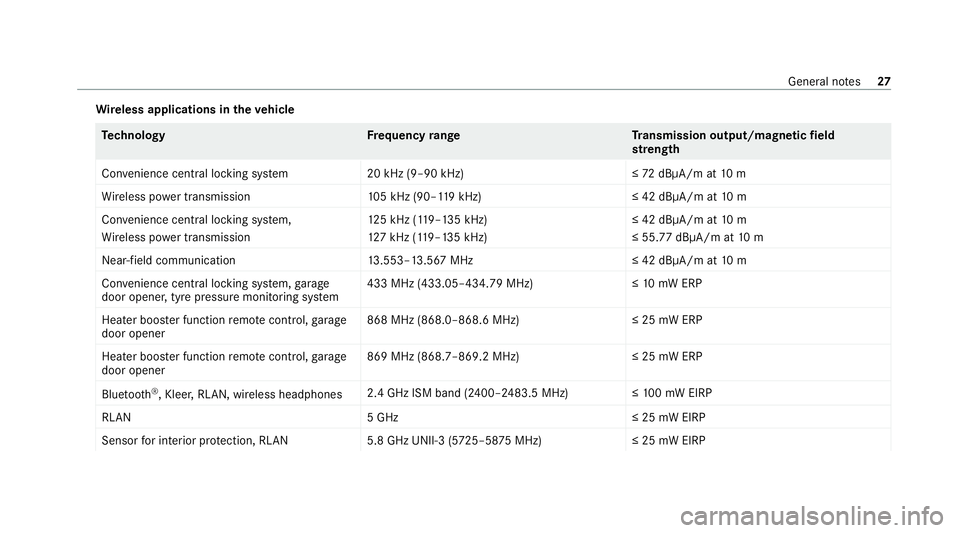
Wire
less applications in theve hicle Te
ch nology Frequency rang eT ransmission output/magnetic field
st re ngth
Con venience central lo cking sy stem 20 kHz (9–90 kHz)≤ 72dBμA/m at 10 m
Wi reless po wer transmission 105 kHz (90–1 19kHz) ≤ 42 dBμA/m at10 m
Con venience central lo cking sy stem,
Wi reless po wer transmission 12
5 kHz (1 19–135 kHz)
12 7 kHz (1 19–135 kHz) ≤ 42 dBμA/m at
10 m
≤ 55.77 dBμA/m at 10 m
Near-field communication 13.553–13.567 MHz ≤ 42 dBμA/m at10 m
Con venience central lo cking sy stem, garage
door opener, tyre pressure monitoring sy stem 433 MHz (433.05–434.79 MHz)≤
10mW ERP
Heater boos ter function remo tecontrol, garage
door opener 868 MHz (868.0–868.6 MHz
)≤25 mW ERP
Heater boos ter function remo tecontrol, garage
door opener 869 MHz (868.7–869.2 MHz
)≤25 mW ERP
Blue tooth ®
, Kleer, RLAN, wireless headphones 2.4 GHz ISM band (2400–2483.5 MHz
)≤100 mW EIRP
RLAN 5 GHz≤ 25 mW EIRP
Sensor for interior pr otection, RLAN 5.8 GHz UNII-3 (5725–58 75MHz) ≤ 25 mW EIRP General no
tes27
Page 31 of 609
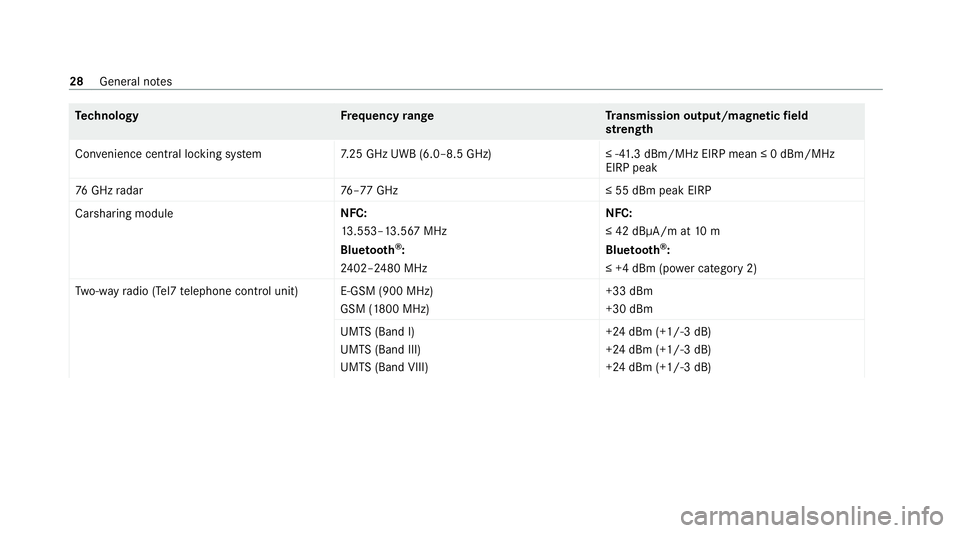
Te
ch nology Frequency rang eT ransmission output/magnetic field
st re ngth
Con venience central lo cking sy stem 7.25 GHz UWB (6.0–8.5 GHz) ≤ -41.3 dBm/MHz EIRP mean ≤ 0 dBm/MHz
EIRP peak
76 GHz radar 76–77 GHz ≤ 55 dBm peak EIRP
Carsharing module NFC:
13
.553–13.567 MHz
Blue tooth ®
:
24 02–2480 MHz NFC:
≤ 42 dBμA/m at
10 m
Blue tooth ®
:
≤ +4 dBm (p ower category 2)
Tw o-w ayradio (Tel7 telephone control unit )E-GSM (900 MHz)
GSM (1800 MHz) +33 dBm
+30 dBm
UMTS (Band I)
UMTS (Band III)
UMTS (Band VIII) +24 dBm (+1/-3 dB)
+24 dBm (+1/-3 dB)
+24 dBm (+1/-3 dB)28
General no tes
Page 34 of 609
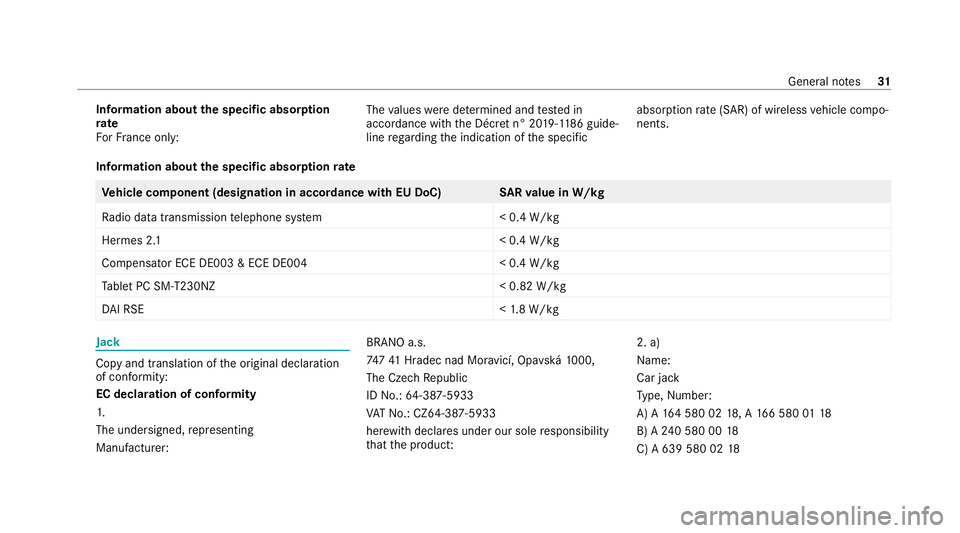
Information about
the specific absor ption
rate
Fo rFr ance on ly: The
values weredeterm ined and tested in
accordance with the Décre t n° 2019-118 6guide‐
line rega rding the indication of the specific absor
ption rate (SAR) of wireless vehicle compo‐
nents.
Information about the specific absor ption rate Ve
hicle comp onent (designation in accordance with EU DoC) SARva lue in W/kg
Ra dio data transmission telephone sy stem < 0.4 W/kg
Hermes 2. 1< 0.4 W/kg
Compensator ECE DE003 & ECE DE004 < 0.4 W/kg
Ta blet PC SM-T230NZ < 0.82 W/kg
DA I RSE <1.8 W/kg Jack
Copy and translation of
the original declaration
of confo rmity:
EC declaration of conformity
1.
The undersigned, representing
Manufacturer: BRANO a.s.
74
741 Hradec nad Mor avicí, Opa vská 1000,
The Czech Republic
ID No.: 64-387-5933
VA T No.: CZ64-387 -5933
her ewith declares under our sole responsibility
th at the product: 2. a)
Na
me:
Car jack
Ty pe, Number:
A) A 164 580 02 18, A 166 580 0118
B) A 240 580 00 18
C) A 639 580 02 18 Gene
ral no tes 31
Page 41 of 609
Depending on
theve hicle equipment, this
includes thefo llowing data, forex ample:
R multimedia data, such as music, films or pho‐
to sfo r playback in an integrated multimedia
sy stem
R address book data for use in connection with
an integrated hands-free sy stem or an inte‐
grated navigation sy stem
R entered navigation destinations
R data about the use of Internet services
These data for con venience and inf otainment
functions may be sa ved locally in theve hicle or
th ey may be located on a device which you ha ve
connected totheve hicle, such as a smartphone,
USB flash drive or MP3 pla yer.If yo u ha ve
entered these data yourself, you can dele tethem
at any time.
This data is transmit ted from theve hicle tothird
parties only at your requ est. This applies, in par‐
ticular, when you use online services in accord‐
ance with the settings that you ha veselected. Smartphone integ
ration (e.g. Android Autoor
Apple CarPlay ®
)
If yo ur vehicle is accordingly equipped, you can
connect your smartphone or ano ther mobile end
device totheve hicle. You can then control them
by means of the control elements integrated in
th eve hicle. Images and audio from the smart‐
phone can be output via the multimedia sy stem.
Cer tain information is simultaneously transfer‐
re dto yo ur smartphone. Depending on the type
and integration, this includes position data, day/
night mode and other general vehicle statuses.
Fo r more information please consult the Owner's
Manual of theve hicle/inf otainment sy stem.
This integration allo ws the use of selected
smartphone apps, such as navigation or music
pla yer apps. There is no fur ther interaction
between the smartphone and theve hicle; in par‐
ticular, vehicle data is not directly accessible.
The type of additional data processing is de ter‐
mined bythe pr ovider of the app being used.
Which settings you can make, if an y,depends on
th e specific app and the operating sy stem of
yo ur smartphone. Online services
Wire
less network connection
If yo ur vehicle has a wireless network connec‐
tion, it enables data tobe exc hanged between
yo ur vehicle and additional sy stems. The wire‐
less network connection is made possible bythe
ve hicle's own transmitter and recei ver or by a
mobile end device that you ha vebrought into the
ve hicle, forex ample, a smartphone. Online func‐
tions can be used via the wireless network con‐
nection. This includes online services and appli‐
cations/apps pr ovided to yo uby the manufac‐
turer or by other pr oviders.
Manu factu rer's se rvices
Re garding the manufacturer's online services,
th e individual functions are described bythe
manufacturer in a suita ble place,forex ample, in
th e Owner's Manual or on the manufacturer's
we bsite, where there leva nt da taprotection
information is also given. Personal data may be
used forth e pr ovision of online services. Data
are exchanged via a secure connection, such as
th e manufacturer's designated IT sy stems. Any
personal data which are collected, processed 38
General no tes
Page 52 of 609
R
Adopt the cor rect seat position and keep
as faraw ay as possible from the airbags.
R Obser vethefo llowing information. #
Alw ays make sure that there are no
objects between the airbag and vehicle
occupant. To
avo idtherisks resulting from the deployment
of an airbag, each vehicle occupant must
obser vethefo llowing information in particular:
R Before starting your journe y,adjust your seat
co rrectly; the driver's seat and front
passenger seat should be mo ved as far back
as possible.
When doing so, alw ays obser vethe informa‐
tion on the cor rect driver's seat position
(/ page 107).
R Only hold thesteering wheel bythesteering
wheel rim. This allow sth e airbag tobe fully
deplo yed.
R Alw ays lean against the seat backrest when
th eve hicle is in motion. Do not lean forw ards
or against the door or side windo w.You may ot
herwise be in the deployment area of the
airbags.
R The occupants must alw ayske ep their feet
on thefloor. Do not put your feet on the
cockpit, forex ample. Your feet may other‐
wise be in the deployment area of the airbag.
R Ifch ildren are tra velling in theve hicle,
obser vethe additional no tes (/ page 58).
R Alw aysstow and secure objects cor rectly.
Objects in theve hicle interior may pr event an
airbag from functioning cor rectly. Each vehicle
occupant must alw ays make sure of thefo llow‐
ing in particular:
R There are no people, animals or objects
between theve hicle occupants and an air‐
bag.
R There are no objects between the seat, door
and door pillar (B-pillar).
R There are no hard objects, e.g. coat hangers,
hanging on the grab handles or coat hooks.
R There are no accessory parts, such as mobile
navigation devices, mobile phones or cup
holders, within the deployment area of an air‐ bag, e.g. on
the cockpit, on the door, on the
side window or on the side trim.
In addition, no connecting cables, tensioning
st ra ps or retaining stra ps must be routed or
attached totheve hicle within the deploy‐
ment area of an airbag. Alw ays comply with
th e accessory manufacturer's ins tallation
instructions and, in particular, the no tes on
suitable places for ins tallation.
R There are no heavy, sharp-edged or fragile
objects in the poc kets of your clo thing. Store
such objects in a suitable place. Limited pr
otection pr ovided byairbags &
WARNING Risk of inju rydue tomodifi‐
cations tothe co ver of an airbag
If yo u modify the co ver of an airbag or af fix
objects such as sticke rs to it,the airbag may
no longer function cor rectly. #
Never modify the co ver of an airbag and
do not af fix objects toit. Occupant saf
ety49
Page 84 of 609
#
Insert emergency key2 into the opening
and lift up co vering 3 and remo veit. #
Repeatedly taptheke y again styour palm
until bat tery 4 falls out of thekey. #
Insert the new battery with the positive pole
fa cing up wards. Use a lint-free clo thtodo so. #
Make sure that the sur face of the battery is
free of lint, grease and other impurities. #
Insert the front tabs of co vering 3 into the
housing and then press on bo thsides to
close it. #
Makesure that co vering 3 is compl etely
closed. #
Insert the front tabs of co ver1 into the
housing and then press until it is comple tely
closed. #
Insert the emer gency key again ( /page 79). Problems with
theke y,troublesho oting Yo
u can no lon ger lo ckor unlock theve hicle
Po ssible causes:
R The key bat tery iswe ak or dischar ged. #
Check the battery using the indicator lamp
(/ page 77). #
Replace theke y bat tery, if necessary
(/ page 79). #
Use there placement key. #
Use the emer gency keyto lock or unlock
(/ page 85). #
Have theke ych ecked at a qualified specialist
wo rkshop.
There is inter fere nce from a po werful radio
signal source
The key function is impaired by,fo rex ample:
R high voltage po wer lines
R mobile phones
R electronic devices (no tebooks, tablets)
R shielding due tome tal objects or induction
loops for electrical gatesystems or auto‐
matic bar riers #
Make sure that there is suf ficient di stance
between theke y and the po tential sou rce of
inter fere nce. Yo
u ha velost a key #
Have theke y deacti vated at a qualified spe‐
cialist workshop. #
If necessar y,ha ve the mechanical lock
re placed as well. Doors
Note
s onthe additional door lock The additional door lock is only
available for
ve hicles forth eUni ted Kingdom. &
WARNING Risk of inju ryto persons
inside theve hicle when the additional
door lock is activated
If th e additional door lock is activated, the
doors can no longer be opened from the
inside. #
Never lea vepersons, in particular chil‐
dren, unat tended in theve hicle. #
Ifth ere are persons in theve hicle, do
not activate the additional door loc k. Opening and closing
81
Page 87 of 609
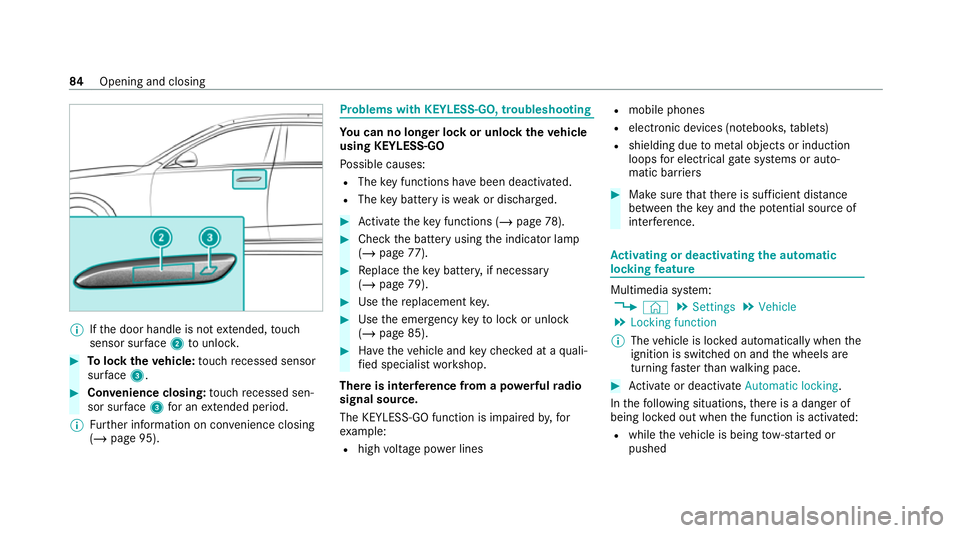
%
Ifth e door handle is not extended, touch
sensor sur face 2 tounlo ck. #
Tolock theve hicle: touch recessed sensor
su rface 3. #
Con venience closing: touch recessed sen‐
sor su rface 3for an extended pe riod.
% Further information on con venience closing
(/ page 95). Problems with
KEYLESS-GO, troubleshooting Yo
u can no lon ger lo ckor unlock theve hicle
using KEYLESS-GO
Po ssible causes:
R The key functions ha vebeen deactivated.
R The key bat tery iswe ak or dischar ged. #
Activate theke y functions (/ page78). #
Check the battery using the indicator lamp
(/ page 77). #
Replace theke y bat tery, if necessary
(/ page 79). #
Use there placement key. #
Use the emer gency keyto lock or unlock
(/ page 85). #
Have theve hicle and keych ecked at a quali‐
fi ed specialist workshop.
There is inter fere nce from a po werful radio
signal source.
The KEYLESS-GO function is impaired by,for
ex ample:
R high voltage po wer lines R
mobile phones
R electronic devices (no tebooks, tablets)
R shielding due tome tal objects or induction
loops for electrical gate systems or auto‐
matic bar riers #
Make sure that there is suf ficient di stance
between theke y and the po tential sou rce of
inter fere nce. Ac
tivating or deactivating the automatic
lo ck ing feature Multimedia sy
stem:
4 © 5
Settings 5
Vehicle
5 Locking function
% The vehicle is loc ked automatically when the
ignition is switched on and the wheels are
turning faster than walking pace. #
Activate or deacti vate Automatic locking .
In thefo llowing situations, there is a danger of
being loc ked out when the function is activated:
R while theve hicle is being tow- star ted or
pushed 84
Opening and closing
Page 137 of 609
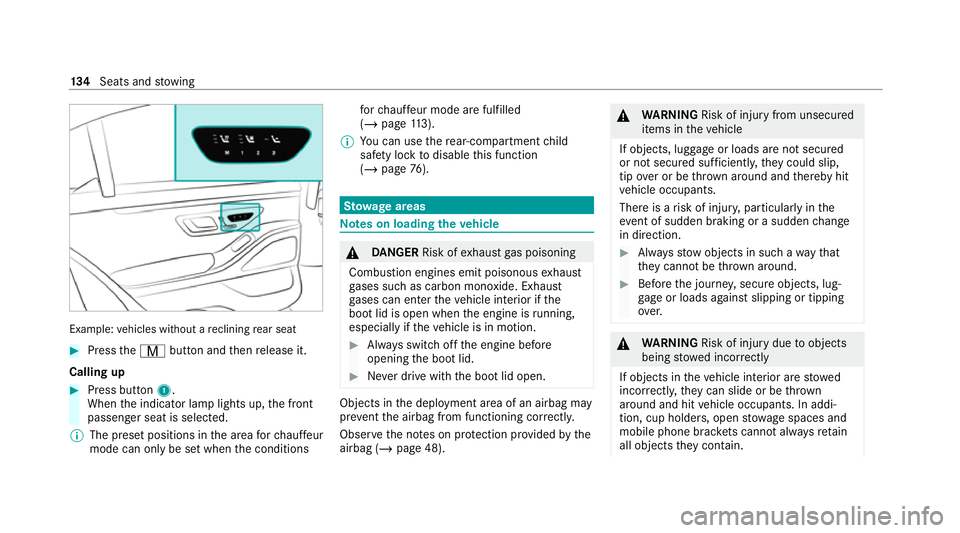
Example:
vehicles without a reclining rear seat #
Press theV button and then release it.
Calling up #
Press button 1.
When the indicator lamp lights up, the front
passenger seat is selected.
% The preset positions in the area forch auf feur
mode can on ly be set when the conditions fo
rch auf feur mode are fulfilled
(/ page 113).
% You can use there ar-compartment child
saf ety lock todisable this function
(/ page 76). St
ow age areas Note
s on loading theve hicle &
DANG ER Risk of exhaust gas poisoning
Combustion engines emit poisonous exhaust
ga ses such as carbon monoxide. Exhaust
ga ses can enter theve hicle interior if the
boot lid is open when the engine is running,
especially if theve hicle is in motion. #
Alw ays switch off the engine before
opening the boot lid. #
Never drive with the boot lid open. Objects in
the deployment area of an airbag may
pr eve ntthe airbag from functioning cor rectly.
Obser vethe no tes on pr otection pr ovided bythe
airbag (/ page 48). &
WARNING Risk of inju ryfrom unsecu red
items in theve hicle
If objects, luggage or loads are not secured
or not secured suf ficientl y,they could slip,
tip ove r or be throw n around and thereby hit
ve hicle occupants.
There is a risk of injur y,particularly in the
ev ent of sudden braking or a sudden change
in direction. #
Alw aysstow objects in such a wayth at
th ey cannot be thro wn around. #
Before the journe y,secure objects, lug‐
ga ge or loads against slipping or tipping
ove r. &
WARNING Risk of inju rydue toobjects
being stowed incor rectly
If objects in theve hicle interior are stowed
incor rectly, they can slide or be thrown
around and hit vehicle occupants. In addi‐
tion, cup holders, open stowage spaces and
mobile phone brac kets cann otalw aysre tain
all objects they contain. 134
Seats and stowing