bulb MERCEDES-BENZ S-CLASS SEDAN 2012 Owners Manual
[x] Cancel search | Manufacturer: MERCEDES-BENZ, Model Year: 2012, Model line: S-CLASS SEDAN, Model: MERCEDES-BENZ S-CLASS SEDAN 2012Pages: 536, PDF Size: 39.39 MB
Page 8 of 536
Basic settingssee Settings
BAS PLUS (Brake Assist System
PLUS) .................................................... 74
Bass, setting ...................................... 139
Battery (SmartKey) Checking .......................................... 85
Important safety notes ....................85
Replacing ......................................... 85
Battery (vehicle)
Charging ........................................ 482
Display message ............................ 407
Important safety notes ..................480
Jump starting ................................. 483
Belt
see Seat belts
Bird's-eye view (navigation) ............. 188
Blind see Roller sunblind
Blind Spot Assist
Activating/deactivating .................387
Notes/function .............................. 363
see Active Blind Spot Assist
BlueTEC (DEF) .................................... 527
Bluetooth ®
Activating/deactivating .................151
Authorizing a device (registering) ..152
Conditions (general) ......................151
Conditions (telephone) ..................199
Connecting another mobile phone . 201
Connecting devices .......................151
De-authorizing (de-registering) a
device ............................................ 153
External authorization (general) .....153
External authorization (telephone) . 201
General information .......................151
Introduction ................................... 197
Receiving vCards ........................... 208
Searching for devices ....................152
Settings ......................................... 151
Telephone basic menu ...................202
Telephony ...................................... 199
Telephony notes ............................ 197
Bluetooth ®
interface
Telephony ...................................... 197
Brake Assist System
see BAS (Brake Assist System) Brake fluid
Display message ............................ 398
Notes ............................................. 529
Brake fluid level ................................ 464
Brake lamps Display message ............................ 404
Brakes
ABS .................................................. 73
BAS .................................................. 74
BAS PLUS ........................................ 74
Brake fluid (notes) .........................529
Display message ............................ 391
Driving tips .................................... 331
High-performance brake system ....333
Important safety notes ..................331
Maintenance .................................. 332
Parking brake ................................ 328
Warning lamp ................................. 424
Breakdown
see Flat tire
see Towing away
Brightness, setting (TV, video) ......... 244
Bulbs see Changing bulbs
C
California Important notice for retail
customers and lessees ....................29
Call
Accepting/ending/rejecting .......... 203
see Telephone
Calling up a malfunction
see Display messages
Calling voicemail ............................... 205
Call lists Displaying details ........................... 209
Introduction ................................... 213
Opening and selecting an entry .....213
Saving an entry in the address
book .............................................. 214
Capacities
see Technical data
Car
see Vehicle
6Index
Page 9 of 536
CareCarpets .......................................... 472
Car wash ........................................ 466
Display ........................................... 470
Exterior lights ................................ 469
Gear or selector lever ....................472
Interior ........................................... 470
Matte finish ................................... 468
Night View Assist Plus ...................471
Notes ............................................. 466
Paint .............................................. 468
Plastic trim .................................... 471
Power washer ................................ 467
Rear view camera .......................... 470
Roof lining ...................................... 472
Seat belt ........................................ 472
Seat cover ..................................... 472
Sensors ......................................... 470
Steering wheel ............................... 472
Tail pipes ....................................... 470
Trim pieces .................................... 472
Washing by hand ........................... 467
Wheels ........................................... 468
Windows ........................................ 469
Wiper blades .................................. 469
Wooden trim .................................. 472
Cargo tie down rings ......................... 437
Car pool lanes .................................... 173
Car wash (care) ................................. 466
Category Satellite radio ................................ 222
CD
Copy protection ............................. 234
Fast forward/fast rewind ...............230
General information .......................234
Inserting ........................................ 225
Inserting/loading (Rear Seat
Entertainment System) ..................255
Mode, switching to ........................226
Multisession .................................. 233
Notes on discs ............................... 234
Operating the player/changer
(on-board computer) ......................381
Pause function ............................... 227
Playback options ........................... 232
Player/changer operation
(COMAND) ..................................... 225Removing/ejecting (Rear Seat
Entertainment System) ..................256
Safety notes .................................. 225
Selecting a media type ..................228
Selecting a track ............................ 229
Sound settings (balance, bass,
fader, treble) .................................. 139
Center console ..................................... 41
Central locking Automatic locking feature
(COMAND) ..................................... 269
Locking/unlocking (SmartKey) ........82
Changing batteries (remote
control, headphones) ........................ 251
Changing bulbs High-beam headlamps (vehicles
with halogen daytime running
lamps) ............................................ 288
High-beam headlamps (vehicles
with LED daylight lamps) ...............288
Important safety notes ..................286
Overview of bulb types ..................287
Changing direction
Announcement phase ....................171
Change of direction phase .............171
Preparation phase .........................171
Character bar ..................................... 133
Characters Entering ......................................... 134
Entering (address book, phone
book) ............................................. 136
Entering (navigation) ......................133
Child-proof locks
Important safety notes ....................70
Rear doors ....................................... 71
Children
In the vehicle ................................... 66
Restraint systems ............................ 66
Child seat
LATCH-type (ISOFIX) child seat
anchors ............................................ 68
Special seat belt retractor ...............68
Top Tether ....................................... 69
Cigarette lighter ................................ 442
Cleaning Mirror turn signal ........................... 470Index7
Page 15 of 536
Opening/closing the garage door ..455
Programming (button in the rear-
view mirror) ................................... 453
Gear indicator (on-board
computer) .......................................... 381
Gear or selector lever (cleaning
guidelines) ......................................... 472
Genuine Mercedes-Benz parts ......... 522
Glove box ........................................... 434
GPS reception .................................... 155
Gracenote Media Database .............. 231
H
Handbrake see Parking brake
Harman/kardon ®
Logic 7 ®
surround sound system see Surround sound (harman/
kardon ®
surround sound system)
Hazard warning lamps ...................... 283
HD Radio™ ......................................... 219
Heading up (navigation) ................... 188
Headlamp cleaning system Notes ............................................. 531
Headlamps
Adding fluid to cleaning system .....464
Cleaning system (function) ............282
Fogging up ..................................... 285
see Automatic headlamp mode
Headphones
Changing batteries ........................251
Function overview ..........................146
Indicator lamp ................................ 147
Selecting a screen .........................146
Switching on/off ........................... 146
Head restraints
Adjusting ....................................... 110
Adjusting (electrically) ...................110
Adjusting (rear) .............................. 111
NECK-PRO ..................................... 110
NECK-PRO luxury ........................... 110
see NECK-PRO head restraints/
NECK-PRO luxury head restraints
Heating
see Climate control
High-beam headlamps
Changing bulbs (vehicles with
halogen daytime running lamps) ....288
Changing bulbs (vehicles with LED
daylight lamps) .............................. 288
Display message ............................ 404
Switching Adaptive Highbeam
Assist on/off ................................. 284
Switching on/off ........................... 283
Hill start assist .................................. 310
HOLD function Display message ............................ 412
Function/notes ............................. 346
Home
see Home address
Home address
Entering and saving .......................160
Selecting from the destination
memory ......................................... 163
Hood
Closing ........................................... 459
Display message ............................ 420
Opening ......................................... 458
Hydroplaning ..................................... 333
I
Ignition lock see Key positions
Immobilizer .......................................... 79
In-car hotspot see Separate operating instructions
Incident (traffic report) ..................... 178
Indicator lamps see Warning and indicator lamps
Indicators
see Turn signals
Insect protection on the radiator .... 459
Instrument cluster Overview .......................................... 37
Warning and indicator lamps ...........38
Instrument lighting
see Instrument cluster lighting
Interface (USB, iPod ®
)
see Media Interface
Interior lighting ......................... 267, 285
Ambient light (COMAND) ...............268
Automatic control ..........................286
Index13
Page 16 of 536
Manual control ............................... 286
Overview ........................................ 285
Reading lamp ................................. 285
Intermediate stop
Deleting ......................................... 166
Entering ......................................... 165
iPod ®
Alphabetical track selection ..........242
Connecting to the Media
Interface ........................................ 238
Selecting a category/playlist .........241
Supported variants ........................238
J
Jack Storage location ............................ 474
Using ............................................. 476
Jump starting (engine) ...................... 483
K
Key see SmartKey
KEYLESS-GO
Convenience closing feature ............97
Locking ............................................ 83
Start/Stop button .......................... 307
Starting the engine ........................309
Unlocking ......................................... 83
Key positions
KEYLESS-GO .................................. 307
SmartKey ....................................... 307
Kickdown
Driving tips .................................... 317
Manual drive program ....................320
L
Lamps see Warning and indicator lamps
Lane-change assistant
see Blind Spot Assist
Lane detection (automatic)
see Lane Keeping Assist
Lane Keeping Assist
Activating/deactivating .................387
Display message ............................ 413
Function/information ....................365
Lap time (RACETIMER) ...................... 382
LATCH-type (ISOFIX) child seat
anchors ................................................ 68
Letter bar see Character bar
License plate lamp (display
message) ............................................ 404
Light function, active Display message ............................ 405
Lighting
see Lights
Lights
Automatic headlamp mode ............281
Cornering light function .................284
Display message ............................ 403
Driving abroad ............................... 280
Fog lamps ...................................... 282
Hazard warning lamps ...................283
High beam flasher .......................... 283
High-beam headlamps ...................283
Light switch ................................... 280
Low-beam headlamps ....................281
Rear fog lamp ................................ 282
Standing lamps .............................. 280
Switching Adaptive Highbeam
Assist on/off ................................. 388
Switching the daytime running
lamps on/off (on-board
computer) ...................................... 387
Switching the daytime running
lamps on/off (switch) ....................281
Turn signals ................................... 283
see Changing bulbs
see Interior lighting
Light sensor (display message) ....... 405
Loading guidelines ............................ 434
Locator lighting setting (COMAND) . 268
Locking see Central locking
Locking (doors)
Automatic ........................................ 89
Emergency locking ........................... 91
From inside (central locking
button) ............................................. 89
Locking centrally
see Central locking
Locking verification signal (on-
board computer) ............................... 38814Index
Page 281 of 536
Useful information ............................280
Exterior lighting ................................ 280
Interior lighting ................................. 285
Replacing bulbs ................................. 286
Windshield wipers ............................289279Lights and windshield wipers
Page 288 of 536
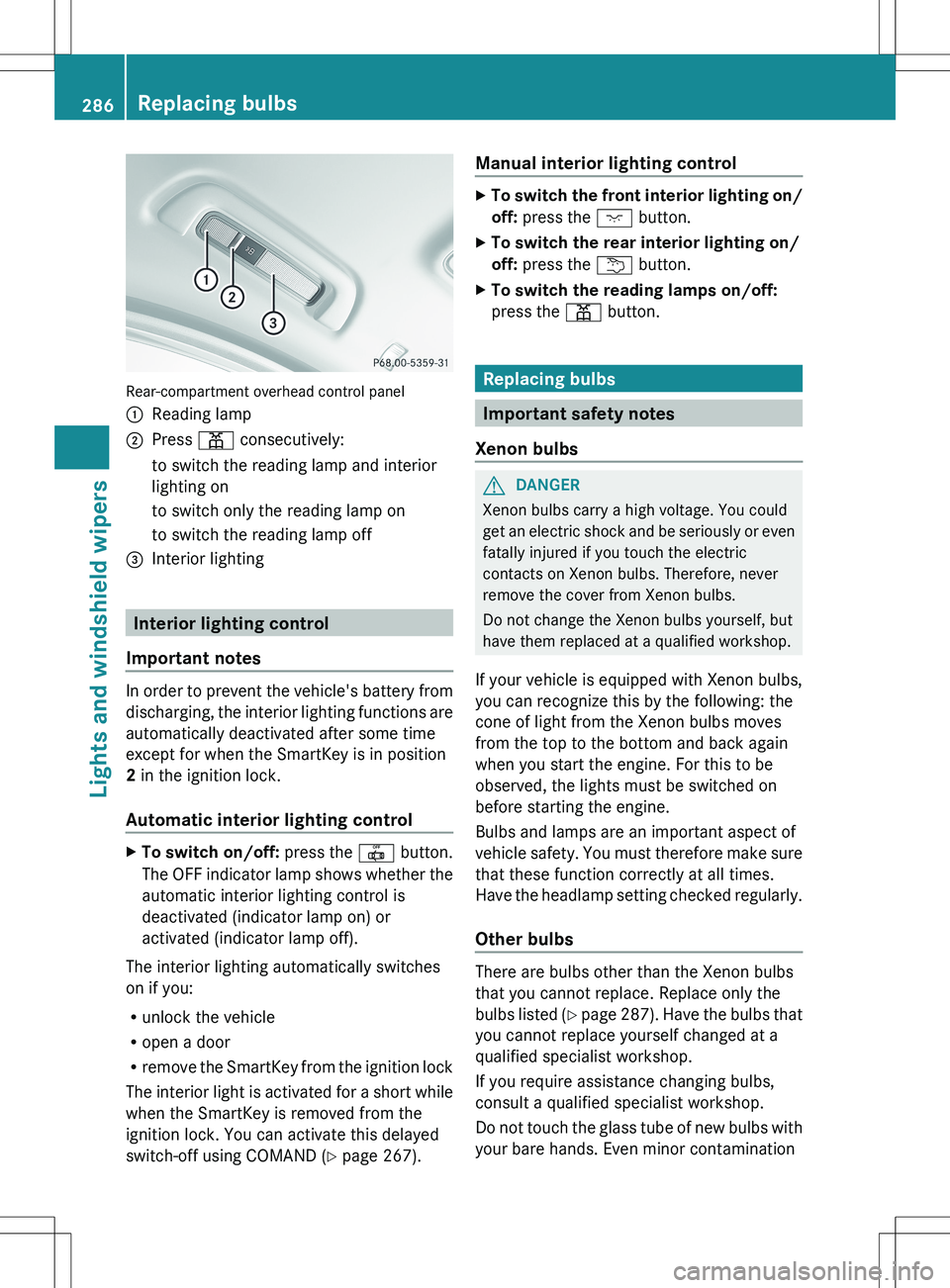
Rear-compartment overhead control panel
:Reading lamp;Press p consecutively:to switch the reading lamp and interior
lighting onto switch only the reading lamp onto switch the reading lamp off=Interior lighting
Interior lighting control
Important notes
In order to prevent the vehicle's battery from
discharging, the interior lighting functions are
automatically deactivated after some time
except for when the SmartKey is in position
2 in the ignition lock.
Automatic interior lighting control
XTo switch on/off: press the | button.
The OFF indicator lamp shows whether the
automatic interior lighting control is
deactivated (indicator lamp on) or
activated (indicator lamp off).
The interior lighting automatically switches
on if you:
R unlock the vehicle
R open a door
R remove the SmartKey from the ignition lock
The interior light is activated for a short while
when the SmartKey is removed from the
ignition lock. You can activate this delayed
switch-off using COMAND ( Y page 267).
Manual interior lighting controlXTo switch the front interior lighting on/
off: press the c button.XTo switch the rear interior lighting on/
off: press the u button.XTo switch the reading lamps on/off:
press the p button.
Replacing bulbs
Important safety notes
Xenon bulbs
GDANGER
Xenon bulbs carry a high voltage. You could
get an electric shock and be seriously or even
fatally injured if you touch the electric
contacts on Xenon bulbs. Therefore, never
remove the cover from Xenon bulbs.
Do not change the Xenon bulbs yourself, but
have them replaced at a qualified workshop.
If your vehicle is equipped with Xenon bulbs,
you can recognize this by the following: the
cone of light from the Xenon bulbs moves
from the top to the bottom and back again
when you start the engine. For this to be
observed, the lights must be switched on
before starting the engine.
Bulbs and lamps are an important aspect of
vehicle safety. You must therefore make sure
that these function correctly at all times.
Have the headlamp setting checked regularly.
Other bulbs
There are bulbs other than the Xenon bulbs
that you cannot replace. Replace only the
bulbs listed (Y page 287). Have the bulbs that
you cannot replace yourself changed at a
qualified specialist workshop.
If you require assistance changing bulbs,
consult a qualified specialist workshop.
Do not touch the glass tube of new bulbs with
your bare hands. Even minor contamination
286Replacing bulbsLights and windshield wipers
Page 289 of 536
can burn into the glass surface and reduce
the service life of the bulbs. Always use a lint-
free cloth or only touch the base of the bulb
when installing.
Only use bulbs of the correct type.
If the new bulb still does not light up, consult
a qualified specialist workshop.
Bulbs and lamps are an important aspect of
vehicle safety. You must therefore make sure
that these function correctly at all times.
Have the headlamp setting checked regularly.GWARNING
Bulbs and lamps can become very hot. For
this reason, allow them to cool down before
changing them. Otherwise, you could burn
yourself when you touch them.
Keep bulbs out of the reach of children.
Otherwise, they could, for example, damage
the bulbs and injure themselves.
Never use a bulb which has been dropped.
Such a bulb may explode and injure you.
Halogen bulbs are pressurized and could
explode when you change them, especially if
they are very hot. You should therefore wear
eye protection and gloves when you are
changing them.
Overview: changing bulbs/bulb types
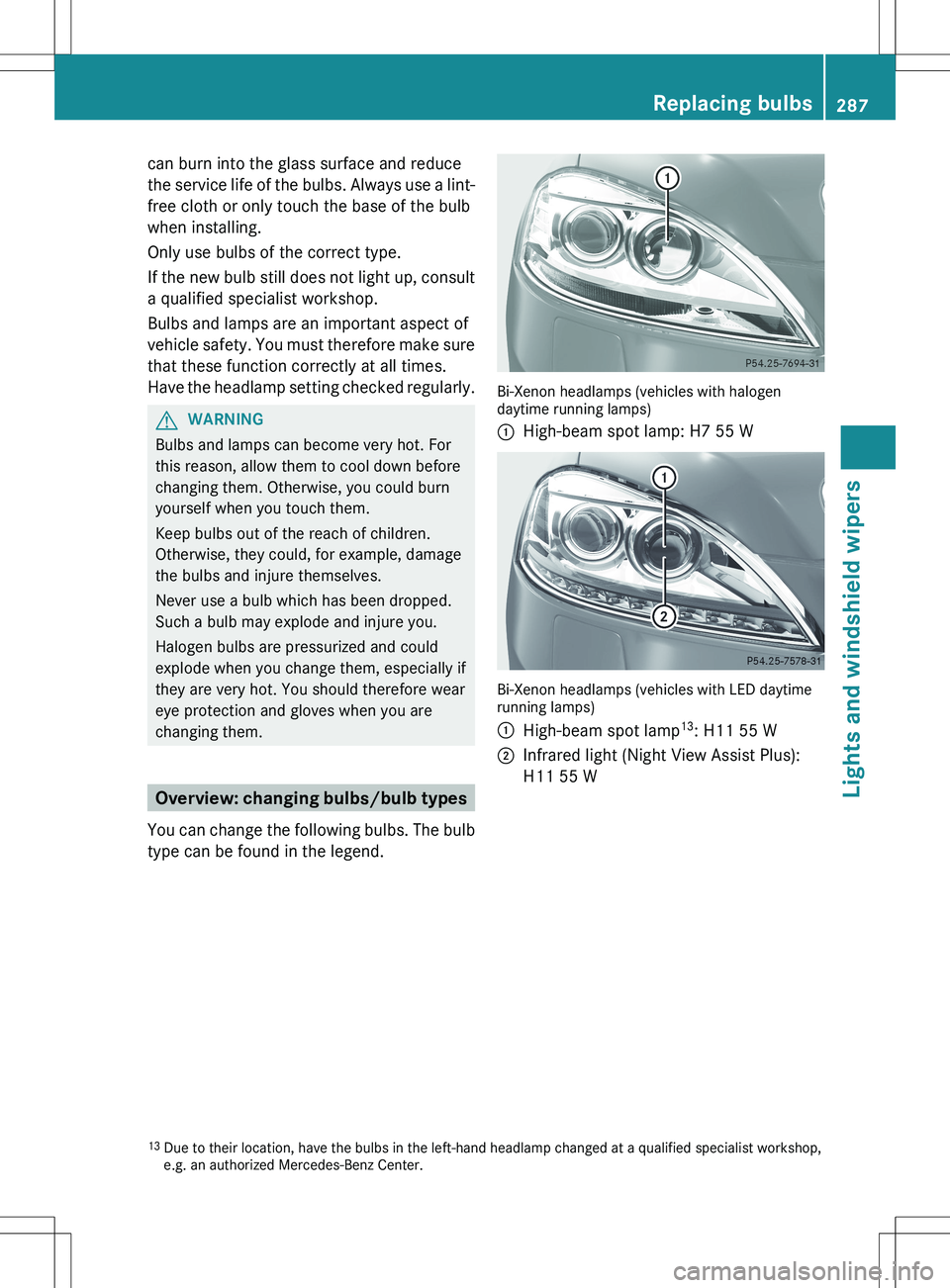
You can change the following bulbs. The bulb
type can be found in the legend.
Bi-Xenon headlamps (vehicles with halogen
daytime running lamps)
:High-beam spot lamp: H7 55 W
Bi-Xenon headlamps (vehicles with LED daytime
running lamps)
:High-beam spot lamp 13
: H11 55 W;Infrared light (Night View Assist Plus):
H11 55 W13 Due to their location, have the bulbs in the left-hand headlamp changed at a qualified specialist workshop,
e.g. an authorized Mercedes-Benz Center.Replacing bulbs287Lights and windshield wipersZ
Page 290 of 536
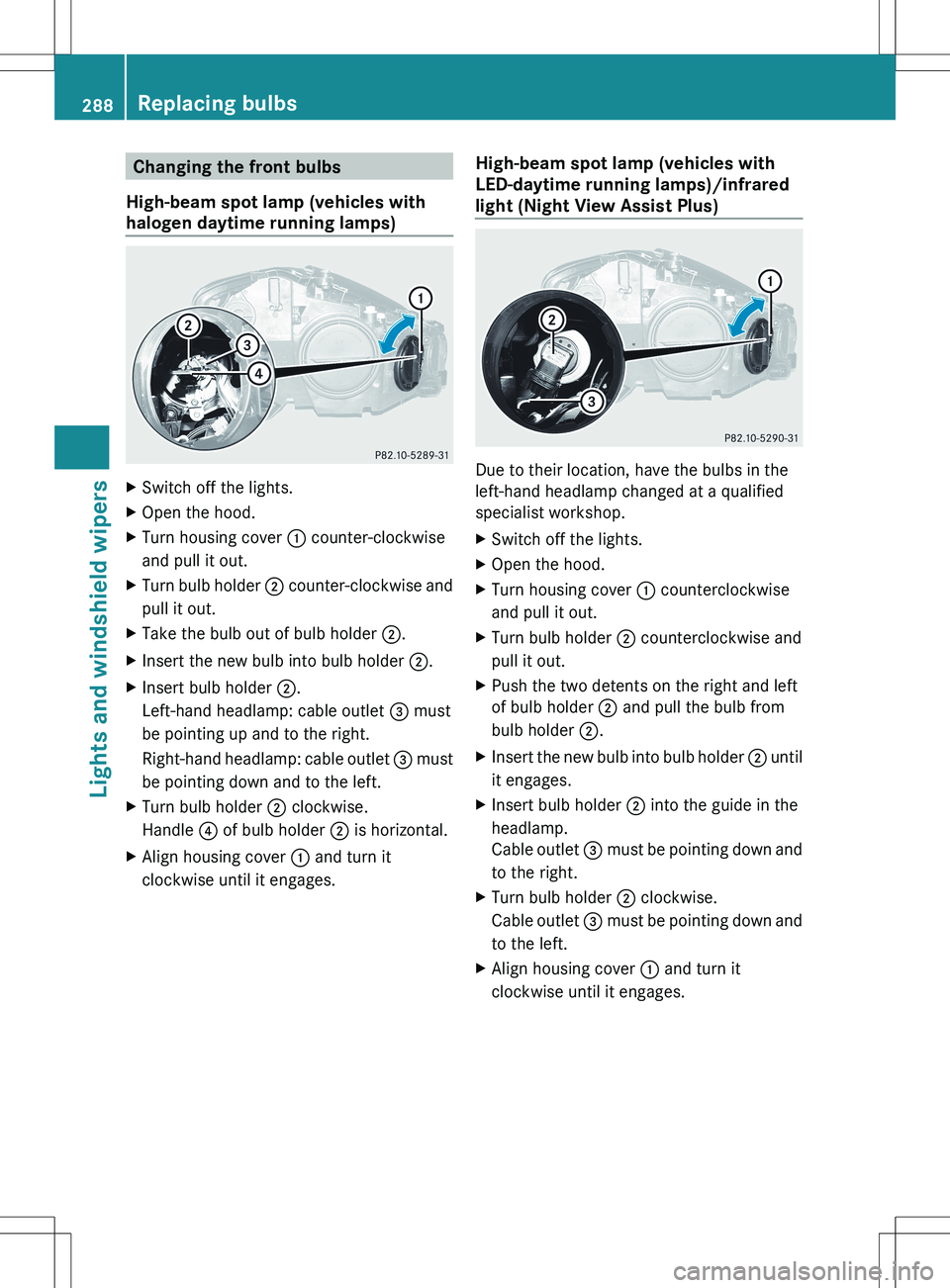
Changing the front bulbs
High-beam spot lamp (vehicles with
halogen daytime running lamps)XSwitch off the lights.XOpen the hood.XTurn housing cover : counter-clockwise
and pull it out.XTurn bulb holder ; counter-clockwise and
pull it out.XTake the bulb out of bulb holder ;.XInsert the new bulb into bulb holder ;.XInsert bulb holder ;.
Left-hand headlamp: cable outlet = must
be pointing up and to the right.
Right-hand headlamp: cable outlet = must
be pointing down and to the left.XTurn bulb holder ; clockwise.
Handle ? of bulb holder ; is horizontal.XAlign housing cover : and turn it
clockwise until it engages.High-beam spot lamp (vehicles with
LED-daytime running lamps)/infrared
light (Night View Assist Plus)
Due to their location, have the bulbs in the
left-hand headlamp changed at a qualified
specialist workshop.
XSwitch off the lights.XOpen the hood.XTurn housing cover : counterclockwise
and pull it out.XTurn bulb holder ; counterclockwise and
pull it out.XPush the two detents on the right and left
of bulb holder ; and pull the bulb from
bulb holder ;.XInsert the new bulb into bulb holder ; until
it engages.XInsert bulb holder ; into the guide in the
headlamp.
Cable outlet = must be pointing down and
to the right.XTurn bulb holder ; clockwise.
Cable outlet = must be pointing down and
to the left.XAlign housing cover : and turn it
clockwise until it engages.288Replacing bulbsLights and windshield wipers
Page 405 of 536
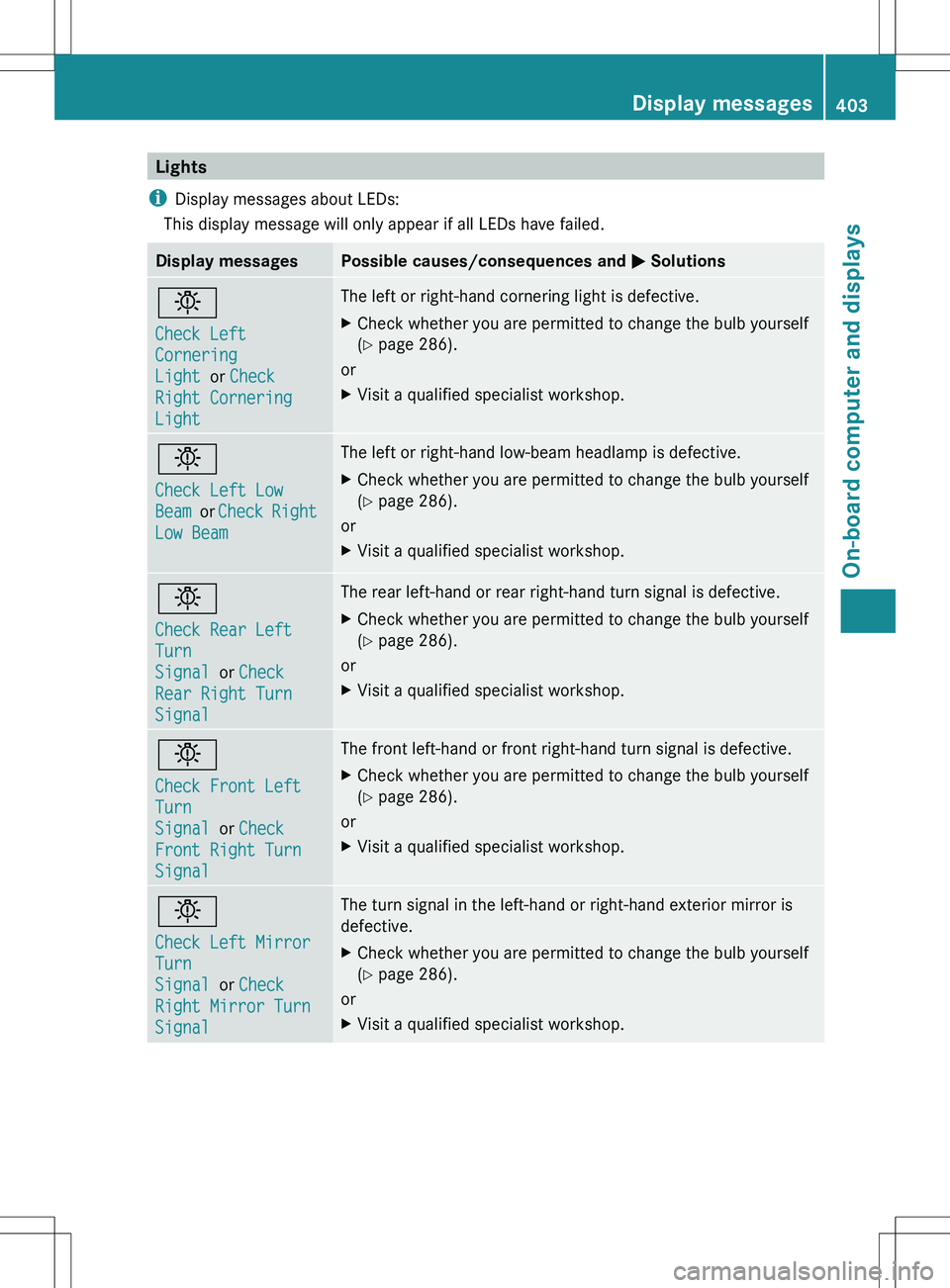
Lights
i Display messages about LEDs:
This display message will only appear if all LEDs have failed.Display messagesPossible causes/consequences and M Solutionsb
Check Left
Cornering
Light or Check
Right Cornering
LightThe left or right-hand cornering light is defective.XCheck whether you are permitted to change the bulb yourself
( Y page 286).
or
XVisit a qualified specialist workshop.b
Check Left Low
Beam or Check Right
Low BeamThe left or right-hand low-beam headlamp is defective.XCheck whether you are permitted to change the bulb yourself
( Y page 286).
or
XVisit a qualified specialist workshop.b
Check Rear Left
Turn
Signal or Check
Rear Right Turn
SignalThe rear left-hand or rear right-hand turn signal is defective.XCheck whether you are permitted to change the bulb yourself
( Y page 286).
or
XVisit a qualified specialist workshop.b
Check Front Left
Turn
Signal or Check
Front Right Turn
SignalThe front left-hand or front right-hand turn signal is defective.XCheck whether you are permitted to change the bulb yourself
( Y page 286).
or
XVisit a qualified specialist workshop.b
Check Left Mirror
Turn
Signal or Check
Right Mirror Turn
SignalThe turn signal in the left-hand or right-hand exterior mirror is
defective.XCheck whether you are permitted to change the bulb yourself
( Y page 286).
or
XVisit a qualified specialist workshop.Display messages403On-board computer and displaysZ
Page 406 of 536
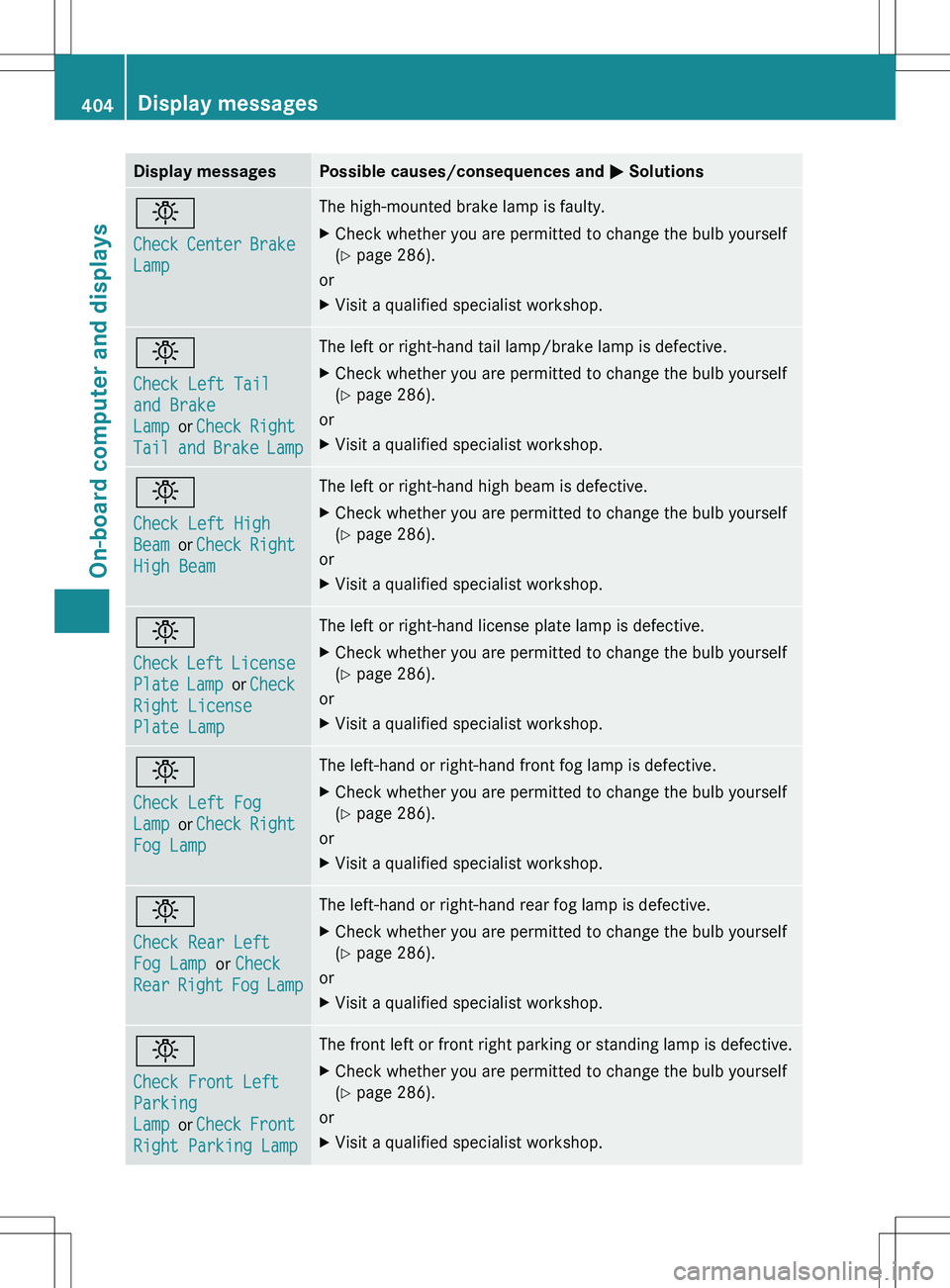
Display messagesPossible causes/consequences and M Solutionsb
Check Center Brake
LampThe high-mounted brake lamp is faulty.XCheck whether you are permitted to change the bulb yourself
( Y page 286).
or
XVisit a qualified specialist workshop.b
Check Left Tail
and Brake
Lamp or Check Right
Tail and Brake LampThe left or right-hand tail lamp/brake lamp is defective.XCheck whether you are permitted to change the bulb yourself
( Y page 286).
or
XVisit a qualified specialist workshop.b
Check Left High
Beam or Check Right
High BeamThe left or right-hand high beam is defective.XCheck whether you are permitted to change the bulb yourself
( Y page 286).
or
XVisit a qualified specialist workshop.b
Check Left License
Plate Lamp or Check
Right License
Plate LampThe left or right-hand license plate lamp is defective.XCheck whether you are permitted to change the bulb yourself
( Y page 286).
or
XVisit a qualified specialist workshop.b
Check Left Fog
Lamp or Check Right
Fog LampThe left-hand or right-hand front fog lamp is defective.XCheck whether you are permitted to change the bulb yourself
( Y page 286).
or
XVisit a qualified specialist workshop.b
Check Rear Left
Fog Lamp or Check
Rear Right Fog LampThe left-hand or right-hand rear fog lamp is defective.XCheck whether you are permitted to change the bulb yourself
( Y page 286).
or
XVisit a qualified specialist workshop.b
Check Front Left
Parking
Lamp or Check Front
Right Parking LampThe front left or front right parking or standing lamp is defective.XCheck whether you are permitted to change the bulb yourself
( Y page 286).
or
XVisit a qualified specialist workshop.404Display messagesOn-board computer and displays