oil type MERCEDES-BENZ S-CLASS SEDAN 2012 Owners Manual
[x] Cancel search | Manufacturer: MERCEDES-BENZ, Model Year: 2012, Model line: S-CLASS SEDAN, Model: MERCEDES-BENZ S-CLASS SEDAN 2012Pages: 536, PDF Size: 39.39 MB
Page 13 of 536
Inserting/loading (Rear Seat
Entertainment System) ..................255
Notes on discs ............................... 234
Removing/ejecting (Rear Seat
Entertainment System) ..................256
Selecting a media type ..................228
Selecting a track ............................ 229
Sound settings (balance, bass,
fader, treble) .................................. 139
DVD audio
Operating (on-board computer) .....381
DVD video
Operating (on-board computer) .....381
E
EASY-ENTRY feature Activating (COMAND) ....................266
Function/notes ............................. 115
EASY-EXIT feature
Activating (COMAND) ....................266
Crash-responsive ........................... 115
Function/notes ............................. 115
EBD (electronic brake force
distribution) Display message ............................ 394
Function/notes ................................ 77
ECO function ...................................... 265
ECO start/stop function Deactivating/activating .................311
General information .......................310
Electrical fuses
see Fuses
Electronic brake force distribution
see EBD (electronic brake force
distribution)
Electronic Stability Program
see ESP ®
(Electronic Stability Program)
Electronic Traction System
see ETS/4ETS (Electronic
Traction System)
Emergency release
Driver's door .................................... 90
Trunk ......................................... 94, 95
Vehicle ............................................. 90
Emergency spare wheel
Storage location ............................ 474
Emergency Tensioning Devices
Function ........................................... 65
Safety guidelines ............................. 49
Emissions control
Service and warranty information ....28
Engine
Check Engine warning lamp ........... 429
Display message ............................ 406
ECO start/stop function ................310
Engine number ............................... 524
Irregular running ............................ 313
Jump-starting ................................. 483
Starting problems ..........................313
Starting the engine with the key ....309
Starting with KEYLESS-GO .............309
Switching off .................................. 327
Tow-starting (vehicle) ..................... 487
Engine electronics
Problem (malfunction) ...................313
Engine emergency stop .................... 490
Engine oil Adding ........................................... 462
Additives ........................................ 529
Checking the oil level ..................... 459
Checking the oil level using the
dipstick .......................................... 460
Checking the oil level using the
on-board computer ........................460
Display message ............................ 408
Filling capacity ............................... 529
Notes about oil grades ................... 528
Notes on oil level/consumption ....459
Temperature (on-board computer) . 381
Viscosity ........................................ 529
Entering the frequency ..................... 217
Entry Deleting ......................................... 135
Saving ............................................ 137
ESP ®
(Electronic Stability
Program) Deactivating/activating .................386
Deactivating/activating (notes) .......76
Display message ............................ 391
ETS/4ETS ........................................ 76
Function/notes ................................ 75
Important safety information ...........75
Warning lamp ................................. 426Index11
Page 19 of 536
Selecting a destination from the
destination memory .......................163
Selecting a destination from the
list of last destinations ................... 163
Selecting your home address ........163
Setting route options (avoiding:
highways, toll roads, tunnels,
ferries) ........................................... 156
Setting the route type (short
route, fast route, dynamic route or
economic route) ............................ 156
Showing/hiding the menu .............156
Starting route calculation ..............160
Switching announcements on/off . 174
Switching to ................................... 155
Traffic report .................................. 178
Troubleshooting ............................. 196
NECK-PRO head restraints
Operation ......................................... 59
Resetting after being triggered ........60
NECK-PRO luxury head restraints
Operation ......................................... 59
Resetting after being triggered ........60
New aluminum style carrier bars
see Separate installation instructions
Night View Assist Plus
Activating/deactivating .................360
Cleaning ......................................... 471
Display message ............................ 410
Function/notes ............................. 360
Problem (malfunction) ...................363
North orientation (navigation) ......... 188
Notes on breaking-in a new
vehicle ................................................ 306
Number keypad ................................. 133
O
Occupant Classification System
(OCS) Faults ............................................... 58
Operation ......................................... 54
System self-test ............................... 57
Occupant safety
Children in the vehicle .....................66
System overview .............................. 48
OCS
Faults ............................................... 58
Operation ......................................... 54
System self-test ............................... 57
Odometer ........................................... 378
see Trip odometer
Off-road .............................................. 177
Oil see Engine oil
On-board computer
AMG menu ..................................... 381
Assistance menu ........................... 385
Audio menu ................................... 380
Displaying a service message ........465
Display messages ..........................390
DISTRONIC PLUS ........................... 343
Important safety notes ..................374
Menu overview .............................. 377
Message memory .......................... 390
Navigation menu ............................ 379
Operation ....................................... 375
RACETIMER ................................... 382
Service menu ................................. 387
Settings menu ............................... 387
Standard display ............................ 378
Telephone menu ............................ 384
Trip menu ...................................... 378
Video DVD operation .....................381
Opening height restriction for
trunk lid .............................................. 269
Operating safety Diagnostics connection ...................31
Operating system
see On-board computer
Outside lighting
Delayed switch-off (COMAND) .......267
Outside temperature display ........... 375
Overhead control panel ...................... 42
Override feature Rear side windows ...........................71
Own address (navigation)
see Home address
P
Paint code number ............................ 523
Paintwork (cleaning instructions) ... 468
Panic alarm .......................................... 72
Index17
Page 467 of 536
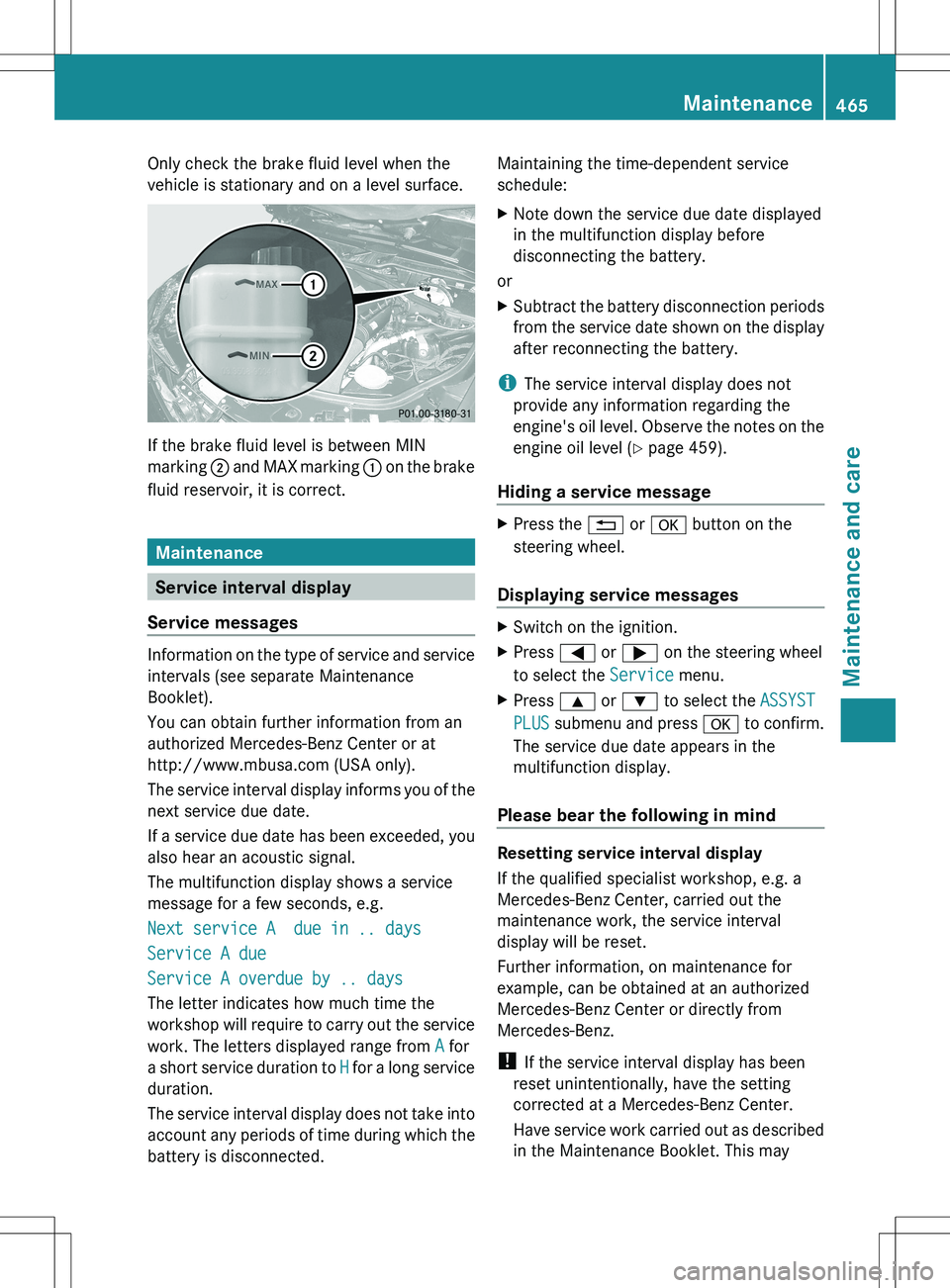
Only check the brake fluid level when the
vehicle is stationary and on a level surface.
If the brake fluid level is between MIN
marking ; and MAX marking : on the brake
fluid reservoir, it is correct.
Maintenance
Service interval display
Service messages
Information on the type of service and service
intervals (see separate Maintenance
Booklet).
You can obtain further information from an
authorized Mercedes-Benz Center or at
http://www.mbusa.com (USA only).
The service interval display informs you of the
next service due date.
If a service due date has been exceeded, you
also hear an acoustic signal.
The multifunction display shows a service
message for a few seconds, e.g.
Next service A due in .. days
Service A due
Service A overdue by .. days
The letter indicates how much time the
workshop will require to carry out the service
work. The letters displayed range from A for
a short service duration to H for a long service
duration.
The service interval display does not take into
account any periods of time during which the
battery is disconnected.
Maintaining the time-dependent service
schedule:XNote down the service due date displayed
in the multifunction display before
disconnecting the battery.
or
XSubtract the battery disconnection periods
from the service date shown on the display
after reconnecting the battery.
i The service interval display does not
provide any information regarding the
engine's oil level. Observe the notes on the
engine oil level ( Y page 459).
Hiding a service message
XPress the % or a button on the
steering wheel.
Displaying service messages
XSwitch on the ignition.XPress = or ; on the steering wheel
to select the Service menu.XPress 9 or : to select the ASSYST
PLUS submenu and press a to confirm.
The service due date appears in the
multifunction display.
Please bear the following in mind
Resetting service interval display
If the qualified specialist workshop, e.g. a
Mercedes-Benz Center, carried out the
maintenance work, the service interval
display will be reset.
Further information, on maintenance for
example, can be obtained at an authorized
Mercedes-Benz Center or directly from
Mercedes-Benz.
! If the service interval display has been
reset unintentionally, have the setting
corrected at a Mercedes-Benz Center.
Have service work carried out as described
in the Maintenance Booklet. This may
Maintenance465Maintenance and careZ
Page 474 of 536
Cleaning the steering wheel and gear or
selector leverXThoroughly wipe with a damp cloth or use
leather care agents that have been
recommended and approved by Mercedes-
Benz.
Cleaning genuine wood and trim
elements
XWipe the wooden trim and trim pieces with
a damp, lint-free cloth, e.g. a microfiber
cloth.XHeavy soiling: use car care and cleaning
products recommended and approved by
Mercedes-Benz.
! Do not use solvent-based cleaning agents
such as tar remover, wheel cleaners,
polishes or waxes. There is otherwise a risk
of damaging the surface.
! Do not use chrome polish on trim pieces.
The trim pieces have a chrome look but are
mostly made of anodized aluminum and
can lose their shine if chrome polish is
used. Use a damp, lint-free cloth instead
when cleaning the trim pieces.
If the chrome-plated trim pieces are very
dirty, you can use a chrome polish. If you
are unsure as to whether the trim pieces
are chrome-plated or not, consult an
authorized Mercedes-Benz Center.
Cleaning the seat covers
! Do not use microfiber cloths to clean
genuine leather, artificial leather or
Alcantara® covers. If used often, these can
damage the cover.
! Observe the following when cleaning:
R clean genuine leather covers carefully
with a damp cloth and then wipe the
covers down with a dry cloth. Make sure
that the leather does not become
soaked. It may otherwise become rough
and cracked. Only use leather care
agents that have been tested and
approved by Mercedes-Benz. You can
obtain these from a qualified specialist
workshop.
R clean artificial leather covers with a cloth
moistened with a solution containing 1%
detergent (e.g. dish washing liquid).
R clean cloth covers with a microfiber cloth
moistened with a solution containing 1%
detergent (e.g. dish washing liquid). Rub
carefully and always wipe entire seat
sections to avoid leaving visible lines.
Leave the seat to dry afterwards.
Cleaning results depend on the type of
dirt and how long it has been there.
R clean Alcantara® covers with a damp
cloth. Make sure that you wipe entire
seat sections to avoid leaving visible
lines.
i Note that regular care is essential to
ensure that the appearance and comfort of
the covers is retained over time.
Cleaning the seat beltsXUse clean, lukewarm water and soap
solution.
! Do not clean the seat belts using chemical
cleaning agents. Do not dry the seat belts
by heating at temperatures above 176 ‡
(80 †) or in direct sunlight.
GWARNING
Do not bleach or dye seat belts as this may
severely weaken them. In a crash, they may
not be able to provide adequate protection.
Cleaning the headliner and carpets
XHeadliner: use a soft brush or a cleaning
agent recommended and approved by
Mercedes-Benz to remove heavy soiling.XCarpets: use the carpet and textile
cleaning agents recommended and
approved by Mercedes-Benz.472CareMaintenance and care