remote control MERCEDES-BENZ S-CLASS SEDAN 2012 Owners Manual
[x] Cancel search | Manufacturer: MERCEDES-BENZ, Model Year: 2012, Model line: S-CLASS SEDAN, Model: MERCEDES-BENZ S-CLASS SEDAN 2012Pages: 536, PDF Size: 39.39 MB
Page 9 of 536
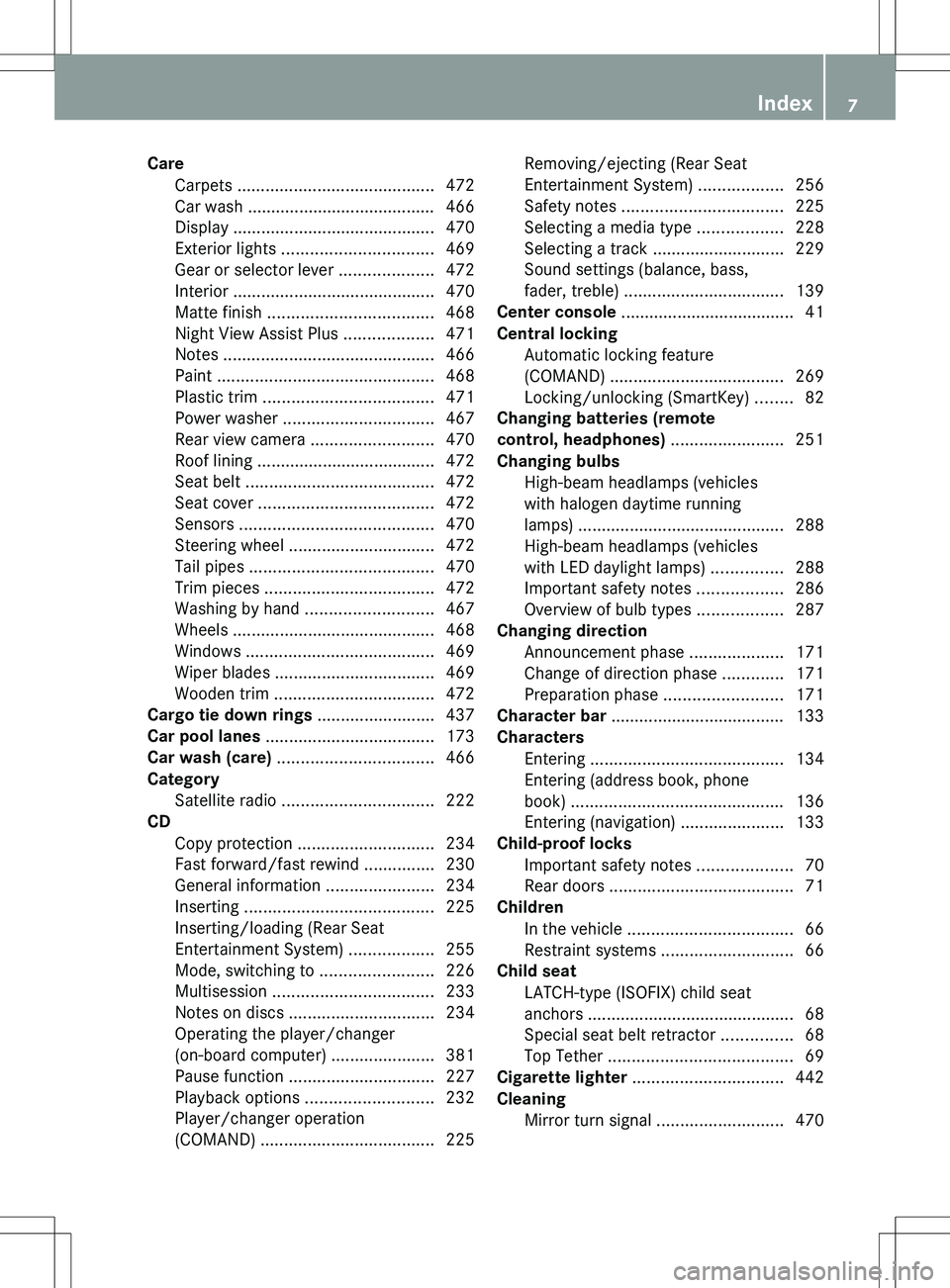
CareCarpets .......................................... 472
Car wash ........................................ 466
Display ........................................... 470
Exterior lights ................................ 469
Gear or selector lever ....................472
Interior ........................................... 470
Matte finish ................................... 468
Night View Assist Plus ...................471
Notes ............................................. 466
Paint .............................................. 468
Plastic trim .................................... 471
Power washer ................................ 467
Rear view camera .......................... 470
Roof lining ...................................... 472
Seat belt ........................................ 472
Seat cover ..................................... 472
Sensors ......................................... 470
Steering wheel ............................... 472
Tail pipes ....................................... 470
Trim pieces .................................... 472
Washing by hand ........................... 467
Wheels ........................................... 468
Windows ........................................ 469
Wiper blades .................................. 469
Wooden trim .................................. 472
Cargo tie down rings ......................... 437
Car pool lanes .................................... 173
Car wash (care) ................................. 466
Category Satellite radio ................................ 222
CD
Copy protection ............................. 234
Fast forward/fast rewind ...............230
General information .......................234
Inserting ........................................ 225
Inserting/loading (Rear Seat
Entertainment System) ..................255
Mode, switching to ........................226
Multisession .................................. 233
Notes on discs ............................... 234
Operating the player/changer
(on-board computer) ......................381
Pause function ............................... 227
Playback options ........................... 232
Player/changer operation
(COMAND) ..................................... 225Removing/ejecting (Rear Seat
Entertainment System) ..................256
Safety notes .................................. 225
Selecting a media type ..................228
Selecting a track ............................ 229
Sound settings (balance, bass,
fader, treble) .................................. 139
Center console ..................................... 41
Central locking Automatic locking feature
(COMAND) ..................................... 269
Locking/unlocking (SmartKey) ........82
Changing batteries (remote
control, headphones) ........................ 251
Changing bulbs High-beam headlamps (vehicles
with halogen daytime running
lamps) ............................................ 288
High-beam headlamps (vehicles
with LED daylight lamps) ...............288
Important safety notes ..................286
Overview of bulb types ..................287
Changing direction
Announcement phase ....................171
Change of direction phase .............171
Preparation phase .........................171
Character bar ..................................... 133
Characters Entering ......................................... 134
Entering (address book, phone
book) ............................................. 136
Entering (navigation) ......................133
Child-proof locks
Important safety notes ....................70
Rear doors ....................................... 71
Children
In the vehicle ................................... 66
Restraint systems ............................ 66
Child seat
LATCH-type (ISOFIX) child seat
anchors ............................................ 68
Special seat belt retractor ...............68
Top Tether ....................................... 69
Cigarette lighter ................................ 442
Cleaning Mirror turn signal ........................... 470Index7
Page 10 of 536
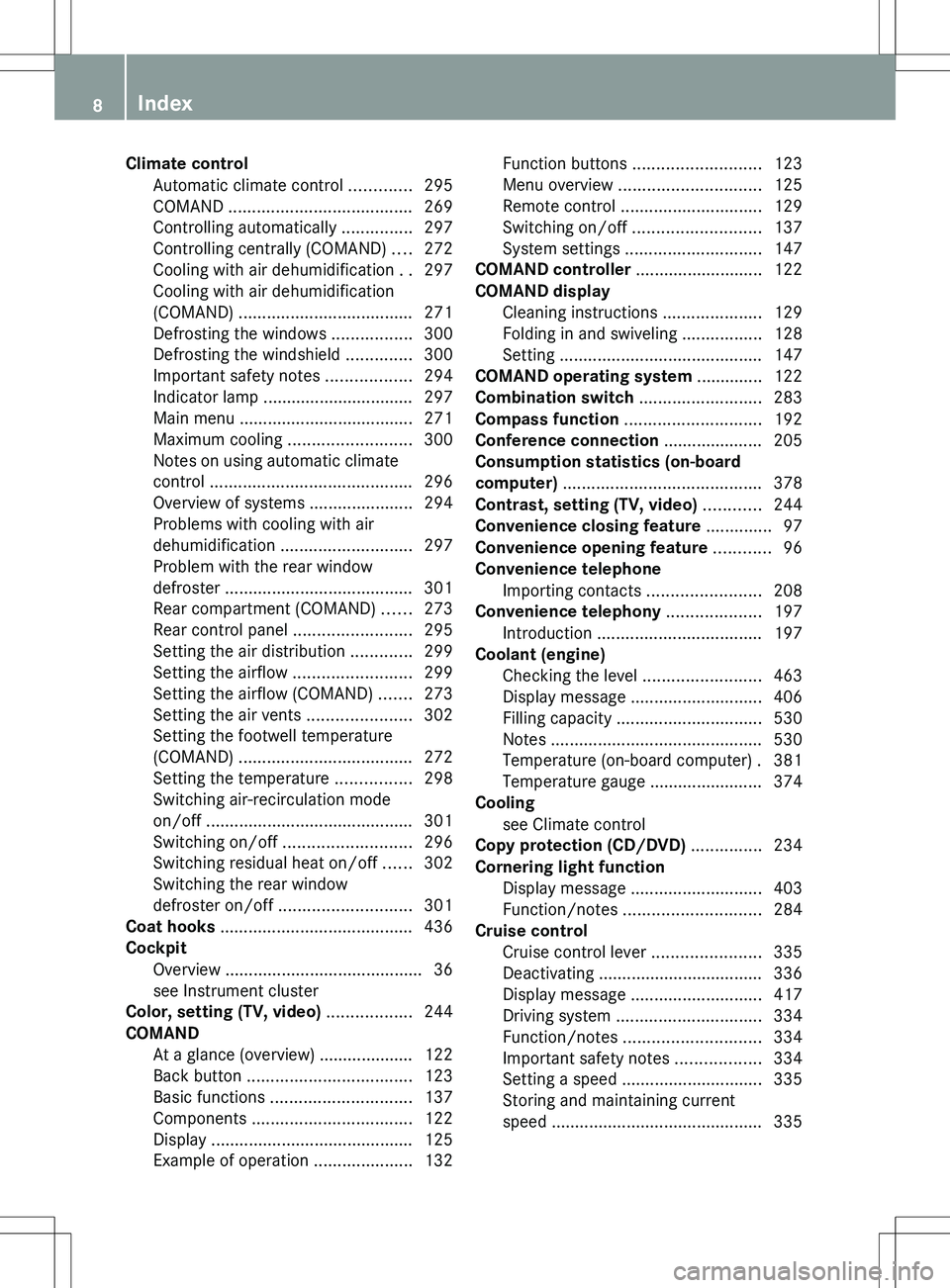
Climate controlAutomatic climate control .............295
COMAND ....................................... 269
Controlling automatically ...............297
Controlling centrally (COMAND) ....272
Cooling with air dehumidification ..297
Cooling with air dehumidification
(COMAND) ..................................... 271
Defrosting the windows .................300
Defrosting the windshield ..............300
Important safety notes ..................294
Indicator lamp ................................ 297
Main menu ..................................... 271
Maximum cooling .......................... 300
Notes on using automatic climate
control ........................................... 296
Overview of systems ......................294
Problems with cooling with air
dehumidification ............................ 297
Problem with the rear window
defroster ........................................ 301
Rear compartment (COMAND) ......273
Rear control panel .........................295
Setting the air distribution .............299
Setting the airflow .........................299
Setting the airflow (COMAND) .......273
Setting the air vents ......................302
Setting the footwell temperature
(COMAND) ..................................... 272
Setting the temperature ................298
Switching air-recirculation mode
on/off ............................................ 301
Switching on/off ........................... 296
Switching residual heat on/off ......302
Switching the rear window
defroster on/off ............................ 301
Coat hooks ......................................... 436
Cockpit Overview .......................................... 36
see Instrument cluster
Color, setting (TV, video) .................. 244
COMAND At a glance (overview) .................... 122
Back button ................................... 123
Basic functions .............................. 137
Components .................................. 122
Display ........................................... 125
Example of operation .....................132Function buttons ........................... 123
Menu overview .............................. 125
Remote control .............................. 129
Switching on/off ........................... 137
System settings ............................. 147
COMAND controller ........................... 122
COMAND display Cleaning instructions .....................129
Folding in and swiveling .................128
Setting ........................................... 147
COMAND operating system .............. 122
Combination switch .......................... 283
Compass function ............................. 192
Conference connection ..................... 205
Consumption statistics (on-board
computer) .......................................... 378
Contrast, setting (TV, video) ............ 244
Convenience closing feature .............. 97
Convenience opening feature ............ 96
Convenience telephone Importing contacts ........................208
Convenience telephony .................... 197
Introduction ................................... 197
Coolant (engine)
Checking the level .........................463
Display message ............................ 406
Filling capacity ............................... 530
Notes ............................................. 530
Temperature (on-board computer) . 381
Temperature gauge ........................ 374
Cooling
see Climate control
Copy protection (CD/DVD) ............... 234
Cornering light function Display message ............................ 403
Function/notes ............................. 284
Cruise control
Cruise control lever .......................335
Deactivating ................................... 336
Display message ............................ 417
Driving system ............................... 334
Function/notes ............................. 334
Important safety notes ..................334
Setting a speed .............................. 335
Storing and maintaining current
speed ............................................. 3358Index
Page 21 of 536
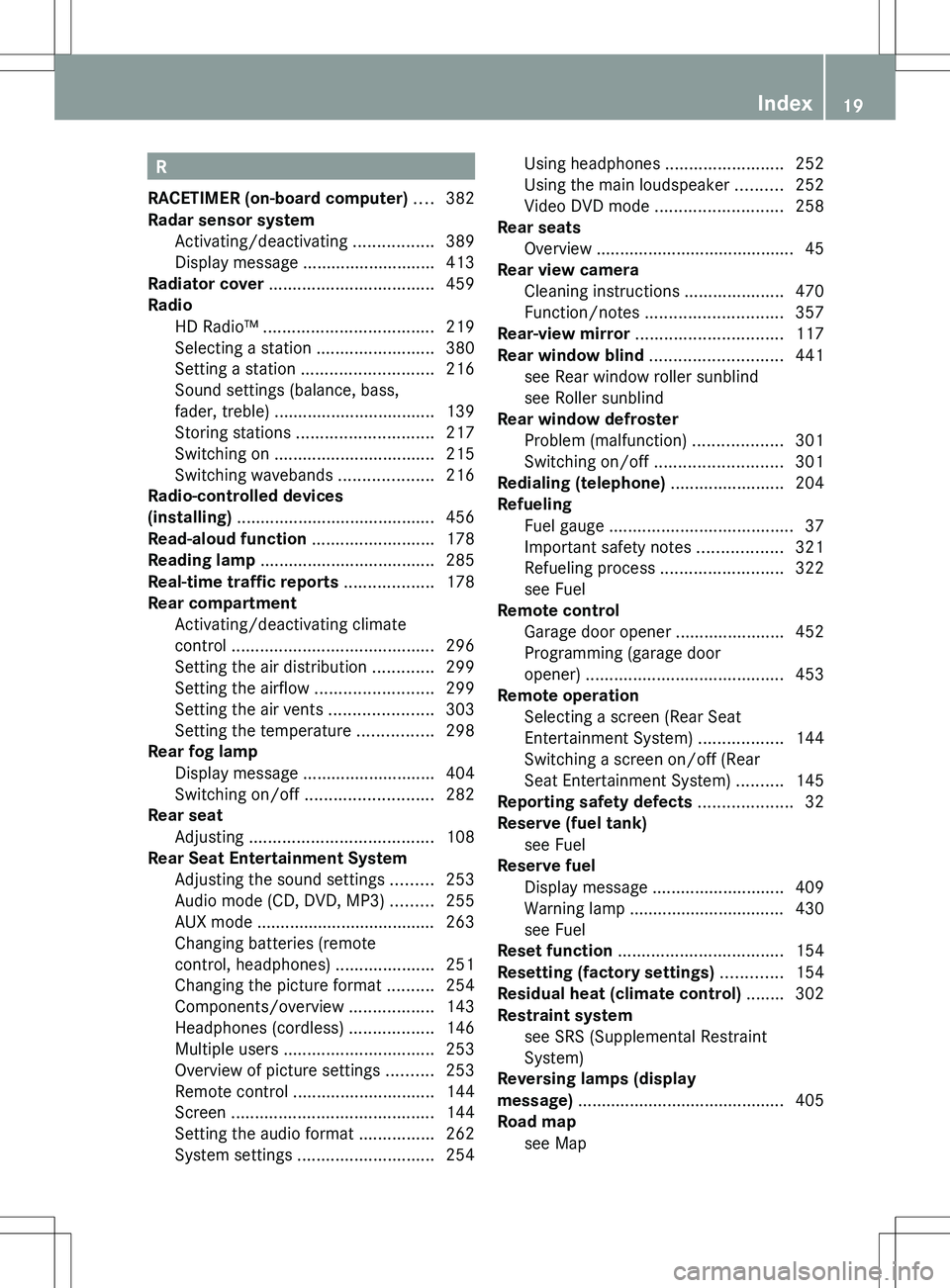
R
RACETIMER (on-board computer) .... 382
Radar sensor system Activating/deactivating .................389
Display message ............................ 413
Radiator cover ................................... 459
Radio HD Radio™ .................................... 219
Selecting a station .........................380
Setting a station ............................ 216
Sound settings (balance, bass,
fader, treble) .................................. 139
Storing stations ............................. 217
Switching on .................................. 215
Switching wavebands ....................216
Radio-controlled devices
(installing) .......................................... 456
Read-aloud function .......................... 178
Reading lamp ..................................... 285
Real-time traffic reports ................... 178
Rear compartment Activating/deactivating climate
control ........................................... 296
Setting the air distribution .............299
Setting the airflow .........................299
Setting the air vents ......................303
Setting the temperature ................298
Rear fog lamp
Display message ............................ 404
Switching on/off ........................... 282
Rear seat
Adjusting ....................................... 108
Rear Seat Entertainment System
Adjusting the sound settings .........253
Audio mode (CD, DVD, MP3) .........255
AUX mode ...................................... 263
Changing batteries (remote
control, headphones) .....................251
Changing the picture format ..........254
Components/overview ..................143
Headphones (cordless) ..................146
Multiple users ................................ 253
Overview of picture settings ..........253
Remote control .............................. 144
Screen ........................................... 144
Setting the audio format ................262
System settings ............................. 254Using headphones .........................252
Using the main loudspeaker ..........252
Video DVD mode ........................... 258
Rear seats
Overview .......................................... 45
Rear view camera
Cleaning instructions .....................470
Function/notes ............................. 357
Rear-view mirror ............................... 117
Rear window blind ............................ 441
see Rear window roller sunblind
see Roller sunblind
Rear window defroster
Problem (malfunction) ...................301
Switching on/off ........................... 301
Redialing (telephone) ........................ 204
Refueling Fuel gauge ....................................... 37
Important safety notes ..................321
Refueling process ..........................322
see Fuel
Remote control
Garage door opener .......................452
Programming (garage door
opener) .......................................... 453
Remote operation
Selecting a screen (Rear Seat
Entertainment System) ..................144
Switching a screen on/off (Rear
Seat Entertainment System) ..........145
Reporting safety defects .................... 32
Reserve (fuel tank) see Fuel
Reserve fuel
Display message ............................ 409
Warning lamp ................................. 430
see Fuel
Reset function ................................... 154
Resetting (factory settings) ............. 154
Residual heat (climate control) ........ 302
Restraint system see SRS (Supplemental Restraint
System)
Reversing lamps (display
message) ............................................ 405
Road map see Map Index19
Page 22 of 536
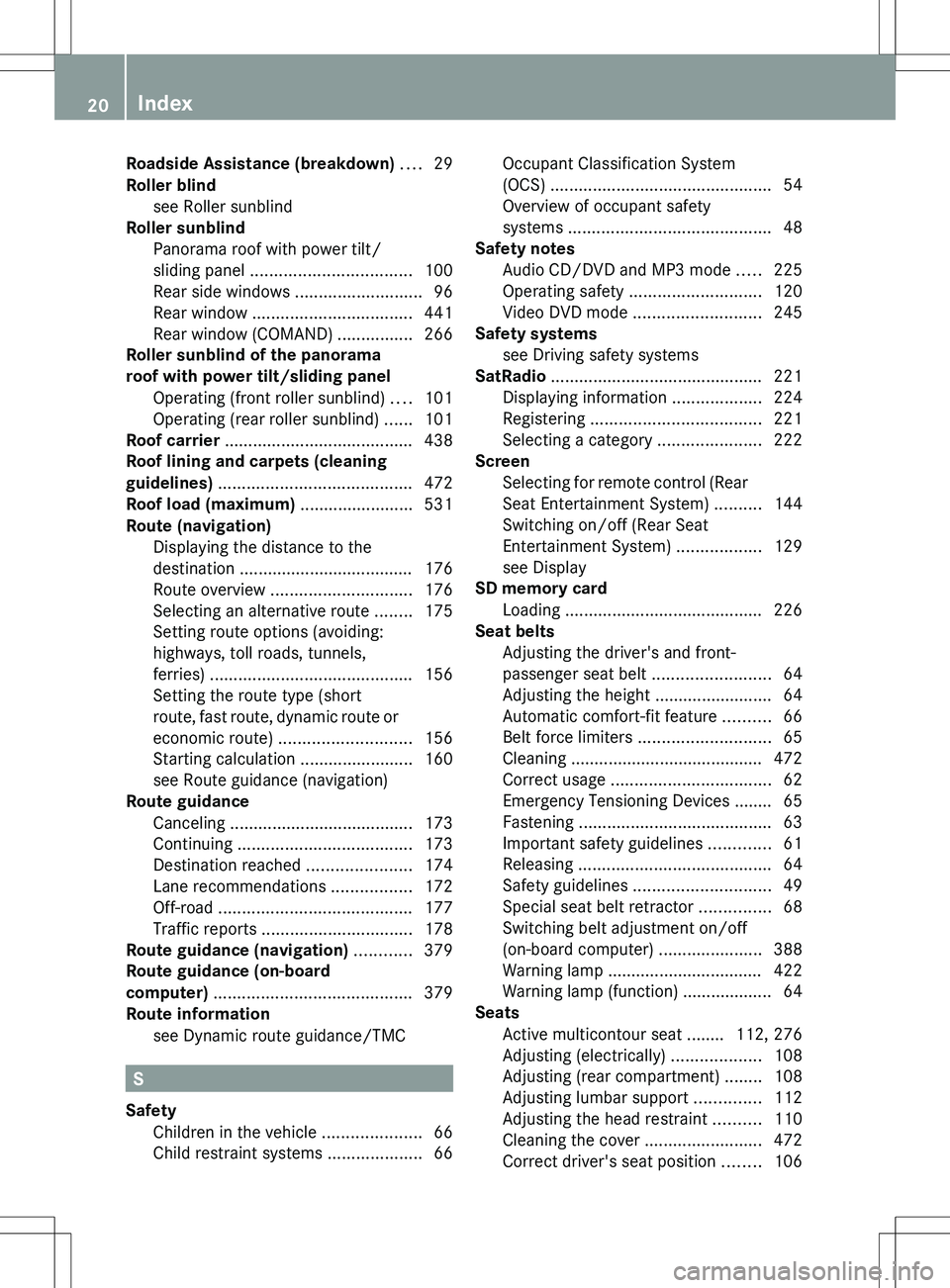
Roadside Assistance (breakdown) .... 29
Roller blind see Roller sunblind
Roller sunblind
Panorama roof with power tilt/
sliding panel .................................. 100
Rear side windows ...........................96
Rear window .................................. 441
Rear window (COMAND) ................266
Roller sunblind of the panorama
roof with power tilt/sliding panel Operating (front roller sunblind) ....101
Operating (rear roller sunblind) ......101
Roof carrier ........................................ 438
Roof lining and carpets (cleaning
guidelines) ......................................... 472
Roof load (maximum) ........................ 531
Route (navigation) Displaying the distance to the
destination ..................................... 176
Route overview .............................. 176
Selecting an alternative route ........175
Setting route options (avoiding:
highways, toll roads, tunnels,
ferries) ........................................... 156
Setting the route type (short
route, fast route, dynamic route or
economic route) ............................ 156
Starting calculation ........................160
see Route guidance (navigation)
Route guidance
Canceling ....................................... 173
Continuing ..................................... 173
Destination reached ......................174
Lane recommendations .................172
Off-road ......................................... 177
Traffic reports ................................ 178
Route guidance (navigation) ............ 379
Route guidance (on-board
computer) .......................................... 379
Route information see Dynamic route guidance/TMC
S
Safety Children in the vehicle .....................66
Child restraint systems ....................66
Occupant Classification System
(OCS) ............................................... 54
Overview of occupant safety
systems ........................................... 48
Safety notes
Audio CD/DVD and MP3 mode .....225
Operating safety ............................ 120
Video DVD mode ........................... 245
Safety systems
see Driving safety systems
SatRadio ............................................. 221
Displaying information ...................224
Registering .................................... 221
Selecting a category ......................222
Screen
Selecting for remote control (Rear
Seat Entertainment System) ..........144
Switching on/off (Rear Seat
Entertainment System) ..................129
see Display
SD memory card
Loading .......................................... 226
Seat belts
Adjusting the driver's and front-
passenger seat belt .........................64
Adjusting the height ......................... 64
Automatic comfort-fit feature ..........66
Belt force limiters ............................ 65
Cleaning ......................................... 472
Correct usage .................................. 62
Emergency Tensioning Devices ........ 65
Fastening ......................................... 63
Important safety guidelines .............61
Releasing ......................................... 64
Safety guidelines ............................. 49
Special seat belt retractor ...............68
Switching belt adjustment on/off
(on-board computer) ......................388
Warning lamp ................................. 422
Warning lamp (function) ................... 64
Seats
Active multicontour seat ........ 112, 276
Adjusting (electrically) ...................108
Adjusting (rear compartment) ........108
Adjusting lumbar support ..............112
Adjusting the head restraint ..........110
Cleaning the cover .........................472
Correct driver's seat position ........10620Index
Page 25 of 536
Switching between picture
formats (TV, video) ............................ 245
Switching between summer time
and standard time ............................. 148
Switching off the alarm (ATA) ............ 79
Switching the hands-free
microphone on/off ............................ 205
Switching wavebands (radio) ........... 216
System settings
Bluetooth ®
..................................... 151
Date ............................................... 148
Language ....................................... 153
Programmable button (COMAND) ..124
Text reader speed ..........................149
Time ............................................... 148
Time zone ...................................... 148
Voice Control System ....................149
T
Tachometer ........................................ 375
Tail lamps Display message ............................ 404
Tank
see Fuel tank
Tank content
Fuel gauge ....................................... 37
Technical data
Notes ............................................. 522
Tires/wheels ................................. 515
Vehicle data ................................... 531
TELEAID
Automatic retrieval of vehicle data
(service due date) ..........................451
Call priority .................................... 449
Display message ............................ 398
Downloading destinations
(COMAND) ..................................... 449
Emergency call .............................. 446
Important safety notes ..................445
Locating a stolen vehicle ...............452
MB info call button ........................448
Remote vehicle locking ..................451
Roadside Assistance button ..........447
Search & Send ............................... 450
Self-test ......................................... 446
System .......................................... 445
Vehicle remote unlocking ..............451
Telephone
Accepting/ending a call ................203
Accepting a call ............................. 384
Adjusting the volume for calls .......138
Basic menu (Bluetooth ®
interface) ....................................... 202
Calling (outgoing call) ....................204
Calling voicemail ............................ 205
Conference connection .................. 205
Connecting a mobile phone
(general information) .....................199
De-authorizing a mobile phone ......202
Ending an active call ......................205
Entering a number .........................204
External authorization
(Bluetooth ®
) ................................... 201
Function restrictions ......................198
General notes ................................ 197
Keypad ........................................... 124
Menu (on-board computer) ............384
Number from the phone book ........ 384
Operating options ..........................198
Overview of functions ....................205
Reception and transmission
volume ........................................... 203
Redialing ........................................ 385
Rejecting/ending a call .................384
Rejecting a call .............................. 203
Rejecting or accepting a waiting
call ................................................. 205
Safety notes .................................. 197
Sending DTMF tones ...................... 207
Switching hands-free microphone
on/off ............................................ 205
Toggling ......................................... 205
Using the telephone ....................... 203
see Bluetooth ®
see Call lists
Telephone mode
Redialing ........................................ 204
Telephone module with
Bluetooth ®
SIM Access Profile
see Separate installation instructions
Temperature
Coolant .......................................... 374
Coolant (on-board computer) ......... 381
Engine oil (on-board computer) ...... 381Index23
Page 28 of 536
Towing away .................................. 485
Transporting .................................. 487
Unlocking (in an emergency) ...........90
Unlocking (SmartKey) ......................82
Vehicle data ................................... 531
Vehicle battery
see Battery (vehicle)
Vehicle data ....................................... 531
Vehicle dimensions ........................... 531
Vehicle emergency locking ................ 91
Vehicle identification number see VIN
Vehicle identification plate .............. 523
Vehicle level Active Body Control (ABC) .............348
AIRMATIC ...................................... 347
Display message ............................ 412
Vehicle level (display message) ....... 411
Vehicle tool kit .................................. 474
Video see Video DVD
Video AUX
Setting the picture .........................244
Video DVD
Automatic picture shutoff ..............244
DVD menu ..................................... 248
Fast forward/rewind ...................... 247
Function restrictions ......................246
Interactive content ........................250
Notes on discs ............................... 245
Operation ....................................... 245
Pause function ............................... 247
Playing conditions .......................... 245
Rear Seat Entertainment System ...258
Safety notes .................................. 245
Selecting ........................................ 247
Selecting a film/title ...................... 248
Selecting a scene/chapter ............247
Setting the audio format ................249
Setting the language ......................249
Setting the picture .........................244
Showing/hiding the control menu . 246
Showing/hiding the menu .............246
Stop function ................................. 247
Subtitles ........................................ 249
Switching to ................................... 246
VIN ...................................................... 523Voice Control System
Settings ......................................... 149
Volume, adjusting
COMAND ....................................... 138
Headphones .................................. 146
Navigation messages .....................138
Using the remote control (Rear
Seat Entertainment System) ..........144
W
Waiting call ........................................ 205
Warning and indicator lamps ABS ................................................ 425
Brakes ........................................... 424
Check Engine ................................. 429
Distance warning ........................... 430
DISTRONIC PLUS ........................... 430
ESP ®
.............................................. 426
ESP ®
OFF ....................................... 427
Fuel tank ........................................ 430
Overview .......................................... 38
PASSENGER AIR BAG OFF
indicator lamp .................................. 54
Reserve fuel ................................... 430
Seat belt ........................................ 422
SRS ................................................ 428
Tire pressure monitor ....................431
Warranty ............................................ 523
Washer fluid Display message ............................ 420
Weather Band
Searching for a channel .................218
Switching on .................................. 218
Wheel bolt tightening torque ........... 479
Wheel chock ...................................... 476
Wheels Changing a wheel .......................... 475
Checking ........................................ 493
Cleaning ......................................... 468
Important safety notes ..................492
Interchanging/changing ................515
Mounting a new wheel ...................478
Removing a wheel ..........................478
Storing ........................................... 515
Tightening torque ........................... 479
Wheel size/tire size .......................515
26Index
Page 45 of 536
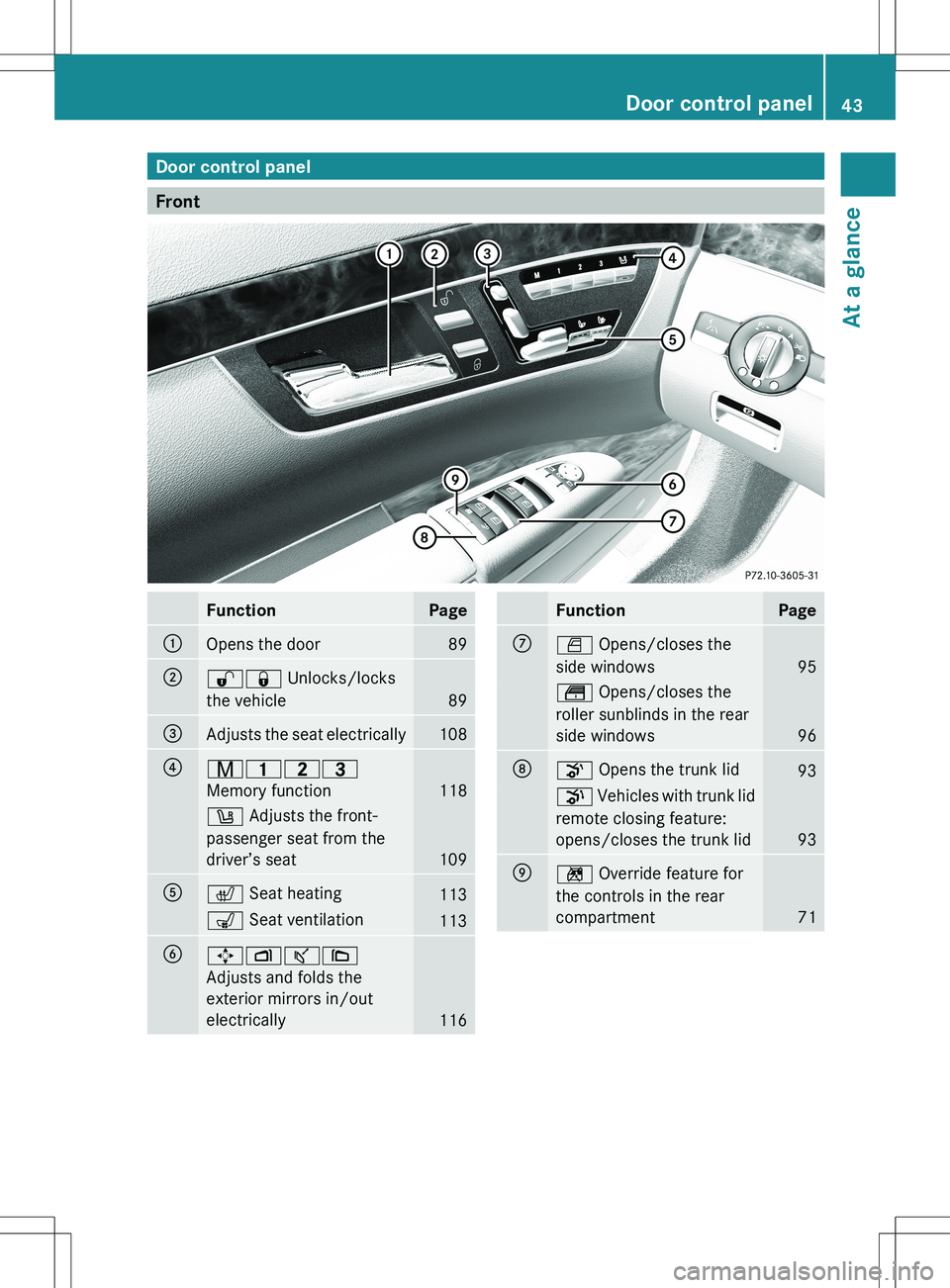
Door control panel
Front
FunctionPage:Opens the door89;%& Unlocks/locks
the vehicle
89
=Adjusts the seat electrically108?r 45=
Memory function
118
w Adjusts the front-
passenger seat from the
driver’s seat
109
Ac Seat heating113s Seat ventilation113B7Zª\
Adjusts and folds the
exterior mirrors in/out
electrically
116
FunctionPageCW Opens/closes the
side windows
95
t Opens/closes the
roller sunblinds in the rear
side windows
96
Do Opens the trunk lid93p Vehicles with trunk lid
remote closing feature:
opens/closes the trunk lid
93
En Override feature for
the controls in the rear
compartment
71
Door control panel43At a glance
Page 89 of 536
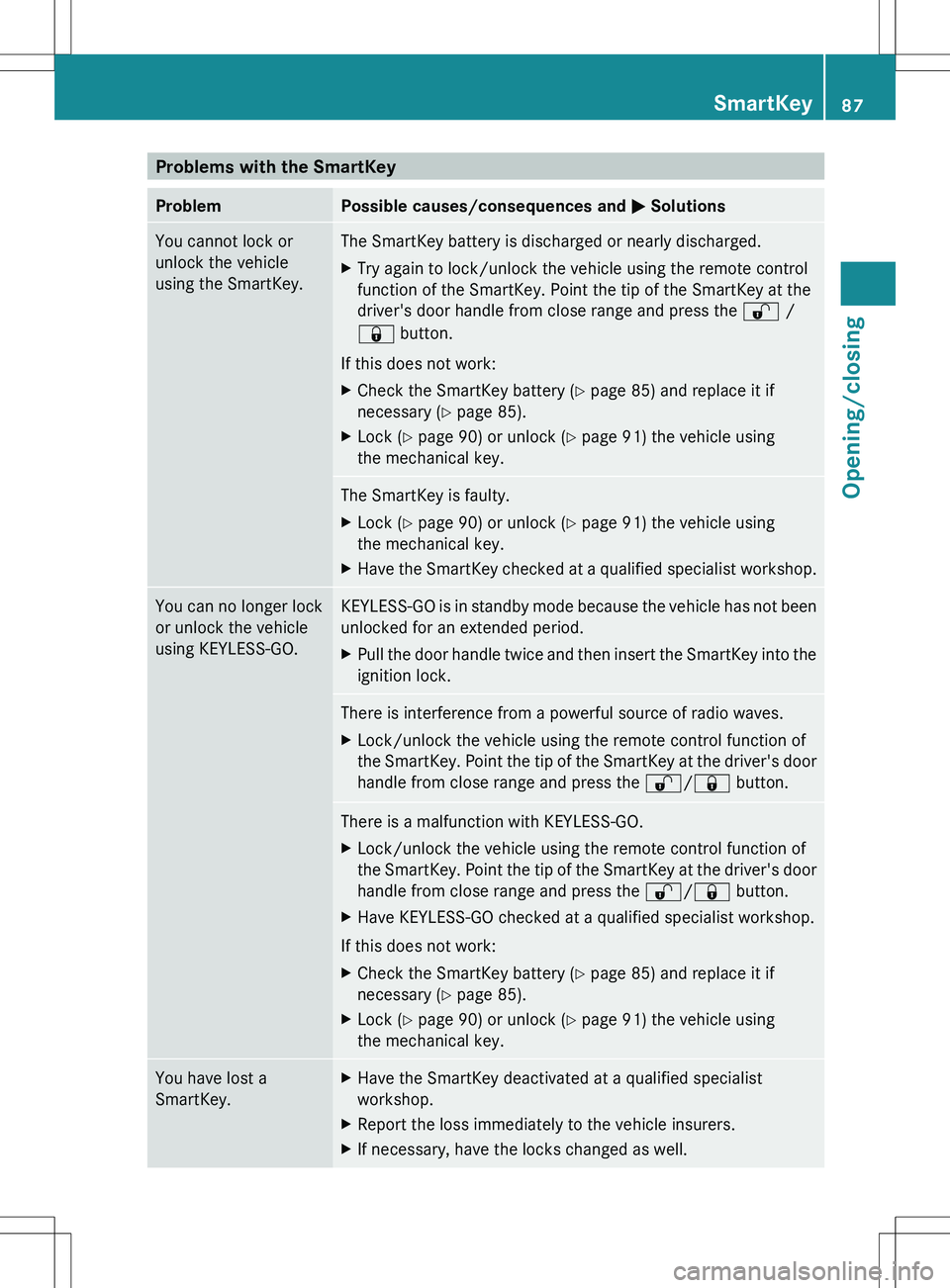
Problems with the SmartKeyProblemPossible causes/consequences and M SolutionsYou cannot lock or
unlock the vehicle
using the SmartKey.The SmartKey battery is discharged or nearly discharged.XTry again to lock/unlock the vehicle using the remote control
function of the SmartKey. Point the tip of the SmartKey at the
driver's door handle from close range and press the % /
& button.
If this does not work:
XCheck the SmartKey battery ( Y page 85) and replace it if
necessary ( Y page 85).XLock ( Y page 90) or unlock ( Y page 91) the vehicle using
the mechanical key.The SmartKey is faulty.XLock ( Y page 90) or unlock ( Y page 91) the vehicle using
the mechanical key.XHave the SmartKey checked at a qualified specialist workshop.You can no longer lock
or unlock the vehicle
using KEYLESS-GO.KEYLESS-GO is in standby mode because the vehicle has not been
unlocked for an extended period.XPull the door handle twice and then insert the SmartKey into the
ignition lock.There is interference from a powerful source of radio waves.XLock/unlock the vehicle using the remote control function of
the SmartKey. Point the tip of the SmartKey at the driver's door
handle from close range and press the %/& button.There is a malfunction with KEYLESS-GO.XLock/unlock the vehicle using the remote control function of
the SmartKey. Point the tip of the SmartKey at the driver's door
handle from close range and press the %/& button.XHave KEYLESS-GO checked at a qualified specialist workshop.
If this does not work:
XCheck the SmartKey battery ( Y page 85) and replace it if
necessary ( Y page 85).XLock ( Y page 90) or unlock ( Y page 91) the vehicle using
the mechanical key.You have lost a
SmartKey.XHave the SmartKey deactivated at a qualified specialist
workshop.XReport the loss immediately to the vehicle insurers.XIf necessary, have the locks changed as well.SmartKey87Opening/closingZ
Page 124 of 536
At a glance
COMAND operating system
Overview
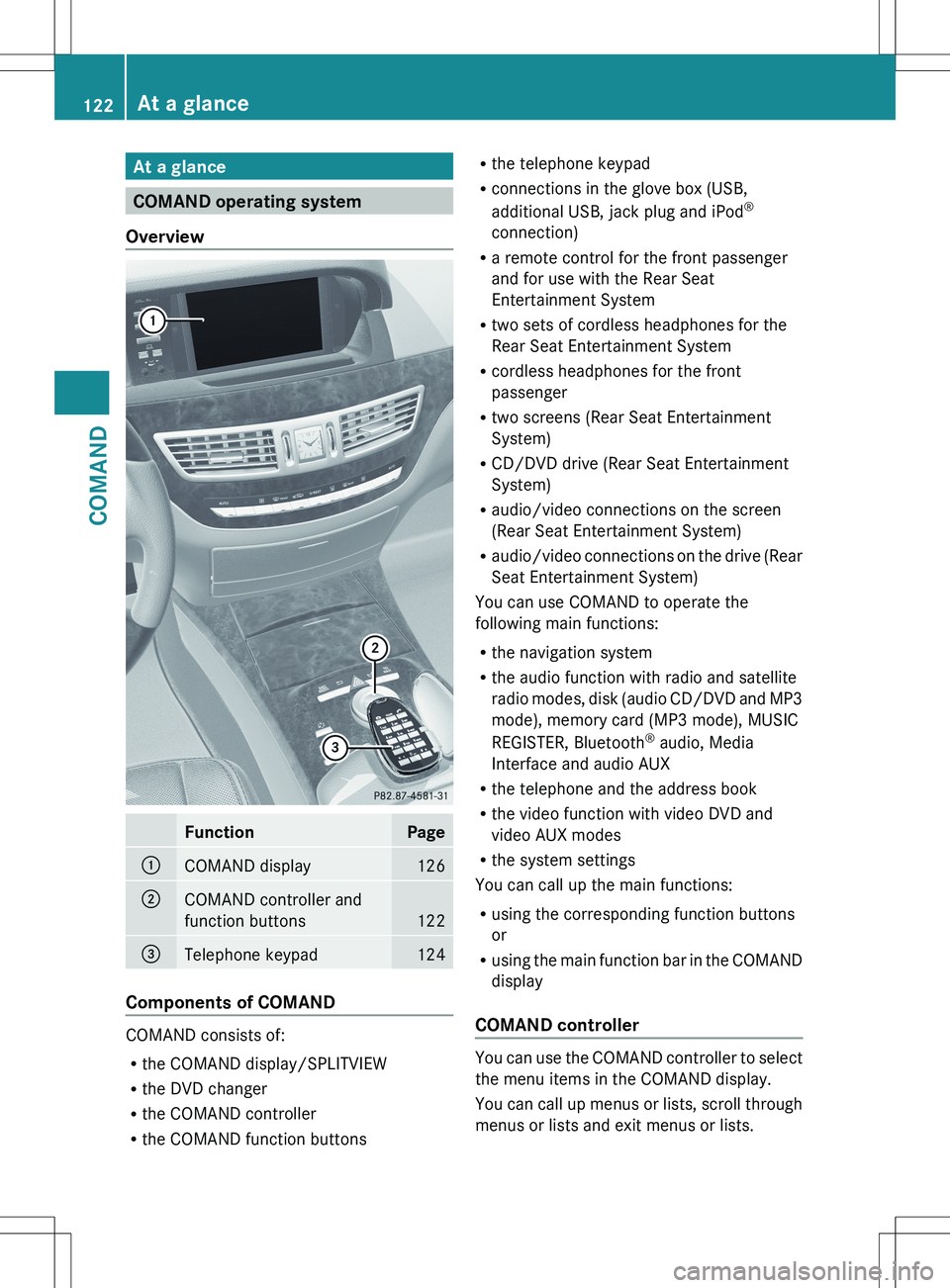
FunctionPage:COMAND display126;COMAND controller and
function buttons
122
=Telephone keypad124
Components of COMAND
COMAND consists of:
R the COMAND display/SPLITVIEW
R the DVD changer
R the COMAND controller
R the COMAND function buttons
R
the telephone keypad
R connections in the glove box (USB,
additional USB, jack plug and iPod ®
connection)
R a remote control for the front passenger
and for use with the Rear Seat
Entertainment System
R two sets of cordless headphones for the
Rear Seat Entertainment System
R cordless headphones for the front
passenger
R two screens (Rear Seat Entertainment
System)
R CD/DVD drive (Rear Seat Entertainment
System)
R audio/video connections on the screen
(Rear Seat Entertainment System)
R audio/video connections on the drive (Rear
Seat Entertainment System)
You can use COMAND to operate the
following main functions:
R the navigation system
R the audio function with radio and satellite
radio modes, disk (audio CD/DVD and MP3
mode), memory card (MP3 mode), MUSIC
REGISTER, Bluetooth ®
audio, Media
Interface and audio AUX
R the telephone and the address book
R the video function with video DVD and
video AUX modes
R the system settings
You can call up the main functions:
R using the corresponding function buttons
or
R using the main function bar in the COMAND
display
COMAND controller
You can use the COMAND controller to select
the menu items in the COMAND display.
You can call up menus or lists, scroll through
menus or lists and exit menus or lists.
122At a glanceCOMAND
Page 129 of 536
For example, the "Navi" function can be used
from the driver's side while the "Video"
function is used on the front-passenger side.
Use the remote control to operate COMAND
from the front-passenger side with
SPLITVIEW.
Please bear the following in mind
R Your vehicle may be equipped with
SPLITVIEW, depending on its date of
production. The use of SPLITVIEW is
currently not permitted in the following
states: AL, AZ, CO, IL, LA, MA, MD, NH, PA,
VA, VT, WA, WI, and WV or in the Canadian
provinces of Manitoba, Newfoundland,
New Brunswick, and Prince Edward Island.
It is the driver's responsibility to observe
ALL regional legally prescribed regulations.
If your vehicle is registered in a state or
province in which SPLITVIEW is not
approved, this function must be
deactivated. Please contact an authorized
specialist dealer to check whether
SPLITVIEW is approved in your state or
province.
R Volume adjustment for the cordless
headphones can be carried out on the
headphones. Before putting on the
headphones, make sure that the volume
has not been set too high.
R The remote control can be used for the
volume adjustment of corded headphones.
R You can only use media from the driver's
and front-passenger sides separately if the
media are from different sources. Example:
on the driver's side, an audio CD is being
played by the DVD changer. This means
that on the front-passenger side, the DVD
changer cannot be used to play a different
disc type, for instance a video DVD.
However, other media can be used at the
same time on the front-passenger side,
including radio, memory card, MUSIC
REGISTER, Media Interface, USB or AUX.
R If you use the same medium on both sides,
settings for this medium can be carried out
from either side.R There must be intervisibility between the
headphones and the display so that
COMAND can optimally transmit music and
speech via the infrared signal on the front-
passenger's headphones. For this reason,
please also observe that the headphones
have left and right sides, and use them
correctly.
R Only entertainment functions, i.e. audio
and video, can be used separately via
SPLITVIEW.
R The multifunction steering wheel can only
be used for functions which relate to the
driver's side.
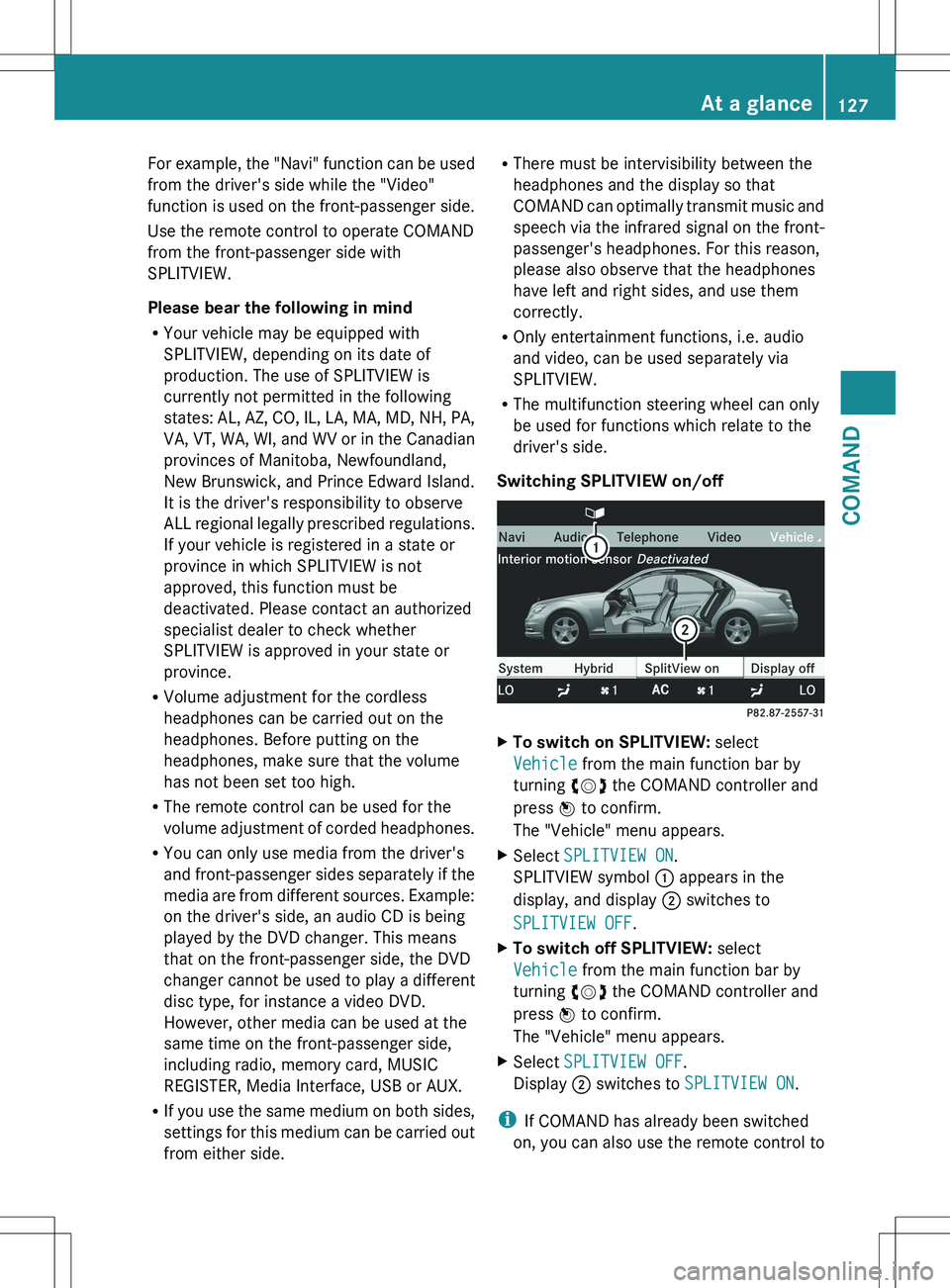
Switching SPLITVIEW on/offXTo switch on SPLITVIEW: select
Vehicle from the main function bar by
turning cVd the COMAND controller and
press W to confirm.
The "Vehicle" menu appears.XSelect SPLITVIEW ON .
SPLITVIEW symbol : appears in the
display, and display ; switches to
SPLITVIEW OFF .XTo switch off SPLITVIEW: select
Vehicle from the main function bar by
turning cVd the COMAND controller and
press W to confirm.
The "Vehicle" menu appears.XSelect SPLITVIEW OFF .
Display ; switches to SPLITVIEW ON .
i
If COMAND has already been switched
on, you can also use the remote control to
At a glance127COMANDZ