Engine light MERCEDES-BENZ S-CLASS SEDAN 2013 User Guide
[x] Cancel search | Manufacturer: MERCEDES-BENZ, Model Year: 2013, Model line: S-CLASS SEDAN, Model: MERCEDES-BENZ S-CLASS SEDAN 2013Pages: 536, PDF Size: 24.14 MB
Page 71 of 536
R
ADAPTIVE BRAKE
R PRE-SAFE ®
Brake Important safety notes
G
WARNING
The following factors increase the risk of
accidents:
R Excessive speed, especially in turns
R Wet and slippery road surfaces
R Following another vehicle too closely
The driving safety systems described in this
section cannot reduce these risks or prevent
the
natural laws of physics from acting on the
vehicle. They cannot increase braking or
steering efficiency beyond that afforded by
the condition of the vehicle brakes and tires
or the traction afforded.
Only a safe, attentive, and skillful driver can
prevent accidents.
The capabilities of a vehicle equipped with the
driving safety systems described in this
section must never be exploited in a reckless
or dangerous manner which could jeopardize
the user's safety or the safety of others.
Always adjust your driving style to the
prevailing road and weather conditions and
keep a safe distance to other road users and
objects on the street.
If a driving system malfunctions, other driving
safety systems may also switch off. Observe
indicator and warning lamps that may come
on as well as messages in the multifunction
display that may appear. G
WARNING
HYBRID vehicles: It is imperative that you read
the HYBRID Supplemental Operating
Instructions
included in your vehicle literature
portfolio. You may otherwise not receive all
necessary safety information and warning for
the operation of your vehicle.
i Please note that the driving safety
systems described only work as effectively as possible when there is adequate contact
between
the tires and the road surface. Pay
particular attention to the information
regarding tires, recommended minimum
tire tread depths etc. in the "Wheels and
tires" section (Y page 490).
In wintry driving conditions, always use
winter tires (M+S tires) and if necessary,
snow chains. Only in this way will the
driving safety systems described in this
section work as effectively as possible. ABS (Anti-lock Braking System)
Important safety notes i
Observe the "Important safety notes"
section ( Y page 69).
ABS regulates brake pressure in such a way
that the wheels do not lock when you brake.
This allows you to continue steering the
vehicle when braking.
ABS works from a speed of about
5 mph
(8 km/h) upwards, regardless of road-
surface conditions. ABS works on slippery
surfaces, even when you only brake gently. G
WARNING
If the ABS malfunctions, other driving systems
such
as the BAS or the ESP ®
are also switched
off. Observe indicator and warning lamps that
may come on as well as messages in the
multifunction display that may appear.
If the ABS malfunctions, the wheels may lock
during hard braking, reducing the steering
capability and extending the braking distance.
The ! warning lamp in the instrument
cluster lights up when the ignition is switched
on. It goes out when the engine is running.
Braking If ABS intervenes when braking, you will feel
a pulsing in the brake pedal. Driving safety systems
69
Safety Z
Page 75 of 536
When you deactivate ESP
®
:
R ESP ®
no longer improves driving stability.
R the
engine's torque is no longer limited and
the drive wheels can spin. The spinning of
the wheels results in a cutting action, which
provides better grip.
R traction control is still activated.
R ESP ®
still provides support when you
brake.
If ESP ®
is deactivated and one or more wheels
start to spin, the ÷ ESP®
warning lamp in
the instrument cluster flashes. In such
situations, ESP ®
will not stabilize the vehicle.
X To deactivate: (Y page 384).
The å ESP ®
OFF warning lamp in the
instrument cluster lights up. G
WARNING
When the å ESP®
OFF warning lamp is lit,
ESP ®
is deactivated.
If the ÷ ESP ®
warning lamp and the
å ESP ®
OFF warning lamp remain lit,
ESP ®
is not available due to a malfunction.
When ESP ®
is deactivated or not operational,
vehicle stability in standard driving
maneuvers is reduced.
Adapt your speed and driving to the prevailing
road conditions and to the non-operating
status of the ESP ®
.
! Avoid spinning the driven wheels for an
extended period with ESP ®
deactivated.
You could otherwise damage the drivetrain.
X To activate: (Y page 384).
The å ESP ®
OFF warning lamp in the
instrument cluster goes out. EBD (electronic brake force
distribution)
i Observe the "Important safety notes"
section ( Y page 69). EBD monitors and controls the brake
pressure on the rear wheels to improve
driving stability while braking. G
WARNING
If EBD has malfunctioned, the braking system
remains available with full brake boosting
effect.
However, the rear wheels can still lock,
e.g. under full braking. This could cause you
to lose control of your vehicle and cause an
accident. You should therefore adapt your
driving style to the different handling
characteristics.
X Observe the notes on warning and indicator
lamps ( Y page 423) as well as display
messages ( Y page 392). ADAPTIVE BRAKE
ADAPTIVE BRAKE enhances braking safety
and offers increased braking comfort. In
addition to the braking function, ADAPTIVE
BRAKE also has the HOLD function
(Y page 342) and hill start assist
(Y page 306). For further information, see
Driving tips (Y page 327). PRE-SAFE
®
Brake
PRE-SAFE ®
Brake is only available in vehicles
with DISTRONIC PLUS.
i Observe the "Important safety notes"
section ( Y page 69).
PRE-SAFE ®
Brake can help you to minimize
the risk of a frontal collision with a vehicle
ahead or reduce the effects of such a
collision. If PRE-SAFE ®
Brake has detected a
risk of collision, you will be warned visually
and acoustically as well as by automatic
braking. PRE-SAFE ®
Brake cannot prevent a
collision without your intervention.
At speeds above approximately
4 mph (7 km/h), this function warns you
when you are rapidly approaching the vehicle
in front. An intermittent warning tone will Driving safety systems
73
Safety Z
Page 80 of 536
Useful information
i This Operator's Manual describes all
models and all standard and optional
equipment of your vehicle available at the
time of publication of the Operator's
Manual. Country-specific differences are
possible.
Please note that your vehicle may
not be equipped with all features
described. This also applies to safety-
related systems and functions.
i Please read the information on qualified
specialist workshops (Y page 31). SmartKey
Important safety notes
G
WARNING
When leaving the vehicle, always remove the
SmartKey from the ignition lock. Always take
the SmartKey with you and lock the vehicle.
Do not leave children unsupervised in the
vehicle, even if they are secured in a child
restraint
system, and do not give them access
to an unlocked vehicle. A child's unsupervised
access to a vehicle could result in an accident
and/or serious personal injury. They could:
R injure themselves on vehicle parts
R be seriously or fatally injured by extreme
heat or cold
R injure themselves or have an accident with
vehicle equipment that may still be in
operation even after the SmartKey has
been removed from the ignition, such as the
seat adjustment, steering wheel
adjustment or memory function.
If children open a door, they could cause
severe or even fatal injury to other persons; if
they get out of the vehicle, they could injure
themselves when doing so or be seriously or
even fatally injured by any passing traffic.
Do not expose the child restraint system to
direct sunlight. The child restraint system's
metal parts, for example, could become very hot, and a child could be burned on these
parts.
G
WARNING
If a key ring is too heavy or too large, the
weight
acting on the key could cause it to turn
in the ignition lock or catch on the steering
wheel. This could cause the engine to be
switched off suddenly. You could lose control
of the vehicle and cause an accident. Do not
attach any heavy or large key rings to the key
that is inserted in the ignition. General notes
If you cannot lock or unlock the vehicle with
the SmartKey, either the battery in the
SmartKey is discharged, the SmartKey is
faulty or the starter battery is discharged.
X Check the battery in the SmartKey and
replace it if necessary
(Y page 82).
X Unlock the driver's door using the
mechanical key ( Y page 87).
X Lock the vehicle (Y page 88).
X Have the starter battery and the battery
contacts checked at a qualified specialist
workshop.
If the SmartKey is faulty, contact Roadside
Assistance
or a qualified specialist workshop. SmartKey functions
General notes i
USA only:
This device complies with Part 15 of the
FCC Rules. Operation is subject to the
following two conditions:
1. This device may not cause harmful
interference, and
2.
this device must accept any interference
received, including interference that may
cause undesired operation. 78
SmartKey
Opening/closing
Page 87 of 536
Problem Possible causes/consequences and
M SolutionsYou have lost the
mechanical key. X
Report the loss immediately to the vehicle insurers.
X If necessary, have the locks changed as well. The engine cannot be
started using the
SmartKey. The on-board voltage is too low.
X
Remove the SmartKey and reinsert it into the ignition lock.
X Start the engine within 30 seconds of inserting the SmartKey in
the ignition lock.
X Repeat if necessary.
If the engine does not start after several attempts:
X Check the starter battery and charge it if necessary
(Y page 478).
or
X Jump-start the vehicle (Y page 481).
or
X Consult a qualified specialist workshop. The engine cannot be
started
using KEYLESS-
GO. The SmartKey is in
the vehicle. A door is open. Therefore, the SmartKey cannot be detected as
easily.
X
Close the door and try to start the vehicle again. There is interference from a powerful source of radio waves.
X
Start your vehicle with the SmartKey in the ignition lock. Doors
Important safety notes
G
WARNING
When leaving the vehicle, always remove the
SmartKey from the ignition lock. Always take
the SmartKey with you and lock the vehicle.
Do not leave children unsupervised in the
vehicle, even if they are secured in a child
restraint
system, and do not give them access
to an unlocked vehicle. A child's unsupervised
access to a vehicle could result in an accident
and/or serious personal injury. They could:
R injure themselves on vehicle parts
R be seriously or fatally injured by extreme
heat or cold
R injure themselves or have an accident with
vehicle equipment that may still be in operation even after the SmartKey has
been
removed from the ignition, such as the
seat adjustment, steering wheel
adjustment or memory function.
If children open a door, they could cause
severe or even fatal injury to other persons; if
they get out of the vehicle, they could injure
themselves when doing so or be seriously or
even fatally injured by any passing traffic.
Do not expose the child restraint system to
direct sunlight. The child restraint system's
metal parts, for example, could become very
hot, and a child could be burned on these
parts. Doors
85
Opening/closing Z
Page 89 of 536
vehicle are turning at a speed of more than
9 mph (15 km/h).
You could therefore be locked out when:
R
the vehicle is being pushed.
R the vehicle is being towed.
R the vehicle is being tested on a
dynamometer.
You can switch off the automatic locking
function via COMAND ( Y page 264).Power closing feature
The power closing feature pulls the doors and
trunk lid into their locks automatically even if
they are only partly closed. G
WARNING
To prevent possible personal injury, always
keep
hands and fingers away from the door or
trunk opening when closing a door or the
trunk lid. Be especially careful when small
children are around.
If danger threatens, pull the inside or outside
door handle, or pull the trunk lid handle.
To prevent personal injury, never activate the
closing assist mechanism by tampering with
the door or trunk lid latch. G
WARNING
Only drive with the doors closed. Otherwise,
one
or more of the doors could open while the
vehicle is in motion, putting you and/or
others at risk. G
WARNING
Make sure the trunk lid is closed when the
engine is running and while driving. Among
other dangers, deadly carbon monoxide (CO)
gases
may enter the vehicle interior resulting
in unconsciousness and death. X
Power closing feature (doors): push the
door past the first detent position of the
lock.
The
power closing feature will pull the door
fully closed.
X Power closing feature (trunk lid): lightly
push the trunk lid closed.
The
power closing feature will pull the trunk
lid fully closed. Unlocking the driver's door
(mechanical key)
If
the vehicle can no longer be unlocked with
the SmartKey, use the mechanical key.
If you use the mechanical key to unlock and
open the driver's door, the anti-theft alarm
system will be triggered ( Y page 75).
X Take the mechanical key out of the
SmartKey (Y page 81).
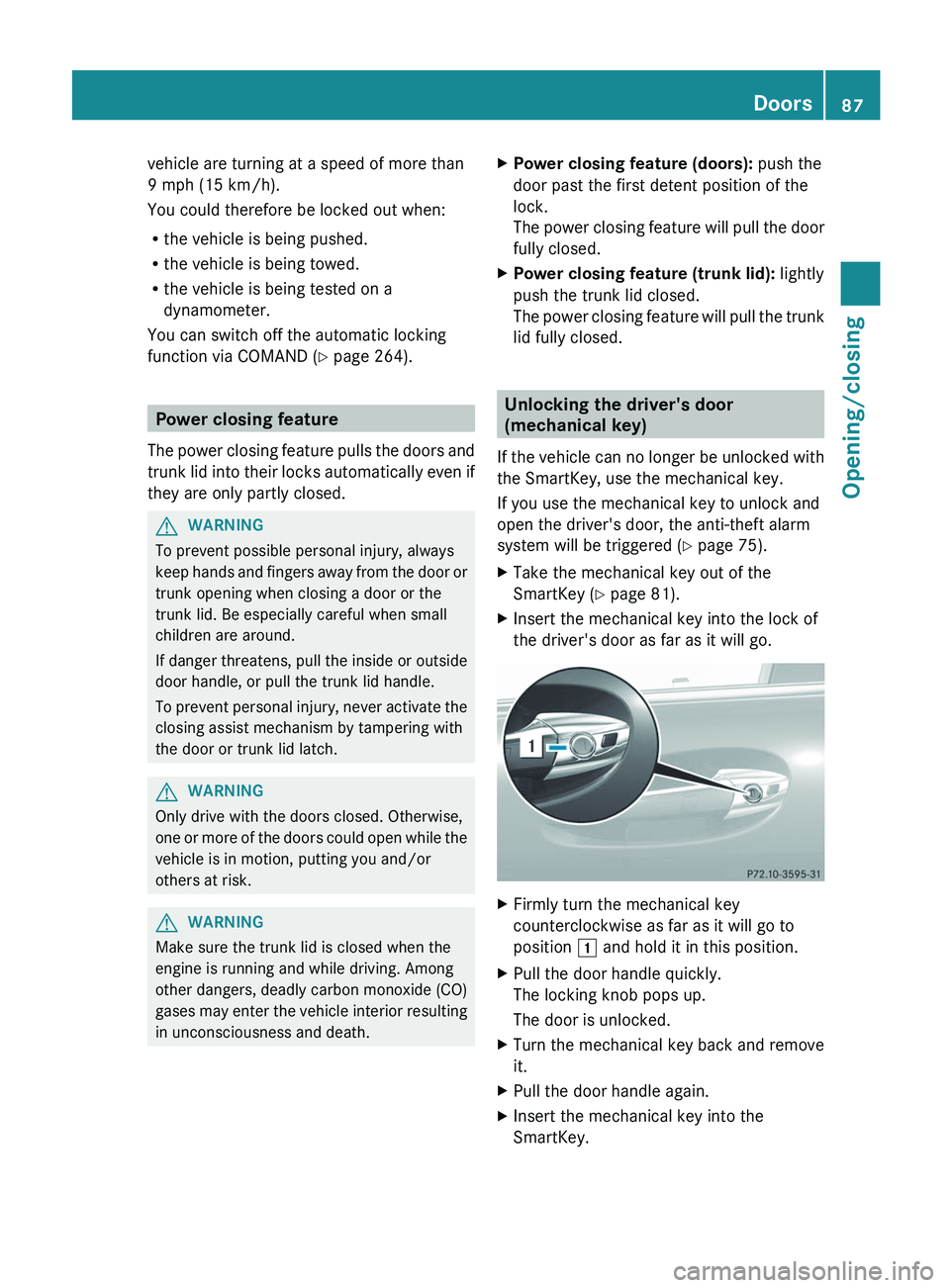
X Insert the mechanical key into the lock of
the driver's door as far as it will go. X
Firmly turn the mechanical key
counterclockwise as far as it will go to
position 1 and hold it in this position.
X Pull the door handle quickly.
The locking knob pops up.
The door is unlocked.
X Turn the mechanical key back and remove
it.
X Pull the door handle again.
X Insert the mechanical key into the
SmartKey. Doors
87
Opening/closing Z
Page 90 of 536
Locking the vehicle
If the vehicle can no longer be locked with the
SmartKey, you can lock it by taking the
following steps. If the central locking in the
vehicle is malfunctioning, you cannot lock the
trunk.
X Press down the locking knobs on the open
rear doors.
X Close the rear doors.
X Open the front-passenger door.
X Close the driver's door and the trunk lid.
X Press down the locking knob of the driver's
door inside the vehicle.
X Press down the locking knob of the open
front-passenger door.
i Make
sure that you have the SmartKey on
your person and that it has not been left in
the vehicle.
X Close the front-passenger door.
X Make sure that the doors and the trunk are
locked.
i If
you lock the vehicle as described above,
the fuel filler flap is not locked. The anti-
theft alarm system is not armed. Trunk
Important safety notes
Do not leave the SmartKey in the trunk. You
could otherwise lock yourself out. G
WARNING
When leaving the vehicle, always remove the
SmartKey from the ignition lock. Always take
the SmartKey with you and lock the vehicle.
Do not leave children unsupervised in the
vehicle, even if they are secured in a child
restraint
system, and do not give them access
to an unlocked vehicle. A child's unsupervised
access to a vehicle could result in an accident
and/or serious personal injury. They could:
R injure themselves on vehicle parts
R be seriously or fatally injured by extreme
heat or cold
R injure themselves or have an accident with
vehicle equipment that may still be in
operation even after the SmartKey has
been removed from the ignition, such as the
seat adjustment, steering wheel
adjustment or memory function.
If children open a door, they could cause
severe or even fatal injury to other persons; if
they get out of the vehicle, they could injure
themselves when doing so or be seriously or
even fatally injured by any passing traffic.
Do not expose the child restraint system to
direct sunlight. The child restraint system's
metal parts, for example, could become very
hot, and a child could be burned on these
parts. G
WARNING
Do not carry heavy or hard objects in the
passenger
compartment or trunk unless they
are firmly secured in place.
Unsecured or improperly positioned cargo
increases a child's risk of injury in the event
of
R strong braking maneuvers
R sudden changes of direction
R an accident G
WARNING
Make sure the trunk lid is closed when the
engine is running and while driving. Among
other dangers, deadly carbon monoxide (CO) 88
Trunk
Opening/closing
Page 98 of 536
term "sliding sunroof" refers to both types of
sliding sunroof.
G
WARNING
When opening or closing the sliding sunroof,
make sure that there is no danger of anyone
being harmed by the opening/closing
procedure.
The sliding sunroof is equipped with
automatic
operation and the anti-entrapment
feature. If the movement of the sliding sunroof
is blocked during the closing procedure, the
sliding sunroof will stop and open slightly.
The sliding sunroof operates differently when
the sliding sunroof switch is pressed and held.
See the "Problems with the sliding sunroof"
section for more details.
The opening/closing procedure of the sliding
sunroof can be immediately halted by
releasing the sliding sunroof switch or, if the
sliding sunroof switch was moved past the
resistance point and released, by moving the
sliding sunroof switch in any direction. G
WARNING
The sliding sunroof is made out of glass. In the
event of an accident, the glass may shatter.
This may result in an opening in the roof.
In a vehicle rollover, occupants not wearing
their seat belts or not wearing them properly
may be thrown out of the opening. Such an
opening
also presents a potential for injury for
occupants wearing their seat belts properly,
as entire body parts or portions of them may
protrude from the passenger compartment.
! Only open the sliding sunroof if it is free
of snow and ice. Otherwise, malfunctions
may occur.
Do not allow anything to protrude from the
sliding sunroof. Otherwise, the seals could
be damaged.
! The weather can change abruptly. It could
start to rain or snow. Make sure that the
sliding sunroof is closed when you leave the
vehicle. The vehicle electronics can be damaged if water enters the vehicle
interior.
i Resonance noises can occur in addition
to
the usual airflow noises when the sliding
sunroof is open. They are caused by minor
pressure fluctuations in the vehicle interior.
Change the position of the sliding sunroof
or open a side window slightly to reduce or
eliminate these noises. Operating the sliding sunroof
Opening and closing i
You can continue to operate the sliding
sunroof after switching off the engine or
removing the SmartKey from the ignition
lock.
This function is available for up to five
minutes or until the driver's or front-
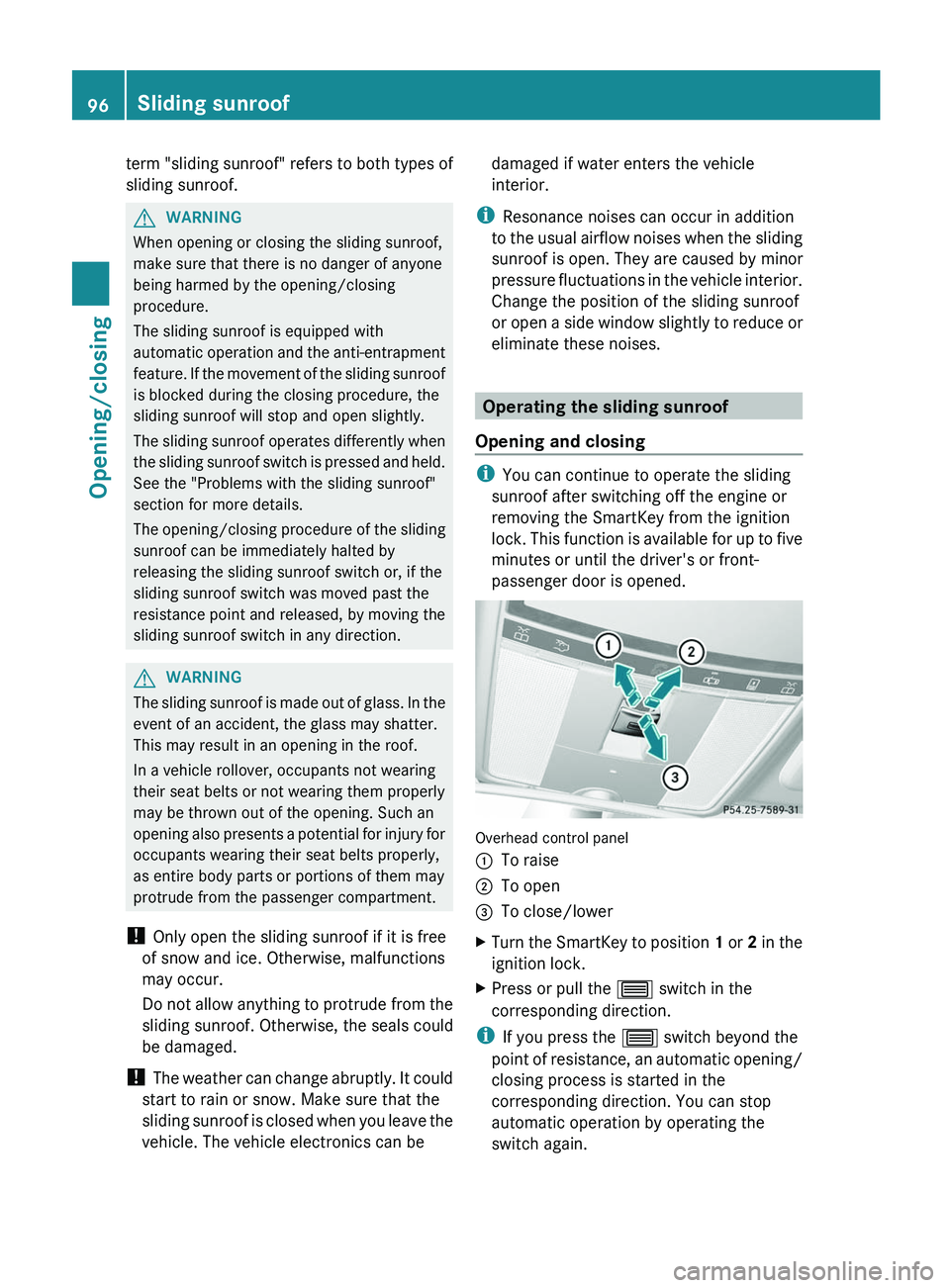
passenger door is opened. Overhead control panel
:
To raise
; To open
= To close/lower
X Turn the SmartKey to position 1
or 2 in the
ignition lock.
X Press or pull the 3 switch in the
corresponding direction.
i If you press the 3 switch beyond the
point
of resistance, an automatic opening/
closing process is started in the
corresponding direction. You can stop
automatic operation by operating the
switch again. 96
Sliding sunroof
Opening/closing
Page 191 of 536
You can install new map software yourself
which, depending on the scope, may consist
of one or more DVDs.
The installation process can take between
10
and 120 minutes, depending on the scope
of the map software. If the radio is switched
on before you start the installation process,
you can still adjust the volume. You can also
use COMAND to operate automatic climate
control and to cancel the process. Other
functions are not operational. If possible,
carry out the installation when the vehicle is
stationary. The DVD read speed is higher
when the vehicle is stationary than when it is
in motion, so less time is required. If the
starter battery is not sufficiently charged,
COMAND may end the process automatically
in order to protect the battery. Therefore, let
the engine idle during the installation
process. G
WARNING
Never leave the engine running in enclosed
spaces. The exhaust gases contain toxic
carbon
monoxide. Breathing in exhaust fumes
is a health hazard and can lead to
unconsciousness or death.
Displaying information on the map
version currently in use
X To activate navigation mode: press the
S function button once or twice.
X To show the menu:
press W the COMAND
controller.
X Select Navi in the main function bar by
sliding VÆ
and turning cVd the COMAND
controller and press W to confirm.
X Select Map Version and press W to
confirm.
Notes on handling DVDs
R Only hold DVDs by the edge.
R Handle DVDs carefully to prevent reading
errors.
R Avoid getting scratches, fingerprints and
dust on DVDs. R
Use a commercially-available cleaning
cloth to clean discs. When cleaning CDs,
you should wipe in straight lines from the
center outwards rather than in a circular
motion.
R Place DVDs back in their cases after use.
R Protect
DVDs from heat and direct sunlight.
Map software copy protection
Map software for COMAND is subject to a
charge. The map software has just one
activation code which is usable in one vehicle
only, and is not transferable. You can obtain
the six-digit activation code from your
authorized Mercedes-Benz Center. If you
have lost the activation code, or if COMAND
does not accept the activation code that you
have received, contact your authorized
Mercedes-Benz Center.
Your vehicle is supplied with map software at
the factory. Depending on the country, map
software for your region is either pre-installed
(Europe/USA) or the map software is
supplied as a DVD (all other countries). You
do not require an activation code for the map
software that is provided with your vehicle.
If the map software on your vehicle has been
installed at the factory and you wish to
reinstall it, this also does not necessitate
entry of the activation code.
Installation process
X Load the map software DVD in the DVD
drive ( Y page 220).
COMAND checks the DVD and shows a
corresponding message in the display.
Map software is not compatible with the
navigation system
You
will see a message that the map software
cannot be installed.
X To confirm the message: press W.
COMAND ejects the DVD.
X Take the DVD out of the slot.
X Insert a DVD which is compatible with the
vehicle’s navigation system. Navigation
189
COMAND Z
Page 279 of 536
X
Turn the light switch to $ or c.
or
X If the rear fog lamp is switched on: press
the light switch in to the stop.
Low-beam headlamps X
To switch on the low-beam headlamps:
turn the SmartKey in the ignition lock to
position 2 or start the engine.
X Turn the light switch to L.
The T
indicator lamp on the light switch
lights up.
X To switch off the low-beam
headlamps: turn the light switch to $.
Daytime running lamps Daytime running lamps in Canada
The daytime running lamps function is
required
by law in Canada. It cannot therefore
be deactivated.
X Turn the light switch to $ or c.
With
the engine running: depending on the
ambient light, the daytime running lamps or
the low-beam headlamps are switched on.
When the low-beam headlamps are
activated, the T indicator lamp on the
light switch lights up.
When the engine is running and the vehicle is
stationary
or if the electronic parking brake is
applied: if you move the selector lever from a
drive position to P, the daytime running
lamps/low-beam headlamps go out after
three minutes.
When the engine is running, the vehicle is
stationary and in high ambient light
brightness: if you turn the light switch
to T, the daytime running lamps and the
parking lamps are switched on.
If the engine is running and you turn the light
switch to L, the manual settings take
precedence over the daytime running lamps. Daytime running lamps in the USA
In the USA, the daytime running lamps are
deactivated upon delivery from the factory.
X
To activate the daytime running
lamps:
activate the daytime running lamps
function in the on-board computer
(Y page 385).
X Turn the light switch to $ or c.
With
the engine running: depending on the
ambient light, the daytime running lamps or
the low-beam headlamps are switched on.
When the low-beam headlamps are
activated, the T indicator lamp on the
light switch lights up.
If the engine is running and you turn the light
switch to T or L, the manual settings
take precedence over the daytime running
lamps.
Automatic headlamp mode X
To switch on automatic headlamp
mode: turn the light switch to c.
SmartKey
in position 1 in the ignition lock:
the parking lamps are switched on or off
automatically depending on the brightness
of the ambient light.
With the engine running: depending on the
brightness of the ambient light, the daytime
running lamps 12
or the parking lamps and
low-beam headlamps are switched on or off
automatically.
When the low-beam headlamps are
switched on, the T indicator lamp on
the light switch lights up. G
WARNING
If the light switch is set to c,
the low-beam
headlamps will not come on automatically if
it is foggy. This could endanger you and
others. Therefore, turn the light switch to
L in fog.
12 Only if daytime running lamps have been activated via the on-board computer. Exterior lighting
277
Lights and windshield wipers
Z
Page 280 of 536
The automatic headlamp feature is only an
aid.
The driver is responsible for the vehicle's
lighting at all times. G
WARNING
When it is dark or foggy, turn the light switch
quickly from c to L. Otherwise, the
headlamps could switch off temporarily and
you could cause an accident.
Front fog lamps G
WARNING
If you suspect that driving conditions will be
foggy,
turn the light switch to L before you
start your journey. Otherwise, your vehicle
may not be visible and you could endanger
yourself and others. G
WARNING
In low ambient lighting or foggy conditions,
only switch from position c to L with
the vehicle at a standstill in a safe location.
Switching from c to L will briefly
switch off the headlamps. Doing so while
driving
in low ambient lighting conditions may
result in an accident.
X To switch on the front fog lamps: turn
the
SmartKey in the ignition lock to position
2 or start the engine.
X Turn the light switch to L
or T. If the
light switch is set to c, you cannot
switch on the fog lamps.
X Pull the light switch out to the first detent.
The
green N indicator lamp on the light
switch lights up.
X To switch off the front fog lamps: press
the light switch in as far as it will go.
The
green N indicator lamp on the light
switch goes out. Rear fog lamp X
To switch on the rear fog lamp: turn the
SmartKey in the ignition lock to position 2
or start the engine.
X Turn the light switch to L or T
(vehicles with front fog lamps), or turn the
light
switch to L (vehicles without front
fog lamps). If the light switch is set to
c, you cannot switch on the rear fog
lamp.
X Turn the light switch to L. If the light
switch
is set to T, you cannot switch on
the rear fog lamp.
X Pull the light switch out to the second stop
(vehicles
with front fog lamps) or pull it out
to the stop (vehicles without front fog
lamps).
The yellow R indicator lamp on the light
switch lights up.
X To switch off the rear fog lamp: press
the
light switch in as far as it will go.
The yellow R indicator lamp on the light
switch goes out.
Headlamp cleaning system The headlamps are cleaned automatically if
the "Wipe with washer fluid" function is
operated
ten times while the lights are on and
the engine is running (Y page 285). When you
switch off the ignition, the automatic
headlamp cleaning system is reset and
counting is resumed from 0. 278
Exterior lighting
Lights and windshield wipers