check engine MERCEDES-BENZ S-CLASS SEDAN 2013 User Guide
[x] Cancel search | Manufacturer: MERCEDES-BENZ, Model Year: 2013, Model line: S-CLASS SEDAN, Model: MERCEDES-BENZ S-CLASS SEDAN 2013Pages: 536, PDF Size: 24.14 MB
Page 87 of 536
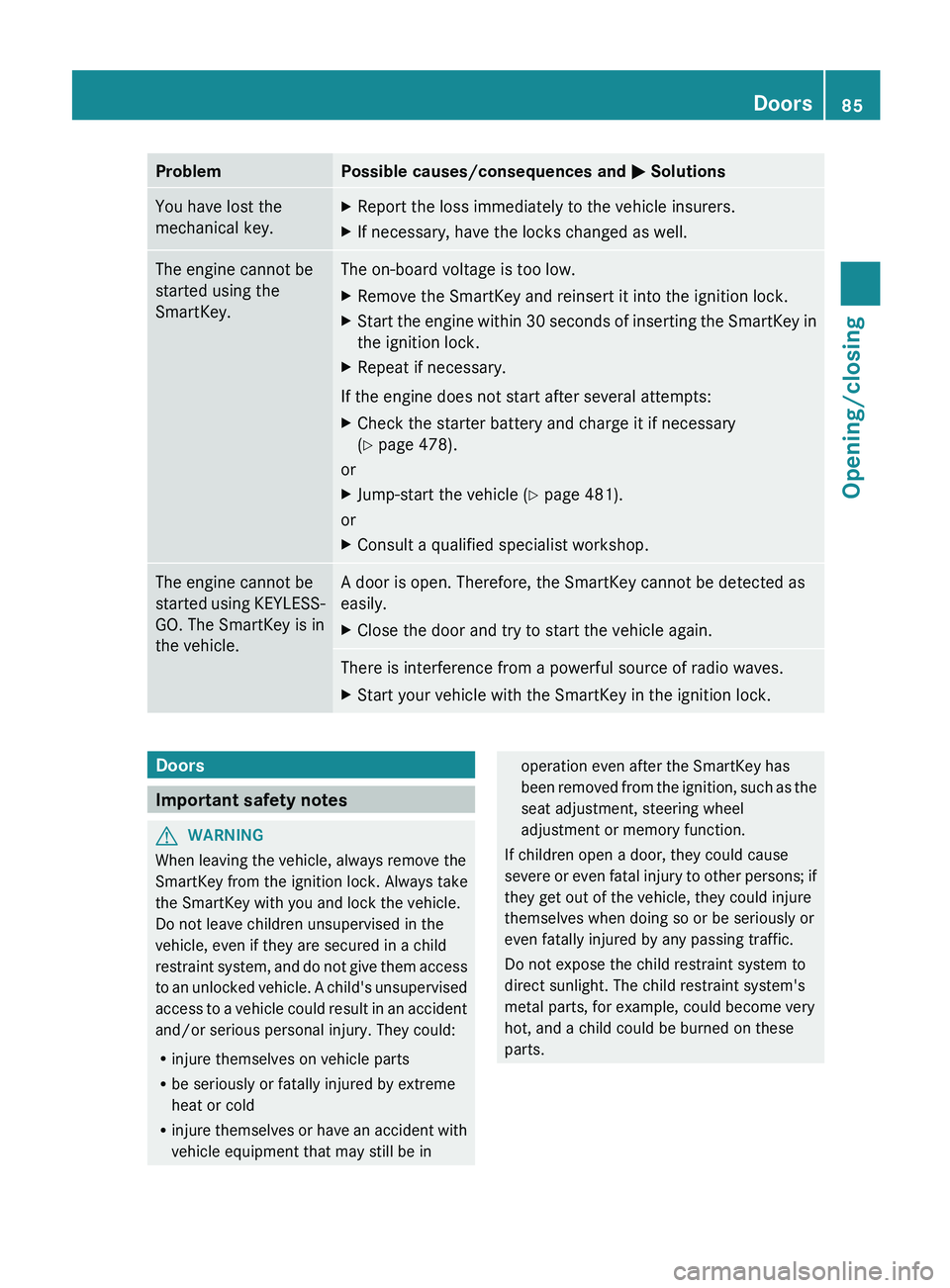
Problem Possible causes/consequences and
M SolutionsYou have lost the
mechanical key. X
Report the loss immediately to the vehicle insurers.
X If necessary, have the locks changed as well. The engine cannot be
started using the
SmartKey. The on-board voltage is too low.
X
Remove the SmartKey and reinsert it into the ignition lock.
X Start the engine within 30 seconds of inserting the SmartKey in
the ignition lock.
X Repeat if necessary.
If the engine does not start after several attempts:
X Check the starter battery and charge it if necessary
(Y page 478).
or
X Jump-start the vehicle (Y page 481).
or
X Consult a qualified specialist workshop. The engine cannot be
started
using KEYLESS-
GO. The SmartKey is in
the vehicle. A door is open. Therefore, the SmartKey cannot be detected as
easily.
X
Close the door and try to start the vehicle again. There is interference from a powerful source of radio waves.
X
Start your vehicle with the SmartKey in the ignition lock. Doors
Important safety notes
G
WARNING
When leaving the vehicle, always remove the
SmartKey from the ignition lock. Always take
the SmartKey with you and lock the vehicle.
Do not leave children unsupervised in the
vehicle, even if they are secured in a child
restraint
system, and do not give them access
to an unlocked vehicle. A child's unsupervised
access to a vehicle could result in an accident
and/or serious personal injury. They could:
R injure themselves on vehicle parts
R be seriously or fatally injured by extreme
heat or cold
R injure themselves or have an accident with
vehicle equipment that may still be in operation even after the SmartKey has
been
removed from the ignition, such as the
seat adjustment, steering wheel
adjustment or memory function.
If children open a door, they could cause
severe or even fatal injury to other persons; if
they get out of the vehicle, they could injure
themselves when doing so or be seriously or
even fatally injured by any passing traffic.
Do not expose the child restraint system to
direct sunlight. The child restraint system's
metal parts, for example, could become very
hot, and a child could be burned on these
parts. Doors
85
Opening/closing Z
Page 172 of 536
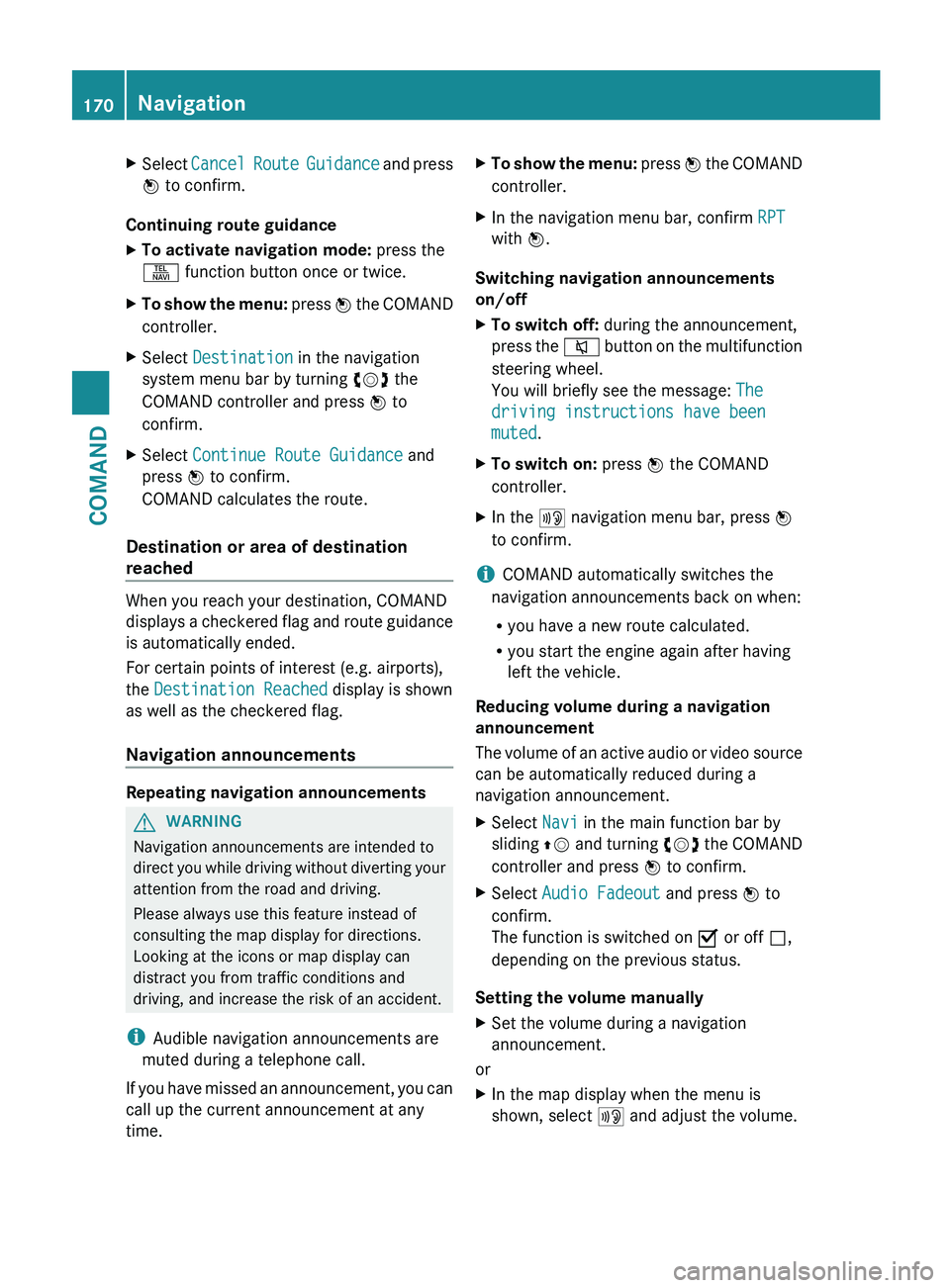
X
Select Cancel Route Guidance and press
W to confirm.
Continuing route guidance
X To activate navigation mode: press the
S function button once or twice.
X To show the menu:
press W the COMAND
controller.
X Select Destination in the navigation
system menu bar by turning cVd the
COMAND controller and press W to
confirm.
X Select Continue Route Guidance and
press W to confirm.
COMAND calculates the route.
Destination or area of destination
reached When you reach your destination, COMAND
displays
a checkered flag and route guidance
is automatically ended.
For certain points of interest (e.g. airports),
the Destination Reached display is shown
as well as the checkered flag.
Navigation announcements Repeating navigation announcements
G
WARNING
Navigation announcements are intended to
direct
you while driving without diverting your
attention from the road and driving.
Please always use this feature instead of
consulting the map display for directions.
Looking at the icons or map display can
distract you from traffic conditions and
driving, and increase the risk of an accident.
i Audible navigation announcements are
muted during a telephone call.
If you have missed an announcement, you can
call up the current announcement at any
time. X
To show the menu:
press W the COMAND
controller.
X In the navigation menu bar, confirm RPT
with W.
Switching navigation announcements
on/off
X To switch off: during the announcement,
press
the 8 button on the multifunction
steering wheel.
You will briefly see the message: The
driving instructions have been
muted.
X To switch on: press W the COMAND
controller.
X In the + navigation menu bar, press W
to confirm.
i COMAND automatically switches the
navigation announcements back on when:
R you have a new route calculated.
R you start the engine again after having
left the vehicle.
Reducing volume during a navigation
announcement
The
volume of an active audio or video source
can be automatically reduced during a
navigation announcement.
X Select Navi in the main function bar by
sliding ZV
and turning cVd the COMAND
controller and press W to confirm.
X Select Audio Fadeout and press W to
confirm.
The function is switched on O or off ª,
depending on the previous status.
Setting the volume manually
X Set the volume during a navigation
announcement.
or
X In the map display when the menu is
shown, select + and adjust the volume.170
Navigation
COMAND
Page 191 of 536
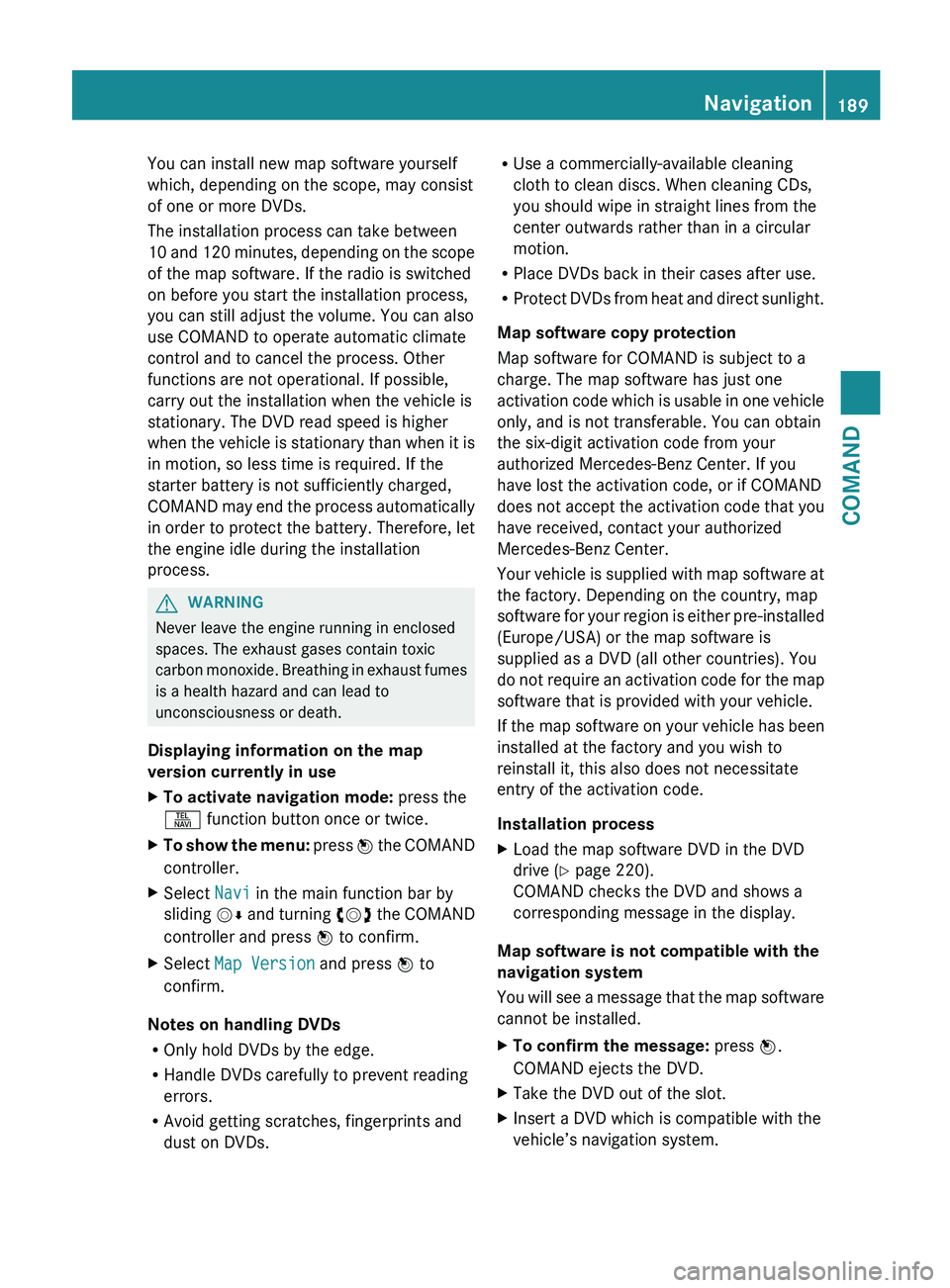
You can install new map software yourself
which, depending on the scope, may consist
of one or more DVDs.
The installation process can take between
10
and 120 minutes, depending on the scope
of the map software. If the radio is switched
on before you start the installation process,
you can still adjust the volume. You can also
use COMAND to operate automatic climate
control and to cancel the process. Other
functions are not operational. If possible,
carry out the installation when the vehicle is
stationary. The DVD read speed is higher
when the vehicle is stationary than when it is
in motion, so less time is required. If the
starter battery is not sufficiently charged,
COMAND may end the process automatically
in order to protect the battery. Therefore, let
the engine idle during the installation
process. G
WARNING
Never leave the engine running in enclosed
spaces. The exhaust gases contain toxic
carbon
monoxide. Breathing in exhaust fumes
is a health hazard and can lead to
unconsciousness or death.
Displaying information on the map
version currently in use
X To activate navigation mode: press the
S function button once or twice.
X To show the menu:
press W the COMAND
controller.
X Select Navi in the main function bar by
sliding VÆ
and turning cVd the COMAND
controller and press W to confirm.
X Select Map Version and press W to
confirm.
Notes on handling DVDs
R Only hold DVDs by the edge.
R Handle DVDs carefully to prevent reading
errors.
R Avoid getting scratches, fingerprints and
dust on DVDs. R
Use a commercially-available cleaning
cloth to clean discs. When cleaning CDs,
you should wipe in straight lines from the
center outwards rather than in a circular
motion.
R Place DVDs back in their cases after use.
R Protect
DVDs from heat and direct sunlight.
Map software copy protection
Map software for COMAND is subject to a
charge. The map software has just one
activation code which is usable in one vehicle
only, and is not transferable. You can obtain
the six-digit activation code from your
authorized Mercedes-Benz Center. If you
have lost the activation code, or if COMAND
does not accept the activation code that you
have received, contact your authorized
Mercedes-Benz Center.
Your vehicle is supplied with map software at
the factory. Depending on the country, map
software for your region is either pre-installed
(Europe/USA) or the map software is
supplied as a DVD (all other countries). You
do not require an activation code for the map
software that is provided with your vehicle.
If the map software on your vehicle has been
installed at the factory and you wish to
reinstall it, this also does not necessitate
entry of the activation code.
Installation process
X Load the map software DVD in the DVD
drive ( Y page 220).
COMAND checks the DVD and shows a
corresponding message in the display.
Map software is not compatible with the
navigation system
You
will see a message that the map software
cannot be installed.
X To confirm the message: press W.
COMAND ejects the DVD.
X Take the DVD out of the slot.
X Insert a DVD which is compatible with the
vehicle’s navigation system. Navigation
189
COMAND Z
Page 284 of 536
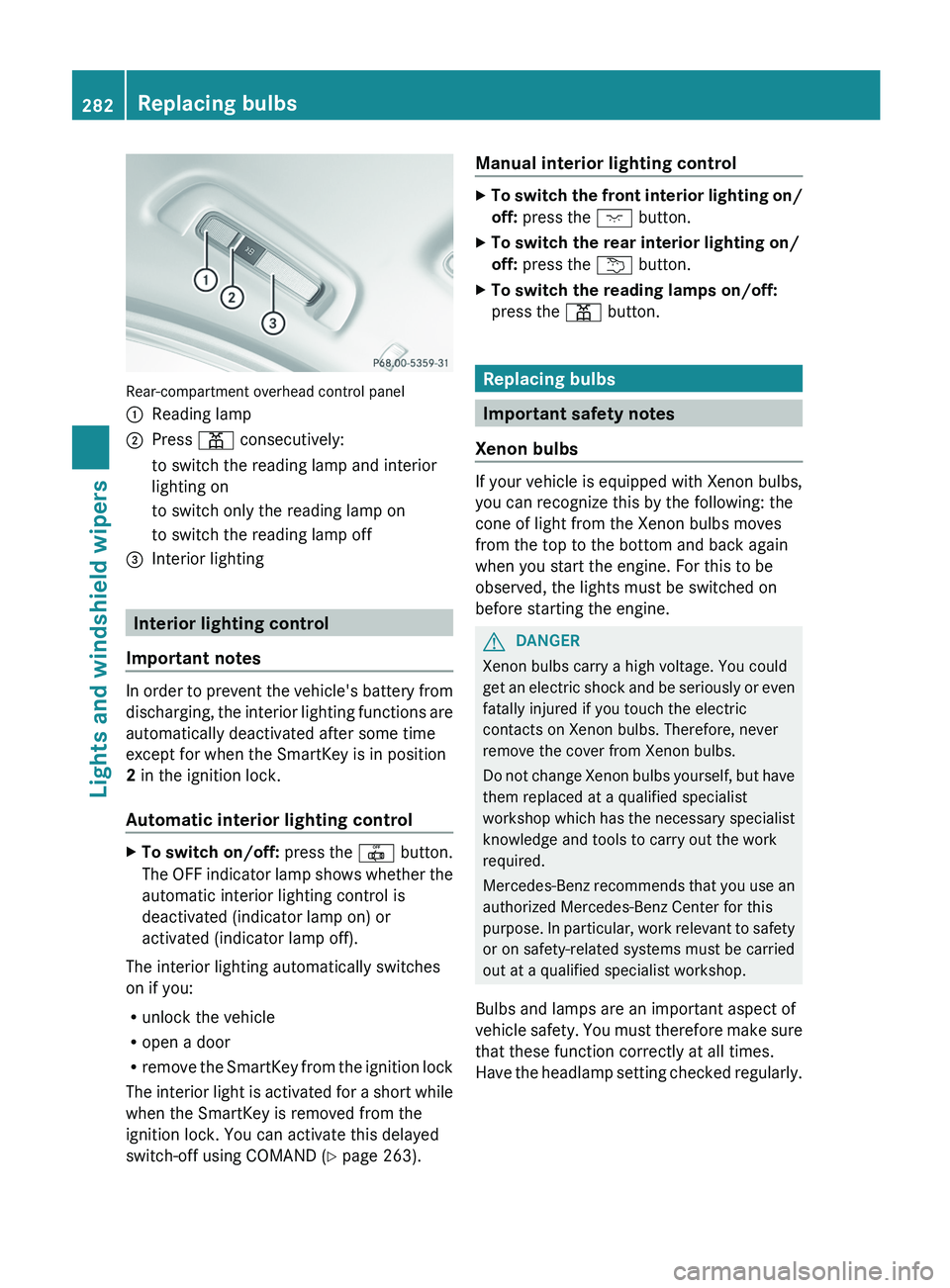
Rear-compartment overhead control panel
:
Reading lamp
; Press p consecutively:
to switch the reading lamp and interior
lighting on
to switch only the reading lamp on
to switch the reading lamp off
= Interior lighting Interior lighting control
Important notes In order to prevent the vehicle's battery from
discharging,
the interior lighting functions are
automatically deactivated after some time
except for when the SmartKey is in position
2 in the ignition lock.
Automatic interior lighting control X
To switch on/off: press the | button.
The
OFF indicator lamp shows whether the
automatic interior lighting control is
deactivated (indicator lamp on) or
activated (indicator lamp off).
The interior lighting automatically switches
on if you:
R unlock the vehicle
R open a door
R remove
the SmartKey from the ignition lock
The interior light is activated for a short while
when the SmartKey is removed from the
ignition lock. You can activate this delayed
switch-off using COMAND ( Y page 263).Manual interior lighting control X
To switch the front interior lighting on/
off: press the c button.
X To switch the rear interior lighting on/
off: press the u button.
X To switch the reading lamps on/off:
press the p button. Replacing bulbs
Important safety notes
Xenon bulbs If your vehicle is equipped with Xenon bulbs,
you can recognize this by the following: the
cone of light from the Xenon bulbs moves
from the top to the bottom and back again
when you start the engine. For this to be
observed, the lights must be switched on
before starting the engine.
G
DANGER
Xenon bulbs carry a high voltage. You could
get
an electric shock and be seriously or even
fatally injured if you touch the electric
contacts on Xenon bulbs. Therefore, never
remove the cover from Xenon bulbs.
Do not change Xenon bulbs yourself, but have
them replaced at a qualified specialist
workshop which has the necessary specialist
knowledge and tools to carry out the work
required.
Mercedes-Benz recommends that you use an
authorized Mercedes-Benz Center for this
purpose. In particular, work relevant to safety
or on safety-related systems must be carried
out at a qualified specialist workshop.
Bulbs and lamps are an important aspect of
vehicle safety. You must therefore make sure
that these function correctly at all times.
Have the headlamp setting checked regularly. 282
Replacing bulbs
Lights and windshield wipers
Page 312 of 536
Problem Possible causes/consequences and
M SolutionsVehicles with a
gasoline engine:
The engine is not
running smoothly and
is misfiring. There is a malfunction in the engine electronics or a mechanical
component of the engine management system.
X
Only depress the accelerator pedal slightly.
X Have the cause rectified immediately at a qualified specialist
workshop, e.g. an authorized Mercedes-Benz Center.
Otherwise, non-combusted fuel may get into the catalytic
converter and damage it. The coolant
temperature gauge
shows a value above
248 ‡
(120 †). The coolant level is too low. The coolant is too hot and the engine
is no longer being cooled sufficiently.
X
Stop as soon as possible and allow the engine and the coolant
to cool down.
X Check the coolant level (Y page 460). Observe the warning
notes as you do so and add coolant if necessary. Automatic transmission
Important safety notes
G
WARNING
It is dangerous to shift the automatic
transmission out of parking position P or
neutral position N if the engine speed is
higher
than idle speed. If your foot is not firmly
on the brake pedal, the vehicle could
accelerate quickly forward or in reverse. You
could lose control of the vehicle and hit
someone or something. Only shift into gear
when the engine is idling normally and when
your right foot is firmly on the brake pedal. G
WARNING
Keep in mind that turning off the engine alone
only
will shift the automatic transmission into
neutral position N automatically.
Always shift the automatic transmission into
park position P before turning off the engine.
Otherwise the vehicle could roll away which
could result in an accident and/or serious
personal injury. G
WARNING
HYBRID vehicles: It is imperative that you read
the HYBRID Supplemental Operating
Instructions
included in your vehicle literature
portfolio. You may otherwise not receive all
necessary safety information and warning for
the operation of your vehicle. DIRECT SELECT lever
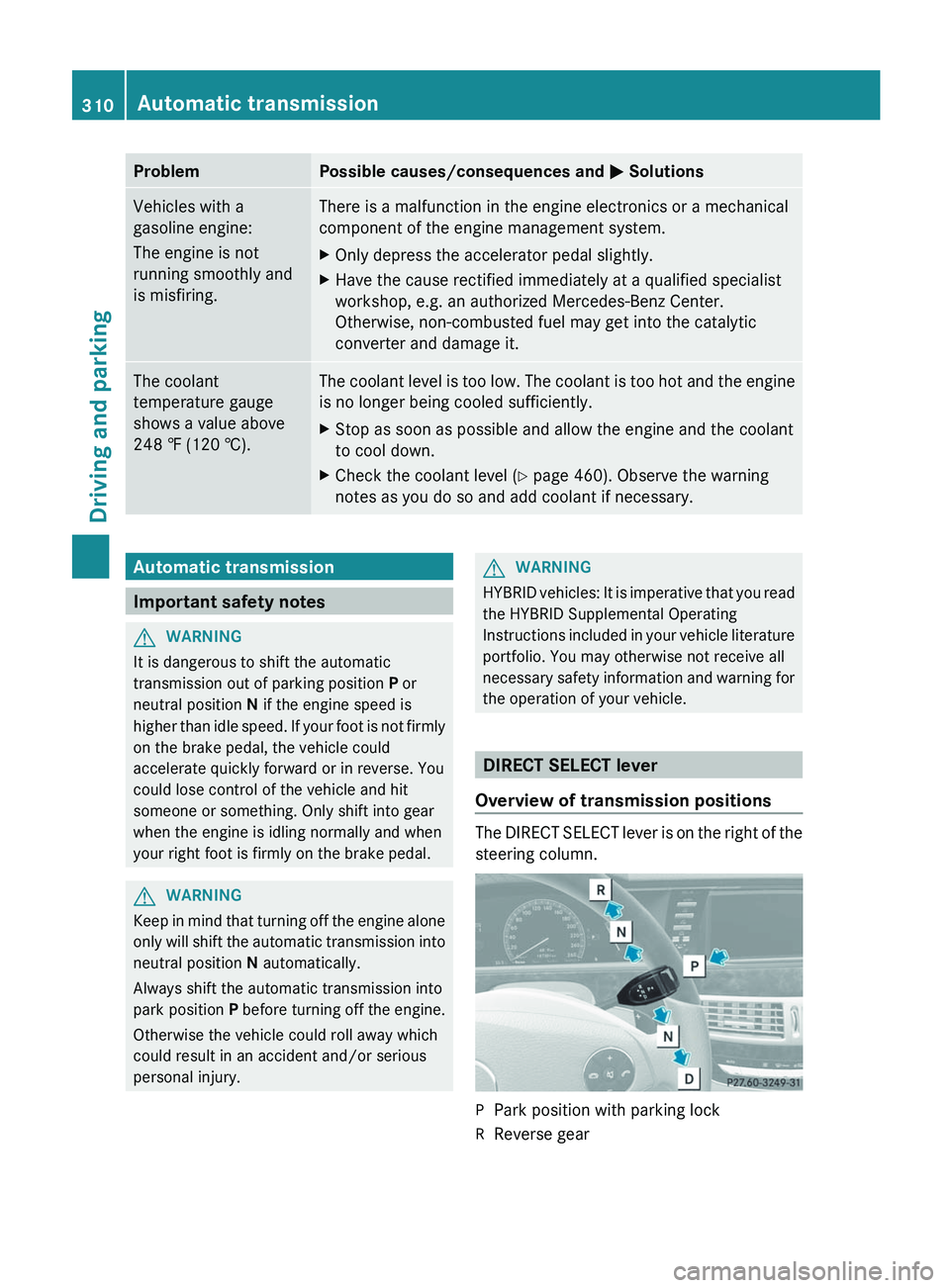
Overview of transmission positions The DIRECT SELECT lever is on the right of the
steering column.
P
Park position with parking lock
R Reverse gear310
Automatic transmission
Driving and parking
Page 314 of 536
R
remove the Start/Stop button from the
ignition lock.
R insert the SmartKey into the ignition lock.
R switch on the ignition.
R depress the brake pedal and keep it
depressed.
R shift to neutral N.
R release the brake pedal.
R if applied, release the electric parking
brake.
R switch off the ignition and leave the
SmartKey in the ignition lock.
Transmission position D with ECO
start/stop function activated The ECO start/stop function switches the
engine off automatically if the vehicle is
braked to a standstill when in transmission
position D and the brake is still depressed.
For
further information on the ECO start/stop
function ( Y page 306).
Shifting to transmission position D X
When the vehicle is stationary, depress the
brake pedal.
X Push the DIRECT SELECT lever down past
the first point of resistance. Transmission position display
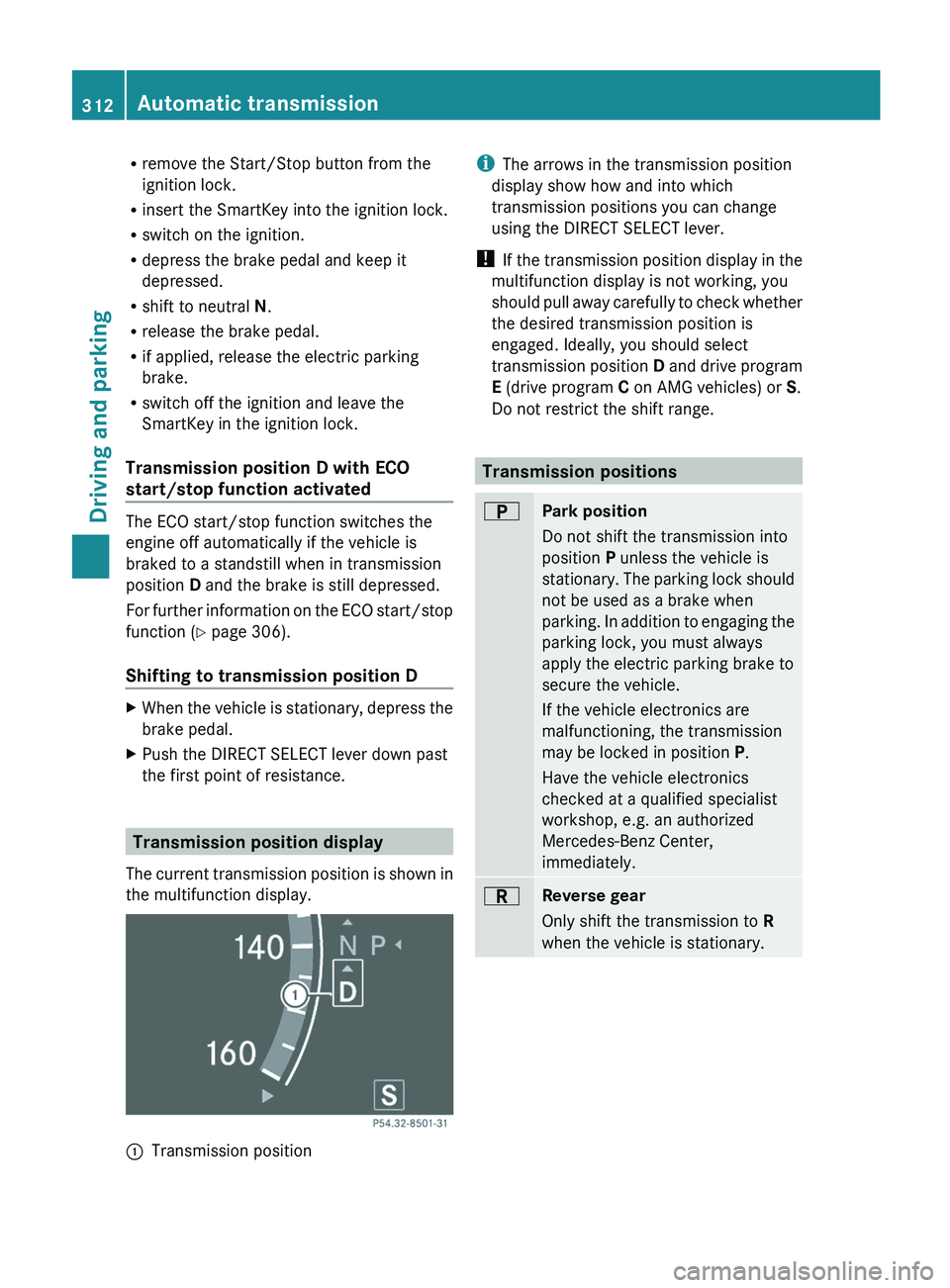
The
current transmission position is shown in
the multifunction display. :
Transmission position i
The arrows in the transmission position
display show how and into which
transmission positions you can change
using the DIRECT SELECT lever.
! If
the transmission position display in the
multifunction display is not working, you
should pull away carefully to check whether
the desired transmission position is
engaged. Ideally, you should select
transmission position D and drive program
E (drive program C on AMG vehicles) or S.
Do not restrict the shift range. Transmission positions
B
Park position
Do not shift the transmission into
position P unless the vehicle is
stationary.
The parking lock should
not be used as a brake when
parking. In addition to engaging the
parking lock, you must always
apply the electric parking brake to
secure the vehicle.
If the vehicle electronics are
malfunctioning, the transmission
may be locked in position P.
Have the vehicle electronics
checked at a qualified specialist
workshop, e.g. an authorized
Mercedes-Benz Center,
immediately. C
Reverse gear
Only shift the transmission to
R
when the vehicle is stationary. 312
Automatic transmissionDriving and parking
Page 319 of 536
Problems with the transmission
Problem Possible causes/consequences and
M SolutionsThe transmission has
problems shifting gear. The transmission is losing oil.
X
Have the transmission checked at a qualified specialist
workshop, e.g. an authorized Mercedes-Benz Center,
immediately. The acceleration ability
is deteriorating.
The transmission no
longer changes gear. The transmission is in emergency mode.
It is only possible to shift into second
gear and reverse gear.
X Stop the vehicle.
X Shift the transmission to position P.
X Switch off the engine.
X Wait at least 10 seconds before restarting the engine.
X Shift the transmission to position D or R.
If D
is selected, the transmission shifts into second gear; if R is
selected, the transmission shifts into reverse gear.
X Have the transmission checked at a qualified specialist
workshop, e.g. an authorized Mercedes-Benz Center,
immediately. Transfer case
This section is only valid for vehicles with 4-
wheel drive (4MATIC). Power is always
transmitted to both axles.
! Performance tests may only be carried
out on a 2-axle dynamometer. The brake
system
or transfer case could otherwise be
damaged. Contact a qualified specialist
workshop for a performance test.
Mercedes-Benz recommends that you use
an authorized Mercedes-Benz Center for
this purpose.
! To prevent ESP ®
from intervening, the
ignition must be switched off (SmartKey or
the Start/Stop button in position 0 or 1) if:
R the electric parking brake is being tested
on a brake dynamometer.
R the vehicle is being towed with only one
axle raised (not permitted for vehicles
with 4MATIC). The brake system could otherwise be
damaged.
Refueling
Important safety notes
G
WARNING
Gasoline and diesel fuels are highly flammable
and poisonous. They burn violently and can
cause serious injury.
Never allow sparks, flames or smoking
materials near gasoline or diesel fuel!
Turn off the engine before refueling.
Whenever you are around gasoline or diesel
fuel, avoid inhaling fumes and any skin or
clothing contact. Extinguish all smoking
materials.
Direct skin contact with fuels and the
inhalation of fuel vapors are damaging your
health. Refueling
317
Driving and parking Z
Page 320 of 536
G
WARNING
Overfilling of the fuel tank may create
pressure in the system which could cause a
gas discharge. This could cause the gasoline
to spray back out when removing the fuel
pump nozzle, which could cause personal
injury. G
WARNING
Hybrid vehicles: be sure to read the "HYBRID"
supplement. Otherwise, you could fail to
recognize dangers. G
WARNING
Do not fill diesel tanks with gasoline. Do not
mix diesel fuel with gasoline. Otherwise the
fuel
system and engine could be damaged. In
addition, the vehicle could catch fire.
! Do not use gasoline to refuel vehicles with
a diesel engine. Do not use diesel to refuel
vehicles with a gasoline engine. Even a
small quantity of the wrong fuel will
damage the fuel system and engine.
! Do not switch on the ignition if you
accidentally refuel with the wrong fuel.
Otherwise, the fuel will enter the fuel lines.
Notify a qualified specialist workshop and
have the fuel tank and fuel lines drained
completely. Gasoline
Fuel grade !
You should only refuel with unleaded
premium-grade gasoline as this avoids
damaging the catalytic converter.
If engine running problems are apparent,
have the cause checked immediately and
repaired. Excess unburned fuel can
otherwise enter the catalytic converter,
leading to overheating and possibly
causing a fire.
! Use
a filter when refueling from a fuel can.
Otherwise, the fuel lines and/or injection system could be blocked by particles from
the fuel can.
i Only
refuel with premium-grade unleaded
gasoline with a specified minimum octane
number of 91 (average value of 96 RON/
86 MON).
You will usually find information about the
fuel grade on the pump. If you cannot find
the label on the pump, ask the staff for
assistance.
You can find more information under "Fuel"
(Y page 525), or by contacting an
authorized Mercedes-Benz Service Center
or visiting http://www.mbusa.com (USA
only). Diesel
Fuel grade !
Only refuel with ULTRA-LOW SULFUR
DIESEL FUEL (ULSD, 15 ppm SULFUR
MAXIMUM). Using other diesel fuels could
result
in increased wear and damage to the
engine and/or exhaust system.
Never refuel with marine diesel or heating
oil.
Do not mix these fuels with diesel fuels and
do not use any special additives, as this
may result in damage.
! Use a filter when adding fuel from a fuel
can. Otherwise, the fuel lines and/or the
fuel injection system could be blocked by
particles from the fuel can.
i Usually, you will find information about
the fuel grade on the pump. If you cannot
find the label on the gasoline pump, ask the
gas station staff.
You can find more information under “Fuel”
(Y page 525), or by contacting an
authorized Mercedes-Benz Service Center
or visiting http://www.mbusa.com (USA
only). 318
Refueling
Driving and parking
Page 321 of 536
Low outside temperatures
!
Do not use gasoline to refuel vehicles with
a diesel engine. Never mix diesel with
gasoline or kerosene, as this may result in
damage to the engine or fuel system.
Diesel fuel with improved cold flow properties
is available during the winter months. Further
information on fuel properties can be
obtained from oil companies, e.g. at gas
stations. Refueling
Fuel filler flap The fuel filler flap is unlocked or locked
automatically when you open or close the
vehicle
with the SmartKey or using KEYLESS-
GO.
The position of the fuel filler cap is displayed
in the instrument cluster 8. The arrow
next to the filling pump indicates the side of
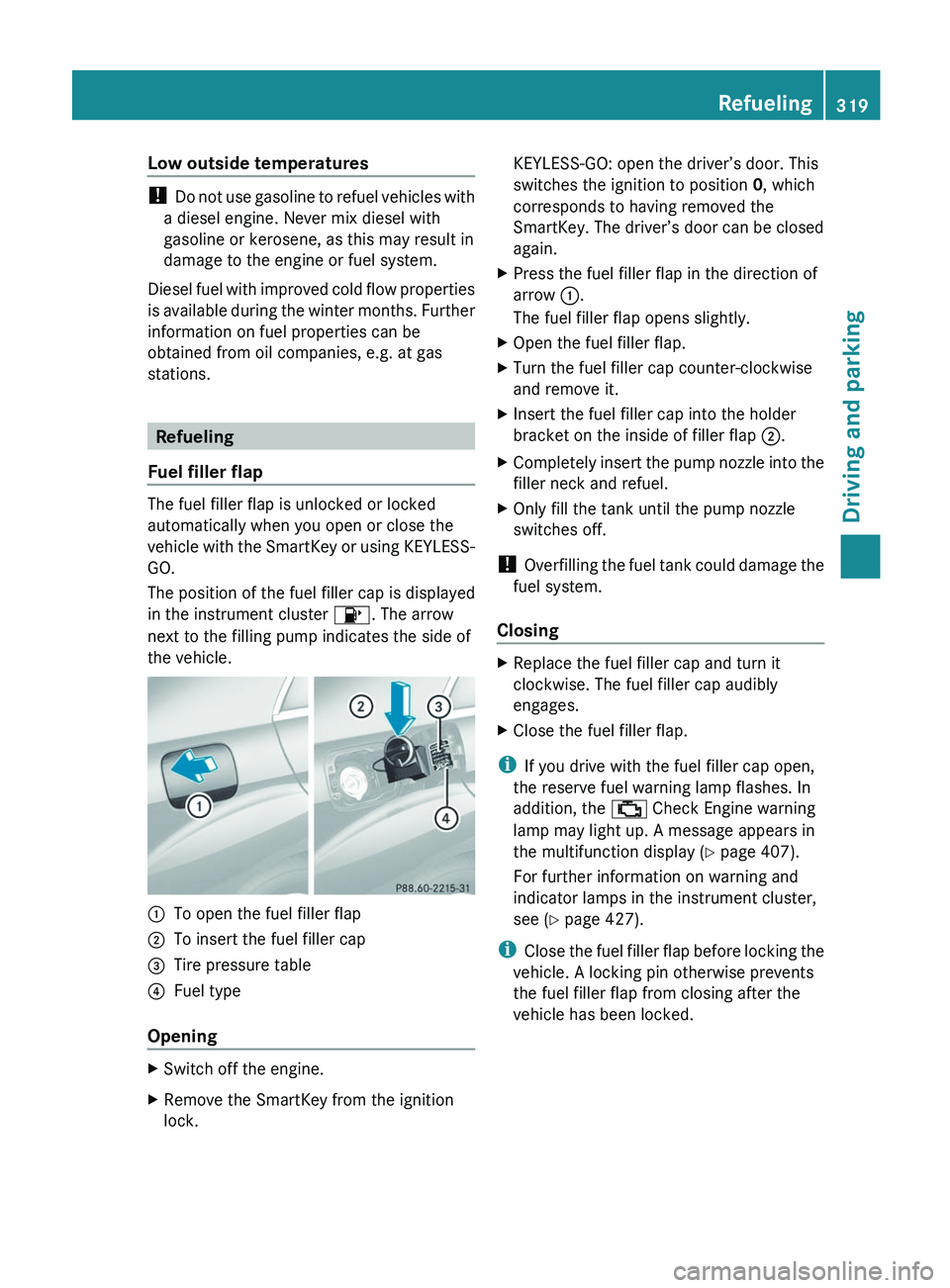
the vehicle. :
To open the fuel filler flap
; To insert the fuel filler cap
= Tire pressure table
? Fuel type
Opening X
Switch off the engine.
X Remove the SmartKey from the ignition
lock. KEYLESS-GO: open the driver’s door. This
switches the ignition to position
0, which
corresponds to having removed the
SmartKey. The driver’s door can be closed
again.
X Press the fuel filler flap in the direction of
arrow :.
The fuel filler flap opens slightly.
X Open the fuel filler flap.
X Turn the fuel filler cap counter-clockwise
and remove it.
X Insert the fuel filler cap into the holder
bracket on the inside of filler flap ;.
X Completely insert the pump nozzle into the
filler neck and refuel.
X Only fill the tank until the pump nozzle
switches off.
! Overfilling
the fuel tank could damage the
fuel system.
Closing X
Replace the fuel filler cap and turn it
clockwise. The fuel filler cap audibly
engages.
X Close the fuel filler flap.
i If you drive with the fuel filler cap open,
the reserve fuel warning lamp flashes. In
addition, the ; Check Engine warning
lamp may light up. A message appears in
the multifunction display
(Y page 407).
For further information on warning and
indicator lamps in the instrument cluster,
see ( Y page 427).
i Close the fuel filler flap before locking the
vehicle. A locking pin otherwise prevents
the fuel filler flap from closing after the
vehicle has been locked. Refueling
319
Driving and parking Z
Page 323 of 536
DEF
Important notes on use To function properly, BlueTEC exhaust gas
aftertreatment must be operated with the
reducing
agent DEF. Adding DEF is one of the
tasks performed during maintenance. Under
normal operating conditions, a tank of DEF
lasts until the next service due date.
When the DEF supply has almost run out, the
Check Additive See Operator's
Manual message is shown in the
multifunction display.
When the DEF supply sinks to a minimum
level, the Remaining Starts: 16 message
is shown in the multifunction display.
When the Remaining Starts: 16 message
is shown in the multifunction display, you can
start the engine 16 more times. If DEF is not
added, it is then not possible to start the
engine again. Fill the DEF tank with about
1 gal (3.8 l) DEF or have the DEF tank refilled
at a qualified specialist workshop.
Use the special DEF refill bottle when filling
between maintenance intervals. Contact an
authorized Mercedes-Benz Center with any
questions or, if necessary, contact Roadside
Assistance ( Y page 29).
Further information about BlueTEC exhaust
gas aftertreatment and DEF is available at any
authorized Mercedes-Benz Center.
Adding DEF G
WARNING
Make sure
R DEF does not come into contact with skin,
eyes, or clothing
R to keep DEF out of the reach of children If you and/or others have come into contact
with DEF:
R
If DEF has gotten into contact with eyes,
flush with plenty of water immediately and
seek medical help.
R Clean
affected skin immediately with plenty
of water.
R If DEF was swallowed, rinse mouth
immediately with plenty of water and drink
plenty of water. Consult a physician. G
WARNING
If you open the DEF tank cap at high
temperatures, ammonia vapors can be
released.
Ammonia
vapors have a pungent odor and are
particularly irritating to:
R skin
R mucous membranes
R eyes
You may experience a burning sensation in
your eyes, nose and throat, as well as
coughing and watering of the eyes.
Do not inhale any ammonia vapors that may
be released. Only refill the DEF tank in well
ventilated areas.
! Only use DEF that complies with
ISO 22241. Do not add any special
additives to DEF and do not thin DEF with
water. This could destroy the BlueTEC
exhaust gas aftertreatment.
If the outside temperature is lower than
Ò11 †, damage may occur when topping up.
If DEF is frozen and there is an active warning
indicator, topping up may not be possible.
Park the vehicle in a warmer place, e.g. in a
garage, until DEF has become fluid again.
Filling is then possible again. Alternatively,
have the DEF tank refilled at a qualified
specialist workshop.
! Rinse surfaces that have come into
contact with DEF immediately with water or
remove DEF using a damp cloth and cold
water. If the DEF has already crystallized, Refueling
321
Driving and parking Z